TL;DR
- This article covers the essential aspects of voice customization for video production, including its impact on branding and audience engagement. It explores key elements like tone, pitch, emotion, and rhythm and introduces top voice customization tools. The guide also provides best practices for implementing custom voices across various platforms to enhance content effectiveness.
On this page
Voice customization means shaping an AI voice so it fits your brand and stays the same across every video. You pick a base voice, adjust its tone, pitch and speed, add emotion where it matters, fix pronunciation, or clone a voice you have rights to. Then you record those settings in a voice style guide.
Last updated: October 7, 2026. Plan details were checked on Kveeky's pricing page on that date.
This guide is for video producers, marketers and course teams who publish often and want one recognizable voice. It covers what you can customize, how to build a consistent brand voice, when to clone, and how to test whether it works.
To customize an AI voice for video: pick a base voice, set speed, volume and emotion, fix how names are said, and write all of it in a voice style guide so every video sounds the same. Clone a voice only with the person's permission. In Kveeky, start on the free plan (500 credits a month, about 40 seconds).
Key Takeaways
- Customization has 5 layers: voice choice, global settings, per-line emotion, pronunciation and cloning.
- Consistency beats perfection. A written voice style guide keeps every video sounding like the same brand.
- Clone only with permission. Cloning limits depend on your Kveeky plan, so check the pricing page first.
- Match the voice to the audience and format, not just the brand. An ad, a course and a short clip need different delivery.
- Test before you lock it in. Compare 2 voice versions on real videos and keep the one viewers stay with.
On this page: What it is · Settings · Brand consistency · Cloning vs stock · Unique brand voice · In Kveeky · Audiences · Measuring · Quick answers · FAQ
What voice customization is
Voice customization is everything you change after you pick an AI voice, so it sounds like your brand instead of a default. It ranges from a small speed change to a fully cloned voice.
| Layer | What you change | Effort |
|---|---|---|
| 1. Voice choice | Gender, age, accent, language and overall character | Low |
| 2. Global settings | Tone, pitch and speed for the whole read | Low |
| 3. Per-line direction | Emotion, pauses and emphasis on specific lines | Medium |
| 4. Pronunciation | Brand names, product terms and jargon | Medium |
| 5. Cloning | A digital copy of a real voice you have rights to | Higher |
Most teams get what they need from layers 1 to 4. Cloning makes sense when a specific person's voice is part of the brand.
Customizable voice settings
These are the settings that change how your brand comes across. Make small changes and listen after each one.
| Setting | What it changes | Example use |
|---|---|---|
| Tone | The overall feel: warm, neutral, firm | Warm for wellness, firm for security |
| Pitch | How high or low the voice sits | Slightly lower for authority, slightly higher for friendliness |
| Speed | How fast the voice reads | Faster for ads, slower for detailed tutorials |
| Emotion | The feeling of a line | Excited for a launch, calm for a how-to |
| Language and accent | Who the voice feels familiar to | Local accent for a regional campaign |
| Pronunciation | How names and terms are said | Brand and product names said the same way every time |
In Kveeky, the text-to-speech settings are voice, transcript language, speed, volume, emotion (Neutral, Happy, Love, Angry, Calm or Sad) and custom punctuation. There is no pitch control, so use the voice choice, speed and emotion for tone. For a deeper look at emotion, see our guide to emotion control in AI voiceovers.

Show me: what each Kveeky setting is for
- Voice: the base voice. Filter by gender and language in the voice library.
- Transcript Language: the language of your script.
- Speed: the pace of the whole read. Faster for ads, slower for detailed tutorials.
- Volume: how loud the voice is before you mix it with music.
- Emotion: Neutral, Happy, Love, Angry, Calm or Sad.
- Custom Punctuation: punctuation hints and word guides for tricky names.
Consistent brand voice
Write down your voice settings once and reuse them for every video. Most brand voices drift because different people make small changes without a reference.
A simple voice style guide includes:
- The voice name and language you always use.
- Default speed, pitch and tone as exact values.
- Default emotion and when to use a different one.
- A pronunciation list for brand names, products and acronyms, spelled the way the voice should say them.
- Script rules, such as sentence length, contractions and words you never use.
- 2 reference clips: one that's on-brand and one that's off-brand.
Paste this into a document, fill in the brackets and share it with everyone who makes videos.

Review the guide every few months, or when your brand changes. Our free brand voice guide template for AI voiceovers gives you a ready-made document to fill in.
Need different moods from the same voice? Our guide to voice style transfer for video producers has speed, emotion and (where a tool offers it) pitch recipes for 6 video types. The same consistency rules apply to phone menus; see AI voice branding for phone systems.
Cloning, stock and custom voices
You have 3 ways to get a brand voice. Pick based on how unique it needs to be and what rights you have.
| Option | What it is | Best for | Watch out for |
|---|---|---|---|
| Stock AI voice | A ready-made voice from a library, customized with settings | Fast, low-cost, consistent narration | Other brands may use the same voice |
| Voice clone | A copy of a real voice, such as a founder or presenter | Keeping a known person's voice across videos | You need that person's clear permission |
| Custom voice design | A new voice built for your brand | A fully unique sonic identity | Usually more time and cost |
What do you need from your brand voice?
Which plans include voice cloning, and how many clones you get, is listed on the Kveeky pricing page. Only clone a voice you own or have written permission to use. For the full process, see our guide to cloning your voice.
Developing a unique brand voice
Follow these steps to go from "a voice we like" to a brand voice you can use for years.
- Define your brand personality. Pick 3 adjectives, such as "trustworthy, warm, direct".
- Translate them into voice traits. "Trustworthy" might mean a steady pace and lower pitch; "warm" might mean a friendly tone.
- Shortlist 3 voices that match those traits in your main language.
- Customize each one with speed, pitch, tone and emotion until it fits.
- Decide whether to clone. If a real person is the face of your brand, a clone may fit better than a stock voice.
- Test on real content. Use a real ad, tutorial and short clip, not a demo sentence.
- Write the style guide and share it with everyone who makes videos.
If you're not sure which tone fits your market, our guide to matching AI voice tone to your niche has examples for gaming, finance and self-help.
Customizing in Kveeky
Here's the short version of the workflow:
- Paste your script into the voice generator.
- Pick a voice from 700+ AI voices across 40+ languages, and preview it.
- Adjust speed and volume for the whole read.
- Choose an emotion (Neutral, Happy, Love, Angry, Calm or Sad) for the feeling you want.
- Fix tricky words by spelling them the way they should sound.
- Clone a voice if you want your own voice or a presenter's, with permission.
- Download the audio and save your settings in your style guide.
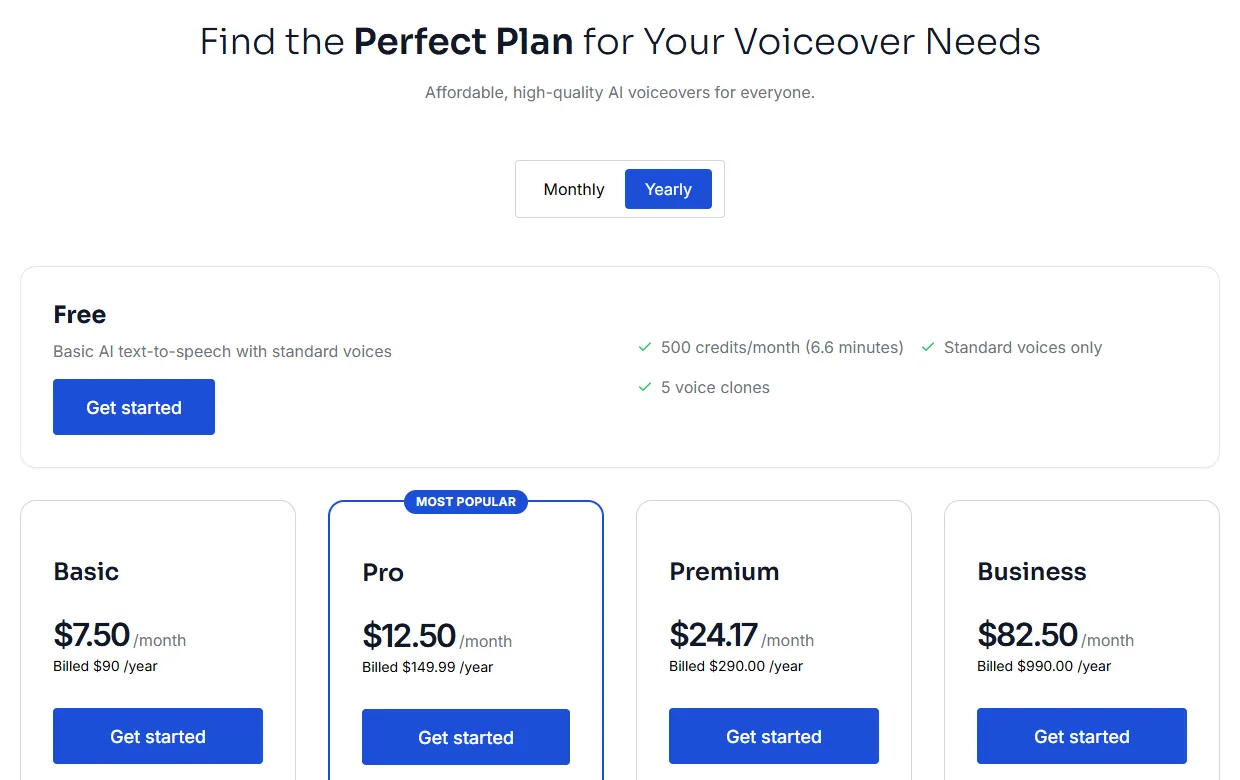
The free plan gives you 500 credits a month (about 40 seconds) with standard voices and no credit card. Paid plans start at $9/month, or $7.50/month billed yearly, and include all 700+ voices and commercial usage rights.
Voices for different audiences
The same brand voice can flex by format and audience. Keep the voice, and change the delivery.
- Social clips: a slightly faster pace and more energy in the hook.
- E-learning and training: a clear, calm delivery with pauses after key points.
- Ads: a confident tone and clear stress on the offer.
- Different regions: use a voice in the local language or accent. Kveeky's Pro plan and above include voice localization.
- Different age groups: simpler words and a slower pace for younger or older viewers.
If the result sounds stiff in any format, our checklist to make an AI voiceover sound less robotic covers the quick fixes.
Measuring results
A custom voice should help people watch, remember and act. Track it like any other creative choice.
- Watch time and drop-off: do viewers stay longer with the new voice?
- Engagement: comments about the voice, likes and shares.
- Brand recall: a short survey asking viewers which brand the video was from.
- Direct feedback: a poll comparing 2 voice styles.
Run one test at a time, and change only the voice. Our guide on how to A/B test voiceover styles shows how to do this without re-recording everything.
Tick each one after testing on real videos.
Be open about AI voices
Tell viewers when a voice is AI-generated, for example in the description or credits, especially in health, finance or education content. It builds trust and avoids misleading anyone.
Quick answers on customization
These are the questions people ask most before they pick a tool. The answers apply to most text-to-speech tools, with Kveeky details where they help.
How do I get more voices for text to speech?
On your own device, add system voices. On iPhone, go to Settings > Accessibility > Spoken Content > Voices and pick a voice and dialect; enhanced voices can be 100 MB or larger, so download them over Wi-Fi (Apple Support, retrieved 2026-10-07). On Windows, open Narrator settings with Windows logo key + Ctrl + N and add natural or legacy voices (Microsoft Support, Appendix A: Supported languages and voices, retrieved 2026-10-07). For voiceovers you can download and put in a video, an AI voice generator gives you a bigger library: Kveeky's free plan has standard voices, and paid plans unlock all 700+.
Do free text-to-speech tools allow voice customization?
Most free tools let you choose a voice and change its speed, and many allow pitch too. Free plans usually limit the voice library, the minutes and commercial use, not the basic settings. Kveeky's free plan gives you standard voices and 500 credits a month (about 40 seconds), while commercial usage rights come with the paid plans. For voice cloning, see the pricing page.
Do online text-to-voice services let you customize the voice in text to audio?
Yes. Online services usually offer voice, language, speed and pitch controls, and some accept SSML, the W3C markup standard in which <prosody> changes pitch, rate and volume and <break> adds a pause (W3C SSML 1.1, retrieved 2026-10-07). You can also customize through the script itself: punctuation, phonetic spelling and short sentences change the delivery in almost every tool.
Can AI voice tools produce different voice styles and voice types?
Yes, in 2 ways. The voice library gives you different types: male and female, younger and older, different accents, plus character voices for stories and games. Within one voice, settings and emotion cues change the style, from calm narration to an excited ad read. You can browse Kveeky's 700+ voices in 40+ languages on our AI voice library page.
Can free AI voice generators replicate specific accents or tones?
They can use any accent that exists in their library, such as American or British English, but they can't invent one the library lacks. Tone is easier, because speed, pitch and emotion settings change it in most tools. To match one person's accent and tone exactly, you need a voice clone made with that person's written consent, so check the clone limit and terms of the free plan first.
How do AI voiceover tools handle emotion and tone in speech?
Neural voices predict rhythm, stress and pitch from the whole sentence, so punctuation and word choice already shape the tone. On top of that, tools give you controls: global speed and pitch, emotion presets or tags for single lines, and SSML on some platforms. In Kveeky, you choose one of 6 emotions in the settings. Use emotion only on the lines that need it, because an emotional read on every line sounds forced.
Frequently asked questions
What is the best way to create a consistent brand voice across videos?
Choose one AI voice, set fixed speed, pitch, tone and emotion defaults, and write them in a voice style guide. Reuse the same settings and pronunciation list for every video.
Can I customize an AI voice to sound like me?
Yes, with voice cloning. Check the Kveeky pricing page for which plans include it. Record a clean sample, and only clone voices you have permission to use.
How do I customize AI voices for different audience demographics?
Keep your core voice and adjust the delivery: pace, energy, word choice and language. Use local languages or accents for regional audiences.
What's the difference between voice cloning and voice design?
Cloning copies an existing person's voice. Voice design creates a new voice for your brand. Cloning is usually faster, while design gives a more unique result.
Do I need commercial rights to use a customized AI voice in ads?
Check the plan terms of the tool you use. Every paid Kveeky plan includes commercial usage rights for the audio you generate.
- Brand voice guide template: a ready-made document for AI voiceovers
- AI voice with emotion: how to control emotion in voiceovers
- Adding personality to AI voices: pacing, pauses and emphasis
- Your brand sounds different in every video: why consistency builds trust
- Voice cloning for video producers: when and how to clone
- Make your AI voiceover sound less robotic: quick fixes
- AI voices: browse the voice library
- Kveeky pricing: plans, cloning and commercial rights
How we checked this guide
This guide is written by Hitesh Kumawat for the Kveeky team. Disclosure: Kveeky makes an AI voice generator.
- Kveeky plan details, clone limits and features come from the Kveeky pricing page and kveeky.com, retrieved October 7, 2026.
- Device voice steps come from Apple Support, "Adjust voice and speed for VoiceOver and Speak Screen on your iPhone, iPad, or iPod touch", and Microsoft Support, "Appendix A: Supported languages and voices", both retrieved 2026-10-07.
- SSML element names come from the W3C Speech Synthesis Markup Language (SSML) Version 1.1 specification, retrieved 2026-10-07.
- No external statistics are used, and no Kveeky usage data is used in this guide.
Your next step: write your brand's 3 personality adjectives, turn them into voice settings, and test them on one real video this week. Save the settings that win in your voice style guide.
Turn your script into a voiceover
Paste your text, pick a voice and download the audio. Free to start, no credit card.