# 5 Best TikTok TTS Generators: Free & Paid Options Compared (2026)

Published: January 2, 2026 · Author: Mohit Singh

The best TikTok TTS generators in 2026 are **Kveeky, ElevenLabs, Fish Audio, Murf AI and Wavel AI**. Kveeky is the simplest pick for most creators: 700+ AI voices, a free plan with about 40 seconds a month and no credit card. ElevenLabs suits instant voice cloning, and Fish Audio suits character voices.

*Last updated: October 6, 2026. Every price below was checked on the vendor's own pricing page on that date.*

TikTok's built-in text-to-speech is convenient, but viewers have heard the same few voices thousands of times. When everyone sounds identical, nobody stands out. A TikTok TTS generator gives you more voices, more languages and more control over tone, then hands you an audio file you can drop into any video.

<div style="margin:28px 0;padding:20px 22px;background:#ffffff;border:1px solid #dbeafe;border-left:4px solid #1d4ed8;border-radius:12px"><div style="font:700 18px/1.3 var(--kv-font-heading);color:#172554;margin-bottom:12px">Key Takeaways</div><ul style="list-style:none;margin:0;padding:0"><li style="margin:0 0 10px;padding-left:28px;position:relative;font:400 16px/1.6 var(--kv-font-body);color:#1f2937"><span aria-hidden="true" style="position:absolute;left:0;top:2px;width:20px;height:20px;border-radius:50%;background:#1d4ed8;color:#ffffff;font:700 12px/20px var(--kv-font-body);text-align:center">&#10003;</span><strong>Best overall:</strong> Kveeky. 700+ voices, 40+ languages, free plan with 500 credits a month (about 40 seconds), paid plans from $7.50/month billed yearly.</li><li style="margin:0 0 10px;padding-left:28px;position:relative;font:400 16px/1.6 var(--kv-font-body);color:#1f2937"><span aria-hidden="true" style="position:absolute;left:0;top:2px;width:20px;height:20px;border-radius:50%;background:#1d4ed8;color:#ffffff;font:700 12px/20px var(--kv-font-body);text-align:center">&#10003;</span><strong>Best for voice cloning:</strong> ElevenLabs. Instant Voice Cloning starts on the $6/month Starter plan.</li><li style="margin:0 0 10px;padding-left:28px;position:relative;font:400 16px/1.6 var(--kv-font-body);color:#1f2937"><span aria-hidden="true" style="position:absolute;left:0;top:2px;width:20px;height:20px;border-radius:50%;background:#1d4ed8;color:#ffffff;font:700 12px/20px var(--kv-font-body);text-align:center">&#10003;</span><strong>Best for character voices:</strong> Fish Audio. Free plan with up to 7 minutes a month; Plus is $11/month.</li><li style="margin:0 0 10px;padding-left:28px;position:relative;font:400 16px/1.6 var(--kv-font-body);color:#1f2937"><span aria-hidden="true" style="position:absolute;left:0;top:2px;width:20px;height:20px;border-radius:50%;background:#1d4ed8;color:#ffffff;font:700 12px/20px var(--kv-font-body);text-align:center">&#10003;</span><strong>Free plans differ a lot:</strong> Murf's free plan allows no downloads, and ElevenLabs' commercial license starts on a paid plan. Check rights before you post sponsored content.</li><li style="margin:0 0 10px;padding-left:28px;position:relative;font:400 16px/1.6 var(--kv-font-body);color:#1f2937"><span aria-hidden="true" style="position:absolute;left:0;top:2px;width:20px;height:20px;border-radius:50%;background:#1d4ed8;color:#ffffff;font:700 12px/20px var(--kv-font-body);text-align:center">&#10003;</span><strong>PlayHT is gone from this list.</strong> It appeared in earlier versions, but play.ht no longer resolves as of October 6, 2026.</li></ul></div>

**On this page:** [Why use a TTS generator](#why-use-a-tts-generator) · [Comparison table](#tool-comparison) · [Kveeky](#1-kveeky) · [ElevenLabs](#2-elevenlabs) · [Fish Audio](#3-fish-audio) · [Murf AI](#4-murf-ai) · [Wavel AI](#5-wavel-ai) · [How to choose](#choosing-a-generator) · [Add it to TikTok](#adding-a-voiceover-to-tiktok) · [FAQ](#frequently-asked-questions)

## Why use a TTS generator

Use an external generator when you want a voice your audience has not heard on every other video, a language TikTok does not offer, or control over emotion and pacing.

TikTok's in-app text-to-speech is fine for a quick caption read-out. It gives you a small set of voices and little control over delivery. A dedicated AI voice generator gives you:

- **More voices.** Hundreds of male, female, young, old, calm and energetic voices instead of a handful.
- **More languages.** Useful if you post in Hindi, Spanish, Arabic or any language the in-app voices skip.
- **Delivery control.** Speed, pitch, pauses and emotion, so a hook sounds excited and a serious story sounds serious.
- **A reusable file.** You download the audio and use the same voiceover on TikTok, Reels and Shorts.

If you only need the built-in voices, our step-by-step guide on [how to use TikTok's text-to-speech feature](https://kveeky.com/blog/voice-generator-text-to-speech-on-tiktok) covers it.

## Tool comparison

Prices were checked on each vendor's pricing page on October 6, 2026. "Paid from" is the cheapest paid plan.

<table>
<thead>
<tr><th>Tool</th><th>Best for</th><th>Free plan</th><th>Paid from</th><th>Voice cloning</th></tr>
</thead>
<tbody>
<tr><td><strong>Kveeky</strong></td><td>Fast, simple voiceovers in 40+ languages</td><td>500 credits/month (about 40 seconds), standard voices, no card</td><td>$9/month, or $7.50/month billed yearly (100 min/month)</td><td>Paid plans only (5 clones on Basic)</td></tr>
<tr><td><strong>ElevenLabs</strong></td><td>Instant voice cloning</td><td>10,000 credits/month, no commercial license</td><td>$6/month Starter (30,000 credits)</td><td>From Starter</td></tr>
<tr><td><strong>Fish Audio</strong></td><td>Character and community voices</td><td>8,000 credits/month (up to about 7 min)</td><td>$11/month Plus (up to about 200 min)</td><td>Yes</td></tr>
<tr><td><strong>Murf AI</strong></td><td>Polished brand and presentation voiceovers</td><td>10 min of generation, no downloads</td><td>$19/month Creator, billed yearly ($228/year)</td><td>Custom clones on Enterprise</td></tr>
<tr><td><strong>Wavel AI</strong></td><td>Voiceover plus dubbing and subtitles</td><td>15 one-time credits, 7-day trial, watermarked</td><td>$25/month Basic, or $16/month billed yearly</td><td>Yes, on paid plans</td></tr>
</tbody>
</table>

<div style="margin:28px 0;padding:20px 22px;background:#eff6ff;border:1px solid #dbeafe;border-radius:12px"><div style="font:700 17px/1.3 var(--kv-font-heading);color:#172554;margin-bottom:6px">How many TikToks fit a free plan?</div><p style="margin:0 0 12px;font:400 16px/1.6 var(--kv-font-body);color:#1f2937">Type how many seconds of voiceover your average video needs. Kveeky's free plan gives about 40 seconds a month, and Fish Audio's gives up to about 7 minutes (420 seconds), both from the table above. Murf is left out because its free plan allows no downloads.</p><label for="fp-len" style="display:block;margin-bottom:6px;font:600 16px/1.4 var(--kv-font-body);color:#172554">Seconds of voiceover per video</label><input id="fp-len" type="number" min="1" max="600" value="30" inputmode="numeric" oninput="var v=parseInt(this.value,10),k=document.getElementById('fp-k'),f=document.getElementById('fp-f');if(v>0){k.textContent=Math.floor(40/v);f.textContent=Math.floor(420/v)}else{k.textContent='-';f.textContent='-'}" style="box-sizing:border-box;width:100%;max-width:180px;min-height:44px;padding:0 12px;border:1px solid #9ca3af;border-radius:10px;background:#ffffff;color:#111827;font:400 16px/1.4 var(--kv-font-body)"><div aria-live="polite" style="display:flex;flex-wrap:wrap;gap:12px;margin-top:14px"><div style="flex:1 1 180px;box-sizing:border-box;padding:12px 14px;background:#ffffff;border:1px solid #dbeafe;border-radius:10px;font:400 15px/1.5 var(--kv-font-body);color:#4b5563">Kveeky Free<div style="font:700 22px/1.3 var(--kv-font-heading);color:#172554"><span id="fp-k">13</span> videos a month</div></div><div style="flex:1 1 180px;box-sizing:border-box;padding:12px 14px;background:#ffffff;border:1px solid #dbeafe;border-radius:10px;font:400 15px/1.5 var(--kv-font-body);color:#4b5563">Fish Audio Free, up to<div style="font:700 22px/1.3 var(--kv-font-heading);color:#172554"><span id="fp-f">14</span> videos a month</div></div></div><p style="margin:12px 0 0;font:400 14px/1.5 var(--kv-font-body);color:#6b7280">Without JavaScript this shows the 30-second case: about 13 videos on Kveeky Free and up to about 14 on Fish Audio Free.</p></div>

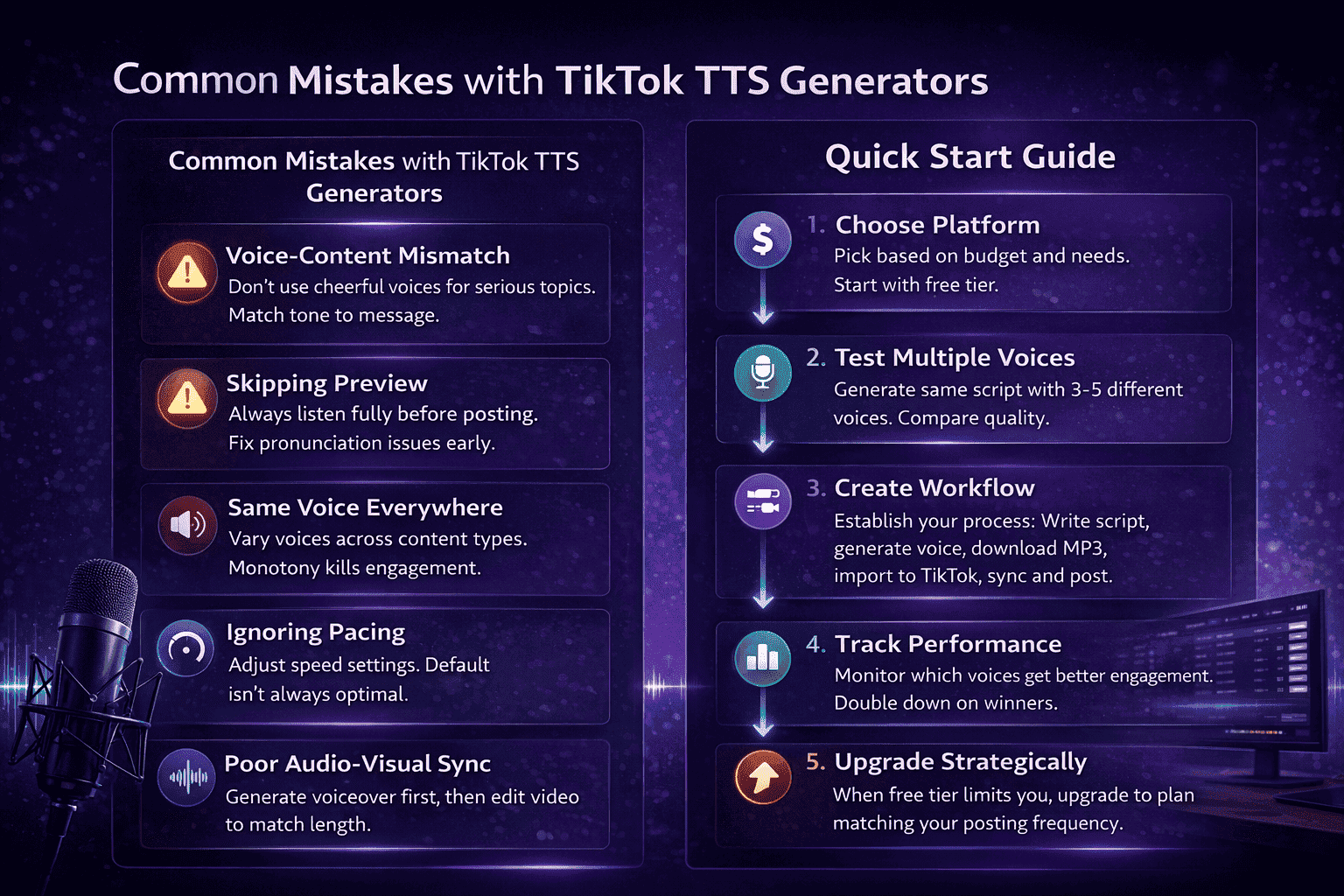
<img src="https://cdn.kveeky.com/portals/685cb8c517a4ca6f01a7884c/686ef597027b1d23f092b348/topics/6954fe0b4f8c172661cfb0f4/13199472-36f1-46ba-b3ff-84ca086a733f.webp" alt="Infographic listing common TikTok text-to-speech mistakes and a five-step quick start: choose a platform, test several voices, build a workflow, track performance and upgrade when needed" width="100%" style="width: 100%; display: block;" />

## 1. Kveeky

Kveeky is the best starting point if you want good voices fast, without learning a studio tool. Paste your script, pick a voice, and download the audio.

<figure style="margin:28px 0;padding:0"><a href="https://kveeky.com/"><img src="https://cdn.kveeky.com/portals/public-uploads/c033eba2-39d4-4683-a5a9-c8cf2ffc6d01.webp" alt="The Kveeky homepage voice demo with three numbered areas: the voice list, the script box and the language and play controls." width="1180" height="532" loading="lazy" decoding="async" style="display:block;width:100%;height:auto;border-radius:14px;border:1px solid #dbeafe"></a><figcaption style="margin-top:12px"><ol style="margin:0;padding:0"><li style="display:flex;gap:10px;align-items:flex-start;margin:0 0 6px;padding:0;list-style:none"><span style="flex:0 0 24px;height:24px;border-radius:50%;background:#1d4ed8;color:#fff;font:700 13px/24px var(--kv-font-heading);text-align:center">1</span><span style="font:400 15px/1.5 var(--kv-font-body);color:#1f2937"><span style="font-weight:700">Pick a voice.</span> Voices are tagged Free or Premium.</span></li><li style="display:flex;gap:10px;align-items:flex-start;margin:0 0 6px;padding:0;list-style:none"><span style="flex:0 0 24px;height:24px;border-radius:50%;background:#1d4ed8;color:#fff;font:700 13px/24px var(--kv-font-heading);text-align:center">2</span><span style="font:400 15px/1.5 var(--kv-font-body);color:#1f2937"><span style="font-weight:700">Type or paste a short line.</span> Pick an emotion if you want one.</span></li><li style="display:flex;gap:10px;align-items:flex-start;margin:0 0 6px;padding:0;list-style:none"><span style="flex:0 0 24px;height:24px;border-radius:50%;background:#1d4ed8;color:#fff;font:700 13px/24px var(--kv-font-heading);text-align:center">3</span><span style="font:400 15px/1.5 var(--kv-font-body);color:#1f2937"><span style="font-weight:700">Choose the language and press play</span> to hear it.</span></li></ol><p style="margin:6px 0 0;font:400 14px/1.5 var(--kv-font-body);color:#6b7280">Try it yourself in the free voice demo on <a href="https://kveeky.com/" style="font:inherit;color:#1d4ed8">Kveeky</a>, no sign-up needed. For longer scripts and downloads, use the free plan.</p></figcaption></figure>

**What you get**

- **700+ AI voices** across 40+ languages, with free and premium voices labelled in the picker.
- **Emotion and delivery control.** Pick one of 6 emotions (Neutral, Happy, Love, Angry, Calm, Sad) from the Emotion dropdown, then adjust speed and volume and add custom punctuation hints.
- **Voice cloning on paid plans.** The free plan does not include it.
- **Audio download**, ready for TikTok, CapCut, Reels or Shorts.
- **Character voices** for fan edits and storytelling in our [library of character and anime AI voices](https://kveeky.com/ai-voices).

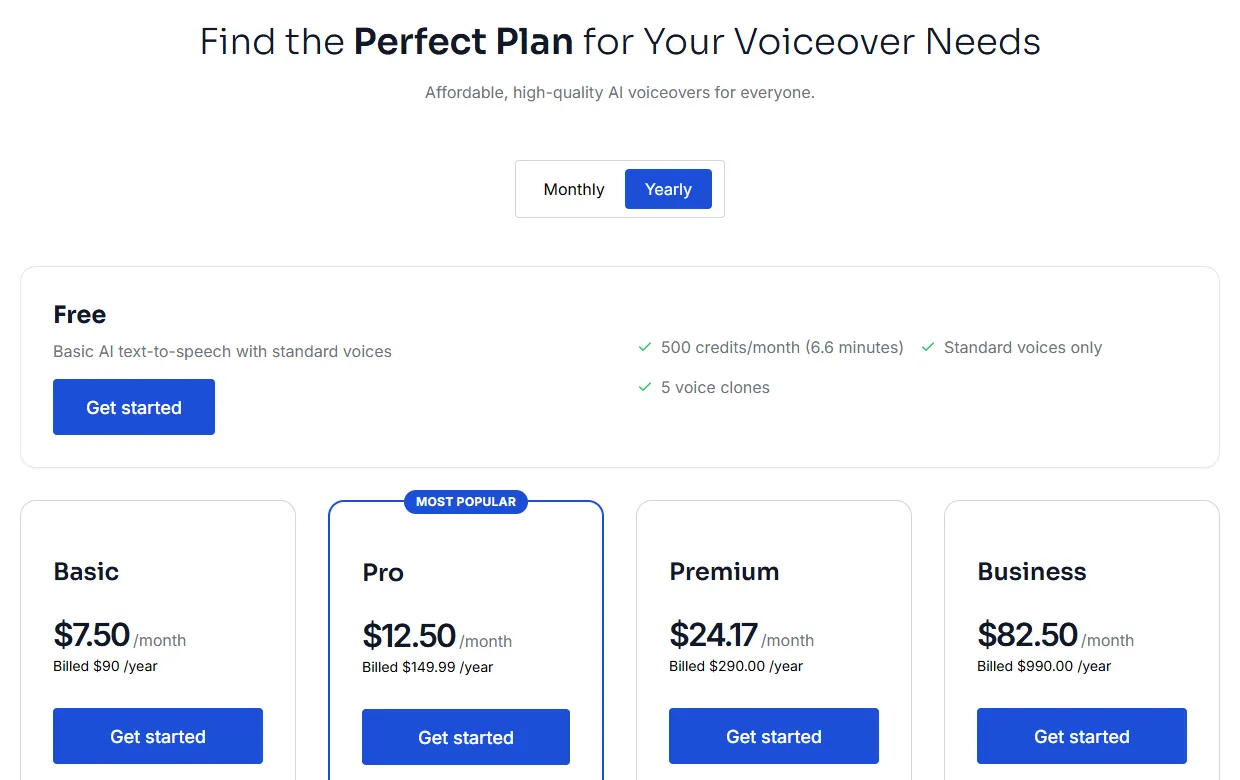
**Pricing (checked October 6, 2026)**

<img src="https://cdn.kveeky.com/portals/public-uploads/fd9b99bd-9fd4-4d11-aeeb-afb143dffff8.webp" alt="Kveeky pricing page with the Free plan at 500 credits a month (about 40 seconds) and yearly prices of $7.50 Basic, $12.50 Pro, $24.17 Premium and $82.50 Business per month" width="100%" style="width: 100%; display: block;" />

<table>
<thead>
<tr><th>Plan</th><th>Monthly billing</th><th>Yearly billing</th><th>Included per month</th></tr>
</thead>
<tbody>
<tr><td>Free</td><td>$0</td><td>$0</td><td>500 credits (about 40 seconds), standard voices, no cloning</td></tr>
<tr><td>Basic</td><td>$9</td><td>$7.50</td><td>100 min, all 700+ voices, 5 clones</td></tr>
<tr><td>Pro</td><td>$19.99</td><td>$12.50</td><td>133 min, 10 clones, voice localization</td></tr>
<tr><td>Premium</td><td>$29</td><td>$24.17</td><td>200 min, 10 clones, voice localization</td></tr>
<tr><td>Business</td><td>$99</td><td>$82.50</td><td>1,000 min, 20 clones, voice localization</td></tr>
</tbody>
</table>

Every paid plan includes commercial usage rights for the audio you generate. See the full [Kveeky pricing page](https://kveeky.com/pricing/) for current details.

**Where Kveeky falls short**

- The free plan uses standard voices only. Premium voices need a paid plan.
- Every plan is credit-metered, so long videos or daily posting need a paid plan.

**Best for:** creators posting several TikToks a week who want natural voices, many languages and a low monthly price.

## 2. ElevenLabs

ElevenLabs is the strongest choice if you want TikToks in your own cloned voice. Instant Voice Cloning starts on the Starter plan.

**Pricing (checked October 6, 2026)**

- **Free:** $0, 10,000 credits a month. No commercial license.
- **Starter:** $6/month, 30,000 credits, commercial license and Instant Voice Cloning.
- **Creator:** $22/month, 121,000 credits and Professional Voice Cloning.
- **Pro:** $99/month, 600,000 credits.

**Where it falls short:** the free plan cannot be used commercially, and credits go fast if you regenerate lines often. For a side-by-side, see our [Kveeky vs ElevenLabs comparison](https://kveeky.com/voice-providers/comparison/kveeky-vs-elevenlabs).

**Best for:** creators who want their own cloned voice and are happy to pay from day one.

## 3. Fish Audio

Fish Audio has a large library of community-made voice models, including many popular character voices. That makes it useful for fan edits and meme formats.

**Pricing (checked October 6, 2026)**

- **Free:** 8,000 credits a month, up to about 7 minutes, up to 500 characters per generation.
- **Plus:** $11/month ($132/year), up to about 200 minutes a month.
- **Pro:** $75/month, up to about 1,620 minutes a month.

**Where it falls short:** community voices vary in quality, and character voices can raise rights questions if you monetize the video. Treat them as fan content.

**Best for:** fan edits, memes and character-voice storytelling.

## 4. Murf AI

Murf AI is built for brand, presentation and training voiceovers, with a studio-style editor and controls for emphasis and pronunciation.

**Pricing (checked October 6, 2026)**

- **Free:** 10 minutes of voice generation. No downloads and no commercial rights.
- **Creator:** $19/month billed yearly ($228/year), 24 hours of generation a year, more than 200 voices, commercial rights.
- **Business:** $66/month billed yearly ($792/year), 96 hours a year. Adds features such as Emphasis and "Say It My Way".

**Where it falls short:** you cannot download anything on the free plan, so you cannot test a full TikTok workflow without paying. More controls also mean a learning curve.

**Best for:** brands and agencies making polished product or explainer TikToks.

## 5. Wavel AI

Wavel AI bundles text-to-speech with AI dubbing, subtitles and editing tools, so it suits creators who translate videos for several audiences.

**Pricing (checked October 6, 2026)**

- **Free:** 15 one-time credits, a 7-day trial, watermarked output.
- **Basic:** $25/month, or $16/month billed yearly, 100 credits a month. One credit equals 1 minute of text-to-speech.
- **Pro:** $40/month, or $26/month billed yearly, 300 credits.

**Where it falls short:** the free trial is short and watermarked, so it is not a long-term free option.

**Best for:** creators who need voiceover, subtitles and dubbing in one place.

## Choosing a generator

Pick the tool that matches how often you post and what kind of videos you make.

<table>
<thead>
<tr><th>If you…</th><th>Choose</th><th>Why</th></tr>
</thead>
<tbody>
<tr><td>Post a few times a week and want it simple</td><td>Kveeky</td><td>Free plan, then $7.50/month billed yearly for 100 minutes</td></tr>
<tr><td>Want TikToks in your own voice</td><td>ElevenLabs or Kveeky</td><td>Instant cloning on ElevenLabs Starter; Kveeky cloning is on paid plans (5 clones on Basic)</td></tr>
<tr><td>Make fan edits or character content</td><td>Fish Audio or Kveeky</td><td>Community character models; Kveeky's character voice library</td></tr>
<tr><td>Run a brand or agency account</td><td>Murf AI or Kveeky</td><td>Studio controls and commercial rights on paid plans</td></tr>
<tr><td>Post in several languages</td><td>Kveeky or Wavel AI</td><td>40+ languages on Kveeky; dubbing and subtitles on Wavel</td></tr>
</tbody>
</table>

Open a tool to see its best use, pros, cons and the closest alternative. Everything here comes from the sections above.

<details style="margin:12px 0;border:1px solid #dbeafe;border-radius:12px;background:#ffffff"><summary style="min-height:44px;display:flex;align-items:center;padding:6px 16px;font:600 16px/1.4 var(--kv-font-body);color:#172554;cursor:pointer">Kveeky: best overall</summary><div style="padding:0 16px 16px;font:400 16px/1.6 var(--kv-font-body);color:#1f2937"><p style="margin:0 0 4px"><strong>Best for:</strong> creators posting several TikToks a week who want natural voices, many languages and a low monthly price.</p><p style="margin:8px 0 4px"><strong>Pros</strong></p><ul style="margin:0 0 8px;padding-left:22px"><li style="margin:0 0 4px">700+ voices in 40+ languages</li><li style="margin:0 0 4px">Free plan: 500 credits a month (about 40 seconds), no credit card</li><li style="margin:0 0 4px">audio download</li><li style="margin:0 0 4px">Commercial usage rights on every paid plan</li></ul><p style="margin:8px 0 4px"><strong>Cons</strong></p><ul style="margin:0 0 8px;padding-left:22px"><li style="margin:0 0 4px">Free plan uses standard voices only</li><li style="margin:0 0 4px">Every plan is credit-metered, so long videos or daily posting need a paid plan</li></ul><p style="margin:8px 0 0"><strong>Best alternative:</strong> ElevenLabs, if instant voice cloning is the priority.</p></div></details>
<details style="margin:12px 0;border:1px solid #dbeafe;border-radius:12px;background:#ffffff"><summary style="min-height:44px;display:flex;align-items:center;padding:6px 16px;font:600 16px/1.4 var(--kv-font-body);color:#172554;cursor:pointer">ElevenLabs: best for instant voice cloning</summary><div style="padding:0 16px 16px;font:400 16px/1.6 var(--kv-font-body);color:#1f2937"><p style="margin:0 0 4px"><strong>Best for:</strong> creators who want their own cloned voice and are happy to pay from day one.</p><p style="margin:8px 0 4px"><strong>Pros</strong></p><ul style="margin:0 0 8px;padding-left:22px"><li style="margin:0 0 4px">Instant Voice Cloning from the $6/month Starter plan</li><li style="margin:0 0 4px">Commercial license on Starter</li><li style="margin:0 0 4px">Professional Voice Cloning on Creator ($22/month)</li></ul><p style="margin:8px 0 4px"><strong>Cons</strong></p><ul style="margin:0 0 8px;padding-left:22px"><li style="margin:0 0 4px">The free plan has no commercial license</li><li style="margin:0 0 4px">Credits go fast if you regenerate lines often</li></ul><p style="margin:8px 0 0"><strong>Best alternative:</strong> Kveeky, which offers voice cloning on its paid plans.</p></div></details>
<details style="margin:12px 0;border:1px solid #dbeafe;border-radius:12px;background:#ffffff"><summary style="min-height:44px;display:flex;align-items:center;padding:6px 16px;font:600 16px/1.4 var(--kv-font-body);color:#172554;cursor:pointer">Fish Audio: best for character voices</summary><div style="padding:0 16px 16px;font:400 16px/1.6 var(--kv-font-body);color:#1f2937"><p style="margin:0 0 4px"><strong>Best for:</strong> fan edits, memes and character-voice storytelling.</p><p style="margin:8px 0 4px"><strong>Pros</strong></p><ul style="margin:0 0 8px;padding-left:22px"><li style="margin:0 0 4px">Large library of community-made voice models, including popular characters</li><li style="margin:0 0 4px">Free plan: 8,000 credits a month, up to about 7 minutes</li><li style="margin:0 0 4px">Plus is $11/month for up to about 200 minutes</li></ul><p style="margin:8px 0 4px"><strong>Cons</strong></p><ul style="margin:0 0 8px;padding-left:22px"><li style="margin:0 0 4px">Community voices vary in quality</li><li style="margin:0 0 4px">Character voices can raise rights questions if you monetize the video</li></ul><p style="margin:8px 0 0"><strong>Best alternative:</strong> Kveeky's library of character and anime AI voices.</p></div></details>
<details style="margin:12px 0;border:1px solid #dbeafe;border-radius:12px;background:#ffffff"><summary style="min-height:44px;display:flex;align-items:center;padding:6px 16px;font:600 16px/1.4 var(--kv-font-body);color:#172554;cursor:pointer">Murf AI: best for polished brand voiceovers</summary><div style="padding:0 16px 16px;font:400 16px/1.6 var(--kv-font-body);color:#1f2937"><p style="margin:0 0 4px"><strong>Best for:</strong> brands and agencies making polished product or explainer TikToks.</p><p style="margin:8px 0 4px"><strong>Pros</strong></p><ul style="margin:0 0 8px;padding-left:22px"><li style="margin:0 0 4px">Studio-style editor with controls for emphasis and pronunciation</li><li style="margin:0 0 4px">Creator plan: $19/month billed yearly, more than 200 voices, commercial rights</li></ul><p style="margin:8px 0 4px"><strong>Cons</strong></p><ul style="margin:0 0 8px;padding-left:22px"><li style="margin:0 0 4px">No downloads and no commercial rights on the free plan</li><li style="margin:0 0 4px">More controls mean a learning curve</li></ul><p style="margin:8px 0 0"><strong>Best alternative:</strong> Kveeky, which offers commercial rights on paid plans.</p></div></details>
<details style="margin:12px 0;border:1px solid #dbeafe;border-radius:12px;background:#ffffff"><summary style="min-height:44px;display:flex;align-items:center;padding:6px 16px;font:600 16px/1.4 var(--kv-font-body);color:#172554;cursor:pointer">Wavel AI: best for dubbing and subtitles</summary><div style="padding:0 16px 16px;font:400 16px/1.6 var(--kv-font-body);color:#1f2937"><p style="margin:0 0 4px"><strong>Best for:</strong> creators who need voiceover, subtitles and dubbing in one place.</p><p style="margin:8px 0 4px"><strong>Pros</strong></p><ul style="margin:0 0 8px;padding-left:22px"><li style="margin:0 0 4px">Text-to-speech bundled with AI dubbing, subtitles and editing tools</li><li style="margin:0 0 4px">Voice cloning on paid plans</li><li style="margin:0 0 4px">Basic is $16/month billed yearly</li></ul><p style="margin:8px 0 4px"><strong>Cons</strong></p><ul style="margin:0 0 8px;padding-left:22px"><li style="margin:0 0 4px">The free trial is short (15 one-time credits, 7 days) and watermarked</li></ul><p style="margin:8px 0 0"><strong>Best alternative:</strong> Kveeky, for 40+ languages.</p></div></details>

Still comparing tools beyond TikTok? Our roundup of the [best free AI voice generators](https://kveeky.com/blog/10-best-free-ai-voice-generatorover-tools) covers more options.

## Adding a voiceover to TikTok

The workflow is short once your script is ready.

1. **Write a short script.** Keep it to a few sentences for a short TikTok, and put the hook in the first sentence.
2. **Generate the voice.** Paste the script into your TTS tool, pick a voice and set the emotion and speed.
3. **Listen once, fix pronunciation.** Re-spell tricky names, or add a pause with punctuation.
4. **Download the audio.**
5. **Add it to your video** in CapCut or any editor, line up the cuts with the voice, then export.
6. **Upload to TikTok** and add captions so viewers can follow with the sound off.

If the result sounds flat, these tips on how to [make an AI voiceover sound less robotic](https://kveeky.com/blog/how-to-make-your-ai-voiceover-sound-less-robotic-in-5-minutes) and on [pacing, pauses and emphasis](https://kveeky.com/blog/adding-personality-to-ai-voices-pacing-pauses-emphasis-tricks) fix most problems.

<div style="margin:28px 0;padding:18px 20px;border:1px solid #dbeafe;border-radius:12px;background:#ffffff"><div style="font:700 17px/1.3 var(--kv-font-heading);color:#172554;margin-bottom:6px">Before you post: 5 quick checks</div><p style="margin:0 0 10px;font:400 15px/1.5 var(--kv-font-body);color:#4b5563">Tick each one as you go. Takes about a minute.</p><label style="display:flex;align-items:flex-start;gap:12px;min-height:44px;padding:8px 0;font:400 16px/1.5 var(--kv-font-body);color:#1f2937;cursor:pointer"><input type="checkbox" style="width:22px;height:22px;margin-top:2px;flex:none;accent-color:#1d4ed8"><span>My plan allows downloads, and includes commercial rights if the video is sponsored or monetized.</span></label><label style="display:flex;align-items:flex-start;gap:12px;min-height:44px;padding:8px 0;font:400 16px/1.5 var(--kv-font-body);color:#1f2937;cursor:pointer"><input type="checkbox" style="width:22px;height:22px;margin-top:2px;flex:none;accent-color:#1d4ed8"><span>I generated the voiceover first, then cut the video to match it.</span></label><label style="display:flex;align-items:flex-start;gap:12px;min-height:44px;padding:8px 0;font:400 16px/1.5 var(--kv-font-body);color:#1f2937;cursor:pointer"><input type="checkbox" style="width:22px;height:22px;margin-top:2px;flex:none;accent-color:#1d4ed8"><span>I listened once and re-spelled any name the voice got wrong.</span></label><label style="display:flex;align-items:flex-start;gap:12px;min-height:44px;padding:8px 0;font:400 16px/1.5 var(--kv-font-body);color:#1f2937;cursor:pointer"><input type="checkbox" style="width:22px;height:22px;margin-top:2px;flex:none;accent-color:#1d4ed8"><span>The voice fits the tone of the topic, and the pacing suits a short hook.</span></label><label style="display:flex;align-items:flex-start;gap:12px;min-height:44px;padding:8px 0;font:400 16px/1.5 var(--kv-font-body);color:#1f2937;cursor:pointer"><input type="checkbox" style="width:22px;height:22px;margin-top:2px;flex:none;accent-color:#1d4ed8"><span>I added captions so viewers can follow with the sound off.</span></label></div>

## Common mistakes

- **Voice-content mismatch.** Do not use a cheerful voice for a serious topic. Match tone to message.
- **Skipping the preview.** Always listen once before posting, and fix pronunciation early.
- **One voice for everything.** Use different voices for different series so each format feels distinct.
- **Ignoring pacing.** The default speed is rarely right for a 15-second hook. Speed it up slightly.
- **Editing video first.** Generate the voiceover first, then cut the video to match it.

<!-- topic-links:start -->
## Related guides

Start with our main guide, then go deeper:

- [AI Voiceover for Video: A Practical Guide for Video Producers](https://kveeky.com/blog/ai-voiceover-for-video)
- [The Top 10 HeyGen Alternatives in 2026 (Free & Paid)](https://kveeky.com/blog/heygen-alternatives-top-ai-tools)
- [Best Free AI Voiceover Tools for YouTube (2026)](https://kveeky.com/blog/best-free-ai-voiceover-tools-for-youtube)
<!-- topic-links:end -->

## Frequently asked questions

### What is the best free TikTok TTS generator?

Kveeky's free plan is the most practical for regular posting: 500 credits a month (about 40 seconds), 700+ voices to try and no credit card (voice cloning is on paid plans). Fish Audio's free plan gives up to about 7 minutes a month.

### Does TikTok have its own text-to-speech?

Yes. TikTok's editor can read on-screen text aloud with a small set of built-in voices. Use an external generator when you want more voices, more languages or control over emotion and speed.

### How do I use an AI voice from another app on TikTok?

Download the voiceover as an MP3 or WAV, add it to your video in CapCut or any video editor, then upload the finished video to TikTok.

### Can I use AI voices in monetized or sponsored TikToks?

It depends on the plan. Every paid Kveeky plan includes commercial usage rights. ElevenLabs' commercial license starts on Starter, and Murf's free plan includes no commercial rights. Check the terms before posting sponsored content.

### Which TikTok TTS tools support voice cloning?

Kveeky includes voice cloning on paid plans (5 custom clones on Basic); the free plan does not include it. ElevenLabs offers Instant Voice Cloning from its $6/month Starter plan, and Fish Audio includes voice cloning on its plans.

### Why is PlayHT not on this list anymore?

PlayHT appeared in earlier versions of this comparison. As of October 6, 2026, the play.ht domain no longer resolves, so we replaced it with Fish Audio.

## How we checked

This guide is written by Mohit Singh for the Kveeky team. **Disclosure: Kveeky makes one of the tools in this list.** We compared each tool on its own published plans, not on marketing claims.

- Prices and plan limits come from each vendor's pricing page, retrieved on October 6, 2026: [Kveeky](https://kveeky.com/pricing/), [ElevenLabs](https://elevenlabs.io/pricing), [Fish Audio](https://fish.audio/plan/), [Murf AI](https://murf.ai/pricing) and [Wavel AI](https://wavel.ai/pricing).
- Prices change often. Always confirm on the vendor's page before you buy.
- No Kveeky usage data is used in this guide.

Ready to hear the difference? [Try Kveeky's voices free](https://kveeky.com/) and download your first TikTok voiceover, or browse more ideas for [AI voiceovers for social media videos](https://kveeky.com/voiceover/social-media-videos/).

<script type="application/ld+json">
{"@context":"https://schema.org","@type":"FAQPage","mainEntity":[
{"@type":"Question","name":"What is the best free TikTok TTS generator?","acceptedAnswer":{"@type":"Answer","text":"Kveeky's free plan is the most practical for regular posting: 500 credits a month (about 40 seconds), 700+ voices to try and no credit card (voice cloning is on paid plans). Fish Audio's free plan gives up to about 7 minutes a month."}},
{"@type":"Question","name":"Does TikTok have its own text-to-speech?","acceptedAnswer":{"@type":"Answer","text":"Yes. TikTok's editor can read on-screen text aloud with a small set of built-in voices. Use an external generator when you want more voices, more languages or control over emotion and speed."}},
{"@type":"Question","name":"How do I use an AI voice from another app on TikTok?","acceptedAnswer":{"@type":"Answer","text":"Download the voiceover as an MP3 or WAV, add it to your video in CapCut or any video editor, then upload the finished video to TikTok."}},
{"@type":"Question","name":"Can I use AI voices in monetized or sponsored TikToks?","acceptedAnswer":{"@type":"Answer","text":"It depends on the plan. Every paid Kveeky plan includes commercial usage rights. ElevenLabs' commercial license starts on Starter, and Murf's free plan includes no commercial rights. Check the terms before posting sponsored content."}},
{"@type":"Question","name":"Which TikTok TTS tools support voice cloning?","acceptedAnswer":{"@type":"Answer","text":"Kveeky includes voice cloning on paid plans (5 custom clones on Basic); the free plan does not include it. ElevenLabs offers Instant Voice Cloning from its $6/month Starter plan, and Fish Audio includes voice cloning on its plans."}},
{"@type":"Question","name":"Why is PlayHT not on this list anymore?","acceptedAnswer":{"@type":"Answer","text":"PlayHT appeared in earlier versions of this comparison. As of October 6, 2026, the play.ht domain no longer resolves, so we replaced it with Fish Audio."}}
]}
</script>