Create Studio-Quality AI Voiceovers in Seconds

700+ realistic AI voices • Free to start • No credit card required

  • Free plan, no credit card
  • 40+ languages
  • Download your audio
  • Commercial rights on paid plans
220/400
Get started for free -->

No credit card required
Find the perfect voice for your next video

Preview standout voices from some of our most popular languages, then explore 700+ realistic AI voices in the app.

Use cases

What are you making?

Pick your project to see the voices, steps and tools that fit it.

Other languages · Compare voice generators · Free tools and guides

Features

Everything between a script and finished audio

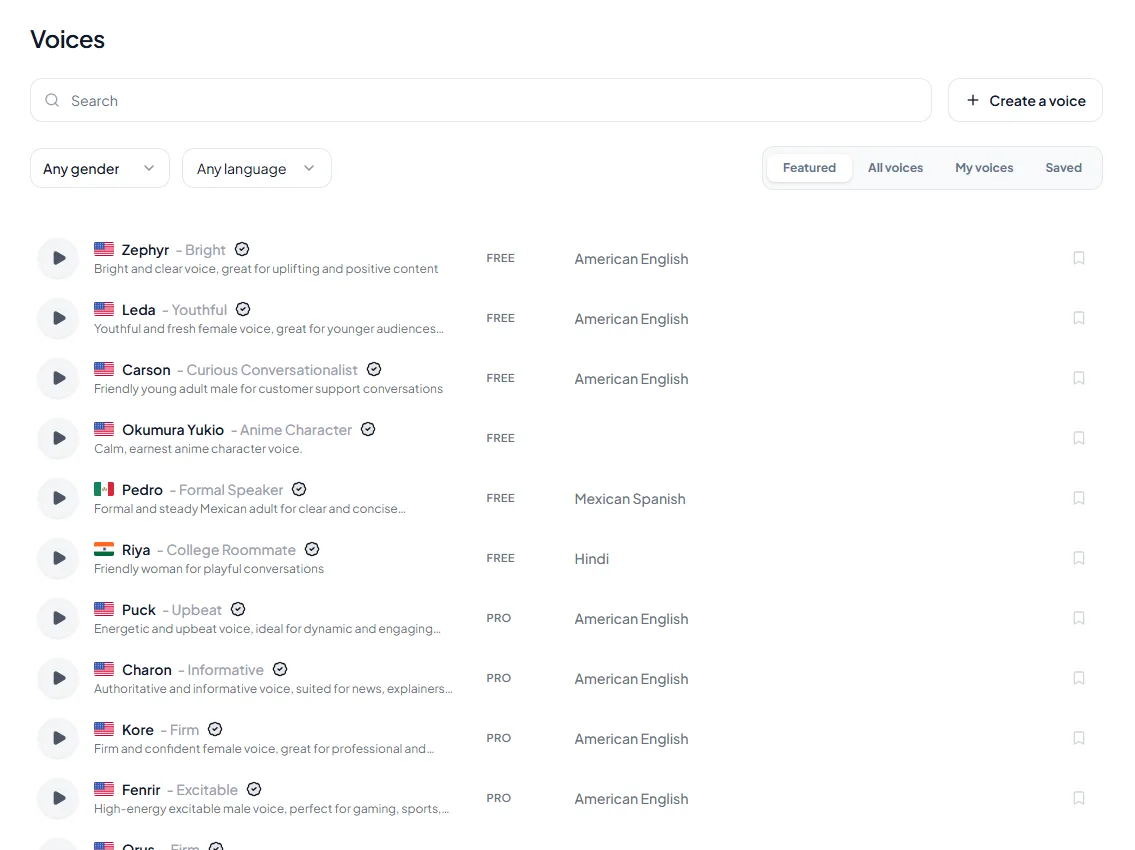
The Kveeky voice library: a search box, gender and language filters, and a list of voices, each with a play button and a FREE or PRO tag.

Step by step

How it works

Turn a script into a voiceover in minutes. This is the real Kveeky editor.

  1. 1

    Add Your Script

    Paste or type the text you want spoken, then edit it in the Kveeky editor.

  2. 2

    Choose Your Perfect Voice

    Choose from 700+ voices and 40+ languages.

  3. 3

    Download and Start Using Voice

    Download and start using voice in your projects.

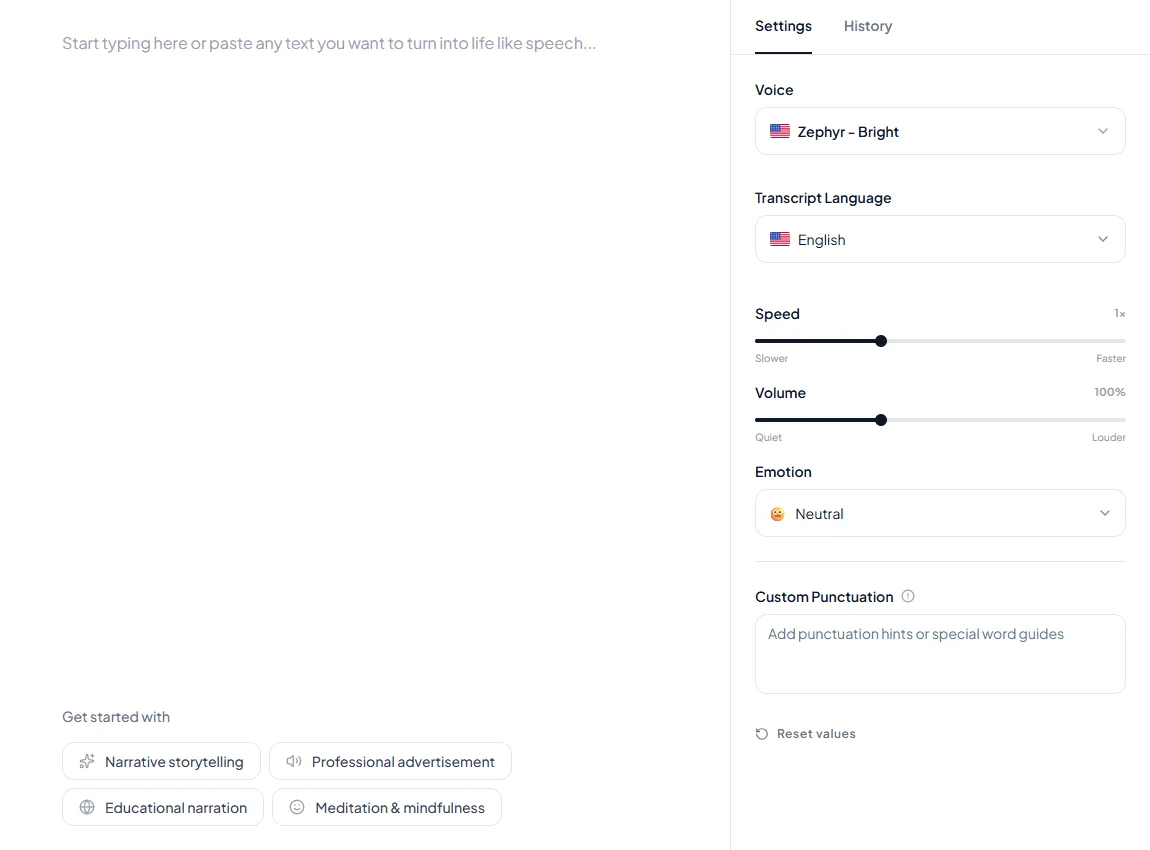
The Kveeky text-to-speech editor: a text box for your script on the left, and on the right the voice, transcript language, speed, volume and emotion settings.
The editor: write the script on the left, choose the voice, speed, volume and emotion on the right.

Compare

How Kveeky compares

Free plan and cheapest paid plan, read from each tool's own pricing page on 2026-10-17. Plans include different things, so open a comparison before you decide.

ToolFree planCheapest paid planComparison
KveekyYes: 500 credits/month (6.6 minutes)$7.50/month billed yearly ($9.00 monthly)See plans
ElevenLabsYes$6/monthKveeky vs ElevenLabs
Murf AIYes$19/monthKveeky vs Murf AI
SpeechifyYes$29/monthKveeky vs Speechify
VoicemakerYes$5/monthKveeky vs Voicemaker
WellSaid LabsYes$10/month (Starter, billed annually at $120/year)Kveeky vs WellSaid Labs
TypecastYes$5/month (Basic)Kveeky vs Typecast

See every comparison and alternatives page

Start free, pay when you need more

See all plans and the minutes finder

Frequently Asked Questions

FAQs offer concise answers to common inquiries about Kveeky.

Simply sign up, choose a voice, input your script, customize settings, and generate your voiceover. Then download or export it for use in your videos or podcasts.

Yes, Kveeky voices are designed to sound realistic and engaging, capturing emotional nuances to enhance your content's quality.

Yes. Pick a voice, set the speed and volume, and choose one of six emotions (Neutral, Happy, Love, Angry, Calm or Sad). Custom punctuation helps you control pauses.

Yes, you can start free. The free plan gives you 500 credits a month (about 6.6 minutes of audio) with standard voices and no credit card. Paid plans add more minutes, all voices and commercial usage rights.

Kveeky pairs 700+ voices in 40+ languages with a free plan that needs no credit card and paid plans from $7.50 a month billed yearly. Other tools are stronger in places: ElevenLabs, for example, is known for realism and its API. Each comparison page sets out price, free plan, voices and commercial rights from the vendor's own pages, with the date we checked.

Commercial usage rights are included on every paid plan. The free plan is for trying Kveeky out.

Kveeky can generate a variety of voiceovers, including narrations for videos, ads, podcasts, tutorials, and audiobooks, in different styles, tones, and languages to suit your specific needs.

Yes. Paste your script in any supported language and pick a voice for it. Voice localization, which carries a voice into other languages, is available on the Pro, Premium and Business plans.

AI voice technology enhances content creation by providing high-quality voiceovers quickly and affordably. Businesses can create engaging marketing materials, TikTokers can produce catchy sound bites, YouTubers can deliver professional narrations, and influencers can personalize their branding, all while saving time and costs associated with traditional voiceover methods. This leads to increased audience engagement and a more professional presentation across platforms.

Start Creating Studio-Quality Voiceovers Today

Choose from 700+ realistic AI voices in 40+ languages — built for creators and brands.

Get started for free -->

No credit card required