# How to Choose the Best Text to Voice Generator Software

Published: November 6, 2024 · Author: Mohit Singh

To choose text to voice generator software, check 6 things in order. Start with how it sounds on your own script, then check its languages, delivery controls, export formats, commercial rights and real cost per minute. Test 2 or 3 free plans with the same script before you pay for anything.

*Last updated: October 7, 2026. Prices used in the examples were checked on each vendor's own page on October 6, 2026 and re-checked on October 7, 2026.*

<div style="margin:28px 0;padding:20px 22px;background:var(--kv-blue-50);border:1px solid var(--kv-blue-100);border-radius:var(--kv-radius-md);min-width:0;box-sizing:border-box;overflow-wrap:anywhere;border-left:4px solid var(--kv-blue-700)"><div style="font:700 17px/1.3 var(--kv-font-heading);color:var(--kv-blue-950);margin-bottom:8px">Quick answer</div><p style="margin:0;font:400 16px/1.6 var(--kv-font-body);color:var(--kv-gray-800)">Test 2 or 3 free plans with the same 30-second script, then score each on voice quality, languages, delivery controls, export, commercial rights and cost per minute. The scorecard and cost calculator below do the sums.</p></div>

This guide is for creators, teachers and small business teams who are about to pick a tool. It gives you a checklist, a step-by-step test and a simple cost-per-minute method, so you can compare any tools on the same terms.

> **Key Takeaways**
>
> - **Test with your own script.** Names, numbers and questions reveal quality gaps faster than a vendor's demo.
> - **Count languages with voices, not language pages.** Ask whether the exact language and accent you need has a voice.
> - **Commercial rights decide most business choices.** Many free plans exclude commercial use, so check the plan page before you publish.
> - **Compare cost per minute, not plan price.** Kveeky's Basic plan works out to about $0.09 per minute; a one-time Narakeet pack is about $0.20 per minute.
> - **Delivery control matters more than voice count.** Speed, pauses and emotion decide whether a voice fits your content.

**On this page:** [What it is](#what-text-to-voice-software-is) · [What to look for](#what-to-look-for) · [Step by step](#how-to-choose-in-7-steps) · [Customization](#best-customization) · [Business use](#software-for-business-use) · [Accessibility and learning](#accessibility-and-language-learning) · [FAQ](#frequently-asked-questions)

## What text to voice software is

Text to voice generator software turns written text into spoken audio with synthetic voices. You paste or upload a script, choose a voice, adjust delivery and download an audio file.

There are 2 broad kinds. **Reader apps** read documents and web pages back to you. **Voice generators** create audio files for videos, courses, ads and podcasts. Decide which one you need first, because they're built differently.

If you mostly want to listen, see our [Speechify alternatives guide](https://kveeky.com/blog/top-best-speechify-alternatives-the-complete-guide). If you need a tool that both reads and exports, see our [AI text to speech reader and exporter tools](https://kveeky.com/blog/ai-text-to-speech-reader-exporter-tools). The rest of this guide focuses on voice generators.

<div style="margin:28px 0;padding:20px 22px;background:var(--kv-blue-50);border:1px solid var(--kv-blue-100);border-radius:var(--kv-radius-md);min-width:0;box-sizing:border-box;overflow-wrap:anywhere"><div style="font:700 17px/1.3 var(--kv-font-heading);color:var(--kv-blue-950);margin-bottom:8px">Reader app or voice generator?</div><p style="margin:0 0 12px;font:400 15px/1.5 var(--kv-font-body);color:var(--kv-gray-600)">Click what you want to do. Decide this first, because the two kinds of tool are built differently.</p><div role="group" aria-label="Reader app or voice generator?" style="display:flex;flex-wrap:wrap;gap:8px;margin-bottom:14px"><button type="button" aria-pressed="false" data-a="A reader app. See our &lt;a href=&quot;/blog/top-best-speechify-alternatives-the-complete-guide&quot; style=&quot;color:var(--kv-blue-700)&quot;&gt;Speechify alternatives guide&lt;/a&gt; or our &lt;a href=&quot;/blog/ai-text-to-speech-reader-exporter-tools&quot; style=&quot;color:var(--kv-blue-700)&quot;&gt;reader and exporter tools&lt;/a&gt;." style="min-height:44px;padding:8px 14px;border:1px solid var(--kv-blue-100);border-radius:var(--kv-radius-sm);background:var(--kv-white);color:var(--kv-blue-700);font:600 15px/1.3 var(--kv-font-body);cursor:pointer" onclick="var o=document.getElementById('cip-o');if(!o)return;var s=this.parentNode.children;for(var i=0;i<s.length;i++){s[i].setAttribute('aria-pressed','false');s[i].style.background='var(--kv-white)';s[i].style.color='var(--kv-blue-700)'}this.setAttribute('aria-pressed','true');this.style.background='var(--kv-blue-700)';this.style.color='var(--kv-white)';o.innerHTML=this.getAttribute('data-a')">Listen to documents and web pages</button><button type="button" aria-pressed="false" data-a="A voice generator: paste a script, choose a voice, adjust delivery and download an audio file. The rest of this guide is for you." style="min-height:44px;padding:8px 14px;border:1px solid var(--kv-blue-100);border-radius:var(--kv-radius-sm);background:var(--kv-white);color:var(--kv-blue-700);font:600 15px/1.3 var(--kv-font-body);cursor:pointer" onclick="var o=document.getElementById('cip-o');if(!o)return;var s=this.parentNode.children;for(var i=0;i<s.length;i++){s[i].setAttribute('aria-pressed','false');s[i].style.background='var(--kv-white)';s[i].style.color='var(--kv-blue-700)'}this.setAttribute('aria-pressed','true');this.style.background='var(--kv-blue-700)';this.style.color='var(--kv-white)';o.innerHTML=this.getAttribute('data-a')">Make audio for videos, courses, ads or podcasts</button><button type="button" aria-pressed="false" data-a="Free built-in readers on iPhone, Android, Edge and Word may be enough for personal study. For learning audio in many languages, check that each language has voices. See &lt;a href=&quot;/blog/is-text-to-speech-beneficial-for-adhd&quot; style=&quot;color:var(--kv-blue-700)&quot;&gt;text to speech and ADHD&lt;/a&gt;." style="min-height:44px;padding:8px 14px;border:1px solid var(--kv-blue-100);border-radius:var(--kv-radius-sm);background:var(--kv-white);color:var(--kv-blue-700);font:600 15px/1.3 var(--kv-font-body);cursor:pointer" onclick="var o=document.getElementById('cip-o');if(!o)return;var s=this.parentNode.children;for(var i=0;i<s.length;i++){s[i].setAttribute('aria-pressed','false');s[i].style.background='var(--kv-white)';s[i].style.color='var(--kv-blue-700)'}this.setAttribute('aria-pressed','true');this.style.background='var(--kv-blue-700)';this.style.color='var(--kv-white)';o.innerHTML=this.getAttribute('data-a')">Study or accessibility</button><button type="button" aria-pressed="false" data-a="A voice generator with commercial rights on the plan you will buy, a clear cost per minute and one or two house voices. See the business section below." style="min-height:44px;padding:8px 14px;border:1px solid var(--kv-blue-100);border-radius:var(--kv-radius-sm);background:var(--kv-white);color:var(--kv-blue-700);font:600 15px/1.3 var(--kv-font-body);cursor:pointer" onclick="var o=document.getElementById('cip-o');if(!o)return;var s=this.parentNode.children;for(var i=0;i<s.length;i++){s[i].setAttribute('aria-pressed','false');s[i].style.background='var(--kv-white)';s[i].style.color='var(--kv-blue-700)'}this.setAttribute('aria-pressed','true');this.style.background='var(--kv-blue-700)';this.style.color='var(--kv-white)';o.innerHTML=this.getAttribute('data-a')">A business or client project</button><button type="button" aria-pressed="false" data-a="Voice cloning, with the speaker's consent. Read &lt;a href=&quot;/blog/text-to-speech-vs-voice-cloning&quot; style=&quot;color:var(--kv-blue-700)&quot;&gt;text to speech vs voice cloning&lt;/a&gt; and the pricing page for what each plan includes." style="min-height:44px;padding:8px 14px;border:1px solid var(--kv-blue-100);border-radius:var(--kv-radius-sm);background:var(--kv-white);color:var(--kv-blue-700);font:600 15px/1.3 var(--kv-font-body);cursor:pointer" onclick="var o=document.getElementById('cip-o');if(!o)return;var s=this.parentNode.children;for(var i=0;i<s.length;i++){s[i].setAttribute('aria-pressed','false');s[i].style.background='var(--kv-white)';s[i].style.color='var(--kv-blue-700)'}this.setAttribute('aria-pressed','true');this.style.background='var(--kv-blue-700)';this.style.color='var(--kv-white)';o.innerHTML=this.getAttribute('data-a')">A voice that sounds like me</button></div><div id="cip-o" aria-live="polite" style="padding:14px 16px;background:var(--kv-white);border:1px solid var(--kv-blue-100);border-radius:var(--kv-radius-sm);font:400 16px/1.6 var(--kv-font-body);color:var(--kv-gray-800)">Pick an option above to see the answer.</div></div>

## What to look for

In an AI voiceover tool, look for 10 things. Start with natural voices on your own script, voices in your exact languages, delivery controls, pronunciation fixes and audio download. Then check commercial rights, real cost per minute, the per-generation limit, a consent step for voice cloning and, if you translate videos, voice localization.

Use the table below as a scorecard. Score each tool on your own test script, not on the vendor's demo clips.

<div style="margin:16px 0 12px"><label for="cif-q" style="display:block;margin-bottom:6px;font:600 15px/1.4 var(--kv-font-body);color:var(--kv-gray-800)">Filter the scorecard by feature or term (for example "export", "clone" or "rights")</label><input id="cif-q" type="search" placeholder="Type to filter the rows" style="box-sizing:border-box;width:100%;min-width:0;min-height:44px;padding:0 12px;border:1px solid var(--kv-blue-100);border-radius:var(--kv-radius-sm);font:400 16px/1 var(--kv-font-body);color:var(--kv-gray-800);background:var(--kv-white)"><p id="cif-qc" aria-live="polite" style="margin:8px 0 0;font:400 14px/1.4 var(--kv-font-body);color:var(--kv-gray-600)"></p><script>(function(){try{var q=document.getElementById("cif-q"),t=document.getElementById("ci-feat"),c=document.getElementById("cif-qc");if(!q||!t||!c)return;function f(){var s=q.value.toLowerCase().trim(),rs=t.querySelectorAll("tbody tr"),n=0;for(var i=0;i<rs.length;i++){var ok=!s||rs[i].textContent.toLowerCase().indexOf(s)>-1;rs[i].style.display=ok?"":"none";if(ok)n++}c.textContent=s?("Showing "+n+" of "+rs.length+" features."):""}q.addEventListener("input",f)}catch(e){}})();</script></div>

<table id="ci-feat">
<thead>
<tr><th>Feature</th><th>What to check</th><th>Red flag</th></tr>
</thead>
<tbody>
<tr><td>Voice quality</td><td>Play your own script, including a question, a list and a number</td><td>Only polished demo clips, no free test</td></tr>
<tr><td>Languages and accents</td><td>A voice exists for the exact language and accent you need</td><td>A big language count with no voices listed per language</td></tr>
<tr><td>Delivery controls</td><td>Speed, pitch, pauses, emphasis or emotion</td><td>One fixed reading style</td></tr>
<tr><td>Pronunciation fixes</td><td>A way to fix names, brands and acronyms</td><td>No way to correct a word except re-spelling the script</td></tr>
<tr><td>Export</td><td>MP3 for quick use, WAV for editing</td><td>Listening only, or downloads only on paid plans</td></tr>
<tr><td>Commercial rights</td><td>Stated on the plan you'll buy</td><td>Rights not mentioned at all</td></tr>
<tr><td>Real cost</td><td>Minutes or characters per month, and renewal price</td><td>Credits with no minute estimate</td></tr>
<tr><td>Voice cloning</td><td>Number of clones per plan and a consent policy</td><td>Cloning any voice with no consent step</td></tr>
<tr><td>Per-generation limit</td><td>How many characters you can generate at once</td><td>A free limit of a few hundred characters, such as Voicemaker's 250 per conversion</td></tr>
<tr><td>Voice localization or dubbing</td><td>Whether the tool can voice the same script in your target languages</td><td>Only 1 language per voice, with no way to keep a consistent sound across languages</td></tr>
</tbody>
</table>

[Kveeky](https://kveeky.com/) covers most of these rows: 700+ voices in 40+ languages, speed, volume and emotion control, an audio download, and commercial rights on every paid plan. Voice localization starts on the Pro plan, at $19.99/month or $12.50/month billed yearly.

<div style="margin:28px 0;padding:20px 22px;background:var(--kv-blue-50);border:1px solid var(--kv-blue-100);border-radius:var(--kv-radius-md);min-width:0;box-sizing:border-box;overflow-wrap:anywhere"><div style="font:700 17px/1.3 var(--kv-font-heading);color:var(--kv-blue-950);margin-bottom:8px">Two-tool scorecard</div><p style="margin:0 0 12px;font:400 15px/1.5 var(--kv-font-body);color:var(--kv-gray-600)">Give each tool 0 to 5 on each row of the table above, scored on your own test script. The totals show which tool wins and where the gap is.</p><div style="display:flex;flex-wrap:wrap;gap:12px;margin-bottom:14px"><label for="cis-a0" style="display:flex;flex-direction:column;gap:4px;flex:1 1 150px;min-width:0;font:600 14px/1.3 var(--kv-font-body);color:var(--kv-gray-800)">Tool A: Voice quality on my script (0 to 5)<input id="cis-a0" type="number" inputmode="decimal" min="0" step="1" value="3" style="box-sizing:border-box;width:100%;min-width:0;min-height:44px;padding:0 12px;border:1px solid var(--kv-blue-100);border-radius:var(--kv-radius-sm);font:400 16px/1 var(--kv-font-body);color:var(--kv-gray-800);background:var(--kv-white)"></label><label for="cis-a1" style="display:flex;flex-direction:column;gap:4px;flex:1 1 150px;min-width:0;font:600 14px/1.3 var(--kv-font-body);color:var(--kv-gray-800)">Tool A: Languages and accents (0 to 5)<input id="cis-a1" type="number" inputmode="decimal" min="0" step="1" value="3" style="box-sizing:border-box;width:100%;min-width:0;min-height:44px;padding:0 12px;border:1px solid var(--kv-blue-100);border-radius:var(--kv-radius-sm);font:400 16px/1 var(--kv-font-body);color:var(--kv-gray-800);background:var(--kv-white)"></label><label for="cis-a2" style="display:flex;flex-direction:column;gap:4px;flex:1 1 150px;min-width:0;font:600 14px/1.3 var(--kv-font-body);color:var(--kv-gray-800)">Tool A: Delivery controls (0 to 5)<input id="cis-a2" type="number" inputmode="decimal" min="0" step="1" value="3" style="box-sizing:border-box;width:100%;min-width:0;min-height:44px;padding:0 12px;border:1px solid var(--kv-blue-100);border-radius:var(--kv-radius-sm);font:400 16px/1 var(--kv-font-body);color:var(--kv-gray-800);background:var(--kv-white)"></label><label for="cis-a3" style="display:flex;flex-direction:column;gap:4px;flex:1 1 150px;min-width:0;font:600 14px/1.3 var(--kv-font-body);color:var(--kv-gray-800)">Tool A: Export and editing (0 to 5)<input id="cis-a3" type="number" inputmode="decimal" min="0" step="1" value="3" style="box-sizing:border-box;width:100%;min-width:0;min-height:44px;padding:0 12px;border:1px solid var(--kv-blue-100);border-radius:var(--kv-radius-sm);font:400 16px/1 var(--kv-font-body);color:var(--kv-gray-800);background:var(--kv-white)"></label><label for="cis-a4" style="display:flex;flex-direction:column;gap:4px;flex:1 1 150px;min-width:0;font:600 14px/1.3 var(--kv-font-body);color:var(--kv-gray-800)">Tool A: Commercial rights (0 to 5)<input id="cis-a4" type="number" inputmode="decimal" min="0" step="1" value="3" style="box-sizing:border-box;width:100%;min-width:0;min-height:44px;padding:0 12px;border:1px solid var(--kv-blue-100);border-radius:var(--kv-radius-sm);font:400 16px/1 var(--kv-font-body);color:var(--kv-gray-800);background:var(--kv-white)"></label><label for="cis-a5" style="display:flex;flex-direction:column;gap:4px;flex:1 1 150px;min-width:0;font:600 14px/1.3 var(--kv-font-body);color:var(--kv-gray-800)">Tool A: Cost per minute (0 to 5)<input id="cis-a5" type="number" inputmode="decimal" min="0" step="1" value="3" style="box-sizing:border-box;width:100%;min-width:0;min-height:44px;padding:0 12px;border:1px solid var(--kv-blue-100);border-radius:var(--kv-radius-sm);font:400 16px/1 var(--kv-font-body);color:var(--kv-gray-800);background:var(--kv-white)"></label><label for="cis-b0" style="display:flex;flex-direction:column;gap:4px;flex:1 1 150px;min-width:0;font:600 14px/1.3 var(--kv-font-body);color:var(--kv-gray-800)">Tool B: Voice quality on my script (0 to 5)<input id="cis-b0" type="number" inputmode="decimal" min="0" step="1" value="3" style="box-sizing:border-box;width:100%;min-width:0;min-height:44px;padding:0 12px;border:1px solid var(--kv-blue-100);border-radius:var(--kv-radius-sm);font:400 16px/1 var(--kv-font-body);color:var(--kv-gray-800);background:var(--kv-white)"></label><label for="cis-b1" style="display:flex;flex-direction:column;gap:4px;flex:1 1 150px;min-width:0;font:600 14px/1.3 var(--kv-font-body);color:var(--kv-gray-800)">Tool B: Languages and accents (0 to 5)<input id="cis-b1" type="number" inputmode="decimal" min="0" step="1" value="3" style="box-sizing:border-box;width:100%;min-width:0;min-height:44px;padding:0 12px;border:1px solid var(--kv-blue-100);border-radius:var(--kv-radius-sm);font:400 16px/1 var(--kv-font-body);color:var(--kv-gray-800);background:var(--kv-white)"></label><label for="cis-b2" style="display:flex;flex-direction:column;gap:4px;flex:1 1 150px;min-width:0;font:600 14px/1.3 var(--kv-font-body);color:var(--kv-gray-800)">Tool B: Delivery controls (0 to 5)<input id="cis-b2" type="number" inputmode="decimal" min="0" step="1" value="3" style="box-sizing:border-box;width:100%;min-width:0;min-height:44px;padding:0 12px;border:1px solid var(--kv-blue-100);border-radius:var(--kv-radius-sm);font:400 16px/1 var(--kv-font-body);color:var(--kv-gray-800);background:var(--kv-white)"></label><label for="cis-b3" style="display:flex;flex-direction:column;gap:4px;flex:1 1 150px;min-width:0;font:600 14px/1.3 var(--kv-font-body);color:var(--kv-gray-800)">Tool B: Export and editing (0 to 5)<input id="cis-b3" type="number" inputmode="decimal" min="0" step="1" value="3" style="box-sizing:border-box;width:100%;min-width:0;min-height:44px;padding:0 12px;border:1px solid var(--kv-blue-100);border-radius:var(--kv-radius-sm);font:400 16px/1 var(--kv-font-body);color:var(--kv-gray-800);background:var(--kv-white)"></label><label for="cis-b4" style="display:flex;flex-direction:column;gap:4px;flex:1 1 150px;min-width:0;font:600 14px/1.3 var(--kv-font-body);color:var(--kv-gray-800)">Tool B: Commercial rights (0 to 5)<input id="cis-b4" type="number" inputmode="decimal" min="0" step="1" value="3" style="box-sizing:border-box;width:100%;min-width:0;min-height:44px;padding:0 12px;border:1px solid var(--kv-blue-100);border-radius:var(--kv-radius-sm);font:400 16px/1 var(--kv-font-body);color:var(--kv-gray-800);background:var(--kv-white)"></label><label for="cis-b5" style="display:flex;flex-direction:column;gap:4px;flex:1 1 150px;min-width:0;font:600 14px/1.3 var(--kv-font-body);color:var(--kv-gray-800)">Tool B: Cost per minute (0 to 5)<input id="cis-b5" type="number" inputmode="decimal" min="0" step="1" value="3" style="box-sizing:border-box;width:100%;min-width:0;min-height:44px;padding:0 12px;border:1px solid var(--kv-blue-100);border-radius:var(--kv-radius-sm);font:400 16px/1 var(--kv-font-body);color:var(--kv-gray-800);background:var(--kv-white)"></label></div><div id="cis-o" aria-live="polite" style="padding:14px 16px;background:var(--kv-white);border:1px solid var(--kv-blue-100);border-radius:var(--kv-radius-sm);font:400 16px/1.6 var(--kv-font-body);color:var(--kv-gray-800)">Change a number to see the result.</div><script>(function(){try{var ids=["a0", "a1", "a2", "a3", "a4", "a5", "b0", "b1", "b2", "b3", "b4", "b5"],o=document.getElementById("cis-o");if(!o)return;var els=[];for(var i=0;i<ids.length;i++){var e=document.getElementById("cis-"+ids[i]);if(!e)return;els.push(e)}function run(){try{var v={};for(var i=0;i<ids.length;i++){var n=parseFloat(els[i].value);v[ids[i]]=isNaN(n)||n<0?0:n}var n=6,A=0,B=0,names=["voice quality","languages","delivery controls","export","commercial rights","cost per minute"],diff=[];for(var k=0;k<n;k++){var a=Math.min(5,v["a"+k]),b=Math.min(5,v["b"+k]);A+=a;B+=b;if(a!==b){diff.push(names[k]+(a>b?" (A)":" (B)"))}}var h="Tool A scores <strong>"+A+" of 30</strong>, Tool B scores <strong>"+B+" of 30</strong>. ";if(A===B){h+="It is a tie, so use commercial rights and cost per minute to break it."}else{h+=(A>B?"Tool A":"Tool B")+" leads by "+Math.abs(A-B)+"."}if(diff.length){h+=" Rows that differ: "+diff.join(", ")+"."}o.innerHTML=h}catch(e){}}for(var i=0;i<els.length;i++){els[i].addEventListener("input",run);els[i].addEventListener("change",run)}run()}catch(e){}})();</script></div>

## How to choose in 7 steps

Follow these steps with 2 or 3 tools at once. It takes about an hour and saves months of using the wrong tool.

1. **Write a 30-second test script.** Include your brand name, a number, a question and one emotional line.
2. **List your languages.** Check each tool's voice list for those exact languages, not just a total count.
3. **Generate the script in each tool.** Use the free plan. Keep the same speed so the comparison is fair.
4. **Fix one mispronunciation in each.** See how long it takes. This is what your weekly work will feel like.
5. **Export and edit.** Drop the file into your video or audio editor. Check that the format works for you.
6. **Read the plan page.** Note minutes per month, commercial rights, clone limits and the renewal price.
7. **Work out cost per minute.** Divide the monthly price by the minutes included, then pick the tool that fits.

<div style="margin:28px 0;padding:20px 22px;background:var(--kv-blue-50);border:1px solid var(--kv-blue-100);border-radius:var(--kv-radius-md);min-width:0;box-sizing:border-box;overflow-wrap:anywhere"><div style="font:700 17px/1.3 var(--kv-font-heading);color:var(--kv-blue-950);margin-bottom:8px">Copy this 30-second test script</div><p style="margin:0 0 12px;font:400 15px/1.5 var(--kv-font-body);color:var(--kv-gray-600)">Step 1 of the list above. It has a brand name, a number, a question and one emotional line. Paste it into each tool at the same speed.</p><div id="cit-t" style="padding:14px 16px;background:var(--kv-white);border:1px solid var(--kv-blue-100);border-radius:var(--kv-radius-sm);font:400 16px/1.6 var(--kv-font-body);color:var(--kv-gray-800)">Welcome to Brightside Learning, where 2,400 students started this term.<br>Did you finish module 3 yet?<br>Here are your next steps: read the guide, take the quiz, and book a call.<br>And honestly, I am so proud of how far you have come!</div><div style="display:flex;flex-wrap:wrap;align-items:center;gap:12px;margin-top:12px"><button type="button" id="cit-b" style="min-height:44px;padding:0 18px;border:0;border-radius:var(--kv-radius-sm);background:var(--kv-blue-700);color:var(--kv-white);font:600 16px/1 var(--kv-font-body);cursor:pointer">Copy</button></div><script>(function(){try{var b=document.getElementById("cit-b"),t=document.getElementById("cit-t");if(!b||!t)return;b.addEventListener("click",function(){try{var x=t.innerText;if(navigator.clipboard&&navigator.clipboard.writeText){navigator.clipboard.writeText(x).then(function(){b.textContent="Copied";setTimeout(function(){b.textContent="Copy"},1800)},function(){})}else{var r=document.createRange();r.selectNodeContents(t);var s=window.getSelection();s.removeAllRanges();s.addRange(r)}}catch(e){}})}catch(e){}})();</script></div>

## Best customization

The best customization is the kind you'll actually use on every script. Most tools offer some mix of these controls:

- **Speed and pitch.** Basic, but they fix most "too fast" or "too flat" problems.
- **Pauses and emphasis.** Short pauses before key points make narration easier to follow.
- **Emotion or style.** Some tools add tags or styles, such as excited, calm or serious.
- **SSML.** The W3C's Speech Synthesis Markup Language lets you "control aspects of speech such as pronunciation, volume, pitch, rate" ([W3C SSML 1.1](https://www.w3.org/TR/speech-synthesis11/), retrieved 2026-10-06). It's powerful, but it suits technical users.
- **Voice cloning.** Useful for a consistent brand voice, if you have consent from the speaker.

Kveeky keeps these controls simple. You get speed and volume control, plus a choice of 6 emotions (Neutral, Happy, Love, Angry, Calm or Sad) and custom punctuation for pause and pronunciation hints. Our [guide to Kveeky's free online text to speech](https://kveeky.com/blog/free-online-text-to-speech-with-realistic-ai-voices) shows how to use them.

<figure style="margin:28px 0;padding:0"><a href="https://kveeky.com/"><img src="https://cdn.kveeky.com/portals/public-uploads/c033eba2-39d4-4683-a5a9-c8cf2ffc6d01.webp" alt="The Kveeky homepage voice demo with three numbered areas: the voice list, the script box and the language and play controls." width="1180" height="532" loading="lazy" decoding="async" style="display:block;width:100%;height:auto;border-radius:14px;border:1px solid #dbeafe"></a><figcaption style="margin-top:12px"><ol style="margin:0;padding:0"><li style="display:flex;gap:10px;align-items:flex-start;margin:0 0 6px;padding:0;list-style:none"><span style="flex:0 0 24px;height:24px;border-radius:50%;background:#1d4ed8;color:#fff;font:700 13px/24px var(--kv-font-heading);text-align:center">1</span><span style="font:400 15px/1.5 var(--kv-font-body);color:#1f2937"><span style="font-weight:700">Pick a voice.</span> Voices are tagged Free or Premium.</span></li><li style="display:flex;gap:10px;align-items:flex-start;margin:0 0 6px;padding:0;list-style:none"><span style="flex:0 0 24px;height:24px;border-radius:50%;background:#1d4ed8;color:#fff;font:700 13px/24px var(--kv-font-heading);text-align:center">2</span><span style="font:400 15px/1.5 var(--kv-font-body);color:#1f2937"><span style="font-weight:700">Type or paste a short line.</span> Pick an emotion if you want one.</span></li><li style="display:flex;gap:10px;align-items:flex-start;margin:0 0 6px;padding:0;list-style:none"><span style="flex:0 0 24px;height:24px;border-radius:50%;background:#1d4ed8;color:#fff;font:700 13px/24px var(--kv-font-heading);text-align:center">3</span><span style="font:400 15px/1.5 var(--kv-font-body);color:#1f2937"><span style="font-weight:700">Choose the language and press play</span> to hear it.</span></li></ol><p style="margin:6px 0 0;font:400 14px/1.5 var(--kv-font-body);color:#6b7280">Try it yourself in the free voice demo on <a href="https://kveeky.com/" style="font:inherit;color:#1d4ed8">Kveeky</a>, no sign-up needed. For longer scripts and downloads, use the free plan.</p></figcaption></figure>

<figure style="margin:28px 0;padding:0"><img src="/blog/product/app-text-to-speech.webp" alt="The Kveeky text-to-speech editor with a script in the text box and the Settings panel showing Voice, Transcript Language, Speed, Volume, Emotion and Custom Punctuation." width="1150" height="850" loading="lazy" decoding="async" style="display:block;width:100%;height:auto;border-radius:var(--kv-radius-md);border:1px solid var(--kv-blue-100)"><figcaption style="margin-top:10px;font:400 14px/1.5 var(--kv-font-body);color:var(--kv-gray-600)">This is the Kveeky editor settings panel: Voice, Transcript Language, Speed, Volume, Emotion and Custom Punctuation. Use it as a model for the delivery controls row in your scorecard: which of these does each tool you test give you?</figcaption></figure>

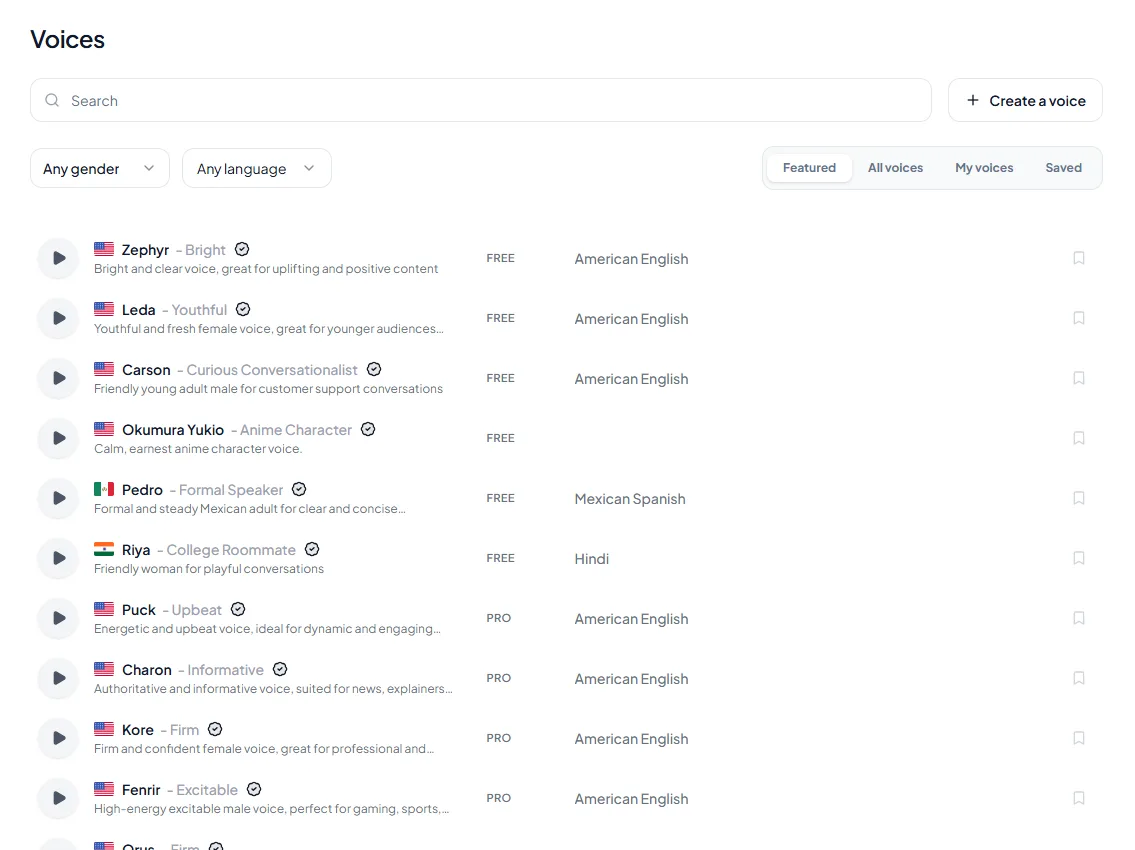
<figure style="margin:28px 0;padding:0"><img src="/blog/product/app-voice-library.webp" alt="The Voices page in the Kveeky app: a search box, gender and language filters, the tabs Featured, All voices, My voices and Saved, and a list of stock voices, each with a preview button and a FREE or PRO tag." width="1135" height="850" loading="lazy" decoding="async" style="display:block;width:100%;height:auto;border-radius:var(--kv-radius-md);border:1px solid var(--kv-blue-100)"><figcaption style="margin-top:10px;font:400 14px/1.5 var(--kv-font-body);color:var(--kv-gray-600)">The Voices page shows the voice-library side of the scorecard: filter by gender and language, press play to preview, and look for the FREE or PRO tag.</figcaption></figure>

If a tool sounds flat even with these controls, our tips on [pacing, emphasis and breath](https://kveeky.com/resources/ai-voice-pacing-emphasis-breath/) help most scripts.

## Software for business use

Business use adds 3 checks: rights, cost at volume and consistency across a team.

**1. Commercial rights.** Monetized videos, ads, courses and client work all need commercial use. Check the exact plan. For example, ElevenLabs' free plan has no commercial license, while every paid Kveeky plan includes commercial usage rights.

**2. Cost per minute at your volume.** Plan prices hide the real cost. This table divides each price by the minutes included, using prices read on October 6, 2026.

<table>
<thead>
<tr><th>Plan</th><th>Price</th><th>Minutes included</th><th>Approx. cost per minute</th></tr>
</thead>
<tbody>
<tr><td>Kveeky Basic (yearly billing)</td><td>$7.50/month</td><td>100/month</td><td>$0.075</td></tr>
<tr><td>Kveeky Basic (monthly billing)</td><td>$9/month</td><td>100/month</td><td>$0.09</td></tr>
<tr><td>Kveeky Business (yearly billing)</td><td>$82.50/month</td><td>1,000/month</td><td>$0.083</td></tr>
<tr><td>Narakeet one-time pack</td><td>$6</td><td>30</td><td>$0.20</td></tr>
<tr><td>WellSaid Starter (yearly billing)</td><td>$120/year</td><td>240 download min/year</td><td>$0.50</td></tr>
</tbody>
</table>

Kveeky's Pro plan costs more per minute than Basic ($12.50 yearly for 133 minutes), because it adds 10 voice clones and voice localization. Pay for features only if you'll use them.

<div style="margin:28px 0;padding:20px 22px;background:var(--kv-blue-50);border:1px solid var(--kv-blue-100);border-radius:var(--kv-radius-md);min-width:0;box-sizing:border-box;overflow-wrap:anywhere"><div style="font:700 17px/1.3 var(--kv-font-heading);color:var(--kv-blue-950);margin-bottom:8px">Cost per minute calculator</div><p style="margin:0 0 12px;font:400 15px/1.5 var(--kv-font-body);color:var(--kv-gray-600)">Enter a plan price and the minutes it includes. The example table uses Kveeky Basic ($9 for 100 minutes), Narakeet ($6 for 30 minutes) and WellSaid Starter ($120 a year for 240 download minutes). Retakes add up, so the finished-minute figure uses a retake factor.</p><div style="display:flex;flex-wrap:wrap;gap:12px;margin-bottom:14px"><label for="cic-p" style="display:flex;flex-direction:column;gap:4px;flex:1 1 150px;min-width:0;font:600 14px/1.3 var(--kv-font-body);color:var(--kv-gray-800)">Price you pay per period ($)<input id="cic-p" type="number" inputmode="decimal" min="0" step="0.5" value="9" style="box-sizing:border-box;width:100%;min-width:0;min-height:44px;padding:0 12px;border:1px solid var(--kv-blue-100);border-radius:var(--kv-radius-sm);font:400 16px/1 var(--kv-font-body);color:var(--kv-gray-800);background:var(--kv-white)"></label><label for="cic-m" style="display:flex;flex-direction:column;gap:4px;flex:1 1 150px;min-width:0;font:600 14px/1.3 var(--kv-font-body);color:var(--kv-gray-800)">Minutes included in that period<input id="cic-m" type="number" inputmode="decimal" min="1" step="5" value="100" style="box-sizing:border-box;width:100%;min-width:0;min-height:44px;padding:0 12px;border:1px solid var(--kv-blue-100);border-radius:var(--kv-radius-sm);font:400 16px/1 var(--kv-font-body);color:var(--kv-gray-800);background:var(--kv-white)"></label><label for="cic-f" style="display:flex;flex-direction:column;gap:4px;flex:1 1 150px;min-width:0;font:600 14px/1.3 var(--kv-font-body);color:var(--kv-gray-800)">Retake factor (1.5 = half again)<input id="cic-f" type="number" inputmode="decimal" min="1" step="0.1" value="1.5" style="box-sizing:border-box;width:100%;min-width:0;min-height:44px;padding:0 12px;border:1px solid var(--kv-blue-100);border-radius:var(--kv-radius-sm);font:400 16px/1 var(--kv-font-body);color:var(--kv-gray-800);background:var(--kv-white)"></label></div><div id="cic-o" aria-live="polite" style="padding:14px 16px;background:var(--kv-white);border:1px solid var(--kv-blue-100);border-radius:var(--kv-radius-sm);font:400 16px/1.6 var(--kv-font-body);color:var(--kv-gray-800)">Change a number to see the result.</div><script>(function(){try{var ids=["p", "m", "f"],o=document.getElementById("cic-o");if(!o)return;var els=[];for(var i=0;i<ids.length;i++){var e=document.getElementById("cic-"+ids[i]);if(!e)return;els.push(e)}function run(){try{var v={};for(var i=0;i<ids.length;i++){var n=parseFloat(els[i].value);v[ids[i]]=isNaN(n)||n<0?0:n}var m=v.m||1,f=v.f||1;var c=v.p/m;o.innerHTML="That is about <strong>$"+c.toFixed(3)+" per minute</strong> of included audio and about <strong>$"+(c*f).toFixed(3)+" per finished minute</strong> once retakes are counted. A 10-minute video then costs about $"+(c*f*10).toFixed(2)+"."}catch(e){}}for(var i=0;i<els.length;i++){els[i].addEventListener("input",run);els[i].addEventListener("change",run)}run()}catch(e){}})();</script></div>

**3. Consistency.** Pick 1 or 2 voices for your brand and write them down with the speed, volume and emotion settings. A shared voice guide stops every video sounding different.

<div style="margin:28px 0;padding:20px 22px;background:var(--kv-white);border:1px solid var(--kv-blue-100);border-radius:var(--kv-radius-md);min-width:0;box-sizing:border-box;overflow-wrap:anywhere"><div style="font:700 17px/1.3 var(--kv-font-heading);color:var(--kv-blue-950);margin-bottom:8px">Business-use checklist</div><p style="margin:0 0 12px;font:400 15px/1.5 var(--kv-font-body);color:var(--kv-gray-600)">Tick each point on the plan page of the tool you plan to buy.</p><label style="display:flex;align-items:flex-start;gap:12px;min-height:44px;padding:8px 0;font:400 16px/1.6 var(--kv-font-body);color:var(--kv-gray-800);cursor:pointer"><input type="checkbox" class="cik-c" style="width:22px;height:22px;margin-top:2px;flex:none;accent-color:var(--kv-blue-700)"><span><strong>Commercial rights</strong> are stated for the exact plan I will use.</span></label><label style="display:flex;align-items:flex-start;gap:12px;min-height:44px;padding:8px 0;font:400 16px/1.6 var(--kv-font-body);color:var(--kv-gray-800);cursor:pointer"><input type="checkbox" class="cik-c" style="width:22px;height:22px;margin-top:2px;flex:none;accent-color:var(--kv-blue-700)"><span><strong>Cost per minute</strong> is worked out at my monthly volume, including retakes.</span></label><label style="display:flex;align-items:flex-start;gap:12px;min-height:44px;padding:8px 0;font:400 16px/1.6 var(--kv-font-body);color:var(--kv-gray-800);cursor:pointer"><input type="checkbox" class="cik-c" style="width:22px;height:22px;margin-top:2px;flex:none;accent-color:var(--kv-blue-700)"><span><strong>House voices</strong> are chosen (1 or 2) and written down with speed, volume and emotion settings.</span></label><label style="display:flex;align-items:flex-start;gap:12px;min-height:44px;padding:8px 0;font:400 16px/1.6 var(--kv-font-body);color:var(--kv-gray-800);cursor:pointer"><input type="checkbox" class="cik-c" style="width:22px;height:22px;margin-top:2px;flex:none;accent-color:var(--kv-blue-700)"><span><strong>Consent</strong> is on file for any cloned voice.</span></label><label style="display:flex;align-items:flex-start;gap:12px;min-height:44px;padding:8px 0;font:400 16px/1.6 var(--kv-font-body);color:var(--kv-gray-800);cursor:pointer"><input type="checkbox" class="cik-c" style="width:22px;height:22px;margin-top:2px;flex:none;accent-color:var(--kv-blue-700)"><span><strong>Renewal price</strong> is checked, not just the first-month price.</span></label><p id="cik-out" aria-live="polite" style="margin:8px 0 0;font:600 15px/1.4 var(--kv-font-body);color:var(--kv-blue-700)">Ticked: 0 of 5</p><script>(function(){try{var b=document.querySelectorAll(".cik-c"),o=document.getElementById("cik-out");if(!o||!b.length)return;function u(){var n=0;for(var i=0;i<b.length;i++){if(b[i].checked)n++}o.textContent=n==b.length?"All "+n+" done":"Ticked: "+n+" of "+b.length}for(var i=0;i<b.length;i++){b[i].addEventListener("change",u)}}catch(e){}})();</script></div>

## Accessibility and language learning

For accessibility and language learning, the priorities change.

- **Accurate pronunciation in the target language** matters more than voice count.
- **Speed control** lets learners slow down hard passages.
- **Text highlighting** while reading helps many readers follow along. Reader apps usually do this better than voice generators.
- **Free built-in readers** on iPhone, Android, Edge and Word may be enough for personal study.

For creating learning audio in many languages, check that each language has voices. Kveeky has voices in 40+ languages, and our [language pages](https://kveeky.com/languages) show what's available for each one.

<div style="margin:28px 0;padding:20px 22px;background:var(--kv-white);border:1px solid var(--kv-blue-100);border-radius:var(--kv-radius-md);min-width:0;box-sizing:border-box;overflow-wrap:anywhere"><div style="font:700 17px/1.3 var(--kv-font-heading);color:var(--kv-blue-950);margin-bottom:8px">Show me</div><p style="margin:0 0 12px;font:400 15px/1.5 var(--kv-font-body);color:var(--kv-gray-600)">Open what you need.</p><details style="border-top:1px solid var(--kv-blue-100);padding:10px 0"><summary style="min-height:44px;display:flex;align-items:center;cursor:pointer;font:600 16px/1.4 var(--kv-font-body);color:var(--kv-blue-950)">How many words is a 30-second script?</summary><div style="padding:4px 0 8px;font:400 16px/1.6 var(--kv-font-body);color:var(--kv-gray-800)">At 150 words per minute a 30-second script is about 75 words. Use the <a href="https://kveeky.com/resources/words-to-minutes-calculator" style="color:var(--kv-blue-700)">words to minutes calculator</a> for longer scripts.</div></details><details style="border-top:1px solid var(--kv-blue-100);padding:10px 0"><summary style="min-height:44px;display:flex;align-items:center;cursor:pointer;font:600 16px/1.4 var(--kv-font-body);color:var(--kv-blue-950)">What does the Kveeky free plan give me for testing?</summary><div style="padding:4px 0 8px;font:400 16px/1.6 var(--kv-font-body);color:var(--kv-gray-800)">500 credits a month (about 40 seconds) with standard voices and no credit card. That is enough for several 30-second tests across voices.</div></details><details style="border-top:1px solid var(--kv-blue-100);padding:10px 0"><summary style="min-height:44px;display:flex;align-items:center;cursor:pointer;font:600 16px/1.4 var(--kv-font-body);color:var(--kv-blue-950)">Why compare cost per minute and not plan price?</summary><div style="padding:4px 0 8px;font:400 16px/1.6 var(--kv-font-body);color:var(--kv-gray-800)">A cheap plan with few minutes can cost more per minute than a bigger one. Dividing the price by the minutes included, as in the table above, puts every plan on the same footing.</div></details></div>


**Keep reading:** [Free vs paid text to speech](/blog/free-vs-paid-text-to-speech) · [AI voice commercial use rights](/blog/ai-voice-commercial-use-rights) · [Best AI voice generator for small business](/blog/best-ai-voice-generator-small-business) · [Add emotion to AI voices](/blog/ai-voice-with-emotion) · [Voice changer vs text to speech](/blog/voice-changer-vs-text-to-speech) · [Google text to speech](/blog/google-text-to-speech) · [Kveeky pricing](https://kveeky.com/pricing) · [Language pages](https://kveeky.com/languages) · [Recommended tools](/recommended-tools)

## Frequently asked questions

### What features should I look for in an AI voiceover tool?

Look for natural voices on your own script, voices in your exact languages, speed and pitch control and a way to fix pronunciation. Then check audio download, commercial rights on the plan you'll buy, the per-generation limit and cost per minute. If you localize videos, add voice localization or dubbing.

### What is the best text to speech software for commercial use?

Choose a tool whose plan page states commercial rights on the plan you'll buy. Every paid Kveeky plan includes commercial usage rights, and Fish Audio lists commercial use even on its free tier. Many other free plans exclude it.

### Which text-to-speech software has the best customization options?

It depends on your skill level. SSML gives the most precise control but suits technical users. Tools with simple controls, such as Kveeky's speed, volume and emotion settings, are faster for most creators.

### How do I test a text to voice generator before buying?

Write a 30-second script with a name, a number and a question. Generate it on 2 or 3 free plans at the same speed, fix one mispronunciation in each, and export the file into your editor.

### Is free text to voice software good enough?

For testing and personal use, often yes. For regular publishing, free plans usually run short on minutes or exclude commercial use. Kveeky's free plan gives about 40 seconds a month, enough to test voices before you upgrade.

### How much does text to voice software cost per minute?

Divide the plan price by the minutes it includes. In this guide, Kveeky Basic works out to about $0.075 to $0.09 per minute, Narakeet's one-time pack about $0.20 and WellSaid Starter about $0.50. Prices were read on October 6, 2026.

### What is the difference between a reader app and a voice generator?

A reader app reads documents and web pages back to you. A voice generator creates audio files for videos, courses, ads and podcasts from a script you paste.

### Can I use free text to voice software commercially?

Often not. Many free plans exclude commercial use, so check the plan page. Every paid Kveeky plan includes commercial usage rights, and the free plan is for testing.

### How do I compare two text to voice tools fairly?

Generate the same 30-second script at the same speed in each, fix one mispronounced word, export the file, and score both on the same six rows with the scorecard above.

## How we checked this guide

This guide is written by Mohit Singh for the Kveeky team. **Disclosure: Kveeky makes an AI voice generator.** The checklist is our own editorial method, and no Kveeky usage data is used in this guide.

- Prices and plan terms, retrieved October 6, 2026 and re-checked October 7, 2026 (plus [Voicemaker](https://voicemaker.in/pricing) for its 250-character free limit): [Kveeky](https://kveeky.com/pricing/), [ElevenLabs](https://elevenlabs.io/pricing), [Fish Audio](https://fish.audio/plan/), [Narakeet](https://www.narakeet.com/docs/pricing/) and [WellSaid](https://www.wellsaid.io/ai-voice-pricing).
- SSML definition: [W3C Speech Synthesis Markup Language 1.1](https://www.w3.org/TR/speech-synthesis11/), retrieved October 6, 2026.
- Cost per minute is our calculation: plan price divided by minutes included.

Want a shortlist instead of a checklist? Our comparison of the [10 best free AI voiceover generators](https://kveeky.com/blog/10-best-free-ai-voice-generatorover-tools) applies these checks to real tools. If your first project is a YouTube video, start with Kveeky's guide to [AI voiceovers for YouTube videos](https://kveeky.com/voiceover/youtube-videos/).


<script type="application/ld+json">
{"@context":"https://schema.org","@type":"FAQPage","mainEntity":[
{"@type":"Question","name":"What features should I look for in an AI voiceover tool?","acceptedAnswer":{"@type":"Answer","text":"Look for natural voices on your own script, voices in your exact languages, speed and pitch control and a way to fix pronunciation. Then check audio download, commercial rights on the plan you'll buy, the per-generation limit and cost per minute. If you localize videos, add voice localization or dubbing."}},
{"@type":"Question","name":"What is the best text to speech software for commercial use?","acceptedAnswer":{"@type":"Answer","text":"Choose a tool whose plan page states commercial rights on the plan you'll buy. Every paid Kveeky plan includes commercial usage rights, and Fish Audio lists commercial use even on its free tier. Many other free plans exclude it."}},
{"@type":"Question","name":"Which text-to-speech software has the best customization options?","acceptedAnswer":{"@type":"Answer","text":"It depends on your skill level. SSML gives the most precise control but suits technical users. Tools with simple controls, such as Kveeky's speed, volume and emotion settings, are faster for most creators."}},
{"@type":"Question","name":"How do I test a text to voice generator before buying?","acceptedAnswer":{"@type":"Answer","text":"Write a 30-second script with a name, a number and a question. Generate it on 2 or 3 free plans at the same speed, fix one mispronunciation in each, and export the file into your editor."}},
{"@type":"Question","name":"Is free text to voice software good enough?","acceptedAnswer":{"@type":"Answer","text":"For testing and personal use, often yes. For regular publishing, free plans usually run short on minutes or exclude commercial use. Kveeky's free plan gives about 40 seconds a month, enough to test voices before you upgrade."}},
{"@type": "Question", "name": "How much does text to voice software cost per minute?", "acceptedAnswer": {"@type": "Answer", "text": "Divide the plan price by the minutes it includes. In this guide, Kveeky Basic works out to about $0.075 to $0.09 per minute, Narakeet's one-time pack about $0.20 and WellSaid Starter about $0.50. Prices were read on October 6, 2026."}},
{"@type": "Question", "name": "What is the difference between a reader app and a voice generator?", "acceptedAnswer": {"@type": "Answer", "text": "A reader app reads documents and web pages back to you. A voice generator creates audio files for videos, courses, ads and podcasts from a script you paste."}},
{"@type": "Question", "name": "Can I use free text to voice software commercially?", "acceptedAnswer": {"@type": "Answer", "text": "Often not. Many free plans exclude commercial use, so check the plan page. Every paid Kveeky plan includes commercial usage rights, and the free plan is for testing."}},
{"@type": "Question", "name": "How do I compare two text to voice tools fairly?", "acceptedAnswer": {"@type": "Answer", "text": "Generate the same 30-second script at the same speed in each, fix one mispronounced word, export the file, and score both on the same six rows with the scorecard above."}}
]}
</script>