TL;DR
- This article explores the realm of free voice cloning options, covering tools and platforms that allow you to replicate voices without breaking the bank. We'll dive into the capabilities, limitations, and ethical considerations of these free services, along with practical tips for getting the best results. Discover how to leverage voice cloning for content creation, accessibility, and more, all while staying within a budget.
On this page
Yes, free voice cloning is real, but every free option has a catch. Kveeky's cloning starts on paid plans (the free plan gives 500 credits, about 40 seconds a month, with standard voices only and no cloning). Fish Audio's free plan includes voice cloning with up to 7 minutes a month. Open-source models such as OpenVoice and Chatterbox are free if you can run them yourself.
Last updated: October 6, 2026. Free plans, clone limits and licenses were checked on each vendor's own page on that date.
This guide is for creators who want to try cloning their own voice without paying first. It compares the free options, explains the limits that matter (minutes, clone counts and commercial rights) and shows how to get a usable clone from a free tool. If you mainly care about speed and how much audio a clone needs, read our guide to instant voice cloning tools instead.
Key Takeaways
- Free voice cloning exists in 2 forms: hosted free plans (Fish Audio) and free open-source models you run yourself (OpenVoice, Chatterbox, XTTS-v2).
- Kveeky's voice cloning is on paid plans. The free plan gives 500 credits a month (about 40 seconds) with standard voices and no credit card, but not cloning. Basic includes 5 custom clones; clone limits are per account, not per month.
- ElevenLabs' free plan has no voice cloning. Instant Voice Cloning starts on its Starter plan (elevenlabs.io/pricing, retrieved 2026-10-06).
- Check commercial rights before you publish. Kveeky includes commercial rights on paid plans only; XTTS-v2's license allows non-commercial use only.
- The recording matters more than the price. A clean, quiet sample beats a paid plan fed with noisy audio.
On this page: What it is · Options compared · Hosted free plans · Open source · Limits · How to clone free · When to pay · Ethics · FAQ
What is free voice cloning
Voice cloning creates a digital copy of your voice, or of someone else's voice if you have their permission. The AI studies your speech patterns, tone, accent and rhythm, then reads any new text in that voice.
"Free" usually means one of 2 things. Either a company gives you a small free allowance on its website, or a research team releases an open-source model you install yourself. The first is easier. The second has no usage cap, but you need a capable computer and some technical skill.
For the bigger picture, including how cloning works and instant vs professional clones, start with our voice cloning guide.
Free options compared
Every row below was checked on the vendor's own page or repository on October 6, 2026.
| Option | Type | Free voice cloning | Free usage | Commercial use on the free option |
|---|---|---|---|---|
| Kveeky | Hosted, no install | No. Cloning starts on paid plans (5 clones on Basic, $9/month) | Free plan: 500 credits/month (about 40 seconds), standard voices, no card | Commercial rights start on Basic ($9/month) |
| Fish Audio | Hosted, no install | Yes ("Enhanced voice cloning") | 8,000 credits/month, up to about 7 min, no card | Listed as included; confirm in its terms |
| ElevenLabs | Hosted, no install | No | 10,000 credits/month for stock voices | No. Commercial license starts on Starter |
| OpenVoice | Open source, self-hosted | Yes | No cap; you supply the computer | Yes. MIT license, "free for both commercial and research use" |
| Chatterbox | Open source, self-hosted | Yes, from a reference audio clip | No cap; you supply the computer | MIT license |
| Coqui XTTS-v2 | Open source, self-hosted | Yes, from a 6-second clip | No cap; you supply the computer | No. Non-commercial use only |
Pick what matters most and see which options from the table match.
Free plans change often. Always confirm the current limits on the vendor's page before you build a workflow around one. For Kveeky, check the pricing page for the current clone allowance on each paid plan.
Hosted free plans
Hosted tools are the easiest way to try voice cloning online for free. You upload a recording in the browser and type text. Nothing to install.
Kveeky
Kveeky's voice cloning is on paid plans; the free plan does not include it. The free plan gives 500 credits a month (about 40 seconds of audio) and no credit card, with standard voices only. Clone limits on paid plans are per account, not per month (Kveeky pricing, retrieved 2026-10-06).

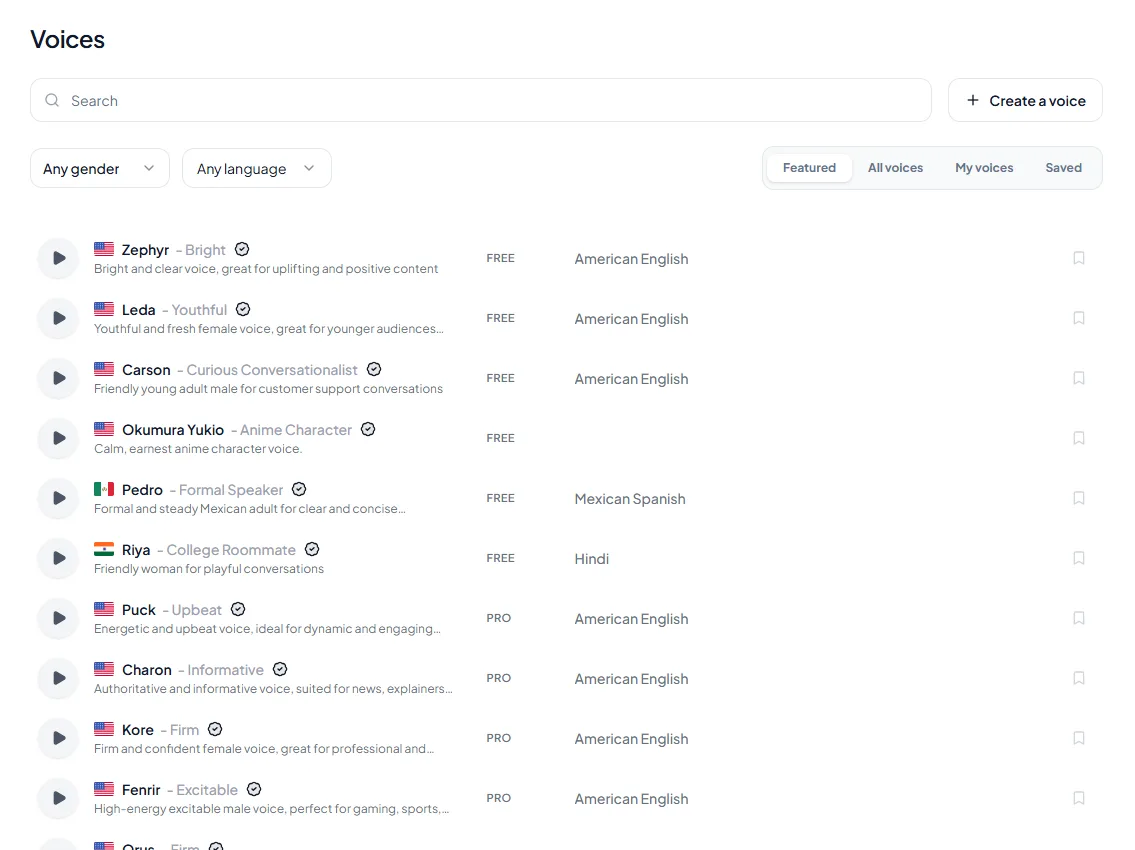
- 1Pick a voice. Voices are tagged Free or Premium.
- 2Type or paste a short line. Pick an emotion if you want one.
- 3Choose the language and press play to hear it.
Try it yourself in the free voice demo on Kveeky, no sign-up needed. For longer scripts and downloads, use the free plan.
You can adjust speed and volume, choose one of 6 emotions, and download the audio. The catch: the free plan has no cloning and no commercial usage rights. Every paid plan includes them, starting with Basic at $9/month, or $7.50/month billed yearly.
Fish Audio
Fish Audio's free plan lists "Enhanced voice cloning", 8,000 credits a month and up to about 7 minutes of generation, with no credit card needed. Its plan page also lists commercial use on the free tier (Fish Audio plans, retrieved 2026-10-06). Read its terms before you rely on that for client work.
Fish Audio wins here: its free plan includes cloning and a slightly larger allowance than Kveeky's. It is also strong on community and character voices.
ElevenLabs (not free for cloning)
ElevenLabs is often named in "free voice cloning" lists, but its free plan doesn't include voice cloning or a commercial license. Instant Voice Cloning and the commercial license start on the Starter plan, priced at $6/month with a first-month discount (ElevenLabs pricing, retrieved 2026-10-06). If you want ElevenLabs specifically, our ElevenLabs review covers the rest of the product.
What about Resemble AI's free tier?
Resemble AI's pricing page lists a $0 "Flex" plan, but it describes deepfake detection and identity enrollment. It does not list voice cloning on the free tier (Resemble AI pricing, retrieved 2026-10-06). Resemble does publish a free open-source cloning model, Chatterbox, covered below.
Open-source voice cloning
Open-source models are the only free voice cloning tools with no usage cap. You pay with time and hardware instead of money. Expect to use Python, install dependencies and ideally have a graphics card.
- OpenVoice. Clones the tone of a reference voice and can speak in other languages and accents. V2 natively supports English, Spanish, French, Chinese, Japanese and Korean. V1 and V2 are "MIT Licensed. Free for both commercial and research use" (OpenVoice on GitHub, retrieved 2026-10-06).
- Chatterbox. Released by Resemble AI under the MIT license. It clones from a reference audio prompt, and its multilingual model lists more than 23 languages. Every file it generates carries an imperceptible "Perth" watermark (Chatterbox on GitHub, retrieved 2026-10-06).
- Coqui XTTS-v2. Clones "with just a 6-second audio clip" in 17 languages (model card, retrieved 2026-10-06). Its Coqui Public Model License "allows only non-commercial use of a machine learning model and its outputs" (license).
- Real-Time-Voice-Cloning. A well-known older project. Its own README now says it "has quickly gotten old" and that paid apps will often give better quality (GitHub, retrieved 2026-10-06). Treat it as a learning project.
If you want to understand the models behind these tools, our explainer on zero-shot voice cloning covers how a clone works from a short sample.
Free tool limitations
Free voice cloning is fine for testing and personal projects. These are the limits you will hit first.
- Minutes run out fast. About 0.67 to 7 minutes a month covers a few short videos, not a podcast series or an audiobook.
- Commercial use is often excluded. Kveeky's free plan, ElevenLabs' free plan and XTTS-v2 don't allow commercial use (and Kveeky's free plan has no cloning). Monetized videos and client work usually need a paid plan or an open license. See our plan-by-plan guide to commercial use of AI voiceovers for the wider picture.
- Quality depends on your input. Clear audio in, better clone out. A noisy or echoey sample gives a noisy clone on any tool, free or paid.
- Clone counts are capped. Hosted plans limit how many voices you can save. On Kveeky cloning starts on paid plans: 5 on Basic.
- Open source needs skill and hardware. No usage cap, but setup takes time, and quality depends on your graphics card and settings.
- Free plans change. What is free today may move to a paid tier later, so recheck before you depend on one.
Enter your script length in words (150 words a minute).
In practice, a short intro for a personal podcast is fine on a free plan. Hours of narration for a paid audiobook won't fit.
Cloning your voice step by step
The process is similar in most free tools.
- Pick a free tool. Choose a hosted free plan for ease, or an open-source model if you are comfortable with code.
- Record a clean sample. Find a quiet room with soft surfaces. Speak naturally, at a steady distance from the mic, for 1 to 2 minutes.
- Upload and confirm consent. Upload the file and confirm the voice is yours or that you have permission.
- Generate a test line. Type a sentence you never recorded and generate it in your cloned voice.
- Listen and refine. If it doesn't sound like you, re-record the sample first. Then adjust speed, pitch or tone if the tool allows it.
- Download and use it. Download the audio, and check the license before you publish anything commercial.
A clean sample and clear permission matter more than the price of the plan.
Expect some trial and error with free tools. Most bad clones come from the sample, not the tool. Our tips on how to make an AI voiceover sound less robotic help once the clone is working.
Show me: the stock-voice route in the Kveeky app
Not ready to clone? Compare your clone with a stock voice from the voice library.
When to upgrade
Upgrade when the free limits, not the voice quality, start blocking your work.
| If you… | Free is enough? | What to do |
|---|---|---|
| Want to hear your clone once or twice | Yes | Use any hosted free plan |
| Post a few short personal videos a month | Usually | Fish Audio free (watch the monthly minutes); Kveeky cloning needs a paid plan |
| Publish monetized or sponsored videos | Often not | Use a plan or license that allows commercial use |
| Narrate courses, podcasts or audiobooks | No | A paid plan with more minutes, or a self-hosted MIT-licensed model |
| Need cloning on Kveeky | No | Cloning starts on Basic (5 clones); Pro and Premium include 10 clones; Business includes 20 |
On Kveeky, Basic costs $9/month, or $7.50/month billed yearly, for 100 minutes a month, all 700+ voices, 5 clones and commercial usage rights. See every plan on the Kveeky pricing page.
Keep a signed note like this with every sample. This is a template, not legal advice.
Ethics and best practices
Free tools make cloning easy, so the rules matter more, not less.
- Get consent first. Only clone your own voice, or a voice you have clear, written permission to use.
- Don't deceive. Never use a cloned voice to impersonate someone or spread false information.
- Tell people. If your audience could be misled, say the voice is AI-generated.
- Keep your sample private. Don't share your recording or your clone with people you don't trust.
Is it legal to clone someone else's voice for free? Price doesn't change the law. Our guide is voice cloning legal? explains the rules. For the ethics side, read navigating the ethical minefield of AI voice cloning.
Frequently asked questions
Is there a completely free voice cloning tool?
Yes. Fish Audio's free plan includes voice cloning without a credit card. Kveeky's cloning is on paid plans; its free plan does not include it. Open-source models such as OpenVoice and Chatterbox are free to run on your own computer.
Can I clone my voice for free online without downloading anything?
Yes. Hosted tools such as Fish Audio (free) and Kveeky (paid plans) run in the browser. You upload a recording, type your text and download the audio. Free plans cap your monthly minutes.
Can I use a free voice clone commercially?
It depends on the tool. Kveeky includes commercial rights on paid plans only, ElevenLabs' free plan has no commercial license, and XTTS-v2 is non-commercial only. OpenVoice is MIT-licensed for commercial use.
Does ElevenLabs have free voice cloning?
No. ElevenLabs' free plan doesn't include voice cloning. Instant Voice Cloning starts on the Starter plan, which also adds a commercial license.
Is there a free voice cloning tool with no limits?
Self-hosted open-source models have no usage cap, but you need your own hardware and some technical skill. Hosted free plans always limit minutes or clones. No hosted tool we checked offers unrestricted free cloning.
Is free voice cloning safe?
It is safe when you clone your own voice on a tool you trust. Read the terms to see how your recording is used, keep your sample private, and never clone someone else's voice without permission.
- How to clone your voice for text-to-speech applications.
- Text to speech vs voice cloning which should you use.
- Top voice cloning solutions instant voice duplication.
- Can AI tools duplicate my voice a short answer.
- Is AI voice safe scams, deepfake fraud and protection.
- Free vs paid text to speech what you actually get.
How we checked this guide
This guide is written by Deepak Gupta for the Kveeky team. Disclosure: Kveeky makes an AI voice generator. It is one of the options compared here, and we list where other options win.
- Free plans and prices come from each vendor's own page, retrieved October 6, 2026: Kveeky, Fish Audio, ElevenLabs and Resemble AI.
- Open-source licenses and capabilities come from each project's repository or model card, retrieved October 6, 2026: OpenVoice, Chatterbox, XTTS-v2 and Real-Time-Voice-Cloning.
- No Kveeky usage data is used in this guide. We did not run timed or quality tests.
Next step: record 1 clean minute of your own voice, create a clone on a free tool, and compare it with a Kveeky stock voice from the character and AI voice library before you decide whether you need a paid plan.
Turn your script into a voiceover
Paste your text, pick a voice and download the audio. Free to start, no credit card.