7 AI Platforms Content Creators Use Behind the Scenes

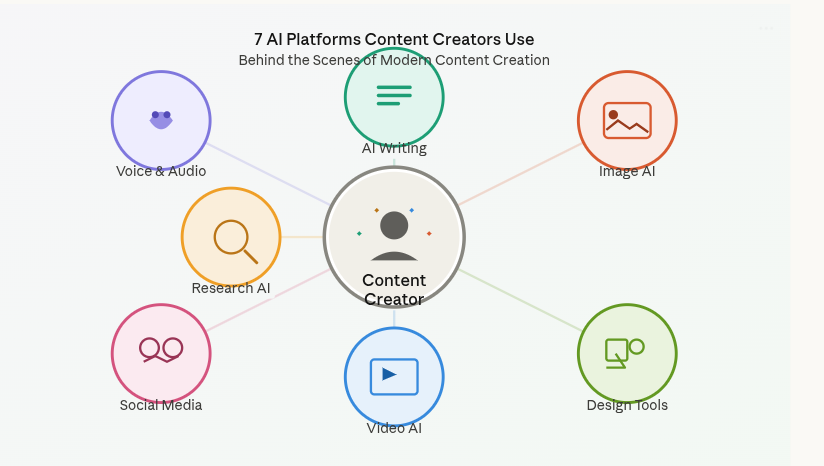
Content creators in 2026 rely on specialized AI platforms to streamline their workflows across voice, visuals, copy, and video production. The seven most essential tools are LogicBalls (hallucination-free AI), Snapcorn (image editing), Social9 (social media content), Canva AI (design), Descript (video/audio editing), Jasper AI (copywriting), and Opus Clip (video repurposing).
When you watch your favorite YouTuber's perfectly edited video or scroll through an influencer's polished Instagram feed, there's often an invisible team of AI tools working behind the scenes. While platforms like Kveeky handle the voiceover magic with 600+ realistic AI voices in 200+ languages, content creators use a carefully curated stack of specialized AI tools to handle everything else—from writing scripts to editing videos to generating eye-catching visuals.
After researching dozens of content creation workflows and analyzing tools used by successful creators, we've identified the seven AI platforms that are genuinely making a difference in 2026. These aren't the tools everyone talks about—they're the ones creators actually use when the camera stops rolling.
Quick Comparison: 7 Essential AI Platforms for Content Creators
Platform | Primary Use | Starting Price | Best For | Key Feature |
|---|---|---|---|---|
LogicBalls | Hallucination-free AI | Free (14K words/mo) | Accurate content generation | Asks clarifying questions before answering |
Snapcorn | Image editing | Free (40 credits/mo) | Product photos, visuals | Background removal, AI enhancement |
Social9 | Social media content | Free (20 credits/mo) | Multi-platform posting | Brand voice training, 50+ languages |
Canva AI | Design & visuals | Free (limited AI) | Graphics, presentations | Magic Design, 100M+ templates |
Descript | Video/audio editing | Free (1 hr/mo) | Podcasts, videos | Text-based editing, Studio Sound |
Jasper AI | Marketing copy | $49/mo | Blog posts, ad copy | Brand voice, SEO optimization |
Opus Clip | Video repurposing | Free (60 credits/mo) | Short-form clips | AI clipping, Virality Score |
1. LogicBalls: The AI That Actually Gets It Right
What it does: LogicBalls stands out as the first hallucination-free AI platform, designed specifically for creators who can't afford factual errors in their content.
Unlike traditional AI tools that confidently generate incorrect information, LogicBalls asks 2-3 clarifying questions when it needs more context before generating content. This simple approach has made it a favorite among journalists, researchers, and content creators who value accuracy over speed.
Why creators use it:
5,000+ AI tools built into one platform for content creation, marketing, and productivity
Zero hallucinations - the AI admits when it doesn't know something rather than making it up
Real source citations for every claim, making fact-checking effortless
Works across 11 languages for global content creation
Pricing:
Free Forever: 14,000 AI words/month with access to 2,000+ tools
Pro: $5/month (billed annually at $59.99/year) - 500K basic AI words + 150K human-like words
Premium: $8.25/month (billed annually) - Unlimited basic words + 500K human-like words
Elite: $11.67/month - Unlimited everything with 31 elite AI models
Real-world use case: A health and wellness blogger uses LogicBalls to research medical topics, knowing that every statistic and claim comes with verifiable sources—eliminating hours of manual fact-checking.
2. Snapcorn: Your AI-Powered Photo Studio
What it does: Snapcorn delivers professional-grade image editing through five AI-powered tools that handle the tedious parts of visual content creation.
Content creators dealing with product photography, thumbnails, or social media visuals use Snapcorn to achieve studio-quality results without expensive software or design skills. The platform's background removal tool alone saves creators hours of manual editing work.
Why creators use it:
One-click background removal for product photos and portraits
AI image enhancement that improves resolution and sharpness automatically
Image colorization for vintage photos or black-and-white content
Text-to-image generation for custom graphics (2 credits per image)
Simple credit system makes costs predictable
Pricing:
Free: 40 credits/month - enough for 20 background removals or 10 image enhancements
Pro: $20/month ($200/year) - 500 credits with priority support and higher quality
Premium: $50/month ($500/year) - 1,500 credits with 24/7 support and fastest processing
Real-world use case: An e-commerce creator batch-processes 50 product photos in under 10 minutes, removing backgrounds and enhancing images for a new collection launch—work that previously took an entire afternoon.
3. Social9: AI That Speaks Your Brand's Language
What it does: Social9 solves the biggest bottleneck in content creation: producing consistent, on-brand social media posts across multiple platforms without burning out.
Social9 uses AI to eliminate the guesswork from content creation, training custom models on your brand voice and automatically adapting content for each platform's best practices. It's the difference between posting generic AI content and posting content that actually sounds like you.
Why creators use it:
AI brand voice training that learns your unique writing style and tone
Multi-platform optimization - one idea becomes platform-specific posts for Instagram, LinkedIn, X, TikTok
50+ language support with cultural adaptation, not just translation
Predictive analytics shows expected engagement before you publish
GEO/AEO optimization helps your content get discovered by AI search engines
Pricing:
Free: 20 credits/month - ~5 post generations with basic AI
Pro: $20/month - 200 credits (~50 posts), custom brand voice, scheduling
Premium: $50/month - 560 credits (~140 posts), team collaboration, bulk generation
Enterprise: Custom pricing - unlimited credits, AI agent workflows, dedicated support
Real-world use case: A SaaS founder generates a week's worth of social content in 15 minutes, with each post automatically optimized for LinkedIn's professional tone, Twitter's brevity, and Instagram's visual storytelling—all while maintaining consistent brand messaging.
4. Canva AI: Design Without the Designer
What it does: Canva has evolved from a simple design tool into a comprehensive AI-powered creative platform that puts professional design capabilities in everyone's hands.
Content creators use Canva for thumbnails, Instagram posts, presentations, and marketing graphics with AI features that handle everything from background removal to automatic design generation.
Why creators use it:
Magic Design turns text prompts into complete designs in seconds
100+ million premium stock photos, videos, and templates
AI background removal for product photos and portraits
Magic Write generates on-brand copy directly in your designs
Brand Kit maintains consistent colors, fonts, and logos across all content
Multi-format templates optimized for every social platform
Pricing:
Free: 250,000+ templates, basic AI tools (200 standard AI uses or 20 premium uses)
Pro: $15/month ($120/year) - Full AI access, 100M+ premium content, unlimited templates
Business: $20/user/month - Team collaboration, brand management, advanced controls
Enterprise: Custom pricing - SSO, unlimited users, dedicated support
Real-world use case: A YouTube creator designs professional thumbnails in 3 minutes using Canva's AI-suggested layouts, then resizes the same design for Instagram Stories, TikTok covers, and Twitter headers—all with one click.
5. Descript: Edit Video Like a Word Doc
What it does: Descript revolutionizes video and podcast editing by letting you edit media files the same way you'd edit a text document—just delete words from the transcript, and the corresponding video disappears.
Descript is the ultimate tool for turning podcasts, interviews, and webinars into blog posts and short clips, with AI features that handle the technical heavy lifting automatically.
Why creators use it:
Text-based editing - edit video by editing the transcript
Studio Sound removes background noise and enhances audio quality with one click
Filler word removal automatically finds and deletes "um," "ah," "like" from recordings
Eye Contact AI adjusts your gaze to look directly at camera
Overdub creates AI voice clones for fixing mistakes without re-recording
Multi-track transcription for interviews with perfect speaker labeling
Pricing:
Free: 60 media minutes/month, 100 one-time AI credits, 720p export with watermark
Creator: $24/month ($12 annual) - 1,800 media minutes, 800 AI credits, 4K export
Business: $50/month ($40 annual) - 3,000 minutes, team collaboration, brand controls
Enterprise: Custom pricing - unlimited everything, API access, dedicated support
Real-world use case: A podcast creator records a 60-minute interview, uses Descript to automatically remove all filler words and awkward pauses, adds professional-quality sound enhancement, and exports 10 social media clips—all in under 20 minutes.
6. Jasper AI: Marketing Copy That Converts
What it does: Jasper AI specializes in creating marketing-focused content that maintains your brand voice across blog posts, ads, emails, and social media.
Jasper is especially well-liked by professionals and marketing teams because it goes beyond generic AI writing—it learns your brand's unique voice and applies it consistently across every piece of content.
Why creators use it:
Brand Voice engine locks your tone and messaging into every output
50+ templates for blog posts, ads, emails, social captions, product descriptions
SEO optimization built in with SurferSEO integration
Campaign builder takes you from content brief to finished assets
Jasper Chat for conversational content refinement
Multi-language support for global content creation
Pricing:
Creator: $49/month ($39 annual) - 1 brand voice, SEO mode, browser extension
Pro: $69/month ($59 annual) - 3 brand voices, 5 user seats, team collaboration
Business: Custom pricing - Unlimited brand voices, API access, dedicated support, SSO
Real-world use case: A digital marketing agency uses Jasper to maintain consistent brand voice across 10 different client accounts, generating blog outlines, ad copy, and email sequences that sound distinctly different for each brand—work that previously required dedicated copywriters for each client.
7. Opus Clip: Turn Long Videos Into Viral Shorts
What it does: Opus Clip uses AI to automatically identify the most engaging moments in long-form videos and turn them into perfectly formatted short clips for TikTok, Reels, and YouTube Shorts.
Opus Clip turns long videos into viral shorts fast with AI clipping, captioning, and publishing, solving the biggest challenge for video creators: repurposing one piece of content across multiple platforms.
Why creators use it:
ClipAnything AI works with any video genre - podcasts, gaming, vlogs, tutorials, sports
Virality Score predicts which clips will perform best (0-99 rating)
Auto-captions with 95% accuracy across 25+ languages
AI B-Roll adds contextual footage to enhance storytelling
One-click reframing keeps subjects centered when converting to vertical
Social scheduler publishes directly to TikTok, Instagram, YouTube, LinkedIn, X
Pricing:
Free: 60 credits/month (~60 minutes of video) with watermark, 3-day clip expiration
Starter: $15/month - 150 credits, no watermark, Virality Score
Pro: $29/month ($14.50 annual) - 300 credits, AI B-Roll, team workspace, social scheduler
Business: Custom pricing - Unlimited processing, API access, priority support
Real-world use case: A business podcaster uploads their weekly 45-minute episode and gets 15 viral-worthy clips ranked by engagement potential, complete with captions and optimized framing—ready to schedule across all platforms in under 5 minutes.
How These Tools Work Together: A Real Creator Workflow
Here's how a professional content creator might use these platforms in a single day:
Morning: Record a 30-minute talking-head video about "AI tools for creators"
- Edit in Descript - remove filler words, enhance audio, fix eye contact (20 minutes)
Mid-morning: Repurpose the video content
Send to Opus Clip - get 12 short clips with Virality Scores (5 minutes)
Use Canva AI to design custom thumbnails for top 5 clips (10 minutes)
Afternoon: Create supporting content
Write a blog post with Jasper AI using the video transcript (30 minutes)
Generate social media captions with Social9 optimized for each platform (10 minutes)
Use LogicBalls to fact-check all statistics mentioned in the content (15 minutes)
Late afternoon: Polish visuals
Edit product screenshots with Snapcorn - remove backgrounds, enhance quality (10 minutes)
Add voiceover with Kveeky - select the perfect AI voice and generate narration (5 minutes)
Total time: About 2 hours for a complete multi-platform content package that would have taken 8-10 hours manually.
The Truth About AI Tools in Content Creation
Let's address the elephant in the room: AI tools don't replace creativity; they eliminate the grunt work that stands between your ideas and published content.
85% of marketers now use AI for content creation, but the successful ones aren't just clicking "generate" and calling it done. They're building intelligent workflows where AI handles the repetitive tasks (transcription, background removal, caption generation, format optimization) while humans focus on strategy, storytelling, and brand voice.
The content creators seeing the best results are those who understand that each AI tool has a specific strength:
LogicBalls for when accuracy matters more than speed
Snapcorn for when you need professional visuals without a photo studio
Social9 for when you're managing multiple platforms and need consistency
Canva AI for when you need polished designs without design skills
Descript for when you're editing hours of audio/video content
Jasper AI for when you're producing high-volume marketing copy
Opus Clip for when you need to maximize reach from existing video content
Choosing the Right AI Stack for Your Content
Not every creator needs all seven tools. Here's how to build your stack based on your content type:
Video-First Creators (YouTube, TikTok):
Essential: Descript, Opus Clip, Canva AI
Optional: Jasper AI for video descriptions, Social9 for cross-platform promotion
Written Content Creators (Bloggers, Newsletter Writers):
Essential: LogicBalls, Jasper AI, Canva AI
Optional: Social9 for promotion, Snapcorn for featured images
Social Media Influencers:
Essential: Social9, Canva AI, Snapcorn
Optional: Opus Clip for video content, Jasper AI for captions
Podcasters:
Essential: Descript, Opus Clip, Social9
Optional: Canva AI for cover art, LogicBalls for research
E-commerce Content Creators:
Essential: Snapcorn, Canva AI, Jasper AI
Optional: Social9 for consistent posting, Opus Clip for product videos
The Voice Layer: Why Kveeky Completes the Stack
While these seven platforms handle visuals, copy, and editing, there's one critical element missing: professional voiceovers. This is where Kveeky becomes the eighth essential tool in the modern creator's arsenal.
With 600+ realistic AI voices across 200+ languages, Kveeky solves the voiceover challenge that stops many creators from scaling their video content. Instead of recording narration yourself or hiring voice actors, you can:
Generate studio-quality voiceovers in minutes, not hours
Switch between voices to match different content types or audiences
Create multilingual versions of the same content for global reach
Maintain consistent voice quality across hundreds of videos
The platform integrates seamlessly with the workflow we've outlined—after editing your video in Descript and creating visuals in Canva, add professional narration with Kveeky before final export.
Kveeky Pricing:
Free: 500 credits/month (6.6 minutes), standard voices only
Basic: $7.50/month (billed annually) - 100 minutes, all 600+ voices
Pro: $12.50/month - 133 minutes, voice localization, priority support
Premium: $24.17/month - 200 minutes, 10 custom voice clones
Business: $82.50/month - 1,000 minutes, pro voice cloning, dedicated support
Looking Ahead: The AI Content Creation Landscape in 2026
The AI content creation market is projected to increase by USD 60.47 billion at a CAGR of 39.1% from 2024 to 2029, and we're seeing three major trends:
1. Specialization Over Generalization
Generic AI tools like ChatGPT are being replaced by specialized platforms that excel at specific tasks. Creators are building custom stacks instead of relying on one-size-fits-all solutions.
2. Quality Over Quantity
The initial "AI content flood" is giving way to a focus on AI-assisted quality. Tools that maintain brand voice and ensure accuracy (like LogicBalls and Social9) are winning over simple text generators.
3. Integration and Workflows
The future isn't about individual tools—it's about how they work together. Successful creators are building automated workflows where content flows seamlessly from recording (Descript) to editing (Opus Clip) to design (Canva) to distribution (Social9).
Final Thoughts: Your AI Toolkit Checklist
The seven platforms we've covered represent the current state-of-the-art in AI-assisted content creation. Each one solves a specific problem that content creators face daily:
✅ LogicBalls - Solves the accuracy problem in AI-generated content
✅ Snapcorn - Solves the professional photo editing barrier
✅ Social9 - Solves the multi-platform consistency challenge
✅ Canva AI - Solves the design skills requirement
✅ Descript - Solves the video editing time sink
✅ Jasper AI - Solves the marketing copy production bottleneck
✅ Opus Clip - Solves the video repurposing challenge
Start with the tools that address your biggest pain points. Most offer free tiers that let you test before committing. As your content operation scales, you'll naturally add more specialized tools to your stack.
The creators thriving in 2026 aren't the ones using the most AI—they're the ones using the right AI for each task, keeping the human touch where it matters most: strategy, storytelling, and authentic connection with their audience.
Frequently Asked Questions
Q: Do I need all seven tools to be a successful content creator?
A: No. Start with 2-3 tools that address your biggest challenges. Video creators should prioritize Descript and Opus Clip, while written content creators should focus on LogicBalls and Jasper AI. Add tools as your needs evolve.
Q: Are these AI tools replacing human creativity?
A: Not at all. These tools eliminate repetitive tasks (transcription, background removal, caption generation) so creators can focus on strategy, storytelling, and audience connection. The most successful creators today are using AI as a creative partner, not a replacement.
Q: How much should I budget for AI tools monthly?
A: You can start completely free with limited features across all platforms. A realistic starter budget is $50-100/month, which gets you Pro plans for 2-3 essential tools. Professional creators typically invest $200-500/month across their full stack.
Q: Which tool should I start with if I'm brand new to AI content creation?
A: Start with Canva AI (free plan) because it delivers immediate visual results and has the gentlest learning curve. Once comfortable, add Descript if you create videos or LogicBalls if you write content.
Q: Can these tools work together, or do I need to manually transfer content between them?
A: Most can work together through exports and imports. For example: edit video in Descript → export to Opus Clip for clipping → design thumbnails in Canva → schedule with Social9. Some tools like Jasper and Social9 have direct integrations.
Q: What's the learning curve like for these platforms?
A: Canva AI and Snapcorn are beginner-friendly (1-2 hours to learn basics). Descript and Social9 require 3-5 hours to master core features. Jasper AI and LogicBalls need 5-10 hours to use effectively. Opus Clip is somewhere in between at 2-3 hours.
Q: Do these tools work for non-English content?
A: Yes. LogicBalls supports 11 languages, Social9 supports 50+ languages, Canva AI works in 100+ languages, Descript transcribes 25 languages, Jasper supports 30+ languages, and Opus Clip handles 20+ languages. Snapcorn is language-agnostic for images.
About This Article: This guide was researched and written to help content creators navigate the rapidly evolving AI tools landscape in 2026. All pricing and features were verified as of April 2026 and may have changed since publication. Visit each platform's official website for current information.
Related Resources:
Visit Kveeky.com for AI voiceover solutions
Explore the full comparison of AI content creation tools
Join the conversation about AI in content creation
Last Updated: April 2026
Direct Answer: Content creators in 2026 rely on specialized AI platforms to streamline their workflows across voice, visuals, copy, and video production. The seven most essential tools are LogicBalls (hallucination-free AI), Snapcorn (image editing), Social9 (social media content), Canva AI (design), Descript (video/audio editing), Jasper AI (copywriting), and Opus Clip (video repurposing).
When you watch your favorite YouTuber's perfectly edited video or scroll through an influencer's polished Instagram feed, there's often an invisible team of AI tools working behind the scenes. While platforms like Kveeky handle the voiceover magic with 600+ realistic AI voices in 200+ languages, content creators use a carefully curated stack of specialized AI tools to handle everything else—from writing scripts to editing videos to generating eye-catching visuals.
After researching dozens of content creation workflows and analyzing tools used by successful creators, we've identified the seven AI platforms that are genuinely making a difference in 2026. These aren't the tools everyone talks about—they're the ones creators actually use when the camera stops rolling.
Quick Comparison: 7 Essential AI Platforms for Content Creators
Platform | Primary Use | Starting Price | Best For | Key Feature |
|---|---|---|---|---|
LogicBalls | Hallucination-free AI | Free (14K words/mo) | Accurate content generation | Asks clarifying questions before answering |
Snapcorn | Image editing | Free (40 credits/mo) | Product photos, visuals | Background removal, AI enhancement |
Social9 | Social media content | Free (20 credits/mo) | Multi-platform posting | Brand voice training, 50+ languages |
Canva AI | Design & visuals | Free (limited AI) | Graphics, presentations | Magic Design, 100M+ templates |
Descript | Video/audio editing | Free (1 hr/mo) | Podcasts, videos | Text-based editing, Studio Sound |
Jasper AI | Marketing copy | $49/mo | Blog posts, ad copy | Brand voice, SEO optimization |
Opus Clip | Video repurposing | Free (60 credits/mo) | Short-form clips | AI clipping, Virality Score |
1. LogicBalls: The AI That Actually Gets It Right
What it does: LogicBalls stands out as the first hallucination-free AI platform, designed specifically for creators who can't afford factual errors in their content.
Unlike traditional AI tools that confidently generate incorrect information, LogicBalls asks 2-3 clarifying questions when it needs more context before generating content. This simple approach has made it a favorite among journalists, researchers, and content creators who value accuracy over speed.
Why creators use it:
5,000+ AI tools built into one platform for content creation, marketing, and productivity
Zero hallucinations - the AI admits when it doesn't know something rather than making it up
Real source citations for every claim, making fact-checking effortless
Works across 11 languages for global content creation
Pricing:
Free Forever: 14,000 AI words/month with access to 2,000+ tools
Pro: $5/month (billed annually at $59.99/year) - 500K basic AI words + 150K human-like words
Premium: $8.25/month (billed annually) - Unlimited basic words + 500K human-like words
Elite: $11.67/month - Unlimited everything with 31 elite AI models
Real-world use case: A health and wellness blogger uses LogicBalls to research medical topics, knowing that every statistic and claim comes with verifiable sources—eliminating hours of manual fact-checking.
2. Snapcorn: Your AI-Powered Photo Studio
What it does: Snapcorn delivers professional-grade image editing through five AI-powered tools that handle the tedious parts of visual content creation.
Content creators dealing with product photography, thumbnails, or social media visuals use Snapcorn to achieve studio-quality results without expensive software or design skills. The platform's background removal tool alone saves creators hours of manual editing work.
Why creators use it:
One-click background removal for product photos and portraits
AI image enhancement that improves resolution and sharpness automatically
Image colorization for vintage photos or black-and-white content
Text-to-image generation for custom graphics (2 credits per image)
Simple credit system makes costs predictable
Pricing:
Free: 40 credits/month - enough for 20 background removals or 10 image enhancements
Pro: $20/month ($200/year) - 500 credits with priority support and higher quality
Premium: $50/month ($500/year) - 1,500 credits with 24/7 support and fastest processing
Real-world use case: An e-commerce creator batch-processes 50 product photos in under 10 minutes, removing backgrounds and enhancing images for a new collection launch—work that previously took an entire afternoon.
3. Social9: AI That Speaks Your Brand's Language
What it does: Social9 solves the biggest bottleneck in content creation: producing consistent, on-brand social media posts across multiple platforms without burning out.
Social9 uses AI to eliminate the guesswork from content creation, training custom models on your brand voice and automatically adapting content for each platform's best practices. It's the difference between posting generic AI content and posting content that actually sounds like you.
Why creators use it:
AI brand voice training that learns your unique writing style and tone
Multi-platform optimization - one idea becomes platform-specific posts for Instagram, LinkedIn, X, TikTok
50+ language support with cultural adaptation, not just translation
Predictive analytics shows expected engagement before you publish
GEO/AEO optimization helps your content get discovered by AI search engines
Pricing:
Free: 20 credits/month - ~5 post generations with basic AI
Pro: $20/month - 200 credits (~50 posts), custom brand voice, scheduling
Premium: $50/month - 560 credits (~140 posts), team collaboration, bulk generation
Enterprise: Custom pricing - unlimited credits, AI agent workflows, dedicated support
Real-world use case: A SaaS founder generates a week's worth of social content in 15 minutes, with each post automatically optimized for LinkedIn's professional tone, Twitter's brevity, and Instagram's visual storytelling—all while maintaining consistent brand messaging.
4. Canva AI: Design Without the Designer
What it does: Canva has evolved from a simple design tool into a comprehensive AI-powered creative platform that puts professional design capabilities in everyone's hands.
Content creators use Canva for thumbnails, Instagram posts, presentations, and marketing graphics with AI features that handle everything from background removal to automatic design generation.
Why creators use it:
Magic Design turns text prompts into complete designs in seconds
100+ million premium stock photos, videos, and templates
AI background removal for product photos and portraits
Magic Write generates on-brand copy directly in your designs
Brand Kit maintains consistent colors, fonts, and logos across all content
Multi-format templates optimized for every social platform
Pricing:
Free: 250,000+ templates, basic AI tools (200 standard AI uses or 20 premium uses)
Pro: $15/month ($120/year) - Full AI access, 100M+ premium content, unlimited templates
Business: $20/user/month - Team collaboration, brand management, advanced controls
Enterprise: Custom pricing - SSO, unlimited users, dedicated support
Real-world use case: A YouTube creator designs professional thumbnails in 3 minutes using Canva's AI-suggested layouts, then resizes the same design for Instagram Stories, TikTok covers, and Twitter headers—all with one click.
5. Descript: Edit Video Like a Word Doc
What it does: Descript revolutionizes video and podcast editing by letting you edit media files the same way you'd edit a text document—just delete words from the transcript, and the corresponding video disappears.
Descript is the ultimate tool for turning podcasts, interviews, and webinars into blog posts and short clips, with AI features that handle the technical heavy lifting automatically.
Why creators use it:
Text-based editing - edit video by editing the transcript
Studio Sound removes background noise and enhances audio quality with one click
Filler word removal automatically finds and deletes "um," "ah," "like" from recordings
Eye Contact AI adjusts your gaze to look directly at camera
Overdub creates AI voice clones for fixing mistakes without re-recording
Multi-track transcription for interviews with perfect speaker labeling
Pricing:
Free: 60 media minutes/month, 100 one-time AI credits, 720p export with watermark
Creator: $24/month ($12 annual) - 1,800 media minutes, 800 AI credits, 4K export
Business: $50/month ($40 annual) - 3,000 minutes, team collaboration, brand controls
Enterprise: Custom pricing - unlimited everything, API access, dedicated support
Real-world use case: A podcast creator records a 60-minute interview, uses Descript to automatically remove all filler words and awkward pauses, adds professional-quality sound enhancement, and exports 10 social media clips—all in under 20 minutes.
6. Jasper AI: Marketing Copy That Converts
What it does: Jasper AI specializes in creating marketing-focused content that maintains your brand voice across blog posts, ads, emails, and social media.
Jasper is especially well-liked by professionals and marketing teams because it goes beyond generic AI writing—it learns your brand's unique voice and applies it consistently across every piece of content.
Why creators use it:
Brand Voice engine locks your tone and messaging into every output
50+ templates for blog posts, ads, emails, social captions, product descriptions
SEO optimization built in with SurferSEO integration
Campaign builder takes you from content brief to finished assets
Jasper Chat for conversational content refinement
Multi-language support for global content creation
Pricing:
Creator: $49/month ($39 annual) - 1 brand voice, SEO mode, browser extension
Pro: $69/month ($59 annual) - 3 brand voices, 5 user seats, team collaboration
Business: Custom pricing - Unlimited brand voices, API access, dedicated support, SSO
Real-world use case: A digital marketing agency uses Jasper to maintain consistent brand voice across 10 different client accounts, generating blog outlines, ad copy, and email sequences that sound distinctly different for each brand—work that previously required dedicated copywriters for each client.
7. Opus Clip: Turn Long Videos Into Viral Shorts
What it does: Opus Clip uses AI to automatically identify the most engaging moments in long-form videos and turn them into perfectly formatted short clips for TikTok, Reels, and YouTube Shorts.
Opus Clip turns long videos into viral shorts fast with AI clipping, captioning, and publishing, solving the biggest challenge for video creators: repurposing one piece of content across multiple platforms.
Why creators use it:
ClipAnything AI works with any video genre - podcasts, gaming, vlogs, tutorials, sports
Virality Score predicts which clips will perform best (0-99 rating)
Auto-captions with 95% accuracy across 25+ languages
AI B-Roll adds contextual footage to enhance storytelling
One-click reframing keeps subjects centered when converting to vertical
Social scheduler publishes directly to TikTok, Instagram, YouTube, LinkedIn, X
Pricing:
Free: 60 credits/month (~60 minutes of video) with watermark, 3-day clip expiration
Starter: $15/month - 150 credits, no watermark, Virality Score
Pro: $29/month ($14.50 annual) - 300 credits, AI B-Roll, team workspace, social scheduler
Business: Custom pricing - Unlimited processing, API access, priority support
Real-world use case: A business podcaster uploads their weekly 45-minute episode and gets 15 viral-worthy clips ranked by engagement potential, complete with captions and optimized framing—ready to schedule across all platforms in under 5 minutes.
How These Tools Work Together: A Real Creator Workflow
Here's how a professional content creator might use these platforms in a single day:
Morning: Record a 30-minute talking-head video about "AI tools for creators"
- Edit in Descript - remove filler words, enhance audio, fix eye contact (20 minutes)
Mid-morning: Repurpose the video content
Send to Opus Clip - get 12 short clips with Virality Scores (5 minutes)
Use Canva AI to design custom thumbnails for top 5 clips (10 minutes)
Afternoon: Create supporting content
Write a blog post with Jasper AI using the video transcript (30 minutes)
Generate social media captions with Social9 optimized for each platform (10 minutes)
Use LogicBalls to fact-check all statistics mentioned in the content (15 minutes)
Late afternoon: Polish visuals
Edit product screenshots with Snapcorn - remove backgrounds, enhance quality (10 minutes)
Add voiceover with Kveeky - select the perfect AI voice and generate narration (5 minutes)
Total time: About 2 hours for a complete multi-platform content package that would have taken 8-10 hours manually.
The Truth About AI Tools in Content Creation
Let's address the elephant in the room: AI tools don't replace creativity—they eliminate the grunt work that stands between your ideas and published content.
85% of marketers now use AI for content creation, but the successful ones aren't just clicking "generate" and calling it done. They're building intelligent workflows where AI handles the repetitive tasks (transcription, background removal, caption generation, format optimization) while humans focus on strategy, storytelling, and brand voice.
The content creators seeing the best results are those who understand that each AI tool has a specific strength:
LogicBalls for when accuracy matters more than speed
Snapcorn for when you need professional visuals without a photo studio
Social9 for when you're managing multiple platforms and need consistency
Canva AI for when you need polished designs without design skills
Descript for when you're editing hours of audio/video content
Jasper AI for when you're producing high-volume marketing copy
Opus Clip for when you need to maximize reach from existing video content
Choosing the Right AI Stack for Your Content
Not every creator needs all seven tools. Here's how to build your stack based on your content type:
Video-First Creators (YouTube, TikTok):
Essential: Descript, Opus Clip, Canva AI
Optional: Jasper AI for video descriptions, Social9 for cross-platform promotion
Written Content Creators (Bloggers, Newsletter Writers):
Essential: LogicBalls, Jasper AI, Canva AI
Optional: Social9 for promotion, Snapcorn for featured images
Social Media Influencers:
Essential: Social9, Canva AI, Snapcorn
Optional: Opus Clip for video content, Jasper AI for captions
Podcasters:
Essential: Descript, Opus Clip, Social9
Optional: Canva AI for cover art, LogicBalls for research
E-commerce Content Creators:
Essential: Snapcorn, Canva AI, Jasper AI
Optional: Social9 for consistent posting, Opus Clip for product videos
The Voice Layer: Why Kveeky Completes the Stack
While these seven platforms handle visuals, copy, and editing, there's one critical element missing: professional voiceovers. This is where Kveeky becomes the eighth essential tool in the modern creator's arsenal.
With 600+ realistic AI voices across 200+ languages, Kveeky solves the voiceover challenge that stops many creators from scaling their video content. Instead of recording narration yourself or hiring voice actors, you can:
Generate studio-quality voiceovers in minutes, not hours
Switch between voices to match different content types or audiences
Create multilingual versions of the same content for global reach
Maintain consistent voice quality across hundreds of videos
The platform integrates seamlessly with the workflow we've outlined—after editing your video in Descript and creating visuals in Canva, add professional narration with Kveeky before final export.
Kveeky Pricing:
Free: 500 credits/month (6.6 minutes), standard voices only
Basic: $7.50/month (billed annually) - 100 minutes, all 600+ voices
Pro: $12.50/month - 133 minutes, voice localization, priority support
Premium: $24.17/month - 200 minutes, 10 custom voice clones
Business: $82.50/month - 1,000 minutes, pro voice cloning, dedicated support
Looking Ahead: The AI Content Creation Landscape in 2026
The AI content creation market is projected to increase by USD 60.47 billion at a CAGR of 39.1% from 2024 to 2029, and we're seeing three major trends:
1. Specialization Over Generalization
Generic AI tools like ChatGPT are being replaced by specialized platforms that excel at specific tasks. Creators are building custom stacks instead of relying on one-size-fits-all solutions.
2. Quality Over Quantity
The initial "AI content flood" is giving way to a focus on AI-assisted quality. Tools that maintain brand voice and ensure accuracy (like LogicBalls and Social9) are winning over simple text generators.
3. Integration and Workflows
The future isn't about individual tools—it's about how they work together. Successful creators are building automated workflows where content flows seamlessly from recording (Descript) to editing (Opus Clip) to design (Canva) to distribution (Social9).
Final Thoughts: Your AI Toolkit Checklist
The seven platforms we've covered represent the current state-of-the-art in AI-assisted content creation. Each one solves a specific problem that content creators face daily:
✅ LogicBalls - Solves the accuracy problem in AI-generated content
✅ Snapcorn - Solves the professional photo editing barrier
✅ Social9 - Solves the multi-platform consistency challenge
✅ Canva AI - Solves the design skills requirement
✅ Descript - Solves the video editing time sink
✅ Jasper AI - Solves the marketing copy production bottleneck
✅ Opus Clip - Solves the video repurposing challenge
Start with the tools that address your biggest pain points. Most offer free tiers that let you test before committing. As your content operation scales, you'll naturally add more specialized tools to your stack.
The creators thriving in 2026 aren't the ones using the most AI—they're the ones using the right AI for each task, keeping the human touch where it matters most: strategy, storytelling, and authentic connection with their audience.
Frequently Asked Questions
Q: Do I need all seven tools to be a successful content creator?
A: No. Start with 2-3 tools that address your biggest challenges. Video creators should prioritize Descript and Opus Clip, while written content creators should focus on LogicBalls and Jasper AI. Add tools as your needs evolve.
Q: Are these AI tools replacing human creativity?
A: Not at all. These tools eliminate repetitive tasks (transcription, background removal, caption generation) so creators can focus on strategy, storytelling, and audience connection. The most successful creators today are using AI as a creative partner, not a replacement.
Q: How much should I budget for AI tools monthly?
A: You can start completely free with limited features across all platforms. A realistic starter budget is $50-100/month, which gets you Pro plans for 2-3 essential tools. Professional creators typically invest $200-500/month across their full stack.
Q: Which tool should I start with if I'm brand new to AI content creation?
A: Start with Canva AI (free plan) because it delivers immediate visual results and has the gentlest learning curve. Once comfortable, add Descript if you create videos or LogicBalls if you write content.
Q: Can these tools work together, or do I need to manually transfer content between them?
A: Most can work together through exports and imports. For example: edit video in Descript → export to Opus Clip for clipping → design thumbnails in Canva → schedule with Social9. Some tools like Jasper and Social9 have direct integrations.
Q: What's the learning curve like for these platforms?
A: Canva AI and Snapcorn are beginner-friendly (1-2 hours to learn basics). Descript and Social9 require 3-5 hours to master core features. Jasper AI and LogicBalls need 5-10 hours to use effectively. Opus Clip is somewhere in between at 2-3 hours.
Q: Do these tools work for non-English content?
A: Yes. LogicBalls supports 11 languages, Social9 supports 50+ languages, Canva AI works in 100+ languages, Descript transcribes 25 languages, Jasper supports 30+ languages, and Opus Clip handles 20+ languages. Snapcorn is language-agnostic for images.
About This Article: This guide was researched and written to help content creators navigate the rapidly evolving AI tools landscape in 2026. All pricing and features were verified as of April 2026 and may have changed since publication. Visit each platform's official website for current information.
Related Resources:
Visit Kveeky.com for AI voiceover solutions
Explore the full comparison of AI content creation tools
Join the conversation about AI in content creation
Last Updated: April 2026
Direct Answer: Content creators in 2026 rely on specialized AI platforms to streamline their workflows across voice, visuals, copy, and video production. The seven most essential tools are LogicBalls (hallucination-free AI), Snapcorn (image editing), Social9 (social media content), Canva AI (design), Descript (video/audio editing), Jasper AI (copywriting), and Opus Clip (video repurposing).
When you watch your favorite YouTuber's perfectly edited video or scroll through an influencer's polished Instagram feed, there's often an invisible team of AI tools working behind the scenes. While platforms like Kveeky handle the voiceover magic with 600+ realistic AI voices in 200+ languages, content creators use a carefully curated stack of specialized AI tools to handle everything else—from writing scripts to editing videos to generating eye-catching visuals.
After researching dozens of content creation workflows and analyzing tools used by successful creators, we've identified the seven AI platforms that are genuinely making a difference in 2026. These aren't the tools everyone talks about—they're the ones creators actually use when the camera stops rolling.
Quick Comparison: 7 Essential AI Platforms for Content Creators
Platform | Primary Use | Starting Price | Best For | Key Feature |
|---|---|---|---|---|
LogicBalls | Hallucination-free AI | Free (14K words/mo) | Accurate content generation | Asks clarifying questions before answering |
Snapcorn | Image editing | Free (40 credits/mo) | Product photos, visuals | Background removal, AI enhancement |
Social9 | Social media content | Free (20 credits/mo) | Multi-platform posting | Brand voice training, 50+ languages |
Canva AI | Design & visuals | Free (limited AI) | Graphics, presentations | Magic Design, 100M+ templates |
Descript | Video/audio editing | Free (1 hr/mo) | Podcasts, videos | Text-based editing, Studio Sound |
Jasper AI | Marketing copy | $49/mo | Blog posts, ad copy | Brand voice, SEO optimization |
Opus Clip | Video repurposing | Free (60 credits/mo) | Short-form clips | AI clipping, Virality Score |
1. LogicBalls: The AI That Actually Gets It Right
What it does: LogicBalls stands out as the first hallucination-free AI platform, designed specifically for creators who can't afford factual errors in their content.
Unlike traditional AI tools that confidently generate incorrect information, LogicBalls asks 2-3 clarifying questions when it needs more context before generating content. This simple approach has made it a favorite among journalists, researchers, and content creators who value accuracy over speed.
Why creators use it:
5,000+ AI tools built into one platform for content creation, marketing, and productivity
Zero hallucinations - the AI admits when it doesn't know something rather than making it up
Real source citations for every claim, making fact-checking effortless
Works across 11 languages for global content creation
Pricing:
Free Forever: 14,000 AI words/month with access to 2,000+ tools
Pro: $5/month (billed annually at $59.99/year) - 500K basic AI words + 150K human-like words
Premium: $8.25/month (billed annually) - Unlimited basic words + 500K human-like words
Elite: $11.67/month - Unlimited everything with 31 elite AI models
Real-world use case: A health and wellness blogger uses LogicBalls to research medical topics, knowing that every statistic and claim comes with verifiable sources—eliminating hours of manual fact-checking.
2. Snapcorn: Your AI-Powered Photo Studio
What it does: Snapcorn delivers professional-grade image editing through five AI-powered tools that handle the tedious parts of visual content creation.
Content creators dealing with product photography, thumbnails, or social media visuals use Snapcorn to achieve studio-quality results without expensive software or design skills. The platform's background removal tool alone saves creators hours of manual editing work.
Why creators use it:
One-click background removal for product photos and portraits
AI image enhancement that improves resolution and sharpness automatically
Image colorization for vintage photos or black-and-white content
Text-to-image generation for custom graphics (2 credits per image)
Simple credit system makes costs predictable
Pricing:
Free: 40 credits/month - enough for 20 background removals or 10 image enhancements
Pro: $20/month ($200/year) - 500 credits with priority support and higher quality
Premium: $50/month ($500/year) - 1,500 credits with 24/7 support and fastest processing
Real-world use case: An e-commerce creator batch-processes 50 product photos in under 10 minutes, removing backgrounds and enhancing images for a new collection launch—work that previously took an entire afternoon.
3. Social9: AI That Speaks Your Brand's Language
What it does: Social9 solves the biggest bottleneck in content creation: producing consistent, on-brand social media posts across multiple platforms without burning out.
Social9 uses AI to eliminate the guesswork from content creation, training custom models on your brand voice and automatically adapting content for each platform's best practices. It's the difference between posting generic AI content and posting content that actually sounds like you.
Why creators use it:
AI brand voice training that learns your unique writing style and tone
Multi-platform optimization - one idea becomes platform-specific posts for Instagram, LinkedIn, X, TikTok
50+ language support with cultural adaptation, not just translation
Predictive analytics shows expected engagement before you publish
GEO/AEO optimization helps your content get discovered by AI search engines
Pricing:
Free: 20 credits/month - ~5 post generations with basic AI
Pro: $20/month - 200 credits (~50 posts), custom brand voice, scheduling
Premium: $50/month - 560 credits (~140 posts), team collaboration, bulk generation
Enterprise: Custom pricing - unlimited credits, AI agent workflows, dedicated support
Real-world use case: A SaaS founder generates a week's worth of social content in 15 minutes, with each post automatically optimized for LinkedIn's professional tone, Twitter's brevity, and Instagram's visual storytelling—all while maintaining consistent brand messaging.
4. Canva AI: Design Without the Designer
What it does: Canva has evolved from a simple design tool into a comprehensive AI-powered creative platform that puts professional design capabilities in everyone's hands.
Content creators use Canva for thumbnails, Instagram posts, presentations, and marketing graphics with AI features that handle everything from background removal to automatic design generation.
Why creators use it:
Magic Design turns text prompts into complete designs in seconds
100+ million premium stock photos, videos, and templates
AI background removal for product photos and portraits
Magic Write generates on-brand copy directly in your designs
Brand Kit maintains consistent colors, fonts, and logos across all content
Multi-format templates optimized for every social platform
Pricing:
Free: 250,000+ templates, basic AI tools (200 standard AI uses or 20 premium uses)
Pro: $15/month ($120/year) - Full AI access, 100M+ premium content, unlimited templates
Business: $20/user/month - Team collaboration, brand management, advanced controls
Enterprise: Custom pricing - SSO, unlimited users, dedicated support
Real-world use case: A YouTube creator designs professional thumbnails in 3 minutes using Canva's AI-suggested layouts, then resizes the same design for Instagram Stories, TikTok covers, and Twitter headers—all with one click.
5. Descript: Edit Video Like a Word Doc
What it does: Descript revolutionizes video and podcast editing by letting you edit media files the same way you'd edit a text document—just delete words from the transcript, and the corresponding video disappears.
Descript is the ultimate tool for turning podcasts, interviews, and webinars into blog posts and short clips, with AI features that handle the technical heavy lifting automatically.
Why creators use it:
Text-based editing - edit video by editing the transcript
Studio Sound removes background noise and enhances audio quality with one click
Filler word removal automatically finds and deletes "um," "ah," "like" from recordings
Eye Contact AI adjusts your gaze to look directly at camera
Overdub creates AI voice clones for fixing mistakes without re-recording
Multi-track transcription for interviews with perfect speaker labeling
Pricing:
Free: 60 media minutes/month, 100 one-time AI credits, 720p export with watermark
Creator: $24/month ($12 annual) - 1,800 media minutes, 800 AI credits, 4K export
Business: $50/month ($40 annual) - 3,000 minutes, team collaboration, brand controls
Enterprise: Custom pricing - unlimited everything, API access, dedicated support
Real-world use case: A podcast creator records a 60-minute interview, uses Descript to automatically remove all filler words and awkward pauses, adds professional-quality sound enhancement, and exports 10 social media clips—all in under 20 minutes.
6. Jasper AI: Marketing Copy That Converts
What it does: Jasper AI specializes in creating marketing-focused content that maintains your brand voice across blog posts, ads, emails, and social media.
Jasper is especially well-liked by professionals and marketing teams because it goes beyond generic AI writing—it learns your brand's unique voice and applies it consistently across every piece of content.
Why creators use it:
Brand Voice engine locks your tone and messaging into every output
50+ templates for blog posts, ads, emails, social captions, product descriptions
SEO optimization built in with SurferSEO integration
Campaign builder takes you from content brief to finished assets
Jasper Chat for conversational content refinement
Multi-language support for global content creation
Pricing:
Creator: $49/month ($39 annual) - 1 brand voice, SEO mode, browser extension
Pro: $69/month ($59 annual) - 3 brand voices, 5 user seats, team collaboration
Business: Custom pricing - Unlimited brand voices, API access, dedicated support, SSO
Real-world use case: A digital marketing agency uses Jasper to maintain consistent brand voice across 10 different client accounts, generating blog outlines, ad copy, and email sequences that sound distinctly different for each brand—work that previously required dedicated copywriters for each client.
7. Opus Clip: Turn Long Videos Into Viral Shorts
What it does: Opus Clip uses AI to automatically identify the most engaging moments in long-form videos and turn them into perfectly formatted short clips for TikTok, Reels, and YouTube Shorts.
Opus Clip turns long videos into viral shorts fast with AI clipping, captioning, and publishing, solving the biggest challenge for video creators: repurposing one piece of content across multiple platforms.
Why creators use it:
ClipAnything AI works with any video genre - podcasts, gaming, vlogs, tutorials, sports
Virality Score predicts which clips will perform best (0-99 rating)
Auto-captions with 95% accuracy across 25+ languages
AI B-Roll adds contextual footage to enhance storytelling
One-click reframing keeps subjects centered when converting to vertical
Social scheduler publishes directly to TikTok, Instagram, YouTube, LinkedIn, X
Pricing:
Free: 60 credits/month (~60 minutes of video) with watermark, 3-day clip expiration
Starter: $15/month - 150 credits, no watermark, Virality Score
Pro: $29/month ($14.50 annual) - 300 credits, AI B-Roll, team workspace, social scheduler
Business: Custom pricing - Unlimited processing, API access, priority support
Real-world use case: A business podcaster uploads their weekly 45-minute episode and gets 15 viral-worthy clips ranked by engagement potential, complete with captions and optimized framing—ready to schedule across all platforms in under 5 minutes.
How These Tools Work Together: A Real Creator Workflow
Here's how a professional content creator might use these platforms in a single day:
Morning: Record a 30-minute talking-head video about "AI tools for creators"
- Edit in Descript - remove filler words, enhance audio, fix eye contact (20 minutes)
Mid-morning: Repurpose the video content
Send to Opus Clip - get 12 short clips with Virality Scores (5 minutes)
Use Canva AI to design custom thumbnails for top 5 clips (10 minutes)
Afternoon: Create supporting content
Write a blog post with Jasper AI using the video transcript (30 minutes)
Generate social media captions with Social9 optimized for each platform (10 minutes)
Use LogicBalls to fact-check all statistics mentioned in the content (15 minutes)
Late afternoon: Polish visuals
Edit product screenshots with Snapcorn - remove backgrounds, enhance quality (10 minutes)
Add voiceover with Kveeky - select the perfect AI voice and generate narration (5 minutes)
Total time: About 2 hours for a complete multi-platform content package that would have taken 8-10 hours manually.
The Truth About AI Tools in Content Creation
Let's address the elephant in the room: AI tools don't replace creativity—they eliminate the grunt work that stands between your ideas and published content.
85% of marketers now use AI for content creation, but the successful ones aren't just clicking "generate" and calling it done. They're building intelligent workflows where AI handles the repetitive tasks (transcription, background removal, caption generation, format optimization) while humans focus on strategy, storytelling, and brand voice.
The content creators seeing the best results are those who understand that each AI tool has a specific strength:
LogicBalls for when accuracy matters more than speed
Snapcorn for when you need professional visuals without a photo studio
Social9 for when you're managing multiple platforms and need consistency
Canva AI for when you need polished designs without design skills
Descript for when you're editing hours of audio/video content
Jasper AI for when you're producing high-volume marketing copy
Opus Clip for when you need to maximize reach from existing video content
Choosing the Right AI Stack for Your Content
Not every creator needs all seven tools. Here's how to build your stack based on your content type:
Video-First Creators (YouTube, TikTok):
Essential: Descript, Opus Clip, Canva AI
Optional: Jasper AI for video descriptions, Social9 for cross-platform promotion
Written Content Creators (Bloggers, Newsletter Writers):
Essential: LogicBalls, Jasper AI, Canva AI
Optional: Social9 for promotion, Snapcorn for featured images
Social Media Influencers:
Essential: Social9, Canva AI, Snapcorn
Optional: Opus Clip for video content, Jasper AI for captions
Podcasters:
Essential: Descript, Opus Clip, Social9
Optional: Canva AI for cover art, LogicBalls for research
E-commerce Content Creators:
Essential: Snapcorn, Canva AI, Jasper AI
Optional: Social9 for consistent posting, Opus Clip for product videos
The Voice Layer: Why Kveeky Completes the Stack
While these seven platforms handle visuals, copy, and editing, there's one critical element missing: professional voiceovers. This is where Kveeky becomes the eighth essential tool in the modern creator's arsenal.
With 600+ realistic AI voices across 200+ languages, Kveeky solves the voiceover challenge that stops many creators from scaling their video content. Instead of recording narration yourself or hiring voice actors, you can:
Generate studio-quality voiceovers in minutes, not hours
Switch between voices to match different content types or audiences
Create multilingual versions of the same content for global reach
Maintain consistent voice quality across hundreds of videos
The platform integrates seamlessly with the workflow we've outlined—after editing your video in Descript and creating visuals in Canva, add professional narration with Kveeky before final export.
Kveeky Pricing:
Free: 500 credits/month (6.6 minutes), standard voices only
Basic: $7.50/month (billed annually) - 100 minutes, all 600+ voices
Pro: $12.50/month - 133 minutes, voice localization, priority support
Premium: $24.17/month - 200 minutes, 10 custom voice clones
Business: $82.50/month - 1,000 minutes, pro voice cloning, dedicated support
Looking Ahead: The AI Content Creation Landscape in 2026
The AI content creation market is projected to increase by USD 60.47 billion at a CAGR of 39.1% from 2024 to 2029, and we're seeing three major trends:
1. Specialization Over Generalization
Generic AI tools like ChatGPT are being replaced by specialized platforms that excel at specific tasks. Creators are building custom stacks instead of relying on one-size-fits-all solutions.
2. Quality Over Quantity
The initial "AI content flood" is giving way to a focus on AI-assisted quality. Tools that maintain brand voice and ensure accuracy (like LogicBalls and Social9) are winning over simple text generators.
3. Integration and Workflows
The future isn't about individual tools—it's about how they work together. Successful creators are building automated workflows where content flows seamlessly from recording (Descript) to editing (Opus Clip) to design (Canva) to distribution (Social9).
Final Thoughts: Your AI Toolkit Checklist
The seven platforms we've covered represent the current state-of-the-art in AI-assisted content creation. Each one solves a specific problem that content creators face daily:
✅ LogicBalls - Solves the accuracy problem in AI-generated content
✅ Snapcorn - Solves the professional photo editing barrier
✅ Social9 - Solves the multi-platform consistency challenge
✅ Canva AI - Solves the design skills requirement
✅ Descript - Solves the video editing time sink
✅ Jasper AI - Solves the marketing copy production bottleneck
✅ Opus Clip - Solves the video repurposing challenge
Start with the tools that address your biggest pain points. Most offer free tiers that let you test before committing. As your content operation scales, you'll naturally add more specialized tools to your stack.
The creators thriving in 2026 aren't the ones using the most AI—they're the ones using the right AI for each task, keeping the human touch where it matters most: strategy, storytelling, and authentic connection with their audience.
Frequently Asked Questions
Q: Do I need all seven tools to be a successful content creator?
A: No. Start with 2-3 tools that address your biggest challenges. Video creators should prioritize Descript and Opus Clip, while written content creators should focus on LogicBalls and Jasper AI. Add tools as your needs evolve.
Q: Are these AI tools replacing human creativity?
A: Not at all. These tools eliminate repetitive tasks (transcription, background removal, caption generation) so creators can focus on strategy, storytelling, and audience connection. The most successful creators today are using AI as a creative partner, not a replacement.
Q: How much should I budget for AI tools monthly?
A: You can start completely free with limited features across all platforms. A realistic starter budget is $50-100/month, which gets you Pro plans for 2-3 essential tools. Professional creators typically invest $200-500/month across their full stack.
Q: Which tool should I start with if I'm brand new to AI content creation?
A: Start with Canva AI (free plan) because it delivers immediate visual results and has the gentlest learning curve. Once comfortable, add Descript if you create videos or LogicBalls if you write content.
Q: Can these tools work together, or do I need to manually transfer content between them?
A: Most can work together through exports and imports. For example: edit video in Descript → export to Opus Clip for clipping → design thumbnails in Canva → schedule with Social9. Some tools like Jasper and Social9 have direct integrations.
Q: What's the learning curve like for these platforms?
A: Canva AI and Snapcorn are beginner-friendly (1-2 hours to learn basics). Descript and Social9 require 3-5 hours to master core features. Jasper AI and LogicBalls need 5-10 hours to use effectively. Opus Clip is somewhere in between at 2-3 hours.
Q: Do these tools work for non-English content?
A: Yes. LogicBalls supports 11 languages, Social9 supports 50+ languages, Canva AI works in 100+ languages, Descript transcribes 25 languages, Jasper supports 30+ languages, and Opus Clip handles 20+ languages. Snapcorn is language-agnostic for images.
About This Article: This guide was researched and written to help content creators navigate the rapidly evolving AI tools landscape in 2026. All pricing and features were verified as of April 2026 and may have changed since publication. Visit each platform's official website for current information.
Related Resources:
Visit Kveeky.com for AI voiceover solutions
Explore the full comparison of AI content creation tools
Join the conversation about AI in content creation
Last Updated: April 2026
handle the voiceover magic with 600+ realistic AI voices in 200+ languages, content creators use a carefully curated stack of specialized AI tools to handle everything else—from writing scripts to editing videos to generating eye-catching visuals.
After researching dozens of content creation workflows and analyzing tools used by successful creators, we've identified the seven AI platforms that are genuinely making a difference in 2026. These aren't the tools everyone talks about—they're the ones creators actually use when the camera stops rolling.
Quick Comparison: 7 Essential AI Platforms for Content Creators
Platform | Primary Use | Starting Price | Best For | Key Feature |
|---|---|---|---|---|
LogicBalls | Hallucination-free AI | Free (14K words/mo) | Accurate content generation | Asks clarifying questions before answering |
Snapcorn | Image editing | Free (40 credits/mo) | Product photos, visuals | Background removal, AI enhancement |
Social9 | Social media content | Free (20 credits/mo) | Multi-platform posting | Brand voice training, 50+ languages |
Canva AI | Design & visuals | Free (limited AI) | Graphics, presentations | Magic Design, 100M+ templates |
Descript | Video/audio editing | Free (1 hr/mo) | Podcasts, videos | Text-based editing, Studio Sound |
Jasper AI | Marketing copy | $49/mo | Blog posts, ad copy | Brand voice, SEO optimization |
Opus Clip | Video repurposing | Free (60 credits/mo) | Short-form clips | AI clipping, Virality Score |
1. LogicBalls: The AI That Actually Gets It Right
What it does: LogicBalls stands out as the first hallucination-free AI platform, designed specifically for creators who can't afford factual errors in their content.
Unlike traditional AI tools that confidently generate incorrect information, LogicBalls asks 2-3 clarifying questions when it needs more context before generating content. This simple approach has made it a favorite among journalists, researchers, and content creators who value accuracy over speed.
Why creators use it:
5,000+ AI tools built into one platform for content creation, marketing, and productivity
Zero hallucinations - the AI admits when it doesn't know something rather than making it up
Real source citations for every claim, making fact-checking effortless
Works across 11 languages for global content creation
Pricing:
Free Forever: 14,000 AI words/month with access to 2,000+ tools
Pro: $5/month (billed annually at $59.99/year) - 500K basic AI words + 150K human-like words
Premium: $8.25/month (billed annually) - Unlimited basic words + 500K human-like words
Elite: $11.67/month - Unlimited everything with 31 elite AI models
Real-world use case: A health and wellness blogger uses LogicBalls to research medical topics, knowing that every statistic and claim comes with verifiable sources—eliminating hours of manual fact-checking.
2. Snapcorn: Your AI-Powered Photo Studio
What it does: Snapcorn delivers professional-grade image editing through five AI-powered tools that handle the tedious parts of visual content creation.
Content creators dealing with product photography, thumbnails, or social media visuals use Snapcorn to achieve studio-quality results without expensive software or design skills. The platform's background removal tool alone saves creators hours of manual editing work.
Why creators use it:
One-click background removal for product photos and portraits
AI image enhancement that improves resolution and sharpness automatically
Image colorization for vintage photos or black-and-white content
Text-to-image generation for custom graphics (2 credits per image)
Simple credit system makes costs predictable
Pricing:
Free: 40 credits/month - enough for 20 background removals or 10 image enhancements
Pro: $20/month ($200/year) - 500 credits with priority support and higher quality
Premium: $50/month ($500/year) - 1,500 credits with 24/7 support and fastest processing
Real-world use case: An e-commerce creator batch-processes 50 product photos in under 10 minutes, removing backgrounds and enhancing images for a new collection launch—work that previously took an entire afternoon.
3. Social9: AI That Speaks Your Brand's Language
What it does: Social9 solves the biggest bottleneck in content creation: producing consistent, on-brand social media posts across multiple platforms without burning out.
Social9 uses AI to eliminate the guesswork from content creation, training custom models on your brand voice and automatically adapting content for each platform's best practices. It's the difference between posting generic AI content and posting content that actually sounds like you.
Why creators use it:
AI brand voice training that learns your unique writing style and tone
Multi-platform optimization - one idea becomes platform-specific posts for Instagram, LinkedIn, X, TikTok
50+ language support with cultural adaptation, not just translation
Predictive analytics shows expected engagement before you publish
GEO/AEO optimization helps your content get discovered by AI search engines
Pricing:
Free: 20 credits/month - ~5 post generations with basic AI
Pro: $20/month - 200 credits (~50 posts), custom brand voice, scheduling
Premium: $50/month - 560 credits (~140 posts), team collaboration, bulk generation
Enterprise: Custom pricing - unlimited credits, AI agent workflows, dedicated support
Real-world use case: A SaaS founder generates a week's worth of social content in 15 minutes, with each post automatically optimized for LinkedIn's professional tone, Twitter's brevity, and Instagram's visual storytelling—all while maintaining consistent brand messaging.
4. Canva AI: Design Without the Designer
What it does: Canva has evolved from a simple design tool into a comprehensive AI-powered creative platform that puts professional design capabilities in everyone's hands.
Content creators use Canva for thumbnails, Instagram posts, presentations, and marketing graphics with AI features that handle everything from background removal to automatic design generation.
Why creators use it:
Magic Design turns text prompts into complete designs in seconds
100+ million premium stock photos, videos, and templates
AI background removal for product photos and portraits
Magic Write generates on-brand copy directly in your designs
Brand Kit maintains consistent colors, fonts, and logos across all content
Multi-format templates optimized for every social platform
Pricing:
Free: 250,000+ templates, basic AI tools (200 standard AI uses or 20 premium uses)
Pro: $15/month ($120/year) - Full AI access, 100M+ premium content, unlimited templates
Business: $20/user/month - Team collaboration, brand management, advanced controls
Enterprise: Custom pricing - SSO, unlimited users, dedicated support
Real-world use case: A YouTube creator designs professional thumbnails in 3 minutes using Canva's AI-suggested layouts, then resizes the same design for Instagram Stories, TikTok covers, and Twitter headers—all with one click.
5. Descript: Edit Video Like a Word Doc
What it does: Descript revolutionizes video and podcast editing by letting you edit media files the same way you'd edit a text document—just delete words from the transcript, and the corresponding video disappears.
Descript is the ultimate tool for turning podcasts, interviews, and webinars into blog posts and short clips, with AI features that handle the technical heavy lifting automatically.
Why creators use it:
Text-based editing - edit video by editing the transcript
Studio Sound removes background noise and enhances audio quality with one click
Filler word removal automatically finds and deletes "um," "ah," "like" from recordings
Eye Contact AI adjusts your gaze to look directly at camera
Overdub creates AI voice clones for fixing mistakes without re-recording
Multi-track transcription for interviews with perfect speaker labeling
Pricing:
Free: 60 media minutes/month, 100 one-time AI credits, 720p export with watermark
Creator: $24/month ($12 annual) - 1,800 media minutes, 800 AI credits, 4K export
Business: $50/month ($40 annual) - 3,000 minutes, team collaboration, brand controls
Enterprise: Custom pricing - unlimited everything, API access, dedicated support
Real-world use case: A podcast creator records a 60-minute interview, uses Descript to automatically remove all filler words and awkward pauses, adds professional-quality sound enhancement, and exports 10 social media clips—all in under 20 minutes.
6. Jasper AI: Marketing Copy That Converts
What it does: Jasper AI specializes in creating marketing-focused content that maintains your brand voice across blog posts, ads, emails, and social media.
Jasper is especially well-liked by professionals and marketing teams because it goes beyond generic AI writing—it learns your brand's unique voice and applies it consistently across every piece of content.
Why creators use it:
Brand Voice engine locks your tone and messaging into every output
50+ templates for blog posts, ads, emails, social captions, product descriptions
SEO optimization built in with SurferSEO integration
Campaign builder takes you from content brief to finished assets
Jasper Chat for conversational content refinement
Multi-language support for global content creation
Pricing:
Creator: $49/month ($39 annual) - 1 brand voice, SEO mode, browser extension
Pro: $69/month ($59 annual) - 3 brand voices, 5 user seats, team collaboration
Business: Custom pricing - Unlimited brand voices, API access, dedicated support, SSO
Real-world use case: A digital marketing agency uses Jasper to maintain consistent brand voice across 10 different client accounts, generating blog outlines, ad copy, and email sequences that sound distinctly different for each brand—work that previously required dedicated copywriters for each client.
7. Opus Clip: Turn Long Videos Into Viral Shorts
What it does: Opus Clip uses AI to automatically identify the most engaging moments in long-form videos and turn them into perfectly formatted short clips for TikTok, Reels, and YouTube Shorts.
Opus Clip turns long videos into viral shorts fast with AI clipping, captioning, and publishing, solving the biggest challenge for video creators: repurposing one piece of content across multiple platforms.
Why creators use it:
ClipAnything AI works with any video genre - podcasts, gaming, vlogs, tutorials, sports
Virality Score predicts which clips will perform best (0-99 rating)
Auto-captions with 95% accuracy across 25+ languages
AI B-Roll adds contextual footage to enhance storytelling
One-click reframing keeps subjects centered when converting to vertical
Social scheduler publishes directly to TikTok, Instagram, YouTube, LinkedIn, X
Pricing:
Free: 60 credits/month (~60 minutes of video) with watermark, 3-day clip expiration
Starter: $15/month - 150 credits, no watermark, Virality Score
Pro: $29/month ($14.50 annual) - 300 credits, AI B-Roll, team workspace, social scheduler
Business: Custom pricing - Unlimited processing, API access, priority support
Real-world use case: A business podcaster uploads their weekly 45-minute episode and gets 15 viral-worthy clips ranked by engagement potential, complete with captions and optimized framing—ready to schedule across all platforms in under 5 minutes.
How These Tools Work Together: A Real Creator Workflow
Here's how a professional content creator might use these platforms in a single day:
Morning: Record a 30-minute talking-head video about "AI tools for creators"
- Edit in Descript - remove filler words, enhance audio, fix eye contact (20 minutes)
Mid-morning: Repurpose the video content
Send to Opus Clip - get 12 short clips with Virality Scores (5 minutes)
Use Canva AI to design custom thumbnails for top 5 clips (10 minutes)
Afternoon: Create supporting content
Write a blog post with Jasper AI using the video transcript (30 minutes)
Generate social media captions with Social9 optimized for each platform (10 minutes)
Use LogicBalls to fact-check all statistics mentioned in the content (15 minutes)
Late afternoon: Polish visuals
Edit product screenshots with Snapcorn - remove backgrounds, enhance quality (10 minutes)
Add voiceover with Kveeky - select the perfect AI voice and generate narration (5 minutes)
Total time: About 2 hours for a complete multi-platform content package that would have taken 8-10 hours manually.
There's a gap in most stacks right where the pieces are supposed to come together. Descript cuts what you recorded and Opus Clip slices what's already finished - but if the footage was generated rather than shot, something still has to assemble it into a video first. That's the job the invideo editor does: an AI video editor that holds your script and approved shots on the timeline, builds the first cut in script order, and takes plain-language notes like "make this thirty seconds shorter" instead of manual trims. It won't out-grade DaVinci. It does remove the step where creators export twelve clips and start dragging them around by hand.
The Truth About AI Tools in Content Creation
Let's address the elephant in the room: AI tools don't replace creativity—they eliminate the grunt work that stands between your ideas and published content.
85% of marketers now use AI for content creation, but the successful ones aren't just clicking "generate" and calling it done. They're building intelligent workflows where AI handles the repetitive tasks (transcription, background removal, caption generation, format optimization) while humans focus on strategy, storytelling, and brand voice.
The content creators seeing the best results are those who understand that each AI tool has a specific strength:
LogicBalls for when accuracy matters more than speed
Snapcorn for when you need professional visuals without a photo studio
Social9 for when you're managing multiple platforms and need consistency
Canva AI for when you need polished designs without design skills
Descript for when you're editing hours of audio/video content
Jasper AI for when you're producing high-volume marketing copy
Opus Clip for when you need to maximize reach from existing video content
Choosing the Right AI Stack for Your Content
Not every creator needs all seven tools. Here's how to build your stack based on your content type:
Video-First Creators (YouTube, TikTok):
Essential: Descript, Opus Clip, Canva AI
Optional: Jasper AI for video descriptions, Social9 for cross-platform promotion
Written Content Creators (Bloggers, Newsletter Writers):
Essential: LogicBalls, Jasper AI, Canva AI
Optional: Social9 for promotion, Snapcorn for featured images
Social Media Influencers:
Essential: Social9, Canva AI, Snapcorn
Optional: Opus Clip for video content, Jasper AI for captions
Podcasters:
Essential: Descript, Opus Clip, Social9
Optional: Canva AI for cover art, LogicBalls for research
E-commerce Content Creators:
Essential: Snapcorn, Canva AI, Jasper AI
Optional: Social9 for consistent posting, Opus Clip for product videos
The Voice Layer: Why Kveeky Completes the Stack
While these seven platforms handle visuals, copy, and editing, there's one critical element missing: professional voiceovers. This is where Kveeky becomes the eighth essential tool in the modern creator's arsenal.
With 600+ realistic AI voices across 200+ languages, Kveeky solves the voiceover challenge that stops many creators from scaling their video content. Instead of recording narration yourself or hiring voice actors, you can:
Generate studio-quality voiceovers in minutes, not hours
Switch between voices to match different content types or audiences
Create multilingual versions of the same content for global reach
Maintain consistent voice quality across hundreds of videos
The platform integrates seamlessly with the workflow we've outlined—after editing your video in Descript and creating visuals in Canva, add professional narration with Kveeky before final export.
Kveeky Pricing:
Free: 500 credits/month (6.6 minutes), standard voices only
Basic: $7.50/month (billed annually) - 100 minutes, all 600+ voices
Pro: $12.50/month - 133 minutes, voice localization, priority support
Premium: $24.17/month - 200 minutes, 10 custom voice clones
Business: $82.50/month - 1,000 minutes, pro voice cloning, dedicated support
Looking Ahead: The AI Content Creation Landscape in 2026
The AI content creation market is projected to increase by USD 60.47 billion at a CAGR of 39.1% from 2024 to 2029, and we're seeing three major trends:
1. Specialization Over Generalization
Generic AI tools like ChatGPT are being replaced by specialized platforms that excel at specific tasks. Creators are building custom stacks instead of relying on one-size-fits-all solutions.
2. Quality Over Quantity
The initial "AI content flood" is giving way to a focus on AI-assisted quality. Tools that maintain brand voice and ensure accuracy (like LogicBalls and Social9) are winning over simple text generators.
3. Integration and Workflows
The future isn't about individual tools—it's about how they work together. Successful creators are building automated workflows where content flows seamlessly from recording (Descript) to editing (Opus Clip) to design (Canva) to distribution (Social9).
Final Thoughts: Your AI Toolkit Checklist
The seven platforms we've covered represent the current state-of-the-art in AI-assisted content creation. Each one solves a specific problem that content creators face daily:
✅ LogicBalls - Solves the accuracy problem in AI-generated content
✅ Snapcorn - Solves the professional photo editing barrier
✅ Social9 - Solves the multi-platform consistency challenge
✅ Canva AI - Solves the design skills requirement
✅ Descript - Solves the video editing time sink
✅ Jasper AI - Solves the marketing copy production bottleneck
✅ Opus Clip - Solves the video repurposing challenge
Start with the tools that address your biggest pain points. Most offer free tiers that let you test before committing. As your content operation scales, you'll naturally add more specialized tools to your stack.
The creators thriving in 2026 aren't the ones using the most AI—they're the ones using the right AI for each task, keeping the human touch where it matters most: strategy, storytelling, and authentic connection with their audience.
Frequently Asked Questions
Q: Do I need all seven tools to be a successful content creator?
A: No. Start with 2-3 tools that address your biggest challenges. Video creators should prioritize Descript and Opus Clip, while written content creators should focus on LogicBalls and Jasper AI. Add tools as your needs evolve.
Q: Are these AI tools replacing human creativity?
A: Not at all. These tools eliminate repetitive tasks (transcription, background removal, caption generation) so creators can focus on strategy, storytelling, and audience connection. The most successful creators today are using AI as a creative partner, not a replacement.
Q: How much should I budget for AI tools monthly?
A: You can start completely free with limited features across all platforms. A realistic starter budget is $50-100/month, which gets you Pro plans for 2-3 essential tools. Professional creators typically invest $200-500/month across their full stack.
Q: Which tool should I start with if I'm brand new to AI content creation?
A: Start with Canva AI (free plan) because it delivers immediate visual results and has the gentlest learning curve. Once comfortable, add Descript if you create videos or LogicBalls if you write content.
Q: Can these tools work together, or do I need to manually transfer content between them?
A: Most can work together through exports and imports. For example: edit video in Descript → export to Opus Clip for clipping → design thumbnails in Canva → schedule with Social9. Some tools like Jasper and Social9 have direct integrations.
Q: What's the learning curve like for these platforms?
A: Canva AI and Snapcorn are beginner-friendly (1-2 hours to learn basics). Descript and Social9 require 3-5 hours to master core features. Jasper AI and LogicBalls need 5-10 hours to use effectively. Opus Clip is somewhere in between at 2-3 hours.
Q: Do these tools work for non-English content?
A: Yes. LogicBalls supports 11 languages, Social9 supports 50+ languages, Canva AI works in 100+ languages, Descript transcribes 25 languages, Jasper supports 30+ languages, and Opus Clip handles 20+ languages. Snapcorn is language-agnostic for images.
About This Article: This guide was researched and written to help content creators navigate the rapidly evolving AI tools landscape in 2026. All pricing and features were verified as of April 2026 and may have changed since publication. Visit each platform's official website for current information.
Related Resources:
Visit Kveeky.com for AI voiceover solutions
Explore the full comparison of AI content creation tools
Join the conversation about AI in content creation