# Accessibility Isn't Optional: Making Your Courses Work for Everyone

Published: August 1, 2026 · Author: Hitesh Kumawat

Course accessibility means every learner can perceive, use and understand your lessons, including people who are blind, Deaf, low-vision, keyboard-only or neurodivergent. In practice, aim for WCAG 2.2 Level AA: captions on videos, transcripts for audio, enough color contrast, full keyboard access and clear headings. Build it in from the start.

*Last updated: October 7, 2026. WCAG 2.2, the ADA Title II rule and the UDL Guidelines were checked on their official sites on October 6, 2026; the text-to-speech answers were checked on October 7, 2026.*

<div style="margin:24px 0;padding:18px 20px;background:var(--kv-blue-50);border:1px solid var(--kv-blue-100);border-radius:var(--kv-radius-md);box-shadow:var(--kv-shadow-xs)"><div style="font:700 17px/1.3 var(--kv-font-heading);color:var(--kv-blue-950);margin:0 0 8px">Which rule applies to you?</div><p style="font:400 16px/1.6 var(--kv-font-body);color:var(--kv-gray-800);margin:0;margin-bottom:12px">Pick the closest description of your course.</p><div style="display:flex;flex-wrap:wrap;gap:8px"><button type="button" data-d="ac" data-i="0" style="min-height:44px;padding:0 14px;border:1px solid var(--kv-blue-700);border-radius:var(--kv-radius-md);background:var(--kv-white);color:var(--kv-blue-700);font:600 15px/1.2 var(--kv-font-body);cursor:pointer;text-align:left">Public college or school</button><button type="button" data-d="ac" data-i="1" style="min-height:44px;padding:0 14px;border:1px solid var(--kv-blue-700);border-radius:var(--kv-radius-md);background:var(--kv-white);color:var(--kv-blue-700);font:600 15px/1.2 var(--kv-font-body);cursor:pointer;text-align:left">I build courses for a public institution</button><button type="button" data-d="ac" data-i="2" style="min-height:44px;padding:0 14px;border:1px solid var(--kv-blue-700);border-radius:var(--kv-radius-md);background:var(--kv-white);color:var(--kv-blue-700);font:600 15px/1.2 var(--kv-font-body);cursor:pointer;text-align:left">I sell courses privately</button><button type="button" data-d="ac" data-i="3" style="min-height:44px;padding:0 14px;border:1px solid var(--kv-blue-700);border-radius:var(--kv-radius-md);background:var(--kv-white);color:var(--kv-blue-700);font:600 15px/1.2 var(--kv-font-body);cursor:pointer;text-align:left">Tiny budget, just starting</button></div><p id="ac-r" style="font:400 16px/1.6 var(--kv-font-body);color:var(--kv-gray-800);margin:0;margin-top:14px" aria-live="polite">Pick an option to see the suggestion.</p><script>(function(){var R=["The ADA Title II rule applies. It sets WCAG 2.1 Level AA, with dates of April 26, 2027 (50,000 or more people) or April 26, 2028 (smaller entities). Aim for WCAG 2.2 AA so you are covered.", "The ADA fact sheet says governments must make sure their contractors follow Title II too. Treat WCAG 2.2 AA as your delivery standard.", "Check the rules in your markets. Meeting WCAG 2.2 AA is a sensible target either way, and it helps every learner.", "Go to <a href=\"#where-to-start-on-a-limited-budget\">where to start on a limited budget</a>: captions, headings and alt text, contrast, keyboard access, then transcripts."],bs=document.querySelectorAll('button[data-d="ac"]'),o=document.getElementById('ac-r');bs.forEach(function(b){b.addEventListener('click',function(){bs.forEach(function(x){x.style.background='var(--kv-white)';x.style.color='var(--kv-blue-700)'});b.style.background='var(--kv-blue-700)';b.style.color='var(--kv-white)';o.innerHTML=R[+b.getAttribute('data-i')]})})})();</script></div>


This guide is for course creators, instructional designers and training teams. It gives you a WCAG-based checklist, explains which rules apply, and shows how to make narration and video accessible without rebuilding everything.

> **Key Takeaways**
>
> - **WCAG 2.2 Level AA is the practical target.** It is the current W3C Recommendation and covers captions, transcripts, contrast, keyboard access and headings.
> - **Public institutions have dated deadlines.** The US ADA Title II rule requires WCAG 2.1 AA from April 26, 2027 for larger state and local governments, including public colleges, and April 26, 2028 for smaller ones.
> - **Captions and transcripts are Level A,** the most basic level. Audio description of video is Level AA.
> - **Script-first narration makes accessibility easier,** because your script is already the base for captions and transcripts.
> - **Building accessibility in costs less than retrofitting.** Set rules in your course template before you upload a single lesson.

**On this page:** [What it means](#what-course-accessibility-means) · [Which rules apply](#accessibility-rules-for-courses) · [Checklist](#wcag-22-checklist) · [Audio and video](#accessible-audio-and-video) · [Build it in](#building-accessible-from-the-start) · [UDL](#universal-design-for-learning) · [Limited budget](#starting-on-a-budget) · [Text to speech](#quick-answers-on-tts-accessibility) · [FAQ](#frequently-asked-questions)

## What course accessibility means

An accessible course works for learners who use screen readers, captions, keyboards, magnifiers or other assistive tools. It also works for people studying on a phone, in a noisy room or in their second language.

WCAG organizes this around 4 principles. Content must be **perceivable**, **operable**, **understandable** and **robust**, so a wide range of browsers and assistive technologies can read it.

"Compliant" and "accessible" are not the same. A course can pass a checklist and still be hard to use. Treat the guidelines as the floor, then test your course with real learners.

## Accessibility rules for courses

It depends on who you are and where you sell. This is general information, not legal advice.

- **WCAG 2.2.** The Web Content Accessibility Guidelines from the W3C are the standard most accessibility laws and policies point to. WCAG 2.2 is the current W3C Recommendation.
- **US public institutions.** The Department of Justice's ADA Title II rule covers state and local governments, including public schools, community colleges and public universities. It sets WCAG 2.1 Level AA as the technical standard.
- **Title II deadlines.** An interim final rule published April 20, 2026 moved the dates: April 26, 2027 for entities with 50,000 or more people, and April 26, 2028 for smaller entities and special districts.
- **Contractors.** If you build courses for a public institution, the ADA fact sheet says governments must make sure their contractors follow Title II too.

If you sell courses privately, check the rules in your markets. Meeting WCAG 2.2 AA is a sensible target either way.

## WCAG 2.2 checklist

Use this as your working checklist. The level shows how basic each requirement is: A is the minimum, AA is the common target.

<table>
<thead>
<tr><th>What to check</th><th>WCAG 2.2 criterion</th><th>Level</th><th>What to do in your course</th></tr>
</thead>
<tbody>
<tr><td>Images and diagrams</td><td>1.1.1 Non-text Content</td><td>A</td><td>Write alt text that gives the meaning, not just "chart"</td></tr>
<tr><td>Audio-only lessons and podcasts</td><td>1.2.1 Audio-only and Video-only</td><td>A</td><td>Provide a transcript</td></tr>
<tr><td>Recorded video</td><td>1.2.2 Captions (Prerecorded)</td><td>A</td><td>Add accurate captions, including speaker names and meaningful sounds</td></tr>
<tr><td>Important visuals in video</td><td>1.2.5 Audio Description (Prerecorded)</td><td>AA</td><td>Describe key on-screen information in the narration or a described version</td></tr>
<tr><td>Live sessions</td><td>1.2.4 Captions (Live)</td><td>AA</td><td>Provide live captions for webinars and live classes</td></tr>
<tr><td>Auto-playing sound</td><td>1.4.2 Audio Control</td><td>A</td><td>Give a way to pause, stop or lower audio that plays by itself</td></tr>
<tr><td>Text color</td><td>1.4.3 Contrast (Minimum)</td><td>AA</td><td>At least 4.5:1 for normal text and 3:1 for large text</td></tr>
<tr><td>Navigation</td><td>2.1.1 Keyboard</td><td>A</td><td>Make every quiz, menu and player work with a keyboard</td></tr>
<tr><td>Moving content</td><td>2.2.2 Pause, Stop, Hide</td><td>A</td><td>Let learners pause animations and auto-advancing slides</td></tr>
<tr><td>Page structure</td><td>2.4.6 Headings and Labels</td><td>AA</td><td>Use headings and labels that describe the topic or purpose</td></tr>
<tr><td>Keyboard focus</td><td>2.4.11 Focus Not Obscured (Minimum)</td><td>AA</td><td>Make sure sticky bars and pop-ups don't fully hide the focused item</td></tr>
</tbody>
</table>

WCAG 2.2 added 9 success criteria, including Focus Not Obscured, Dragging Movements and Target Size. It also removed 4.1.1 Parsing as obsolete.

<figure>
<svg viewBox="0 0 1200 620" xmlns="http://www.w3.org/2000/svg" role="img" aria-labelledby="inclusive-course-design-accessibility-guide-fig-t inclusive-course-design-accessibility-guide-fig-d" style="width:100%;height:auto;display:block">
<title id="inclusive-course-design-accessibility-guide-fig-t">WCAG 2.2 checklist by level</title>
<desc id="inclusive-course-design-accessibility-guide-fig-d">The course checklist split by WCAG level. Level A, the minimum: alt text for images, transcripts for audio-only lessons, captions on recorded video, control for auto-playing audio, full keyboard access and a way to pause moving content. Level AA, the common target: audio description of key visuals, live captions, contrast of 4.5:1 or 3:1 for large text, descriptive headings and labels, and focus not obscured.</desc>
<rect x="0" y="0" width="1200" height="620" rx="16" fill="#ffffff"/>
<g font-family="var(--kv-font-body)">
<text x="600" y="62" text-anchor="middle" font-family="var(--kv-font-heading)" font-weight="700" font-size="38" fill="#111827">WCAG 2.2 checklist by level</text>
<rect x="50" y="100" width="530" height="480" rx="16" fill="#eff6ff" stroke="#dbeafe" stroke-width="2"/>
<rect x="620" y="100" width="530" height="480" rx="16" fill="#eff6ff" stroke="#1d4ed8" stroke-width="3"/>
<text x="90" y="155" font-size="30" font-weight="700" fill="#1e40af">Level A: the minimum</text>
<text x="660" y="155" font-size="30" font-weight="700" fill="#1e40af">Level AA: the common target</text>
<line x1="90" y1="180" x2="540" y2="180" stroke="#dbeafe" stroke-width="2"/>
<line x1="660" y1="180" x2="1110" y2="180" stroke="#dbeafe" stroke-width="2"/>
<g fill="#1d4ed8">
<circle cx="100" cy="221" r="8"/>
<circle cx="100" cy="283" r="8"/>
<circle cx="100" cy="345" r="8"/>
<circle cx="100" cy="407" r="8"/>
<circle cx="100" cy="469" r="8"/>
<circle cx="100" cy="531" r="8"/>
<circle cx="670" cy="221" r="8"/>
<circle cx="670" cy="283" r="8"/>
<circle cx="670" cy="345" r="8"/>
<circle cx="670" cy="407" r="8"/>
<circle cx="670" cy="469" r="8"/>
</g>
<g font-size="26" fill="#374151">
<text x="124" y="230">Alt text for images</text>
<text x="124" y="292">Transcripts for audio-only</text>
<text x="124" y="354">Captions on recorded video</text>
<text x="124" y="416">Control for auto-playing audio</text>
<text x="124" y="478">Full keyboard access</text>
<text x="124" y="540">Pause for moving content</text>
<text x="694" y="230">Audio description of visuals</text>
<text x="694" y="292">Live captions for sessions</text>
<text x="694" y="354">Contrast 4.5:1, or 3:1 large</text>
<text x="694" y="416">Descriptive headings and labels</text>
<text x="694" y="478">Focus not obscured</text>
</g>
</g>
</svg>
<figcaption>Start with the Level A items, then work through the AA items that make up the practical target.</figcaption>
</figure>

<div style="margin:24px 0;padding:18px 20px;background:var(--kv-blue-50);border:1px solid var(--kv-blue-100);border-radius:var(--kv-radius-md);box-shadow:var(--kv-shadow-xs)"><div style="font:700 17px/1.3 var(--kv-font-heading);color:var(--kv-blue-950);margin:0 0 8px">Self-check one module (your ticks are saved in this browser)</div><p style="font:400 16px/1.6 var(--kv-font-body);color:var(--kv-gray-800);margin:0;margin-bottom:10px">Tick what is already true for one module. The unticked rows are your to-do list.</p><ul style="margin:0;padding:0"><li style="margin:0 0 6px;list-style:none"><label style="display:flex;gap:10px;align-items:flex-start;min-height:32px;font:400 16px/1.5 var(--kv-font-body);color:var(--kv-gray-800);cursor:pointer"><input type="checkbox" data-ck="ac1" style="width:20px;height:20px;margin-top:3px;flex:0 0 20px;accent-color:var(--kv-blue-700)"><span>Every image and diagram has alt text that gives the meaning</span></label></li><li style="margin:0 0 6px;list-style:none"><label style="display:flex;gap:10px;align-items:flex-start;min-height:32px;font:400 16px/1.5 var(--kv-font-body);color:var(--kv-gray-800);cursor:pointer"><input type="checkbox" data-ck="ac1" style="width:20px;height:20px;margin-top:3px;flex:0 0 20px;accent-color:var(--kv-blue-700)"><span>Every recorded video has accurate captions with speaker names</span></label></li><li style="margin:0 0 6px;list-style:none"><label style="display:flex;gap:10px;align-items:flex-start;min-height:32px;font:400 16px/1.5 var(--kv-font-body);color:var(--kv-gray-800);cursor:pointer"><input type="checkbox" data-ck="ac1" style="width:20px;height:20px;margin-top:3px;flex:0 0 20px;accent-color:var(--kv-blue-700)"><span>Every audio-only lesson has a transcript</span></label></li><li style="margin:0 0 6px;list-style:none"><label style="display:flex;gap:10px;align-items:flex-start;min-height:32px;font:400 16px/1.5 var(--kv-font-body);color:var(--kv-gray-800);cursor:pointer"><input type="checkbox" data-ck="ac1" style="width:20px;height:20px;margin-top:3px;flex:0 0 20px;accent-color:var(--kv-blue-700)"><span>Key on-screen information is also spoken (audio description)</span></label></li><li style="margin:0 0 6px;list-style:none"><label style="display:flex;gap:10px;align-items:flex-start;min-height:32px;font:400 16px/1.5 var(--kv-font-body);color:var(--kv-gray-800);cursor:pointer"><input type="checkbox" data-ck="ac1" style="width:20px;height:20px;margin-top:3px;flex:0 0 20px;accent-color:var(--kv-blue-700)"><span>Text contrast is at least 4.5:1 (3:1 for large text)</span></label></li><li style="margin:0 0 6px;list-style:none"><label style="display:flex;gap:10px;align-items:flex-start;min-height:32px;font:400 16px/1.5 var(--kv-font-body);color:var(--kv-gray-800);cursor:pointer"><input type="checkbox" data-ck="ac1" style="width:20px;height:20px;margin-top:3px;flex:0 0 20px;accent-color:var(--kv-blue-700)"><span>I finished the module with a keyboard only</span></label></li><li style="margin:0 0 6px;list-style:none"><label style="display:flex;gap:10px;align-items:flex-start;min-height:32px;font:400 16px/1.5 var(--kv-font-body);color:var(--kv-gray-800);cursor:pointer"><input type="checkbox" data-ck="ac1" style="width:20px;height:20px;margin-top:3px;flex:0 0 20px;accent-color:var(--kv-blue-700)"><span>Animations and auto-playing sound can be paused or stopped</span></label></li><li style="margin:0 0 6px;list-style:none"><label style="display:flex;gap:10px;align-items:flex-start;min-height:32px;font:400 16px/1.5 var(--kv-font-body);color:var(--kv-gray-800);cursor:pointer"><input type="checkbox" data-ck="ac1" style="width:20px;height:20px;margin-top:3px;flex:0 0 20px;accent-color:var(--kv-blue-700)"><span>Headings and labels describe the topic or purpose</span></label></li></ul><p id="ac1-n" style="font:600 14px/1.4 var(--kv-font-body);color:var(--kv-blue-700);margin:8px 0 0" aria-live="polite"></p><script>(function(){var b=document.querySelectorAll('input[data-ck="ac1"]'),o=document.getElementById('ac1-n'),k='kv-ck-ac1',s={};try{s=JSON.parse(localStorage.getItem(k)||'{}')}catch(e){}function u(){var n=0;b.forEach(function(x){if(x.checked)n++});o.textContent=n+' of '+b.length+' done'}b.forEach(function(x,i){x.checked=!!s[i];x.addEventListener('change',function(){s[i]=x.checked;try{localStorage.setItem(k,JSON.stringify(s))}catch(e){}u()})});u()})();</script></div>


## Accessible audio and video

Audio and video are where most courses fail. The fixes are simple once you work from a script.

1. **Write the script first.** A script gives you the base for captions, transcripts and audio description in one document.
2. **Caption every video.** Include speaker names and important sounds, not just words. Review auto-generated captions before you publish.
3. **Add a transcript** for every audio-only lesson or podcast episode.
4. **Narrate what's on screen.** If a chart carries the lesson, say what it shows. That helps blind learners and anyone listening on the go.
5. **Let learners control playback.** Use a player with pause, speed and volume controls that work by keyboard.
6. **Keep the voice clear and steady.** Use one consistent narrator per module and a moderate speaking speed.

If you narrate with text-to-speech, your script already exists, so captions and transcripts take less work. A tool such as [Kveeky](https://kveeky.com/) lets you set speed and volume, choose an emotion, download the audio file, and produce versions in 40+ languages. Our page on [AI voiceover for e-learning](https://kveeky.com/voiceover/e-learning/) shows sample course narration.

One nuance: WCAG doesn't require a separate transcript when audio is a media alternative for text already on the page. The audio must be clearly labeled as such. A "listen to this lesson" audio version of a written lesson is an example.

<div style="margin:24px 0;padding:18px 20px;background:var(--kv-blue-50);border:1px solid var(--kv-blue-100);border-radius:var(--kv-radius-md);box-shadow:var(--kv-shadow-xs)"><div style="font:700 17px/1.3 var(--kv-font-heading);color:var(--kv-blue-950);margin:0 0 8px">Plan an audio version of your course</div><p style="font:400 16px/1.6 var(--kv-font-body);color:var(--kv-gray-800);margin:0;margin-bottom:12px">Your script becomes the base for captions and the transcript. This estimates how big the job is at about 150 words a minute.</p><div style="display:flex;flex-wrap:wrap;gap:12px"><label style="flex:1 1 150px;font:600 14px/1.4 var(--kv-font-body);color:var(--kv-gray-800)">Number of lessons<input id="ac2-l" type="number" inputmode="decimal" min="0" step="1" value="10" style="box-sizing:border-box;width:100%;min-height:44px;padding:0 12px;border:1px solid var(--kv-gray-300);border-radius:var(--kv-radius-md);background:var(--kv-white);color:var(--kv-gray-900);font:400 16px/1.2 var(--kv-font-body);margin-top:6px"></label><label style="flex:1 1 150px;font:600 14px/1.4 var(--kv-font-body);color:var(--kv-gray-800)">Minutes of audio per lesson<input id="ac2-m" type="number" inputmode="decimal" min="0" step="0.5" value="5" style="box-sizing:border-box;width:100%;min-height:44px;padding:0 12px;border:1px solid var(--kv-gray-300);border-radius:var(--kv-radius-md);background:var(--kv-white);color:var(--kv-gray-900);font:400 16px/1.2 var(--kv-font-body);margin-top:6px"></label></div><p id="ac2-o" style="font:400 16px/1.6 var(--kv-font-body);color:var(--kv-gray-800);margin:0;margin-top:14px;font-weight:600" aria-live="polite"></p><p style="font:400 14px/1.5 var(--kv-font-body);color:var(--kv-gray-600);margin:8px 0 0">An estimate only. Check the <a href="https://kveeky.com/pricing">pricing page</a> for plans, and the <a href="https://kveeky.com/resources/words-to-minutes-calculator">words to minutes calculator</a> for script length.</p><script>(function(){var ids=["l", "m"],o=document.getElementById('ac2-o');function run(){var v={};ids.forEach(function(i){v[i]=parseFloat(document.getElementById('ac2-'+i).value)||0});o.innerHTML=(function(v){var t=v.l*v.m,c=Math.round(t*60*500/40),w=Math.round(t*150);return 'About '+t.toFixed(0)+' minutes of narration, roughly '+w+' words to script and about '+c+' credits. At 500 free credits a month (about 40 seconds) that is '+Math.max(1,Math.ceil(c/500))+' month(s) on the free plan, or see the pricing page.'})(v)}ids.forEach(function(i){document.getElementById('ac2-'+i).addEventListener('input',run)});run()})();</script></div>

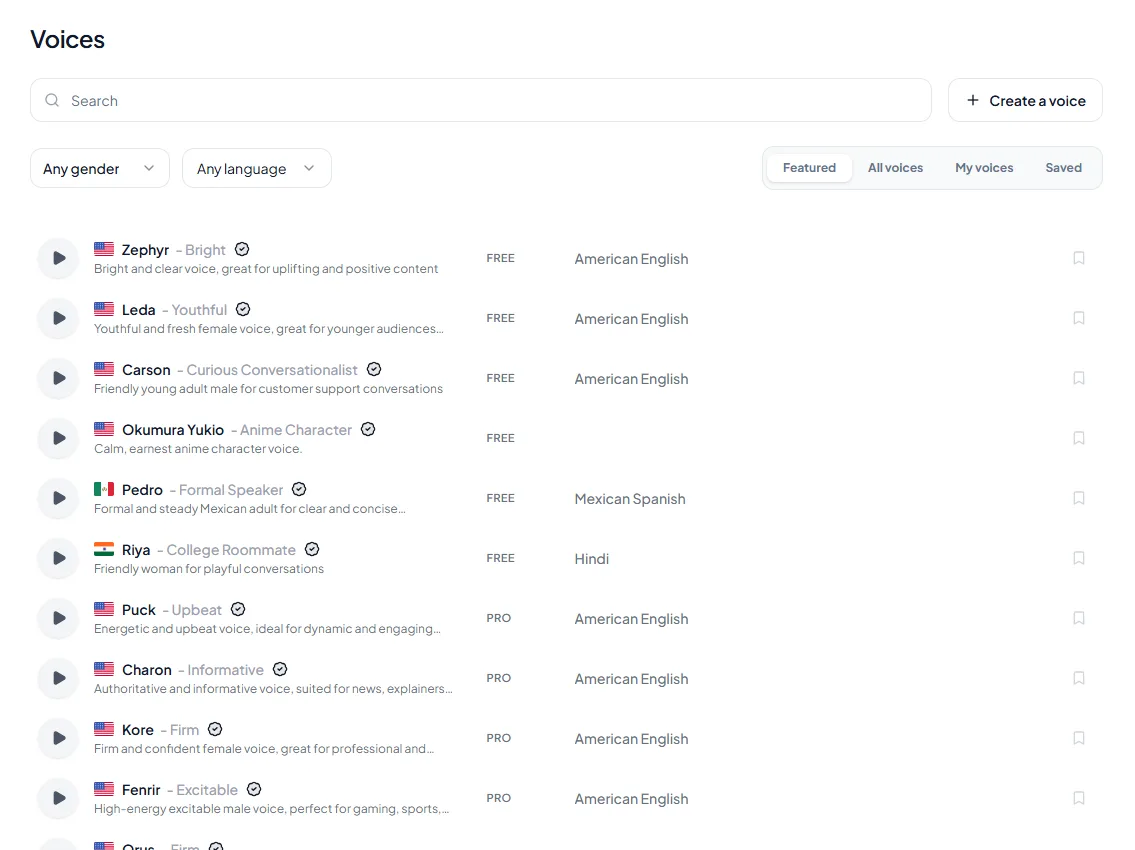
<figure style="margin:28px 0;padding:0"><img src="/blog/product/app-voice-library.webp" alt="The Kveeky voice library with search, gender and language filters, and voice cards tagged FREE or PRO." width="1150" height="850" loading="lazy" decoding="async" style="display:block;width:100%;max-width:100%;height:auto;border-radius:var(--kv-radius-md);border:1px solid var(--kv-blue-100)"><figcaption style="margin-top:12px;font:400 15px/1.5 var(--kv-font-body);color:var(--kv-gray-600)">Choosing a narrator. Use the language and gender filters, press the preview button on a few voices, and look for the FREE or PRO tag before you commit. One consistent narrator per module keeps the course easy to follow.</figcaption></figure>


## Building accessible from the start

Retrofitting means auditing every lesson, then fixing alt text, captions and layouts one by one. Building accessibility into your template avoids most of that work.

1. **Set template rules.** Fix heading levels, fonts, colors and contrast in your course template.
2. **Choose an accessible player and platform.** Test keyboard access and caption support before you commit.
3. **Write accessibility into the brief.** Each lesson brief lists alt text, captions and transcript as deliverables.
4. **Check as you build.** Test each module with a keyboard and a screen reader before you move on.
5. **Test with learners.** Ask learners who use assistive technology to try a module and report problems.

Accessible design doesn't have to look plain. Clear contrast, spacing and structure tend to make a course feel more professional, not less.

## Universal Design for Learning

Accessibility removes barriers. Universal Design for Learning (UDL) goes further and plans for different ways of learning from the start.

The UDL Guidelines 3.0, released by CAST on July 30, 2024, have 3 principles:

- **Design multiple means of engagement.** Give learners choices and reasons to care, such as real-world examples.
- **Design multiple means of representation.** Offer the same idea as text, audio, video and diagrams.
- **Design multiple means of action and expression.** Let learners show what they know in more than one way, such as a quiz, a project or a recording.

Audio narration supports the second principle. Pairing a written lesson with an audio version gives learners a choice of format. For a look at how narration affects learning itself, see our summary of [research on voice in learning](https://kveeky.com/blog/science-of-voice-in-learning-retention).

## Starting on a budget

Fix the barriers that block the most learners first.

1. **Captions on every video.** This is Level A and affects every Deaf and hard-of-hearing learner.
2. **Correct headings and alt text.** Screen reader users depend on both to navigate.
3. **Color contrast.** Check every text color against 4.5:1, or 3:1 for large text.
4. **Keyboard access.** Try finishing one module without a mouse.
5. **Transcripts for audio-only content.**

Then fix the most-used lessons first and plan the rest as a schedule, not a single project. Poor audio is another common reason learners give up; our guide on [narration quality and course drop-off](https://kveeky.com/blog/course-narration-quality-and-dropouts) covers it.

## Quick answers on TTS accessibility

Text to speech helps on 2 sides of a course: learners use readers to listen, and course creators use voice generators to produce narration. These answers cover both. Facts were checked on each source's own page on October 7, 2026.

### What are the best free text-to-speech options for accessibility?

Start with the readers already on your learners' devices: Read & Speak on iPhone and iPad, Select to Speak on Android, and Read aloud in Microsoft Edge. They're free and don't use credits. Blind and low-vision learners on Windows often need a full screen reader instead, and NVDA is free and open source (NV Access, [About NVDA](https://www.nvaccess.org/about-nvda/), retrieved 2026-10-07).

### How does text to speech improve accessibility?

It gives learners an audio route into text, which helps people with low vision, dyslexia, attention difficulties or reading fatigue. For course creators, an AI voice also makes it practical to offer a "listen to this lesson" version of every written lesson. WCAG treats audio that only reads on-page text as a media alternative, as long as you label it clearly.

### Is text-to-speech good for learning?

The evidence is positive but modest. A 2018 meta-analysis of text-to-speech and read-aloud tools found an average effect size of 0.35 on reading comprehension for students with reading difficulties (Wood et al., [Journal of Learning Disabilities](https://pubmed.ncbi.nlm.nih.gov/28112580/), retrieved 2026-10-07). The authors say more studies are needed, so offer audio as a choice alongside text, not a replacement for it.

### Is text-to-speech effective for language learning and training?

It helps most with listening and pronunciation: learners hear each word while they read it and can slow the voice for hard sentences. Microsoft's Immersive Reader adds translation of a word or a whole document, plus syllable breaks (Microsoft Support, [Use Immersive Reader in Word](https://support.microsoft.com/en-us/accessibility/word/use-immersive-reader-in-word), retrieved 2026-10-07). For training teams, the same script can be voiced in several languages; Kveeky has voices in 40+ languages, and our guide to [multilingual AI voiceover](https://kveeky.com/blog/multilingual-voiceover-ai) covers the workflow.

### What are the best free text-to-speech tools for students and teachers?

For students who want to listen, Immersive Reader in Word, including Word for the web, offers reading speed, Line Focus and Picture Dictionary at no extra cost. For teachers who want audio files, a voice generator with a free tier works: Kveeky gives 500 credits a month (about 40 seconds) with no credit card. If you sell the course, use a paid plan, since every paid Kveeky plan includes commercial usage rights.

### How can educators use online text to voice?

Use it for audio versions of readings, narrated slides, spoken instructions for younger learners and pronunciation models in language classes. It also speeds up updates, because you edit the script and regenerate one line instead of re-recording. Our page on [AI voiceover for e-learning](https://kveeky.com/voiceover/e-learning/) has sample course narration.

### How does text-to-speech translation improve accessibility in public spaces?

Spoken announcements in several languages help people who can't read the local language or the signs. Pairing the audio with on-screen text keeps the same information available to Deaf and hard-of-hearing people. The course version of this idea is the same: offer each key message as text and as audio, in your learners' languages.

<div style="margin:24px 0;padding:18px 20px;background:var(--kv-blue-50);border:1px solid var(--kv-blue-100);border-radius:var(--kv-radius-md);box-shadow:var(--kv-shadow-xs)"><div style="font:700 17px/1.3 var(--kv-font-heading);color:var(--kv-blue-950);margin:0 0 8px">Keep reading</div><ul style="margin:0;padding-left:20px;font:400 16px/1.6 var(--kv-font-body)"><li style="margin:0 0 6px"><a href="/blog/e-learning-voiceover-guide">E-learning voiceover guide</a></li><li style="margin:0 0 6px"><a href="/blog/multi-voice-courses-narrator-strategy">Multi-voice courses and narrator strategy</a></li><li style="margin:0 0 6px"><a href="/blog/is-text-to-speech-beneficial-for-adhd">Is text to speech good for ADHD?</a></li><li style="margin:0 0 6px"><a href="/blog/ai-voiceover-script">Writing the script your captions start from</a></li><li style="margin:0 0 6px"><a href="/blog/ai-voiceovers-customer-onboarding">AI voiceovers for customer onboarding</a></li><li style="margin:0 0 6px"><a href="/languages/english-text-to-speech">English text to speech voices</a></li></ul></div>

## Frequently asked questions

### What is the minimum accessibility standard for an online course?

Most organizations aim for WCAG 2.2 Level AA. US state and local governments, including public colleges, must meet WCAG 2.1 Level AA under the ADA Title II rule. Deadlines are April 26, 2027 or April 26, 2028, depending on size.

### How is Universal Design for Learning different from accessibility compliance?

Accessibility compliance removes barriers so people with disabilities can use the content. UDL is a teaching framework that plans for many ways of learning, through multiple means of engagement, representation, and action and expression.

### What are the first accessibility changes to make with a small budget?

Start with captions on every video, correct headings and alt text, and color contrast of at least 4.5:1 for normal text. Then check that every module works with a keyboard alone.

### Do I need to redo my entire course to make it accessible?

Usually not. Fix the most-used lessons and the biggest barriers first, such as missing captions, then work through the rest on a schedule. Build new modules accessible from the start.

### Does an AI-narrated audio version of a lesson need a transcript?

Not if it reads text that's already on the page and is clearly labeled as an audio version. WCAG exempts audio that is a media alternative for text. Audio-only lessons with no matching text still need a transcript.

### What are the best free text-to-speech options for accessibility?

Start with the free readers built into devices: Read & Speak on iPhone and iPad, Select to Speak on Android and Read aloud in Microsoft Edge. Blind and low-vision Windows users may need a full screen reader such as NVDA, which is free and open source.

## How we checked this guide

This guide is written by Hitesh Kumawat for the Kveeky team. **Disclosure: Kveeky makes an AI voice generator.** We rewrote an older version of this post, corrected the legal section and replaced general claims with the source standards.

- WCAG criteria and levels: [Web Content Accessibility Guidelines (WCAG) 2.2](https://www.w3.org/TR/WCAG22/), W3C Recommendation, retrieved October 6, 2026.
- Captions, transcripts and audio description: [Making Audio and Video Media Accessible](https://www.w3.org/WAI/media/av/), W3C WAI, and [Understanding SC 1.2.1](https://www.w3.org/WAI/WCAG22/Understanding/audio-only-and-video-only-prerecorded.html), retrieved October 6, 2026.
- ADA Title II scope and dates: [ADA.gov fact sheet on the web and mobile accessibility rule](https://www.ada.gov/resources/2024-03-08-web-rule/), retrieved October 6, 2026.
- UDL principles and version: [CAST UDL Guidelines](https://udlguidelines.cast.org/), retrieved October 6, 2026.
- Text-to-speech answers, retrieved October 7, 2026: Wood, Moxley, Tighe and Wagner, [Does Use of Text-to-Speech and Related Read-Aloud Tools Improve Reading Comprehension for Students With Reading Disabilities? A Meta-Analysis](https://pubmed.ncbi.nlm.nih.gov/28112580/), Journal of Learning Disabilities, 2018; Microsoft Support, [Use Immersive Reader in Word](https://support.microsoft.com/en-us/accessibility/word/use-immersive-reader-in-word); NV Access, [About NVDA](https://www.nvaccess.org/about-nvda/); Google, [Android Accessibility Help: Select to Speak](https://support.google.com/accessibility/android/answer/7349565); Apple, [Hear iPhone speak the screen](https://support.apple.com/guide/iphone/hear-whats-on-the-screen-or-typed-iph96b214f0/ios); Microsoft Support, [Reading mode and Read aloud in Microsoft Edge](https://support.microsoft.com/en-us/edge/use-immersive-reader-in-microsoft-edge).
- No Kveeky usage data is used in this guide. Kveeky facts come from kveeky.com/pricing.

Pick one module this week. Caption its videos, fix its headings and test it with a keyboard. If you plan to re-record its narration, read our tips on [narrating a long course without vocal strain](https://kveeky.com/blog/narrate-long-course-without-vocal-strain), or see how teams use [text-to-speech across business content](https://kveeky.com/blog/text-to-speech-marketing-tools).

<script type="application/ld+json">
{"@context":"https://schema.org","@type":"FAQPage","mainEntity":[
{"@type":"Question","name":"What is the minimum accessibility standard for an online course?","acceptedAnswer":{"@type":"Answer","text":"Most organizations aim for WCAG 2.2 Level AA. US state and local governments, including public colleges, must meet WCAG 2.1 Level AA under the ADA Title II rule. Deadlines are April 26, 2027 or April 26, 2028, depending on size."}},
{"@type":"Question","name":"How is Universal Design for Learning different from accessibility compliance?","acceptedAnswer":{"@type":"Answer","text":"Accessibility compliance removes barriers so people with disabilities can use the content. UDL is a teaching framework that plans for many ways of learning, through multiple means of engagement, representation, and action and expression."}},
{"@type":"Question","name":"What are the first accessibility changes to make with a small budget?","acceptedAnswer":{"@type":"Answer","text":"Start with captions on every video, correct headings and alt text, and color contrast of at least 4.5:1 for normal text. Then check that every module works with a keyboard alone."}},
{"@type":"Question","name":"Do I need to redo my entire course to make it accessible?","acceptedAnswer":{"@type":"Answer","text":"Usually not. Fix the most-used lessons and the biggest barriers first, such as missing captions, then work through the rest on a schedule. Build new modules accessible from the start."}},
{"@type":"Question","name":"Does an AI-narrated audio version of a lesson need a transcript?","acceptedAnswer":{"@type":"Answer","text":"Not if it reads text that's already on the page and is clearly labeled as an audio version. WCAG exempts audio that is a media alternative for text. Audio-only lessons with no matching text still need a transcript."}},
{"@type":"Question","name":"What are the best free text-to-speech options for accessibility?","acceptedAnswer":{"@type":"Answer","text":"Start with the free readers built into devices: Read & Speak on iPhone and iPad, Select to Speak on Android and Read aloud in Microsoft Edge. Blind and low-vision Windows users may need a full screen reader such as NVDA, which is free and open source."}}
]}
</script>
