On this page
The best free AI voice generators 2026 has to offer are Kveeky, ElevenLabs, Fish Audio and Murf AI for voiceovers you can download. Kveeky is the simplest start: 700+ voices, 500 free credits a month (about 40 seconds) and no credit card. Fish Audio's free plan allows commercial use, and ElevenLabs is the budget pick for voice cloning.
Last updated: October 7, 2026. Every price and free-plan limit below was checked on the vendor's own pricing or help page on October 6 or 7, 2026.
Kveeky for the simplest free start (500 credits a month, about 40 seconds, no card), Fish Audio for free audio whose plan page lists commercial use, ElevenLabs Starter for budget cloning. Use the picker below to match your job.
"Free" means very different things in this category. Some free plans let you download audio and use it in a monetized video. Others let you listen but not download, or download but not use the file commercially. This guide compares 10 tools on exactly those points, then covers free text to speech apps for reading on your phone.
- Best overall: Kveeky. 700+ AI voices in 40+ languages, 500 credits a month free (about 40 seconds), paid plans from $7.50/month billed yearly.
- Free plan with commercial use: Fish Audio lists commercial use on its free tier (8,000 credits, up to about 7 minutes a month), retrieved 2026-10-06.
- Cheapest voice cloning: ElevenLabs Starter is $6/month with Instant Voice Cloning and a commercial license. Its free plan has no commercial license.
- Watch the download rules: Murf's free plan does not allow downloads, and WellSaid's trial gives 3 download minutes a month.
- PlayHT, Lovo and Resemble AI are gone from this list. play.ht no longer resolves, and we could not verify the other two as free voiceover options on October 6, 2026.
Free AI voice generators explained
A free AI voice generator turns written text into speech and gives you some use at no cost, usually a monthly allowance of characters, credits or minutes. You paste a script, pick a voice and get an audio file or a playback.
Most tools in this list share the same basics:
- A voice library with male and female voices, accents and languages.
- Delivery controls for speed and pauses, and sometimes pitch. Some add emotion or emphasis.
- An export, usually MP3, so you can use the audio in a video, podcast or course.
The differences are in the limits. Before you pick a tool, check 3 things on its free plan: the monthly minutes, the download rule and commercial use. If you're unsure whether to upgrade, our guide to free vs paid text to speech works out the cost per minute.
Comparison table
Prices and limits were read on each vendor's own page on October 6, 2026. "Paid from" is the cheapest paid plan we could confirm. A dash means the figure was not stated on the page we checked.
| Tool | Best for | Free plan | Commercial use on free plan | Paid from | Voices / languages (vendor figure) |
|---|---|---|---|---|---|
| Kveeky | Simple voiceovers for creators | 500 credits/month (about 40 seconds), standard voices, no card | No. Commercial rights come with every paid plan | $9/month, or $7.50/month billed yearly | 700+ voices, 40+ languages |
| ElevenLabs | Voice cloning on a budget | 10,000 credits/month | No | $6/month Starter | 74 languages |
| Fish Audio | Free plan you can use commercially | 8,000 credits/month (up to about 7 min), 500 characters per generation | Yes, listed on the plan page | $11/month Plus, billed yearly ($132/year) | — |
| Murf AI | Polished business voiceovers | 10 min of generation, no downloads | No | $19/month Creator, billed yearly ($228/year) | More than 200 voices |
| NaturalReader | Listening to documents | Free plan for listening | No. Commercial use needs the separate Commercial version | $79/year Lite (personal use) | — |
| WellSaid | English narration teams | Trial, no card, 3 download min/month | No | $10/month billed yearly ($120/year) | All English voices |
| Voicemaker | Language range on a budget | 250 characters per conversion | No, personal only | $5/month Starter | More than 500 voices, 120 languages on Free |
| Narakeet | Pay-as-you-go minutes | 20 conversions, 1 KB audio scripts | No | $6 for 30 minutes, one-time | — |
| Wavel AI | Dubbing and subtitles | 15 one-time credits, 7-day trial, no downloads | — | $25/month Basic, or $16/month billed yearly | — |
| TTSMP3 | A quick MP3 | Free, 3,000 characters per conversion | Check its terms | — | — |
Kveeky loses on language count here. Voicemaker lists 120 languages on its free plan and ElevenLabs lists 74, against Kveeky's 40+ languages with voices.
Click what you need. The answer uses only the facts in the table above.
1. Kveeky
Kveeky is built for one job: paste a script, pick a voice, download the audio. That makes it the fastest start if you make YouTube videos, social clips, courses or product demos.
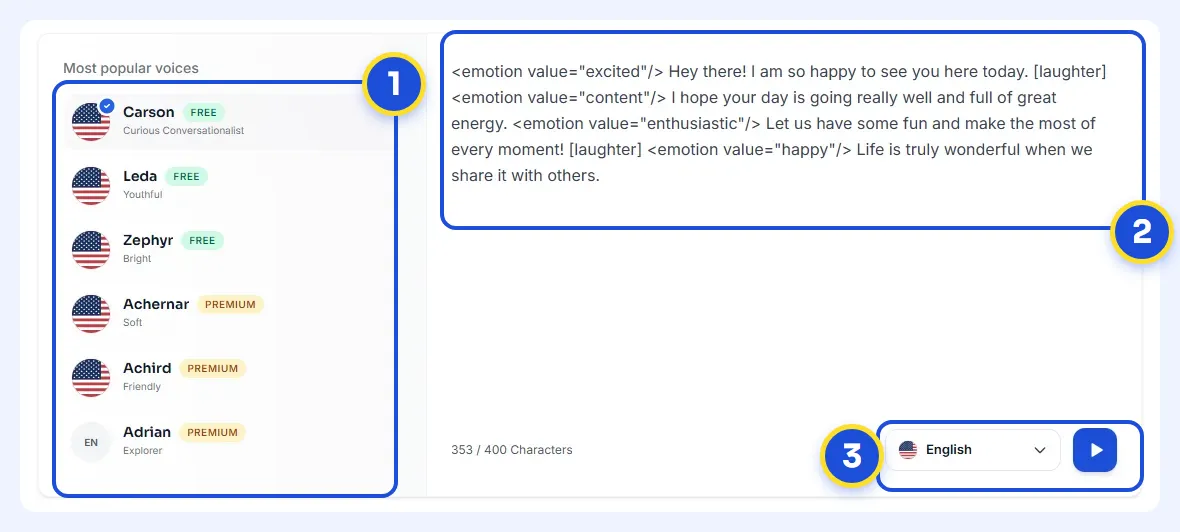
- 1Pick a voice. Voices are tagged Free or Premium.
- 2Type or paste a short line. Pick an emotion if you want one.
- 3Choose the language and press play to hear it.
Try it yourself in the free voice demo on Kveeky, no sign-up needed. For longer scripts and downloads, use the free plan.
What you get
- 700+ AI voices across 40+ languages, with free and premium voices labelled in the picker.
- Delivery control for speed and volume, plus a choice of 6 emotions: Neutral, Happy, Love, Angry, Calm or Sad.
- Voice cloning depends on your plan. Check the Kveeky pricing page for what each plan includes.
- Audio download that drops into any video editor.
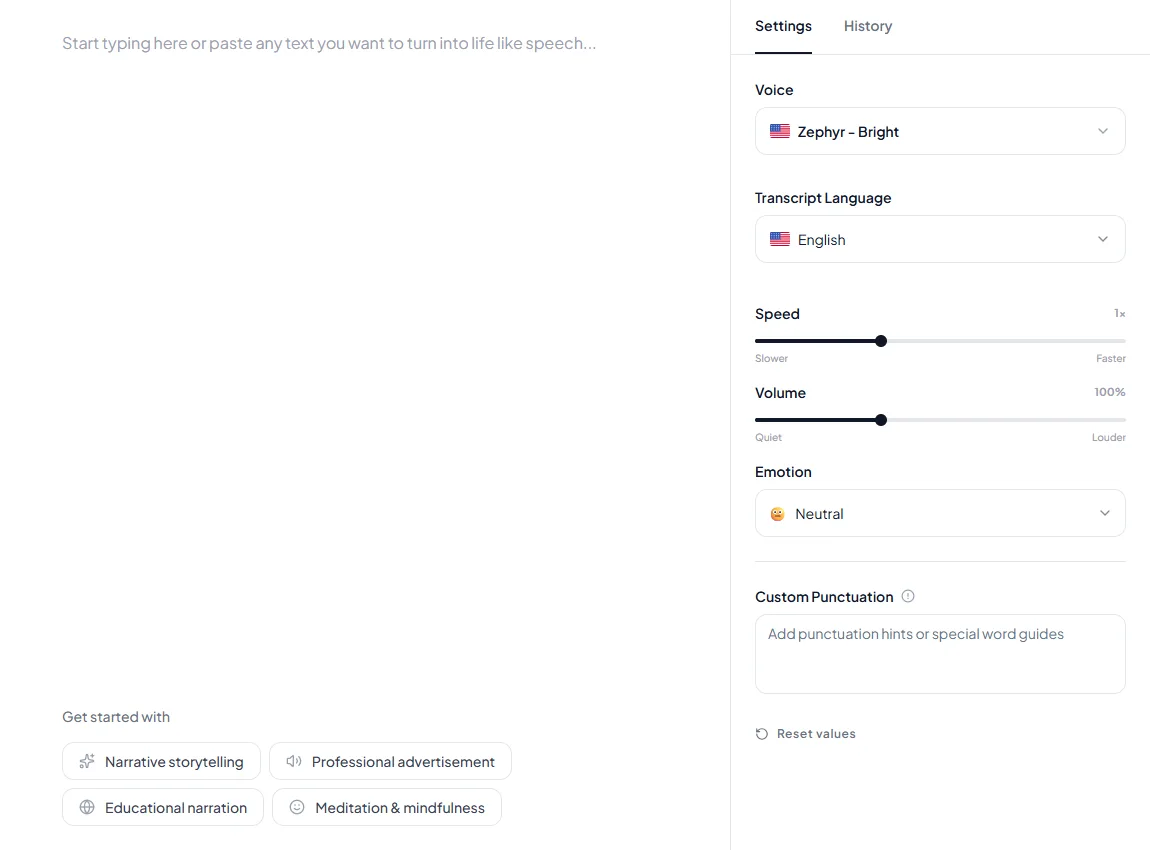
Pricing (checked October 6, 2026)
| Plan | Monthly billing | Yearly billing | Included per month |
|---|---|---|---|
| Free | $0 | $0 | 500 credits (about 40 seconds), standard voices |
| Basic | $9 | $7.50 | 100 min, all 700+ voices, 5 clones |
| Pro | $19.99 | $12.50 | 133 min, 10 clones, voice localization |
| Premium | $29 | $24.17 | 200 min, 10 clones, voice localization |
| Business | $99 | $82.50 | 1,000 min, 20 clones, voice localization |
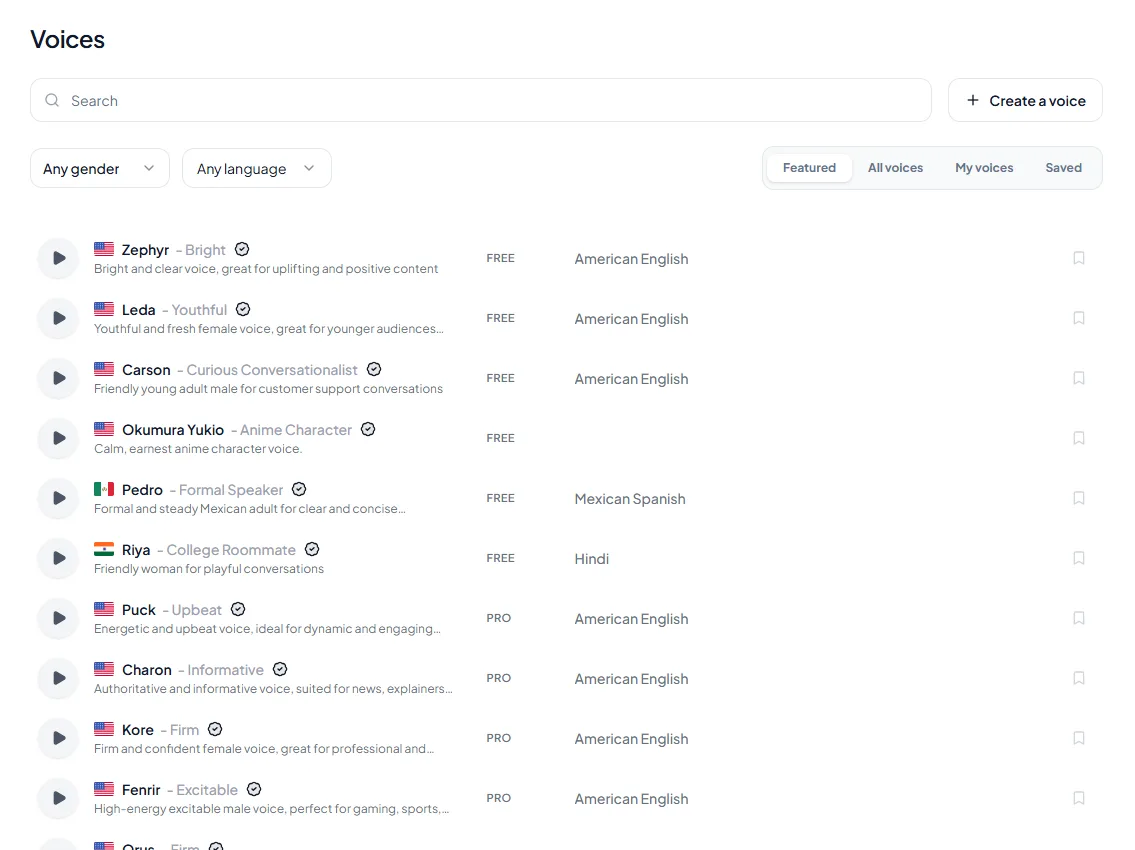
Real samples from the Kveeky voice library.
Every paid plan includes commercial usage rights, according to the Kveeky pricing page.
Enter your script length and how many videos you make a month. The free plan is 500 credits, about 40 seconds of audio, at a speaking pace of 150 words per minute. Character counts use the 8 characters per word implied by TTSMP3's 3,000 characters (about 375 words).
2. ElevenLabs
ElevenLabs is the cheapest route to cloning your own voice with a commercial license. Its pricing page lists 74 languages on every plan.
Pricing (checked October 6, 2026)
- Free: 10,000 credits a month. No commercial license and no voice cloning.
- Starter: $6/month, 30,000 credits, commercial license, Instant Voice Cloning.
- Creator: $22/month, 121,000 credits, Professional Voice Cloning.
- Pro: $99/month, 600,000 credits.
3. Fish Audio
Fish Audio is the only tool here whose free tier lists commercial use on the plan page. It also has a large library of community voice models.
Pricing (checked October 6, 2026)
- Free: 8,000 credits a month, up to about 7 minutes, up to 500 characters per generation, voice cloning and commercial use listed.
- Plus: $11/month billed yearly ($132/year), up to about 200 minutes a month.
- Pro: $75/month billed yearly ($900/year), up to about 1,620 minutes a month.
4. Murf AI
Murf AI is a studio-style editor for presentations, training and product videos. It suits teams that want fine control over emphasis and pronunciation.
Pricing (checked October 6, 2026)
- Free: 10 minutes of voice generation. No downloads and no commercial rights.
- Creator: $19/month billed yearly ($228/year), 24 hours of generation a year, more than 200 voices, downloads and commercial rights.
- Business: $66/month billed yearly ($792/year), 96 hours a year, plus a business license.
5. NaturalReader
NaturalReader started as a reading tool. Its homepage lists a free forever plan with no credit card, and it reads documents, web pages and scanned text.
Pricing (checked October 6, 2026)
- Free: listening plan, no card needed.
- Personal plans: Lite $13.90/month or $79/year; Plus $20.90/month or $119/year; Pro $25.90/month or $159/year. Audio from personal plans is for personal use only.
- Commercial version: Starter $29/month, or $16.50/month billed yearly. Commercially licensed audio.
6. WellSaid
WellSaid focuses on English voiceover for training and corporate video. Its trial needs no credit card.
Pricing (checked October 6, 2026)
- Trial: free, no credit card, 3 download minutes a month, no commercial rights.
- Starter: $10/month billed yearly ($120/year), 240 download minutes a year, all English voices, full commercial rights.
- Pro: $33/month billed yearly ($396/year), 2,160 download minutes a year.
7. Voicemaker
Voicemaker lists more than 500 voices and 120 languages on its free plan, which is the widest language range in this list.
Pricing (checked October 6, 2026)
- Free: $0, 250 characters per conversion, personal use only.
- Starter: $5/month, 200,000 credits (about 4 hours), commercial use.
- Creator: $10/month, 500,000 credits (about 9 hours).
8. Narakeet
Narakeet sells minutes instead of subscriptions, and it can turn slides or scripts into narrated video.
Pricing (checked October 6, 2026)
- Free: 20 conversions, audio scripts up to 1 KB, no commercial use.
- Paid: one-time packs, from $6 for 30 minutes. Credits don't expire, and paid use allows commercial use.
9. Wavel AI
Wavel AI combines text to speech with dubbing and subtitles, which helps if you translate videos.
Pricing (checked October 6, 2026)
- Free: 15 one-time credits, a 7-day trial of its tools, watermarked output and no downloads (checked October 7, 2026).
- Basic: $25/month, or $16/month billed yearly.
- Pro: $40/month, or $26/month billed yearly.
10. TTSMP3
TTSMP3 is a plain web page: paste text, pick a voice and download an MP3. Its page states an input limit of 3,000 characters, about 375 words.
Best free text to speech apps
If you want an app that reads to you, rather than a tool that makes voiceovers, start with what your phone already has. These are free and need no new account.
| App | Platform | What the free version does |
|---|---|---|
| Read & Speak (Speak Screen, Speak Selection) | iPhone and iPad | Reads selected text or the whole screen; adjustable rate and voices |
| Select to Speak | Android | Reads items you tap or select, including web pages |
| Read aloud in Microsoft Edge | Edge browser | Reads supported web pages from Reading mode (F9), with voice and speed options |
| ElevenReader | iOS and Android | Free app that reads PDFs, ePubs, articles and pasted text |
| Speechify | iOS, Android, web | 10 voices on the free plan, up to 1.5x speed |
For step-by-step setup on Apple devices, see our iPhone and iPad text to speech guide. If you want more reading apps, our Speechify alternatives guide compares 15 of them.
These apps read aloud, but most don't give you a file to publish. If you need an MP3 for a video, use one of the 10 voiceover tools above.
Video editors have their own built-in voices too. If you already edit in CapCut, our CapCut text to speech vs Kveeky comparison shows when the free in-app voice is enough and when a separate voice file is worth it. Editing in Microsoft's editor instead? Read our Clipchamp text to speech vs Kveeky comparison.
Choosing a free tool
Match the tool to the job, then check the free plan's fine print.

- Decide if you need to listen or to publish. A web reader plays text back. A voiceover tool gives you an audio file you can edit.
- Check the download rule. Murf's free plan has no downloads, and WellSaid's trial gives 3 download minutes a month.
- Check commercial rights. Monetized YouTube, ads and client work count as commercial. Most free plans exclude it.
- Check the per-generation limit. Fish Audio allows 500 characters and Voicemaker 250 on free plans, so long scripts take many steps.
- Test your own script. Generate the same 3 sentences in 2 or 3 tools and listen for pronunciation of names and numbers.
- Count your monthly minutes. If you publish weekly, you'll outgrow 6 to 10 free minutes fast.
Tick each item for the tool you are testing. If any box stays empty, read the plan page before you publish.
Ticked: 0 of 6
Our buyer guide on choosing text to voice generator software goes deeper on voice quality, languages and business use. If Luvvoice is on your shortlist, see our Luvvoice alternatives comparison.
Quick answers on free TTS
These short answers cover what people ask most about free text to speech: limits, quality, Linux, offline use, APIs and websites. Vendor facts were checked on each vendor's own page on October 7, 2026.
Is AI voice free to use?
Yes, within limits. Most AI voice generators are freemium: you get a small monthly allowance, such as Kveeky's 500 credits (about 40 seconds) or ElevenLabs' 10,000 credits, then pay for more.
Basic text to speech is free on phones too, through iPhone Read & Speak and Android Select to Speak. If you're looking for ready-made voices to try, browse Kveeky's library of character and AI voices.
What limits do free AI voice generators have?
Every free plan caps something: monthly minutes or credits, characters per generation, downloads or commercial use. Voicemaker allows 250 characters per conversion and Fish Audio 500 per generation, while Wavel AI gives 15 one-time credits with no downloads (vendor pricing pages, retrieved 2026-10-07). Kveeky's free plan gives 500 credits a month with standard voices only, so check all 4 limits before you plan a project around a free tier.
Are free AI voices as good as paid ones?
Quality depends on the voice model more than on the price, but free plans often hold back the best voices. Kveeky's free plan uses standard voices, while every paid plan unlocks all 700+ voices.
Test your own script, with names and numbers in it, on the free plan before you pay. If a voice sounds flat, these 5-minute fixes for robotic AI voiceovers usually help more than switching tools.
Are free text-to-speech platforms reliable for professional use?
For testing and drafts, yes. For client work or monetized videos, the free tier is risky: most exclude commercial use, monthly caps can stop you mid-project, and support is limited. Move to a paid plan that states commercial rights before you publish; every paid Kveeky plan includes them, from $9/month.
What is the best free text-to-speech tool for beginners?
Pick a web tool where you paste text, choose a voice and download the audio, with nothing to install. Kveeky works this way and needs no credit card. TTSMP3 is even simpler for a one-off MP3 of up to 3,000 characters, and your phone's built-in reader is the easiest option if you only want to listen.
What is the AI voice everyone uses?
Most people asking this mean the text-to-speech voice built into TikTok's editor, which creators add from the Text tool. Because it's free inside the app, the same few voices show up across many videos.
That audio stays inside the TikTok project and can't be exported, according to our guide to TikTok text to speech. For a similar style as a file you can download, see our TikTok TTS generators compared.
How do you use an AI voice generator to turn text into audio?
You paste a script, pick a voice, adjust delivery and download the file. In Kveeky, the steps look like this:
- Paste your script. Short sentences read more naturally.
- Pick a voice and language. Preview 2 or 3 voices on the same line.
- Set delivery. Adjust speed and volume, and choose an emotion (Neutral, Happy, Love, Angry, Calm or Sad).
- Generate and listen. Re-spell any name the voice mispronounces.
- Download the audio and drop it into your video editor.
You can also make your own text-to-speech voice with voice cloning, which you should only do with the speaker's consent. Check the pricing page for what each plan includes. For the video side, see how to add text to speech to your videos.
Which free text-to-speech software works on Linux?
Browser-based generators work on Linux the same way as on any other system, because they run in the browser rather than as installed software. For local software, start with eSpeak NG, an open source synthesizer for Linux, Windows and Android with more than 100 languages and accents (eSpeak NG, README on GitHub, retrieved 2026-10-07).
Piper is "a fast, local neural text to speech system" that also runs on Linux. Its original repository was archived on October 6, 2025, and development moved to OHF-Voice/piper1-gpl (Rhasspy, Piper on GitHub, retrieved 2026-10-07).
Can I use free text to speech offline, and is there open-source TTS?
Yes. Online generators need an internet connection, but open-source engines run on your own computer once installed.
eSpeak NG uses the GPL version 3 or later, and the original Piper repository is MIT-licensed. Kokoro-82M is an Apache-licensed model with 82 million parameters (Hugging Face, Kokoro-82M model card, retrieved 2026-10-07). Expect to use the command line and choose voice models yourself; our open-source TTS toolkit guide covers the setup.
Is there a free text-to-speech API?
Yes, though Kveeky doesn't offer an API. Browsers include the Web Speech API: its SpeechSynthesis interface speaks text with the device's own voices and has worked across browsers since September 2018 (MDN, SpeechSynthesis, retrieved 2026-10-07).
Google Cloud Text-to-Speech gives 1 million free characters a month for Chirp 3: HD voices and 4 million for WaveNet voices. You must enable billing to use it (Google Cloud, Text-to-Speech pricing, retrieved 2026-10-07).
What free text-to-speech tools work best for websites?
There are 2 routes. You can generate an MP3 once in a voice generator and embed it with an HTML audio player, so every visitor hears the same voice.
Or you can use the Web Speech API to read page text aloud live. It's free, but it sounds different on each device because it uses that device's voices.
Do online text-to-voice services work in real time?
Most voiceover tools don't: you submit a script, the service generates a file, then you play or download it. Readers such as Edge Read aloud and the Web Speech API speak as you listen, which feels instant for reading. For publishing, generate the file first, check it, then add it to your edit.
More guides
Every guide in this topic, in one place:
- AI Text to Speech Reader and Exporter Tools
- Top 10 Luvvoice Alternatives for 2026
- How to Choose the Best Text to Voice Generator Software
- Free Online Text to Speech with Realistic AI Voices
- iOS Text-to-Speech: Complete Guide to Voice Features on iPhone & iPad (2025)
- Is Text to Speech Beneficial for ADHD?
- Microsoft Word Text-to-Speech: Complete Integration Tutorial for Document Reading
- Top 15 Best Speechify Alternatives in 2026: The Complete Guide
- Best Black Friday AI Voiceover Deals (2026)
Ready to pay for a plan? Our best AI voice generator for small business guide compares cost per minute and commercial rights across 7 paid plans.
Keep reading: Free vs paid text to speech · AI voice commercial use rights · Best free AI voiceover tools for YouTube · AI voiceover cost per video · Text to speech vs voice cloning · Free voice cloning options · Words to minutes calculator · All AI voices
Looking for a voice changer rather than text to speech? Our voice changer vs text to speech comparison explains the difference, and our Google text to speech guide covers the free voice already on your phone.
Paste it into each tool at the same speed, then listen for the name, the number and the question.
We shipped 3 features in 12 days.
Did you see the new dashboard yet?
If not, it takes about 2 minutes to learn, and I think you will love it.
Short answers you can open when you need them.
What does about 40 seconds of audio look like?
How do I run a fair 3-tool test?
Why do free plans exclude commercial use?
Frequently asked questions
What is the best free AI voice generator in 2026?
For most creators, Kveeky: 700+ voices, 500 free credits a month (about 40 seconds) and no credit card. Pick Fish Audio if you need free audio you can use commercially, or ElevenLabs if you want cheap voice cloning.
Can I use free AI voiceovers commercially?
Usually not. ElevenLabs, Murf, Voicemaker and Narakeet exclude commercial use on free plans. Fish Audio lists commercial use on its free tier, and every paid Kveeky plan, from $9/month, includes commercial usage rights. Read the plan page before you monetize a video or deliver client work.
Which free AI voice generator has the most languages?
Of the tools we checked, Voicemaker lists the most: 120 languages on its free plan. ElevenLabs lists 74 languages. Kveeky has voices in 40+ languages.
What is the best free AI voice cloning tool?
Fish Audio lists voice cloning on its free tier, and Kveeky's pricing page shows what each plan includes. ElevenLabs has no cloning on its free plan, but Starter at $6/month adds Instant Voice Cloning.
What is the best free text to speech app for phones?
Start with the built-in options: Read & Speak on iPhone and iPad, and Select to Speak on Android. Both are free. ElevenReader is a free app for PDFs and articles, and Speechify's free plan has 10 voices.
Why are PlayHT, Lovo and Resemble AI not on this list?
PlayHT was in earlier versions, but play.ht no longer resolves as of October 6, 2026. Resemble AI's pricing page now centres on deepfake detection, and we could not verify Lovo's pricing page on that date.
How many words is 500 free credits?
Kveeky's free plan is about 40 seconds a month. At 150 words per minute that is about 100 words, roughly four 250-word scripts.
Which free AI voice generators do not let you download audio?
Murf AI's free plan has no downloads, Wavel AI's trial has none, and WellSaid's trial gives 3 download minutes a month. Read the plan page before you plan a project around a free tool.
Which free tool has the highest per-generation limit?
Of the limits stated in this guide, TTSMP3 allows 3,000 characters per conversion, Fish Audio 500 and Voicemaker 250.
Can I use a free AI voice in a monetized video?
Usually not. Of the tools compared here only Fish Audio lists commercial use on its free tier; most others, including Kveeky, include commercial rights on paid plans.
How we checked this guide
This guide is written by Ankit Agarwal for the Kveeky team. Disclosure: Kveeky makes an AI voice generator. We compared each tool on its own published plans, not on marketing claims.
- Prices and limits come from each vendor's own page, retrieved on October 6, 2026, with Kveeky, ElevenLabs, Fish Audio, WellSaid, Voicemaker, Narakeet and Wavel AI re-checked on October 7, 2026: Kveeky, ElevenLabs, Fish Audio, Murf AI pricing and Murf help center, NaturalReader personal plans and commercial plans, WellSaid, Voicemaker, Narakeet, Wavel AI and TTSMP3.
- App features come from Apple Support, Android Accessibility Help, Microsoft Support, ElevenReader and Speechify pricing, all retrieved October 6, 2026.
- Quick answers on Linux, offline, open-source and API options, retrieved October 7, 2026: eSpeak NG, README on GitHub; Rhasspy, Piper on GitHub; Hugging Face, Kokoro-82M model card; MDN, SpeechSynthesis; Google Cloud, Text-to-Speech pricing.
- Prices change often. Confirm on the vendor's page before you buy. No Kveeky usage data is used in this guide.
Making videos for YouTube? Start with the free plan, then see how creators use AI voiceovers for YouTube videos to script, voice and publish faster.
Turn your script into a voiceover
Paste your text, pick a voice and download the audio. Free to start, no credit card.