On this page
An AI voiceover script is written for a text-to-speech engine and a listener, not a reader. It uses short sentences, punctuation to control pauses, phonetic spellings for hard words and tone cues the voice tool understands. Get those right and most robotic-sounding problems disappear before you press generate.
Last updated: October 7, 2026. We checked the SSML element list against the W3C specification and the settings in the Kveeky app, and added a section on using AI to draft scripts.
This guide is for creators, marketers and course makers who write their own voiceovers. It covers how to write and adapt a script, how to fix common delivery problems, and 3 templates you can copy. It's the starting point for our scripts and workflow series, so each section links to a deeper guide.
Key Takeaways
- Write for the ear. Short sentences, one idea each, and everyday words give an AI voice fewer chances to stumble.
- Punctuation is your pause control. Commas give short pauses, periods give longer ones, and a missing period can make a voice run sentences together.
- Spell hard words the way they sound. Re-spell names, brands and jargon phonetically, and write numbers and symbols as words.
- Add tone cues your tool can read. Kveeky has an Emotion setting (Neutral, Happy, Love, Angry, Calm, Sad); other tools may accept SSML. Check before you paste.
- Generate in chunks. If a voice starts mashing words together late in a long script, split it into paragraph-sized generations and join them in your editor.
On this page: How it differs · 7 steps · Techniques · Mashed words · Adapting a script · AV format · Templates · Testing · Drafting with AI · Guides by format · FAQ
Write for the ear: one idea per sentence, punctuation for pauses, hard words spelled the way they sound, and numbers written as words. Then set the emotion and speed in your voice tool, generate a short test and fix whatever trips. The 7 steps below take you from goal to final file, and you can copy three templates.
AI vs normal voiceover scripts
An AI voice reads exactly what you give it. There is no director in the room to say "slow down there" or "stress that word". Every instruction has to live in the text itself.
That changes how you write. A script that reads well on screen can sound flat or rushed when a voice engine reads it.
| Written to be read | Written for an AI voice |
|---|---|
| Long sentences with several clauses | Short sentences, one idea each |
| Abbreviations, symbols and digits ("&", "%", "Q3") | Words written the way you want them spoken ("and", "percent", "third quarter") |
| Bullets without end punctuation | Full sentences that end with a period |
| Formal or corporate phrasing | Plain, conversational wording |
| Tone implied by context | Tone set with the emotion setting and speed |
Here is a quick example. "The synergistic integration of our core competencies will facilitate enhanced stakeholder value" is hard to say and hard to hear. "When our teams work together, everyone gets better results" says the same thing in a voice-friendly way.
Writing a script in 7 steps
Use this process for any AI voiceover script, from a 15-second hook to a 10-minute course module.
- Define one goal and one listener. Write down what the listener should know or do at the end. Everything else is optional.
- Outline in spoken beats. List the hook, 2 to 4 main points and the call to action. Each beat becomes 1 short paragraph.
- Draft in plain, short sentences. Aim for one idea per sentence and use "you" to talk to the listener.
- Mark pauses with punctuation. Use commas, periods and line breaks where a human would breathe.
- Fix pronunciation in the text. Re-spell names and jargon phonetically, and write numbers and symbols as words.
- Add tone cues. Set the emotion and speed for each section in your voice tool. Kveeky has no pitch control, so pick a voice that already sounds right.
- Generate a test, listen and revise. Listen once at normal speed, fix anything that trips, then generate the final file.
How Kveeky helps
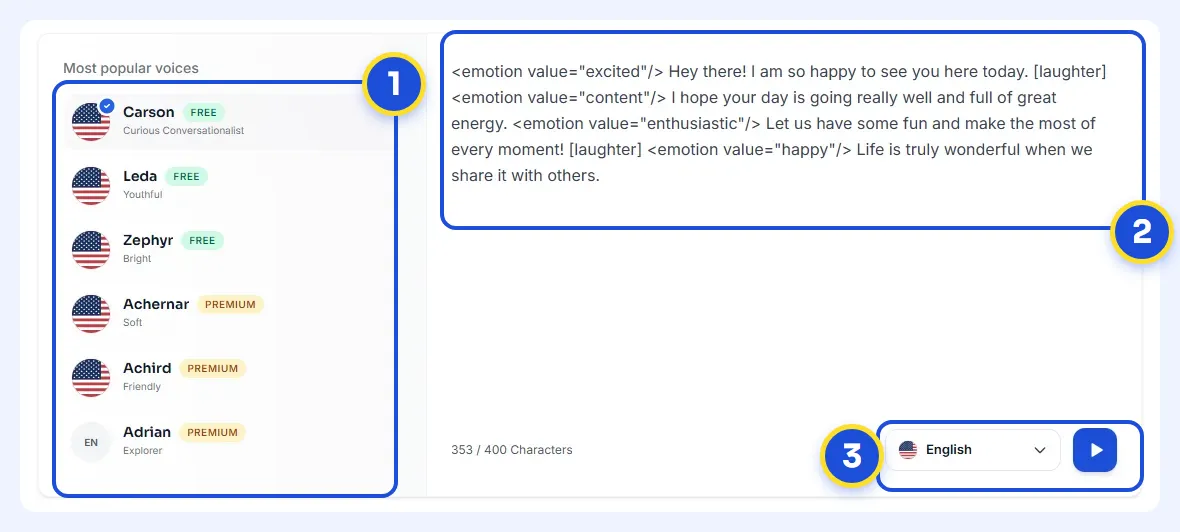
- 1Pick a voice. Voices are tagged Free or Premium.
- 2Type or paste a short line. Pick an emotion if you want one.
- 3Choose the language and press play to hear it.
Try it yourself in the free voice demo on Kveeky, no sign-up needed. For longer scripts and downloads, use the free plan.
Script techniques that fix delivery
These techniques solve the problems listeners notice most: flat tone, odd pauses and mispronounced words.
Keep sentences short and varied
Long, winding sentences are where AI voices lose energy. Break one long sentence into 2 or 3 short ones, and the voice resets its pitch at each period.
Do not make every sentence the same length, though. Mix a short, punchy line with a slightly longer one so the rhythm does not drone.
Paste a paragraph. The checker counts your sentences and flags any longer than 20 words, so you know where to split. The 20-word line is a rule of thumb, not a fixed rule.
Paste a script to check it.
Use punctuation as your pause controls
Most voice engines treat punctuation as timing. A comma gives a short pause, a period gives a longer one, and a new paragraph often gives a longer break again.
- Add a comma where you want a breath inside a sentence.
- End every line with a period, including list items and headings you want read aloud.
- Use a question mark when you want rising intonation on a question.
Spell hard words the way they sound
Voices can stumble on names, brands, acronyms and technical terms. Write them the way they are said. For example, write the Irish name "Saoirse" as "Sur-sha" in the script you paste into the voice tool.
Keep one style for the whole script. If you spell a brand phonetically once, spell it the same way every time.
Write numbers, symbols and abbreviations as words
"$1.5M", "24/7" or "Dr." can be read in more than one way. Write "1.5 million dollars", "24 hours a day, 7 days a week" and "Doctor" when the exact reading matters. Do the same for "&", "%" and "+".
Add tone cues your voice tool can read
Descriptive wording helps a little, but direct controls help more. In Kveeky you set the Emotion, Speed and Volume for the voice in Settings. Pick Calm for a serious section, and use Custom Punctuation for punctuation hints and word guides.
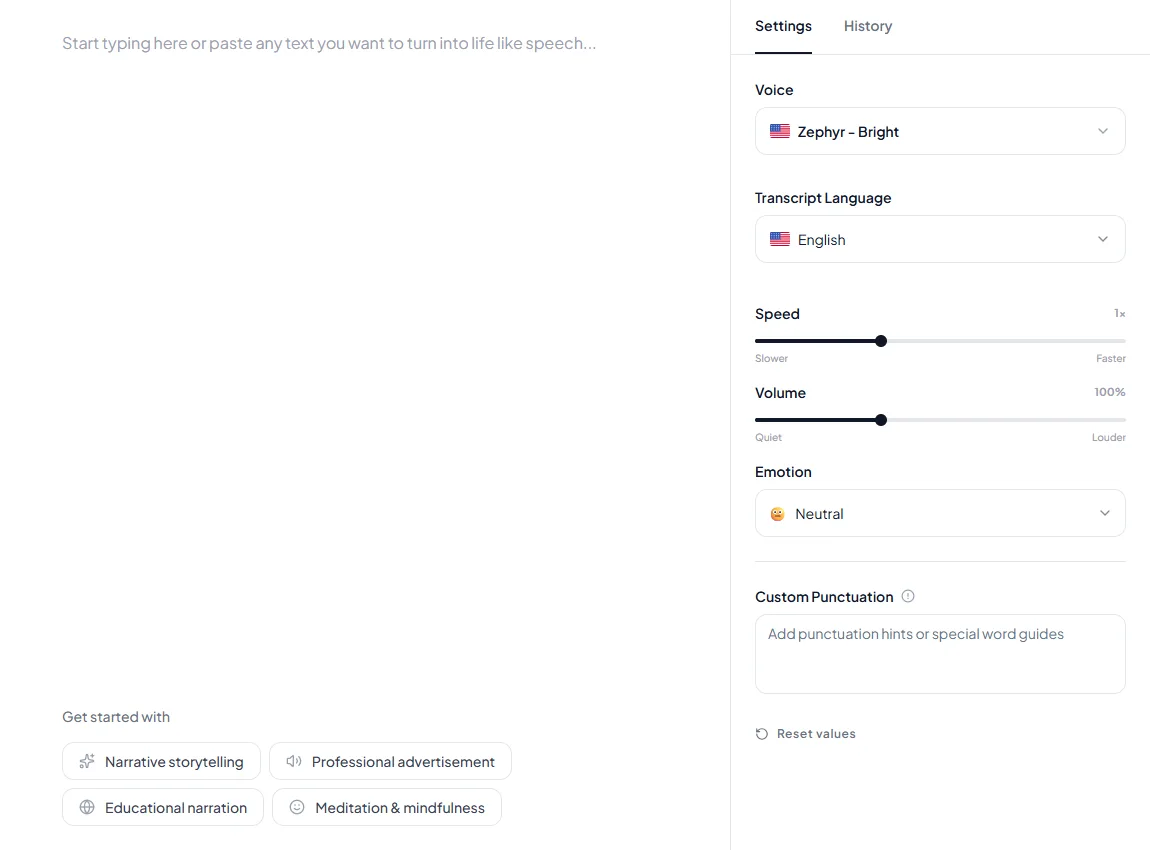
Other tools may accept SSML, the W3C markup standard that defines elements such as break, emphasis, prosody and phoneme. Support varies by tool, so check its documentation before you paste SSML into a script. For more delivery tricks, see how to make an AI voiceover sound less robotic.
Why words blur late in scripts
When a voice starts slurring or running words together after a certain point, the cause is usually the input, not the voice. Long stretches without punctuation, very long single generations and bullet lists without periods are the usual triggers.
Fix it in this order:
- Add end punctuation everywhere. Every sentence, list item and heading that will be read aloud needs a period.
- Split the script into chunks. Generate one paragraph or scene at a time instead of the whole script at once.
- Join the files in your editor. Line up the chunks on your timeline. This also lets you regenerate one weak section without redoing the rest.
- Lower the speed slightly for dense sections, such as lists of numbers or technical terms.
If the audio does not play at all, or the tool shows an error, use our guide to fix text-to-speech that stops working.
Adapting an existing script
Most teams already have scripts written for human narrators, slide decks or blog posts. These are the recommended practices for script adaptation in AI voiceovers.
- Read it aloud first. Mark every place you run out of breath or trip. Those spots will trouble the AI too.
- Turn bullets into sentences. Fragments lack the grammar a voice uses to place stress and pitch.
- Cut stage directions out of the spoken text. Notes like "(pause)" or "(smiling)" get read aloud. Move them into emotion tags or your visual column.
- Replace on-screen references. "As you can see in the table below" does not work in audio. Say what the listener needs to know.
- Re-spell names and expand abbreviations. Do this once, then reuse the adapted script for every language or voice you test.
Two-column AV script format
The two-column audio-visual (AV) script keeps your voiceover and your visuals in sync. The left column holds what the voice says. The right column holds what the viewer sees at that moment.
This format has 2 benefits for AI voiceovers. Your editor knows exactly when each cut should land. You can also regenerate one audio row without touching the rest of the script.
3 script templates to copy
Copy these into your editor and swap in your own lines. The emotion notes name the choice in Kveeky's Emotion setting; set it in the editor and do not paste the note into the text. If you use another tool, use that tool's controls.
Pick your video type to see where to start.
Pick one to see the advice.
Template A: 30-second explainer
| Audio (paste only the spoken words) | Visual cue |
|---|---|
| Emotion: Happy. Still building reports by hand every Friday? | Person sighing at a spreadsheet |
| Emotion: Neutral. There's a faster way. Connect your data once, and your report builds itself. | Product screen, report filling in |
| Set it up in 5 minutes. Then get your Fridays back. | On-screen text: "Set up in 5 minutes" |
| Emotion: Happy. Start your free trial today. | Logo and call to action |
Replace the "5 minutes" line with a claim you can prove for your own product.
Template B: step-by-step tutorial
| Audio (paste only the spoken words) | Visual cue |
|---|---|
| Emotion: Calm. In this video, you'll learn how to export your project. | Title card |
| Step 1. Open the File menu. | Zoom on the File menu |
| Step 2. Choose Export, then pick a format. | Highlight the Export option |
| That's it. Your file is ready to share. | Finished file in a folder |
Template C: two-voice interview
| Audio (paste only the spoken words) | Visual cue |
|---|---|
| Host voice: Emotion: Happy. Welcome back. Today we're talking about pricing. | Split screen, host speaking |
| Guest voice: Emotion: Neutral. Thanks for having me. Let's start with the biggest mistake. | Guest speaking |
| Host voice: That's a great point, Sarah. So how did you fix it? | Transition graphic |
For two-voice scripts, pick voices that sound clearly different, and script the hand-off with a name or a question. That way the listener always knows who is talking.
Show me: all three templates as plain spoken text, ready to paste
Spoken words only. Set the emotion in the editor, not in the text.
There's a faster way. Connect your data once, and your report builds itself.
Set it up in 5 minutes. Then get your Fridays back.
Start today.
Spoken words only. Set the emotion in the editor, not in the text.
Step 1. Open the File menu.
Step 2. Choose Export, then pick a format.
That's it. Your file is ready to share.
Spoken words only. Set the emotion in the editor, not in the text.
Guest: Thanks for having me. Let's start with the biggest mistake.
Host: That's a great point, Sarah. So how did you fix it?
Testing and refining your script
Testing is where an AI voiceover script goes from good to finished. It costs a few credits, not a studio session.
- Generate a short test first. Use your hook and one hard paragraph before you voice the whole script.
- Listen for 3 things: wrong pronunciations, pauses in odd places and tone that does not fit the line.
- Check readability. Plain wording at roughly a grade 7 to 9 reading level is easier to hear.
- Prefer active voice. "We fixed the bug" is shorter and clearer than "The bug was fixed by our team".
- Try 2 versions. If you are unsure about a voice or tone, generate both and compare. Our guide on how to A/B test two voiceover styles shows how to do it properly.
Paste your script to see its length at 150 words a minute, and how much of the free plan it uses.
0 words = 0 min 0 s.
Using AI to draft scripts
AI writing tools can draft, rewrite and shorten a voiceover script in seconds, but you still own the facts, the voice and the final read-through. These answers cover the questions people ask most before they try it.
How do you rewrite or edit a script with AI?
Paste your script into an AI writing assistant and give it one clear job at a time, such as shortening, simplifying or making it friendlier. Then read the result aloud, check every fact and name, and apply the techniques above before you generate audio. A prompt like this works well for voiceover:
Paste this into your AI writing assistant, fill the brackets and compare the result with your original line by line.
The last rule matters most. AI rewriters sometimes change a price, a feature or a name while "improving" a sentence, so compare the new version line by line with the original.
How does an AI scriptwriter work?
An AI scriptwriter is a large language model that predicts the most likely next words from patterns in the text it was trained on. Your prompt sets the topic, audience, length and tone, and the model drafts text to match. It doesn't know your product or check facts, so it can state wrong details with confidence.
Is there an AI that writes scripts, and which one is best?
Yes. General-purpose AI chat assistants and dedicated writing tools can all draft scripts, and many have free tiers.
The best one for you follows length and tone instructions, keeps your facts unchanged and allows commercial use of its output. Test 2 or 3 with the same prompt, and read each tool's terms on who owns what it writes.
Can AI write in different styles and tones?
Yes. Name the style in the prompt, such as "calm tutorial," "upbeat 30-second ad" or "documentary narration," and paste a short sample of writing you like. Then match the voice to the words: in Kveeky, pick a voice that fits and choose the Emotion setting that matches where the tone shifts.
Can AI generate creative scripts for movies?
AI can produce loglines, outlines and draft scenes, but the results tend toward familiar plots and flat dialogue without heavy human revision. Under the Writers Guild of America contract for US film and TV, AI is not a writer. AI-generated material can't count as literary material (Writers Guild of America West, Know Your Rights: Artificial Intelligence, retrieved 2026-10-07).
Use AI for brainstorming and structure, and keep the creative decisions human.
Can AI scriptwriters replace human writers?
Not for work that needs judgment, original ideas or a real point of view. AI is good at first drafts, variations and cutting length, while a human decides what to say, checks it and gives it a voice. Under the guild contract above, a covered writer may choose to use AI with the company's consent, but a company can't require it.
Is AI scriptwriting cost-effective, and what are the benefits?
For short, repeatable scripts such as product demos, tutorials and social clips, usually yes. The benefits are fast first drafts, quick variations to test and easy shortening to fit a time slot. Budget for the hidden cost, which is editing and fact-checking time, and keep a human pass on anything published.
Once the script is final, paste it into Kveeky to hear it. The free plan gives 500 credits a month, about 40 seconds of audio, with no credit card.
Tick each one before you press Generate.
Guides by video format
Once the basics are in place, these guides apply them to specific formats:
- Product demos: the 60-second product demo script framework shows how to lead with the result.
- Fast production: a script-to-upload AI voiceover workflow for getting one video out quickly.
- Volume: how to batch-produce a month of videos in one weekend.
- Repurposing: how to turn one webinar into short-form clips with an AI voice.
- The perfect script structure for AI voiceovers (with templates)
- Pacing AI voiceovers for complex topics
- AI voice with emotion: how to control emotion
- A brand voice guide for AI voiceovers (free template)
- E-learning voiceover guide
- AI voice for YouTube: the complete guide
- Kveeky pricing and free plan
- Words to minutes calculator
More script and workflow guides
Every guide in this topic, in one place:
- AI Image Enhancement Tools for Scriptwriters and Voiceover Creators
- The 60-Second Product Demo: Script Framework That Actually Converts
- 8 Screen Recording Tips with Voiceover to Engage Viewers
- How to A/B Test Voiceover Styles Without Re-Recording Everything
- AI Chat with PDF: A Practical Guide for Scriptwriters & Voiceover Creators
- From Script to Upload in 30 Minutes: My AI Voiceover Workflow
- How to Convert Text to Speech in Videos
- The Lazy Creator's Guide to Batch-Producing 30 Videos in a Weekend
- Turning One Webinar Into 10 Short-Form Videos With AI Voice
- Text-to-Speech Not Working? Complete Troubleshooting Guide & Solutions
Frequently asked questions
How do I rewrite a script with AI?
Paste the script into an AI writing assistant and give it one job at a time, such as shortening or simplifying it for speech. Then read it aloud and check every fact and name against the original before you generate audio.
How does an AI scriptwriter work?
It is a large language model that predicts likely next words from patterns in its training text. Your prompt sets the topic, audience, length and tone. It does not check facts, so review every claim it writes.
Why does my AI voiceover sound robotic even with a good voice?
The script is usually the cause. Long sentences, missing punctuation and bullet fragments flatten the delivery. Break sentences up, end every line with a period and add tone cues such as emotion and speed settings.
Should I write in full sentences or bullet points for text to speech?
Write full sentences. Voices use grammar to decide where to stress words and how to shape pitch. Bullet fragments without punctuation often come out clipped or run together.
How long should a script be for a 10-minute video?
Split a long script into short chapters, and change something every few sentences: a question, a new visual or a shift in tone. Generate each chapter separately so you can fix one part without redoing the rest. To size the script first, our words to minutes calculator shows that 10 minutes is about 1,500 words at an average pace.
Can I use SSML tags in every AI voice generator?
No. SSML is a W3C standard, but support differs from tool to tool. In Kveeky, use the Emotion, Speed and Volume settings plus punctuation. Check your tool's documentation before pasting SSML into a script.
How customizable is an AI voice script?
It depends on the tool. In Kveeky you can choose from 700+ voices, choose an emotion, and adjust speed and volume in the editor.
How do you optimize a game voice-over script for AI?
Keep each line as its own short entry, name each file after the line or character, and mark the emotion for every line. Short, separate lines are easier to regenerate when the game's script changes.
How we checked this guide
This guide is written by Ankit Agarwal for the Kveeky team. Disclosure: Kveeky makes an AI voice generator.
- SSML elements (
break,emphasis,prosody,phoneme) come from the W3C Speech Synthesis Markup Language 1.1 Recommendation, retrieved 2026-10-06. - Kveeky features (700+ voices, the Emotion, Speed and Volume settings) come from kveeky.com, retrieved 2026-10-06.
- The Writers Guild contract rules on AI come from Writers Guild of America West, Know Your Rights: Artificial Intelligence, retrieved 2026-10-07.
- No Kveeky usage data is used in this guide. The techniques are editorial recommendations, not measured results.
Your next step: take one script you already have, apply the 7 steps above and generate a 30-second test. If you make product or brand explainers, our page on AI voiceover for explainer videos shows voices and use cases to start from.
Related guide: From Written Words to Natural Voiceovers: A TTS Workflow.
Turn your script into a voiceover
Paste your text, pick a voice and download the audio. Free to start, no credit card.