On this page
Luvvoice is a browser-based AI text to speech tool with more than 200 voices in more than 70 languages and a free plan. Its pricing page lists 10,000 free characters a month, with commercial rights from the $13/month Plus plan. If you need more free minutes, emotion control or free commercial use, Kveeky, ElevenLabs and Fish Audio are the main alternatives.
Last updated: October 6, 2026. All plans and prices were checked on each vendor's own pages on that date.
Luvvoice's pricing page lists 10,000 free characters a month (about 8 minutes of audio) and commercial rights from Plus at $13/month. Pick Fish Audio for free commercial use, ElevenLabs for cheap cloning, or Kveeky for expressive voices and a free plan with no card.
This guide is for anyone evaluating the tool: what it does well, what its free plan really includes, and when another tool fits better. We name where it wins, too.
- The free plan: 10,000 characters a month on its pricing page, with more than 200 voices in more than 70 languages. Its homepage says 20,000, so check your account (luvvoice.com, retrieved 2026-10-06).
- Commercial rights start on Plus ($13/month). The pricing page lists them on Plus and Enterprise, and on its one-time credit packs.
- It wins on price per character. Lite is $8/month for 700,000 standard credits, which is hard to beat for plain narration.
- Kveeky is the simplest switch for creators: 700+ voices, 6 emotions and an audio download.
- Fish Audio lists commercial use on its free tier, which this tool's free plan does not.
What is Luvvoice?
It's an AI voice generator that runs in your browser. You type or paste text, choose a voice, adjust speed and pitch, and download an MP3.
According to its homepage, it offers:
- More than 200 AI voices in more than 70 languages.
- Speed and pitch controls, plus pauses for logged-in users.
- MP3 download of the generated audio.
- Paid extras: voice cloning, API access and ebook-to-audiobook conversion.
It's a good fit for quick narration, study audio and simple social clips.
Luvvoice free limits and pricing
It sells monthly plans and one-time credit packs. These are the figures on its pricing page on October 6, 2026.
| Plan | Price | Monthly allowance | Per conversion | Commercial rights |
|---|---|---|---|---|
| Free | $0 | 10,000 characters | — | Not listed |
| Lite | $8/month | 700,000 standard credits + 10,000 custom-voice credits | 20,000 characters | Not listed |
| Plus | $13/month | 1,500,000 standard credits + 30,000 custom-voice credits | 20,000 characters | Yes |
| Enterprise | $45/month | 6,000,000 standard credits + 200,000 custom-voice credits, API access | 20,000 characters | Yes |
| Credit packs | One-time | 800,000 or 2,000,000 standard credits, or 500,000 custom-voice credits; never expire | 20,000 characters | Yes |
Two things to check before you rely on the free plan:
- The free allowance. The pricing page says 10,000 characters a month, while the homepage mentions 20,000. Your account dashboard is the final word.
- Commercial use. The pricing page lists commercial rights on Plus, Enterprise and the credit packs, not on Free or Lite. If you publish monetized videos, budget for Plus.
Enter the words you voice in a month. Luvvoice's pricing page lists 10,000 free characters; Kveeky's free plan is 500 credits (40 seconds, about 40 seconds); Fish Audio's free plan is up to about 7 minutes. Words become characters at 8 per word, the ratio implied by TTSMP3's 3,000 characters (about 375 words), and minutes use your speaking pace.
Luvvoice strengths and weaknesses
Luvvoice alternatives compared
Prices and limits were read on each vendor's own page on October 6, 2026. A dash means the page we checked did not state it.
| Tool | Best for | Free plan | Commercial use on free | Paid from | Voice cloning |
|---|---|---|---|---|---|
| Luvvoice | Cheap plain narration | 10,000 characters/month | No | $8/month Lite | Custom voices on paid plans |
| Kveeky | Creators who want expressive voices | 500 credits/month (about 40 seconds), no card | No; every paid plan includes it | $9/month, or $7.50/month yearly | See the pricing page |
| ElevenLabs | Cloning your own voice | 10,000 credits/month | No | $6/month Starter | From Starter |
| Fish Audio | Free audio you can monetize | 8,000 credits/month (up to about 7 min) | Yes, listed | $11/month billed yearly | Yes, on Free |
| Murf AI | Business presentations | 10 min, no downloads | No | $19/month Creator | — |
| Voicemaker | Most languages on a budget | 250 characters per conversion | No | $5/month Starter | — |
| Narakeet | Pay-as-you-go minutes | 20 conversions | No | $6 for 30 min, one-time | — |
| NaturalReader | Listening to documents | Free plan, no card | No | $79/year Lite (personal use) | Cloned voices on Plus |
| WellSaid | English corporate narration | Trial, 3 download min/month | No | $10/month billed yearly | — |
| Wavel AI | Dubbing and subtitles | $0 plan | — | $25/month, or $16/month yearly | — |
| TTSMP3 | A quick one-off MP3 | Free, 3,000 characters per conversion | Check its terms | — | No |
Click what Luvvoice does not give you. Answers use the table above.
10 best Luvvoice alternatives
1. Kveeky: best for creators who want expressive voices
Kveeky works the same simple way: paste a script, pick a voice, download the audio. The difference is delivery control and voice range.

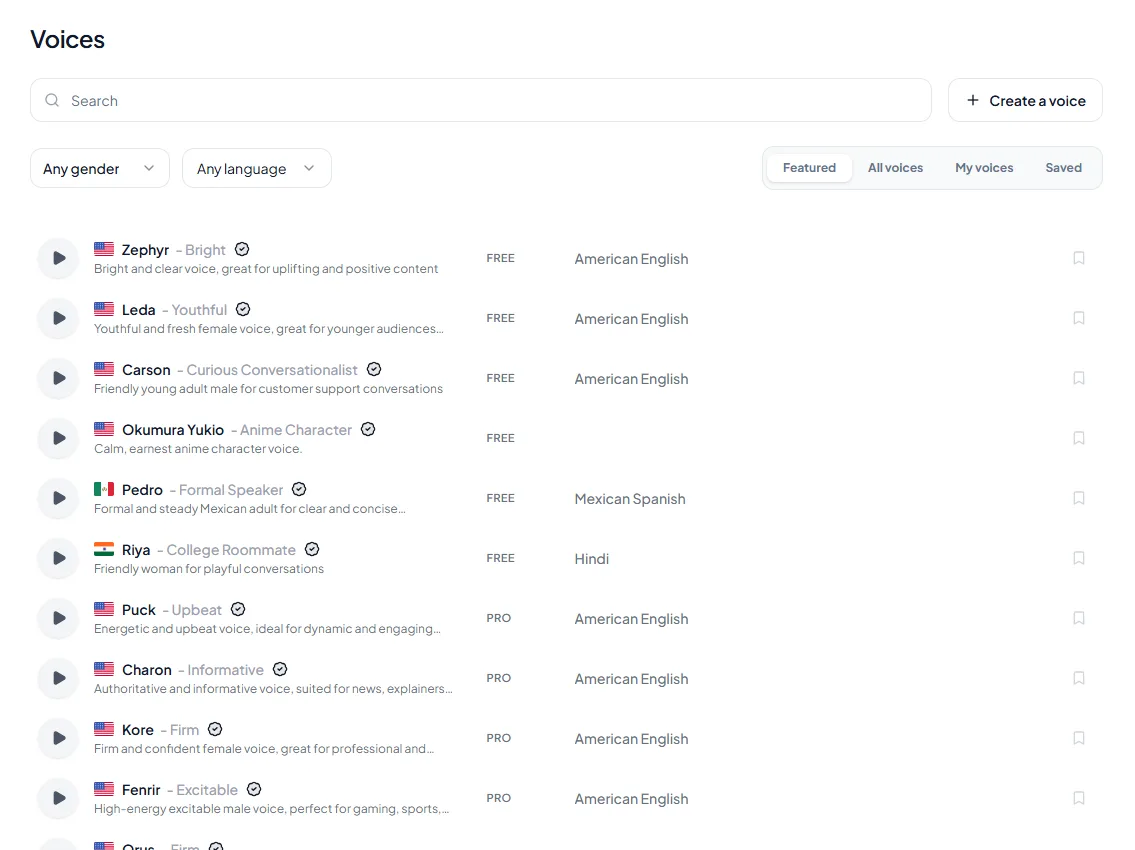
- 1Pick a voice. Voices are tagged Free or Premium.
- 2Type or paste a short line. Pick an emotion if you want one.
- 3Choose the language and press play to hear it.
Try it yourself in the free voice demo on Kveeky, no sign-up needed. For longer scripts and downloads, use the free plan.
- 700+ AI voices in 40+ languages, plus speed and volume control.
- 6 emotions (Neutral, Happy, Love, Angry, Calm or Sad) change how a line is read.
- Voice cloning depends on the plan. See the pricing page for what each plan includes.
- Plans: Free (500 credits a month, about 40 seconds, standard voices), Basic $9/month or $7.50 billed yearly (100 minutes), Pro $19.99/month or $12.50 billed yearly (133 minutes). Every paid plan includes commercial usage rights. See the Kveeky pricing page.

2. ElevenLabs: best for cloning your own voice
ElevenLabs' Starter plan is $6/month with Instant Voice Cloning and a commercial license. Its free plan gives 10,000 credits a month, without a commercial license. The pricing page lists 74 languages.
3. Fish Audio: best free plan for commercial use
Fish Audio's free tier lists commercial use and voice cloning, with 8,000 credits a month (up to about 7 minutes). Plus is $11/month billed yearly.
4. Murf AI: best for business presentations
Murf AI's studio editor suits training and presentation videos. Its free plan has 10 minutes of generation and no downloads, and Creator starts at $19/month.
5. Voicemaker: best for language range
Voicemaker lists more than 500 voices and 120 languages on its free plan. Free use is personal only, with 250 characters per conversion, and Starter is $5/month with commercial use.
6. Narakeet: best for pay-as-you-go
Narakeet sells one-time minute packs from $6 for 30 minutes, and credits don't expire. Its free tier gives 20 conversions without commercial use.
7. NaturalReader: best if you mostly listen
NaturalReader reads documents and web pages back to you, with a free plan and no card. Personal plans start at $79/year, but their audio is for personal use only.
8. WellSaid: best for English corporate narration
WellSaid's trial needs no card and gives 3 download minutes a month. Starter is $10/month billed yearly with full commercial rights and all English voices.
9. Wavel AI: best for dubbing and subtitles
Wavel AI combines voiceover with dubbing and subtitles. Basic is $25/month, or $16/month billed yearly.
10. TTSMP3: best for a quick one-off MP3
TTSMP3 converts up to 3,000 characters at a time for free, then gives you an MP3.
For more free options in one place, see our roundup of the best free AI voiceover generators.
Luvvoice vs Kveeky
| Luvvoice | Kveeky | |
|---|---|---|
| Voices | 200+ | 700+ |
| Languages | 70+ | 40+ with voices |
| Free plan | 10,000 characters/month (pricing page) | 500 credits/month (about 40 seconds) |
| Cheapest paid plan | $8/month Lite | $9/month, or $7.50/month billed yearly |
| Commercial rights | From Plus ($13/month) and credit packs | Every paid plan |
| Emotion control | Speed, pitch and pauses | Speed, volume and 6 emotions |
| Export | MP3 | Audio download |
Pick it for the lowest cost per character and wide language range. Pick Kveeky for more voices and emotion control.
Real samples from the Kveeky voice library.
Choosing a Luvvoice alternative
- Write down your monthly volume. Count characters or minutes from last month's scripts.
- Decide if you need commercial rights. Monetized and client work does. That rules out most free plans.
- Check your language. Look for the exact language and accent, not just a language count.
- Test emotion and pacing. Read the same script in 2 tools and compare a question, a list and a pause.
- Check the export format. WAV is easier to edit in video and audio tools than MP3.
Tick each step before you move off Luvvoice.
Ticked: 0 of 5

Our guide on how to choose text to voice generator software covers these checks in more detail. If you mainly want text read to you, our Speechify alternatives guide is a better match.
Paste the same lines into Luvvoice and your shortlisted alternative at the same speed, then compare the question, the list and the pause.
Three things changed this week: pricing, voices, and the export.
Take a breath here. Then read the last line slowly: we are almost done.
Open what you need.
How long is 10,000 characters of audio?
Why do the free allowances not match?
How do I make a cheap voice sound less flat?
Keep reading: Best free AI voice generators · AI voice commercial use rights · Free vs paid text to speech · Text to speech vs voice cloning · Add emotion to AI voices · Best AI voice generator for small business · Kveeky pricing · Voice providers · AI voice generator comparisons
Frequently asked questions
Is Luvvoice free?
Yes. Its pricing page lists 10,000 characters a month with more than 200 voices in more than 70 languages. Its homepage mentions 20,000 characters, so check your account for the current limit.
What are Luvvoice's free tier limits in 2026?
On October 6, 2026, the pricing page listed 10,000 characters a month on the free plan, with no commercial rights listed. Paid plans allow up to 20,000 characters per conversion.
Can I use Luvvoice audio commercially?
The pricing page lists commercial rights on the Plus plan ($13/month), the Enterprise plan and its one-time credit packs. It does not list them on Free or Lite.
Does Luvvoice have voice cloning?
Yes, on paid plans. Lite, Plus and Enterprise include custom-voice credits, and there's a one-time custom credits pack. The free plan does not list cloning.
What is the best Luvvoice alternative?
For creators, Kveeky: 700+ voices, 6 emotions and commercial rights on every paid plan. Pick Fish Audio for free commercial use, or ElevenLabs for cheap cloning of your own voice.
How many minutes is 10,000 characters?
About 8 minutes. At 8 characters per word that is roughly 1,250 words, and at a speaking pace of 150 words per minute that is about 8.3 minutes.
Which Luvvoice alternative allows free commercial use?
Fish Audio lists commercial use on its free tier. ElevenLabs, Murf, Voicemaker, Narakeet and Kveeky exclude it on free plans, though every paid Kveeky plan includes commercial rights.
Which Luvvoice alternative has the most languages?
Voicemaker lists 120 languages on its free plan, against about 70 for Luvvoice and 74 for ElevenLabs. Check that your exact language has voices.
Which Luvvoice alternatives need no credit card?
Kveeky's free plan needs no card, NaturalReader's free plan needs no card, and WellSaid's trial needs no card.
How we checked this guide
This guide is written by Mohit Singh for the Kveeky team. Disclosure: Kveeky makes an AI voice generator. We compared tools on their own published plans, not on marketing claims.
- Luvvoice facts come from its homepage and pricing page, retrieved October 6, 2026.
- Alternatives' prices and limits, retrieved October 6, 2026: Kveeky, ElevenLabs, Fish Audio, Murf AI, Voicemaker, Narakeet, NaturalReader, WellSaid, Wavel AI and TTSMP3.
- No Kveeky usage data is used in this guide. Prices change, so confirm on the vendor's page before you buy.
Working in a language other than English? Check which voices exist for it in our text to speech language pages before you switch tools.
Turn your script into a voiceover
Paste your text, pick a voice and download the audio. Free to start, no credit card.