# CapCut Text to Speech vs Kveeky: Which Is Better for Creators?

Published: October 13, 2026 · Author: Ankit Agarwal

CapCut text to speech vs Kveeky comes down to where you work and what the audio is for. CapCut's text to speech is free inside a video editor and is the fastest way to voice a short personal clip. [Kveeky](https://kveeky.com) is a dedicated voice generator with 700+ voices, metered minutes and commercial rights on every paid plan.

*Last updated: October 12, 2026. CapCut details come from CapCut's own pages, terms and app-store listings; Kveeky details come from kveeky.com/pricing.*

This guide is for creators and small teams in the US and UK who already edit in CapCut and wonder whether a separate voice tool is worth it. It covers features, prices in USD and GBP, what CapCut's license actually says about commercial use, and a simple way to use both together.

> **Key Takeaways**
>
> - **CapCut wins on convenience.** Its text to speech runs inside the editor, the core feature is free, and CapCut says "some premium voices" need Pro.
> - **Kveeky wins on clear rights and volume.** Every paid Kveeky plan includes commercial usage rights, and Basic gives 100 minutes a month for $9 ($7.50 billed yearly).
> - **CapCut's commercial answer is split.** Its FAQ says yes; its Materials License Agreement limits commercial use to materials marked "commercial" and doesn't name text-to-speech voices.
> - **CapCut Pro costs $19.99 a month in the US and £21.99 in the UK** on the App Store (October 12, 2026). CapCut says prices vary by region and platform.
> - **You don't have to choose.** Many creators generate the voice in Kveeky, download the audio, and edit the video in CapCut.

**On this page:** [Quick verdict](#capcut-tts-vs-kveeky) · [Side by side](#side-by-side-comparison) · [Where CapCut wins](#where-capcut-wins) · [Where Kveeky wins](#where-does-kveeky-win) · [Commercial use](#capcut-commercial-use) · [Pricing](#capcut-pro-and-kveeky-cost) · [Worked example](#worked-example-5-videos-a-week) · [Use both](#using-a-kveeky-voice-in-capcut) · [Decision table](#decision-table) · [FAQ](#frequently-asked-questions)

## CapCut TTS vs Kveeky

Use CapCut's text to speech for quick, personal or test videos you're already editing in CapCut. Use Kveeky when the voice is for a client, a brand, an ad or a regular channel, where you need clear commercial rights, more voices and a known monthly allowance.

The two tools solve different problems. CapCut is a video editor that includes text to speech. Kveeky is a voice generator: you paste a script, pick a voice and download the audio for any editor.

That difference shapes everything below. CapCut keeps you in one app. Kveeky gives you a voice file you control and can reuse anywhere.

<div style="margin:28px 0;padding:20px 22px;background:var(--kv-blue-50);border:1px solid var(--kv-blue-100);border-radius:var(--kv-radius-md);box-shadow:var(--kv-shadow-xs)" ><div style="font:700 17px/1.3 var(--kv-font-heading);color:var(--kv-blue-950);margin-bottom:8px">Find your fit in one click</div><p style="margin:0 0 12px;font:400 15px/1.6 var(--kv-font-body);color:var(--kv-gray-600)">Pick the line that sounds most like your project. The answer uses only what this guide found.</p><div style="display:flex;flex-wrap:wrap;gap:10px;margin-bottom:12px"><button type="button" class="cc-pick-b" data-i="0" aria-pressed="false" style="min-height:44px;padding:0 16px;border:1px solid var(--kv-blue-700);border-radius:var(--kv-radius-md);background:var(--kv-white);color:var(--kv-blue-700);font:600 15px/1.2 var(--kv-font-body);cursor:pointer;text-align:left">A quick personal clip</button><button type="button" class="cc-pick-b" data-i="1" aria-pressed="false" style="min-height:44px;padding:0 16px;border:1px solid var(--kv-blue-700);border-radius:var(--kv-radius-md);background:var(--kv-white);color:var(--kv-blue-700);font:600 15px/1.2 var(--kv-font-body);cursor:pointer;text-align:left">A monetized channel</button><button type="button" class="cc-pick-b" data-i="2" aria-pressed="false" style="min-height:44px;padding:0 16px;border:1px solid var(--kv-blue-700);border-radius:var(--kv-radius-md);background:var(--kv-white);color:var(--kv-blue-700);font:600 15px/1.2 var(--kv-font-body);cursor:pointer;text-align:left">Client work or paid ads</button><button type="button" class="cc-pick-b" data-i="3" aria-pressed="false" style="min-height:44px;padding:0 16px;border:1px solid var(--kv-blue-700);border-radius:var(--kv-radius-md);background:var(--kv-white);color:var(--kv-blue-700);font:600 15px/1.2 var(--kv-font-body);cursor:pointer;text-align:left">My own cloned voice</button><button type="button" class="cc-pick-b" data-i="4" aria-pressed="false" style="min-height:44px;padding:0 16px;border:1px solid var(--kv-blue-700);border-radius:var(--kv-radius-md);background:var(--kv-white);color:var(--kv-blue-700);font:600 15px/1.2 var(--kv-font-body);cursor:pointer;text-align:left">I need FLAC or AAC</button></div><div aria-live="polite"><div class="cc-pick-r" hidden style="padding:14px 16px;background:var(--kv-white);border:1px solid var(--kv-blue-100);border-radius:var(--kv-radius-md);font:400 16px/1.6 var(--kv-font-body);color:var(--kv-gray-800)"><p style="margin:0;font:400 16px/1.6 var(--kv-font-body);color:var(--kv-gray-800)"><strong>Use CapCut.</strong> The core text to speech is free, it runs inside the editor and there is no file to re-import. Keep it to videos that are not for money or a client.</p></div><div class="cc-pick-r" hidden style="padding:14px 16px;background:var(--kv-white);border:1px solid var(--kv-blue-100);border-radius:var(--kv-radius-md);font:400 16px/1.6 var(--kv-font-body);color:var(--kv-gray-800)"><p style="margin:0;font:400 16px/1.6 var(--kv-font-body);color:var(--kv-gray-800)"><strong>Use Kveeky for the voice and CapCut for the edit.</strong> Paid Kveeky plans list commercial rights on the pricing page, while CapCut limits commercial use to materials marked "commercial".</p></div><div class="cc-pick-r" hidden style="padding:14px 16px;background:var(--kv-white);border:1px solid var(--kv-blue-100);border-radius:var(--kv-radius-md);font:400 16px/1.6 var(--kv-font-body);color:var(--kv-gray-800)"><p style="margin:0;font:400 16px/1.6 var(--kv-font-body);color:var(--kv-gray-800)"><strong>Use Kveeky.</strong> The rights sit on the pricing page, not split across license marks. If you still want CapCut's voice, run the <a href="#can-you-use-capcut-text-to-speech-commercially">commercial-use checklist</a> first and get written confirmation from CapCut support.</p></div><div class="cc-pick-r" hidden style="padding:14px 16px;background:var(--kv-white);border:1px solid var(--kv-blue-100);border-radius:var(--kv-radius-md);font:400 16px/1.6 var(--kv-font-body);color:var(--kv-gray-800)"><p style="margin:0;font:400 16px/1.6 var(--kv-font-body);color:var(--kv-gray-800)"><strong>Use Kveeky.</strong> The side-by-side table lists custom voice clones on its paid plans, and CapCut was not checked for cloning. See the <a href="https://kveeky.com/pricing">pricing page</a> for the current plan details.</p></div><div class="cc-pick-r" hidden style="padding:14px 16px;background:var(--kv-white);border:1px solid var(--kv-blue-100);border-radius:var(--kv-radius-md);font:400 16px/1.6 var(--kv-font-body);color:var(--kv-gray-800)"><p style="margin:0;font:400 16px/1.6 var(--kv-font-body);color:var(--kv-gray-800)"><strong>Use CapCut.</strong> Its tool page lists AAC, FLAC, MP3 and WAV, while Kveeky lets you download the audio.</p></div></div></div>
<script>
(function(){try{var b=document.querySelectorAll(".cc-pick-b"),r=document.querySelectorAll(".cc-pick-r");function pick(k){for(var i=0;i<r.length;i++){r[i].hidden=(i!==k);b[i].setAttribute("aria-pressed",i===k?"true":"false");b[i].style.background=(i===k)?"var(--kv-blue-700)":"var(--kv-white)";b[i].style.color=(i===k)?"var(--kv-white)":"var(--kv-blue-700)"}}for(var i=0;i<b.length;i++){(function(k){b[k].addEventListener("click",function(){pick(k)})})(i)}}catch(e){}})();
</script>

## Side-by-side comparison

CapCut is free to start and built into editing, while Kveeky has a larger documented voice library and plan-level commercial rights. The table shows what each vendor states on its own pages.

<table>
<thead>
<tr><th>What you need</th><th>CapCut text to speech</th><th>Kveeky</th></tr>
</thead>
<tbody>
<tr><td>What it is</td><td>A feature inside the CapCut video editor (mobile, desktop and web)</td><td>A standalone AI voice generator in the browser</td></tr>
<tr><td>Price to start</td><td>Core text to speech is free; "some premium voices" are part of Pro</td><td>Free plan: 500 credits a month (about 40 seconds), standard voices, no credit card</td></tr>
<tr><td>Paid plan</td><td>CapCut Pro: $19.99/month (US App Store) or £21.99/month (UK App Store)</td><td>From $9/month, or $7.50/month billed yearly</td></tr>
<tr><td>Monthly allowance</td><td>No text-to-speech allowance published</td><td>Stated per plan: 100 minutes on Basic, up to 1,000 on Business</td></tr>
<tr><td>Voices</td><td>CapCut's pages give different counts (see below)</td><td>700+ voices on paid plans</td></tr>
<tr><td>Languages</td><td>"16 global options" on one CapCut page, "dozens of languages" on another</td><td>40+ languages with voices</td></tr>
<tr><td>Commercial use</td><td>FAQ says yes; the license limits commercial use to materials marked "commercial"</td><td>Every paid plan includes commercial usage rights for generated audio</td></tr>
<tr><td>Audio export</td><td>Direct download from the web tool; CapCut lists AAC, FLAC, MP3 and WAV</td><td>MP3 and WAV</td></tr>
<tr><td>Voice cloning</td><td>Not compared here (not checked)</td><td>5 custom voice clones on Basic, up to 20 on Business</td></tr>
<tr><td>Video editing</td><td>Full editor, auto captions, effects</td><td>None: you add the audio in your editor</td></tr>
</tbody>
</table>

A note on CapCut's voice count: its text-to-speech tool page said "More than 1000 AI voices" in April 2026, while its AI text-to-speech page says "dozens of languages" without a voice count. We couldn't confirm a current number, so we don't rank CapCut on voice count.

## Where CapCut wins

CapCut wins when the video is already in CapCut and the clip is short. You type on a text layer, tap Text-to-Speech, pick a voice and generate. There's no file to download and re-import.

CapCut's own help page lists the steps for each version:

1. **Web:** add a text box to your timeline, click Text-to-Speech in the toolbar, choose a voice and language, then click Generate.
2. **Desktop:** add a text layer, select the text clip, then click the Text-to-Speech option.
3. **Mobile:** tap the text layer, select Text-to-Speech from the bottom menu, then tap Generate.

Three other strengths are real:

- **Price.** CapCut says the core text-to-speech feature is free for all users.
- **Captions in the same place.** The voice, the on-screen text and auto captions stay in one project.
- **More export formats.** CapCut's tool page lists AAC and FLAC as well as MP3 and WAV.

Two limits to know: CapCut says text to speech "relies on cloud processing", so it needs a connection, and it only works on text layers.

## Where does Kveeky win?

Kveeky wins when the voice has to carry a brand, a client project or a regular channel. You get a documented library, a fixed monthly allowance and commercial rights written on the pricing page.

- **700+ voices across 40+ languages.** The full library unlocks on any paid plan; the free plan uses standard voices.
- **Clear rights.** "Every paid plan includes commercial usage rights for generated audio" (kveeky.com/pricing).
- **Predictable volume.** Basic includes 100 minutes a month; Pro 133; Premium 200; Business 1,000.
- **One voice file, any editor.** Download the audio and use it in CapCut, Premiere Pro, DaVinci Resolve or a podcast host.
- **Your own voice.** Paid plans include custom voice clones (5 on Basic, 10 on Pro).

Where Kveeky loses: it isn't a video editor. You still need CapCut or another editor to add captions and cut the video to the voice. You can hear the voices before you sign up in the [Kveeky voice generator for social media videos](https://kveeky.com/voiceover/social-media-videos/).

## CapCut commercial use

CapCut's FAQ says yes, but its binding license is narrower. Treat client and ad work as "check first" until CapCut's license clearly covers text-to-speech voices.

Here is what each CapCut document says (all retrieved October 12, 2026):

<table>
<thead>
<tr><th>CapCut document</th><th>What it says</th><th>What it means for you</th></tr>
</thead>
<tbody>
<tr><td>Text-to-speech tool page FAQ</td><td>Audio "can be used for commercial purposes such as advertisements, YouTube videos, and brand promotions"</td><td>Marketing copy says yes; it also tells you to follow CapCut's terms</td></tr>
<tr><td>Terms of Service (updated April 15, 2026)</td><td>Commercial use of Company Content "may vary depending on the CapCut product" and points to the Materials License Agreement</td><td>The license, not the FAQ, decides</td></tr>
<tr><td>Materials License Agreement (updated January 22, 2026)</td><td>Commercial use is for "Dual Use Materials", which carry marks such as "commercial use" on the platform</td><td>Look for the "commercial" mark on what you use</td></tr>
<tr><td>Same agreement</td><td>Content that mixes commercial and non-commercial materials is for "personal and non-commercial use" only</td><td>One unmarked asset can make the whole video non-commercial</td></tr>
<tr><td>Same agreement</td><td>You may not exploit materials "on a stand-along basis" (CapCut's spelling), meaning outside content made on the platform</td><td>Reusing CapCut assets on their own is restricted</td></tr>
</tbody>
</table>

The license's list of materials names templates, clips, fonts, sound effects and similar items. It doesn't mention text-to-speech voices, so it's unclear whether they count. US users are also covered by separate US terms with TikTok USDS Joint Venture LLC, and a separate US Materials License Agreement that we could not open.

Before you use CapCut's voice in paid work, run this checklist:

<div style="margin:28px 0;padding:20px 22px;background:var(--kv-white);border:1px solid var(--kv-blue-100);border-radius:var(--kv-radius-md);box-shadow:var(--kv-shadow-xs)" ><div style="font:700 17px/1.3 var(--kv-font-heading);color:var(--kv-blue-950);margin-bottom:8px">Before you use CapCut's voice in paid work</div><p style="margin:0 0 12px;font:400 15px/1.6 var(--kv-font-body);color:var(--kv-gray-600)">Tick each step as you finish it.</p><label style="display:flex;align-items:flex-start;gap:12px;min-height:44px;padding:8px 0;font:400 16px/1.5 var(--kv-font-body);color:var(--kv-gray-800);cursor:pointer"><input type="checkbox" class="cc-chk-c" style="width:22px;height:22px;margin-top:2px;flex:none;accent-color:var(--kv-blue-700)"><span>Check the voice or asset for a "commercial" mark in the editor.</span></label><label style="display:flex;align-items:flex-start;gap:12px;min-height:44px;padding:8px 0;font:400 16px/1.5 var(--kv-font-body);color:var(--kv-gray-800);cursor:pointer"><input type="checkbox" class="cc-chk-c" style="width:22px;height:22px;margin-top:2px;flex:none;accent-color:var(--kv-blue-700)"><span>Make sure nothing in the same video is marked non-commercial only.</span></label><label style="display:flex;align-items:flex-start;gap:12px;min-height:44px;padding:8px 0;font:400 16px/1.5 var(--kv-font-body);color:var(--kv-gray-800);cursor:pointer"><input type="checkbox" class="cc-chk-c" style="width:22px;height:22px;margin-top:2px;flex:none;accent-color:var(--kv-blue-700)"><span>Read the terms for your country (the US has its own version).</span></label><label style="display:flex;align-items:flex-start;gap:12px;min-height:44px;padding:8px 0;font:400 16px/1.5 var(--kv-font-body);color:var(--kv-gray-800);cursor:pointer"><input type="checkbox" class="cc-chk-c" style="width:22px;height:22px;margin-top:2px;flex:none;accent-color:var(--kv-blue-700)"><span>Keep a screenshot of the voice and its label with the date.</span></label><label style="display:flex;align-items:flex-start;gap:12px;min-height:44px;padding:8px 0;font:400 16px/1.5 var(--kv-font-body);color:var(--kv-gray-800);cursor:pointer"><input type="checkbox" class="cc-chk-c" style="width:22px;height:22px;margin-top:2px;flex:none;accent-color:var(--kv-blue-700)"><span>If a client or ad budget depends on it, get written confirmation from CapCut support.</span></label><div id="cc-chk-out" aria-live="polite" style="margin-top:8px;font:600 15px/1.4 var(--kv-font-body);color:var(--kv-blue-950)">Ticked: 0 of 5</div></div>
<script>
(function(){try{var b=document.querySelectorAll(".cc-chk-c"),o=document.getElementById("cc-chk-out");if(!o)return;function u(){var n=0;for(var i=0;i<b.length;i++){if(b[i].checked)n++}o.textContent="Ticked: "+n+" of "+b.length+(n===b.length?". All done.":"")}for(var i=0;i<b.length;i++){b[i].addEventListener("change",u)}}catch(e){}})();
</script>

This isn't legal advice. For a wider view, see our table of [commercial rights by plan across 10 AI voice tools](https://kveeky.com/blog/ai-voice-commercial-use-rights).

## CapCut Pro and Kveeky cost

CapCut Pro is $19.99 a month on the US App Store and £21.99 in the UK. Kveeky starts at $9 a month, or $7.50 a month billed yearly. Kveeky bills in USD.

<table>
<thead>
<tr><th>Plan</th><th>Monthly</th><th>Yearly</th><th>Voice allowance</th></tr>
</thead>
<tbody>
<tr><td>CapCut (free)</td><td>$0</td><td>$0</td><td>Core text to speech free; no allowance published</td></tr>
<tr><td>CapCut Standard (App Store)</td><td>$9.99 / £10.99</td><td>Not listed by tier</td><td>Not stated for text to speech</td></tr>
<tr><td>CapCut Pro (App Store)</td><td>$19.99 / £21.99</td><td>A yearly subscription is listed at $89.99 / £99.99, tier not named</td><td>Not stated; adds premium voices</td></tr>
<tr><td>Kveeky Free</td><td>$0</td><td>$0</td><td>About 40 seconds/month, standard voices</td></tr>
<tr><td>Kveeky Basic</td><td>$9</td><td>$7.50/month ($90/year)</td><td>100 minutes/month, all 700+ voices</td></tr>
<tr><td>Kveeky Pro</td><td>$19.99</td><td>$12.50/month ($149.99/year)</td><td>133 minutes/month, voice localization</td></tr>
</tbody>
</table>

CapCut's prices aren't fixed. Its help center says it offers "flexible subscription options" rather than one global price, and a CapCut article from August 2026 quotes $179.99 a year for Pro. Check the price in your own app store before you subscribe.

The bigger difference is what you're paying for. CapCut Pro pays for an editor: effects, templates, filters and 100GB of cloud storage, according to CapCut's help center. Kveeky pays for voice minutes and rights.

## Worked example: 5 videos a week

Say you post 5 short videos a week, each with 45 seconds of narration. That is about 16 finished minutes a month. Add 50% for retakes and you need about 24 minutes of generated audio.

<table>
<thead>
<tr><th>Option</th><th>Covers 24 minutes?</th><th>Commercial rights clear?</th><th>Monthly cost</th></tr>
</thead>
<tbody>
<tr><td>CapCut free text to speech</td><td>No allowance published</td><td>Only for assets marked "commercial"</td><td>$0</td></tr>
<tr><td>CapCut Pro (US App Store)</td><td>No allowance published</td><td>Same license rules apply</td><td>$19.99</td></tr>
<tr><td>Kveeky Free</td><td>No: about 40 seconds</td><td>Not listed on Free</td><td>$0</td></tr>
<tr><td>Kveeky Basic</td><td>Yes, with about 76 minutes spare</td><td>Yes, on every paid plan</td><td>$9, or $7.50 billed yearly</td></tr>
</tbody>
</table>

On Kveeky Basic billed yearly, that is about $0.47 per finished minute ($7.50 ÷ 16). This is our calculation. If the channel is a hobby and makes no money, CapCut's free voice may be all you need.

<div style="margin:28px 0;padding:20px 22px;background:var(--kv-blue-50);border:1px solid var(--kv-blue-100);border-radius:var(--kv-radius-md);box-shadow:var(--kv-shadow-xs)" ><div style="font:700 17px/1.3 var(--kv-font-heading);color:var(--kv-blue-950);margin-bottom:8px">How many voice minutes do you need?</div><p style="margin:0 0 12px;font:400 15px/1.6 var(--kv-font-body);color:var(--kv-gray-600)">Change the numbers to match your channel. It uses 4.33 weeks a month and the plan allowances from the table above.</p><div style="display:flex;flex-wrap:wrap;gap:12px;margin-bottom:14px"><label style="flex:1 1 150px;font:600 15px/1.4 var(--kv-font-body);color:var(--kv-gray-800)">Videos a week<input id="cc-v" type="number" min="0" step="1" value="5" inputmode="decimal" style="display:block;box-sizing:border-box;width:100%;min-height:44px;margin-top:6px;padding:0 12px;border:1px solid var(--kv-gray-400);border-radius:var(--kv-radius-md);background:var(--kv-white);color:var(--kv-gray-800);font:400 16px/1.2 var(--kv-font-body)"></label><label style="flex:1 1 150px;font:600 15px/1.4 var(--kv-font-body);color:var(--kv-gray-800)">Seconds of voice per video<input id="cc-s" type="number" min="0" step="1" value="45" inputmode="decimal" style="display:block;box-sizing:border-box;width:100%;min-height:44px;margin-top:6px;padding:0 12px;border:1px solid var(--kv-gray-400);border-radius:var(--kv-radius-md);background:var(--kv-white);color:var(--kv-gray-800);font:400 16px/1.2 var(--kv-font-body)"></label><label style="flex:1 1 150px;font:600 15px/1.4 var(--kv-font-body);color:var(--kv-gray-800)">Extra for retakes (%)<input id="cc-r" type="number" min="0" step="5" value="50" inputmode="decimal" style="display:block;box-sizing:border-box;width:100%;min-height:44px;margin-top:6px;padding:0 12px;border:1px solid var(--kv-gray-400);border-radius:var(--kv-radius-md);background:var(--kv-white);color:var(--kv-gray-800);font:400 16px/1.2 var(--kv-font-body)"></label></div><div id="cc-out" aria-live="polite" style="padding:14px 16px;background:var(--kv-white);border:1px solid var(--kv-blue-100);border-radius:var(--kv-radius-md);font:400 16px/1.6 var(--kv-font-body);color:var(--kv-gray-800)">With 5 videos a week at 45 seconds each and 50% extra for retakes, you need about <strong>24 minutes</strong> of generated audio a month. Kveeky Basic (100 minutes) covers it. On Basic billed yearly that is about <strong>$0.47 per finished minute</strong>.</div></div>
<script>
(function(){try{var v=document.getElementById("cc-v"),s=document.getElementById("cc-s"),r=document.getElementById("cc-r"),o=document.getElementById("cc-out");if(!v||!s||!r||!o)return;
function calc(){var vi=Math.max(0,+v.value||0),se=Math.max(0,+s.value||0),re=Math.max(0,+r.value||0);var fin=vi*4.33*se/60,need=fin*(1+re/100);var f=Math.round(fin),n=Math.round(need);var h;
if(need<=0){o.textContent="Enter your numbers to see the result.";return}
if(need<=0.67){h="The Kveeky Free plan (about 40 seconds a month, standard voices) covers it, but Free does not list commercial rights."}
else if(need<=100){h="Kveeky Basic (100 minutes) covers it, with about "+Math.round(100-need)+" minutes spare. Billed yearly that is about <strong>$"+(7.5/fin).toFixed(2)+" per finished minute</strong> ($7.50 divided by "+f+" finished minutes), or $"+(9/fin).toFixed(2)+" billed monthly."}
else if(need<=133){h="Kveeky Pro (133 minutes) covers it. Billed yearly that is about <strong>$"+(12.5/fin).toFixed(2)+" per finished minute</strong> ($12.50 divided by "+f+" finished minutes)."}
else if(need<=200){h="Kveeky Premium (200 minutes) covers it. See the pricing page for its price."}
else if(need<=1000){h="Kveeky Business (up to 1,000 minutes) covers it. See the pricing page for its price."}
else{h="That is more than the 1,000 minutes on Business. Check the pricing page or ask Kveeky."}
o.innerHTML="You need about <strong>"+n+" minutes</strong> of generated audio a month ("+f+" finished minutes plus retakes). "+h}
["input","change"].forEach(function(e){v.addEventListener(e,calc);s.addEventListener(e,calc);r.addEventListener(e,calc)});calc()}catch(e){}})();
</script>

Not sure how long your script runs? Paste it into the [words to minutes calculator](https://kveeky.com/resources/words-to-minutes-calculator/) first. For full per-video costs, see [what an AI voiceover costs per video](https://kveeky.com/blog/ai-voiceover-cost-per-video).

## Using a Kveeky voice in CapCut

You can use both: generate the voice in Kveeky, then edit in CapCut. It takes about 5 steps and keeps CapCut's captions and effects.

<figure>
<svg viewBox="0 0 1200 420" xmlns="http://www.w3.org/2000/svg" role="img" aria-labelledby="capcut-kveeky-fig-t capcut-kveeky-fig-d" style="width:100%;height:auto;display:block">
<title id="capcut-kveeky-fig-t">Kveeky voice, CapCut edit: a 5-step workflow</title>
<desc id="capcut-kveeky-fig-d">Five boxes connected by arrows from left to right. Step 1, write the script. Step 2, generate the voice in Kveeky. Step 3, download the audio. Step 4, import the audio into CapCut and cut the clips to it. Step 5, add auto captions and export the video.</desc>
<rect x="0" y="0" width="1200" height="420" rx="16" fill="#ffffff"/>
<text x="600" y="62" text-anchor="middle" font-family="var(--kv-font-heading)" font-weight="700" font-size="36" fill="#111827">Kveeky voice, CapCut edit</text>
<rect x="30" y="130" width="200" height="190" rx="14" fill="#eff6ff" stroke="#dbeafe" stroke-width="2"/>
<rect x="265" y="130" width="200" height="190" rx="14" fill="#1d4ed8"/>
<rect x="500" y="130" width="200" height="190" rx="14" fill="#1d4ed8"/>
<rect x="735" y="130" width="200" height="190" rx="14" fill="#eff6ff" stroke="#dbeafe" stroke-width="2"/>
<rect x="970" y="130" width="200" height="190" rx="14" fill="#eff6ff" stroke="#dbeafe" stroke-width="2"/>
<text x="130" y="185" text-anchor="middle" font-family="var(--kv-font-heading)" font-weight="700" font-size="34" fill="#1e40af">1</text>
<text x="365" y="185" text-anchor="middle" font-family="var(--kv-font-heading)" font-weight="700" font-size="34" fill="#ffffff">2</text>
<text x="600" y="185" text-anchor="middle" font-family="var(--kv-font-heading)" font-weight="700" font-size="34" fill="#ffffff">3</text>
<text x="835" y="185" text-anchor="middle" font-family="var(--kv-font-heading)" font-weight="700" font-size="34" fill="#1e40af">4</text>
<text x="1070" y="185" text-anchor="middle" font-family="var(--kv-font-heading)" font-weight="700" font-size="34" fill="#1e40af">5</text>
<text x="130" y="240" text-anchor="middle" font-family="var(--kv-font-body)" font-weight="600" font-size="24" fill="#111827"><tspan x="130">Write the</tspan><tspan x="130" dy="32">script</tspan></text>
<text x="365" y="240" text-anchor="middle" font-family="var(--kv-font-body)" font-weight="600" font-size="24" fill="#ffffff"><tspan x="365">Generate the</tspan><tspan x="365" dy="32">voice in Kveeky</tspan></text>
<text x="600" y="240" text-anchor="middle" font-family="var(--kv-font-body)" font-weight="600" font-size="24" fill="#ffffff"><tspan x="600">Download</tspan><tspan x="600" dy="32">the audio</tspan></text>
<text x="835" y="240" text-anchor="middle" font-family="var(--kv-font-body)" font-weight="600" font-size="24" fill="#111827"><tspan x="835">Import into</tspan><tspan x="835" dy="32">CapCut, cut to it</tspan></text>
<text x="1070" y="240" text-anchor="middle" font-family="var(--kv-font-body)" font-weight="600" font-size="24" fill="#111827"><tspan x="1070">Add captions,</tspan><tspan x="1070" dy="32">export video</tspan></text>
<line x1="232" y1="225" x2="250" y2="225" stroke="#1e40af" stroke-width="4"/>
<line x1="467" y1="225" x2="485" y2="225" stroke="#1e40af" stroke-width="4"/>
<line x1="702" y1="225" x2="720" y2="225" stroke="#1e40af" stroke-width="4"/>
<line x1="937" y1="225" x2="955" y2="225" stroke="#1e40af" stroke-width="4"/>
<polygon points="264,225 250,215 250,235" fill="#1e40af"/>
<polygon points="499,225 485,215 485,235" fill="#1e40af"/>
<polygon points="734,225 720,215 720,235" fill="#1e40af"/>
<polygon points="969,225 955,215 955,235" fill="#1e40af"/>
<text x="600" y="380" text-anchor="middle" font-family="var(--kv-font-body)" font-size="22" fill="#374151">Blue steps happen in Kveeky; light steps happen in your editor.</text>
</svg>
<figcaption>The voice is made once in Kveeky and edited in CapCut, so you keep a reusable audio file and CapCut's captions.</figcaption>
</figure>

1. **Write the script** and time it at about 150 words a minute.
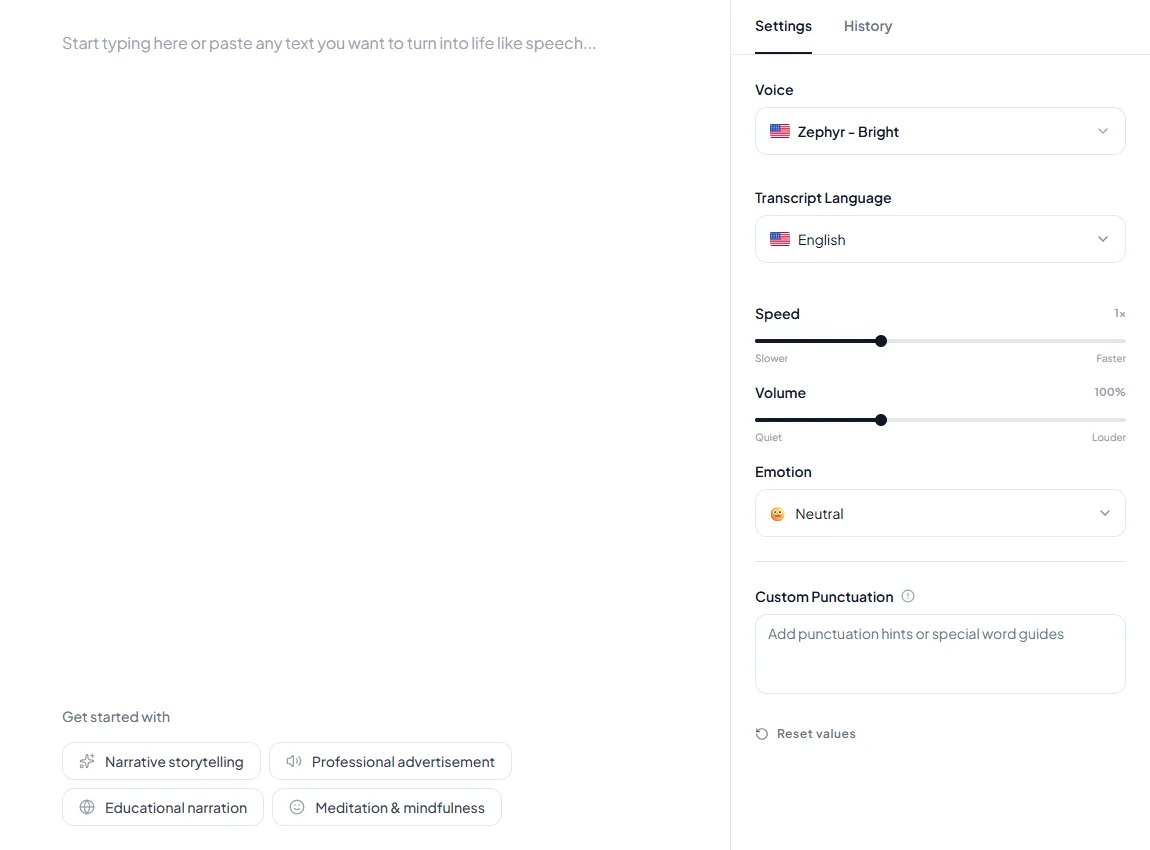
2. **Generate the voice in Kveeky.** Try 2 or 3 voices on the same line and keep the best.
3. **Download the audio.**
4. **Import the file into CapCut** as an audio track, then cut the clips to the voice.
5. **Add auto captions in CapCut** and export the video.

<figure style="margin:28px 0;padding:0"><img src="/blog/product/app-text-to-speech.webp" alt="The Kveeky text-to-speech editor with a script in the text box and the Settings panel showing Voice, Transcript Language, Speed, Volume, Emotion and Custom Punctuation." width="1150" height="850" loading="lazy" decoding="async" style="display:block;width:100%;max-width:100%;height:auto;border-radius:var(--kv-radius-md);border:1px solid var(--kv-blue-100)"><figcaption style="margin-top:12px;font:400 15px/1.5 var(--kv-font-body);color:var(--kv-gray-600)">Step 2 happens here. Paste the script into the text box, open the Settings tab, and pick a Voice. Speed and Volume sit below the voice, and Emotion offers 6 options. Generate, listen, then change one setting at a time.</figcaption></figure>

<div style="margin:28px 0;padding:20px 22px;background:var(--kv-blue-50);border:1px solid var(--kv-blue-100);border-radius:var(--kv-radius-md);box-shadow:var(--kv-shadow-xs)" ><div style="font:700 17px/1.3 var(--kv-font-heading);color:var(--kv-blue-950);margin-bottom:8px">Try it: a test script for both tools</div><p style="margin:0 0 12px;font:400 16px/1.6 var(--kv-font-body);color:var(--kv-gray-800)">Voice this 83-word script in CapCut and in Kveeky. It runs about 33 seconds at 150 words a minute, so it is a fair side-by-side test.</p><div id="cc-script-txt" style="padding:14px 16px;background:var(--kv-white);border:1px solid var(--kv-blue-100);border-radius:var(--kv-radius-md);font:400 16px/1.6 var(--kv-font-body);color:var(--kv-gray-800)">Here are three things I check before I post a voiceover. First, I listen to the whole clip once with my eyes closed. Second, I say every name and number out loud. Third, I trim any line that runs longer than two breaths. If a sentence feels rushed, I split it in two. Short lines sound calmer and easier to follow. Voice this script in CapCut and in Kveeky, then keep the one that sounds more like a person talking to a friend.</div><div style="display:flex;flex-wrap:wrap;align-items:center;gap:12px;margin-top:12px"><button type="button" id="cc-script-btn" aria-live="polite" style="min-height:44px;padding:0 18px;border:0;border-radius:var(--kv-radius-md);background:var(--kv-blue-700);color:var(--kv-white);font:600 16px/1 var(--kv-font-body);cursor:pointer" onclick="var t=document.getElementById('cc-script-txt').innerText,b=this;function ok(){b.textContent='Copied';setTimeout(function(){b.textContent='Copy script'},1800)}try{if(navigator.clipboard&&navigator.clipboard.writeText){navigator.clipboard.writeText(t).then(ok,function(){})}else{var r=document.createRange();r.selectNodeContents(document.getElementById('cc-script-txt'));var s=window.getSelection();s.removeAllRanges();s.addRange(r)}}catch(e){}">Copy script</button><a href="https://kveeky.com/" style="display:inline-flex;align-items:center;min-height:44px;font:600 16px/1.3 var(--kv-font-body);color:var(--kv-blue-700)">Open the Kveeky homepage demo</a></div></div>

Expected result: one voice file you can reuse in other edits, with CapCut's editing and captions on top. Common mistakes are mixing a CapCut voice and a Kveeky voice in one video, and forgetting to check other CapCut assets for the "commercial" mark.

The same workflow works for TikTok. Our [TikTok text-to-speech guide](https://kveeky.com/blog/voice-generator-text-to-speech-on-tiktok) covers the in-app voices, and our comparison of [the best TikTok TTS generators](https://kveeky.com/blog/best-tiktok-tts-generators-free-paid-options-compared) covers the alternatives.

## Decision table

Pick CapCut for speed on personal clips and Kveeky for anything a brand or client depends on. Use both when you want CapCut's editing with a documented voice license.

<table>
<thead>
<tr><th>Your situation</th><th>Better choice</th><th>Why</th></tr>
</thead>
<tbody>
<tr><td>A quick personal or meme video</td><td>CapCut</td><td>Free, inside the editor, no extra file</td></tr>
<tr><td>Testing an idea before you commit</td><td>CapCut, or Kveeky Free</td><td>Both cost $0 to try</td></tr>
<tr><td>A monetized YouTube or TikTok channel</td><td>Kveeky + CapCut</td><td>Paid Kveeky plans list commercial rights; CapCut handles the edit</td></tr>
<tr><td>Client work or paid ads</td><td>Kveeky</td><td>Rights are on the pricing page, not split across license marks</td></tr>
<tr><td>The same voice across many videos</td><td>Kveeky</td><td>One voice file and a fixed monthly allowance</td></tr>
<tr><td>Your own voice, cloned</td><td>Kveeky</td><td>Custom voice clones on paid plans</td></tr>
<tr><td>You need FLAC or AAC audio</td><td>CapCut</td><td>CapCut lists both; with Kveeky you download the audio</td></tr>
<tr><td>No budget at all and personal use</td><td>CapCut</td><td>The core voice feature is free</td></tr>
</tbody>
</table>

If you edit in Microsoft's editor instead, see our [Clipchamp text to speech vs Kveeky comparison](https://kveeky.com/blog/clipchamp-text-to-speech-vs-kveeky).

If you are still comparing tools, our list of the [best free AI voice generators](https://kveeky.com/blog/10-best-free-ai-voice-generatorover-tools) and our guide to [free vs paid text to speech](https://kveeky.com/blog/free-vs-paid-text-to-speech) cover the wider market.

## Frequently asked questions

### Is CapCut text to speech free?

Yes, the core feature is free, according to CapCut. CapCut also says some premium voices are part of its Pro subscription, which is $19.99 a month on the US App Store.

### Can I use CapCut text to speech for YouTube or ads?

CapCut's FAQ says yes. Its Materials License Agreement limits commercial use to materials marked "commercial", and it doesn't name text-to-speech voices. Check the mark and your country's terms first.

### Can I download CapCut text to speech audio?

Yes. CapCut's web tool lets you download the generated audio, and its tool page lists AAC, FLAC, MP3 and WAV. Its license still restricts using platform materials on their own.

### Is CapCut available in the US in 2026?

Yes. CapCut is listed on the US App Store, and its US terms are with TikTok USDS Joint Venture LLC.

### Is Kveeky better than CapCut for voiceovers?

For voice alone, Kveeky offers 700+ voices, a stated monthly allowance and commercial rights on every paid plan. CapCut is better if you want the voice and the edit in one free app.

### Can I use a Kveeky voice in CapCut?

Yes. Download the voiceover from Kveeky, import it into CapCut as audio, then edit and caption the video there.

### Does CapCut text to speech work offline?

No. CapCut says text to speech "relies on cloud processing", so it needs an internet connection. It also only works on text layers in your project.

### How many minutes can I voice on Kveeky for free?

The Kveeky free plan gives 500 credits a month, about 40 seconds, with standard voices and no credit card. That is enough to test a voice against CapCut's before you pay.

<div style="margin:28px 0;padding:20px 22px;background:var(--kv-white);border:1px solid var(--kv-blue-100);border-radius:var(--kv-radius-md);box-shadow:var(--kv-shadow-xs)" ><div style="font:700 17px/1.3 var(--kv-font-heading);color:var(--kv-blue-950);margin-bottom:8px">Keep reading</div><ul style="margin:0;padding-left:20px;font:400 16px/1.5 var(--kv-font-body);color:var(--kv-gray-800)"><li style="margin:0 0 8px"><a href="/blog/ai-voiceover-script" style="color:var(--kv-blue-700);font-weight:600">How to write an AI voiceover script</a> <span style="color:var(--kv-gray-600)">to get the words right before you pick a voice.</span></li><li style="margin:0 0 8px"><a href="/blog/how-to-make-your-ai-voiceover-sound-less-robotic-in-5-minutes" style="color:var(--kv-blue-700);font-weight:600">Make your AI voiceover sound less robotic</a> <span style="color:var(--kv-gray-600)">with pacing and punctuation fixes.</span></li><li style="margin:0 0 8px"><a href="/blog/ai-voice-for-youtube" style="color:var(--kv-blue-700);font-weight:600">AI voice for YouTube</a> <span style="color:var(--kv-gray-600)">for channels that earn money.</span></li><li style="margin:0 0 8px"><a href="/blog/lazy-creators-guide-batch-producing-30-videos-weekend" style="color:var(--kv-blue-700);font-weight:600">Batch-producing 30 videos in a weekend</a> <span style="color:var(--kv-gray-600)">if you post often.</span></li><li style="margin:0 0 8px"><a href="/blog/ai-voice-commercial-use-rights" style="color:var(--kv-blue-700);font-weight:600">Commercial rights by plan across 10 tools</a> <span style="color:var(--kv-gray-600)">before you take client work.</span></li><li style="margin:0 0 8px"><a href="/ai-voices" style="color:var(--kv-blue-700);font-weight:600">Browse AI voices</a> <span style="color:var(--kv-gray-600)">and hear them before you choose.</span></li><li style="margin:0 0 8px"><a href="https://kveeky.com/pricing" style="color:var(--kv-blue-700);font-weight:600">Kveeky pricing</a> <span style="color:var(--kv-gray-600)">for plans, minutes and rights.</span></li></ul></div>

## How we checked this guide

This guide is written by Ankit Agarwal for the [Kveeky team](https://kveeky.com/). **Disclosure: Kveeky makes an AI voice generator.** We list where CapCut wins, quote CapCut's own documents rather than third-party summaries, and use no Kveeky usage data. Every figure above is external and linked, or from kveeky.com/pricing.

- Kveeky plans, minutes and rights: kveeky.com/pricing.md, retrieved 2026-10-12.
- CapCut Terms of Service, last updated April 15, 2026: [capcut.com/clause/terms-of-service](https://www.capcut.com/clause/terms-of-service), retrieved 2026-10-12. The US version names TikTok USDS Joint Venture LLC.
- CapCut Materials License Agreement, last updated January 22, 2026: [capcut.com/clause/material-license-agreement](https://www.capcut.com/clause/material-license-agreement), retrieved 2026-10-12.
- CapCut text-to-speech tool page (voices, languages, export formats, commercial FAQ): capcut.com/tools/text-to-speech, [archived copy of April 13, 2026](https://web.archive.org/web/20260413184001/https://www.capcut.com/tools/text-to-speech), retrieved 2026-10-12.
- CapCut AI text-to-speech page (free core feature, premium voices in Pro): capcut.com/tools/ai-text-to-speech, [archived copy of April 23, 2026](https://web.archive.org/web/20260423040749/https://www.capcut.com/tools/ai-text-to-speech), retrieved 2026-10-12.
- CapCut help pages on text-to-speech steps, Pro plans and pricing: capcut.com/help ([text-to-speech steps, archived copy of April 5, 2026](https://web.archive.org/web/20260405132223/https://www.capcut.com/help/text-to-speech-feature)), retrieved 2026-10-12.
- CapCut prices: [US App Store](https://apps.apple.com/us/app/capcut-video-editor/id1500855883) and [UK App Store](https://apps.apple.com/gb/app/capcut-video-editor/id1500855883) listings, retrieved 2026-10-12.

CapCut's website blocks some regions, so we read parts of it through archived copies of CapCut's own pages. Cost per minute is our calculation: plan price ÷ finished minutes.

Your next step: take one script from your next video and voice it both ways, in CapCut and in Kveeky. If the video earns money or carries a brand, start with the [Kveeky voice generator for YouTube videos](https://kveeky.com/voiceover/youtube-videos/) and compare [Kveeky plans and minutes](https://kveeky.com/pricing/).

<script type="application/ld+json">
{"@context":"https://schema.org","@type":"FAQPage","mainEntity":[
{"@type":"Question","name":"Is CapCut text to speech free?","acceptedAnswer":{"@type":"Answer","text":"Yes, the core feature is free, according to CapCut. CapCut also says some premium voices are part of its Pro subscription, which is $19.99 a month on the US App Store."}},
{"@type":"Question","name":"Can I use CapCut text to speech for YouTube or ads?","acceptedAnswer":{"@type":"Answer","text":"CapCut's FAQ says yes. Its Materials License Agreement limits commercial use to materials marked \"commercial\", and it doesn't name text-to-speech voices. Check the mark and your country's terms first."}},
{"@type":"Question","name":"Can I download CapCut text to speech audio?","acceptedAnswer":{"@type":"Answer","text":"Yes. CapCut's web tool lets you download the generated audio, and its tool page lists AAC, FLAC, MP3 and WAV. Its license still restricts using platform materials on their own."}},
{"@type":"Question","name":"Is CapCut available in the US in 2026?","acceptedAnswer":{"@type":"Answer","text":"Yes. CapCut is listed on the US App Store, and its US terms are with TikTok USDS Joint Venture LLC."}},
{"@type":"Question","name":"Is Kveeky better than CapCut for voiceovers?","acceptedAnswer":{"@type":"Answer","text":"For voice alone, Kveeky offers 700+ voices, a stated monthly allowance and commercial rights on every paid plan. CapCut is better if you want the voice and the edit in one free app."}},
{"@type":"Question","name":"Can I use a Kveeky voice in CapCut?","acceptedAnswer":{"@type":"Answer","text":"Yes. Download the voiceover from Kveeky, import it into CapCut as audio, then edit and caption the video there."}}
,
{"@type":"Question","name":"Does CapCut text to speech work offline?","acceptedAnswer":{"@type":"Answer","text":"No. CapCut says text to speech relies on cloud processing, so it needs an internet connection. It also only works on text layers in your project."}},
{"@type":"Question","name":"How many minutes can I voice on Kveeky for free?","acceptedAnswer":{"@type":"Answer","text":"The Kveeky free plan gives 500 credits a month, about 40 seconds, with standard voices and no credit card."}}
]}
</script>
