How to Make Your AI Voiceover Sound Less Robotic in 5 Minutes

TL;DR
- This guide covering practical hacks to fix stiff ai narration quickly. It include tips on script formatting, using SSML tags, and picking the right voice styles to save your video projects from sounding like a computer. You'll learn how to inject personality into every word without spending hours in the studio.
Here's how to make AI voice sound less robotic: fix the script before you touch the settings. Write short sentences with contractions and use punctuation to place pauses. Then slow the speed a little, pick a voice that fits the topic and add emotion only where a line needs it. One 5-minute pass fixes most flat voiceovers.
Last updated: October 7, 2026. We checked the SSML tags below against the W3C specification on that date.
This guide is for creators, marketers and course makers who already have a script and a voice, but the result sounds like a machine reading a list. It covers the quick fixes first, then the deeper tools for pacing, emotion and voice choice.
Key Takeaways
- Most robotic audio is a script problem. Text written for the eye has long sentences and formal words that no one says out loud.
- Punctuation is your pause control. Commas, periods and ellipses tell the voice where to breathe, so a run-on sentence sounds flat.
- Slow down slightly. Many default voices read fast for narration; a small speed cut adds clarity.
- Use emotion on purpose. Kveeky supports tags such as
<emotion value="excited"/>and[laughter], plus tone, pitch and speed control.- Polish the mix. Low music under the voice and a little room tone hide the "floating in silence" effect.
On this page: Why it sounds robotic · The 5-minute fix · Script · Pauses · Settings · Voice choice · Final polish · Troubleshooting · How it works · Realistic voices · FAQ
Why does an AI voice sound robotic?
An AI voice sounds robotic when the rhythm, pitch and pauses don't match how people really talk. Modern voices can sound natural, but they still follow the text you give them.
The usual causes are:
- The script was written to be read, not heard. Long sentences, passive voice and formal words ("utilize", "in order to") sound stiff out loud.
- There are no pauses. Without punctuation, the voice runs ideas together at one even pitch.
- The speed is wrong for the format. A speed that works for a 15-second hook feels rushed in a tutorial.
- The voice doesn't fit the topic. A bright, upbeat voice reading a serious finance update sounds fake.
- Every line has the same energy. Real speakers rise for a key point and soften for an aside.
- The audio sits in total silence. Dry voice with no music or room sound feels empty.
- The voice itself is basic or older. Some voices predict less natural rhythm and stress, so even a clean script sounds flat. Try a newer neural voice on the same lines.
The good news is that each cause has a quick fix.
The 5-minute fix: how to make AI voice sound less robotic
Run this pass on any script before you generate the final file. Each step takes about 1 minute.
- Read the script out loud once. Mark every place you run out of breath or stumble. Those are the lines the AI will also read badly.
- Cut and contract. Split long sentences in 2. Change "do not" to "don't" and "it is" to "it's".
- Add pauses with punctuation. Put a comma where you'd take a small breath and a period where an idea ends. Use an ellipsis for a thinking pause.
- Lower the speed a little. Try 0.9x to 0.95x for explainers and training. Keep the default, or go slightly faster, for short social hooks.
- Add one emotion cue where it matters. Mark the hook or the key line with an emotion, then listen again before you download.

If you only have 5 minutes, steps 2 and 3 give you the biggest change.
How to make text to speech sound more natural with your script
To make text to speech sound more natural, write the way you talk. The voice can only perform the words you give it.
Use these script rules:
- Keep most sentences under 15 words. Short sentences give the voice natural places to reset its pitch.
- Use contractions everywhere. "You'll", "we're" and "doesn't" remove the stiff, formal edge.
- Write numbers the way they're said. Write "about 2 and a half million" if the voice reads "2.5M" oddly.
- Spell tricky words by sound. If a drug name or brand trips the voice, type it phonetically, for example "meh-TOE-pro-lol".
- Spell out acronyms you want read as letters. "S-E-O" reads as letters; "SEO" may be read as a word.
- Cut filler written for the eye. Phrases like "as mentioned above" make no sense in audio.
Here's a quick before-and-after rewrite for a voiceover script:
| Written for the eye | Rewritten for the ear |
|---|---|
| In order to utilize this feature, it is necessary to first navigate to the settings menu. | To use this, open Settings first. |
| The platform, which was updated last quarter, now supports a wider range of export formats. | We updated the platform last quarter. You can now export in more formats. |
| Results may vary depending upon a number of factors. | Your results will depend on a few things. |
Read each rewrite out loud. If it sounds like something you'd say to a friend, the voice will sound more natural too.
How do punctuation and pauses change AI delivery?
Punctuation tells the voice where to breathe and where to change pitch. It's the fastest control you have, and it works in almost every tool.
| Mark | What it does | Use it for |
|---|---|---|
| Comma ( , ) | Short breath, small pitch reset | Lists and long clauses |
| Period ( . ) | Full stop, pitch falls | Ending an idea; breaking up run-ons |
| Ellipsis ( ... ) | Longer, hesitant pause | Suspense or a thinking moment |
| Question mark ( ? ) | Pitch often rises at the end | Real questions and hooks |
| Exclamation mark ( ! ) | More energy on the line | One key line, not every line |
| Line break | Often a longer gap | Moving to a new point |
Don't overdo it. An exclamation mark on every line sounds like shouting, and too many ellipses sound unsure. For more ways to control rhythm, see our tips on pacing, pauses and emphasis in AI voices.
Which voice settings make text to speech sound natural?
Speed, pitch and emotion are the 3 settings that change delivery most. Change one at a time and listen after each change.
Speed
Many voices read quickly by default. For explainers, training and finance content, try 0.9x to 0.95x. For TikTok and Shorts hooks, the default or slightly faster usually works better.
Pitch and tone
Small pitch changes go a long way. A slightly lower pitch can sound calmer and more serious, while a slightly higher one can sound warmer. Large changes tend to sound processed, so move in small steps.
Emotion
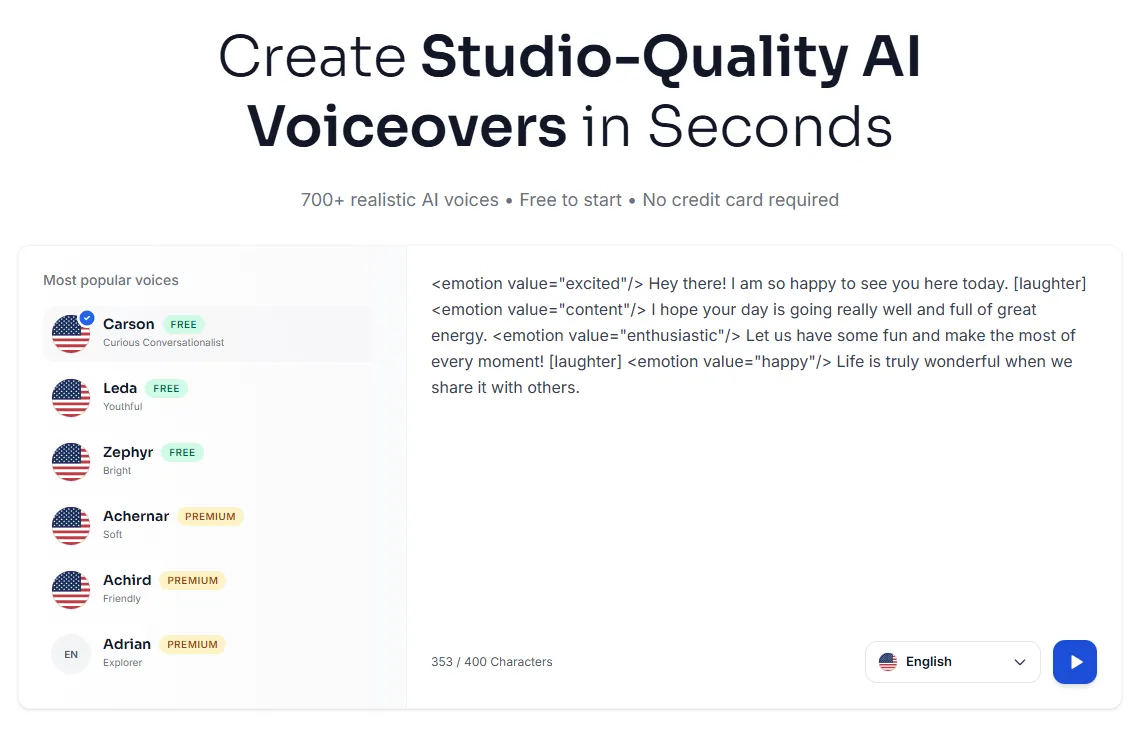
Emotion cues change how a line is read, not just how loud it is. In Kveeky, you can add a tag such as <emotion value="excited"/> before a line, or [laughter] for a short laugh. You can also adjust tone, pitch and speed for the whole read.
<emotion value="calm"/> Most robotic voiceovers have the same problem.
<emotion value="excited"/> And you can fix it in 5 minutes!
Our guide to AI voice emotion control shows which emotions fit which scripts.
SSML, if your tool supports it
Some text-to-speech tools accept SSML (Speech Synthesis Markup Language), a W3C standard. Its <break> element adds a pause, such as <break time="500ms"/>. Its <emphasis> element stresses a word, and <prosody> changes pitch, rate and volume.
Support varies by tool, so check your tool's docs before you rely on tags. If you want to understand what these settings change under the hood, read our explainer on prosody in AI voiceovers.

How do you choose a voice that fits your content?
A well-matched voice needs fewer fixes. A calm, mid-paced voice suits finance and training. An energetic voice suits gaming and short social clips, and a warm, slower voice suits self-help and stories.
Test 3 voices on the same 2 lines of your real script, not on a demo sentence. Pick the one that sounds right without any tweaks. Our guide to matching AI voice tone to your niche gives examples for common niches.
If your video has more than one speaker, give each one a clearly different voice. See how to generate dialogue with multiple AI voices. To keep one consistent voice across a whole channel or brand, read our guide to voice customization for video producers.
How do you polish the final audio?
Even a good voice track can feel empty when it sits in total silence. A few mixing steps in any video editor make it feel grounded.
- Add quiet room tone. A very low recording of a quiet room fills the gaps between words.
- Duck the music under the voice. Lower background music whenever the narrator speaks, so the two don't compete.
- Add light sound effects where they fit. A soft click on a screen recording or ambient sound in a story adds context.
- Cut to the voice. Generate the voiceover first, then edit your video to its timing.

Quick troubleshooting table
Use this when one part of the voiceover still sounds off.
| What you hear | Likely cause | Fix |
|---|---|---|
| Flat, one-pitch reading | Long sentences, no punctuation | Split sentences; add commas and periods |
| Rushed delivery | Default speed too fast for the format | Lower speed to 0.9x–0.95x |
| A word is mispronounced | Name, acronym or jargon | Spell it phonetically and regenerate that line |
| Wrong mood | Voice or emotion doesn't fit the topic | Try another voice or add an emotion tag |
| Sounds "floating" or empty | No background sound | Add quiet room tone and ducked music |
| Same energy on every line | No emphasis | Put one emotion cue on the key line only |
How does a text prompt become natural-sounding speech?
Modern text-to-speech uses neural networks in a few stages. First, the system cleans the text and works out how each word is pronounced. Then it predicts prosody, which is the rhythm, stress and pitch of the sentence.
Next, an acoustic model turns that plan into a sound representation, and a vocoder turns it into the audio you hear. Because the model reads the whole sentence, punctuation and word choice change the result. For the full picture, see how text-to-speech AI works.
Realistic AI voices: quick answers to common questions
People who search for a less robotic voice often ask which voice is the most realistic, and whether any of them is "real". Here are short, honest answers.
What is the most realistic AI voice or text to speech?
No single voice wins for every script. Realism depends on the model, the voice, the language and how well the script is written for the ear. A voice that sounds human on a demo line can still slip on names, numbers or a 10-minute read, so run a blind test: generate the same 2 lines of your real script in 3 or 4 voices and let someone pick without knowing which is which. Our roundup of free AI voice generators compares the main tools side by side.
Which free AI voice generator sounds most realistic for videos?
Test the voice you'll actually get on the free tier, because free plans often hold back the most natural voices. Free voices can sound close to human on short, well-punctuated lines; the gap usually shows on long reads, strong emotion and unusual names. Kveeky's free plan uses standard voices with 500 credits a month (about 6.6 minutes), and all 700+ voices come with paid plans from $9/month. Run the 5-minute fix above on any free voice before you judge it.
How do I convert text to speech with a human-like voice?
Write the script for the ear first, then paste it into a neural AI voice generator and test 3 voices on the same 2 lines. Pick the one that fits the topic, lower the speed slightly, add pauses with punctuation and put one emotion cue on the key line. Listen once, re-spell any misread names, then export MP3 or WAV for your video. In Kveeky, that means pasting the script, choosing from 700+ voices, adjusting tone, pitch and speed, and downloading the file.
What makes a text-to-speech voice sound human?
Human-sounding speech gets the prosody right: natural rhythm, stress on the right words, pitch that follows the meaning and pauses where a speaker would breathe. Neural models learn these patterns from recorded human speech and read the whole sentence before they speak. Your script supplies the rest, because contractions, short sentences and punctuation give the model the cues it needs.
How close can text to speech get to a real human voice?
Very close on short, clean sentences. In June 2024, Microsoft researchers reported that their VALL-E 2 model was the first to reach human parity on the LibriSpeech and VCTK benchmarks, which use read speech (arXiv:2406.05370, retrieved 2026-10-07). Long scripts, strong emotion, jokes and unusual names still expose AI voices more often than benchmark sentences do. Treat "human parity" as a lab result, and judge any voice on your own script.
How does text to speech compare to a human voiceover?
Text to speech wins on cost and edits: you change one line and regenerate it in the same voice, without booking a session. A skilled voice actor still wins on subtle acting, comedy timing and taking direction such as "warmer, but tired." Many teams use AI voices for explainers, training and frequent updates, and hire a person for flagship ads or character-heavy stories. Our breakdown of the cost of hiring a voice actor for 100 YouTube videos puts numbers on that trade-off.
Is text to speech a real voice?
The audio is synthetic, made by software, but most modern voices start from real people. Microsoft, for example, defines voice talent as the people whose voices are recorded and used to create synthetic voice models (Microsoft Learn, Text to speech transparency note, retrieved 2026-10-07). That's why consent matters. In 2021, voice actor Bev Standing sued TikTok's parent company, saying her recordings were used for its text-to-speech voice without permission; the court dismissed the case in September 2021 after the parties reported a settlement (CourtListener, Standing v. Bytedance E-Commerce, Inc., 7:21-cv-04033, retrieved 2026-10-07).
How do you humanize an AI voice, including for phone calls?
Apply the 5-minute fix: rewrite for the ear, add pauses, slow down slightly and use emotion only where it counts. For AI voice calls, keep each reply short and use one calm, consistent voice. In the US, the FCC ruled in February 2024 that AI-generated voices in calls count as "artificial" under the TCPA, so robocalls that use them need prior express consent (FCC news release, February 8, 2024, retrieved 2026-10-07). A more human-sounding voice doesn't change that rule.
More guides on natural-sounding AI voices
Every guide in this topic, in one place:
- Adding Personality to AI Voices: Pacing, Pauses, and Emphasis Tricks
- Matching AI Voice Tone to Your Niche: Gaming vs. Finance vs. Self-Help
- AI Voice With Emotion: How to Control Emotion in AI Voiceovers
- Mastering Prosody Modeling in AI Voiceovers: A Comprehensive Guide for Video Producers
- Female Speech Patterns: How AI Replicates Natural Women's Voice Characteristics
- Generate Dialogue with Multiple Voices
- Mastering Voice Customization: A Comprehensive Guide for Video Producers
- Sexy AI Voice Generator: Create Sultry & Attractive Voices for Content
Frequently asked questions
Why does my AI voice still sound robotic after I changed the voice?
The script is usually the cause. Long sentences, formal words and missing punctuation make any voice sound flat. Split sentences, add contractions and commas, then regenerate.
My educational video's AI voice sounds too robotic. What should I do?
Try a better AI voice or adjust how it sounds. Rewrite the script for the ear, lower the speed slightly and add pauses before you consider recording your own voice or removing the voiceover.
How do I make text to speech sound more natural for free?
Most of the fixes cost nothing: shorter sentences, contractions, punctuation and a slower speed. Kveeky's free plan gives 500 credits a month (about 6.6 minutes) with standard voices and no credit card.
Does SSML make text to speech sound more natural?
It can, if your tool supports it. SSML tags such as break, emphasis and prosody control pauses, stress, pitch and rate. Support varies, so check your tool's docs first.
How do I fix how an AI voice pronounces names?
Spell the name the way it sounds, for example "Shi-von" for Siobhan, and regenerate that line. Listen once more before you export the final file.
How can I stop AI voice agents from sounding robotic?
Use the same rules: short sentences, contractions and natural pauses in every scripted reply. Pick one calm, consistent voice and avoid reading long lists in a single sentence.
How we checked this guide
This guide is written by Govind Kumar for the Kveeky team. Disclosure: Kveeky makes an AI voice generator. The tips are general and work in most text-to-speech tools.
- SSML element names and attributes come from the W3C Speech Synthesis Markup Language (SSML) Version 1.1 specification, retrieved October 6, 2026.
- Kveeky features and plan details come from kveeky.com and its pricing page, retrieved October 7, 2026.
- Human parity result: Chen et al., "VALL-E 2: Neural Codec Language Models are Human Parity Zero-Shot Text to Speech Synthesizers", arXiv:2406.05370, June 2024, retrieved 2026-10-07.
- Voice talent definition: Microsoft Learn, "Text to speech transparency note", retrieved 2026-10-07.
- Lawsuit: Standing v. Bytedance E-Commerce, Inc., No. 7:21-cv-04033 (S.D.N.Y.), docket on CourtListener, retrieved 2026-10-07.
- AI voices in calls: FCC, "FCC Makes AI-Generated Voices in Robocalls Illegal", February 8, 2024, retrieved 2026-10-07.
- No Kveeky usage data is used in this guide.
Your next step: take one script you've already published, run the 5-minute pass above, and compare the two versions side by side. If you make training or course videos, our page on AI voiceover for e-learning shows how to apply these fixes to a full course.