The Lazy Creator's Guide to Batch-Producing 30 Videos in a Weekend

TL;DR
- This guide covers how to automate your video workflow using ai voiceover tools and smart script templates to hit high volume goals. It include a step by step plan for batching audio production and visual assembly so you can finish a months worth of content in just two days without burning out.
To batch produce videos, do each type of task for every video at once instead of finishing one video at a time. Write all 30 scripts, then generate all 30 voiceovers, then gather visuals, then edit and export in one queue. With short videos, one format and an AI voice, a month of content fits into one weekend.
Last updated: October 6, 2026. We rewrote this guide as a recommended plan and removed market statistics and examples we could not verify.
This guide is for solo creators and small teams who post short videos often and want to stop recording and editing every day. It gives you a weekend schedule, script and file templates, and the credit math for the voiceovers.
Key Takeaways
- Batch by task, not by video. Switching between writing, voicing and editing is what eats your time.
- Use one format for the whole batch, such as hook, value and call to action in 30 to 60 seconds.
- AI voiceovers remove the recording session. Pick one voice and keep the same settings for all 30 scripts.
- Do the credit math first. 30 videos of about 45 seconds need roughly 22 to 23 minutes of audio. That's more than Kveeky's free plan (about 6.6 minutes) but within Basic's 100 minutes.
- Name files consistently so audio, visuals and exports match up without hunting.
On this page: Is it realistic? · Prep · Saturday morning · Saturday midday · Saturday afternoon · Sunday · Scheduling · FAQ
Can you batch produce videos for a whole month in one weekend?
Yes, if the videos are short and follow one template. When you batch produce videos this way, a month of posts can come from 2 days of work. It's not realistic for 30 long, story-driven videos with custom edits.
| Batch works well for | Batch works badly for |
|---|---|
| 30 to 60 second tips, explainers and product spotlights | Long documentaries or story videos |
| Series with the same intro, music and layout | Videos that each need a unique style |
| Faceless channels with a voiceover | On-camera content that depends on filming days |
| Evergreen topics | Breaking news or fast-moving trends |

Before the weekend: pick one format and one voice
Spend an hour before the weekend making these decisions, so you don't make them 30 times.
- List 30 topics in a spreadsheet, one per row, with a working title.
- Choose one format, such as 45 seconds: hook, value, call to action.
- Choose one voice and note its settings (speed, pitch, any emotion tags).
- Set up an editing template with intro, captions style, music and export settings.
- Check your audio budget. At about 45 seconds per video, 30 videos need about 22 to 23 minutes of voiceover. Kveeky's free plan covers about 6.6 minutes a month, so a batch this size needs a paid plan such as Basic (100 minutes a month).
Saturday morning: write all 30 scripts
Use the same 3-part template for every script, so writing becomes filling in blanks.
| Part | Length | Example |
|---|---|---|
| Hook | About 5 seconds | "Stop typing the same data into 3 spreadsheets." |
| Value | About 30 seconds | "Connect them once. Now every update shows up everywhere, and you never copy a row again." |
| Call to action | About 5 seconds | "Follow for one time-saving tip every day." |
- Draft fast, edit once. You can use an AI writing assistant for first drafts, then check every fact and rewrite lines that sound stiff.
- Write for the ear. Short sentences, commas for pauses, numbers and symbols as words.
- Fix your master script first. Get one script sounding right, then apply the same style rules to the other 29.
Our guide to writing an AI voiceover script has more on pacing and pronunciation.
Saturday midday: generate all 30 voiceovers
With scripts done, voicing is repetitive in a good way.
- Open your voice tool with the voice and settings you chose.
- Paste one script, generate, listen once. Fix any mispronounced word by re-spelling it.
- Download and name the file to match the topic row, for example
07_hook-value-cta.mp3. - Repeat for all 30 scripts, keeping the same voice and settings so the series sounds consistent.
In Kveeky, you choose from 700+ voices, adjust tone, pitch and speed, and add emotion tags such as <emotion value="excited"/> to the hook line. Download as MP3 for most uploads, or WAV if you plan more audio editing.
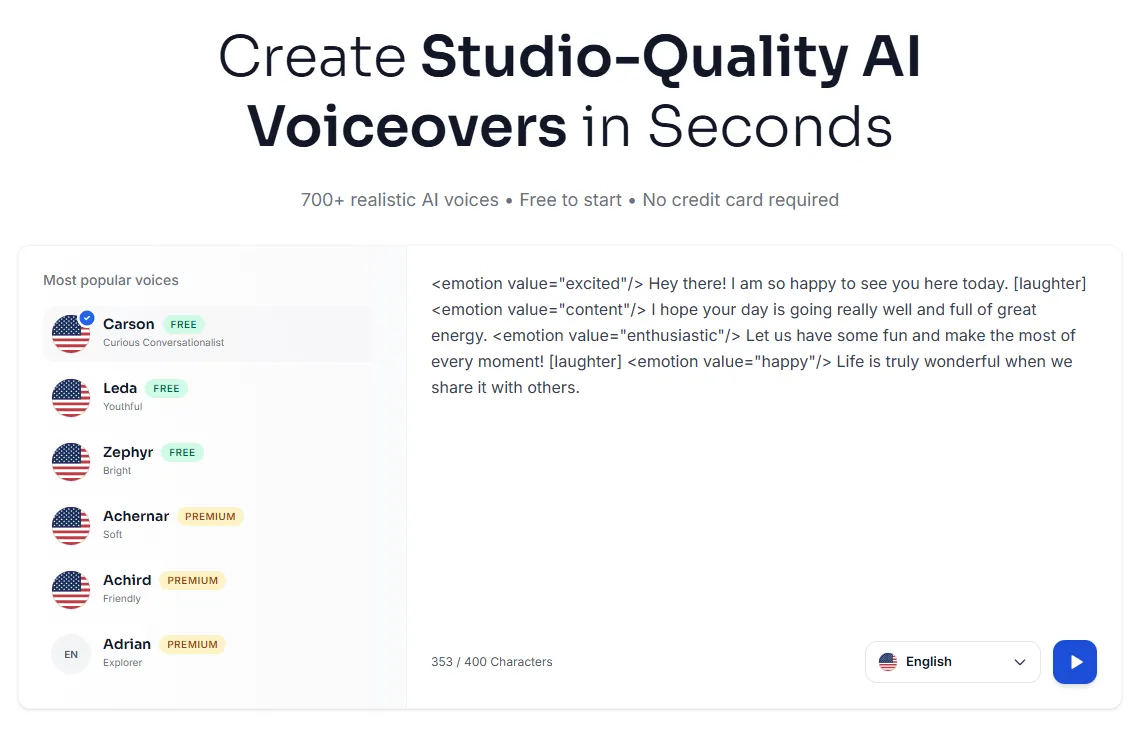
Not sure which voice to commit to for 30 videos? A/B test 2 voiceover styles on a few hooks before your batch weekend.
Saturday afternoon: build the visual library
Stop hunting for the perfect clip for every sentence. Build one library of matching assets and reuse it across the batch.
- Collect clips in sets that share lighting and color, so videos look like a series.
- Record screen footage in one long session, then cut it into clips. Our tips for screen recording with voiceover help here.
- Prepare overlays once: lower thirds, logo, captions style, call-to-action card.
- Use a fixed folder structure so you always know where a file lives.

Sunday: assemble, caption and export
Sunday is assembly. If Saturday went well, this is the easiest day.
- Duplicate your editing template for each video.
- Drop in the voiceover first, then place visuals to match each sentence.
- Add captions with your editor's auto-caption feature, then check names and numbers.
- Keep music, intro and outro the same across the series.
- Queue all exports in your editor's render queue and let them run.
If you'd rather make videos one at a time on busy weeks, the 30-minute AI voiceover workflow uses the same steps for a single video.
After the weekend: schedule and review
- Schedule uploads across the month instead of posting all at once.
- Label AI voices where platforms ask you to. Check each platform's current rules on synthetic or AI-generated content.
- Track one metric per video, such as average view duration, and note which topics and hooks did best.
- Feed what you learn into the next batch. Keep the template; change the topics and hooks.
Frequently asked questions
How long should each video be when batch producing?
Short videos of 30 to 60 seconds are the easiest to batch. They fit one template, need fewer visuals and take less audio to voice.
How many voiceover minutes do I need for 30 videos?
Multiply video length by 30. At about 45 seconds each, that's about 22 to 23 minutes of audio. Kveeky's Basic plan includes 100 minutes a month; the free plan covers about 6.6 minutes.
Should I use the same AI voice for all 30 videos?
Yes, for one series. A consistent voice helps viewers recognize your channel. Use a different voice only for a different series or format.
Can I write all 30 scripts with AI?
You can use AI for first drafts, but edit each one yourself. Check facts, cut filler and make sure each script sounds natural when read aloud.
Should I post all 30 videos at once?
No. Schedule them across the month so you post regularly without extra work on busy days.
How we checked this guide
This guide is written by Ankit Agarwal for the Kveeky team. Disclosure: Kveeky makes an AI voice generator.
- The weekend schedule is a recommended plan, not a measured case study.
- Kveeky plan figures (free plan about 6.6 minutes, Basic 100 minutes a month) and features come from Kveeky pricing and kveeky.com, retrieved 2026-10-06. The 22 to 23 minute estimate is our own calculation (30 × 45 seconds).
- No Kveeky usage data is used in this guide.
Next step: fill a spreadsheet with 30 topics this week, then book one weekend for the batch. If you're turning longer content into short clips, see how to turn one webinar into 10 short-form videos with the same approach.