# Clipchamp Text to Speech vs Kveeky: Features, Limits and Pricing

Published: October 14, 2026 · Author: Govind Kumar

Clipchamp text to speech is a free voiceover feature inside Microsoft's video editor, powered by Azure AI Speech, with voices in over 80 languages. [Kveeky](https://kveeky.com) is a dedicated voice generator with 700+ voices, a stated monthly allowance and commercial rights on every paid plan. Pick Clipchamp to voice a video you're already editing; pick Kveeky when the voice file itself matters.

*Last updated: October 13, 2026. Clipchamp details come from Microsoft's own support pages, Clipchamp's site and Microsoft's terms; Kveeky details come from kveeky.com/pricing.*

This guide is for creators, teachers and small teams in the US and UK who use Clipchamp on Windows or in the browser. It compares features, limits, prices in USD and GBP, what Microsoft's terms say about commercial use, and how to use both tools together.

> **Key Takeaways**
>
> - **Clipchamp wins on price and languages.** Its text to speech is free to use, works inside the editor and covers over 80 languages, according to Clipchamp.
> - **Kveeky wins on the voice file and allowance.** You get a downloadable audio file, 100 minutes a month on Basic for $9 ($7.50 billed yearly), and commercial rights on every paid plan.
> - **Clipchamp's audio-only export is an .m4a file**, and character limits vary by language, so long scripts must be split into several items.
> - **Microsoft doesn't publish a commercial-use statement for Clipchamp's AI voices.** Its stock-media rule allows commercial use of videos made on paid plans; text to speech isn't mentioned.
> - **Clipchamp Premium comes with Microsoft 365 Personal or Family**: $9.99 or $12.99 a month in the US, £8.49 or £10.49 in the UK (October 13, 2026).

**On this page:** [Quick verdict](#clipchamp-vs-kveeky-overview) · [Side by side](#side-by-side-comparison) · [How Clipchamp TTS works](#how-clipchamp-text-to-speech-works) · [Limits](#clipchamp-limits) · [Where Kveeky wins](#where-does-kveeky-win) · [Commercial use](#commercial-use) · [Pricing](#clipchamp-premium-vs-kveeky-cost) · [Worked example](#worked-example-4-videos-a-month) · [Use both](#using-a-kveeky-voice-in-clipchamp) · [Decision table](#decision-table) · [FAQ](#frequently-asked-questions)

## Clipchamp vs Kveeky overview

Use Clipchamp's text to speech for school projects, slide videos and internal clips you're already editing in Clipchamp. Use Kveeky when the voice goes into client work, ads, courses or a regular channel, where you want a reusable audio file and written commercial rights.

The two tools do different jobs. Clipchamp is a video editor that includes a voiceover feature. Kveeky is a voice generator: you paste a script, pick a voice and download audio for any editor, including Clipchamp.

Clipchamp also beats Kveeky on language count. If you need a voice in a language outside Kveeky's 40+, Clipchamp may be the better free choice.

<div style="margin:28px 0;padding:20px 22px;background:var(--kv-blue-50);border:1px solid var(--kv-blue-100);border-radius:var(--kv-radius-md);box-shadow:var(--kv-shadow-xs)" ><div style="font:700 17px/1.3 var(--kv-font-heading);color:var(--kv-blue-950);margin-bottom:8px">Find your fit in one click</div><p style="margin:0 0 12px;font:400 15px/1.6 var(--kv-font-body);color:var(--kv-gray-600)">Pick the line that sounds most like your project. The answer uses only what this guide found.</p><div style="display:flex;flex-wrap:wrap;gap:10px;margin-bottom:12px"><button type="button" class="cl-pick-b" data-i="0" aria-pressed="false" style="min-height:44px;padding:0 16px;border:1px solid var(--kv-blue-700);border-radius:var(--kv-radius-md);background:var(--kv-white);color:var(--kv-blue-700);font:600 15px/1.2 var(--kv-font-body);cursor:pointer;text-align:left">A school or class video</button><button type="button" class="cl-pick-b" data-i="1" aria-pressed="false" style="min-height:44px;padding:0 16px;border:1px solid var(--kv-blue-700);border-radius:var(--kv-radius-md);background:var(--kv-white);color:var(--kv-blue-700);font:600 15px/1.2 var(--kv-font-body);cursor:pointer;text-align:left">A language outside Kveeky's 40+</button><button type="button" class="cl-pick-b" data-i="2" aria-pressed="false" style="min-height:44px;padding:0 16px;border:1px solid var(--kv-blue-700);border-radius:var(--kv-radius-md);background:var(--kv-white);color:var(--kv-blue-700);font:600 15px/1.2 var(--kv-font-body);cursor:pointer;text-align:left">Client work or paid ads</button><button type="button" class="cl-pick-b" data-i="3" aria-pressed="false" style="min-height:44px;padding:0 16px;border:1px solid var(--kv-blue-700);border-radius:var(--kv-radius-md);background:var(--kv-white);color:var(--kv-blue-700);font:600 15px/1.2 var(--kv-font-body);cursor:pointer;text-align:left">A 20-minute course</button><button type="button" class="cl-pick-b" data-i="4" aria-pressed="false" style="min-height:44px;padding:0 16px;border:1px solid var(--kv-blue-700);border-radius:var(--kv-radius-md);background:var(--kv-white);color:var(--kv-blue-700);font:600 15px/1.2 var(--kv-font-body);cursor:pointer;text-align:left">An internal update at work</button></div><div aria-live="polite"><div class="cl-pick-r" hidden style="padding:14px 16px;background:var(--kv-white);border:1px solid var(--kv-blue-100);border-radius:var(--kv-radius-md);font:400 16px/1.6 var(--kv-font-body);color:var(--kv-gray-800)"><p style="margin:0;font:400 16px/1.6 var(--kv-font-body);color:var(--kv-gray-800)"><strong>Use Clipchamp.</strong> The voice is free with a personal Microsoft account, it runs in the browser, and there is no extra file to move around.</p></div><div class="cl-pick-r" hidden style="padding:14px 16px;background:var(--kv-white);border:1px solid var(--kv-blue-100);border-radius:var(--kv-radius-md);font:400 16px/1.6 var(--kv-font-body);color:var(--kv-gray-800)"><p style="margin:0;font:400 16px/1.6 var(--kv-font-body);color:var(--kv-gray-800)"><strong>Use Clipchamp.</strong> It says its AI voiceover covers over 80 languages. Check <a href="/languages/spanish-text-to-speech">Kveeky's language pages</a> first, in case your language is already covered.</p></div><div class="cl-pick-r" hidden style="padding:14px 16px;background:var(--kv-white);border:1px solid var(--kv-blue-100);border-radius:var(--kv-radius-md);font:400 16px/1.6 var(--kv-font-body);color:var(--kv-gray-800)"><p style="margin:0;font:400 16px/1.6 var(--kv-font-body);color:var(--kv-gray-800)"><strong>Use Kveeky.</strong> Its rights are written on the pricing page, while Microsoft has no commercial-use statement for Clipchamp's AI voices. Run the <a href="#can-you-use-clipchamp-text-to-speech-commercially">commercial-use checklist</a> if you still want Clipchamp.</p></div><div class="cl-pick-r" hidden style="padding:14px 16px;background:var(--kv-white);border:1px solid var(--kv-blue-100);border-radius:var(--kv-radius-md);font:400 16px/1.6 var(--kv-font-body);color:var(--kv-gray-800)"><p style="margin:0;font:400 16px/1.6 var(--kv-font-body);color:var(--kv-gray-800)"><strong>Use Kveeky for the voice and Clipchamp for the edit.</strong> Clipchamp splits long scripts by a per-language character limit and exports audio-only as .m4a. Kveeky states a monthly allowance and lets you download the audio.</p></div><div class="cl-pick-r" hidden style="padding:14px 16px;background:var(--kv-white);border:1px solid var(--kv-blue-100);border-radius:var(--kv-radius-md);font:400 16px/1.6 var(--kv-font-body);color:var(--kv-gray-800)"><p style="margin:0;font:400 16px/1.6 var(--kv-font-body);color:var(--kv-gray-800)"><strong>Use Clipchamp.</strong> A standard version is included in some Microsoft 365 business and education licenses. Check your organization's own agreement.</p></div></div></div>
<script>
(function(){try{var b=document.querySelectorAll(".cl-pick-b"),r=document.querySelectorAll(".cl-pick-r");function pick(k){for(var i=0;i<r.length;i++){r[i].hidden=(i!==k);b[i].setAttribute("aria-pressed",i===k?"true":"false");b[i].style.background=(i===k)?"var(--kv-blue-700)":"var(--kv-white)";b[i].style.color=(i===k)?"var(--kv-white)":"var(--kv-blue-700)"}}for(var i=0;i<b.length;i++){(function(k){b[k].addEventListener("click",function(){pick(k)})})(i)}}catch(e){}})();
</script>

## Side-by-side comparison

Clipchamp is free, built into editing and broad on languages. Kveeky has a documented voice library, a fixed allowance and plan-level commercial rights. The table shows what each vendor states on its own pages.

<table>
<thead>
<tr><th>What you need</th><th>Clipchamp text to speech</th><th>Kveeky</th></tr>
</thead>
<tbody>
<tr><td>What it is</td><td>A feature in Microsoft's Clipchamp video editor (browser and Windows app)</td><td>A standalone AI voice generator in the browser</td></tr>
<tr><td>Voice engine</td><td>Microsoft Azure AI Speech</td><td>Kveeky's own voice catalog</td></tr>
<tr><td>Price to start</td><td>Free with a personal Microsoft account</td><td>Free plan: 500 credits a month (about 40 seconds), standard voices, no credit card</td></tr>
<tr><td>Paid plan</td><td>Premium comes with Microsoft 365 Personal ($9.99/month US, £8.49/month UK) or Family</td><td>From $9/month, or $7.50/month billed yearly</td></tr>
<tr><td>Monthly allowance</td><td>None published; character limits per item vary by language</td><td>Stated per plan: 100 minutes on Basic, up to 1,000 on Business</td></tr>
<tr><td>Voices</td><td>"Hundreds" of voices, filtered by the language you pick</td><td>700+ voices on paid plans</td></tr>
<tr><td>Languages</td><td>Over 80 languages for voiceover</td><td>40+ languages with voices</td></tr>
<tr><td>Voice controls</td><td>5 pitch levels; pace from 0.5x to 2x; punctuation sets pauses</td><td>Voice, speed and volume; 6 emotions to choose from; custom punctuation for pauses and word guides</td></tr>
<tr><td>Audio-only export</td><td>MPEG-4 audio (.m4a)</td><td>Audio download</td></tr>
<tr><td>Commercial use of the voice</td><td>No statement for AI voices; paid-plan videos may be used commercially under the stock-media rule</td><td>Every paid plan includes commercial usage rights for generated audio</td></tr>
<tr><td>Voice cloning</td><td>Not mentioned in Microsoft's text-to-speech help page</td><td>5 custom voice clones on Basic, up to 20 on Business</td></tr>
<tr><td>Video editing</td><td>Full editor, auto captions, stock media, exports up to 4K on Premium</td><td>None: you add the audio in your editor</td></tr>
</tbody>
</table>

A note on voice counts: Clipchamp's February 2026 update post says "hundreds of realistic AI voices", without an exact number. We don't rank Clipchamp on voice count for that reason.

## How Clipchamp text to speech works

You create the voice inside a project, and Clipchamp places it on the timeline above your video. Microsoft's help page lists these steps:

1. Open the **Record & create** tab and choose **Text to speech**. The tab opens in the property panel.
2. Pick a **language**, then a **voice**. Use "hear this voice" to preview it.
3. Open **advanced settings** to set pitch (extra low to extra high) and drag the pace slider.
4. Type or paste your text, then click **Preview** to listen.
5. Click **Save**. The audio lands on the timeline and in your media tab.

Three strengths are real. You can edit the text later and the timeline updates automatically. Captions, stock media and the voice stay in one project. And free exports go up to 1080p with no watermark, according to Clipchamp's pricing page.

Punctuation is your main delivery control. Microsoft says a period adds a moderate pause and a comma a short one. Exclamation marks and capital letters are "unlikely to affect the delivery".

## Clipchamp limits

The main limits are per-item character caps, an .m4a audio file and an online-only engine. None of them matter for a short school video; all of them show up on a 20-minute course.

<table>
<thead>
<tr><th>Limit</th><th>What Microsoft says</th><th>What it means for you</th></tr>
</thead>
<tbody>
<tr><td>Character limit</td><td>It "will vary across different languages"; split long text into multiple items</td><td>Long scripts become many short clips to line up on the timeline</td></tr>
<tr><td>Audio-only file type</td><td>The audio-only option gives "an MPEG-4 (.m4a) audio file"</td><td>Some podcast hosts, LMS tools and phone systems want MP3 or WAV, so you may need a converter</td></tr>
<tr><td>Internet connection</td><td>The feature runs on Azure AI Speech; work networks must allow Microsoft's speech servers</td><td>No offline voiceovers; on a locked-down work network, voices can stay stuck on "loading"</td></tr>
<tr><td>Delivery control</td><td>Pitch, pace and punctuation pauses</td><td>No published way to fix how a single word is pronounced</td></tr>
<tr><td>Re-use</td><td>The voice is saved to the project's media tab</td><td>Fine inside Clipchamp; extra steps to reuse the same line in another editor</td></tr>
</tbody>
</table>

If your IT team blocks the voices, Microsoft's help page asks admins to allow augloop.svc.cloud.microsoft and eastus.tts.speech.microsoft.com, including WebSocket traffic. That applies to Clipchamp for work accounts.

## Where does Kveeky win?

Kveeky wins when the voice has to carry a brand, a course or client work. You get a known allowance, standard audio files and commercial rights written on the pricing page.

- **700+ voices.** The full library unlocks on any paid plan; the free plan uses standard voices.
- **Clear rights.** "Every paid plan includes commercial usage rights for generated audio" (kveeky.com/pricing).
- **Predictable volume.** Basic includes 100 minutes a month; Pro 133; Premium 200; Business 1,000.
- **Audio download.** The file drops into Clipchamp, PowerPoint, Premiere Pro, an LMS or a podcast host.
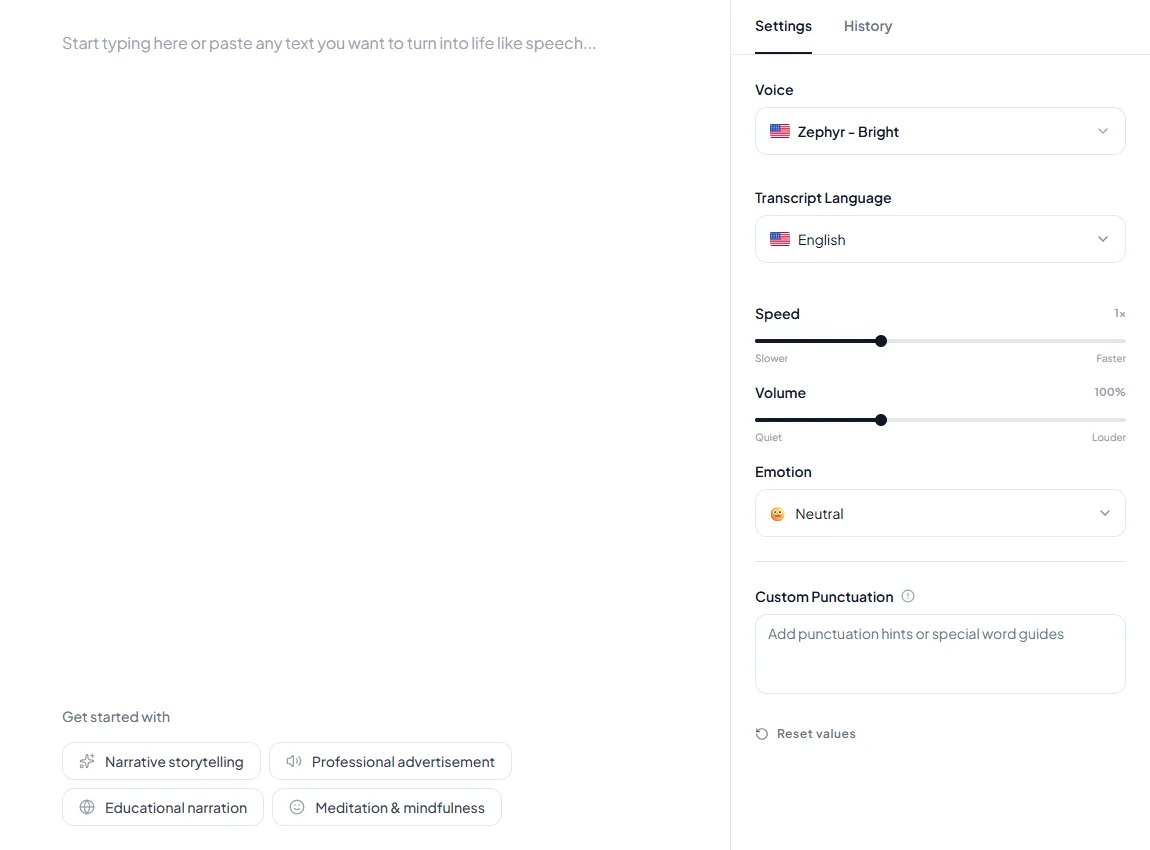
- **More delivery control.** Speed and volume controls, 6 emotions to choose from (Neutral, Happy, Love, Angry, Calm, Sad), and custom punctuation for pauses and word guides. Kveeky has no pitch control, which Clipchamp does.
- **Your own voice.** Paid plans include custom voice clones (5 on Basic, 10 on Pro).

Where Kveeky loses: it isn't a video editor, it supports fewer languages than Clipchamp, and its free plan is about 40 seconds a month. You can hear the voices before you sign up on the [Kveeky voice generator for training videos](https://kveeky.com/voiceover/training-videos/).

## Commercial use

Microsoft doesn't say so directly. Its documents allow commercial use of videos made on paid plans, but none of them mention the AI voices. Treat client and ad work as "check first".

Here is what each Microsoft document says (all retrieved October 13, 2026):

<table>
<thead>
<tr><th>Microsoft document</th><th>What it says</th><th>What it means for you</th></tr>
</thead>
<tbody>
<tr><td>Text-to-speech help page and Clipchamp's text-to-speech update post</td><td>No statement on commercial use</td><td>There is no voice-specific permission to point to</td></tr>
<tr><td>Help page on copyright warnings (personal accounts)</td><td>If you paid through a subscription plan, "you have the right to use the resulting video for commercial and non-commercial purposes"</td><td>Covers stock media in videos made on a paid plan; doesn't name AI voices</td></tr>
<tr><td>Same help page</td><td>You may not redistribute the underlying stock files, "use them in other editing programs, share, or sell them"</td><td>Exporting assets to reuse elsewhere is restricted for stock media</td></tr>
<tr><td>Microsoft Services Agreement (effective September 30, 2026)</td><td>Lists Clipchamp as a covered service; its AI section says you decide the rights in output content and bars using AI output to train other AI</td><td>Microsoft doesn't promise you rights in the voice audio</td></tr>
<tr><td>Microsoft 365 Family and Personal use terms (January 2023)</td><td>"The noncommercial use restriction in the Microsoft Services Agreement does not apply to Microsoft 365 subscription Services."</td><td>A Premium subscription isn't limited to home use by the agreement</td></tr>
</tbody>
</table>

Work and school accounts are covered by separate Microsoft commercial terms, so check your organization's agreement instead.

Before you use a Clipchamp voice in paid work, run this checklist:

<div style="margin:28px 0;padding:20px 22px;background:var(--kv-white);border:1px solid var(--kv-blue-100);border-radius:var(--kv-radius-md);box-shadow:var(--kv-shadow-xs)" ><div style="font:700 17px/1.3 var(--kv-font-heading);color:var(--kv-blue-950);margin-bottom:8px">Before you use a Clipchamp voice in paid work</div><p style="margin:0 0 12px;font:400 15px/1.6 var(--kv-font-body);color:var(--kv-gray-600)">Tick each step as you finish it.</p><label style="display:flex;align-items:flex-start;gap:12px;min-height:44px;padding:8px 0;font:400 16px/1.5 var(--kv-font-body);color:var(--kv-gray-800);cursor:pointer"><input type="checkbox" class="cl-chk-c" style="width:22px;height:22px;margin-top:2px;flex:none;accent-color:var(--kv-blue-700)"><span>Confirm whether you're on a free or paid plan; the stock-media permission is tied to paid plans.</span></label><label style="display:flex;align-items:flex-start;gap:12px;min-height:44px;padding:8px 0;font:400 16px/1.5 var(--kv-font-body);color:var(--kv-gray-800);cursor:pointer"><input type="checkbox" class="cl-chk-c" style="width:22px;height:22px;margin-top:2px;flex:none;accent-color:var(--kv-blue-700)"><span>Check every stock asset in the video for a premium or free label.</span></label><label style="display:flex;align-items:flex-start;gap:12px;min-height:44px;padding:8px 0;font:400 16px/1.5 var(--kv-font-body);color:var(--kv-gray-800);cursor:pointer"><input type="checkbox" class="cl-chk-c" style="width:22px;height:22px;margin-top:2px;flex:none;accent-color:var(--kv-blue-700)"><span>Keep the voice inside the exported video; don't sell or share the audio on its own.</span></label><label style="display:flex;align-items:flex-start;gap:12px;min-height:44px;padding:8px 0;font:400 16px/1.5 var(--kv-font-body);color:var(--kv-gray-800);cursor:pointer"><input type="checkbox" class="cl-chk-c" style="width:22px;height:22px;margin-top:2px;flex:none;accent-color:var(--kv-blue-700)"><span>Save a screenshot of your plan, the voice and the date.</span></label><label style="display:flex;align-items:flex-start;gap:12px;min-height:44px;padding:8px 0;font:400 16px/1.5 var(--kv-font-body);color:var(--kv-gray-800);cursor:pointer"><input type="checkbox" class="cl-chk-c" style="width:22px;height:22px;margin-top:2px;flex:none;accent-color:var(--kv-blue-700)"><span>If a client or ad budget depends on it, ask Microsoft support for written confirmation.</span></label><div id="cl-chk-out" aria-live="polite" style="margin-top:8px;font:600 15px/1.4 var(--kv-font-body);color:var(--kv-blue-950)">Ticked: 0 of 5</div></div>
<script>
(function(){try{var b=document.querySelectorAll(".cl-chk-c"),o=document.getElementById("cl-chk-out");if(!o)return;function u(){var n=0;for(var i=0;i<b.length;i++){if(b[i].checked)n++}o.textContent="Ticked: "+n+" of "+b.length+(n===b.length?". All done.":"")}for(var i=0;i<b.length;i++){b[i].addEventListener("change",u)}}catch(e){}})();
</script>

This isn't legal advice. For a wider view, see our table of [commercial rights by plan across 10 AI voice tools](https://kveeky.com/blog/ai-voice-commercial-use-rights).

## Clipchamp Premium vs Kveeky cost

Clipchamp itself is free; Premium comes with Microsoft 365 Personal at $9.99 a month in the US or £8.49 in the UK. Kveeky starts at $9 a month, or $7.50 billed yearly, and bills in USD.

<table>
<thead>
<tr><th>Plan</th><th>Monthly</th><th>Yearly</th><th>Voice allowance</th></tr>
</thead>
<tbody>
<tr><td>Clipchamp Free</td><td>$0 / £0</td><td>$0 / £0</td><td>Text to speech included; no allowance published</td></tr>
<tr><td>Microsoft 365 Personal (adds Clipchamp Premium)</td><td>$9.99 / £8.49</td><td>$99.99 / £84.99</td><td>No text-to-speech allowance published</td></tr>
<tr><td>Microsoft 365 Family (adds Clipchamp Premium)</td><td>$12.99 / £10.49</td><td>$129.99 / £104.99</td><td>No text-to-speech allowance published</td></tr>
<tr><td>Kveeky Free</td><td>$0</td><td>$0</td><td>About 40 seconds/month, standard voices</td></tr>
<tr><td>Kveeky Basic</td><td>$9</td><td>$7.50/month ($90/year)</td><td>100 minutes/month, all 700+ voices</td></tr>
<tr><td>Kveeky Pro</td><td>$19.99</td><td>$12.50/month ($149.99/year)</td><td>133 minutes/month, voice localization</td></tr>
</tbody>
</table>

The two prices buy different things. Clipchamp Premium adds 4K exports, premium stock assets and a brand kit, according to Clipchamp's pricing page. It doesn't add a documented voice allowance. Kveeky pays for voice minutes and rights.

For work accounts, Clipchamp says a standard version is included in some Microsoft 365 business and education licenses. All premium features and AI video creation need a Copilot license.

## Worked example: 4 videos a month

Say your team makes 4 training videos a month, each with 5 minutes of narration. That's 20 finished minutes. Add 50% for retakes and script changes, and you need about 30 minutes of generated audio.

<table>
<thead>
<tr><th>Option</th><th>Covers 30 minutes?</th><th>Commercial rights for the voice</th><th>Monthly cost</th></tr>
</thead>
<tbody>
<tr><td>Clipchamp Free</td><td>No allowance published; split long scripts by character limit</td><td>No voice statement; stock rule covers paid plans only</td><td>$0</td></tr>
<tr><td>Clipchamp via Microsoft 365 Personal</td><td>No allowance published</td><td>No voice statement; paid-plan videos may be used commercially</td><td>$9.99 (£8.49)</td></tr>
<tr><td>Kveeky Free</td><td>No: about 40 seconds</td><td>Not listed on Free</td><td>$0</td></tr>
<tr><td>Kveeky Basic</td><td>Yes, with about 70 minutes spare</td><td>Yes, on every paid plan</td><td>$9, or $7.50 billed yearly</td></tr>
</tbody>
</table>

On Kveeky Basic billed yearly, that's about $0.38 per finished minute ($7.50 ÷ 20). This is our calculation. For internal videos that never leave your company, Clipchamp's free voice may be all you need.

<div style="margin:28px 0;padding:20px 22px;background:var(--kv-blue-50);border:1px solid var(--kv-blue-100);border-radius:var(--kv-radius-md);box-shadow:var(--kv-shadow-xs)" ><div style="font:700 17px/1.3 var(--kv-font-heading);color:var(--kv-blue-950);margin-bottom:8px">How many voice minutes does your team need?</div><p style="margin:0 0 12px;font:400 15px/1.6 var(--kv-font-body);color:var(--kv-gray-600)">Change the numbers to match your team. It uses the plan allowances from the table above.</p><div style="display:flex;flex-wrap:wrap;gap:12px;margin-bottom:14px"><label style="flex:1 1 150px;font:600 15px/1.4 var(--kv-font-body);color:var(--kv-gray-800)">Videos a month<input id="cl-v" type="number" min="0" step="1" value="4" inputmode="decimal" style="display:block;box-sizing:border-box;width:100%;min-height:44px;margin-top:6px;padding:0 12px;border:1px solid var(--kv-gray-400);border-radius:var(--kv-radius-md);background:var(--kv-white);color:var(--kv-gray-800);font:400 16px/1.2 var(--kv-font-body)"></label><label style="flex:1 1 150px;font:600 15px/1.4 var(--kv-font-body);color:var(--kv-gray-800)">Minutes of narration per video<input id="cl-m" type="number" min="0" step="0.5" value="5" inputmode="decimal" style="display:block;box-sizing:border-box;width:100%;min-height:44px;margin-top:6px;padding:0 12px;border:1px solid var(--kv-gray-400);border-radius:var(--kv-radius-md);background:var(--kv-white);color:var(--kv-gray-800);font:400 16px/1.2 var(--kv-font-body)"></label><label style="flex:1 1 150px;font:600 15px/1.4 var(--kv-font-body);color:var(--kv-gray-800)">Extra for retakes (%)<input id="cl-r" type="number" min="0" step="5" value="50" inputmode="decimal" style="display:block;box-sizing:border-box;width:100%;min-height:44px;margin-top:6px;padding:0 12px;border:1px solid var(--kv-gray-400);border-radius:var(--kv-radius-md);background:var(--kv-white);color:var(--kv-gray-800);font:400 16px/1.2 var(--kv-font-body)"></label></div><div id="cl-out" aria-live="polite" style="padding:14px 16px;background:var(--kv-white);border:1px solid var(--kv-blue-100);border-radius:var(--kv-radius-md);font:400 16px/1.6 var(--kv-font-body);color:var(--kv-gray-800)">With 4 videos a month at 5 minutes each and 50% extra for retakes, you need about <strong>30 minutes</strong> of generated audio a month. Kveeky Basic (100 minutes) covers it. On Basic billed yearly that is about <strong>$0.38 per finished minute</strong>.</div></div>
<script>
(function(){try{var v=document.getElementById("cl-v"),s=document.getElementById("cl-m"),r=document.getElementById("cl-r"),o=document.getElementById("cl-out");if(!v||!s||!r||!o)return;
function calc(){var vi=Math.max(0,+v.value||0),mi=Math.max(0,+s.value||0),re=Math.max(0,+r.value||0);var fin=vi*mi,need=fin*(1+re/100);var f=Math.round(fin*10)/10,n=Math.round(need);var h;
if(need<=0){o.textContent="Enter your numbers to see the result.";return}
if(need<=0.67){h="The Kveeky Free plan (about 40 seconds a month, standard voices) covers it, but Free does not list commercial rights."}
else if(need<=100){h="Kveeky Basic (100 minutes) covers it, with about "+Math.round(100-need)+" minutes spare. Billed yearly that is about <strong>$"+(7.5/fin).toFixed(2)+" per finished minute</strong> ($7.50 divided by "+f+" finished minutes), or $"+(9/fin).toFixed(2)+" billed monthly."}
else if(need<=133){h="Kveeky Pro (133 minutes) covers it. Billed yearly that is about <strong>$"+(12.5/fin).toFixed(2)+" per finished minute</strong> ($12.50 divided by "+f+" finished minutes)."}
else if(need<=200){h="Kveeky Premium (200 minutes) covers it. See the pricing page for its price."}
else if(need<=1000){h="Kveeky Business (up to 1,000 minutes) covers it. See the pricing page for its price."}
else{h="That is more than the 1,000 minutes on Business. Check the pricing page or ask Kveeky."}
o.innerHTML="You need about <strong>"+n+" minutes</strong> of generated audio a month ("+f+" finished minutes plus retakes). "+h}
["input","change"].forEach(function(e){v.addEventListener(e,calc);s.addEventListener(e,calc);r.addEventListener(e,calc)});calc()}catch(e){}})();
</script>

Not sure how long your script runs? Paste it into the [words to minutes calculator](https://kveeky.com/resources/words-to-minutes-calculator/) first. For full per-video numbers, see [what an AI voiceover costs per video](https://kveeky.com/blog/ai-voiceover-cost-per-video).

## Using a Kveeky voice in Clipchamp

You can use both: generate the voice in Kveeky, then edit the video in Clipchamp. Clipchamp imports common audio files, so a voiceover downloaded from Kveeky can go straight into your media tab.

<figure>
<svg viewBox="0 0 1200 420" xmlns="http://www.w3.org/2000/svg" role="img" aria-label="Five-step workflow: write the script, generate the voice in Kveeky, download the audio, import into Clipchamp and line up the video, then add captions and export" style="width:100%;height:auto;display:block">
<title>Kveeky voice, Clipchamp edit: a 5-step workflow</title>
<desc>Five boxes connected by arrows from left to right. Step 1, write the script. Step 2, generate the voice in Kveeky. Step 3, download the audio. Step 4, import the audio into Clipchamp and line up the video. Step 5, add auto captions and export the video.</desc>
<rect x="0" y="0" width="1200" height="420" rx="16" fill="#ffffff"></rect>
<text x="600" y="62" text-anchor="middle" font-family="var(--kv-font-heading)" font-weight="700" font-size="36" fill="#111827">Kveeky voice, Clipchamp edit</text>
<rect x="30" y="130" width="200" height="190" rx="14" fill="#eff6ff" stroke="#dbeafe" stroke-width="2"></rect>
<rect x="265" y="130" width="200" height="190" rx="14" fill="#1d4ed8"></rect>
<rect x="500" y="130" width="200" height="190" rx="14" fill="#1d4ed8"></rect>
<rect x="735" y="130" width="200" height="190" rx="14" fill="#eff6ff" stroke="#dbeafe" stroke-width="2"></rect>
<rect x="970" y="130" width="200" height="190" rx="14" fill="#eff6ff" stroke="#dbeafe" stroke-width="2"></rect>
<text x="130" y="185" text-anchor="middle" font-family="var(--kv-font-heading)" font-weight="700" font-size="34" fill="#1e40af">1</text>
<text x="365" y="185" text-anchor="middle" font-family="var(--kv-font-heading)" font-weight="700" font-size="34" fill="#ffffff">2</text>
<text x="600" y="185" text-anchor="middle" font-family="var(--kv-font-heading)" font-weight="700" font-size="34" fill="#ffffff">3</text>
<text x="835" y="185" text-anchor="middle" font-family="var(--kv-font-heading)" font-weight="700" font-size="34" fill="#1e40af">4</text>
<text x="1070" y="185" text-anchor="middle" font-family="var(--kv-font-heading)" font-weight="700" font-size="34" fill="#1e40af">5</text>
<text x="130" y="240" text-anchor="middle" font-family="var(--kv-font-body)" font-weight="600" font-size="24" fill="#111827"><tspan x="130">Write the</tspan><tspan x="130" dy="32">script</tspan></text>
<text x="365" y="240" text-anchor="middle" font-family="var(--kv-font-body)" font-weight="600" font-size="24" fill="#ffffff"><tspan x="365">Generate the</tspan><tspan x="365" dy="32">voice in Kveeky</tspan></text>
<text x="600" y="240" text-anchor="middle" font-family="var(--kv-font-body)" font-weight="600" font-size="24" fill="#ffffff"><tspan x="600">Download</tspan><tspan x="600" dy="32">the audio</tspan></text>
<text x="835" y="240" text-anchor="middle" font-family="var(--kv-font-body)" font-weight="600" font-size="24" fill="#111827"><tspan x="835">Import into</tspan><tspan x="835" dy="32">Clipchamp</tspan></text>
<text x="1070" y="240" text-anchor="middle" font-family="var(--kv-font-body)" font-weight="600" font-size="24" fill="#111827"><tspan x="1070">Add captions,</tspan><tspan x="1070" dy="32">export video</tspan></text>
<line x1="232" y1="225" x2="250" y2="225" stroke="#1e40af" stroke-width="4"></line>
<line x1="467" y1="225" x2="485" y2="225" stroke="#1e40af" stroke-width="4"></line>
<line x1="702" y1="225" x2="720" y2="225" stroke="#1e40af" stroke-width="4"></line>
<line x1="937" y1="225" x2="955" y2="225" stroke="#1e40af" stroke-width="4"></line>
<polygon points="264,225 250,215 250,235" fill="#1e40af"></polygon>
<polygon points="499,225 485,215 485,235" fill="#1e40af"></polygon>
<polygon points="734,225 720,215 720,235" fill="#1e40af"></polygon>
<polygon points="969,225 955,215 955,235" fill="#1e40af"></polygon>
<text x="600" y="380" text-anchor="middle" font-family="var(--kv-font-body)" font-size="22" fill="#374151">Blue steps happen in Kveeky; light steps happen in Clipchamp.</text>
</svg>
<figcaption>The voice is made once in Kveeky and edited in Clipchamp, so you keep a reusable audio file and Clipchamp's captions and stock media.</figcaption>
</figure>

1. **Write the script** and time it at about 150 words a minute.
2. **Generate the voice in Kveeky.** Try 2 or 3 voices on the same line and keep the best.
3. **Download the audio.** Keep the file; you can reuse it in slides or an LMS later.
4. **Import the file into Clipchamp** through the media tab, drag it to the timeline and line up your clips.
5. **Add auto captions in Clipchamp** from the captions tab, then export the video.

<figure style="margin:28px 0;padding:0"><img src="/blog/product/app-text-to-speech.webp" alt="The Kveeky text-to-speech editor with a script in the text box and the Settings panel showing Voice, Transcript Language, Speed, Volume, Emotion and Custom Punctuation." width="1150" height="850" loading="lazy" decoding="async" style="display:block;width:100%;max-width:100%;height:auto;border-radius:var(--kv-radius-md);border:1px solid var(--kv-blue-100)"><figcaption style="margin-top:12px;font:400 15px/1.5 var(--kv-font-body);color:var(--kv-gray-600)">Step 2 happens here. Paste the script into the text box, open the Settings tab, and pick a Voice. Speed and Volume sit below the voice, and Emotion offers 6 options. Generate, listen, then change one setting at a time.</figcaption></figure>

<div style="margin:28px 0;padding:20px 22px;background:var(--kv-blue-50);border:1px solid var(--kv-blue-100);border-radius:var(--kv-radius-md);box-shadow:var(--kv-shadow-xs)" ><div style="font:700 17px/1.3 var(--kv-font-heading);color:var(--kv-blue-950);margin-bottom:8px">Try it: a training-video test script</div><p style="margin:0 0 12px;font:400 16px/1.6 var(--kv-font-body);color:var(--kv-gray-800)">Voice this 69-word onboarding script in Clipchamp and in Kveeky. It runs about 28 seconds at 150 words a minute. Listen for pauses between the three points.</p><div id="cl-script-txt" style="padding:14px 16px;background:var(--kv-white);border:1px solid var(--kv-blue-100);border-radius:var(--kv-radius-md);font:400 16px/1.6 var(--kv-font-body);color:var(--kv-gray-800)">Welcome to the team. In this short video, we cover three things you need on your first day. First, where to find your tools. Second, who to ask when you are stuck. Third, how to book your first check-in. Take your time with each step, and pause the video whenever you need to. You can replay any part later. When you are ready, move on to the next lesson.</div><div style="display:flex;flex-wrap:wrap;align-items:center;gap:12px;margin-top:12px"><button type="button" id="cl-script-btn" aria-live="polite" style="min-height:44px;padding:0 18px;border:0;border-radius:var(--kv-radius-md);background:var(--kv-blue-700);color:var(--kv-white);font:600 16px/1 var(--kv-font-body);cursor:pointer" onclick="var t=document.getElementById('cl-script-txt').innerText,b=this;function ok(){b.textContent='Copied';setTimeout(function(){b.textContent='Copy script'},1800)}try{if(navigator.clipboard&&navigator.clipboard.writeText){navigator.clipboard.writeText(t).then(ok,function(){})}else{var r=document.createRange();r.selectNodeContents(document.getElementById('cl-script-txt'));var s=window.getSelection();s.removeAllRanges();s.addRange(r)}}catch(e){}">Copy script</button><a href="https://kveeky.com/" style="display:inline-flex;align-items:center;min-height:44px;font:600 16px/1.3 var(--kv-font-body);color:var(--kv-blue-700)">Open the Kveeky homepage demo</a></div></div>

Expected result: one voice file you control, with Clipchamp's editing and captions on top. Common mistakes are mixing a Clipchamp voice and a Kveeky voice in one video, and exporting audio-only from Clipchamp when you need an MP3.

For slide-based training, our guide to [converting text to speech in videos](https://kveeky.com/blog/how-to-convert-text-to-speech-in-videos) covers more editors. If your scripts start in Word, see the [Microsoft Word text-to-speech tutorial](https://kveeky.com/blog/microsoft-word-text-to-speech-integration-tutorial).

## Decision table

Pick Clipchamp for free, quick voiceovers inside a Microsoft workflow. Pick Kveeky for anything a brand, client or course depends on. Use both when you want Clipchamp's editing with a documented voice license.

<table>
<thead>
<tr><th>Your situation</th><th>Better choice</th><th>Why</th></tr>
</thead>
<tbody>
<tr><td>A school project or class video</td><td>Clipchamp</td><td>Free, in the browser, no extra file</td></tr>
<tr><td>A language Kveeky doesn't cover</td><td>Clipchamp</td><td>Over 80 voiceover languages</td></tr>
<tr><td>An internal update video at work</td><td>Clipchamp</td><td>A standard version is included in some Microsoft 365 business and education licenses</td></tr>
<tr><td>Client work or paid ads</td><td>Kveeky</td><td>Rights are written on the pricing page</td></tr>
<tr><td>A course with 20+ minutes of narration</td><td>Kveeky + Clipchamp</td><td>A stated allowance and no per-item character splits</td></tr>
<tr><td>Audio for a podcast, LMS or phone line</td><td>Kveeky</td><td>An audio download instead of .m4a</td></tr>
<tr><td>Your own voice, cloned</td><td>Kveeky</td><td>Custom voice clones on paid plans</td></tr>
<tr><td>No budget and personal use</td><td>Clipchamp</td><td>The voice feature is free</td></tr>
</tbody>
</table>

If you edit in CapCut too, our [CapCut text to speech vs Kveeky comparison](https://kveeky.com/blog/capcut-text-to-speech-vs-kveeky) runs the same test. For the wider market, see our list of the [best free AI voice generators](https://kveeky.com/blog/10-best-free-ai-voice-generatorover-tools) and our guide to [free vs paid text to speech](https://kveeky.com/blog/free-vs-paid-text-to-speech).

## Frequently asked questions

### Is Clipchamp text to speech free?

Yes. Microsoft describes the feature as free, and Clipchamp's free plan needs only a personal Microsoft account. Premium, which comes with Microsoft 365 Personal or Family, adds 4K exports and premium stock rather than a voice allowance.

### How many languages does Clipchamp text to speech support?

Clipchamp says its AI voiceover works in over 80 languages. The voices you see depend on the language and region you pick.

### Can I use Clipchamp text to speech on YouTube or for commercial work?

Microsoft hasn't published a statement on the AI voices. Its help pages say videos made on a paid plan can be used commercially under the stock-media rule, so check your plan and ask Microsoft support for client work.

### Can I download Clipchamp text to speech as an MP3?

Not directly. Clipchamp's audio-only export creates an MPEG-4 (.m4a) file, so you'd need a converter for MP3 or WAV.

### What is the Clipchamp text to speech character limit?

Microsoft doesn't publish one number. It says the limit varies by language and suggests splitting long text into several text-to-speech items.

### Can I use a Kveeky voice in Clipchamp?

Yes. Download the voiceover from Kveeky, import it in Clipchamp's media tab and drag it onto the timeline.

### Does Clipchamp text to speech work offline?

No. The feature runs on Azure AI Speech, so it needs an internet connection. On a locked-down work network, the voices can stay stuck on "loading" until an admin allows Microsoft's speech servers.

### Can I change the pitch of a Clipchamp voice?

Yes. Clipchamp's advanced settings offer 5 pitch levels, from extra low to extra high, plus a pace slider from 0.5x to 2x. Kveeky has no pitch control; it offers voice, speed, volume, 6 emotions and custom punctuation.

### How many minutes can I voice on Kveeky for free?

The Kveeky free plan gives 500 credits a month, about 40 seconds, with standard voices and no credit card.

<div style="margin:28px 0;padding:20px 22px;background:var(--kv-white);border:1px solid var(--kv-blue-100);border-radius:var(--kv-radius-md);box-shadow:var(--kv-shadow-xs)" ><div style="font:700 17px/1.3 var(--kv-font-heading);color:var(--kv-blue-950);margin-bottom:8px">Keep reading</div><ul style="margin:0;padding-left:20px;font:400 16px/1.5 var(--kv-font-body);color:var(--kv-gray-800)"><li style="margin:0 0 8px"><a href="/blog/e-learning-voiceover-guide" style="color:var(--kv-blue-700);font-weight:600">E-learning voiceover guide</a> <span style="color:var(--kv-gray-600)">for courses with 20+ minutes of narration.</span></li><li style="margin:0 0 8px"><a href="/blog/fix-corporate-training-video-voiceover" style="color:var(--kv-blue-700);font-weight:600">Fix the voice of internal training videos</a> <span style="color:var(--kv-gray-600)">before you fix anything else.</span></li><li style="margin:0 0 8px"><a href="/blog/ai-voiceover-script" style="color:var(--kv-blue-700);font-weight:600">How to write an AI voiceover script</a> <span style="color:var(--kv-gray-600)">with techniques and templates.</span></li><li style="margin:0 0 8px"><a href="/blog/multilingual-voiceover-ai" style="color:var(--kv-blue-700);font-weight:600">Multilingual voiceover with AI</a> <span style="color:var(--kv-gray-600)">if your viewers speak more than one language.</span></li><li style="margin:0 0 8px"><a href="/blog/ai-voice-commercial-use-rights" style="color:var(--kv-blue-700);font-weight:600">Commercial rights by plan across 10 tools</a> <span style="color:var(--kv-gray-600)">before you take client work.</span></li><li style="margin:0 0 8px"><a href="/languages/spanish-text-to-speech" style="color:var(--kv-blue-700);font-weight:600">Spanish text to speech</a> <span style="color:var(--kv-gray-600)">as an example of a Kveeky language page.</span></li><li style="margin:0 0 8px"><a href="https://kveeky.com/pricing" style="color:var(--kv-blue-700);font-weight:600">Kveeky pricing</a> <span style="color:var(--kv-gray-600)">for plans, minutes and rights.</span></li></ul></div>

## How we checked this guide

This guide is written by Govind Kumar for the [Kveeky team](https://kveeky.com/). **Disclosure: Kveeky makes an AI voice generator.** We list where Clipchamp wins, quote Microsoft's own documents rather than third-party summaries, and use no Kveeky usage data. Every figure above is external and linked, or from kveeky.com/pricing.

- Kveeky plans, minutes and rights: kveeky.com/pricing.md, retrieved 2026-10-13.
- Steps, pitch, pace, character limits and network requirements: Microsoft Support, [How to use the text to speech feature](https://support.microsoft.com/en-us/clipchamp/how-to-use-the-text-to-speech-feature), retrieved 2026-10-13.
- Over 80 languages, "hundreds" of voices, 0.5x to 2x pace: Clipchamp, [text-to-speech update post](https://clipchamp.com/en/blog/text-to-speech-update/) (updated February 2, 2026), retrieved 2026-10-13.
- Free and Premium features: [Clipchamp pricing](https://clipchamp.com/en/pricing/), retrieved 2026-10-13.
- Audio-only .m4a export: Microsoft Support, [Exporting and saving a video in Clipchamp](https://support.microsoft.com/en-us/clipchamp/exporting-and-saving-a-video-in-clipchamp), retrieved 2026-10-13.
- Recommended import formats: Microsoft Support, [Video file formats supported by Clipchamp](https://support.microsoft.com/en-us/clipchamp/video-file-formats-supported-by-clipchamp), retrieved 2026-10-13.
- Commercial use of paid-plan videos: Microsoft Support, [Why does my Clipchamp video get a copyright warning?](https://support.microsoft.com/en-gb/clipchamp/why-does-my-clipchamp-video-get-a-copyright-warning-on-youtube-or-other-sites), retrieved 2026-10-13.
- [Microsoft Services Agreement](https://www.microsoft.com/en-us/servicesagreement) (effective September 30, 2026) and [Microsoft 365 Family and Personal use terms](https://www.microsoft.com/en-us/useterms/microsoft-365-family-and-personal-english) (January 2023), retrieved 2026-10-13.
- Microsoft 365 prices: [US](https://www.microsoft.com/en-us/microsoft-365/buy/compare-all-microsoft-365-products) and [UK](https://www.microsoft.com/en-gb/microsoft-365/buy/compare-all-microsoft-365-products) plan comparison pages, retrieved 2026-10-13.

Cost per minute is our calculation: plan price ÷ finished minutes. Microsoft's prices vary by country and can change, so check the price in your own account before you subscribe.

Your next step: take one script from your next training or class video and voice it both ways, in Clipchamp and in Kveeky. If the video carries a brand or goes to a client, start with the [Kveeky voice generator for e-learning](https://kveeky.com/voiceover/e-learning/) and compare [Kveeky plans and minutes](https://kveeky.com/pricing/).

<script type="application/ld+json">
{"@context":"https://schema.org","@type":"FAQPage","mainEntity":[
{"@type":"Question","name":"Is Clipchamp text to speech free?","acceptedAnswer":{"@type":"Answer","text":"Yes. Microsoft describes the feature as free, and Clipchamp's free plan needs only a personal Microsoft account. Premium, which comes with Microsoft 365 Personal or Family, adds 4K exports and premium stock rather than a voice allowance."}},
{"@type":"Question","name":"How many languages does Clipchamp text to speech support?","acceptedAnswer":{"@type":"Answer","text":"Clipchamp says its AI voiceover works in over 80 languages. The voices you see depend on the language and region you pick."}},
{"@type":"Question","name":"Can I use Clipchamp text to speech on YouTube or for commercial work?","acceptedAnswer":{"@type":"Answer","text":"Microsoft hasn't published a statement on the AI voices. Its help pages say videos made on a paid plan can be used commercially under the stock-media rule, so check your plan and ask Microsoft support for client work."}},
{"@type":"Question","name":"Can I download Clipchamp text to speech as an MP3?","acceptedAnswer":{"@type":"Answer","text":"Not directly. Clipchamp's audio-only export creates an MPEG-4 (.m4a) file, so you'd need a converter for MP3 or WAV."}},
{"@type":"Question","name":"What is the Clipchamp text to speech character limit?","acceptedAnswer":{"@type":"Answer","text":"Microsoft doesn't publish one number. It says the limit varies by language and suggests splitting long text into several text-to-speech items."}},
{"@type":"Question","name":"Can I use a Kveeky voice in Clipchamp?","acceptedAnswer":{"@type":"Answer","text":"Yes. Download the voiceover from Kveeky, import it in Clipchamp's media tab and drag it onto the timeline."}}
,
{"@type":"Question","name":"Does Clipchamp text to speech work offline?","acceptedAnswer":{"@type":"Answer","text":"No. The feature runs on Azure AI Speech, so it needs an internet connection."}},
{"@type":"Question","name":"Can I change the pitch of a Clipchamp voice?","acceptedAnswer":{"@type":"Answer","text":"Yes. Clipchamp advanced settings offer 5 pitch levels and a pace slider from 0.5x to 2x. Kveeky has no pitch control."}},
{"@type":"Question","name":"How many minutes can I voice on Kveeky for free?","acceptedAnswer":{"@type":"Answer","text":"The Kveeky free plan gives 500 credits a month, about 40 seconds, with standard voices and no credit card."}}
]}
</script>
