TL;DR
- This article explores the intricacies of multilingual speech synthesis, detailing the unique hurdles encountered when creating AI voiceovers in multiple languages. It covers data acquisition, linguistic nuances, cultural adaptation, and emerging techniques like parameter tuning and frozen alignment. Discover Kveeky’s AI scriptwriting and multilingual voiceover services, designed to streamline your video production workflow.
On this page
A multilingual voiceover is one script voiced in several languages, so each audience hears your video in its own language. With AI text to speech, you translate the script, pick a native voice and accent per language, fix pronunciation, then export one audio file per language. The hard parts are translation, accent and pronunciation, not recording.
Last updated: October 7, 2026. We rechecked the language counts, the plan details and every external source, and added answers on text-to-speech translators.
This guide is for video producers, course creators and marketing teams who need the same video in 2 or more languages. It explains why multilingual speech synthesis is harder than English-only text to speech and how to fix the common problems. It also shows how to check quality in languages you don't speak.
Write and lock one script, translate it with a human or a reviewed translation, pick a native voice for each language and region, fix pronunciation of names and numbers, then export one audio file per language. Have a native speaker listen before you publish. Translation, accent and pronunciation are the hard parts, not the recording.
Key Takeaways
- Translation comes first. A voice can only read what you give it. A weak translation sounds wrong in any voice.
- Pick a native voice per language and region. Mexican and Castilian Spanish, or Brazilian and European Portuguese, sound different to local viewers.
- Pronunciation and emphasis need a manual pass. Names, numbers, acronyms and tonal languages such as Mandarin cause most errors.
- Language support varies a lot between tools. Kveeky has voices in 40+ languages. Research systems such as Meta's MMS cover more than 1,100.
- Use a native speaker to check each language before you publish, even if only for 10 minutes.
On this page: What it is · Challenges · Pronunciation · Accents · Step by step · Which method · Compare quality · Organize projects · In Kveeky · Translator questions · Language guides · FAQ
What is multilingual voiceover
A multilingual voiceover is the same narration delivered in several languages, usually over the same video. Each version should sound like it was made for that audience, not translated for it.
There are 3 common ways to make one:
- AI text to speech. You translate the script, then generate each language with an AI voice.
- Human voice actors. You hire a native speaker for each language and record in a studio.
- Speech-to-speech translation. A system listens to the original audio and speaks it in another language.
Multilingual speech synthesis is the technical name for the first method: one system that can turn text in many languages into speech. If you want the basics of how that works, see our explainer on how text-to-speech AI works.
Multilingual challenges
The main challenges are translation quality, uneven language support, pronunciation, accent choice and checking work in languages you don't speak. Most problems show up after the audio is generated, so plan time for a review pass.
| Challenge | What goes wrong | How to fix it |
|---|---|---|
| Translation | Literal translation, idioms that make no sense, text that runs longer than the video | Write a simple source script, use a human or reviewed translation, allow for longer text |
| Language support | The tool has no voice, or only 1 voice, for your language | Check the voice list for each language before you plan the project |
| Pronunciation | Brand names, numbers, dates and acronyms read the wrong way | Spell names the way they sound, write numbers as words where needed |
| Accent and region | A Castilian Spanish voice on a video for Mexico, or a European Portuguese voice for Brazil | Pick a voice that matches the region, not only the language |
| Emphasis and tone | Stress lands on the wrong word, or a friendly line sounds flat | Rewrite the line, adjust speed, add emotion where the tool allows it |
| Timing | German or French versions run longer than English and no longer fit the scene | Shorten the translation or adjust the edit, not only the speech speed |
| Review | Nobody on the team can hear the mistakes | Book a native speaker for a short listening check |
Why is language support so uneven? Training a voice needs a lot of recorded speech, and many languages have little of it. Meta's Massively Multilingual Speech project worked around this with readings of the New Testament. That gave it data in more than 1,100 languages, with about 32 hours per language on average (Meta, retrieved 2026-10-06).
Pronunciation and emphasis
AI voices learn pronunciation and stress from training data for each language. They usually handle everyday words well and struggle with names, brands, numbers, mixed-language sentences and tonal languages.
A few patterns cause most errors:
- Numbers and dates. "1/2/2026" is a different date in the US and in Europe. Write it out the way it should be read.
- Brand and product names. The voice reads your brand with the rules of the target language. Re-spell it so it sounds right.
- Mixed languages. An English product name inside a Hindi sentence may be read with Hindi sounds. That can be fine, but listen for it.
- Tonal languages. In Mandarin Chinese, pitch changes the meaning of a syllable. A wrong tone is not an accent; it can be a different word.
- Emphasis. Stress patterns differ by language, so a line that sounds lively in English can sound odd in Japanese.
Some developer tools support SSML, the W3C standard markup for speech. SSML 1.1 lets you mark a change of language. Its phoneme element gives an exact pronunciation, often in the International Phonetic Alphabet (W3C SSML 1.1, retrieved 2026-10-06). Creator tools usually give you simpler controls: speed, tone and re-spelling.
For emphasis, the same craft rules apply in every language. Use shorter sentences, a comma where you want a pause, and the key word near the end of the line.
Regional accents
To match a regional accent, choose a voice built for that region instead of a general voice for the language. Then check local words and spelling in the script, because an accent can't fix vocabulary.
- Name the region, not only the language. "Spanish" is not enough. Decide between Mexico, Spain, Colombia or another market.
- Filter voices by accent. Many voice libraries label accents. For example, our catalog includes Mexican and Castilian Spanish, Parisian and Canadian French, and Brazilian and European Portuguese voices.
- Localize the words. A Mexican Spanish voice reading Spain-specific words still sounds foreign. Ask your translator for the regional version.
- Test 2 or 3 voices. Generate the same 2 sentences with each and pick the one a local listener prefers.
- Keep the accent for the whole series. Switching accents between videos confuses returning viewers.
If no voice exists for your region, a neutral voice for the language is usually better than a voice from the wrong region.
Step-by-step multilingual voiceover
This workflow works for marketing videos, courses, product demos and explainers.
- Finish and lock the source script. Changes after translation multiply across every language.
- Simplify it for translation. Use short sentences. Remove idioms, puns and culture-specific jokes.
- Translate. Use a professional translator, or machine translation reviewed by a native speaker.
- Check length. Read each translation aloud against the video. Cut lines that run too long.
- Pick one voice per language. Match the region, gender and tone of your source voice.
- Generate the audio and listen once, start to finish.
- Fix pronunciation of names and numbers, then regenerate only the lines that changed.
- Get a native-speaker check. Ask one question: "Would you notice this was made outside your country?"
- Download the audio and add each file to its own version of the video, or as a separate audio track.
For marketing videos, start with your 2 or 3 biggest markets, measure results, then add more. The product video guide in the language guides section below covers that rollout in detail.
AI, actors or translation
Use AI text to speech for most explainer, training and social videos. Use human actors when the performance carries the video. Speech-to-speech translation is useful for speed, but you have less control over the words.
| Method | Best for | Control over words | Cost and speed | Main risk |
|---|---|---|---|---|
| AI text to speech | Explainers, training, product demos, social video | Full: you edit the translated script | Low cost, fast to update | Pronunciation and tone errors if nobody reviews |
| Human voice actors | Ads, drama, brand films, long emotional stories | Full, plus direction in the session | Highest cost, slowest to update | Budget and scheduling for each language |
| Speech-to-speech translation | Fast versions of talks, interviews and live content | Low: the system translates and speaks in one pass | Fast, often automated | Translation errors you can't easily edit |
Speech-to-speech translation comes in 2 designs. A cascaded system turns speech into text, translates the text, then speaks it. An end-to-end system maps the source audio to target audio more directly. Cascaded systems let you inspect the translated text. End-to-end systems aim to keep more of the speaker's tone, but they are harder to correct line by line.
Pick what you are making. The answers come from the comparison table above.
Comparing quality across languages
Compare voices with the same short test script in every language, and judge them with native listeners. A demo that sounds good in English tells you little about Thai or Arabic.
Use a test script that includes:
- A brand or product name and a person's name.
- A number, a price and a date.
- A question and an exclamation, to test intonation.
- A technical term from your field.
- One long sentence, to test pacing and breathing.
Translate it, generate it in each voice, and score every language from 1 to 5 on: every word correct, accent fits the region, stress sounds natural, good enough for a paid ad. Keep the scores in your project sheet.
Then rate each language on 4 points. Is every word correct? Does the accent fit the region? Does the stress sound natural? Would you use it in a paid ad? Score 1 to 5 and keep the scores in your project sheet. Repeat the test when a tool adds new voices.
Organizing multilingual projects
Multilingual projects fail through version confusion more than through bad voices. A simple structure saves hours.
- One master script with an ID per line. Every translation keeps the same line IDs, so you can fix line 14 in all languages at once.
- A pronunciation sheet per language. List names, brands and terms with how they should sound.
- A voice sheet. Record which voice, speed and emotion setting you used for each language, so the next video matches.
- Clear file names. For example
product-demo_v3_es-MX.wav. - A sign-off column. Mark who checked each language and when.
These habits also help when you produce high volumes of multilingual audio. You can regenerate a single line instead of a whole file.
Multilingual voiceover in Kveeky
Kveeky has 700+ AI voices with voices in 40+ languages. You paste a script, pick a voice for each language, set emotion and speed, and download the audio.

- 1Pick a voice. Voices are tagged Free or Premium.
- 2Type or paste a short line. Pick an emotion if you want one.
- 3Choose the language and press play to hear it.
Try it yourself in the free voice demo on Kveeky, no sign-up needed. For longer scripts and downloads, use the free plan.
What helps on multilingual work:
- The Emotion setting (Neutral, Happy, Love, Angry, Calm or Sad) changes how a line is read.
- Voice localization is listed on the Pro, Premium and Business plans. Check the Kveeky pricing page for what each plan includes.
- Commercial usage rights are included on every paid plan.
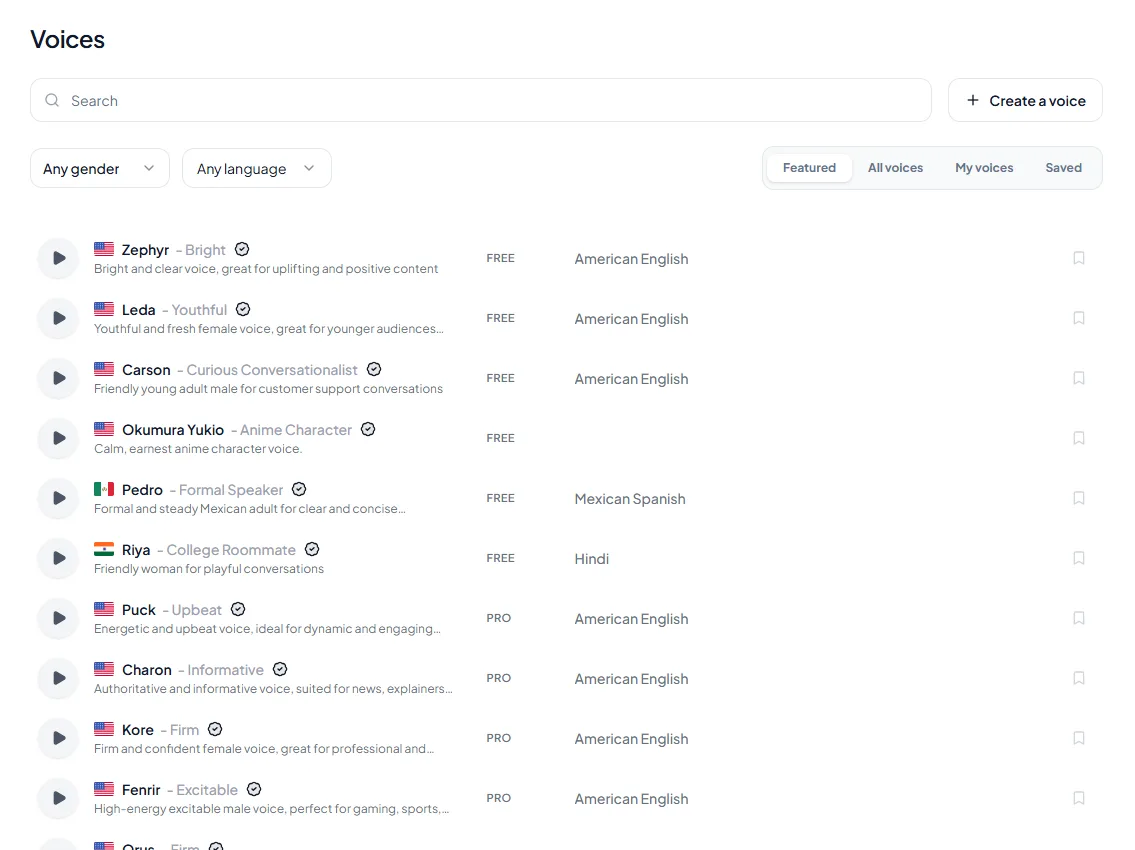
Know the limits before you plan. The free plan gives 500 credits a month (about 40 seconds) and uses standard voices only. Our site has 100+ language pages, but that counts pages, not languages with voices. Some languages with a page, such as Odia, Assamese and Burmese, have no voices in our catalog today. Check the text to speech language pages, for example Spanish or Hindi, for your language before you commit to a project.
Enter the finished length of one version and how many languages you need. Count regenerated lines as extra minutes if you expect many fixes.
Planning estimate: 500 credits is about 40 seconds of audio on the free plan. Not every language you can write has voices; check the voice list first. See the pricing page for plan details.
TTS translators quick answers
These are the questions people ask most about turning text into speech in another language. Each answer assumes you want audio you can publish, not only a rough listen.
What is the difference between speech synthesis and text-to-speech translation?
Speech synthesis turns text into speech in the language it was written in. Text-to-speech translation adds a step first: the text is translated into another language, then a voice for that language reads it. A translator can fail in 2 places, the translation and the voice, so check both.
How does a text-to-speech translator work for different languages?
It runs 2 systems in a row. Machine translation turns your text into the target language, then a voice model trained on that language reads it with that language's pronunciation rules. To translate text to voice yourself, translate the script, have a native speaker check it, then paste it into a voice tool and pick a native voice.
Can text to speech support multiple languages?
Yes, most modern tools speak several languages, but support is uneven. A tool may have many voices for Spanish and only 1, or none, for a smaller language. Check the voice list for each language you need and test a short line, instead of trusting the headline language count.
Can one AI voiceover project cover several languages?
Yes. Keep one master script and generate a separate audio track per language, with the same line IDs in every version so a fix reaches all of them. In Kveeky, you generate each language version with its own voice and download each one as audio.
Is there a free text-to-speech service that supports multiple languages?
Yes, many voice tools have free tiers, but they limit minutes, voices or commercial use. Kveeky's free plan gives 500 credits a month (about 40 seconds) with standard voices only and no credit card, so test which of your languages it covers. For personal listening a free tier is often enough; for published work, check the plan's commercial terms.
How accurate are free text-to-speech translations?
They are usually good enough to understand and not always good enough to publish. Machine translation often trips on idioms, names, numbers and formal or informal address, and the voice then reads those mistakes with full confidence. Neural models improve accuracy because they translate whole sentences in context, but quality still drops for languages with little training data.
What are the limits of text-to-speech translators with tone and emotion?
Tone is often lost in translation before the voice even starts: humor, sarcasm and politeness levels rarely survive a literal translation. The voice then reads in a neutral default unless you direct it. Rewrite emotional lines in the target language, then adjust speed or pick an emotion in Kveeky, and have a native speaker listen.
What makes a good text-to-speech translator?
A good one lets you edit the translated text before any audio is made and offers native voices per region. It also gives you pronunciation controls such as re-spelling or SSML phonemes.
Then check that it exports a standard format like MP3 or WAV and states commercial use clearly on the plan you pay for. Test it with the 5-line script from the quality section above.
Can text-to-speech translators be used in live broadcasts?
Only with care. Live use needs low-latency speech-to-speech systems, and nobody can review a line before the audience hears it, so errors go straight out.
For most creators it is safer to translate and voice recorded segments or post-show clips, and to label AI-voiced audio. Kveeky is built for scripts you prepare in advance, not live translation.
Language guides in this series
These guides go deeper on specific languages and use cases:
- Hindi: the best Hindi text to speech tools compared, with free options and Indian-language tips.
- Mandarin Chinese: free Mandarin text to speech and MP3 download, including tones and pinyin.
- Product video localization: how to localize product videos without 5 budgets.
- Dubbing: our AI dubbing and video localization guide covers lip sync and subtitles.
More multilingual guides
Every guide in this topic, in one place:
- Free Text-to-Speech and MP3 Conversion for Mandarin Chinese
- Hindi Text-to-Speech: Best Indian Voice Generator & Natural TTS (2026)
- How to Localize Product Videos for 5 Markets Without 5 Budgets
Frequently asked questions
What is the difference between speech synthesis and text-to-speech translation?
Speech synthesis reads text aloud in the language it was written in. Text-to-speech translation first translates the text into another language, then a voice for that language reads it, so you need to check both the translation and the voice.
Can I use voiceover studio tools for multilingual projects?
Yes, if the tool has native voices for each of your languages. Check the voice list per language, not the headline language count, and test a short script in each language before you commit.
How many languages does text to speech support?
It depends on the tool. Kveeky has voices in 40+ languages. Research systems go further: Meta's MMS project covers text to speech in more than 1,100 languages, though quality varies widely.
What is speech-to-speech translation?
It is a system that listens to speech in one language and speaks it in another. Some systems go through text in between; end-to-end systems map audio more directly. You get speed but less control over the exact words.
Can I keep the same voice across languages?
Sometimes. Some tools let a cloned or chosen voice speak several languages, but accents can carry over. Test it with a native listener; a native voice for each language often sounds more natural.
How do I produce multilingual audio at high volume?
Lock the source script, give every line an ID, keep a pronunciation sheet per language, and regenerate only changed lines. This keeps every language in sync when the script changes.
Do I still need a native speaker if I use AI?
Yes, for at least one listening check per language. Only a native listener reliably catches wrong stress, odd phrasing or a translation that sounds foreign.
- How to Localize Product Videos for 5 Markets Without 5 Budgets
- Hindi Text-to-Speech: Best Indian Voice Generator & Natural TTS (2026)
- Free Text-to-Speech and MP3 Conversion for Mandarin Chinese
- E-learning Voiceover Guide: AI Narration for Online Courses (2026)
- AI Voice for YouTube: The Complete Guide for Creators (2026)
- How to Write an AI Voiceover Script: Techniques and Templates
- Can You Use AI Voiceovers Commercially? Rights by Plan Across 10 Tools (2026)
- How Businesses Utilize Text-to-Speech Tools for Marketing
- Spanish text to speech
- French text to speech
- German text to speech
- Kveeky pricing
How we checked this guide
This guide is written by Ankit Agarwal for the Kveeky team. Disclosure: Kveeky makes an AI voice generator.
- Meta's language figures come from the Massively Multilingual Speech announcement, retrieved October 6, 2026.
- SSML details come from the W3C Speech Synthesis Markup Language 1.1 Recommendation, retrieved October 6, 2026.
- Kveeky plan details come from kveeky.com/pricing, checked October 6, 2026. Accent examples come from our shipped voice catalog.
- No Kveeky usage data is used in this guide.
Your next step: pick your first 2 target languages and write the 5-line test script above. Then run it through a few voices on our Hindi text to speech page, or any other language page, before you translate the full video.
Turn your script into a voiceover
Paste your text, pick a voice and download the audio. Free to start, no credit card.