TL;DR
- This guide covers the top-rated Hindi text-to-speech tools available in 2026, focusing on natural sounding voices and emotional depth. We explore platforms like Speechactors, ElevenLabs, and MicMonster to help video producers find the perfect Indian accent. You'll learn how ai technology is changing voiceover production for YouTube, e-learning, and global marketing.
On this page
The best Hindi text to speech tools in 2026 are Kveeky, ElevenLabs, Murf AI, Narakeet and Microsoft Azure AI Speech. Kveeky is the simplest pick for creators: Hindi voices, a free plan with no credit card, and paid plans from $7.50/month billed yearly. ElevenLabs suits expressive voices and cloning; Azure covers the most Indian languages.
Last updated: October 6, 2026. Every price and language claim below was checked on the vendor's own page on that date.
This comparison is for YouTubers, teachers, course creators and marketers who publish in Hindi. If you just want to hear Hindi voices and generate audio now, go straight to our Hindi text to speech voices page.
- Best overall for creators: Kveeky. Hindi voices plus 8 more Indian languages, audio download, paid plans from $7.50/month billed yearly.
- Best for expressive Hindi and voice cloning: ElevenLabs. Hindi is supported in its Multilingual v2, v3 and v4 models; Instant Voice Cloning starts on the $6/month Starter plan.
- Best for studio-style editing: Murf AI, which lists more than 40 Hindi voices on its Hindi page.
- Best for widest Indian-language coverage: Microsoft Azure AI Speech, which lists voices for Odia and Assamese as well as Hindi. It is a developer service, not a creator app.
- Free plans are limited everywhere. Check download and commercial-use rules before you publish monetized videos.
For regular Hindi videos, Kveeky is the simplest start: Hindi voices, a free plan of 500 credits a month (about 40 seconds) with no credit card, and paid plans from $7.50/month billed yearly. Choose ElevenLabs for expressive Hindi or cloning, Murf AI for studio-style editing, Narakeet for a one-off long script, and Azure for Odia or Assamese.
Click what you publish. The answers repeat this guide's own findings from the vendors' pages checked on October 6, 2026.
Best Hindi TTS tools compared
Prices were checked on each vendor's page on October 6, 2026. "Paid from" is the cheapest paid option.
| Tool | Best for | Indian languages | Free option | Paid from |
|---|---|---|---|---|
| Kveeky | Creators who want fast Hindi voiceovers at a low price | Hindi, Bengali, Gujarati, Kannada, Malayalam, Marathi, Punjabi, Tamil, Telugu | 500 credits/month (about 40 seconds), standard voices, no card | $9/month, or $7.50/month billed yearly (100 min) |
| ElevenLabs | Expressive Hindi and voice cloning | Hindi and Tamil in Multilingual v2; more Indian languages in v4 | 10,000 credits/month, no commercial license | $6/month Starter, with commercial license |
| Murf AI | Studio editing for e-learning and presentations | Hindi plus Tamil, Telugu, Bengali and other Indian languages | 10 min of generation, no downloads | $19/month Creator, billed yearly |
| Narakeet | Long scripts and narrated slide videos | Hindi (113 voices listed) | 20 conversions, no commercial use | $6 for 30 minutes, pay as you go |
| Microsoft Azure AI Speech | Developers and rare Indian languages | Hindi plus Odia, Assamese, Urdu and 8 more Indian locales | 0.5 million characters free per month | Pay as you go, developer account |
1. Kveeky
Kveeky is the quickest path from a Hindi script to an audio file. Paste your text in Devanagari, pick a Hindi voice, and download the audio.

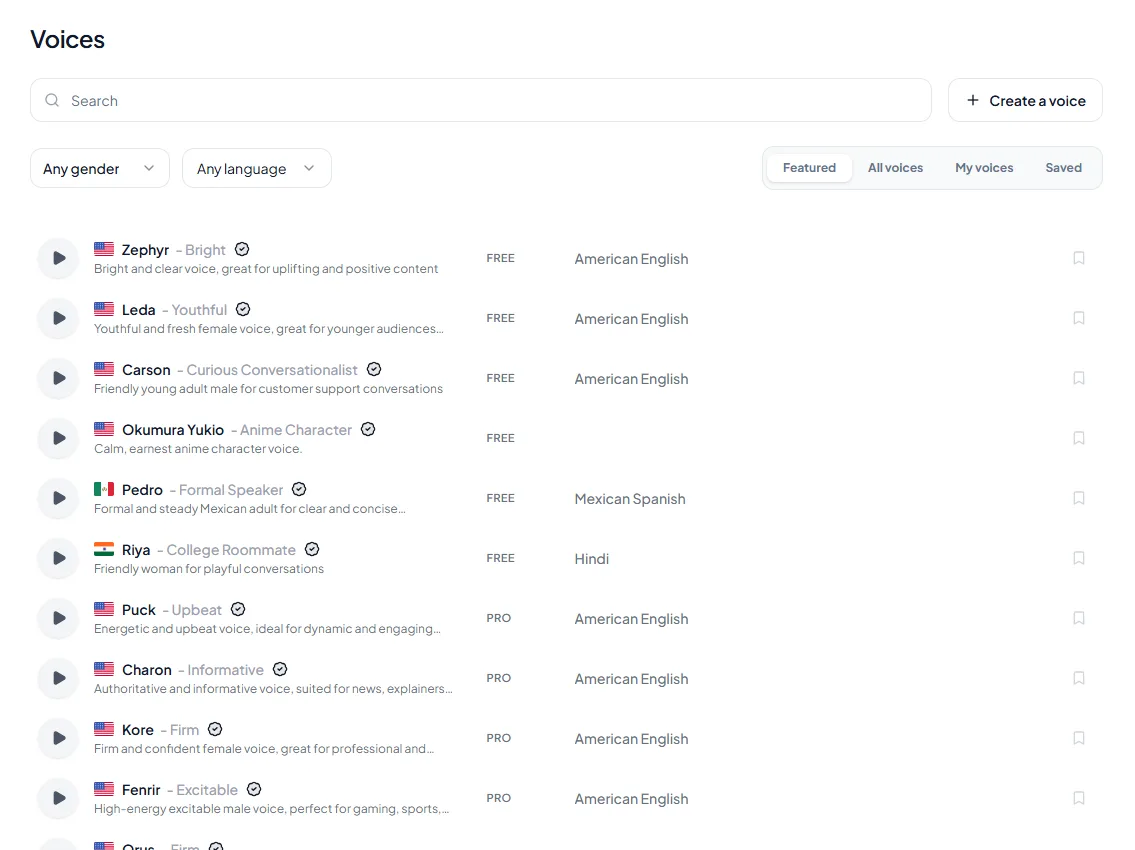
- 1Pick a voice. Voices are tagged Free or Premium.
- 2Type or paste a short line. Pick an emotion if you want one.
- 3Choose the language and press play to hear it.
Try it yourself in the free voice demo on Kveeky, no sign-up needed. For longer scripts and downloads, use the free plan.
What you get
- Hindi voices, male and female, plus voices for 8 more Indian languages and Indian English.
- 700+ AI voices in 40+ languages, if you also publish in English or other languages.
- Speed and volume controls, plus a choice of 6 emotions (Neutral, Happy, Love, Angry, Calm, Sad) for lively lines. There is no pitch control.
- Voice cloning is a plan feature. Check the pricing page for what your plan includes.
- Commercial usage rights on every paid plan.
Where Kveeky falls short
- The free plan uses standard voices only. Most Hindi voices in our catalog are premium, so regular Hindi work needs a paid plan.
- Our catalog has no Odia or Assamese voices today. If you need those, Azure is the better fit.
- Every plan is credit-metered, so daily long videos need a higher plan.
Want to hear the voices first? Our Hindi text to speech page lets you preview them. For Tamil, the Tamil text to speech voices page works the same way.
Enter your Hindi words and how many videos you make each month. It uses 150 words a minute, the Kveeky free plan of 500 credits (about 40 seconds), Kveeky Basic at 100 minutes for $7.50/month billed yearly, and Narakeet at $6 for 30 minutes. Prices were checked on October 6, 2026.

2. ElevenLabs
ElevenLabs is strong when you want emotional range or Hindi audio in a cloned voice. Its documentation lists Hindi in the Multilingual v2, Eleven v3 and Eleven v4 models. Bengali, Marathi, Telugu and several other Indian languages are listed only for v4 (ElevenLabs models, retrieved 2026-10-06).
Pricing (checked October 6, 2026)
- Free: 10,000 credits a month. No commercial license.
- Starter: $6/month with a first-month discount. Adds a commercial license and Instant Voice Cloning.
- Creator: $22/month. Adds Professional Voice Cloning.
Where it falls short: the free plan can't be used commercially, and credits go quickly if you regenerate long Hindi scripts. Our ElevenLabs review covers it in more depth.
Best for: creators who want a cloned voice speaking Hindi, or very expressive narration.
3. Murf AI
Murf AI suits e-learning, training and presentation voiceovers, where you edit timing and emphasis line by line. Its Hindi page lists more than 40 Hindi voices and voices for other Indian languages, including Tamil, Telugu and Bengali (Murf Hindi page, retrieved 2026-10-06).
Pricing (checked October 6, 2026)
- Free: 10 minutes of voice generation. No downloads and no commercial rights.
- Creator: $19/month billed yearly, with commercial rights.
Where it falls short: you can't download anything on the free plan, so you can't test a full workflow without paying.
Best for: course creators and companies making Hindi training or explainer videos.
4. Narakeet
Narakeet says it has 113 Hindi text to speech voices, with MP3, WAV and M4A downloads (Narakeet Hindi page, retrieved 2026-10-06). It can also turn slides into narrated videos.
Pricing (checked October 6, 2026)
- Free: 20 conversions, no commercial use.
- Paid: one-time purchases, starting at $6 for 30 minutes. Credits don't expire (Narakeet pricing).
Where it falls short: the interface is plain, and fine control over emotion is limited compared with newer tools.
Best for: teachers and publishers who produce long Hindi audio occasionally and prefer not to subscribe.
5. Microsoft Azure AI Speech
Azure AI Speech is a cloud service for developers, not a creator app. Its language list includes Hindi neural voices plus Odia, Assamese, Bengali, Gujarati, Kannada, Malayalam, Marathi, Punjabi, Tamil, Telugu and Urdu (Azure language support, retrieved 2026-10-06).
Pricing (checked October 6, 2026): the free tier includes 0.5 million characters a month for neural voices (Azure Speech pricing). After that you pay per character.
Where it falls short: you need an Azure account and some technical setup. There is no simple "paste and download" editor for most creators.
Best for: developers building apps, and anyone who needs Odia or Assamese voices.
Best free Hindi TTS tool
For regular publishing, Kveeky's free plan is the easiest place to start: 500 credits a month (about 40 seconds), no credit card, and audio downloads. It uses standard voices only, so you get a limited Hindi voice choice until you upgrade.

Other free options have trade-offs:
- ElevenLabs Free gives 10,000 credits a month but no commercial license.
- Murf Free lets you generate 10 minutes but not download.
- Narakeet Free gives 20 conversions, for non-commercial use only.
- Azure Free (F0) gives 0.5 million characters a month, if you can work with a developer console.
If your video is monetized or for a client, use a paid plan with commercial rights.
Tick each habit before you generate. They fix most problems with Hindi text to voice.
0 of 6 done
Choosing a Hindi TTS tool
Pick by what you publish and how often.
| If you… | Choose | Why |
|---|---|---|
| Make Hindi YouTube, Reels or Shorts every week | Kveeky | Simple editor, audio download, $7.50/month billed yearly for 100 minutes |
| Want your own voice speaking Hindi | ElevenLabs or Kveeky | Instant cloning on ElevenLabs Starter; Kveeky cloning depends on the plan (see pricing) |
| Build Hindi e-learning with lots of edits | Murf AI | Studio-style timeline and emphasis controls |
| Need a long audiobook once, not monthly | Narakeet | Pay-as-you-go minutes that don't expire |
| Need Odia, Assamese or an app integration | Microsoft Azure AI Speech | Widest Indian-language list, developer API |
Paste this into any Hindi voice to compare three voices in a minute. Then swap in your own lines.
Show me: how numbers can be written for a Hindi voice
The amount may be read in English or in Hindi, depending on the voice. If the reading matters, write it out in words.
- Risky: ₹1,500
- Clear: पंद्रह सौ रुपये
Listen once, then fix only the line that sounds wrong.
Making the same video for several Indian languages? Our Indian language voiceover guide covers script and voice choices per language.
Natural-sounding Hindi voiceovers
The tool matters, but the script matters more. These habits fix most problems with Hindi text to voice.
- Write in Devanagari. Romanized Hindi ("aap kaise ho") can be misread; "आप कैसे हो" is clearer for the voice.
- Decide on Hindi or Hinglish. Everyday YouTube Hindi mixes English words. Keep English brand names in Latin script, and listen to how the voice reads them.
- Write numbers the way you want them read. "₹1,500" may be read in English or Hindi. Write "पंद्रह सौ रुपये" if it matters.
- Use the danda (।) and commas for pauses. Short sentences give the voice natural breaks.
- Match the voice to the audience. A calm, formal voice suits news and education; a younger, energetic voice suits shorts and ads.
- Listen once and fix names. Re-spell names and places that come out wrong, then regenerate only that line.
Our hub guide on multilingual voiceover challenges explains pronunciation and accent problems that apply to every language.
AI video generators with Hindi
Most creators get better results by making the Hindi voiceover in a text to speech tool, then adding it to the video. Generate the audio, drop it into CapCut, Premiere or any editor, and cut the visuals to the voice.
If you are planning the same product video in Hindi and other languages, see our guide to localizing product videos on a single budget. If you also publish in Mandarin, our free Mandarin text to speech guide covers that language.
Frequently asked questions
What is the most natural sounding TTS for Indian languages?
It depends on the language. For Hindi, Kveeky, ElevenLabs and Murf all offer natural-sounding voices; listen to samples before you choose. For Odia or Assamese, Microsoft Azure AI Speech lists voices where many creator tools have none.
Is ElevenLabs good for Hindi?
Yes. ElevenLabs lists Hindi in its Multilingual v2, v3 and v4 models and is strong on expression and cloning. Its free plan has no commercial license, so monetized videos need at least the $6/month Starter plan.
Can I use Hindi AI voices on YouTube?
Yes, if your plan allows commercial use. Every paid Kveeky plan includes commercial usage rights. ElevenLabs Free, Murf Free and Narakeet Free don't allow commercial use, so check the terms before you monetize.
Does Kveeky support Indian languages other than Hindi?
Yes. Our catalog has voices for Hindi, Bengali, Gujarati, Kannada, Malayalam, Marathi, Punjabi, Tamil and Telugu, plus Indian English. It has no Odia or Assamese voices today.
Should I write Hindi scripts in Devanagari or English letters?
Use Devanagari for the most reliable pronunciation. Keep English brand names in Latin script, then listen and re-spell any word the voice reads wrongly.
More questions about Hindi text to speech
Is there a free Hindi text to speech tool with no sign-up?
You can hear short lines in the free voice demo on the Kveeky homepage without signing up. For longer scripts and downloads, use the free plan: 500 credits a month, about 40 seconds, no credit card.
How long is a 1,000-word Hindi script when spoken?
At a pace of 150 words a minute, 1,000 words is about 6.7 minutes. The words to minutes calculator checks your own script.
Can I change the pitch of a Hindi voice in Kveeky?
No. Kveeky has no pitch control. If a Hindi voice sounds too high or too low, choose a different voice, then use speed and emotion (Neutral, Happy, Love, Angry, Calm, Sad). The other settings are voice, transcript language, volume and custom punctuation.
What is the cheapest way to make one long Hindi audiobook?
Narakeet sells minutes as one-time purchases from $6 for 30 minutes, and credits do not expire, so it suits a one-off job. For ongoing videos, compare it with a monthly plan using the calculator above.
Can I mix Hindi and English in one script?
Yes. Everyday Hindi often mixes English words. Keep English brand names in Latin script and listen to how the voice reads them; our multilingual voiceover guide covers pronunciation problems.
How we checked this comparison
This comparison is written by Deepak Gupta for the Kveeky team. Disclosure: Kveeky makes an AI voice generator. It is one of the tools in this list. We compared each tool on its own published plans and language lists, not on marketing claims.
- Language support comes from each vendor's own page, retrieved October 6, 2026: ElevenLabs models, Murf Hindi, Narakeet Hindi and Azure language support.
- Prices come from Kveeky, ElevenLabs, Murf, Narakeet and Azure, retrieved October 6, 2026.
- Kveeky's Indian-language list comes from our shipped voice catalog. No Kveeky usage data is used in this guide.
Ready to try it? Paste 2 lines of your next Hindi script into our Hindi voice preview page, compare 3 voices, and keep the one your audience would trust.
Turn your script into a voiceover
Paste your text, pick a voice and download the audio. Free to start, no credit card.