# Open-Source Toolkit for Text-to-Speech Synthesis

Published: September 14, 2025 · Author: Govind Kumar

The Coqui TTS open-source toolkit is a Python library for training and running text-to-speech models, including XTTS voice cloning. The original coqui-ai/TTS repo has had no release since December 2023. Today the maintained version is the Idiap fork, installed as `coqui-tts`, with release 0.27.5 out on January 26, 2026.

*Last updated: October 6, 2026. GitHub, PyPI and Hugging Face pages were checked on that date.*

This guide is for creators and developers who want to run speech synthesis on their own machine. It covers Coqui TTS's current status, its architecture, setup and the XTTS license. It also compares 4 other open-source speech synthesis libraries.

<div style="margin:28px 0;padding:20px 22px;background:var(--kv-blue-50);border:1px solid var(--kv-blue-100);border-radius:var(--kv-radius-md);box-sizing:border-box;max-width:100%"><div style="font:700 13px/1 var(--kv-font-body);letter-spacing:.06em;text-transform:uppercase;color:var(--kv-blue-700);margin:0 0 8px">Quick answer</div><div style="font:400 16px/1.6 var(--kv-font-body);color:var(--kv-gray-800)"><strong>Use the Idiap fork.</strong> Install <code>coqui-tts</code> (not <code>TTS</code>) with Python 3.10 or newer and PyTorch. The code is MPL-2.0, but the XTTS-v2 voice-cloning model is non-commercial only. If you need a finished voiceover today, jump to the <a href="#when-a-hosted-ai-voice-generator-makes-more-sense" style="color:var(--kv-blue-700)">hosted option</a>.</div></div>

> **Key Takeaways**
>
> - **Use the Idiap fork.** The original coqui-ai/TTS repo's last release was v0.22.0 on December 12, 2023. The fork at idiap/coqui-ai-TTS calls the original "unmaintained" and ships as `coqui-tts` on PyPI.
> - **XTTS-v2 clones a voice from a 6-second clip** in 17 languages, but its model license is non-commercial only.
> - **The toolkit code is MPL-2.0.** Model weights can carry their own licenses, so check each model before you publish audio.
> - **Alternatives exist for every need:** Piper for fast local voices, eSpeak NG for tiny devices and 100+ languages, ESPnet for research.
> - **Running models yourself takes setup.** You'll need Python 3.10 or newer, PyTorch and some patience with dependencies.

**On this page:** [Status](#what-is-coqui-tts) · [News](#recent-coqui-tts-releases) · [Architecture](#how-coqui-tts-works) · [Install](#installing-coqui-tts) · [Voice cloning](#voice-cloning-with-xtts-v2) · [Alternatives](#other-open-source-libraries) · [Choosing](#choosing-a-tts-toolkit) · [Hosted option](#when-hosted-makes-sense) · [FAQ](#frequently-asked-questions)

## What is Coqui TTS

Coqui TTS is a deep learning toolkit for text-to-speech. Its GitHub description calls it "battle-tested in research and production" ([coqui-ai/TTS](https://github.com/coqui-ai/TTS), retrieved 2026-10-06). It bundles many model types, pretrained voices and training scripts in one Python package.

There are 2 GitHub repos, and the difference matters:

<table>
<thead>
<tr><th>Repo</th><th>PyPI package</th><th>Latest release</th><th>Status (October 6, 2026)</th></tr>
</thead>
<tbody>
<tr><td>coqui-ai/TTS (original)</td><td><code>TTS</code></td><td>v0.22.0, December 12, 2023</td><td>Not archived, but last code push was August 16, 2024</td></tr>
<tr><td>idiap/coqui-ai-TTS (fork)</td><td><code>coqui-tts</code></td><td>v0.27.5, January 26, 2026</td><td>Maintained; describes itself as a fork of the "original, unmaintained repository"</td></tr>
</tbody>
</table>

Sources: [GitHub API for coqui-ai/TTS](https://api.github.com/repos/coqui-ai/TTS), [idiap/coqui-ai-TTS](https://github.com/idiap/coqui-ai-TTS) and [PyPI coqui-tts](https://pypi.org/project/coqui-tts/), retrieved 2026-10-06.

Both repos use the Mozilla Public License 2.0 (MPL-2.0) for the code. The fork is maintained by the Idiap Research Institute team. If you follow an older tutorial that says `pip install TTS`, swap it for `coqui-tts`.

## Recent Coqui TTS releases

Searches for "Coqui TTS news" usually mean "what changed lately?" Here are the recent releases of the maintained fork, from its GitHub releases page ([idiap/coqui-ai-TTS releases](https://api.github.com/repos/idiap/coqui-ai-TTS/releases), retrieved 2026-10-06).

<table>
<thead>
<tr><th>Version</th><th>Date</th><th>Main change</th></tr>
</thead>
<tbody>
<tr><td>v0.27.5</td><td>January 26, 2026</td><td>Fixed XTTS inference with newer Hugging Face Transformers</td></tr>
<tr><td>v0.27.4</td><td>January 23, 2026</td><td>Python 3.14 and PyTorch 2.10 support; PyTorch no longer installed by default</td></tr>
<tr><td>v0.27.3</td><td>December 13, 2025</td><td>Sentence-level timestamps; better PyTorch 2.9 support</td></tr>
<tr><td>v0.27.2</td><td>September 25, 2025</td><td>Python 3.13 support and documentation link fixes</td></tr>
<tr><td>v0.27.0</td><td>July 14, 2025</td><td>Speaker caching for cloned voices and a unified <code>synthesize()</code> interface</td></tr>
</tbody>
</table>

There was no release in November 2025. The December 2025 release (v0.27.3) is the one most "late 2025" news refers to.

## How Coqui TTS works

Most text-to-speech systems, Coqui included, turn text into audio in 3 stages. Think of it as a small assembly line.

1. **Text processing.** The text is cleaned up and often turned into phonemes, the basic sounds of a language. "Dr." becomes "doctor", for example.
2. **Acoustic model.** A neural network turns the phonemes into a spectrogram, a picture of how the sound's pitch and energy change over time. Coqui calls these "spectrogram models", such as Tacotron 2, Glow-TTS and FastSpeech 2.
3. **Vocoder.** A second network turns the spectrogram into a real audio waveform. Coqui includes vocoders such as HiFi-GAN, MelGAN and WaveRNN.

Coqui also ships **end-to-end models** that do stages 2 and 3 in one network, such as VITS, YourTTS, XTTS, Tortoise and Bark ([coqui-ai/TTS README](https://github.com/coqui-ai/TTS), retrieved 2026-10-06). End-to-end models are simpler to run and often sound more natural.

<figure>
<svg viewBox="0 0 1200 600" xmlns="http://www.w3.org/2000/svg" role="img" aria-labelledby="open-source-toolkit-for-text-to-speech-synthesis-fig-t open-source-toolkit-for-text-to-speech-synthesis-fig-d" style="width:100%;height:auto;display:block">
<title id="open-source-toolkit-for-text-to-speech-synthesis-fig-t">How text becomes audio in 3 stages</title>
<desc id="open-source-toolkit-for-text-to-speech-synthesis-fig-d">A three-stage flow. Stage 1, text processing, cleans the text and makes phonemes, for example Dr. becomes doctor. Stage 2, the acoustic model, turns phonemes into a spectrogram, as in Glow-TTS or Tacotron 2. Stage 3, the vocoder, turns the spectrogram into an audio waveform, as in HiFi-GAN or MelGAN. Below stages 2 and 3, a box notes that end-to-end models such as VITS, YourTTS, XTTS and Bark do both stages in one network.</desc>
<rect x="0" y="0" width="1200" height="600" rx="16" fill="#ffffff"/>
<g font-family="var(--kv-font-body)" text-anchor="middle">
<text x="600" y="66" font-family="var(--kv-font-heading)" font-weight="700" font-size="36" fill="#111827">How text becomes audio in 3 stages</text>
<text x="600" y="106" font-size="26" fill="#6b7280">Most TTS systems, Coqui included</text>
<rect x="45" y="150" width="330" height="230" rx="14" fill="#eff6ff" stroke="#dbeafe" stroke-width="3"/>
<text x="210" y="205" font-weight="700" font-size="30" fill="#1e40af">1. Text processing</text>
<text x="210" y="255" font-size="26" fill="#374151">Cleans the text,</text>
<text x="210" y="290" font-size="26" fill="#374151">makes phonemes</text>
<text x="210" y="345" font-size="26" fill="#1d4ed8">“Dr.” → “doctor”</text>
<rect x="435" y="150" width="330" height="230" rx="14" fill="#eff6ff" stroke="#dbeafe" stroke-width="3"/>
<text x="600" y="205" font-weight="700" font-size="30" fill="#1e40af">2. Acoustic model</text>
<text x="600" y="255" font-size="26" fill="#374151">Phonemes to</text>
<text x="600" y="290" font-size="26" fill="#374151">spectrogram</text>
<text x="600" y="345" font-size="26" fill="#1d4ed8">Glow-TTS, Tacotron 2</text>
<rect x="825" y="150" width="330" height="230" rx="14" fill="#eff6ff" stroke="#dbeafe" stroke-width="3"/>
<text x="990" y="205" font-weight="700" font-size="30" fill="#1e40af">3. Vocoder</text>
<text x="990" y="255" font-size="26" fill="#374151">Spectrogram to</text>
<text x="990" y="290" font-size="26" fill="#374151">audio waveform</text>
<text x="990" y="345" font-size="26" fill="#1d4ed8">HiFi-GAN, MelGAN</text>
<line x1="378" y1="265" x2="418" y2="265" stroke="#1d4ed8" stroke-width="5"/>
<polygon points="432,265 414,254 414,276" fill="#1d4ed8"/>
<line x1="768" y1="265" x2="808" y2="265" stroke="#1d4ed8" stroke-width="5"/>
<polygon points="822,265 804,254 804,276" fill="#1d4ed8"/>
<line x1="600" y1="380" x2="600" y2="420" stroke="#1e40af" stroke-width="4"/>
<line x1="990" y1="380" x2="990" y2="420" stroke="#1e40af" stroke-width="4"/>
<rect x="435" y="420" width="720" height="140" rx="14" fill="#1e40af"/>
<text x="795" y="463" font-weight="700" font-size="30" fill="#ffffff">End-to-end models</text>
<text x="795" y="501" font-size="26" fill="#ffffff">One network for stages 2–3</text>
<text x="795" y="539" font-size="26" fill="#dbeafe">VITS, YourTTS, XTTS, Bark</text>
</g>
</svg>
<figcaption>Text processing feeds an acoustic model and then a vocoder, while end-to-end models such as XTTS handle the last two stages in one network.</figcaption>
</figure>

Want a deeper look at each stage? Our explainer on [neural network architectures for AI voice generation](https://kveeky.com/blog/neural-network-voice-synthesis) covers the acoustic models, and the guide to [neural vocoder architectures](https://kveeky.com/blog/neural-vocoder-architectures) covers stage 3.

## Installing Coqui TTS

These steps follow the fork's README. They assume you're comfortable with a terminal.

1. **Check Python.** The fork is tested with Python 3.10 up to (but not including) 3.15.
2. **Install PyTorch first.** From v0.27.4, PyTorch is not included by default, so install it for your system using the official PyTorch instructions.
3. **Install the toolkit:** `pip install coqui-tts`
4. **List the available models:** `tts --list_models`
5. **Make your first file:** `tts --text "Hello from my first open-source voice." --out_path hello.wav`
6. **Import it into your editor.** Drop the WAV file into your video editor like any other audio clip.

You can also use it from Python. The README's single-speaker example loads a model and writes a file:

```python
from TTS.api import TTS

tts = TTS("tts_models/de/thorsten/tacotron2-DDC")
tts.tts_to_file(text="Ich bin eine Testnachricht.", file_path="output.wav")
```

If installation fails, the cause is usually a Python or PyTorch version mismatch. Create a fresh virtual environment and match the versions in the README.

<div style="margin:28px 0;padding:20px 22px;background:var(--kv-blue-50);border:1px solid var(--kv-blue-100);border-radius:var(--kv-radius-md);box-sizing:border-box;max-width:100%"><div style="font:700 18px/1.3 var(--kv-font-heading);color:var(--kv-blue-950);margin:0 0 8px">Try it: the three install commands</div><p style="margin:0 0 12px;font:400 15px/1.5 var(--kv-font-body);color:var(--kv-gray-600)">Copy these into a terminal after PyTorch is installed. Each line is one step from the list above.</p><div id="os-cp-t" style="padding:14px 16px;background:var(--kv-white);border:1px solid var(--kv-blue-100);border-radius:var(--kv-radius-sm);font:400 16px/1.6 var(--kv-font-body);color:var(--kv-gray-800);box-sizing:border-box;max-width:100%;overflow-wrap:anywhere;white-space:normal">pip install coqui-tts<br>tts --list_models<br>tts --text "Hello from my first open-source voice." --out_path hello.wav</div><div style="display:flex;flex-wrap:wrap;align-items:center;gap:12px;margin-top:12px"><button type="button" id="os-cp-b" style="min-height:44px;padding:0 18px;border:0;border-radius:var(--kv-radius-sm);background:var(--kv-blue-700);color:var(--kv-white);font:600 16px/1 var(--kv-font-body);cursor:pointer">Copy</button></div></div><script>(function(){try{var t=document.getElementById('os-cp-t'),b=document.getElementById('os-cp-b');if(!t||!b)return;b.addEventListener('click',function(){var s=t.innerText;function ok(){b.textContent='Copied';setTimeout(function(){b.textContent='Copy'},1800)}try{if(navigator.clipboard&&navigator.clipboard.writeText){navigator.clipboard.writeText(s).then(ok,function(){})}else{var r=document.createRange();r.selectNodeContents(t);var sel=window.getSelection();sel.removeAllRanges();sel.addRange(r)}}catch(e){}})}catch(e){}})();</script>

<div style="margin:28px 0;padding:20px 22px;background:var(--kv-white);border:1px solid var(--kv-blue-100);border-radius:var(--kv-radius-md);box-sizing:border-box;max-width:100%"><div style="font:700 18px/1.3 var(--kv-font-heading);color:var(--kv-blue-950);margin:0 0 8px">Setup checklist</div><p style="margin:0 0 12px;font:400 15px/1.5 var(--kv-font-body);color:var(--kv-gray-600)">Tick each step as you finish it. Your ticks stay in this browser.</p><label style="display:flex;align-items:flex-start;gap:12px;min-height:44px;padding:8px 0;font:400 16px/1.6 var(--kv-font-body);color:var(--kv-gray-800);cursor:pointer"><input type="checkbox" class="os-ck" style="width:22px;height:22px;margin-top:2px;flex:none;accent-color:var(--kv-blue-700)"><span style="min-width:0"><strong>Python version.</strong> 3.10 or newer, up to but not including 3.15.</span></label><label style="display:flex;align-items:flex-start;gap:12px;min-height:44px;padding:8px 0;font:400 16px/1.6 var(--kv-font-body);color:var(--kv-gray-800);cursor:pointer"><input type="checkbox" class="os-ck" style="width:22px;height:22px;margin-top:2px;flex:none;accent-color:var(--kv-blue-700)"><span style="min-width:0"><strong>Fresh virtual environment,</strong> so old packages cannot clash.</span></label><label style="display:flex;align-items:flex-start;gap:12px;min-height:44px;padding:8px 0;font:400 16px/1.6 var(--kv-font-body);color:var(--kv-gray-800);cursor:pointer"><input type="checkbox" class="os-ck" style="width:22px;height:22px;margin-top:2px;flex:none;accent-color:var(--kv-blue-700)"><span style="min-width:0"><strong>PyTorch installed first</strong> for your system (not included by default from v0.27.4).</span></label><label style="display:flex;align-items:flex-start;gap:12px;min-height:44px;padding:8px 0;font:400 16px/1.6 var(--kv-font-body);color:var(--kv-gray-800);cursor:pointer"><input type="checkbox" class="os-ck" style="width:22px;height:22px;margin-top:2px;flex:none;accent-color:var(--kv-blue-700)"><span style="min-width:0"><strong>Toolkit installed</strong> with <code>pip install coqui-tts</code>, not <code>TTS</code>.</span></label><label style="display:flex;align-items:flex-start;gap:12px;min-height:44px;padding:8px 0;font:400 16px/1.6 var(--kv-font-body);color:var(--kv-gray-800);cursor:pointer"><input type="checkbox" class="os-ck" style="width:22px;height:22px;margin-top:2px;flex:none;accent-color:var(--kv-blue-700)"><span style="min-width:0"><strong>Models listed</strong> with <code>tts --list_models</code>.</span></label><label style="display:flex;align-items:flex-start;gap:12px;min-height:44px;padding:8px 0;font:400 16px/1.6 var(--kv-font-body);color:var(--kv-gray-800);cursor:pointer"><input type="checkbox" class="os-ck" style="width:22px;height:22px;margin-top:2px;flex:none;accent-color:var(--kv-blue-700)"><span style="min-width:0"><strong>First file made,</strong> then dropped into your video editor.</span></label><label style="display:flex;align-items:flex-start;gap:12px;min-height:44px;padding:8px 0;font:400 16px/1.6 var(--kv-font-body);color:var(--kv-gray-800);cursor:pointer"><input type="checkbox" class="os-ck" style="width:22px;height:22px;margin-top:2px;flex:none;accent-color:var(--kv-blue-700)"><span style="min-width:0"><strong>Licence read</strong> for every model you plan to publish audio from.</span></label><p id="os-ck-n" aria-live="polite" style="margin:10px 0 0;font:600 15px/1.4 var(--kv-font-body);color:var(--kv-blue-700)">0 of 7 done</p></div><script>(function(){try{var bx=document.querySelectorAll('input.os-ck'),n=document.getElementById('os-ck-n');if(!bx.length||!n)return;var key='kvck-os-ck';var st=[];try{st=JSON.parse(localStorage.getItem(key)||'[]')}catch(e){st=[]}function upd(){var c=0,a=[];for(var i=0;i<bx.length;i++){if(bx[i].checked){c++;a.push(i)}}n.textContent=c+' of '+bx.length+' done';try{localStorage.setItem(key,JSON.stringify(a))}catch(e){}}for(var i=0;i<bx.length;i++){if(st.indexOf(i)>-1)bx[i].checked=true;bx[i].addEventListener('change',upd)}upd()}catch(e){}})();</script>

<div style="margin:28px 0;padding:20px 22px;background:var(--kv-blue-50);border:1px solid var(--kv-blue-100);border-radius:var(--kv-radius-md);box-sizing:border-box;max-width:100%"><div style="font:700 18px/1.3 var(--kv-font-heading);color:var(--kv-blue-950);margin:0 0 8px">Stuck? Two quick answers</div><details style="margin:0 0 8px;background:var(--kv-white);border:1px solid var(--kv-blue-100);border-radius:var(--kv-radius-sm);padding:0 14px"><summary style="min-height:44px;display:flex;align-items:center;cursor:pointer;font:600 16px/1.4 var(--kv-font-body);color:var(--kv-blue-950)">Install failed? Show me what to check</summary><div style="padding:0 0 14px;font:400 16px/1.6 var(--kv-font-body);color:var(--kv-gray-800)">The cause is usually a Python or PyTorch version mismatch. Create a fresh virtual environment, confirm your Python is between 3.10 and 3.14, install PyTorch for your system, then install <code>coqui-tts</code> again. Match the versions in the fork README.</div></details><details style="margin:0 0 8px;background:var(--kv-white);border:1px solid var(--kv-blue-100);border-radius:var(--kv-radius-sm);padding:0 14px"><summary style="min-height:44px;display:flex;align-items:center;cursor:pointer;font:600 16px/1.4 var(--kv-font-body);color:var(--kv-blue-950)">Which kind of model should I pick? Show me</summary><div style="padding:0 0 14px;font:400 16px/1.6 var(--kv-font-body);color:var(--kv-gray-800)">Spectrogram models such as Tacotron 2, Glow-TTS and FastSpeech 2 do stage 2 and need a vocoder such as HiFi-GAN. End-to-end models such as VITS, YourTTS, XTTS, Tortoise and Bark do stages 2 and 3 in one network, which is simpler to run and often sounds more natural.</div></details></div>

## Voice cloning with XTTS-v2

XTTS-v2 is Coqui's best-known model. It can clone a voice from a short reference clip and speak in another language. Its Hugging Face model card says it needs "just a 6-second audio clip". It supports 17 languages, including English, Spanish, French, German, Arabic, Chinese, Japanese and Hindi ([coqui/XTTS-v2](https://huggingface.co/coqui/XTTS-v2), retrieved 2026-10-06).

In code, you pass a short WAV file of the target voice:

```python
tts = TTS("tts_models/multilingual/multi-dataset/xtts_v2")
wav = tts.tts(text="Hello world!", speaker_wav="my/cloning/audio.wav", language="en")
```

**Check the license before you publish.** The XTTS-v2 weights use the Coqui Public Model License 1.0.0. That license is for non-commercial use only. In its terms, non-commercial means you get no direct or indirect payment from the model or its output ([XTTS-v2 license](https://huggingface.co/coqui/XTTS-v2/raw/main/LICENSE.txt), retrieved 2026-10-06). So a monetized YouTube channel or a client video is likely outside it.

<div style="margin:28px 0;padding:20px 22px;background:var(--kv-blue-50);border:1px solid var(--kv-blue-100);border-radius:var(--kv-radius-md);box-sizing:border-box;max-width:100%"><div style="font:700 18px/1.3 var(--kv-font-heading);color:var(--kv-blue-950);margin:0 0 8px">Can I use this model for my project?</div><p style="margin:0 0 12px;font:400 15px/1.5 var(--kv-font-body);color:var(--kv-gray-600)">Pick the part of the toolkit and how you will use the audio. The answer repeats this guide, so it is a summary, not legal advice.</p><div style="display:flex;flex-wrap:wrap;gap:12px;margin-bottom:12px"><label for="os-lm" style="flex:1 1 180px;min-width:0;font:600 15px/1.4 var(--kv-font-body);color:var(--kv-gray-800)">What I use<select id="os-lm" style="display:block;width:100%;box-sizing:border-box;min-height:44px;margin-top:6px;padding:0 12px;border:1px solid var(--kv-blue-100);border-radius:var(--kv-radius-sm);font:400 16px/1 var(--kv-font-body);color:var(--kv-gray-800);background:var(--kv-white)"><option value="code">Coqui TTS code (MPL-2.0)</option><option value="xtts">XTTS-v2 model weights</option><option value="other">Another model's weights</option></select></label><label for="os-lu" style="flex:1 1 180px;min-width:0;font:600 15px/1.4 var(--kv-font-body);color:var(--kv-gray-800)">What I do with the audio<select id="os-lu" style="display:block;width:100%;box-sizing:border-box;min-height:44px;margin-top:6px;padding:0 12px;border:1px solid var(--kv-blue-100);border-radius:var(--kv-radius-sm);font:400 16px/1 var(--kv-font-body);color:var(--kv-gray-800);background:var(--kv-white)"><option value="personal">Personal project, no income</option><option value="commercial">Monetized video or client work</option></select></label></div><div id="os-lo" aria-live="polite" style="padding:14px 16px;background:var(--kv-white);border:1px solid var(--kv-blue-100);border-radius:var(--kv-radius-sm);font:400 16px/1.6 var(--kv-font-body);color:var(--kv-gray-800);box-sizing:border-box;max-width:100%;overflow-wrap:anywhere"></div></div><script>(function(){try{var m=document.getElementById("os-lm"),u=document.getElementById("os-lu"),o=document.getElementById("os-lo");if(!m||!u||!o)return;
function go(){var t="";if(m.value==="code"){t="<strong>Usually fine.</strong> The toolkit code is MPL-2.0, which allows commercial use under its terms. Read the licence for the conditions, and remember that the model weights are a separate matter."}
else if(m.value==="xtts"){if(u.value==="personal"){t="<strong>Fits the licence.</strong> XTTS-v2 uses the Coqui Public Model License, which is for non-commercial use only. Personal projects with no payment from the model or its output fit. Clone only voices you have permission to use."}else{t="<strong>Likely outside the licence.</strong> Non-commercial means no direct or indirect payment from the model or its output, so a monetized channel or a client video is probably not covered. Choose a model with a commercial licence or a hosted tool with commercial rights."}}
else{t="<strong>Check that model.</strong> Weights often carry a different licence from the code. Open the model card or LICENSE file and read it before you publish audio."}
o.innerHTML=t}
m.addEventListener("change",go);u.addEventListener("change",go);go()}catch(e){}})();</script>

Only clone voices you have permission to use. For how this kind of cloning works under the hood, see our guide to [zero-shot voice cloning](https://kveeky.com/blog/zero-shot-voice-cloning-ai-voiceovers). If you are weighing cloning against a stock voice, read [text-to-speech vs voice cloning](/blog/text-to-speech-vs-voice-cloning), and check [whether voice cloning is legal](/blog/is-voice-cloning-legal-ai-rights-guide) before you publish.

## Other open-source libraries

Coqui isn't the only choice. Here are 4 maintained or widely used options, with facts from each project's own GitHub page (retrieved 2026-10-06).

<div><div style="display:flex;flex-wrap:wrap;gap:12px;margin:16px 0 8px"><label for="os-f-q" style="flex:1 1 180px;min-width:0;font:600 15px/1.4 var(--kv-font-body);color:var(--kv-gray-800)">Filter the toolkits (for example "GPL", "offline" or "research")<input id="os-f-q" type="search" placeholder="Type to filter the rows" style="display:block;width:100%;box-sizing:border-box;min-height:44px;margin-top:6px;padding:0 12px;border:1px solid var(--kv-blue-100);border-radius:var(--kv-radius-sm);font:400 16px/1 var(--kv-font-body);color:var(--kv-gray-800);background:var(--kv-white)"></label></div><p id="os-f-c" aria-live="polite" style="margin:0 0 8px;font:400 14px/1.4 var(--kv-font-body);color:var(--kv-gray-600)"></p></div><script>(function(){try{var q=document.getElementById('os-f-q'),t=document.getElementById('os-table'),c=document.getElementById('os-f-c'),s=document.getElementById('os-f-s');if(!q||!t||!c)return;function f(){var v=q.value.toLowerCase().trim(),sv=s?s.value.toLowerCase():'',rs=t.querySelectorAll('tbody tr'),n=0;for(var i=0;i<rs.length;i++){var ok=!v||rs[i].textContent.toLowerCase().indexOf(v)>-1;if(ok&&sv&&-1>-1){var cs=rs[i].children;ok=cs.length>-1&&cs[-1].textContent.toLowerCase().indexOf(sv)>-1}rs[i].style.display=ok?'':'none';if(ok)n++}c.textContent=(v||sv)?('Showing '+n+' of '+rs.length+' rows.'):''}q.addEventListener('input',f);if(s)s.addEventListener('change',f)}catch(e){}})();</script>

<table id="os-table">
<thead>
<tr><th>Toolkit</th><th>Code license</th><th>Approach</th><th>Status</th><th>Best for</th></tr>
</thead>
<tbody>
<tr><td><strong>Coqui TTS (Idiap fork)</strong></td><td>MPL-2.0</td><td>Neural, many models, voice cloning via XTTS</td><td>Maintained</td><td>Trying many models and cloning in one package</td></tr>
<tr><td><strong>Piper</strong></td><td>GPL-3.0 (new repo); MIT (old repo)</td><td>Neural, "fast and local"</td><td>Old rhasspy/piper repo archived; development moved to OHF-Voice/piper1-gpl</td><td>Fast offline voices on modest hardware</td></tr>
<tr><td><strong>eSpeak NG</strong></td><td>GPL-3.0</td><td>Formant synthesis, a few MB in size</td><td>Maintained</td><td>Tiny devices, screen readers, 100+ languages and accents</td></tr>
<tr><td><strong>ESPnet</strong></td><td>Apache 2.0</td><td>Research toolkit with Tacotron 2, FastSpeech 2, VITS and more</td><td>Maintained</td><td>Researchers training and comparing models</td></tr>
</tbody>
</table>

Sources: [OHF-Voice/piper1-gpl](https://github.com/OHF-Voice/piper1-gpl), [rhasspy/piper](https://github.com/rhasspy/piper), [eSpeak NG](https://github.com/espeak-ng/espeak-ng) and [ESPnet](https://github.com/espnet/espnet), retrieved 2026-10-06.

eSpeak NG sounds robotic next to neural models, but it's clear, small and covers many languages. Piper sits in the middle: neural quality with low resource needs. ESPnet is the most flexible, and the hardest to start with.

## Choosing a TTS toolkit

Match the toolkit to your goal, not to the longest feature list.

<div style="margin:28px 0;padding:20px 22px;background:var(--kv-blue-50);border:1px solid var(--kv-blue-100);border-radius:var(--kv-radius-md);box-sizing:border-box;max-width:100%"><div style="font:700 18px/1.3 var(--kv-font-heading);color:var(--kv-blue-950);margin:0 0 8px">Which toolkit fits you? Pick your goal</div><p style="margin:0 0 12px;font:400 15px/1.5 var(--kv-font-body);color:var(--kv-gray-600)">Click the goal that sounds like yours. Answers use only the facts in this guide.</p><div style="display:flex;flex-wrap:wrap;gap:8px;margin-bottom:12px"><button type="button" data-pk="os-pk" aria-pressed="false" style="min-height:44px;padding:8px 14px;border:1px solid var(--kv-blue-700);border-radius:var(--kv-radius-sm);background:var(--kv-white);color:var(--kv-blue-700);font:600 15px/1.3 var(--kv-font-body);cursor:pointer;text-align:left">Try many voices fast</button><button type="button" data-pk="os-pk" aria-pressed="false" style="min-height:44px;padding:8px 14px;border:1px solid var(--kv-blue-700);border-radius:var(--kv-radius-sm);background:var(--kv-white);color:var(--kv-blue-700);font:600 15px/1.3 var(--kv-font-body);cursor:pointer;text-align:left">Clone a voice for fun</button><button type="button" data-pk="os-pk" aria-pressed="false" style="min-height:44px;padding:8px 14px;border:1px solid var(--kv-blue-700);border-radius:var(--kv-radius-sm);background:var(--kv-white);color:var(--kv-blue-700);font:600 15px/1.3 var(--kv-font-body);cursor:pointer;text-align:left">Offline voices, small computer</button><button type="button" data-pk="os-pk" aria-pressed="false" style="min-height:44px;padding:8px 14px;border:1px solid var(--kv-blue-700);border-radius:var(--kv-radius-sm);background:var(--kv-white);color:var(--kv-blue-700);font:600 15px/1.3 var(--kv-font-body);cursor:pointer;text-align:left">Tiny engine, many languages</button><button type="button" data-pk="os-pk" aria-pressed="false" style="min-height:44px;padding:8px 14px;border:1px solid var(--kv-blue-700);border-radius:var(--kv-radius-sm);background:var(--kv-white);color:var(--kv-blue-700);font:600 15px/1.3 var(--kv-font-body);cursor:pointer;text-align:left">Research and training</button><button type="button" data-pk="os-pk" aria-pressed="false" style="min-height:44px;padding:8px 14px;border:1px solid var(--kv-blue-700);border-radius:var(--kv-radius-sm);background:var(--kv-white);color:var(--kv-blue-700);font:600 15px/1.3 var(--kv-font-body);cursor:pointer;text-align:left">A finished voiceover today</button></div><div id="os-pk-h" aria-live="polite" style="padding:14px 16px;background:var(--kv-white);border:1px solid var(--kv-blue-100);border-radius:var(--kv-radius-sm);font:400 16px/1.6 var(--kv-font-body);color:var(--kv-gray-800);box-sizing:border-box;max-width:100%;overflow-wrap:anywhere;color:var(--kv-gray-600)">Pick an option above to see the answer.</div><div data-pa="os-pk" style="padding:14px 16px;background:var(--kv-white);border:1px solid var(--kv-blue-100);border-radius:var(--kv-radius-sm);font:400 16px/1.6 var(--kv-font-body);color:var(--kv-gray-800);box-sizing:border-box;max-width:100%;overflow-wrap:anywhere"><strong>Coqui TTS (Idiap fork).</strong> Pretrained models and a one-line command. Install <code>coqui-tts</code>, run <code>tts --list_models</code> and listen.</div><div data-pa="os-pk" style="padding:14px 16px;background:var(--kv-white);border:1px solid var(--kv-blue-100);border-radius:var(--kv-radius-sm);font:400 16px/1.6 var(--kv-font-body);color:var(--kv-gray-800);box-sizing:border-box;max-width:100%;overflow-wrap:anywhere"><strong>XTTS-v2.</strong> It clones from a 6-second clip in 17 languages, but its licence is non-commercial. Use only voices you have permission to use.</div><div data-pa="os-pk" style="padding:14px 16px;background:var(--kv-white);border:1px solid var(--kv-blue-100);border-radius:var(--kv-radius-sm);font:400 16px/1.6 var(--kv-font-body);color:var(--kv-gray-800);box-sizing:border-box;max-width:100%;overflow-wrap:anywhere"><strong>Piper.</strong> Neural quality with low resource needs. The old rhasspy/piper repo is archived and development moved to OHF-Voice/piper1-gpl (GPL-3.0).</div><div data-pa="os-pk" style="padding:14px 16px;background:var(--kv-white);border:1px solid var(--kv-blue-100);border-radius:var(--kv-radius-sm);font:400 16px/1.6 var(--kv-font-body);color:var(--kv-gray-800);box-sizing:border-box;max-width:100%;overflow-wrap:anywhere"><strong>eSpeak NG.</strong> A few MB, 100+ languages and accents, GPL-3.0. It sounds more robotic than neural models, but it is clear and small.</div><div data-pa="os-pk" style="padding:14px 16px;background:var(--kv-white);border:1px solid var(--kv-blue-100);border-radius:var(--kv-radius-sm);font:400 16px/1.6 var(--kv-font-body);color:var(--kv-gray-800);box-sizing:border-box;max-width:100%;overflow-wrap:anywhere"><strong>ESPnet.</strong> Apache 2.0, with Tacotron 2, FastSpeech 2, VITS and more. The most flexible and the hardest to start with.</div><div data-pa="os-pk" style="padding:14px 16px;background:var(--kv-white);border:1px solid var(--kv-blue-100);border-radius:var(--kv-radius-sm);font:400 16px/1.6 var(--kv-font-body);color:var(--kv-gray-800);box-sizing:border-box;max-width:100%;overflow-wrap:anywhere"><strong>A hosted voice generator.</strong> No installs and no GPU, with clear commercial terms. See <a href="#when-a-hosted-ai-voice-generator-makes-more-sense" style="color:var(--kv-blue-700)">when a hosted tool makes more sense</a>.</div></div><script>(function(){try{var bs=document.querySelectorAll('[data-pk="os-pk"]'),as=document.querySelectorAll('[data-pa="os-pk"]'),h=document.getElementById('os-pk-h');if(!bs.length||!as.length||!h)return;function go(i){for(var k=0;k<as.length;k++){as[k].style.display=(k===i)?'block':'none'}h.style.display=(i<0)?'block':'none';for(var j=0;j<bs.length;j++){var on=(j===i);bs[j].setAttribute('aria-pressed',on?'true':'false');bs[j].style.background=on?'var(--kv-blue-700)':'var(--kv-white)';bs[j].style.color=on?'var(--kv-white)':'var(--kv-blue-700)'}}go(-1);for(var n=0;n<bs.length;n++){(function(m){bs[m].addEventListener('click',function(){go(m)})})(n)}}catch(e){}})();</script>

<table>
<thead>
<tr><th>If you want…</th><th>Start with</th><th>Why</th></tr>
</thead>
<tbody>
<tr><td>To try many voices and models fast</td><td>Coqui TTS</td><td>Pretrained models and a one-line command</td></tr>
<tr><td>Voice cloning for personal projects</td><td>Coqui XTTS-v2</td><td>6-second clip, 17 languages, non-commercial license</td></tr>
<tr><td>Offline voices on a small computer</td><td>Piper</td><td>Built to be fast and local</td></tr>
<tr><td>A tiny engine with wide language coverage</td><td>eSpeak NG</td><td>A few MB, 100+ languages and accents</td></tr>
<tr><td>To train and publish research models</td><td>ESPnet</td><td>Recipes for many model types</td></tr>
</tbody>
</table>

Also check 3 things before you commit:

- **License of the code and of the model weights.** They're often different.
- **Recent activity.** Look at the date of the last release, not just the star count.
- **Your hardware.** Large neural models run far faster on a GPU.

To compare output quality between toolkits, run the same script through each and score it with the listening tests in our guide to [synthetic speech intelligibility metrics](https://kveeky.com/blog/synthetic-speech-intelligibility-metrics).

## When hosted makes sense

Open-source toolkits are great for learning, privacy and custom research. They're less great when you just need a finished voiceover by this afternoon.

A hosted tool like [Kveeky](https://kveeky.com/) skips the setup: paste a script, pick a voice, download the audio. Kveeky has 700+ AI voices in 40+ languages and a free plan with 500 credits a month (about 40 seconds) and no credit card. Every paid plan includes commercial usage rights, which matters if XTTS's non-commercial license rules it out for you.

Where open source wins: you control the model, your audio never leaves your machine, and you can train on your own data. Where a hosted tool wins: no installs, no GPU, ready-made voices and clear commercial terms.

To size a script, try the <a href="https://kveeky.com/resources/words-to-minutes-calculator" style="color:var(--kv-blue-700)">words-to-minutes calculator</a>, compare plans on the <a href="https://kveeky.com/pricing" style="color:var(--kv-blue-700)">pricing page</a> and read <a href="/blog/free-vs-paid-text-to-speech" style="color:var(--kv-blue-700)">free vs paid text to speech</a>. Other hosted names are profiled under <a href="/voice-providers/elevenlabs" style="color:var(--kv-blue-700)">ElevenLabs</a> and in our <a href="/blog/10-best-free-ai-voice-generatorover-tools" style="color:var(--kv-blue-700)">10 best free AI voiceover generators</a>.

<div style="margin:28px 0;padding:20px 22px;background:var(--kv-blue-50);border:1px solid var(--kv-blue-100);border-radius:var(--kv-radius-md);box-sizing:border-box;max-width:100%"><div style="font:700 18px/1.3 var(--kv-font-heading);color:var(--kv-blue-950);margin:0 0 8px">Would your script fit a hosted free plan?</div><p style="margin:0 0 12px;font:400 15px/1.5 var(--kv-font-body);color:var(--kv-gray-600)">Enter the words in your script. The estimate uses 150 words a minute and the free-plan rate of 500 credits for about 40 seconds a month. It is a planning guide, not a quote.</p><div style="display:flex;flex-wrap:wrap;gap:12px;margin-bottom:12px"><label for="os-cw" style="flex:1 1 180px;min-width:0;font:600 15px/1.4 var(--kv-font-body);color:var(--kv-gray-800)">Words in your script<input id="os-cw" type="number" inputmode="decimal" min="0" step="1" value="300" style="display:block;width:100%;box-sizing:border-box;min-height:44px;margin-top:6px;padding:0 12px;border:1px solid var(--kv-blue-100);border-radius:var(--kv-radius-sm);font:400 16px/1 var(--kv-font-body);color:var(--kv-gray-800);background:var(--kv-white)"></label><label for="os-cs" style="flex:1 1 180px;min-width:0;font:600 15px/1.4 var(--kv-font-body);color:var(--kv-gray-800)">Speaking speed<select id="os-cs" style="display:block;width:100%;box-sizing:border-box;min-height:44px;margin-top:6px;padding:0 12px;border:1px solid var(--kv-blue-100);border-radius:var(--kv-radius-sm);font:400 16px/1 var(--kv-font-body);color:var(--kv-gray-800);background:var(--kv-white)"><option value="1">Normal (1x)</option><option value="0.9">Slower (0.9x)</option><option value="0.8">Much slower (0.8x)</option><option value="1.1">Faster (1.1x)</option><option value="1.25">Fast (1.25x)</option></select></label></div><div id="os-co" aria-live="polite" style="padding:14px 16px;background:var(--kv-white);border:1px solid var(--kv-blue-100);border-radius:var(--kv-radius-sm);font:400 16px/1.6 var(--kv-font-body);color:var(--kv-gray-800);box-sizing:border-box;max-width:100%;overflow-wrap:anywhere"></div></div><script>(function(){try{var w=document.getElementById("os-cw"),s=document.getElementById("os-cs"),o=document.getElementById("os-co");if(!w||!s||!o)return;
function go(){var n=parseFloat(w.value),sp=parseFloat(s.value);if(!(n>=0)||!(sp>0)){o.textContent="Enter your word count to see the estimate.";return}
var sec=n/150*60/sp,min=sec/60,cr=sec*500/40,pct=sec/40*100;
o.innerHTML="<strong>About "+Math.round(sec)+" seconds ("+min.toFixed(1)+" minutes)</strong> of speech at 150 words a minute. On a free plan with 500 credits (about 40 seconds) a month that is roughly "+Math.round(cr)+" credits, or "+Math.min(pct,9999).toFixed(0)+"% of one month."}
w.addEventListener("input",go);s.addEventListener("change",go);go()}catch(e){}})();</script>

<figure style="margin:28px 0;padding:0"><img src="/blog/product/app-text-to-speech.webp" alt="The Kveeky text-to-speech editor with a script in the text box and the Settings panel showing Voice, Transcript Language, Speed, Volume, Emotion and Custom Punctuation." width="1150" height="850" loading="lazy" decoding="async" style="display:block;width:100%;height:auto;border-radius:var(--kv-radius-md);border:1px solid var(--kv-blue-100)"><figcaption style="margin-top:10px;font:400 14px/1.5 var(--kv-font-body);color:var(--kv-gray-600)">Look at the editor: a script in the box and, on the right, the settings Voice, Transcript Language, Speed, Volume, Emotion and Custom Punctuation. This is the whole hosted workflow: paste, choose, generate, download the audio.</figcaption></figure>

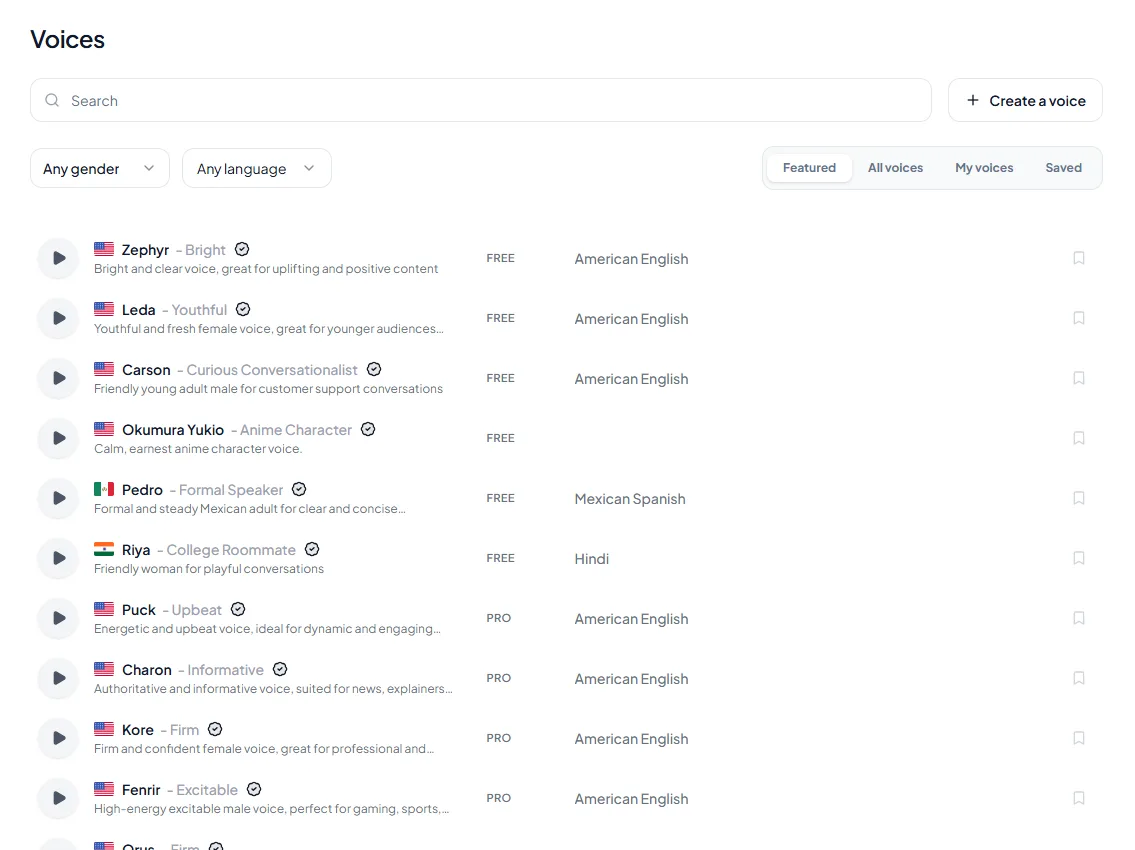
<figure style="margin:28px 0;padding:0"><img src="/blog/product/app-voice-library.webp" alt="The Voices page in the Kveeky app: a search box, gender and language filters, the tabs Featured, All voices, My voices and Saved, and a list of stock voices, each with a preview button and a FREE or PRO tag." width="1135" height="850" loading="lazy" decoding="async" style="display:block;width:100%;height:auto;border-radius:var(--kv-radius-md);border:1px solid var(--kv-blue-100)"><figcaption style="margin-top:10px;font:400 14px/1.5 var(--kv-font-body);color:var(--kv-gray-600)">The Voices page: search, gender and language filters, a preview button on every voice and a FREE or PRO tag. Press play on a few before you choose. There are more in the <a href="/ai-voices" style="color:var(--kv-blue-700)">AI voices library</a>.</figcaption></figure>

## Frequently asked questions

### Is Coqui TTS still maintained?

The original coqui-ai/TTS repo has had no release since v0.22.0 on December 12, 2023. The Idiap fork, installed as `coqui-tts`, is maintained. Its latest release was v0.27.5 on January 26, 2026.

### Is Coqui TTS free for commercial use?

The toolkit code is MPL-2.0, which allows commercial use under its terms. Model weights have their own licenses. XTTS-v2 uses the Coqui Public Model License, which is non-commercial only, so check each model you use.

### Where is the Coqui TTS GitHub repo?

The original is github.com/coqui-ai/TTS. The maintained fork is github.com/idiap/coqui-ai-TTS, and its PyPI package is `coqui-tts`.

### Can Coqui TTS clone voices?

Yes. The XTTS-v2 model clones a voice from a short reference clip, about 6 seconds according to its model card, and supports 17 languages. Its license limits use to non-commercial projects.

### What are the best open-source speech synthesis libraries?

Coqui TTS for many models and voice cloning, Piper for fast offline voices, eSpeak NG for tiny size and 100+ languages, and ESPnet for research. The best one depends on your hardware and license needs.

### Do I need a GPU to run Coqui TTS?

Not always. Smaller models can run on a CPU, but large models like XTTS-v2 run much faster on a GPU. Lighter engines such as Piper or eSpeak NG are better fits for low-power machines.

### How do I install Coqui TTS?

Use Python 3.10 or newer (below 3.15), install PyTorch for your system first, then run pip install coqui-tts. List the models with tts --list_models and make your first file with the tts command.

### Is Coqui TTS open source?

Yes. The toolkit code is MPL-2.0. Model weights can carry their own licenses, and XTTS-v2 uses the Coqui Public Model License, which is non-commercial only.

### What is the difference between TTS and coqui-tts on PyPI?

TTS is the original package, last released as v0.22.0 on December 12, 2023. coqui-tts is the maintained Idiap fork, with v0.27.5 released on January 26, 2026.

### Which open-source TTS is the lightest?

eSpeak NG is only a few MB and covers 100+ languages and accents, but it sounds more robotic than neural models. Piper is a neural option built to be fast and local.

### What is a vocoder in text-to-speech?

A vocoder is the network in stage 3 that turns a spectrogram into an audio waveform. Coqui includes vocoders such as HiFi-GAN, MelGAN and WaveRNN.

## How we checked this guide

This guide is written by Govind Kumar for the Kveeky team. **Disclosure: Kveeky makes an AI voice generator.** No Kveeky usage data is used in this guide.

- Coqui TTS repo status, license and release dates: [GitHub coqui-ai/TTS](https://github.com/coqui-ai/TTS), [Idiap fork](https://github.com/idiap/coqui-ai-TTS) and [PyPI coqui-tts](https://pypi.org/project/coqui-tts/), retrieved 2026-10-06.
- XTTS-v2 languages, clip length and license: [Hugging Face model card](https://huggingface.co/coqui/XTTS-v2) and [license text](https://huggingface.co/coqui/XTTS-v2/raw/main/LICENSE.txt), retrieved 2026-10-06.
- Piper, eSpeak NG and ESPnet facts: each project's GitHub page, retrieved 2026-10-06.
- Kveeky plans: [Kveeky pricing](https://kveeky.com/pricing/), retrieved 2026-10-06.

Your next step: if you're new to speech synthesis, read our plain-English guide to [how text-to-speech AI works](https://kveeky.com/blog/how-does-text-to-speech-work) before you install anything. It'll make every model name above easier to follow.

<div style="margin:28px 0;padding:20px 22px;background:var(--kv-white);border:1px solid var(--kv-blue-100);border-radius:var(--kv-radius-md);box-sizing:border-box;max-width:100%"><div style="font:700 18px/1.3 var(--kv-font-heading);color:var(--kv-blue-950);margin:0 0 8px">Keep reading</div><ul style="margin:0;padding-left:20px"><li style="margin:0 0 8px;font:400 16px/1.5 var(--kv-font-body);color:var(--kv-gray-800)"><a href="/blog/text-to-speech-vs-voice-cloning" style="color:var(--kv-blue-700)">Text-to-speech vs voice cloning</a>: when a stock voice beats a clone.</li><li style="margin:0 0 8px;font:400 16px/1.5 var(--kv-font-body);color:var(--kv-gray-800)"><a href="/blog/ai-voice-commercial-use-rights" style="color:var(--kv-blue-700)">AI voice commercial use rights</a>: what the licence terms mean for monetized audio.</li><li style="margin:0 0 8px;font:400 16px/1.5 var(--kv-font-body);color:var(--kv-gray-800)"><a href="/blog/is-voice-cloning-legal-ai-rights-guide" style="color:var(--kv-blue-700)">Is voice cloning legal?</a> Consent and rights before you clone.</li><li style="margin:0 0 8px;font:400 16px/1.5 var(--kv-font-body);color:var(--kv-gray-800)"><a href="/blog/free-vs-paid-text-to-speech" style="color:var(--kv-blue-700)">Free vs paid text to speech</a>: what you actually get.</li><li style="margin:0 0 8px;font:400 16px/1.5 var(--kv-font-body);color:var(--kv-gray-800)"><a href="/blog/10-best-free-ai-voice-generatorover-tools" style="color:var(--kv-blue-700)">10 best free AI voiceover generators</a> if you would rather not install anything.</li><li style="margin:0 0 8px;font:400 16px/1.5 var(--kv-font-body);color:var(--kv-gray-800)"><a href="/voice-providers" style="color:var(--kv-blue-700)">AI voice generator comparisons</a> and the <a href="/ai-voices" style="color:var(--kv-blue-700)">AI voices library</a>.</li></ul></div>

<script type="application/ld+json">
{"@context":"https://schema.org","@type":"FAQPage","mainEntity":[
{"@type":"Question","name":"Is Coqui TTS still maintained?","acceptedAnswer":{"@type":"Answer","text":"The original coqui-ai/TTS repo has had no release since v0.22.0 on December 12, 2023. The Idiap fork, installed as `coqui-tts`, is maintained. Its latest release was v0.27.5 on January 26, 2026."}},
{"@type":"Question","name":"Is Coqui TTS free for commercial use?","acceptedAnswer":{"@type":"Answer","text":"The toolkit code is MPL-2.0, which allows commercial use under its terms. Model weights have their own licenses. XTTS-v2 uses the Coqui Public Model License, which is non-commercial only, so check each model you use."}},
{"@type":"Question","name":"Where is the Coqui TTS GitHub repo?","acceptedAnswer":{"@type":"Answer","text":"The original is github.com/coqui-ai/TTS. The maintained fork is github.com/idiap/coqui-ai-TTS, and its PyPI package is `coqui-tts`."}},
{"@type":"Question","name":"Can Coqui TTS clone voices?","acceptedAnswer":{"@type":"Answer","text":"Yes. The XTTS-v2 model clones a voice from a short reference clip, about 6 seconds according to its model card, and supports 17 languages. Its license limits use to non-commercial projects."}},
{"@type":"Question","name":"What are the best open-source speech synthesis libraries?","acceptedAnswer":{"@type":"Answer","text":"Coqui TTS for many models and voice cloning, Piper for fast offline voices, eSpeak NG for tiny size and 100+ languages, and ESPnet for research. The best one depends on your hardware and license needs."}},
{"@type":"Question","name":"Do I need a GPU to run Coqui TTS?","acceptedAnswer":{"@type":"Answer","text":"Not always. Smaller models can run on a CPU, but large models like XTTS-v2 run much faster on a GPU. Lighter engines such as Piper or eSpeak NG are better fits for low-power machines."}},
{"@type":"Question","name":"How do I install Coqui TTS?","acceptedAnswer":{"@type":"Answer","text":"Use Python 3.10 or newer (below 3.15), install PyTorch for your system first, then run pip install coqui-tts. List the models with tts --list_models and make your first file with the tts command."}},
{"@type":"Question","name":"Is Coqui TTS open source?","acceptedAnswer":{"@type":"Answer","text":"Yes. The toolkit code is MPL-2.0. Model weights can carry their own licenses, and XTTS-v2 uses the Coqui Public Model License, which is non-commercial only."}},
{"@type":"Question","name":"What is the difference between TTS and coqui-tts on PyPI?","acceptedAnswer":{"@type":"Answer","text":"TTS is the original package, last released as v0.22.0 on December 12, 2023. coqui-tts is the maintained Idiap fork, with v0.27.5 released on January 26, 2026."}},
{"@type":"Question","name":"Which open-source TTS is the lightest?","acceptedAnswer":{"@type":"Answer","text":"eSpeak NG is only a few MB and covers 100+ languages and accents, but it sounds more robotic than neural models. Piper is a neural option built to be fast and local."}},
{"@type":"Question","name":"What is a vocoder in text-to-speech?","acceptedAnswer":{"@type":"Answer","text":"A vocoder is the network in stage 3 that turns a spectrogram into an audio waveform. Coqui includes vocoders such as HiFi-GAN, MelGAN and WaveRNN."}}
]}
</script>