# Sexy AI Voice Generator: Create Sultry & Attractive Voices for Content

Published: January 16, 2026 · Author: Hitesh Kumawat

A sexy AI voice is usually a warm, smooth, slightly breathy voice read slowly, with soft words and longer pauses. To make one, pick a voice with natural warmth that sounds a little lower, slow the speed to around 0.9x and write short lines with ellipses. Then set the Calm emotion and add soft background music.

*Last updated: October 6, 2026. We checked the voice research cited below on that date.*

This guide is for creators making luxury ads, perfume and fashion promos, ASMR and sleep content, romance audiobook narration, late-night podcast intros and game characters. It covers tasteful, non-explicit content: how to get a sultry tone, how to write for it and the rules to follow.

<div style="margin:28px 0;padding:20px 22px;background:var(--kv-blue-50);border:1px solid var(--kv-blue-100);border-radius:var(--kv-radius-md);box-sizing:border-box;max-width:100%"><div style="font:700 13px/1 var(--kv-font-body);letter-spacing:.06em;text-transform:uppercase;color:var(--kv-blue-700);margin:0 0 8px">Quick answer</div><div style="font:400 16px/1.6 var(--kv-font-body);color:var(--kv-gray-800)"><strong>Warm voice, about 0.9x speed, Calm emotion, short lines with pauses.</strong> Preview a few warm, breathy voices, slow the speed, set Emotion to Calm and write soft lines with ellipses. Use the recipe picker and the timing calculator below to tune it for your project.</div></div>

> **Key Takeaways**
>
> - **Sultry comes from delivery, not just the voice.** Slow pace, soft volume, breathiness and pauses do most of the work.
> - **Research links breathiness with attractiveness.** A 2013 PLOS ONE study found breathiness made both female and male voices more attractive to listeners.
> - **Write for intimacy.** Short phrases, soft sounds, sensory words and ellipses make any warm voice feel closer.
> - **Keep it tasteful and legal.** Never imitate a real person without permission, and follow your platform's content rules.
> - **Kveeky gives you 700+ AI voices** with speed, volume and 6 emotion settings (including Calm), and you download the audio to mix in your editor.

**On this page:** [What makes a voice sultry](#what-makes-a-voice-sultry) · [Step by step](#making-a-sexy-ai-voice) · [Writing the script](#writing-a-seductive-voice-script) · [Choosing a generator](#choosing-a-voice-generator) · [Female vs male](#female-vs-male-sultry-voices) · [Use cases](#tasteful-uses) · [Rules](#using-sexy-voices-responsibly) · [FAQ](#frequently-asked-questions)

## What makes a voice sultry

A sultry voice sounds close, relaxed and unhurried. It feels like the speaker is talking to one person, not announcing to a crowd.

Research gives some clues about why. A 2013 PLOS ONE study by Xu and colleagues tested which voice traits listeners found attractive. It used a natural recording and voices made with an articulatory speech synthesizer:

- **Female voices** were rated more attractive by male listeners with higher pitch, wider formant dispersion and a breathy voice quality.
- **Male voices** were rated more attractive by female listeners with lower pitch and narrower formant dispersion.
- **Breathiness also helped male voices.** The authors suggest it softened the aggressive feel of a very deep voice.

It was a small study with mostly synthetic speech, so treat it as a guide, not a rule. For voiceovers, the practical traits look like this:

<table>
<thead>
<tr><th>Trait</th><th>Sultry setting</th><th>Why it works</th></tr>
</thead>
<tbody>
<tr><td>Pace</td><td>Slow, around 0.9x</td><td>Sounds relaxed and confident</td></tr>
<tr><td>Pitch</td><td>A voice that sounds slightly lower (Kveeky has no pitch control, so the voice you pick sets it)</td><td>Feels warmer and calmer</td></tr>
<tr><td>Breathiness</td><td>A soft, airy voice</td><td>Feels intimate and gentle</td></tr>
<tr><td>Volume and energy</td><td>Low, even</td><td>Sounds like a close conversation</td></tr>
<tr><td>Pauses</td><td>Longer, especially before key words</td><td>Builds anticipation</td></tr>
<tr><td>Words</td><td>Soft sounds, sensory words</td><td>Matches the mood of the voice</td></tr>
</tbody>
</table>

## Making a sexy AI voice

You can get a sultry read from most AI voice generators. Here's the process in [Kveeky](https://kveeky.com/).

1. **Write a short script.** Start with 3 or 4 lines so you can test quickly.
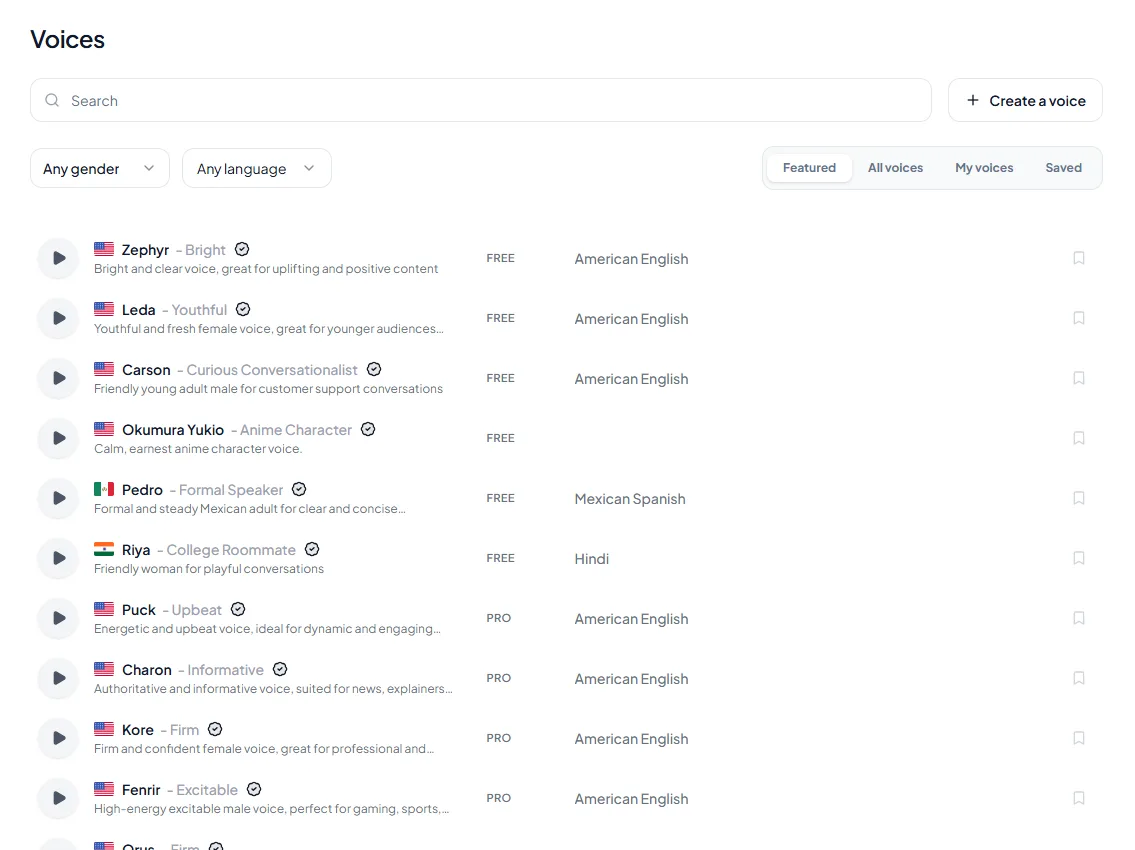
2. **Pick 3 warm, smooth voices.** Preview them and listen for natural breath and a relaxed tone.
3. **Choose a lower-sounding voice.** Kveeky has no pitch control, so the voice you pick sets the pitch. A slightly lower voice adds warmth; a very deep one can feel heavy.
4. **Slow the speed to around 0.9x.** Slower delivery is the biggest single change.
5. **Set a calm emotion.** In Settings, open Emotion and choose Calm (the options are Neutral, Happy, Love, Angry, Calm and Sad).
6. **Add pauses with punctuation.** Use ellipses and line breaks before the words you want to land.
7. **Generate, listen and compare.** Keep the version that sounds relaxed, not sleepy.
8. **Download the audio** and mix it with soft music or ambient sound.

A dry voice can sound too clean. A quiet bed of music or room tone makes a sultry voice feel richer and hides small digital artifacts.

<div style="margin:28px 0;padding:20px 22px;background:var(--kv-blue-50);border:1px solid var(--kv-blue-100);border-radius:var(--kv-radius-md);box-sizing:border-box;max-width:100%"><div style="font:700 18px/1.3 var(--kv-font-heading);color:var(--kv-blue-950);margin:0 0 8px">Pick your project, get a starting recipe</div><p style="margin:0 0 12px;font:400 15px/1.5 var(--kv-font-body);color:var(--kv-gray-600)">Click the kind of content you are making. Each recipe uses only the settings Kveeky has: voice, speed, volume and the Emotion list.</p><div style="display:flex;flex-wrap:wrap;gap:8px;margin-bottom:12px"><button type="button" data-pk="sx-pk" aria-pressed="false" style="min-height:44px;padding:8px 14px;border:1px solid var(--kv-blue-700);border-radius:var(--kv-radius-sm);background:var(--kv-white);color:var(--kv-blue-700);font:600 15px/1.3 var(--kv-font-body);cursor:pointer;text-align:left">Perfume or luxury ad</button><button type="button" data-pk="sx-pk" aria-pressed="false" style="min-height:44px;padding:8px 14px;border:1px solid var(--kv-blue-700);border-radius:var(--kv-radius-sm);background:var(--kv-white);color:var(--kv-blue-700);font:600 15px/1.3 var(--kv-font-body);cursor:pointer;text-align:left">ASMR or sleep</button><button type="button" data-pk="sx-pk" aria-pressed="false" style="min-height:44px;padding:8px 14px;border:1px solid var(--kv-blue-700);border-radius:var(--kv-radius-sm);background:var(--kv-white);color:var(--kv-blue-700);font:600 15px/1.3 var(--kv-font-body);cursor:pointer;text-align:left">Romance audiobook</button><button type="button" data-pk="sx-pk" aria-pressed="false" style="min-height:44px;padding:8px 14px;border:1px solid var(--kv-blue-700);border-radius:var(--kv-radius-sm);background:var(--kv-white);color:var(--kv-blue-700);font:600 15px/1.3 var(--kv-font-body);cursor:pointer;text-align:left">Late-night podcast intro</button><button type="button" data-pk="sx-pk" aria-pressed="false" style="min-height:44px;padding:8px 14px;border:1px solid var(--kv-blue-700);border-radius:var(--kv-radius-sm);background:var(--kv-white);color:var(--kv-blue-700);font:600 15px/1.3 var(--kv-font-body);cursor:pointer;text-align:left">Game or visual novel character</button></div><div id="sx-pk-h" aria-live="polite" style="padding:14px 16px;background:var(--kv-white);border:1px solid var(--kv-blue-100);border-radius:var(--kv-radius-sm);font:400 16px/1.6 var(--kv-font-body);color:var(--kv-gray-800);box-sizing:border-box;max-width:100%;overflow-wrap:anywhere;color:var(--kv-gray-600)">Pick an option above to see the answer.</div><div data-pa="sx-pk" style="padding:14px 16px;background:var(--kv-white);border:1px solid var(--kv-blue-100);border-radius:var(--kv-radius-sm);font:400 16px/1.6 var(--kv-font-body);color:var(--kv-gray-800);box-sizing:border-box;max-width:100%;overflow-wrap:anywhere"><strong>Warm, slow, intimate.</strong> Pick a smooth voice, set speed around 0.9x and Emotion to Calm. Pause before the product name with an ellipsis, and keep a soft music bed under it.</div><div data-pa="sx-pk" style="padding:14px 16px;background:var(--kv-white);border:1px solid var(--kv-blue-100);border-radius:var(--kv-radius-sm);font:400 16px/1.6 var(--kv-font-body);color:var(--kv-gray-800);box-sizing:border-box;max-width:100%;overflow-wrap:anywhere"><strong>Soft, breathy, very slow.</strong> Start at 0.9x and slow further if it still feels brisk. Keep volume steady and low, with Calm as the emotion.</div><div data-pa="sx-pk" style="padding:14px 16px;background:var(--kv-white);border:1px solid var(--kv-blue-100);border-radius:var(--kv-radius-sm);font:400 16px/1.6 var(--kv-font-body);color:var(--kv-gray-800);box-sizing:border-box;max-width:100%;overflow-wrap:anywhere"><strong>Warm and expressive.</strong> Vary the emotion by scene, not by line: Calm for quiet scenes, and try Love for tender ones. Compare both on one paragraph first.</div><div data-pa="sx-pk" style="padding:14px 16px;background:var(--kv-white);border:1px solid var(--kv-blue-100);border-radius:var(--kv-radius-sm);font:400 16px/1.6 var(--kv-font-body);color:var(--kv-gray-800);box-sizing:border-box;max-width:100%;overflow-wrap:anywhere"><strong>Low, smooth, relaxed.</strong> Choose a lower-sounding voice, around 0.9x speed, and pair the intro with soft music.</div><div data-pa="sx-pk" style="padding:14px 16px;background:var(--kv-white);border:1px solid var(--kv-blue-100);border-radius:var(--kv-radius-sm);font:400 16px/1.6 var(--kv-font-body);color:var(--kv-gray-800);box-sizing:border-box;max-width:100%;overflow-wrap:anywhere"><strong>Confident, playful.</strong> Give the character one fixed voice and one fixed set of settings, so every line sounds like the same person.</div></div><script>(function(){try{var bs=document.querySelectorAll('[data-pk="sx-pk"]'),as=document.querySelectorAll('[data-pa="sx-pk"]'),h=document.getElementById('sx-pk-h');if(!bs.length||!as.length||!h)return;function go(i){for(var k=0;k<as.length;k++){as[k].style.display=(k===i)?'block':'none'}h.style.display=(i<0)?'block':'none';for(var j=0;j<bs.length;j++){var on=(j===i);bs[j].setAttribute('aria-pressed',on?'true':'false');bs[j].style.background=on?'var(--kv-blue-700)':'var(--kv-white)';bs[j].style.color=on?'var(--kv-white)':'var(--kv-blue-700)'}}go(-1);for(var n=0;n<bs.length;n++){(function(m){bs[m].addEventListener('click',function(){go(m)})})(n)}}catch(e){}})();</script>

### How Kveeky helps

<figure style="margin:28px 0;padding:0"><a href="https://kveeky.com/"><img src="https://cdn.kveeky.com/portals/public-uploads/c033eba2-39d4-4683-a5a9-c8cf2ffc6d01.webp" alt="The Kveeky homepage voice demo with three numbered areas: the voice list, the script box and the language and play controls." width="1180" height="532" loading="lazy" decoding="async" style="display:block;width:100%;height:auto;border-radius:14px;border:1px solid #dbeafe"></a><figcaption style="margin-top:12px"><ol style="margin:0;padding:0"><li style="display:flex;gap:10px;align-items:flex-start;margin:0 0 6px;padding:0;list-style:none"><span style="flex:0 0 24px;height:24px;border-radius:50%;background:#1d4ed8;color:#fff;font:700 13px/24px var(--kv-font-heading);text-align:center">1</span><span style="font:400 15px/1.5 var(--kv-font-body);color:#1f2937"><span style="font-weight:700">Pick a voice.</span> Voices are tagged Free or Premium.</span></li><li style="display:flex;gap:10px;align-items:flex-start;margin:0 0 6px;padding:0;list-style:none"><span style="flex:0 0 24px;height:24px;border-radius:50%;background:#1d4ed8;color:#fff;font:700 13px/24px var(--kv-font-heading);text-align:center">2</span><span style="font:400 15px/1.5 var(--kv-font-body);color:#1f2937"><span style="font-weight:700">Type or paste a short line.</span> Pick an emotion if you want one.</span></li><li style="display:flex;gap:10px;align-items:flex-start;margin:0 0 6px;padding:0;list-style:none"><span style="flex:0 0 24px;height:24px;border-radius:50%;background:#1d4ed8;color:#fff;font:700 13px/24px var(--kv-font-heading);text-align:center">3</span><span style="font:400 15px/1.5 var(--kv-font-body);color:#1f2937"><span style="font-weight:700">Choose the language and press play</span> to hear it.</span></li></ol><p style="margin:6px 0 0;font:400 14px/1.5 var(--kv-font-body);color:#6b7280">Try it yourself in the free voice demo on <a href="https://kveeky.com/" style="font:inherit;color:#1d4ed8">Kveeky</a>, no sign-up needed. For longer scripts and downloads, use the free plan.</p></figcaption></figure>

<figure style="margin:28px 0;padding:0"><img src="/blog/product/app-voice-library.webp" alt="The Voices page in the Kveeky app: a search box, gender and language filters, the tabs Featured, All voices, My voices and Saved, and a list of stock voices, each with a preview button and a FREE or PRO tag." width="1135" height="850" loading="lazy" decoding="async" style="display:block;width:100%;height:auto;border-radius:var(--kv-radius-md);border:1px solid var(--kv-blue-100)"><figcaption style="margin-top:10px;font:400 14px/1.5 var(--kv-font-body);color:var(--kv-gray-600)">Choose the voice first. Filter by gender or language, press play on a few voices, and listen for natural breath and a relaxed tone. FREE voices work on the free plan; PRO voices need a paid plan.</figcaption></figure>

<figure style="margin:28px 0;padding:0"><img src="/blog/product/app-text-to-speech.webp" alt="The Kveeky text-to-speech editor with a script in the text box and the Settings panel showing Voice, Transcript Language, Speed, Volume, Emotion and Custom Punctuation." width="1150" height="850" loading="lazy" decoding="async" style="display:block;width:100%;height:auto;border-radius:var(--kv-radius-md);border:1px solid var(--kv-blue-100)"><figcaption style="margin-top:10px;font:400 14px/1.5 var(--kv-font-body);color:var(--kv-gray-600)">Then set the tone. On the right of the editor, move Speed toward Slower, lower Volume if you want it close and soft, and open Emotion to pick Calm. Custom Punctuation is there for punctuation hints and word guides.</figcaption></figure>

<div style="margin:28px 0;padding:20px 22px;background:var(--kv-white);border:1px solid var(--kv-blue-100);border-radius:var(--kv-radius-md);box-sizing:border-box;max-width:100%"><div style="font:700 18px/1.3 var(--kv-font-heading);color:var(--kv-blue-950);margin:0 0 8px">Sultry recipe checklist</div><p style="margin:0 0 12px;font:400 15px/1.5 var(--kv-font-body);color:var(--kv-gray-600)">Tick each step as you do it. Your ticks stay in this browser.</p><label style="display:flex;align-items:flex-start;gap:12px;min-height:44px;padding:8px 0;font:400 16px/1.6 var(--kv-font-body);color:var(--kv-gray-800);cursor:pointer"><input type="checkbox" class="sx-ck" style="width:22px;height:22px;margin-top:2px;flex:none;accent-color:var(--kv-blue-700)"><span style="min-width:0"><strong>Short script written,</strong> 3 or 4 lines to start.</span></label><label style="display:flex;align-items:flex-start;gap:12px;min-height:44px;padding:8px 0;font:400 16px/1.6 var(--kv-font-body);color:var(--kv-gray-800);cursor:pointer"><input type="checkbox" class="sx-ck" style="width:22px;height:22px;margin-top:2px;flex:none;accent-color:var(--kv-blue-700)"><span style="min-width:0"><strong>Three warm, smooth voices previewed</strong> and compared.</span></label><label style="display:flex;align-items:flex-start;gap:12px;min-height:44px;padding:8px 0;font:400 16px/1.6 var(--kv-font-body);color:var(--kv-gray-800);cursor:pointer"><input type="checkbox" class="sx-ck" style="width:22px;height:22px;margin-top:2px;flex:none;accent-color:var(--kv-blue-700)"><span style="min-width:0"><strong>A lower-sounding voice chosen</strong> (there is no pitch control).</span></label><label style="display:flex;align-items:flex-start;gap:12px;min-height:44px;padding:8px 0;font:400 16px/1.6 var(--kv-font-body);color:var(--kv-gray-800);cursor:pointer"><input type="checkbox" class="sx-ck" style="width:22px;height:22px;margin-top:2px;flex:none;accent-color:var(--kv-blue-700)"><span style="min-width:0"><strong>Speed set to about 0.9x.</strong></span></label><label style="display:flex;align-items:flex-start;gap:12px;min-height:44px;padding:8px 0;font:400 16px/1.6 var(--kv-font-body);color:var(--kv-gray-800);cursor:pointer"><input type="checkbox" class="sx-ck" style="width:22px;height:22px;margin-top:2px;flex:none;accent-color:var(--kv-blue-700)"><span style="min-width:0"><strong>Emotion set to Calm</strong> in Settings.</span></label><label style="display:flex;align-items:flex-start;gap:12px;min-height:44px;padding:8px 0;font:400 16px/1.6 var(--kv-font-body);color:var(--kv-gray-800);cursor:pointer"><input type="checkbox" class="sx-ck" style="width:22px;height:22px;margin-top:2px;flex:none;accent-color:var(--kv-blue-700)"><span style="min-width:0"><strong>Pauses added</strong> with ellipses and line breaks before key words.</span></label><label style="display:flex;align-items:flex-start;gap:12px;min-height:44px;padding:8px 0;font:400 16px/1.6 var(--kv-font-body);color:var(--kv-gray-800);cursor:pointer"><input type="checkbox" class="sx-ck" style="width:22px;height:22px;margin-top:2px;flex:none;accent-color:var(--kv-blue-700)"><span style="min-width:0"><strong>Listened and compared:</strong> relaxed, not sleepy.</span></label><label style="display:flex;align-items:flex-start;gap:12px;min-height:44px;padding:8px 0;font:400 16px/1.6 var(--kv-font-body);color:var(--kv-gray-800);cursor:pointer"><input type="checkbox" class="sx-ck" style="width:22px;height:22px;margin-top:2px;flex:none;accent-color:var(--kv-blue-700)"><span style="min-width:0"><strong>Audio downloaded</strong> and mixed with soft music or room tone.</span></label><p id="sx-ck-n" aria-live="polite" style="margin:10px 0 0;font:600 15px/1.4 var(--kv-font-body);color:var(--kv-blue-700)">0 of 8 done</p></div><script>(function(){try{var bx=document.querySelectorAll('input.sx-ck'),n=document.getElementById('sx-ck-n');if(!bx.length||!n)return;var key='kvck-sx-ck';var st=[];try{st=JSON.parse(localStorage.getItem(key)||'[]')}catch(e){st=[]}function upd(){var c=0,a=[];for(var i=0;i<bx.length;i++){if(bx[i].checked){c++;a.push(i)}}n.textContent=c+' of '+bx.length+' done';try{localStorage.setItem(key,JSON.stringify(a))}catch(e){}}for(var i=0;i<bx.length;i++){if(st.indexOf(i)>-1)bx[i].checked=true;bx[i].addEventListener('change',upd)}upd()}catch(e){}})();</script>

## Writing a seductive voice script

The script matters as much as the voice. Long, complex sentences leave no room for the voice to slow down and breathe.

- **Keep phrases short.** Short phrases let the pitch fall at the end, which sounds calm and confident.
- **Choose soft sounds.** Words like "smooth", "velvet", "warm" and "glow" sound softer than harsh, clipped words.
- **Use sensory language.** Describe how something feels, smells or looks.
- **Use ellipses for tension.** "Close your eyes... and breathe." holds a beat before the key word.
- **Talk to one person.** "You" sounds closer than "customers" or "everyone".

### How to make the voice drop to a sultry whisper

A voice dropping to a sultry whisper is a strong effect, so use it once, not every line.

1. **Put the whisper line on its own line,** after an ellipsis.
2. **Generate it separately** with a softer, breathier voice or a calm emotion, at a slightly slower speed.
3. **Lower its volume a little in your editor** and remove the music for a moment.

Here's a tasteful example for a perfume ad (set the Calm emotion in Settings before you generate):

```
It starts with a single drop...
Warm amber. Soft vanilla.
And something you can't quite name.
Lumière... wear it close.
```

For more ways to shape timing, see our guide to [pacing, pauses and emphasis tricks](https://kveeky.com/blog/adding-personality-to-ai-voices-pacing-pauses-emphasis-tricks).

Use the <a href="https://kveeky.com/resources/words-to-minutes-calculator" style="color:var(--kv-blue-700)">words-to-minutes calculator</a> to size any script before you generate it.

<div style="margin:28px 0;padding:20px 22px;background:var(--kv-blue-50);border:1px solid var(--kv-blue-100);border-radius:var(--kv-radius-md);box-sizing:border-box;max-width:100%"><div style="font:700 18px/1.3 var(--kv-font-heading);color:var(--kv-blue-950);margin:0 0 8px">How long will your sultry read run?</div><p style="margin:0 0 12px;font:400 15px/1.5 var(--kv-font-body);color:var(--kv-gray-600)">Enter your word count, pick a speed and add the long pauses you plan to cut in with your editor. It uses 150 words a minute at 1x and the free-plan rate of 500 credits for about 40 seconds.</p><div style="display:flex;flex-wrap:wrap;gap:12px;margin-bottom:12px"><label for="sx-w" style="flex:1 1 180px;min-width:0;font:600 15px/1.4 var(--kv-font-body);color:var(--kv-gray-800)">Words in your script<input id="sx-w" type="number" inputmode="decimal" min="0" step="1" value="60" style="display:block;width:100%;box-sizing:border-box;min-height:44px;margin-top:6px;padding:0 12px;border:1px solid var(--kv-blue-100);border-radius:var(--kv-radius-sm);font:400 16px/1 var(--kv-font-body);color:var(--kv-gray-800);background:var(--kv-white)"></label><label for="sx-s" style="flex:1 1 180px;min-width:0;font:600 15px/1.4 var(--kv-font-body);color:var(--kv-gray-800)">Speed<select id="sx-s" style="display:block;width:100%;box-sizing:border-box;min-height:44px;margin-top:6px;padding:0 12px;border:1px solid var(--kv-blue-100);border-radius:var(--kv-radius-sm);font:400 16px/1 var(--kv-font-body);color:var(--kv-gray-800);background:var(--kv-white)"><option value="1">1x (default)</option><option value="0.9">0.9x (sultry start)</option><option value="0.8">0.8x (very slow)</option></select></label><label for="sx-n" style="flex:1 1 180px;min-width:0;font:600 15px/1.4 var(--kv-font-body);color:var(--kv-gray-800)">Long pauses added in your editor<input id="sx-n" type="number" inputmode="decimal" min="0" step="1" value="3" style="display:block;width:100%;box-sizing:border-box;min-height:44px;margin-top:6px;padding:0 12px;border:1px solid var(--kv-blue-100);border-radius:var(--kv-radius-sm);font:400 16px/1 var(--kv-font-body);color:var(--kv-gray-800);background:var(--kv-white)"></label><label for="sx-d" style="flex:1 1 180px;min-width:0;font:600 15px/1.4 var(--kv-font-body);color:var(--kv-gray-800)">Seconds per pause<input id="sx-d" type="number" inputmode="decimal" min="0" step="0.5" value="1" style="display:block;width:100%;box-sizing:border-box;min-height:44px;margin-top:6px;padding:0 12px;border:1px solid var(--kv-blue-100);border-radius:var(--kv-radius-sm);font:400 16px/1 var(--kv-font-body);color:var(--kv-gray-800);background:var(--kv-white)"></label></div><div id="sx-o" aria-live="polite" style="padding:14px 16px;background:var(--kv-white);border:1px solid var(--kv-blue-100);border-radius:var(--kv-radius-sm);font:400 16px/1.6 var(--kv-font-body);color:var(--kv-gray-800);box-sizing:border-box;max-width:100%;overflow-wrap:anywhere"></div></div><script>(function(){try{var w=document.getElementById("sx-w"),s=document.getElementById("sx-s"),n=document.getElementById("sx-n"),d=document.getElementById("sx-d"),o=document.getElementById("sx-o");if(!w||!s||!n||!d||!o)return;
function go(){var wv=parseFloat(w.value),sp=parseFloat(s.value),nv=parseFloat(n.value),dv=parseFloat(d.value);if(!(wv>=0)||!(sp>0)){o.textContent="Enter your word count to see the timing.";return}
if(!(nv>=0))nv=0;if(!(dv>=0))dv=0;var sp1=wv/150*60/sp,pa=nv*dv,tot=sp1+pa,cr=sp1*500/40;
o.innerHTML="<strong>Speech: about "+Math.round(sp1)+" seconds.</strong> Added pauses: "+Math.round(pa)+" seconds. Finished read: about "+Math.round(tot)+" seconds ("+(tot/60).toFixed(1)+" minutes). Generating the speech uses roughly "+Math.round(cr)+" credits of the 500 free credits a month (about 40 seconds); pauses you add in your editor cost none."}
w.addEventListener("input",go);s.addEventListener("change",go);n.addEventListener("input",go);d.addEventListener("input",go);go()}catch(e){}})();</script>

<div style="margin:28px 0;padding:20px 22px;background:var(--kv-blue-50);border:1px solid var(--kv-blue-100);border-radius:var(--kv-radius-md);box-sizing:border-box;max-width:100%"><div style="font:700 18px/1.3 var(--kv-font-heading);color:var(--kv-blue-950);margin:0 0 8px">Try it: one line, three ways</div><p style="margin:0 0 12px;font:400 15px/1.5 var(--kv-font-body);color:var(--kv-gray-600)">Generate each line with the same voice at 0.9x and Emotion set to Calm. Listen for which one sounds closest to you, then use that style for the rest of the script.</p><div id="sx-cp-t" style="padding:14px 16px;background:var(--kv-white);border:1px solid var(--kv-blue-100);border-radius:var(--kv-radius-sm);font:400 16px/1.6 var(--kv-font-body);color:var(--kv-gray-800);box-sizing:border-box;max-width:100%;overflow-wrap:anywhere;white-space:normal">Version 1 (flat): Our new perfume has warm amber and soft vanilla notes.<br>Version 2 (short): Warm amber. Soft vanilla.<br>Version 3 (pause): Warm amber... soft vanilla... and something you can't quite name.</div><div style="display:flex;flex-wrap:wrap;align-items:center;gap:12px;margin-top:12px"><button type="button" id="sx-cp-b" style="min-height:44px;padding:0 18px;border:0;border-radius:var(--kv-radius-sm);background:var(--kv-blue-700);color:var(--kv-white);font:600 16px/1 var(--kv-font-body);cursor:pointer">Copy</button></div></div><script>(function(){try{var t=document.getElementById('sx-cp-t'),b=document.getElementById('sx-cp-b');if(!t||!b)return;b.addEventListener('click',function(){var s=t.innerText;function ok(){b.textContent='Copied';setTimeout(function(){b.textContent='Copy'},1800)}try{if(navigator.clipboard&&navigator.clipboard.writeText){navigator.clipboard.writeText(s).then(ok,function(){})}else{var r=document.createRange();r.selectNodeContents(t);var sel=window.getSelection();sel.removeAllRanges();sel.addRange(r)}}catch(e){}})}catch(e){}})();</script>

<div style="margin:28px 0;padding:20px 22px;background:var(--kv-blue-50);border:1px solid var(--kv-blue-100);border-radius:var(--kv-radius-md);box-sizing:border-box;max-width:100%"><div style="font:700 18px/1.3 var(--kv-font-heading);color:var(--kv-blue-950);margin:0 0 8px">Show me</div><p style="margin:0 0 12px;font:400 15px/1.5 var(--kv-font-body);color:var(--kv-gray-600)">Open what you need. Each answer is short and uses only settings Kveeky has.</p><details style="margin:0 0 8px;background:var(--kv-white);border:1px solid var(--kv-blue-100);border-radius:var(--kv-radius-sm);padding:0 14px"><summary style="min-height:44px;display:flex;align-items:center;cursor:pointer;font:600 16px/1.4 var(--kv-font-body);color:var(--kv-blue-950)">Show me the Emotion options</summary><div style="padding:0 0 14px;font:400 16px/1.6 var(--kv-font-body);color:var(--kv-gray-800)">In the Kveeky editor, Settings has an Emotion list: Neutral, Happy, Love, Angry, Calm and Sad. For a sultry read, start with Calm. For tender romance lines, compare Love against Calm on the same paragraph.</div></details><details style="margin:0 0 8px;background:var(--kv-white);border:1px solid var(--kv-blue-100);border-radius:var(--kv-radius-sm);padding:0 14px"><summary style="min-height:44px;display:flex;align-items:center;cursor:pointer;font:600 16px/1.4 var(--kv-font-body);color:var(--kv-blue-950)">Show me what Custom Punctuation is for</summary><div style="padding:0 0 14px;font:400 16px/1.6 var(--kv-font-body);color:var(--kv-gray-800)">Settings also has Custom Punctuation, described in the app as a place to add punctuation hints or special word guides. Use it with ellipses and line breaks to shape where a line pauses.</div></details><details style="margin:0 0 8px;background:var(--kv-white);border:1px solid var(--kv-blue-100);border-radius:var(--kv-radius-sm);padding:0 14px"><summary style="min-height:44px;display:flex;align-items:center;cursor:pointer;font:600 16px/1.4 var(--kv-font-body);color:var(--kv-blue-950)">Show me how to keep the whisper from sounding processed</summary><div style="padding:0 0 14px;font:400 16px/1.6 var(--kv-font-body);color:var(--kv-gray-800)">Generate the whisper line on its own, with a softer voice at a slightly slower speed. Lower its volume in your editor rather than pushing the speed to extremes, and drop the music for a moment so the line stays clear.</div></details></div>

## Choosing a voice generator

Any good AI voice generator can sound sultry if it gives you enough control. Test these before you commit.

<table>
<thead>
<tr><th>Feature</th><th>Why it matters</th><th>What Kveeky offers</th></tr>
</thead>
<tbody>
<tr><td>Voice library</td><td>You need warm, smooth, breathy voices to start from</td><td>700+ AI voices in 40+ languages</td></tr>
<tr><td>Speed control and voice choice</td><td>Slow pace and a lower-sounding voice create the mood</td><td>Speed (Slower to Faster, default 1x) and volume settings; no pitch control, so pick a lower-sounding voice</td></tr>
<tr><td>Emotion or style control</td><td>Calm, soft delivery on key lines</td><td>An Emotion setting: Neutral, Happy, Love, Angry, Calm or Sad</td></tr>
<tr><td>Export quality</td><td>Soft voices need clean audio for mixing</td><td>Download the audio file</td></tr>
<tr><td>Commercial rights</td><td>Needed for ads and paid content</td><td>Included on every paid plan</td></tr>
<tr><td>Free testing</td><td>Hear your script before you pay</td><td>Free plan: 500 credits a month (about 40 seconds), standard voices, no card</td></tr>
</tbody>
</table>

Other generators may offer specific "whisper" styles or different voice libraries. Compare on your own script before deciding.

## Female vs male sultry voices

Both work; choose based on the mood and audience of your content.

- **Female sultry voices:** soft, breathy and smooth. They suit perfume, beauty, fashion, wellness and ASMR. Keep the pace slow and the volume low.
- **Male sultry voices:** low, calm and slightly breathy. They suit luxury cars, watches, whisky-style ads and late-night intros. A little breathiness keeps a deep voice from sounding harsh.
- **Match the product.** A deep, sultry male voice may feel wrong for a gentle skincare brand. A whispery voice may feel wrong for a serious finance ad.

If you're choosing a female voice, our guide to [female speech patterns in AI voices](https://kveeky.com/blog/female-speech-patterns-ai-replicates-natural-womens-voice-characteristics) explains what makes one sound natural.

## Tasteful uses

<div><div style="display:flex;flex-wrap:wrap;gap:12px;margin:16px 0 8px"><label for="sx-f-q" style="flex:1 1 180px;min-width:0;font:600 15px/1.4 var(--kv-font-body);color:var(--kv-gray-800)">Filter the use cases (for example "ASMR", "ads" or "podcast")<input id="sx-f-q" type="search" placeholder="Type to filter the rows" style="display:block;width:100%;box-sizing:border-box;min-height:44px;margin-top:6px;padding:0 12px;border:1px solid var(--kv-blue-100);border-radius:var(--kv-radius-sm);font:400 16px/1 var(--kv-font-body);color:var(--kv-gray-800);background:var(--kv-white)"></label></div><p id="sx-f-c" aria-live="polite" style="margin:0 0 8px;font:400 14px/1.4 var(--kv-font-body);color:var(--kv-gray-600)"></p></div><script>(function(){try{var q=document.getElementById('sx-f-q'),t=document.getElementById('sx-table'),c=document.getElementById('sx-f-c'),s=document.getElementById('sx-f-s');if(!q||!t||!c)return;function f(){var v=q.value.toLowerCase().trim(),sv=s?s.value.toLowerCase():'',rs=t.querySelectorAll('tbody tr'),n=0;for(var i=0;i<rs.length;i++){var ok=!v||rs[i].textContent.toLowerCase().indexOf(v)>-1;if(ok&&sv&&-1>-1){var cs=rs[i].children;ok=cs.length>-1&&cs[-1].textContent.toLowerCase().indexOf(sv)>-1}rs[i].style.display=ok?'':'none';if(ok)n++}c.textContent=(v||sv)?('Showing '+n+' of '+rs.length+' rows.'):''}q.addEventListener('input',f);if(s)s.addEventListener('change',f)}catch(e){}})();</script>

<table id="sx-table">
<thead>
<tr><th>Use case</th><th>Style</th><th>Tip</th></tr>
</thead>
<tbody>
<tr><td>Luxury and perfume ads</td><td>Warm, slow, intimate</td><td>Pause before the product name</td></tr>
<tr><td>ASMR and sleep content</td><td>Soft, breathy, very slow</td><td>Keep volume steady and low</td></tr>
<tr><td>Romance audiobook narration</td><td>Warm, expressive</td><td>Vary emotion by scene, not by line</td></tr>
<tr><td>Late-night podcast intro</td><td>Low, smooth, relaxed</td><td>Pair with soft music</td></tr>
<tr><td>Game and visual novel characters</td><td>Confident, playful</td><td>Give the character a fixed voice profile</td></tr>
</tbody>
</table>

For ad work, see our page on [AI voiceover for advertisements](https://kveeky.com/voiceover/advertisements/).

## Using sexy voices responsibly

A sultry voice is fine for many kinds of content. A few rules keep it that way.

- **Never imitate a real person without permission.** Copying a celebrity's or anyone's voice for an ad can break their rights. Read our guide on [whether voice cloning is legal](https://kveeky.com/blog/is-voice-cloning-legal-ai-rights-guide) before you clone anyone.
- **Follow platform and tool rules.** YouTube, TikTok, app stores and AI voice tools all have content policies. Check them before you publish.
- **Keep it non-explicit for general audiences.** Suggestive is different from explicit, and most ad platforms reject explicit audio.
- **Disclose AI voices** where your platform or audience expects it.
- **Don't use a seductive tone to mislead,** for example in scams or fake personal messages.

<div style="margin:28px 0;padding:20px 22px;background:var(--kv-white);border:1px solid var(--kv-blue-100);border-radius:var(--kv-radius-md);box-sizing:border-box;max-width:100%"><div style="font:700 18px/1.3 var(--kv-font-heading);color:var(--kv-blue-950);margin:0 0 8px">Before you publish</div><p style="margin:0 0 12px;font:400 15px/1.5 var(--kv-font-body);color:var(--kv-gray-600)">A quick responsible-use check for every sultry piece.</p><label style="display:flex;align-items:flex-start;gap:12px;min-height:44px;padding:8px 0;font:400 16px/1.6 var(--kv-font-body);color:var(--kv-gray-800);cursor:pointer"><input type="checkbox" class="sx-ck2" style="width:22px;height:22px;margin-top:2px;flex:none;accent-color:var(--kv-blue-700)"><span style="min-width:0"><strong>No real person imitated</strong> without permission.</span></label><label style="display:flex;align-items:flex-start;gap:12px;min-height:44px;padding:8px 0;font:400 16px/1.6 var(--kv-font-body);color:var(--kv-gray-800);cursor:pointer"><input type="checkbox" class="sx-ck2" style="width:22px;height:22px;margin-top:2px;flex:none;accent-color:var(--kv-blue-700)"><span style="min-width:0"><strong>Platform and tool rules read</strong> (YouTube, TikTok, app stores, ad networks).</span></label><label style="display:flex;align-items:flex-start;gap:12px;min-height:44px;padding:8px 0;font:400 16px/1.6 var(--kv-font-body);color:var(--kv-gray-800);cursor:pointer"><input type="checkbox" class="sx-ck2" style="width:22px;height:22px;margin-top:2px;flex:none;accent-color:var(--kv-blue-700)"><span style="min-width:0"><strong>Kept non-explicit</strong> for general audiences.</span></label><label style="display:flex;align-items:flex-start;gap:12px;min-height:44px;padding:8px 0;font:400 16px/1.6 var(--kv-font-body);color:var(--kv-gray-800);cursor:pointer"><input type="checkbox" class="sx-ck2" style="width:22px;height:22px;margin-top:2px;flex:none;accent-color:var(--kv-blue-700)"><span style="min-width:0"><strong>AI voice disclosed</strong> where your platform or audience expects it.</span></label><label style="display:flex;align-items:flex-start;gap:12px;min-height:44px;padding:8px 0;font:400 16px/1.6 var(--kv-font-body);color:var(--kv-gray-800);cursor:pointer"><input type="checkbox" class="sx-ck2" style="width:22px;height:22px;margin-top:2px;flex:none;accent-color:var(--kv-blue-700)"><span style="min-width:0"><strong>Plan checked for commercial rights</strong> if the audio goes in a paid ad. See <a href="/blog/ai-voice-commercial-use-rights" style="color:var(--kv-blue-700)">AI voice commercial use rights</a>.</span></label><label style="display:flex;align-items:flex-start;gap:12px;min-height:44px;padding:8px 0;font:400 16px/1.6 var(--kv-font-body);color:var(--kv-gray-800);cursor:pointer"><input type="checkbox" class="sx-ck2" style="width:22px;height:22px;margin-top:2px;flex:none;accent-color:var(--kv-blue-700)"><span style="min-width:0"><strong>No misleading use,</strong> such as scams or fake personal messages.</span></label><p id="sx-ck2-n" aria-live="polite" style="margin:10px 0 0;font:600 15px/1.4 var(--kv-font-body);color:var(--kv-blue-700)">0 of 6 done</p></div><script>(function(){try{var bx=document.querySelectorAll('input.sx-ck2'),n=document.getElementById('sx-ck2-n');if(!bx.length||!n)return;var key='kvck-sx-ck2';var st=[];try{st=JSON.parse(localStorage.getItem(key)||'[]')}catch(e){st=[]}function upd(){var c=0,a=[];for(var i=0;i<bx.length;i++){if(bx[i].checked){c++;a.push(i)}}n.textContent=c+' of '+bx.length+' done';try{localStorage.setItem(key,JSON.stringify(a))}catch(e){}}for(var i=0;i<bx.length;i++){if(st.indexOf(i)>-1)bx[i].checked=true;bx[i].addEventListener('change',upd)}upd()}catch(e){}})();</script>

## Frequently asked questions

### Is there a free sexy AI voice generator?

You can test a sultry read for free on Kveeky's free plan: 500 credits a month (about 40 seconds) with standard voices and no credit card. Pick a lower-sounding voice, slow the speed and add pauses.

### How do I make an AI voice whisper?

Pick a soft, breathy voice, slow it down and set the Calm emotion. Generate the whisper line separately, then lower its volume slightly in your editor.

### How do I make a seductive female AI voice?

Choose a smooth, slightly breathy female voice. Slow it to around 0.9x, keep the volume low and write short, soft lines with ellipses.

### How do I make a seductive male AI voice?

Choose a low, calm male voice that sounds slightly lower than average. Keep a little breathiness so it sounds warm rather than harsh, and slow the pace.

### Can I clone a celebrity's sultry voice?

Not without their permission. Using someone's voice for content or ads without consent can break their rights. Use stock AI voices or clone only voices you're allowed to use.

### Can I use a sultry AI voice in paid ads?

Yes, if your plan includes commercial rights and the ad follows the platform's rules. Every paid Kveeky plan includes commercial usage rights.

### What emotion setting makes an AI voice sound sultry?

Start with Calm. Kveeky's Emotion list is Neutral, Happy, Love, Angry, Calm and Sad. Compare Calm with Love on the same paragraph and keep the one that sounds relaxed, not sleepy.

### How slow should a sultry AI voice be?

Around 0.9x is a good starting point. The Speed setting runs from Slower to Faster with a default of 1x, so try 0.9x first and slow it a little more if it still sounds brisk.

### Can I use a sexy AI voice for ASMR or sleep content?

Yes, as tasteful, non-explicit content. Use a soft, breathy voice, a very slow pace, steady low volume and long pauses, then check your platform's content rules.

### Are sexy AI voices allowed in ads?

Suggestive is different from explicit, and most ad platforms reject explicit audio. Keep it tasteful, follow the platform's policy and use a plan that includes commercial rights.

### How do I find a warm, breathy voice?

Open the Voices page, filter by gender and language, and press the preview button on several voices. Listen for natural breath and a relaxed tone before you choose.

## How we checked this guide

This guide is written by Hitesh Kumawat for the Kveeky team. **Disclosure: Kveeky makes an AI voice generator.**

- Attractiveness findings come from Xu, Lee, Wu, Liu and Birkholz, "[Human Vocal Attractiveness as Signaled by Body Size Projection](https://journals.plos.org/plosone/article?id=10.1371/journal.pone.0062397)", PLOS ONE, 2013, retrieved October 6, 2026.
- Kveeky features and plan details come from kveeky.com and its pricing page, retrieved October 6, 2026.
- No Kveeky usage data is used in this guide.

Your next step: write a 4-line script for your next ad or intro. Generate it with 3 warm voices at around 0.9x speed, and keep the one that sounds relaxed. If it still sounds flat, add emotion with our guide to [AI voice emotion control](https://kveeky.com/blog/ai-voice-with-emotion), or run through our checklist to [make an AI voiceover sound less robotic](https://kveeky.com/blog/how-to-make-your-ai-voiceover-sound-less-robotic-in-5-minutes).

<div style="margin:28px 0;padding:20px 22px;background:var(--kv-white);border:1px solid var(--kv-blue-100);border-radius:var(--kv-radius-md);box-sizing:border-box;max-width:100%"><div style="font:700 18px/1.3 var(--kv-font-heading);color:var(--kv-blue-950);margin:0 0 8px">Keep reading</div><ul style="margin:0;padding-left:20px"><li style="margin:0 0 8px;font:400 16px/1.5 var(--kv-font-body);color:var(--kv-gray-800)"><a href="/blog/ai-voice-with-emotion" style="color:var(--kv-blue-700)">AI voice with emotion</a>: how the emotion setting changes a read.</li><li style="margin:0 0 8px;font:400 16px/1.5 var(--kv-font-body);color:var(--kv-gray-800)"><a href="/blog/adding-personality-to-ai-voices-pacing-pauses-emphasis-tricks" style="color:var(--kv-blue-700)">Pacing, pauses and emphasis tricks</a> for softer timing.</li><li style="margin:0 0 8px;font:400 16px/1.5 var(--kv-font-body);color:var(--kv-gray-800)"><a href="/blog/how-to-make-your-ai-voiceover-sound-less-robotic-in-5-minutes" style="color:var(--kv-blue-700)">Make your AI voiceover sound less robotic</a> if a take feels flat.</li><li style="margin:0 0 8px;font:400 16px/1.5 var(--kv-font-body);color:var(--kv-gray-800)"><a href="/blog/ai-voice-commercial-use-rights" style="color:var(--kv-blue-700)">AI voice commercial use rights</a> before a paid ad.</li><li style="margin:0 0 8px;font:400 16px/1.5 var(--kv-font-body);color:var(--kv-gray-800)"><a href="/blog/is-voice-cloning-legal-ai-rights-guide" style="color:var(--kv-blue-700)">Is voice cloning legal?</a> Before you copy any voice.</li><li style="margin:0 0 8px;font:400 16px/1.5 var(--kv-font-body);color:var(--kv-gray-800)"><a href="/languages/english-text-to-speech" style="color:var(--kv-blue-700)">English text to speech</a>, the <a href="/ai-voices" style="color:var(--kv-blue-700)">AI voices library</a> and the <a href="https://kveeky.com/pricing" style="color:var(--kv-blue-700)">pricing page</a>.</li></ul></div>

<script type="application/ld+json">
{"@context":"https://schema.org","@type":"FAQPage","mainEntity":[
{"@type":"Question","name":"Is there a free sexy AI voice generator?","acceptedAnswer":{"@type":"Answer","text":"You can test a sultry read for free on Kveeky's free plan: 500 credits a month (about 40 seconds) with standard voices and no credit card. Pick a lower-sounding voice, slow the speed and add pauses."}},
{"@type":"Question","name":"How do I make an AI voice whisper?","acceptedAnswer":{"@type":"Answer","text":"Pick a soft, breathy voice, slow it down and set the Calm emotion. Generate the whisper line separately, then lower its volume slightly in your editor."}},
{"@type":"Question","name":"How do I make a seductive female AI voice?","acceptedAnswer":{"@type":"Answer","text":"Choose a smooth, slightly breathy female voice. Slow it to around 0.9x, keep the volume low and write short, soft lines with ellipses."}},
{"@type":"Question","name":"How do I make a seductive male AI voice?","acceptedAnswer":{"@type":"Answer","text":"Choose a low, calm male voice that sounds slightly lower than average. Keep a little breathiness so it sounds warm rather than harsh, and slow the pace."}},
{"@type":"Question","name":"Can I clone a celebrity's sultry voice?","acceptedAnswer":{"@type":"Answer","text":"Not without their permission. Using someone's voice for content or ads without consent can break their rights. Use stock AI voices or clone only voices you're allowed to use."}},
{"@type":"Question","name":"Can I use a sultry AI voice in paid ads?","acceptedAnswer":{"@type":"Answer","text":"Yes, if your plan includes commercial rights and the ad follows the platform's rules. Every paid Kveeky plan includes commercial usage rights."}},
{"@type":"Question","name":"What emotion setting makes an AI voice sound sultry?","acceptedAnswer":{"@type":"Answer","text":"Start with Calm. Kveeky's Emotion list is Neutral, Happy, Love, Angry, Calm and Sad. Compare Calm with Love on the same paragraph and keep the one that sounds relaxed, not sleepy."}},
{"@type":"Question","name":"How slow should a sultry AI voice be?","acceptedAnswer":{"@type":"Answer","text":"Around 0.9x is a good starting point. The Speed setting runs from Slower to Faster with a default of 1x, so try 0.9x first and slow it a little more if it still sounds brisk."}},
{"@type":"Question","name":"Can I use a sexy AI voice for ASMR or sleep content?","acceptedAnswer":{"@type":"Answer","text":"Yes, as tasteful, non-explicit content. Use a soft, breathy voice, a very slow pace, steady low volume and long pauses, then check your platform's content rules."}},
{"@type":"Question","name":"Are sexy AI voices allowed in ads?","acceptedAnswer":{"@type":"Answer","text":"Suggestive is different from explicit, and most ad platforms reject explicit audio. Keep it tasteful, follow the platform's policy and use a plan that includes commercial rights."}},
{"@type":"Question","name":"How do I find a warm, breathy voice?","acceptedAnswer":{"@type":"Answer","text":"Open the Voices page, filter by gender and language, and press the preview button on several voices. Listen for natural breath and a relaxed tone before you choose."}}
]}
</script>
