# Unlocking Clarity: A Video Producer's Guide to Voice Source Separation in AI Voiceover
Published: July 3, 2025 · Author: Govind Kumar
Voice source separation is the process of pulling one voice out of a mixed recording. It splits speech from background music, noise or other speakers, so each can be edited on its own. Modern AI voice separators do this from a single audio track. Video producers use it to rescue dialogue, remove music and prepare clean voice samples.
*Last updated: October 6, 2026. Project pages and papers below were checked on that date.*
This guide is for video producers and editors who work with messy audio, and for creators who mix AI voiceovers with music. It explains how voice source separation works, which tools and models exist, a step-by-step workflow, and where it fits next to AI voiceover.
> **Key Takeaways**
>
> - **Source separation un-mixes audio.** It turns one mixed track into separate tracks, such as voice, music and noise.
> - **There are 3 main jobs:** voice vs music, voice vs noise, and one speaker vs another speaker.
> - **AI models learn to do this from one track.** Older methods needed several microphones or worked only on narrow frequency bands.
> - **Check each model's license.** Some popular models allow only non-commercial use, and some well-known repos are no longer maintained.
> - **The easiest separation is the one you avoid.** Record or generate voice and music as separate tracks, then mix them yourself.
**On this page:** [What it is](#what-is-voice-source-separation) · [How AI does it](#how-separation-works) · [Tools](#voice-separator-tools) · [Step by step](#separating-voice-from-music) · [Multiple voices](#separating-multiple-voices) · [With AI voiceover](#fit-in-a-voiceover-workflow) · [Limits](#limits-to-know) · [FAQ](#frequently-asked-questions)
## What is voice source separation?
Voice source separation means isolating a voice from everything else in a recording. Think of a smoothie: separation tries to get the strawberries back out. It's never perfect, but modern AI gets surprisingly close.
People listen this way naturally. You can follow one friend's voice in a noisy café, which researchers call the "cocktail party effect". Source separation tries to give software the same skill.
There are 3 common versions of the task:
Task
Separates
Typical use in video
Vocal isolation
Voice from music
Remove a music bed under an interview or old promo
Speech enhancement
Voice from noise
Clean wind, traffic or room hum from location audio
Speaker separation
One voice from another
Split 2 people talking over each other in a podcast or panel
What are you trying to fix?
Pick your problem to see the right task, and where to read more.
Vocal isolation (voice from music). Try your editor's voice isolation first, or a music separator's "vocals" stem. Steps: separate a voice from background music.
Speech enhancement (voice from noise). Use your editor's dialogue cleanup, then gentle noise reduction and EQ. Blend a little of the original back so it does not sound watery.
Speaker separation. If each person had a microphone, use those tracks. If not, you need a speaker separation model and should expect artifacts. See multiple voices in one recording.
No separation needed. Generate the voice on its own and keep it on a separate track from the music. See AI voiceover with background music.
## How separation works
Most AI separators follow 4 steps. The details differ, but the idea is shared.
1. **Turn audio into a workable form.** Many models convert sound into a spectrogram, a picture of frequencies over time. Others work directly on the raw waveform.
2. **Estimate each source.** A neural network trained on many mixed and clean examples predicts which parts belong to the voice and which belong to music or noise.
3. **Apply a mask or rebuild the signal.** Spectrogram models usually apply a "mask" that keeps the voice parts and mutes the rest. Waveform models rebuild each source directly.
4. **Convert back to audio.** You get separate files, often called stems, for each source.
### Older methods vs AI
Before deep learning, separation relied on tricks like using several microphones to locate a voice in space, or filtering certain frequencies. These need controlled recording setups, and they fail when voice and music share the same frequencies.
AI models learn patterns from data instead. A well-known example is Conv-TasNet, a 2018 model by Yi Luo and Nima Mesgarani. It separates speakers directly in the time domain instead of masking a spectrogram, and its title claims it surpasses ideal time-frequency magnitude masking ([arXiv 1809.07454](https://arxiv.org/abs/1809.07454), retrieved 2026-10-06).
### The "who is who" problem
When a model splits 2 voices, it doesn't know which output is speaker A and which is speaker B. Researchers call this the permutation problem. In a long recording, the voices can swap between outputs halfway through. Some systems use video of the speakers' lips to keep each voice on the right track.
For the bigger picture of the neural networks behind this, see our explainer on [neural network architectures for AI voice generation](https://kveeky.com/blog/neural-network-voice-synthesis).
## Voice separator tools
There are 2 kinds of voice separators: open-source models you run yourself, and separation features built into audio and video editors. Here's what the main open-source projects say on their own pages.
Project
What it separates
License
Status (October 6, 2026)
Demucs
Music into 4 stems: drums, bass, vocals, other
MIT (code)
Original repo archived and "not maintained anymore"; the author points to a personal fork
Open-Unmix
Music into 4 stems: vocals, drums, bass, other
MIT code; default umxl model is CC BY-NC-SA 4.0 (non-commercial)
Reference implementation for research and artists
Conv-TasNet
Speech from speech (speaker separation)
Research paper; check any code you use
A widely cited research model
Sources: [Demucs on GitHub](https://github.com/facebookresearch/demucs), [Open-Unmix on GitHub](https://github.com/sigsep/open-unmix-pytorch) and the [Conv-TasNet paper](https://arxiv.org/abs/1809.07454), retrieved 2026-10-06.
Demucs and Open-Unmix were built for music, but their "vocals" stem works well for pulling a voice out of a music bed. Many editing apps now include a voice isolation or dialogue cleanup feature too. Try the one in your editor first, because it fits straight into your timeline.
Show me: a 60-second test before you process a whole video
Cut one short clip where the music is at its loudest under the voice.
Run it through your editor's voice isolation and through one separation model.
Listen to both voice stems on headphones, then on a phone speaker.
Pick the one with fewer watery or metallic edges, and only then run the full video.
This takes minutes and saves you from processing an hour of audio with the wrong tool.
## Separating voice from music
Here's a simple workflow for a typical job: an interview clip with music baked into the audio.
1. **Export the audio** from your video as WAV, not MP3, to avoid extra compression artifacts.
2. **Run a separator.** Use your editor's voice isolation feature or a music separation model's "vocals" output.
3. **Listen to the voice stem alone,** on headphones. Check for a watery or metallic sound and for music bleeding through.
4. **Blend, don't replace.** Mixing a little of the original back in often sounds more natural than the fully separated track.
5. **Clean up lightly.** Remove remaining hum or clicks with gentle noise reduction and EQ.
6. **Re-mix and check on a phone.** Add new music at a lower level, then make sure every word is still clear.
To check that the final mix is clear, use the simple listening test in our guide to [synthetic speech intelligibility metrics](https://kveeky.com/blog/synthetic-speech-intelligibility-metrics).
Mix check before you export
Tick each one after you listen on a phone speaker.
0 of 5 done
## Separating multiple voices
Separating 2 or more speakers is harder than separating voice from music. Voices share the same frequency range, and people often talk over each other.
- **Best case:** each person had their own microphone. Use those tracks and skip separation.
- **Good case:** speakers take turns. Speaker diarization, which labels "who spoke when", plus simple editing may be enough.
- **Hard case:** people talk over each other on one track. You need a speaker separation model, and you should expect some artifacts.
A "multiple voice separator" works best on clean, close-mic recordings with 2 speakers. Results drop with more speakers, room echo or loud background noise.
## Fit in a voiceover workflow
An AI voiceover is generated as a clean voice track, so it rarely needs separation. Separation helps in the steps around it.
- **Cleaning a sample before voice cloning.** A clone copies everything in the sample, including music and hiss. Separate and clean the sample first. For the cloning side, see [text to speech vs voice cloning](/blog/text-to-speech-vs-voice-cloning) and the [pricing page](https://kveeky.com/pricing) for which plans include cloning. Our guide to [zero-shot voice cloning](https://kveeky.com/blog/zero-shot-voice-cloning-ai-voiceovers) explains why clean samples matter so much.
- **Replacing a voice in an old video.** Separate the old narration from the music, keep the music, and drop in a new AI voiceover.
- **Fixing a single line.** Re-generate the line with AI instead of trying to rescue a noisy take.
### How to create an AI voiceover with background music
Here's the cleanest way to get voice plus music, with no separation needed:
1. **Generate the voiceover on its own.** In [Kveeky](https://kveeky.com/), for example, you paste your script, pick from 700+ AI voices and adjust speed, volume and emotion.
2. **Download the audio** and open it in your editor.
3. **Place the voice and music on separate tracks.**
4. **Lower the music under speech.** Many editors call this "ducking". A gap of several decibels between voice and music keeps words clear.
5. **Check on a phone speaker** and adjust the music level until every word is easy to follow.
Because the voice and music never mixed, you can change either one later without any separation at all. If your audio still sounds amateur after mixing, our guide on [why YouTube videos sound amateur](https://kveeky.com/blog/why-youtube-videos-sound-amateur-audio-tips) covers the usual causes. For a full production routine, see the [30-minute AI voiceover workflow](/blog/ai-voiceover-workflow-30-minutes) and our guide to [AI voiceover for video](/blog/ai-voiceover-for-video).
How long will your voiceover be?
Enter your script's word count to plan the music bed and the length of your edit.
About 6.7 minutes of audio (400 seconds). On the free plan (500 credits, about 40 seconds a month) that is 101% of one month.
Based on 150 words a minute at normal pace, a planning figure, not a measured Kveeky speed. For other lengths use the words to minutes calculator.
## Limits to know
Source separation is useful, but it has real limits.
- **Artifacts.** Separated voices can sound watery, thin or metallic, especially when music is loud.
- **Overlap.** When voice and an instrument hit the same notes, some of each leaks into the other stem.
- **Licenses.** Some separation models are non-commercial only. Check before you use the output in paid work.
- **Rights.** Separating a voice from a copyrighted song doesn't give you rights to use that voice or song.
- **Maintenance.** Some well-known repos, such as the original Demucs repo, are no longer maintained, which can cause install problems.
## Frequently asked questions
### What is voice source separation?
Voice source separation is the process of isolating a voice from a mixed recording. It splits speech from music, noise or other speakers so each part can be edited, cleaned or replaced on its own.
### What is a voice separator?
A voice separator is a tool or AI model that splits a mixed audio track into separate stems, such as voice and music. It can be a feature in your video editor or an open-source model you run yourself.
### Can AI separate multiple voices in one recording?
Yes, speaker separation models can split overlapping voices, but results are best with 2 speakers, close microphones and little echo. If each speaker had their own mic, use those tracks instead.
### How do I add background music to an AI voiceover?
Generate the voiceover on its own and download the audio. Put voice and music on separate tracks in your editor, lower the music while the voice speaks, and check the mix on a phone speaker.
### Is Demucs still maintained?
The original facebookresearch/demucs repository is archived. Its README says it is no longer maintained and points to a fork by the original author.
## How we checked this guide
This guide is written by Govind Kumar for the Kveeky team. **Disclosure: Kveeky makes an AI voice generator.** No Kveeky usage data is used in this guide.
- Conv-TasNet: Luo and Mesgarani, [arXiv 1809.07454](https://arxiv.org/abs/1809.07454), retrieved 2026-10-06.
- Demucs stems, license and maintenance status: [GitHub](https://github.com/facebookresearch/demucs), retrieved 2026-10-06.
- Open-Unmix stems and licenses: [GitHub](https://github.com/sigsep/open-unmix-pytorch), retrieved 2026-10-06.
- Kveeky features: kveeky.com/pricing, retrieved 2026-10-06.
Your next step: run one clip with music under the voice through your editor's voice isolation. Then compare it with a fresh AI voiceover of the same lines. For documentary-style narration you can drop straight into that timeline, see our page on [AI voiceover for documentaries](https://kveeky.com/voiceover/documentary/). For the basics behind generated voices, start with [how text-to-speech AI works](https://kveeky.com/blog/how-does-text-to-speech-work).
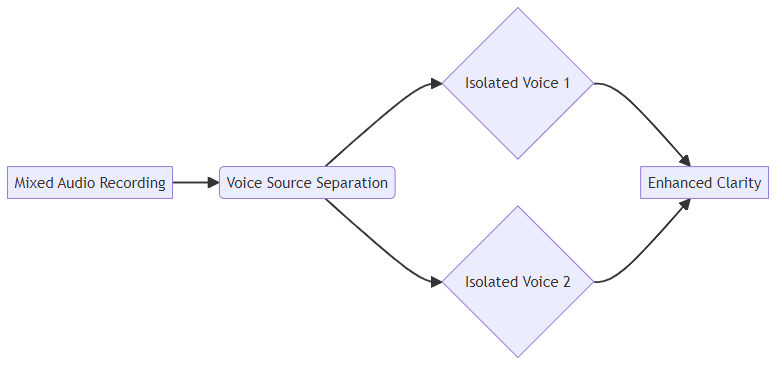 ## How separation works
Most AI separators follow 4 steps. The details differ, but the idea is shared.
1. **Turn audio into a workable form.** Many models convert sound into a spectrogram, a picture of frequencies over time. Others work directly on the raw waveform.
2. **Estimate each source.** A neural network trained on many mixed and clean examples predicts which parts belong to the voice and which belong to music or noise.
3. **Apply a mask or rebuild the signal.** Spectrogram models usually apply a "mask" that keeps the voice parts and mutes the rest. Waveform models rebuild each source directly.
4. **Convert back to audio.** You get separate files, often called stems, for each source.
### Older methods vs AI
Before deep learning, separation relied on tricks like using several microphones to locate a voice in space, or filtering certain frequencies. These need controlled recording setups, and they fail when voice and music share the same frequencies.
AI models learn patterns from data instead. A well-known example is Conv-TasNet, a 2018 model by Yi Luo and Nima Mesgarani. It separates speakers directly in the time domain instead of masking a spectrogram, and its title claims it surpasses ideal time-frequency magnitude masking ([arXiv 1809.07454](https://arxiv.org/abs/1809.07454), retrieved 2026-10-06).
### The "who is who" problem
When a model splits 2 voices, it doesn't know which output is speaker A and which is speaker B. Researchers call this the permutation problem. In a long recording, the voices can swap between outputs halfway through. Some systems use video of the speakers' lips to keep each voice on the right track.
For the bigger picture of the neural networks behind this, see our explainer on [neural network architectures for AI voice generation](https://kveeky.com/blog/neural-network-voice-synthesis).
## Voice separator tools
There are 2 kinds of voice separators: open-source models you run yourself, and separation features built into audio and video editors. Here's what the main open-source projects say on their own pages.
## How separation works
Most AI separators follow 4 steps. The details differ, but the idea is shared.
1. **Turn audio into a workable form.** Many models convert sound into a spectrogram, a picture of frequencies over time. Others work directly on the raw waveform.
2. **Estimate each source.** A neural network trained on many mixed and clean examples predicts which parts belong to the voice and which belong to music or noise.
3. **Apply a mask or rebuild the signal.** Spectrogram models usually apply a "mask" that keeps the voice parts and mutes the rest. Waveform models rebuild each source directly.
4. **Convert back to audio.** You get separate files, often called stems, for each source.
### Older methods vs AI
Before deep learning, separation relied on tricks like using several microphones to locate a voice in space, or filtering certain frequencies. These need controlled recording setups, and they fail when voice and music share the same frequencies.
AI models learn patterns from data instead. A well-known example is Conv-TasNet, a 2018 model by Yi Luo and Nima Mesgarani. It separates speakers directly in the time domain instead of masking a spectrogram, and its title claims it surpasses ideal time-frequency magnitude masking ([arXiv 1809.07454](https://arxiv.org/abs/1809.07454), retrieved 2026-10-06).
### The "who is who" problem
When a model splits 2 voices, it doesn't know which output is speaker A and which is speaker B. Researchers call this the permutation problem. In a long recording, the voices can swap between outputs halfway through. Some systems use video of the speakers' lips to keep each voice on the right track.
For the bigger picture of the neural networks behind this, see our explainer on [neural network architectures for AI voice generation](https://kveeky.com/blog/neural-network-voice-synthesis).
## Voice separator tools
There are 2 kinds of voice separators: open-source models you run yourself, and separation features built into audio and video editors. Here's what the main open-source projects say on their own pages.