TL;DR
- A voicemail greeting generator turns a short script into spoken audio for your phone line. Copy one of 15 scripts, edit the placeholders and generate it.
On this page
A voicemail greeting generator turns a short script into a spoken greeting you can upload to your phone line. Copy one of the 15 scripts below, replace the names, hours and dates, and paste it into a text-to-speech tool. Most greetings should run 15 to 30 seconds.
Last updated: October 29, 2026. Kveeky plan facts come from kveeky.com/pricing; the scripts and timings are our own.
Most people searching this need words, not software. So this guide gives you the words first: 15 greetings you can copy, then the numbers to check that each one fits a length and a plan, then the steps to turn it into audio.
Key Takeaways
- Short wins. Aim for 15 to 30 seconds: who you are, why you can’t answer, and what the caller should do next.
- Every script is ready to copy. Replace the [brackets] with your details. Each one has a character count so you know the credits it uses.
- 1 credit is 1 character. At about 750 credits a minute, a 300-character greeting is about 24 seconds.
- Kveeky’s free plan fits a short greeting. It gives 500 credits a month (about 40 seconds). Sign-up is required, no credit card.
- Check your phone system’s file rules before you generate the final version. We don’t know which file type your provider accepts.
On this page: What a good greeting has · 15 voicemail greeting scripts · Length and credits · Make the audio file · Where Kveeky fits · FAQ
What a good greeting has
A good voicemail greeting names the person or business, says why nobody answered, and tells the caller what to do next. Everything else is optional.
Use this order in any greeting:
- Who you are. Your name or business name, so callers know they dialed the right number.
- Why you’re unavailable. One short reason, or none at all.
- What to leave. Name, number and the reason for the call.
- What happens next. A callback time, such as "within one business day". Only promise what you can do.
Write for the ear. Use short sentences, no abbreviations and numbers you can say aloud. Our guide on how to write a voice over script covers this in more depth.
15 voicemail greeting scripts
Each script below has a one-line verdict and a Copy button. Replace everything in [brackets] before you generate the audio. The numbers come in the next section.
1. Business, general
The safe default for any small company.
2. Business, after hours
Tells callers when to try again.
3. Business, busy line
Good for a shop or clinic with a full queue.
4. Sales team
Asks for the detail a salesperson needs.
5. Customer support
Sends simple questions to the web.
6. Personal, short
Short and friendly.
7. Personal, warm
A little more personality.
8. Out of office
Gives a return date and a backup contact.
9. Holiday closure
Seasonal, with the reopening date.
10. Appointment-based business
Points callers to booking and cancellations.
11. Medical or dental office
Calm, with a clear emergency line.
12. Real estate agent
Fast, because buyers call several agents.
13. Restaurant
Hours first, then the booking request.
14. Freelancer or consultant
Professional but light.
15. Funny, for friends
For a personal line only.
Length and credits
Short greetings use few credits. At 750 credits per minute of paid audio, 1 credit is 1 character, so seconds equal characters divided by 12.5. This table is our calculation on the scripts as written, with the [brackets] left in. Your names will change the count a little.
| Script | Characters (credits) | Spoken length | Fits the 500-credit Free plan? |
|---|---|---|---|
| 1. Business, general | 189 | about 15 seconds | Yes |
| 2. Business, after hours | 212 | about 17 seconds | Yes |
| 3. Business, busy line | 201 | about 16 seconds | Yes |
| 4. Sales team | 201 | about 16 seconds | Yes |
| 5. Customer support | 207 | about 17 seconds | Yes |
| 6. Personal, short | 108 | about 9 seconds | Yes |
| 7. Personal, warm | 170 | about 14 seconds | Yes |
| 8. Out of office | 237 | about 19 seconds | Yes |
| 9. Holiday closure | 196 | about 16 seconds | Yes |
| 10. Appointment-based business | 198 | about 16 seconds | Yes |
| 11. Medical or dental office | 240 | about 19 seconds | Yes |
| 12. Real estate agent | 187 | about 15 seconds | Yes |
| 13. Restaurant | 193 | about 15 seconds | Yes |
| 14. Freelancer or consultant | 196 | about 16 seconds | Yes |
| 15. Funny, for friends | 155 | about 12 seconds | Yes |
A greeting of about 300 characters is about 24 seconds. To check your own text, use the character counter from the free Kveeky script tools, or the words to minutes calculator.
Make the audio file
To make a voicemail greeting, paste the script into the editor, pick a voice, generate the speech and download the audio file. Kveeky works this way, and you do it once per greeting.
Show me: the editor you generate in
The editor you generate in.
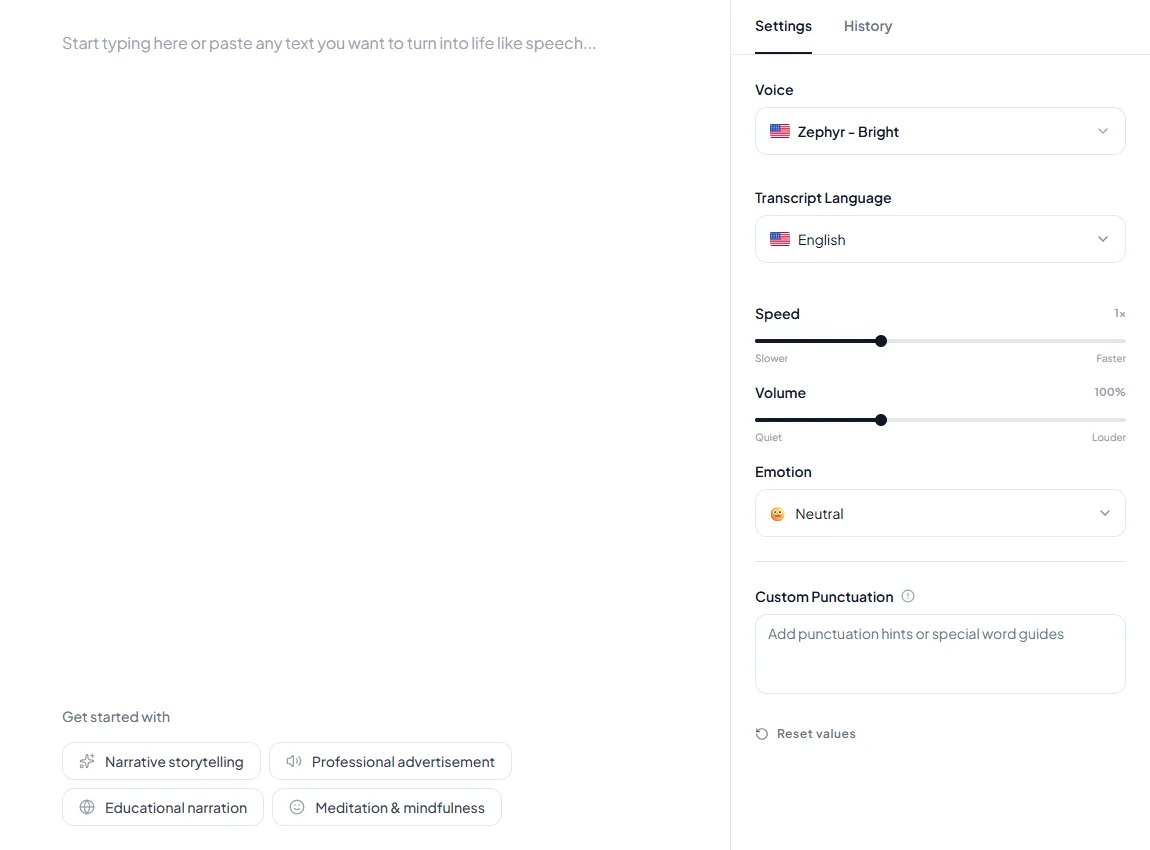
Tick each step as you go. Nothing is stored.
Add a pause after the business name or before the callback promise with a comma or a line break in the text. The pause inserter does this for you. For menus and call flows, read our guide to text to speech for IVR and phone greetings, and for the use case see Kveeky voices for IVR. If you need a particular file type, see text to speech MP3.
Where Kveeky fits
Kveeky is a good fit when you need one or several short greetings and want to change them often. The free plan gives 500 credits a month, about 40 seconds, with standard voices. Sign-up is required and no credit card is needed. That covers one short greeting a month.
Paid plans list commercial usage rights and more minutes: Basic is $9 a month, or $7.50 a month billed yearly, for 75,000 credits (about 100 minutes). See the pricing page for current plans.
Where Kveeky is weaker: it doesn’t connect to your phone system. You download the audio file and upload it yourself. If you want a service that answers calls live, you need a phone-system product, not a voice generator.
Paste one of the scripts above and listen to it in a few seconds. Start free on app.kveeky.com. The free plan needs a sign-up and no credit card.
Frequently asked questions
What is a voicemail greeting generator?
A voicemail greeting generator is a text-to-speech tool that turns a short written script into a spoken greeting. You paste the text, choose a voice, generate the audio and download an audio file to upload to your phone line, instead of recording the greeting yourself.
How long should a voicemail greeting be?
Aim for 15 to 30 seconds. That is our recommendation, not a rule from any phone provider. Callers want to leave a message, so give your name or business, a reason you’re unavailable, and what to do next. Anything longer than 30 seconds is better trimmed.
Can I make a voicemail greeting for free?
Yes, within limits. Kveeky’s free plan gives 500 credits a month, about 40 seconds of audio, with standard voices. A sign-up is required and no credit card is needed. Scripts under 500 characters fit, so one short greeting fits in a month.
Can I use a free greeting for my business line?
Check the rights first. Kveeky lists commercial usage rights on every paid plan and does not list them for the Free plan, so we treat Free as testing. For a business phone line, use a paid plan or read the terms before you upload the audio.
Which file does my phone system need?
It depends on the system, and we can’t tell you without checking yours. Look in your phone provider’s help pages for the accepted audio file type, length limit and upload steps before you generate the final greeting.
Should I record my own voice instead?
Recording yourself sounds personal and costs nothing. A generated voice is faster to update when hours or names change, and it stays consistent across several lines. Many small teams use their own voice on the main line and generated audio for after-hours and holidays.
Conclusion
A voicemail greeting needs a name, a reason, a request and a next step, in 15 to 30 seconds. Pick a script, replace the brackets, check the length, and generate it. Update it whenever your hours change.
How we checked this guide
This guide is written by Hitesh Kumawat for the Kveeky team. Disclosure: Kveeky makes an AI voice generator. The 15 scripts are our own. Spoken lengths are our calculation from 750 credits per minute (kveeky.com/pricing, retrieved October 29, 2026). The 15 to 30 second advice is our recommendation. We did not check any phone provider’s file rules, so confirm yours.
Related guides
- Text to speech for IVR and phone greetings
- How to add a voiceover to a video
- How many words is a 5 minute speech?
Turn your script into a voiceover
Paste your text, pick a voice and download the audio. Free to start, no credit card.