Top 15 Best Speechify Alternatives in 2026: The Complete Guide
Quick Takeaways
Speechify is expensive: Premium plans start at $29/month, limiting access for budget-conscious users
Better alternatives exist: Tools like Kveeky, Murf AI, and ElevenLabs offer superior features at competitive prices
Voice quality matters: Modern AI voices now sound remarkably human, eliminating the robotic tone issue
Use case specific: Different tools excel at different tasks—choose based on your specific needs
Free options available: Several alternatives offer generous free plans with quality voices
Multi-language support: Most modern TTS tools support 20+ languages for global content
Commercial rights included: Unlike Speechify's restrictions, many alternatives include full commercial rights
Introduction
Finding the perfect text-to-speech tool shouldn't mean settling for Speechify's $29/month premium plan. While Speechify pioneered accessible TTS, the market has evolved dramatically. Modern alternatives deliver superior voice quality, advanced features like instant voice cloning, and pricing that's 50-80% cheaper.
The reality is harsh: Speechify's free plan caps you at 220 WPM with just 10 robotic voices, making it essentially unusable for serious work. Their premium plan costs more than Netflix, while competitors offer professional-grade voices starting at $5-8/month with features that Speechify reserves for enterprise customers.
This guide examines 15 Speechify alternatives based on weeks of hands-on testing, not marketing materials. We've compared voice quality, features, pricing, and real-world performance. The TTS market is projected to reach $8.89 billion by 2029, growing at 15.32% annually. This explosive growth means innovation, competition, and dramatically better tools at better prices.
Whether you're a student working through textbooks, a content creator producing videos, or someone with dyslexia seeking accessibility tools, you'll find better options here. From free forever solutions to professional suites under $25/month, these alternatives deliver the quality Speechify promises at prices that make sense.
Understanding Speechify and the Need for Alternatives
What is Speechify?
Speechify transformed how millions interact with written content. At its core, it's a text-to-speech app that converts articles, PDFs, emails, and even printed text (via OCR) into natural-sounding audio. You can listen at speeds up to 4.5x, making it popular among students, professionals, and anyone trying to consume more content in less time.
The app syncs across iOS, Android, Mac, Windows, and web browsers. You can start reading an article on your phone during your commute and pick up where you left off on your laptop at home.
Why Look for Alternatives?
Cost presents the primary barrier. Speechify Premium's $29/month ($144 annually) significantly exceeds competitors, charging $5-15/month for comparable or superior features. The free plan's 1x speed cap and 10 voices create a deliberately frustrating experience,e pushing users toward premium.
Voice quality issues persist even in premium tiers. Free voices sound noticeably robotic, while premium voices lack the emotional range competitors now offer as standard. Celebrity voices like Snoop Dogg feel gimmicky rather than professionally useful. Pronunciation errors with technical terms require manual correction that modern AI handles automatically.
Feature limitations restrict serious users. Voice cloning requires enterprise plans, while competitors offer it at $5-8/month. No API access exists for developers, integration options are minimal, and commercial usage terms are more restrictive than alternatives. The platform focuses on individual reading rather than content creation, missing modern features like emotion control, multi-language switching, and video integration.
User experience complaints include unexpected auto-renewal charges, difficult cancellation processes, and mobile app stability issues. The learning curve exceeds what simpler alternatives require, and customer support responsiveness lags behind competitors.
Comparison Table: Top 15 Speechify Alternatives at a Glance
Tool | Starting Price | Free Plan | Voices | Languages | Best For | Voice Cloning | Commercial Rights |
|---|---|---|---|---|---|---|---|
Kveeky | $8.33/month | Yes (10 gen/month) | 200+ | 40+ | Creators, YouTubers | Premium | Included |
Murf AI | $29/month | Yes (10 min) | 300+ | 33 | Professional voiceovers | Paid addon | Included |
ElevenLabs | $5/month | Yes (10k chars) | 1000+ | 29 | Ultra-realistic voices | Instant | Included |
Play.ht | $19/month | Yes (2500 words) | 900+ | 142 | Multilingual content | Instant | Included |
Natural Reader | $20/month | Yes (20 min/day) | 200+ | 50+ | Students, accessibility | No | Included |
Lovo AI | $10/month | Yes (2 hrs) | 500+ | 100+ | AI video + voice | Genny Pro | Included |
Descript | $24/month | Yes (limited) | 80+ | 20 | Podcasters, video editors | Overdub | Included |
Resemble AI | $9.5/sec | Yes (10k sec) | Unlimited | 60+ | Custom voice clones | Instant | Included |
Speechelo | $39 one-time | No trial | 30+ | 24 | Budget-conscious users | No | Included |
ReadSpeaker | $4/month | No trial | 200+ | 50+ | Web accessibility | No | Enterprise |
Balabolka | Free | Yes (Forever) | System voices | All | Windows offline use | No | Included |
Google TTS | Free/Pay-as-go | Yes (Free tier) | 380+ | 50+ | Developers, Android | No | Included |
Amazon Polly | Pay-as-go | Yes (Free tier) | 60+ | 31 | AWS ecosystem | No | Included |
VEED.io | $18/month | Yes (limited) | 20+ | 20+ | Social media videos | No | Included |
Narakeet | $6/30 min | No trial | 700+ | 100+ | Bulk audio creation | No | Included |
Top 15 Best Speechify Alternatives in 2026
1. Kveeky – Best Overall Value for Content Creators
Best For: YouTubers, podcasters, content creators, and businesses looking for affordable, high-quality AI voiceovers with emotional expression
Tool Description:
Kveeky stands out as the most value-packed Speechify alternative in 2026. Born from a vision to democratize professional voice generation, Kveeky delivers studio-quality AI voices at a fraction of competitors' prices.
The platform has gained trust from 2M+ creators who appreciate its balance of advanced features and simplicity.
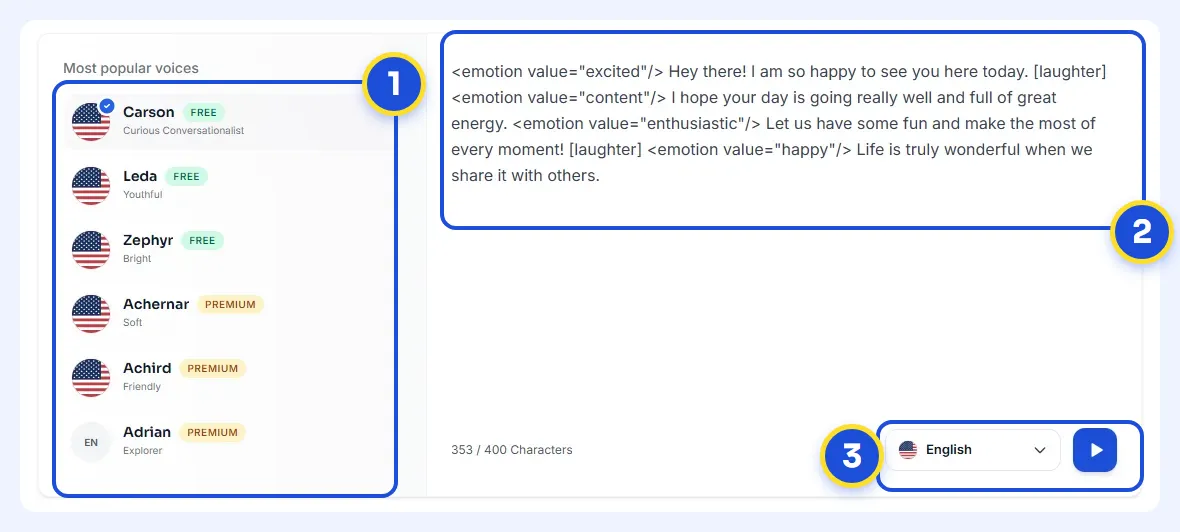
What makes Kveeky special is its focus on emotional intelligence. Unlike robotic TTS tools, Kveeky's voices convey genuine emotion—sadness, excitement, anger, calmness—making content feel authentically human. The platform supports 40+ languages and 200+ unique voices, ensuring you'll find the perfect voice for any project.
Kveeky's interface prioritizes speed without sacrificing control. Generate voiceovers in minutes, adjust pitch and pace on the fly, and export in multiple formats. The platform includes built-in audio editing, eliminating the need for separate software.
Features:
200+ AI voices across 40+ languages with regional accents
Emotional expression controls – Add sadness, joy, anger, or professional tones
Premium voice styles including meditative, promo, conversational modes
Advanced customization: Pitch adjustment (±50%), speed control (±50%), pause insertion
Unlimited regenerations – Refine until perfect without counting against quota
Multi-format export – MP3, WAV, and more for various use cases
Character limit flexibility – From 1,000 to 11,000 characters per generation
Priority support on Pro and Premium plans
Pros:
Exceptional value – Premium features at $8.33/month (Pro) or $12.50/month (Premium)
Generous free tier – 10 audio generations and 30 minutes monthly without credit card
Commercial rights included – Use generated voices for monetized YouTube, podcasts, ads
Emotional expressions – Voices sound natural and engaging, not robotic
No hidden fees – Transparent pricing with annual billing discounts
Fast generation – Audio ready in seconds, not minutes
Intuitive interface – No learning curve, start creating immediately
Cons:
Smaller voice library – 200+ voices solid but fewer than ElevenLabs' 1000+
Voice cloning limited – Only available in Premium plan, not Pro
Newer platform – Less established than Murf AI or Speechify
No offline mode – Requires internet connection unlike Balabolka
Pricing:
Free Plan:
Available: Yes
10 audio generations per month
30 minutes of audio per month
Standard voices only
Up to 1,000 characters per generation
No emotional expressions
Paid Plans:
Pro: $8.33/month (billed $99.99/year)
500 audio generations/month
4 hours of audio/month
Up to 5,000 characters per generation
No emotional expressions
Priority support
Premium: $12.50/month (billed $149.99/year)
1,000 audio generations/month
8 hours of audio/month
Premium voices access
Up to 11,000 characters per generation
Emotional expressions included
Advanced voice controls
Priority support
Why Choose Kveeky?
Choose Kveeky if you're tired of paying Speechify's $29/month but refuse to compromise on voice quality. It's perfect for:
YouTube creators needing voiceovers for explainer videos, tutorials, or documentary content
Podcasters wanting consistent, professional narration without recording hours
Course creators building e-learning content with engaging narration
Marketing teams producing video ads, social media content, and promo materials
Indie developers adding voice to apps or games without hiring voice actors
Authors converting books to audiobooks affordably
The emotional expression feature alone justifies Kveeky's place at #1. While competitors offer "natural voices," Kveeky's voices convey genuine emotion, creating content that resonates. The free plan is genuinely useful (not a glorified trial), and the Pro plan costs less than Netflix while delivering professional voiceovers.
2. Murf AI – Best for Professional Voiceovers
Best For: Professional content creators, marketing teams, e-learning developers, and businesses requiring studio-quality voiceovers with advanced customization
Tool Description:
Murf AI has earned its reputation as the "professional's choice" in text-to-speech. With 6+ million users including Fortune 2000 companies like Deloitte and Lenovo, Murf represents the gold standard for corporate voiceovers.
The platform's Speech Gen 2 technology, trained on 70,000+ hours of human speech, produces voices indistinguishable from professional voice actors. Murf doesn't just convert text to speech—it creates performances. The voice editor offers granular control over pronunciation, emphasis, pitch, and pacing, allowing you to craft exactly the voiceover you envision.
Murf's standout feature is MultiNative, which enables seamless language switching mid-sentence. Imagine saying "Welcome to Paris" in English, then "la ville de l'amour" in perfect French pronunciation—all from one voice model. This game-changing feature eliminates the need for multiple voice actors in multilingual content.
The platform includes a complete content creation studio with millions of stock images, videos, and music tracks. You can script, voice, edit, and export finished videos without leaving Murf.
Features:
300+ ultra-realistic voices in 33 languages and accents
MultiNative technology – Seamless mid-sentence language switching
Advanced voice customization – Pitch, speed, volume, emphasis control
Pronunciation library – Save custom pronunciations for brands, technical terms
Voice cloning (Business+) – Create digital replica of any voice in 24-48 hours
Built-in video editor – Add images, music, and text to voiceovers
Real-time collaboration – Team members can edit projects simultaneously
API access (Business+) – Integrate Murf into your applications
Commercial licensing included – Full rights to use generated audio
Pros:
Professional-grade quality – 99.38% pronunciation accuracy across voices
No regeneration limits – Refine voiceovers unlimited times within your hours
Complete studio suite – Audio + video editing in one platform
Team collaboration – Built-in workspace for agencies and teams
Extensive integrations – Works with Canva, Google Slides, PowerPoint
Enterprise-ready – SOC 2, ISO 27001, ISO 42001 compliance
Outstanding support – Responsive team with detailed documentation
Cons:
Higher price point – $23/month minimum vs. competitors' $8-15/month
Voice cloning costs extra – Not included in Creator plan
Hour-based limits – 24 hours/year on Creator plan may feel restrictive
Learning curve – Advanced features require time to master
Pricing:
Free Plan:
Available: Yes
10 minutes of voice generation
Basic features only
Export disabled
Watermark on outputs
Paid Plans:
Creator: $29/month ($19/month annual)
24 hours voice generation/year
100 projects
All 300+ voices
Video editing tools
Commercial rights
Business: $99/month ($66/month annual)
96 hours voice generation/year
500 projects
Voice cloning included
API access
Priority support
Team collaboration
Enterprise: Custom pricing
Unlimited voice generation
Custom voice creation
AI dubbing and translation
Dedicated account manager
Advanced security features
Why Choose Murf AI?
Choose Murf AI when voice quality cannot be compromised. It's ideal for:
Marketing agencies producing client commercials and branded content
E-learning companies creating courses with consistent, engaging narration
Audiobook publishers needing book-length professional narration
Corporate training departments developing internal learning materials
Product demo creators requiring polished, authoritative voiceovers
International businesses leveraging MultiNative for multilingual content
3. ElevenLabs – Best for Ultra-Realistic Voice Cloning
Best For: Content creators, authors, indie filmmakers, and anyone requiring instant voice cloning with the most realistic AI voices available
Tool Description:
ElevenLabs has revolutionized voice cloning, making what once required expensive studio sessions accessible to everyone. With just 60 seconds of audio, ElevenLabs creates a near-perfect digital clone capturing subtle nuances, emotional inflections, and unique vocal characteristics.
The platform's claim to fame is voice quality. ElevenLabs' proprietary AI models produce voices so realistic that distinguishing them from humans becomes genuinely difficult. The voices breathe, pause naturally, and convey genuine emotion—not programmed responses but authentic feeling.
Unlike competitors charging thousands for voice cloning, ElevenLabs offers instant cloning starting at $5/month. Upload a voice sample, wait 2-3 minutes, and your clone is ready. The technology supports 29 languages, making it invaluable for multilingual creators.
ElevenLabs also pioneered the "sound effects" feature, generating custom audio effects from text descriptions—think "door creaking open" or "distant thunder" created by AI rather than sourced from libraries.
Features:
Instant voice cloning – Clone any voice in minutes from 60-second sample
1000+ pre-made voices across 29 languages
Emotional range control – Adjust happiness, anger, sadness in real-time
Speech-to-Speech – Transform recorded audio into different voices
Projects workspace – Organize long-form content like audiobooks
Pronunciation library – Train AI on specific words, names, brands
API access (all plans) – Integrate into apps with low-latency processing
Sound effects generator (beta) – Create custom SFX from text descriptions
Voice lab – Design custom voices by blending characteristics
Pros:
Unmatched realism – Industry-leading voice quality and emotional depth
Affordable cloning – Instant voice cloning from just $5/month
Generous free tier – 10,000 characters monthly, no credit card required
Fast generation – Audio ready in seconds with low latency
Developer-friendly – Comprehensive API with excellent documentation
Constant innovation – Regular feature updates and model improvements
Active community – Discord with 100k+ members sharing tips and voices
Cons:
Character-based limits – Can feel restrictive for bulk content
Cloning quality varies – Depends heavily on sample quality and environment
Limited editing tools – No built-in audio or video editor
Pronunciation challenges – Some technical terms require multiple attempts
Pricing:
Free Plan:
Available: Yes (no credit card)
10,000 characters/month
3 voice clones
All voices access
Commercial rights
Paid Plans:
Starter: $5/month
30,000 characters/month
10 voice clones
All features unlocked
Creator: $22/month ($11/month annual)
100,000 characters/month
30 voice clones
Professional voice cloning
Projects feature
Pro: $99/month ($49/month annual)
500,000 characters/month
160 voice clones
Ultra-high quality output
Business: From $330/month
2 million+ characters/month
Unlimited voice clones
White-label options
Dedicated support
Why Choose ElevenLabs?
Choose ElevenLabs when voice cloning is priority or you need voices that sound undeniably human. Perfect for:
Authors converting books to audiobooks with their own voice
Video essayists creating consistent narration without recording sessions
Indie game developers voicing characters without hiring actors
Filmmakers adding voiceovers or dubbing in post-production
CEOs/founders scaling personal communication without time investment
Language learners creating content in multiple languages with consistent voice
4. Play.ht – Best for Multilingual Content
Best For: International content creators, language learning platforms, translation services, and anyone producing content in multiple languages
Tool Description:
Play.ht dominates the multilingual TTS space with support for 142 languages and accents—nearly 3x more than Speechify or Murf AI. If your content crosses borders, Play.ht ensures authentic pronunciation and natural delivery in virtually any language.
The platform's voice library includes 900+ voices spanning every major language and numerous regional dialects. Whether you need Mandarin Chinese (Beijing vs. Taipei accent), Spanish (Spain vs. Latin America), or Arabic (Egyptian vs. Gulf), Play.ht has you covered.
Play.ht's instant voice cloning (available in all paid plans) allows you to create multilingual content in your own voice. Clone once, generate in 142 languages. This consistency is invaluable for personal brands expanding internationally.
The platform recently added ultra-realistic voice generation (PlayHT 3.0) that rivals ElevenLabs in quality while maintaining competitive pricing. Integration options include WordPress, Shopify, and YouTube, making it easy to add voiceovers wherever your content lives.
Features:
900+ AI voices across 142 languages and accents
Instant voice cloning – Create clones in minutes, available in all paid plans
PlayHT 3.0 ultra-realistic voices – Latest generation AI voices
Voice customization – Adjust speed, pitch, emphasis, pronunciation
Bulk generation – Process multiple texts simultaneously
Audio embedding – Add voiceovers directly to websites
API access – Robust API for developers with streaming support
WordPress plugin – Convert blog posts to audio automatically
Commercial rights included – Full licensing for monetized content
Pros:
Unmatched language support – 142 languages vs. competitors' 20-50
Affordable pricing – $7.20/month significantly undercuts competitors
Voice cloning included – Available in all paid tiers, not premium-only
Easy embedding – Add audio players to any website effortlessly
Bulk processing – Great for large content libraries
Consistent quality – Voices maintain natural sound across all languages
Flexible API – Great for developers building voice into products
Cons:
Interface feels dated – UI hasn't received major updates recently
Limited editing tools – Basic audio controls compared to Murf or Descript
Free plan restrictive – Only 2,500 words limits real testing
Voice discovery challenging – Finding the right voice among 900+ takes time
Pricing:
Free Plan:
Available: Yes
2,500 words/month
Attribution required
1 voice clone
All voices access
Paid Plans:
Creator: $19/month
600,000 words/year
Unlimited voice clones
No attribution
Commercial rights
Unlimited: $39/month ($29/month annual)
Unlimited words/month
Priority voice generation
Priority support
API access
Business: $99/month
All Unlimited features
Team collaboration
Dedicated support
Custom integrations
Why Choose Play.ht?
Choose Play.ht if your content strategy includes multiple languages. Ideal for:
Language learning platforms creating lessons in dozens of languages
Global e-commerce brands localizing product descriptions and ads
Translation services adding audio to translated content
International YouTubers dubbing content for regional audiences
Educational content reaching learners in their native languages
Audiobook publishers releasing books in multiple language editions
5. Natural Reader – Best for Students and Accessibility
Best For: Students with dyslexia or ADHD, accessibility-focused users, educators, and anyone prioritizing ease of use over advanced features
Tool Description:
Natural Reader has been serving the accessibility community since before AI voices became sophisticated. While competitors chase content creators and businesses, Natural Reader remains focused on its core mission: making written content accessible to everyone.
The platform shines in simplicity. No complex voice editors, no overwhelming options—just upload your document, select a voice, and listen. This simplicity appeals to users who feel overwhelmed by Murf AI's professional studio or Descript's video editing suite.
Natural Reader's OCR technology excels at converting printed materials and low-quality scans into listenable audio—crucial for students working with textbooks, research papers, and handouts. The text synchronization feature highlights words as they're spoken, improving comprehension and reading skills.
The web reader works across all browsers, eliminating installation requirements. For offline use, Natural Reader offers downloadable desktop apps for Windows and Mac, ensuring students can study without internet access.
Features:
200+ natural-sounding voices in 50+ languages
OCR technology – Convert printed text from photos and scans
Text highlighting – Visual sync between spoken words and text
Speed control – Adjust from 0.5x to 3x listening speed
File format support – PDF, Word, EPUB, TXT, web pages, and more
Offline mode (desktop apps) – Study without internet connection
Pronunciation editor – Customize how names and terms are spoken
MP3 export – Save audio files for portable listening
Floating bar – Hover over any text on any website to hear it read
Pros:
Student-friendly interface – Dead simple, no learning curve
Excellent free tier – 20 minutes daily reading, no credit card required
Strong OCR – Better than Speechify at handling low-quality scans
Affordable education pricing – Student discounts and institutional licensing
Offline functionality – Desktop apps work without internet
Text synchronization – Improves reading comprehension visibly
Trusted by schools – Used in educational institutions globally
Cons:
Dated interface – Looks like software from 2010
Limited voice emotions – Voices sound flat compared to ElevenLabs or Kveeky
No voice cloning – Not aimed at content creators
Basic customization – Can't fine-tune beyond speed and pronunciation
Pricing:
Free Plan:
Available: Yes (forever)
20 minutes/day reading
Basic voices
Web reader access
No download limit
Paid Plans:
Personal: $20/month ($9.99/month annual)
Unlimited reading
All premium voices
OCR unlimited
MP3 downloads (up to 20 pages at once)
Commercial use allowed
Professional: $14.99/month
All Personal features
Cloud storage
Priority support
Ultimate: Contact for pricing
Institutional licensing
API access
Custom voice development
Why Choose Natural Reader?
Choose Natural Reader if simplicity and accessibility trump advanced features. Perfect for:
Students with learning disabilities (dyslexia, ADHD) needing straightforward tools
Elderly users wanting simple interfaces without complexity
Budget-conscious learners maximizing free tier benefits
Offline students studying in areas with unreliable internet
Teachers recommending tools to students with diverse tech skills
Researchers processing academic papers and journals
6. Lovo AI – Best for AI Video + Voice Combination
Best For: Video creators, social media marketers, course creators, and anyone needing synchronized video and voiceover generation in one platform
Tool Description:
Lovo AI takes a different approach: instead of just text-to-speech, it combines voice generation with AI video creation through its Genny platform. Think of it as Murf AI meets Synthesia—voiceovers and AI avatars in one unified workspace.
The platform offers 500+ voices in 100+ languages, covering major markets and niche dialects. What sets Lovo apart is voice director mode, allowing precise control over emotion, emphasis, and delivery style. You can direct an AI voice actor as you would a human performer, adjusting takes until the delivery matches your vision perfectly.
Lovo's AI video features include avatar creation, text-to-video generation, and auto-subtitling. Create complete video content—script, voiceover, avatar, captions—without leaving the platform. This integration eliminates the workflow friction of juggling multiple tools.
The Writer feature uses AI to generate scripts based on prompts, creating a complete content creation pipeline: prompt → script → voiceover → video → export. For busy creators, this streamlines production dramatically.
Features:
500+ AI voices across 100+ languages with emotional range
Genny video platform – AI avatars and video generation integrated
Voice director mode – Frame-by-frame emotion and emphasis control
AI script writer – Generate video scripts from prompts
Auto-subtitling – AI-generated captions in multiple languages
Voice cloning (Pro+) – Create custom voice models
Stock media library – Images, videos, music for video creation
API access (Business+) – Integrate Lovo into workflows
Multi-voice conversations – Multiple speakers in one project
Commercial rights included – Full licensing for monetization
Pros:
All-in-one platform – Voice + video + script generation unified
Emotional granularity – Frame-level control over voice delivery
Avatar diversity – Wide range of ethnicities, ages, styles
Time-saving workflow – Create complete videos in minutes
Strong language support – 100+ languages with quality voices
Generous free trial – 2 hours voice generation to test properly
Regular updates – Platform evolves with new features frequently
Cons:
Complex interface – More features = steeper learning curve
Higher pricing – $24/month minimum for serious use
Avatar limitations – AI avatars still look synthetic in close-ups
Processing time – Video generation takes longer than audio-only tools
Pricing:
Free Plan:
Available: Yes
2 hours voice generation (trial)
Limited video exports
Watermarks on output
Basic features only
Paid Plans:Basic: $10/month
5 hours voice generation/month
20 video generations
Standard voices
720p video export
Pro: $48/month ($40/month annual)
20 hours voice generation/month
100 video generations
Premium voices
Voice cloning (5 clones)
1080p video export
Priority support
Business: Custom pricing
Unlimited generation
White-label options
API access
Custom voice development
Dedicated account manager
Why Choose Lovo AI?
Choose Lovo AI when you need video and voice in one platform. Ideal for:
Social media managers creating short-form video content at scale
Course creators producing e-learning videos with avatar instructors
Marketing teams generating product demos and explainer videos
YouTubers adding AI avatars and voiceovers to videos
Corporate training departments building video-based learning modules
Localization teams dubbing videos into multiple languages with avatars
7. Descript – Best for Podcasters and Video Editors
Best For: Podcasters, video editors, content creators who edit audio/video frequently, and teams needing collaborative editing workflows
Tool Description:
Descript revolutionized audio and video editing by making it as simple as editing a text document. Delete words from the transcript, and Descript removes them from the audio. Copy and paste paragraphs to rearrange interview sections. It's magical—and the text-to-speech is just one of many powerful features.
The Overdub feature is Descript's voice cloning solution. Record 10 minutes of your voice reading provided scripts, and Descript creates a digital twin. Use it to fix mistakes in recordings ("umm" → silence, mispronunciations → corrected version) or generate new content without re-recording.
Unlike pure TTS tools, Descript excels at editing recorded content. The automatic transcription (extremely accurate) serves as your editing interface, while effects like Studio Sound polish your audio to professional quality. Collaboration features let teams work on projects simultaneously, with version control and commenting.
For podcasters, Descript removes filler words (um, uh, like) automatically, detects and cuts silences, and levels audio for consistent volume—tasks that normally take hours. The text-to-speech feature integrates seamlessly into this workflow.
Features:
Overdub voice cloning – Create realistic voice clone from 10-minute sample
Text-based editing – Edit audio/video by editing transcript
Automatic transcription – Industry-leading accuracy across accents
Studio Sound – AI removes background noise and enhances quality
Filler word removal – Automatically delete "um," "uh," "like," etc.
Multi-track editing – Work with multiple audio/video layers
Screen recording – Record screen + webcam for tutorials
Collaboration tools – Multiple editors working simultaneously
80+ stock voices for TTS narration
Video editing – Timeline editing for polished video output
Pros:
Revolutionary editing – Text-based interface is genuinely innovative
Overdub magic – Fix mistakes without re-recording saves hours
Podcaster's dream – Purpose-built for audio content creators
Collaboration-first – Teams work together seamlessly
All-in-one tool – Recording, transcription, editing, publishing unified
Regular innovation – Descript constantly adds cutting-edge features
Strong community – Active user base sharing tips and workflows
Cons:
Expensive for TTS alone – $12/month minimum, but you're paying for full editor
Steep learning curve – Powerful features require time investment
Limited TTS voices – 80+ voices pale next to ElevenLabs' 1000+
Export limits – Hour-based caps on lower tiers feel restrictive
Pricing:
Free Plan:
Available: Yes
1 hour transcription/month
Watermarks on exports
Limited editing features
720p video export
Paid Plans:
Hobbyist: $24/month ($18/month annual)
10 hours transcription/month
Overdub (30 minutes voice clone)
HD video export (1080p)
Unlimited projects
Creator: $24/month ($24/month annual)
30 hours transcription/month
Overdub unlimited
4K video export
Multi-track timeline
Priority support
Business: $50/user/month
All Creator features
Team collaboration
Admin controls
API access
Enterprise: Custom pricing
SSO and security
Dedicated support
Volume discounts
Why Choose Descript?
Choose Descript if you're already editing audio/video and want integrated TTS. Perfect for:
Podcasters editing episodes and fixing mistakes without re-recording
Video creators producing YouTube content with efficient workflows
Interview content creators rearranging Q&A sections effortlessly
Tutorial makers recording screens and adding polished voiceovers
Teams collaborating on content production
Bloggers converting written content to podcast episodes
8. Resemble AI – Best for Custom Enterprise Voice Solutions
Best For: Large enterprises, game developers, call centers, and organizations requiring deeply customized voice solutions at scale
Tool Description:
Resemble AI operates differently from consumer-focused tools—it's enterprise infrastructure for voice AI. While Speechify targets individuals and Murf focuses on content teams, Resemble builds custom voice solutions for companies with unique requirements.
The platform's strength lies in creating production-ready voice clones optimized for specific use cases. Need a brand voice that works consistently across 60 languages? Resemble trains it. Want emotional nuance for video game characters? Resemble refines it until perfect. Require real-time voice synthesis for call centers? Resemble's API delivers sub-200ms latency.
Resemble's pay-per-use model ($0.006/second) scales from startups to enterprise. You pay only for what you generate, avoiding monthly commitments when usage fluctuates. The generous 10,000 seconds free monthly (about 2.8 hours) lets teams test thoroughly before committing.
The platform includes voice conversion (change recorded audio to different voices), speech-to-speech (preserve inflection while changing voice), and localization features that maintain vocal characteristics across languages—capabilities typically requiring professional studios.
Features:
Unlimited custom voices – Create as many voice clones as needed
Real-time voice synthesis – Low-latency generation for live applications
60+ language support with consistent voice characteristics
Neural audio editing – Modify recordings by editing text
Speech-to-speech – Transform one voice to another while preserving emotion
API-first architecture – Built for developers and system integration
Granular emotion control – Adjust specific feelings and intensity
Voice marketplace – Access community-created voices or license your own
Ethical AI safeguards – Speaker consent verification and watermarking
Enterprise compliance – SOC 2, GDPR, custom contracts available
Pros:
Pay-per-use flexibility – No monthly fee, pay only for generation
Unlimited voice clones – No artificial limits on voice creation
Production quality – Voices suitable for AAA games and major brands
Real-time capable – Perfect for conversational AI and call centers
Developer-friendly – Comprehensive API, SDKs, extensive documentation
Ethical framework – Consent and attribution built into platform
Generous free tier – 10,000 seconds/month (2.8 hours) free forever
Cons:
Enterprise focus – Can feel overwhelming for individual creators
No GUI editing – Primarily API-driven, less visual interface
Steeper learning curve – Requires technical knowledge for advanced features
Pricing complexity – Calculate costs carefully for large-scale use
Pricing:
Free Plan:
Available: Yes (no credit card)
10,000 seconds/month (about 2.8 hours)
Unlimited voice clones
All features accessible
API access included
Paid Plans:Pay-as-you-go: $0.010/second
No monthly commitment
All features unlocked
Scales infinitely
Volume discounts available
Creator: $39/month
100,000 seconds/month included
Additional seconds at reduced rate
Priority support
Enterprise: Custom pricing
Dedicated infrastructure
White-label options
Custom voice development
SLA guarantees
Compliance packages
Why Choose Resemble AI?
Choose Resemble AI for enterprise needs or when standard TTS tools won't suffice. Ideal for:
Game developers voicing characters across multiple languages
Call centers implementing conversational AI assistants
Media companies creating brand voice identities
Entertainment studios dubbing content while preserving original performances
EdTech platforms building scalable learning experiences
Healthcare creating accessible medical information systems
9. Speechelo – Best One-Time Purchase Option
Best For: Budget-conscious creators, one-time project needs, users preferring ownership over subscriptions, and those wanting simple TTS without recurring fees
Tool Description:
In a landscape dominated by monthly subscriptions, Speechelo offers a refreshing alternative: pay once, own forever. For $47 (frequently on sale), you get lifetime access to 30+ natural voices across 24 languages with no recurring costs.
Speechelo positions itself as the "anti-subscription" TTS tool, appealing to creators tired of $10-30 monthly bills. The software runs in your browser, requiring no installation, and features a straightforward three-step process: paste text, select voice, generate audio.
The tool targets video creators specifically, offering voices optimized for explainer videos, sales videos, and YouTube content. While the voice library is smaller than competitors, the included voices cover common use cases: male/female voices in American, British, Australian accents, plus Spanish, French, German, and other major languages.
Speechelo Pro (one-time $47 upgrade) adds background music tracks and more voices, but the standard version suffices for most users. The commercial license is included, allowing you to use generated audio in client work and monetized content.
Features:
30+ natural-sounding voices (Standard) or 60+ (Pro)
24 language support including major European and Asian languages
Tone variations – Normal, joyful, serious voice delivery styles
Breathing and pauses – Add natural speech patterns
Speed control – Adjust reading pace
Text emphasis – Mark words for emphasis
Background music (Pro) – Add royalty-free music tracks
Commercial license included – Use in client work and monetization
Multi-voice generation – Combine different voices in one project
MP3 export – Standard audio format for maximum compatibility
Pros:
One-time payment – $47 lifetime vs. $10-30/month competitors
No recurring fees – Significant savings over time
Simple interface – Three-step process, no learning curve
Commercial rights – Included without premium plans
Instant access – Browser-based, no installation required
60-day guarantee – Refund if unsatisfied
Decent voice quality – Not cutting-edge but certainly usable
Cons:
Limited voices – 30-60 voices vs. 200-1000+ in premium tools
No voice cloning – Basic TTS only, no custom voice creation
Outdated interface – Feels like older software (because it is)
No major updates – Development seems stagnant compared to competitors
Voice quality gap – Noticeably less realistic than ElevenLabs or Murf
Pricing:
Standard Version:
One-time: $47 (frequently discounted to $37)
30+ voices
24 languages
Standard features
Commercial license
Lifetime access
Pro Version:
One-time: $39 upgrade
Background music library
More voice styles
Extended commercial license
No subscription, no recurring fees, no hidden costs.
Why Choose Speechelo?
Choose Speechelo if you hate subscriptions or need simple TTS for occasional use. Perfect for:
Budget-conscious YouTubers creating voiceovers for monetized videos
Freelance video editors needing occasional TTS for client projects
Small business owners creating explainer and sales videos
Educators developing course materials without ongoing costs
Marketers producing ads and promotional content
Anyone tired of monthly subscription fatigue
10. ReadSpeaker – Best for Website Accessibility
Best For: Website owners, accessibility compliance, publishers, e-learning platforms, and organizations prioritizing reader engagement
Tool Description:
ReadSpeaker pioneered web-based text-to-speech, helping websites become accessible long before "inclusive design" became trendy. The platform specializes in embedding listen buttons on websites, allowing visitors to hear content read aloud with a single click.
Unlike tools designed for content creators generating voiceovers, ReadSpeaker focuses on real-time website reading. The technology integrates seamlessly into WordPress, Drupal, SharePoint, and custom platforms, providing visitors with on-demand audio versions of web content.
ReadSpeaker supports 200+ voices across 50+ languages, making it invaluable for international websites. The voices are optimized for readability rather than theatrical performance—clear, consistent pronunciation ideal for long-form articles, documentation, and educational content.
The platform includes analytics showing which pages visitors listen to most, how long they listen, and completion rates. This data helps website owners understand content engagement beyond traditional page views and scroll depth.
Features:
200+ TTS voices across 50+ languages and dialects
Web reader widget – Easy-to-integrate listen button for websites
Automatic content detection – Identifies main content, skips navigation
Highlighting – Synchronized text highlighting as words are spoken
Speed control – Visitor-adjustable playback speed
Download option – Visitors can download audio files
Analytics dashboard – Track listening behavior and engagement
Reading list – Visitors save articles for later listening
Accessibility compliance – Meets WCAG, ADA, Section 508 standards
Custom branding – Match listen button to your website design
Pros:
Accessibility focus – Purpose-built for inclusive web experiences
Easy integration – Copy-paste embed code works on any platform
Engagement boost – Increase time-on-site and content consumption
Compliance ready – Helps meet legal accessibility requirements
Excellent reliability – 99.9% uptime for consistent visitor experience
Global reach – 50+ languages ensure international accessibility
Data insights – Analytics inform content and accessibility strategy
Cons:
Website-only focus – Not designed for offline audio creation
Enterprise pricing – No public pricing, quote-based for serious commitment
Limited customization – Voices are standardized for consistency
Not creator-focused – Doesn't compete with Murf/ElevenLabs for voiceover work
Pricing:
ReadSpeaker Online:
Contact for pricing quote
Based on page views and features
Typical range: $500-5,000/year depending on traffic
Monthly options available
ReadSpeaker webReader:Approximately $4/month mentioned in some listings
Entry-level option for small websites
Limited language and voice options
Enterprise:Custom pricing
Unlimited page views
Full feature access
Dedicated support
White-label options
Why Choose ReadSpeaker?
Choose ReadSpeaker to make your website content accessible. Ideal for:
Publishers making articles and news accessible to visually impaired readers
E-learning platforms providing text and audio learning modalities
Government websites meeting accessibility compliance requirements
Corporate intranets ensuring employee information is accessible
Healthcare portals providing medical information in accessible formats
Educational institutions supporting diverse learning needs
11. Balabolka – Best Free Desktop Option
Best For: Windows users, offline use, budget-constrained students, users wanting total control without subscriptions, and those with legacy file formats
Tool Description:
Balabolka is the anti-SaaS TTS solution—completely free, runs entirely offline, requires no account, sends no data to cloud servers. The Windows-only desktop application has been quietly serving users for over a decade while competitors chase venture capital and subscription revenue.
The software supports Microsoft SAPI and SAPI5 voices, meaning it works with any TTS engine installed on your Windows system—including the built-in Windows voices, plus any third-party voices you install. This flexibility allows you to customize quality based on your needs and budget.
Balabolka excels at batch processing and format flexibility. Convert entire ebook libraries to audio, process clipboard text automatically, or set up custom rules for how text is spoken. The interface looks dated (think Windows XP era), but functionality trumps aesthetics for its dedicated user base.
The program includes extensive customization: adjust pitch, rate, and volume globally or per-voice, create pronunciation dictionaries, split audio by chapters or file size, and embed metadata in output files. Advanced users appreciate scripting support for automated workflows.
Features:
Unlimited free use – No trials, no limits, forever
Offline operation – No internet required after installation
SAPI voice support – Works with any Windows-compatible TTS engine
Batch processing – Convert multiple files simultaneously
Format support – Read DOC, DOCX, PDF, EPUB, HTML, TXT, and more
Output formats – MP3, MP4, OGG, WAV with customizable quality
Pronunciation editor – Create custom dictionaries for specialized terms
Portable version – Run from USB drive without installation
Scripting support – Automate tasks with built-in script engine
Zero data collection – Complete privacy, no telemetry
Pros:
Completely free – Not freemium, not trial, genuinely free forever
No account required – Download and use immediately
Offline capable – Works without internet connection
Privacy guaranteed – No data sent to external servers
Highly customizable – Extensive options for power users
Batch processing – Efficient for bulk conversions
Active development – Regular updates despite being free
Cons:
Windows only – Not available for Mac or Linux
Dated interface – Looks like software from 2005
Voice quality depends – Limited by installed TTS engines
No cloud sync – Manual file management only
Learning curve – Many options can overwhelm initially
Pricing:
Free:
Cost: $0 (forever)
No limitations
No accounts
No subscriptions
All features included
Open source alternative also available
Why Choose Balabolka?
Choose Balabolka when budget is zero, privacy is paramount, or offline operation is required. Perfect for:Budget-conscious students needing TTS for studying
Privacy-focused users uncomfortable with cloud services
Offline workers operating in internet-restricted environments
Power users wanting total control and customization
Researchers processing large document collections
Writers listening to their own drafts for editing
12. Google Text-to-Speech – Best for Android and Developers
Best For: Android app developers, Google ecosystem users, high-volume API users, and those needing reliable free TTS at scale
Tool Description:
Google Text-to-Speech leverages DeepMind's WaveNet technology, delivering remarkably natural voices considering many use cases are completely free. The service powers Android's native TTS, Google Assistant, Google Translate, and countless third-party apps.
For individuals, Google TTS appears in Google Play Books (read ebooks aloud), Chrome's "Read Aloud" feature, and Android accessibility settings. The voices are reliably good—not as impressive as ElevenLabs' latest models but far superior to robotic TTS from years past.
For developers, Google Cloud Text-to-Speech offers powerful API access with generous free tiers and pay-as-you-go pricing. The API supports 380+ voices across 50+ languages, includes SSML (Speech Synthesis Markup Language) for fine control, and integrates seamlessly with other Google Cloud services.
The Custom Voice feature (enterprise) allows organizations to create unique brand voices by training on custom datasets—think airlines with signature announcements or toy companies with character voices.
Features:
380+ voices (Cloud API) across 50+ languages and variants
WaveNet voices – DeepMind's neural network technology
SSML support – Fine-grained control over pronunciation, pauses, pitch
Audio profiles – Optimize for devices (headphones, phones, etc.)
Custom Voice (enterprise) – Train brand-specific voices
Streaming support – Real-time audio generation
Voice tuning – Adjust pitch, speaking rate, volume
Text preprocessing – Handles numbers, dates, abbreviations intelligently
Integration friendly – Works with Google Cloud ecosystem
99.95% SLA (paid tiers) – Enterprise-grade reliability
Pros:
Free tier generous – 0-4 million characters/month free
WaveNet quality – DeepMind technology sounds remarkably natural
Massive scale – Handle millions of requests effortlessly
Google integration – Works seamlessly with Cloud, Android, Chrome
Developer-friendly – Excellent documentation and SDKs
Transparent pricing – Clear pay-as-you-go costs
Reliable infrastructure – Google's global infrastructure ensures uptime
Cons:
-
No GUI for individuals – API-first design, less accessible for non-developers
Voice discovery challenging – 380+ voices hard to preview efficiently
No voice cloning – Standard voices only, no custom personal voices
Google account required – Platform lock-in considerations
Pricing:
Free Tier (Always Free):
0-4 million characters/month
Standard (non-WaveNet) voices only
All languages and features
Perfect for testing and small projects
Paid Pricing:Standard voices: $4 per 1 million characters
WaveNet voices: $16 per 1 million characters
Neural2 voices: $16 per 1 million characters
Studio voices: $100 per 1 million characters (ultra premium)
Example costs:10,000 characters (2-3 pages): $0.16 with WaveNet
100,000 characters (20-30 pages): $1.60 with WaveNet
1 million characters (200-300 pages): $16 with WaveNet
Why Choose Google TTS?
Choose Google TTS when you need reliable, scalable TTS at predictable costs. Perfect for:
App developers adding voice to Android or iOS applications
Automated systems generating announcements or notifications
Language learning apps providing pronunciation examples
Accessibility features in software needing TTS integration
News readers converting articles to audio at scale
IVR systems (phone menus) needing natural voice prompts
13. Amazon Polly – Best for AWS Ecosystem Integration
Best For: AWS developers, applications requiring real-time speech, IoT devices with voice, and organizations already invested in Amazon Web Services
Tool Description:
Amazon Polly is AWS's answer to Google Text-to-Speech—a cloud service converting text to lifelike speech with low latency and high scalability. Polly integrates natively with AWS services like Lambda, S3, and Lex, making it the natural choice for developers already in the AWS ecosystem.
The service offers 60+ voices across 31 languages, including Neural TTS voices that sound remarkably human. Polly's speech marks feature returns metadata about when words are spoken, enabling synchronized animations or captions—crucial for educational content or interactive applications.
Polly supports Speech Synthesis Markup Language (SSML), allowing precise control over pronunciation, intonation, and timing. Developers can create dynamic content that adjusts based on context—think personalized news briefings or interactive games.
The real-time streaming capability means audio generates as users need it, eliminating storage requirements and ensuring content updates immediately without regenerating cached files. This is invaluable for applications with frequently changing content.
Features:
60+ voices across 31 languages including Neural TTS
Real-time streaming – Generate audio on-demand with low latency
Speech marks – Metadata for synchronized animations and captions
SSML support – Fine-grained control over speech output
Lexicons – Custom pronunciation for industry terms and brands
Neural TTS – Advanced AI voices with natural prosody
Long-form content – Process documents up to 200,000 characters
Audio formats – MP3, OGG, PCM for flexibility
AWS integration – Native compatibility with Lambda, S3, CloudWatch
Pay-as-you-go – No upfront costs, pay only for usage
Pros:
AWS integration – Seamless if you're already using AWS services
Real-time capable – Low latency for live applications
Free tier – 5 million characters/month for first year (standard voices)
Neural TTS quality – Voices sound genuinely natural
Scalable – Handle millions of requests effortlessly
Developer-focused – Comprehensive API and documentation
Reliable – AWS infrastructure guarantees uptime
Cons:
AWS knowledge required – Steep learning curve for AWS newcomers
Limited voice selection – 60 voices vs. competitors' 300-1000+
No GUI interface – API-only, not friendly for non-developers
Cost calculation complexity – Need to understand AWS billing
Pricing:
Free Tier (First 12 months):
5 million characters/month (standard voices)
1 million characters/month (neural voices)
Available for new AWS customers
Paid Pricing:
Standard voices: $4.00 per 1 million characters
Neural voices: $16.00 per 1 million characters
Example costs:10,000 characters: $0.16 (neural) or $0.04 (standard)
100,000 characters: $1.60 (neural) or $0.40 (standard)
1 million characters: $16.00 (neural) or $4.00 (standard)
Why Choose Amazon Polly?
Choose Polly if AWS is your infrastructure. Perfect for:
Alexa skill developers creating voice experiences
IoT device manufacturers adding voice to hardware
Mobile app developers using AWS backend services
Serverless applications leveraging Lambda functions
News applications converting articles to audio in real-time
E-learning platforms generating narration programmatically
14. VEED.io – Best for Quick Social Media Videos
Best For: Social media managers, marketers creating short-form content, TikTok/Instagram creators, and anyone needing fast video + voice combinations
Tool Description:
VEED.io isn't primarily a TTS tool—it's a browser-based video editor that includes text-to-speech as one of many features. The platform excels at creating short social media videos with subtitles, voiceovers, and effects, all without installing software.
The text-to-speech feature integrates directly into the video timeline. Type your script, select from 20+ voices, generate, and the audio appears synchronized with your video. VEED's auto-subtitle feature transcribes audio (including TTS) and generates captions with customizable styling—crucial for social media where 80% of viewers watch without sound.
VEED targets speed over sophistication. Create a complete TikTok video—footage, voiceover, captions, music, export—in under 10 minutes. The interface prioritizes fast content production over granular voice control, perfect for high-volume social media workflows.
The platform includes stock footage, music library, AI avatar generation, and collaboration tools, making it a content creation hub rather than just TTS. For teams creating 10-50 social videos weekly, VEED's all-in-one approach saves switching between tools.
Features:
20+ TTS voices in 20+ languages
Auto-subtitles – AI-generated captions with customizable styling
Video editor – Browser-based timeline editing
Stock library – Images, videos, music tracks included
AI avatars – Create talking head videos from text
Collaboration – Multiple editors working simultaneously
Templates – Pre-designed layouts for common video types
Export formats – MP4, GIF, audio-only options
Mobile apps – Edit on iOS and Android
Direct publishing – Upload to YouTube, Facebook, Instagram, TikTok
Pros:
All-in-one platform – Video editing + TTS unified workflow
Browser-based – No installation, works on any device
Fast output – Optimized for quick social media production
Collaboration friendly – Teams work together in real-time
Auto-subtitles save time – Captions generated automatically
Mobile support – Create content on phones and tablets
Templates accelerate production – Start from proven designs
Cons:
Limited voice selection – 20 voices vs. specialized TTS tools' hundreds
Voice quality gap – Noticeably less realistic than ElevenLabs or Murf
Expensive for TTS alone – $18/month when competitors offer TTS for $8-12
Feature overload – Learning curve if you just need TTS
Pricing:
Free Plan:
Available: Yes
720p export
Watermarks on videos
Limited features
10 minutes/month
Paid Plans:
Basic: $18/month ($12/month annual)
1080p export
No watermarks
30 minutes/month
All features
Pro: $30/month ($24/month annual)
4K export
Unlimited videos
2 hours video/month
Priority support
Business: $70/month ($59/month annual)
All Pro features
Team collaboration
Brand kit
10 hours video/month
Why Choose VEED.io?
Choose VEED for speed and convenience when creating social videos. Perfect for:
Social media managers producing daily content across platforms
Marketing teams creating ads and promotional videos quickly
Influencers editing TikTok and Instagram content on-the-go
Course creators producing lesson videos with narration and subtitles
Podcast clips turning audio snippets into shareable video
Teams collaborating on video content remotely
15. Narakeet – Best for Bulk Audio Production
Best For: Educators creating course audio at scale, authors producing chapter-by-chapter audiobooks, marketers generating multiple ad variants, and anyone needing batch TTS processing
Tool Description:
Narakeet takes an unconventional approach: instead of typing or pasting text into a web interface, you upload entire documents or spreadsheets, and Narakeet converts everything to audio or video automatically. It's TTS optimized for volume.
The platform supports PowerPoint, Word, Excel, Markdown, plain text, and subtitle files. Upload a PowerPoint deck, and Narakeet creates a complete narrated presentation video. Upload a CSV with product descriptions, and generate individual audio files for each row. This bulk processing capability is unmatched by competitors.
Narakeet offers 700+ voices across 100+ languages, providing extensive choice for global content. The platform includes video generation, allowing you to combine images, text, and narration into complete videos—perfect for explainer videos or product demos.
The pay-per-minute pricing model means you pay only for output, not monthly commitments. Generate 30 minutes of audio one month and nothing the next—you're only charged for what you use. This flexibility appeals to seasonal or project-based content needs.
Features:
700+ voices across 100+ languages
Bulk processing – Upload multiple files, generate multiple outputs
Document support – PowerPoint, Word, Excel, Markdown, subtitles
Video generation – Combine slides, images, text, narration automatically
SSML support – Control pronunciation, pauses, emphasis
Batch video production – Generate dozens of videos from spreadsheet data
Subtitle synchronization – Automatic timing for video captions
Audio formatting – Control pauses, silence, emphasis via simple markup
API access – Automate workflows programmatically
No subscriptions – Pay only for what you generate
Pros:
Bulk processing – Unmatched for high-volume audio production
Pay-per-use – No monthly fees, only pay for generation
Document automation – Convert entire PowerPoints or Word docs automatically
Video capabilities – Audio + video generation in one workflow
Extensive voices – 700+ voices cover most languages and accents
Fair pricing – $6 for 30 minutes competitive vs. subscriptions
Simple markup – Easy text formatting for pauses and emphasis
Cons:
No free trial – Must purchase credits upfront to test
Voice preview limited – Hard to audition voices before purchasing
No real-time editor – Upload, generate, download workflow (not interactive)
Voice quality varies – Some voices sound dated compared to neural TTS
Pricing:
Pay-per-use Pricing:
No free plan or trial
$5 per 30 minutes of audio or video
$16 per 100 minutes
$52 per 300 minutes
Credits never expire
Volume Discounts:Bulk purchases available
Custom pricing for large-scale needs
Invoice billing for enterprises
Example costs:5-minute video: $1
30-minute training module: $6
100 videos (10 min each): $200
Full audiobook (10 hours): $120
Why Choose Narakeet?
Choose Narakeet for bulk production where efficiency trumps editing flexibility. Perfect for:
Course creators converting lesson scripts to audio at scale
Authors producing chapter-based audiobooks efficiently
Marketing agencies generating multiple ad variants for testing
Product managers creating demo videos for feature sets
HR departments producing training content in multiple languages
Presentation designers adding narration to PowerPoint decks
Conclusion: Choosing Your Speechify Alternative
After testing 15 alternatives, the verdict is clear: Speechify isn't bad, but you can do significantly better in 2026 regarding both quality and value. Kveeky delivers exceptional value at $8.33/month with emotional voices and generous features, ideal for 80% of content creators. Murf AI justifies its $23/month premium with studio-quality voices and complete production suite. ElevenLabs makes instant voice cloning accessible at $5/month with the most realistic AI voices available. Play.ht's 142 languages at $7.20/month dominate global content creation.
Budget-conscious users should start with Natural Reader's free 20 minutes daily, upgrade to Kveeky Pro ($8.33/month) if needing more, or buy Speechelo ($47 lifetime) for occasional use. Quality-focused users should choose ElevenLabs ($5-22/month) or Murf AI ($29/month) for indistinguishable-from-human voices. Multilingual creators benefit from Play.ht's 142 languages or Murf's MultiNative feature. Developers should select Google TTS (general), Amazon Polly (AWS), or Resemble AI (custom) based on technical requirements.
Compared to Speechify's $29/month, most alternatives cost $5-15/month while offering 200-1000+ voices versus Speechify's 130, plus voice cloning, emotions, and video integration versus basic TTS. The restrictive free plan (10 voices, 1x speed) pales against competitors' generous alternatives. The text-to-speech landscape has matured dramatically with better options costing less and delivering more for your specific needs.
Frequently Asked Questions (FAQs)
- Is there a completely free Speechify alternative?
Yes, several options:
Balabolka (Windows): 100% free forever, offline, no limits
Google Text-to-Speech: Free tier up to 4 million characters/month
Natural Reader: 20 minutes/day free indefinitely
ElevenLabs: 10,000 characters/month free (no credit card)
Kveeky: 10 audio generations + 30 minutes monthly free
For most users, Natural Reader's free 20 minutes/day or ElevenLabs' 10k characters/month provide adequate free access. Balabolka is genuinely unlimited but Windows-only.
- Which alternative has the most realistic voices?
ElevenLabs leads in voice realism, with Murf AI close behind:
ElevenLabs: Proprietary AI models trained specifically for emotional realism and human-like inflection
Murf AI: Speech Gen 2 technology with 99.38% pronunciation accuracy
Resemble AI: Custom enterprise voices with deep training
Kveeky: Emotional expressions make voices sound natural and engaging
Google TTS/Amazon Polly: WaveNet/Neural TTS deliver solid quality
Free voices (Google TTS, Balabolka) sound noticeably more robotic than premium options. If voice quality is your priority, invest $5-22/month in ElevenLabs or Murf AI.Can I use these tools for commercial YouTube videos?
Yes, most alternatives include commercial rights. Kveeky, Murf AI, ElevenLabs, Play.ht, Lovo AI, Descript, Resemble AI, Speechelo, Balabolka, Google TTS, Amazon Polly, VEED.io, and Narakeet all permit monetized YouTube videos, ads, podcasts, and commercial projects. Natural Reader requires paid plan for commercial use. ReadSpeaker licensing varies by enterprise agreement. Always verify licensing terms, though most paid plans explicitly permit commercial use.Which alternative is best for students with dyslexia?
Natural Reader is purpose-built for accessibility with simple interface, text highlighting for synchronized visual and audio, superior OCR for converting printed textbooks, speed control for comfortable pacing, and affordable student pricing at $4.99/month annually. The 20 minutes daily free tier provides genuine utility. Balabolka offers unlimited free for Windows students with tight budgets. Key accessibility features include text synchronization, OCR, offline mode, and simple interfaces avoiding overwhelming options.Do any alternatives offer voice cloning?
Yes. ElevenLabs provides instant cloning in minutes from 60-second sample starting at $5/month. Play.ht includes instant cloning in all paid plans. Resemble AI offers unlimited clones in free tier. Murf AI provides 24-48 hour professional processing in Business plan ($79/month). Descript's Overdub requires 10-minute training sample. Lovo AI includes cloning in Pro plan ($48/month). Natural Reader, Speechelo, ReadSpeaker, Balabolka, and Google/Amazon TTS don't offer voice cloning or restrict it to enterprise tiers.How do costs compare for heavy users (100+ hours audio/year)?
For 100 hours annually: Natural Reader at $59.88/year delivers best value if quality suffices. Lovo AI Pro at $480/year includes video generation too. Google/Amazon TTS costs approximately $96 pay-per-use with technical knowledge required. Narakeet charges $360 pay-per-use. Speechify Premium costs $348/year but offers fewer features. Murf AI Business at $948/year includes 96 hours but needs upgrades for 100+ hours. ElevenLabs Pro at $588/year provides enough characters for 100 hours. Evaluate per-hour costs carefully as subscription models often beat pay-per-use at high volumes.Which alternative works best offline?
Balabolka (Windows) operates fully offline with unlimited free use. Natural Reader Desktop offers offline mode after installation. Descript Desktop caches projects for offline editing. Voice Dream Reader (iOS) downloads voices for offline use. Cloud-only tools requiring internet include Kveeky, Murf AI, ElevenLabs, Play.ht, Lovo AI, Google TTS, Amazon Polly, VEED.io, and Narakeet. For students in areas with unreliable internet or travelers needing TTS on planes, Balabolka or Natural Reader provide genuine offline functionality.How does voice quality actually compare to Speechify?
ElevenLabs and Murf AI surpass Speechify's premium voices while costing less. Tier 1 (indistinguishable from human): ElevenLabs, Murf AI, Resemble AI. Tier 2 (very natural): Kveeky, Play.ht, Lovo AI, Speechify premium, Descript Overdub, Google/Amazon Neural. Tier 3 (natural, fit for purpose): Natural Reader premium, VEED.io, Narakeet, Speechify standard. Tier 4 (functional but robotic): Speechelo, Balabolka, Google/Amazon standard. Speechify's free voices sound noticeably robotic while competitors like Kveeky and ElevenLabs offer superior free tiers.Are any alternatives better for audiobook creation?
Yes. Murf AI's Projects feature organizes chapters maintaining consistency across hours. Descript's Overdub lets your own voice narrate without recording hours. ElevenLabs' realism increases listener engagement. Narakeet's bulk processing uploads all chapters for automatic generation. For authors producing audiobooks, Murf AI Creator ($23/month, 24 hours/year) or ElevenLabs Creator ($22/month) deliver purpose-built tools. Narakeet offers pay-per-use value at $120 for 10 hours for one-time projects.Can I try these tools before committing?
Yes. Forever free plans include Balabolka (unlimited), Google TTS (4M characters/month), Natural Reader (20 min/day), ElevenLabs (10k characters/month), Kveeky (10 generations + 30 min/month), Play.ht (2,500 words/month), and Resemble AI (10k seconds/month). Free trials include Murf AI (10 minutes), Lovo AI (2 hours), Descript (limited features), and VEED.io (watermarked exports). Speechelo and Narakeet require purchases upfront though Speechelo offers 60-day guarantee. Always test free options before purchasing.