5 Best TikTok TTS Generators: Free & Paid Options Compared (2026)

The best TikTok TTS generators in 2026 are Kveeky, ElevenLabs, Fish Audio, Murf AI and Wavel AI. Kveeky is the simplest pick for most creators: 700+ AI voices, a free plan with about 6.6 minutes a month and no credit card. ElevenLabs suits instant voice cloning, and Fish Audio suits character voices.
Last updated: October 6, 2026. Every price below was checked on the vendor's own pricing page on that date.
TikTok's built-in text-to-speech is convenient, but viewers have heard the same few voices thousands of times. When everyone sounds identical, nobody stands out. A TikTok TTS generator gives you more voices, more languages and more control over tone, then hands you an audio file you can drop into any video.
Key Takeaways
- Best overall: Kveeky. 700+ voices, 40+ languages, free plan with 500 credits a month (about 6.6 minutes), paid plans from $7.50/month billed yearly.
- Best for voice cloning: ElevenLabs. Instant Voice Cloning starts on the $6/month Starter plan.
- Best for character voices: Fish Audio. Free plan with up to 7 minutes a month; Plus is $11/month.
- Free plans differ a lot: Murf's free plan allows no downloads, and ElevenLabs' commercial license starts on a paid plan. Check rights before you post sponsored content.
- PlayHT is gone from this list. It appeared in earlier versions, but play.ht no longer resolves as of October 6, 2026.
On this page: Why use a TTS generator · Comparison table · Kveeky · ElevenLabs · Fish Audio · Murf AI · Wavel AI · How to choose · Add it to TikTok · FAQ
Why use a TikTok TTS generator instead of TikTok's built-in voices?
Use an external generator when you want a voice your audience has not heard on every other video, a language TikTok does not offer, or control over emotion and pacing.
TikTok's in-app text-to-speech is fine for a quick caption read-out. It gives you a small set of voices and little control over delivery. A dedicated AI voice generator gives you:
- More voices. Hundreds of male, female, young, old, calm and energetic voices instead of a handful.
- More languages. Useful if you post in Hindi, Spanish, Arabic or any language the in-app voices skip.
- Delivery control. Speed, pitch, pauses and emotion, so a hook sounds excited and a serious story sounds serious.
- A reusable file. You download an MP3 or WAV and use the same voiceover on TikTok, Reels and Shorts.
If you only need the built-in voices, our step-by-step guide on how to use TikTok's text-to-speech feature covers it. For a list of popular TikTok-style voices, see our TikTok text-to-speech voices guide.
Quick comparison of the 5 best TikTok TTS generators
Prices were checked on each vendor's pricing page on October 6, 2026. "Paid from" is the cheapest paid plan.
| Tool | Best for | Free plan | Paid from | Voice cloning |
|---|---|---|---|---|
| Kveeky | Fast, simple voiceovers in 40+ languages | 500 credits/month (about 6.6 min), standard voices, no card | $9/month, or $7.50/month billed yearly (100 min/month) | Yes, 5 clones even on Free |
| ElevenLabs | Instant voice cloning | 10,000 credits/month, no commercial license | $6/month Starter (30,000 credits) | From Starter |
| Fish Audio | Character and community voices | 8,000 credits/month (up to about 7 min) | $11/month Plus (up to about 200 min) | Yes |
| Murf AI | Polished brand and presentation voiceovers | 10 min of generation, no downloads | $19/month Creator, billed yearly ($228/year) | Custom clones on Enterprise |
| Wavel AI | Voiceover plus dubbing and subtitles | 15 one-time credits, 7-day trial, watermarked | $25/month Basic, or $16/month billed yearly | Yes, on paid plans |
1. Kveeky: best overall for TikTok creators
Kveeky is the best starting point if you want good voices fast, without learning a studio tool. Paste your script, pick a voice, and download the audio.
What you get
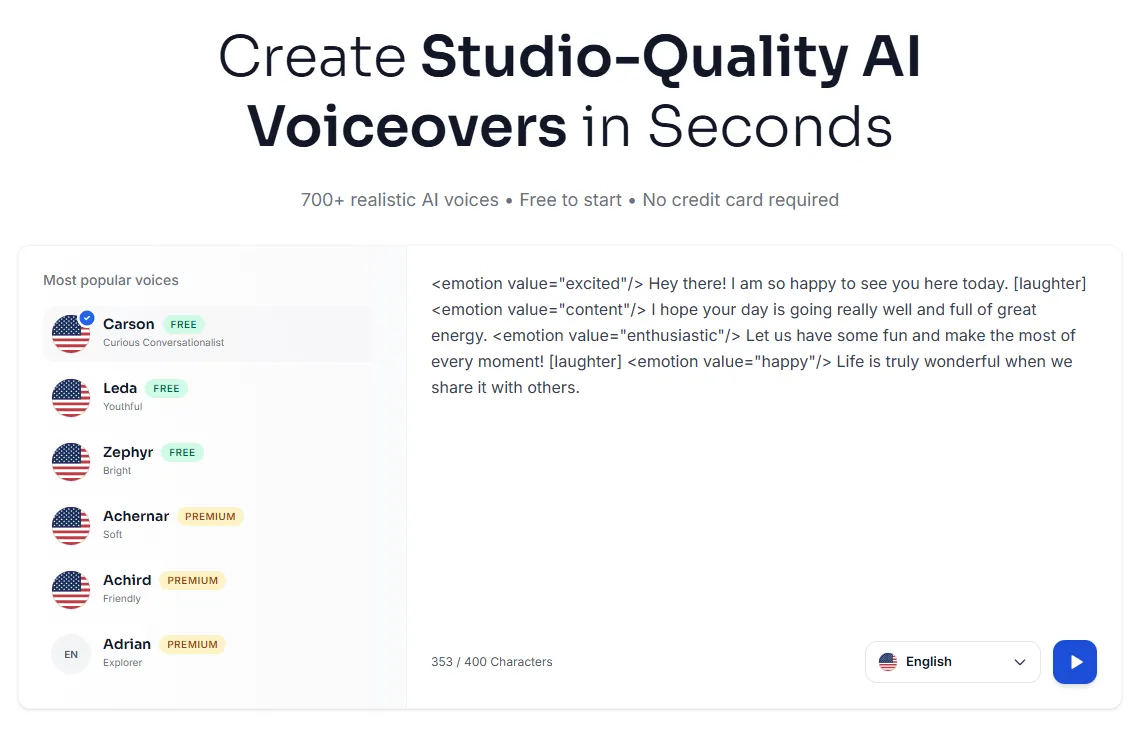
- 700+ AI voices across 40+ languages, with free and premium voices labelled in the picker.
- Emotion and delivery control. Tags such as
<emotion value="excited"/>and[laughter]change how a line is read. You can also adjust tone, pitch and speed. - Voice cloning on every plan, including 5 clones on the free plan.
- MP3 and WAV export, ready for TikTok, CapCut, Reels or Shorts.
- Character voices for fan edits and storytelling in our library of character and anime AI voices.
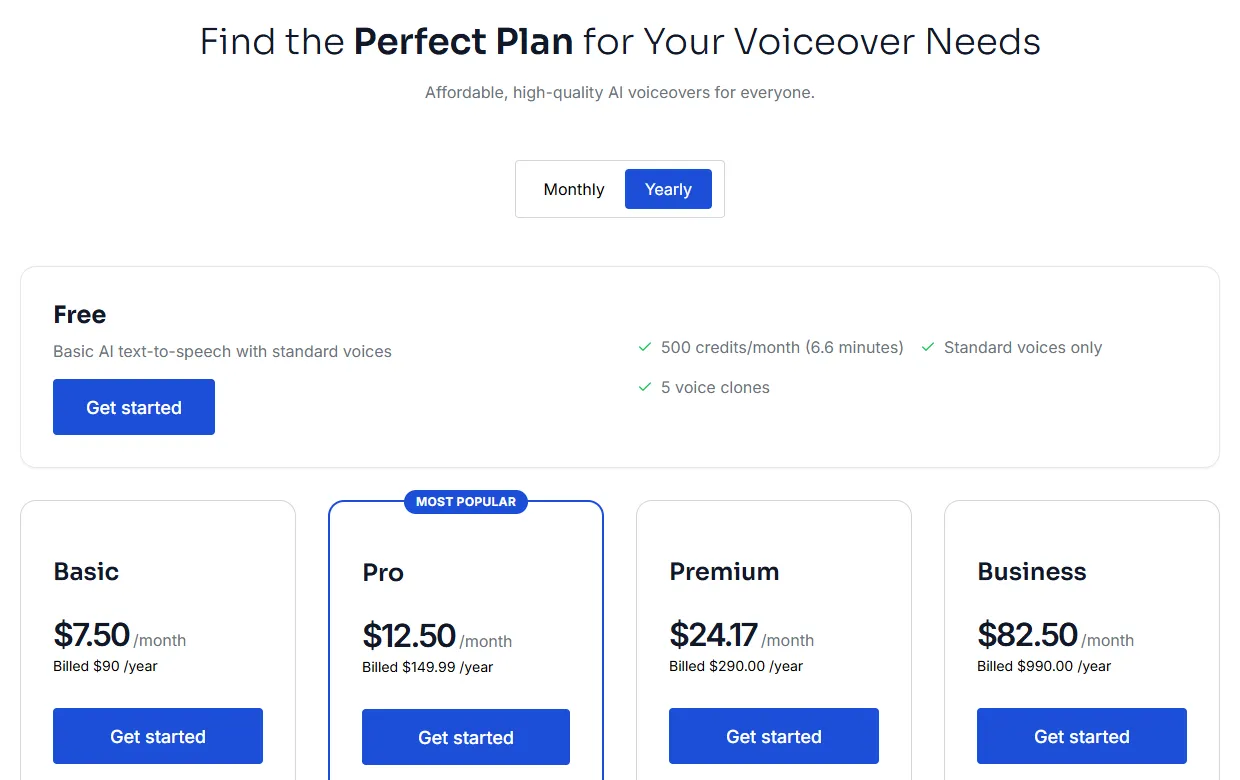
Pricing (checked October 6, 2026)
| Plan | Monthly billing | Yearly billing | Included per month |
|---|---|---|---|
| Free | $0 | $0 | 500 credits (about 6.6 min), standard voices, 5 voice clones |
| Basic | $9 | $7.50 | 100 min, all 700+ voices, 5 clones |
| Pro | $19.99 | $12.50 | 133 min, 10 clones, voice localization |
| Premium | $29 | $24.17 | 200 min, 10 clones, voice localization |
| Business | $99 | $82.50 | 1,000 min, 20 clones, voice localization |
Every paid plan includes commercial usage rights for the audio you generate. See the full Kveeky pricing page for current details.
Where Kveeky falls short
- The free plan uses standard voices only. Premium voices need a paid plan.
- Every plan is credit-metered, so long videos or daily posting need a paid plan.
Best for: creators posting several TikToks a week who want natural voices, many languages and a low monthly price.
2. ElevenLabs: best for instant voice cloning
ElevenLabs is the strongest choice if you want TikToks in your own cloned voice. Instant Voice Cloning starts on the Starter plan.
Pricing (checked October 6, 2026)
- Free: $0, 10,000 credits a month. No commercial license.
- Starter: $6/month, 30,000 credits, commercial license and Instant Voice Cloning.
- Creator: $22/month, 121,000 credits and Professional Voice Cloning.
- Pro: $99/month, 600,000 credits.
Where it falls short: the free plan cannot be used commercially, and credits go fast if you regenerate lines often. For a side-by-side, see our Kveeky vs ElevenLabs comparison.
Best for: creators who want their own cloned voice and are happy to pay from day one.
3. Fish Audio: best for character and community voices
Fish Audio has a large library of community-made voice models, including many popular character voices. That makes it useful for fan edits and meme formats.
Pricing (checked October 6, 2026)
- Free: 8,000 credits a month, up to about 7 minutes, up to 500 characters per generation.
- Plus: $11/month ($132/year), up to about 200 minutes a month.
- Pro: $75/month, up to about 1,620 minutes a month.
Where it falls short: community voices vary in quality, and character voices can raise rights questions if you monetize the video. Treat them as fan content.
Best for: fan edits, memes and character-voice storytelling.
4. Murf AI: best for polished brand voiceovers
Murf AI is built for brand, presentation and training voiceovers, with a studio-style editor and controls for emphasis and pronunciation.
Pricing (checked October 6, 2026)
- Free: 10 minutes of voice generation. No downloads and no commercial rights.
- Creator: $19/month billed yearly ($228/year), 24 hours of generation a year, 200+ voices, commercial rights.
- Business: $66/month billed yearly ($792/year), 96 hours a year. Adds features such as Emphasis and "Say It My Way".
Where it falls short: you cannot download anything on the free plan, so you cannot test a full TikTok workflow without paying. More controls also mean a learning curve.
Best for: brands and agencies making polished product or explainer TikToks.
5. Wavel AI: best if you also need dubbing and subtitles
Wavel AI bundles text-to-speech with AI dubbing, subtitles and editing tools, so it suits creators who translate videos for several audiences.
Pricing (checked October 6, 2026)
- Free: 15 one-time credits, a 7-day trial, watermarked output.
- Basic: $25/month, or $16/month billed yearly, 100 credits a month. One credit equals 1 minute of text-to-speech.
- Pro: $40/month, or $26/month billed yearly, 300 credits.
Where it falls short: the free trial is short and watermarked, so it is not a long-term free option.
Best for: creators who need voiceover, subtitles and dubbing in one place.
How to choose the right TikTok TTS generator
Pick the tool that matches how often you post and what kind of videos you make.
| If you… | Choose | Why |
|---|---|---|
| Post a few times a week and want it simple | Kveeky | Free plan, then $7.50/month billed yearly for 100 minutes |
| Want TikToks in your own voice | ElevenLabs or Kveeky | Instant cloning on ElevenLabs Starter; 5 clones on Kveeky Free |
| Make fan edits or character content | Fish Audio or Kveeky | Community character models; Kveeky's character voice library |
| Run a brand or agency account | Murf AI or Kveeky | Studio controls and commercial rights on paid plans |
| Post in several languages | Kveeky or Wavel AI | 40+ languages on Kveeky; dubbing and subtitles on Wavel |
Still comparing tools beyond TikTok? Our roundup of the best free AI voice generators covers more options.
How to add an AI voiceover to a TikTok video
The workflow is short once your script is ready.
- Write a short script. Keep it to a few sentences for a short TikTok, and put the hook in the first sentence.
- Generate the voice. Paste the script into your TTS tool, pick a voice and set the emotion and speed.
- Listen once, fix pronunciation. Re-spell tricky names, or add a pause with punctuation.
- Download the MP3 or WAV.
- Add it to your video in CapCut or any editor, line up the cuts with the voice, then export.
- Upload to TikTok and add captions so viewers can follow with the sound off.
If the result sounds flat, these tips on how to make an AI voiceover sound less robotic and on pacing, pauses and emphasis fix most problems.
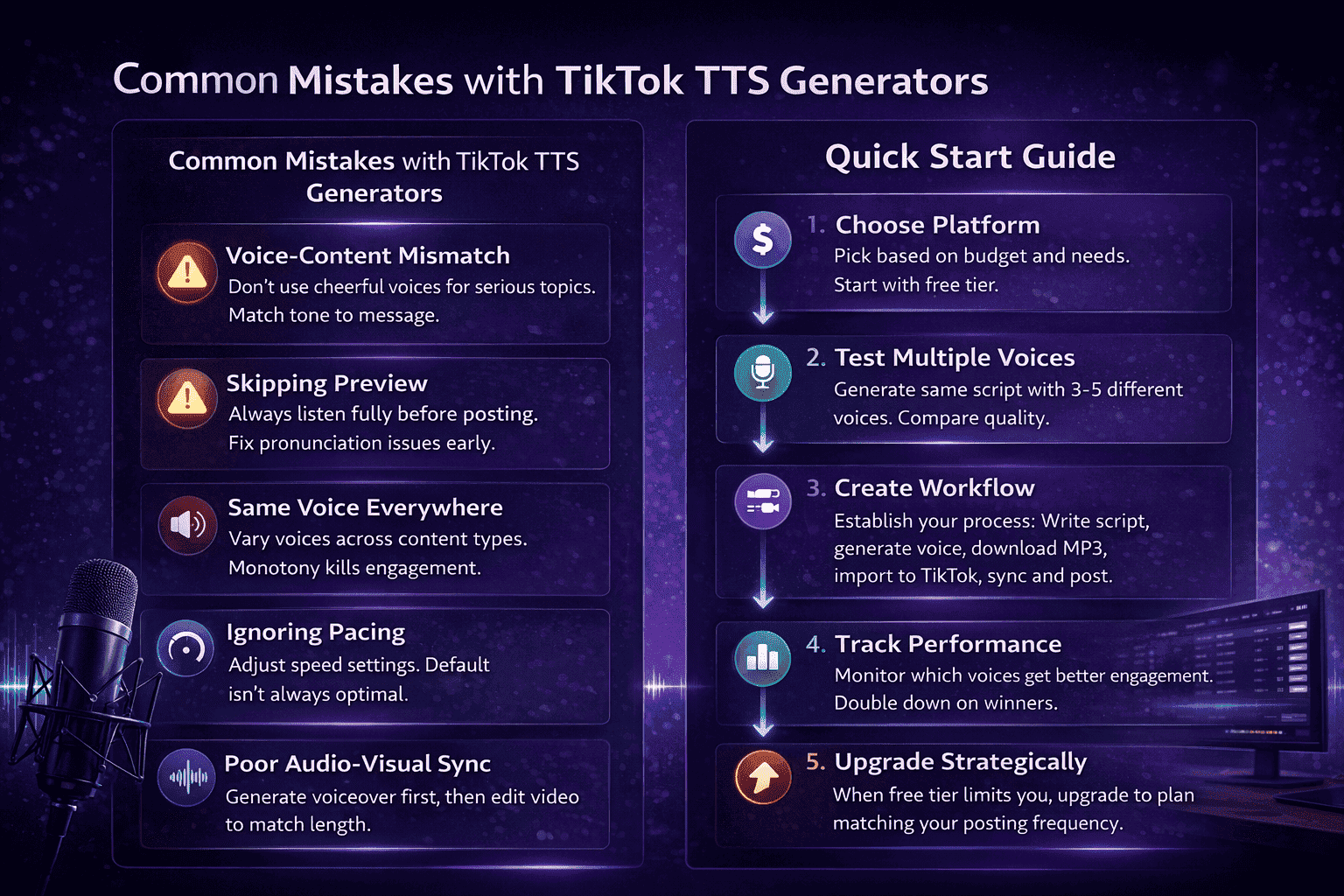
Common mistakes with TikTok text-to-speech
- Voice-content mismatch. Do not use a cheerful voice for a serious topic. Match tone to message.
- Skipping the preview. Always listen once before posting, and fix pronunciation early.
- One voice for everything. Use different voices for different series so each format feels distinct.
- Ignoring pacing. The default speed is rarely right for a 15-second hook. Speed it up slightly.
- Editing video first. Generate the voiceover first, then cut the video to match it.
Related guides on AI voiceovers for creators and video
Start with our main guide, then go deeper:
- AI Voiceover for Video: A Practical Guide for Video Producers
- The Top 10 HeyGen Alternatives in 2026 (Free & Paid)
- Best Free AI Voiceover Tools for YouTube (2026)
Frequently asked questions
What is the best free TikTok TTS generator?
Kveeky's free plan is the most practical for regular posting: 500 credits a month (about 6.6 minutes), 700+ voices to try, 5 voice clones and no credit card. Fish Audio's free plan gives up to about 7 minutes a month.
Does TikTok have its own text-to-speech?
Yes. TikTok's editor can read on-screen text aloud with a small set of built-in voices. Use an external generator when you want more voices, more languages or control over emotion and speed.
How do I use an AI voice from another app on TikTok?
Download the voiceover as an MP3 or WAV, add it to your video in CapCut or any video editor, then upload the finished video to TikTok.
Can I use AI voices in monetized or sponsored TikToks?
It depends on the plan. Every paid Kveeky plan includes commercial usage rights. ElevenLabs' commercial license starts on Starter, and Murf's free plan includes no commercial rights. Check the terms before posting sponsored content.
Which TikTok TTS tools support voice cloning?
Kveeky includes 5 voice clones even on its free plan. ElevenLabs offers Instant Voice Cloning from its $6/month Starter plan, and Fish Audio includes voice cloning on its plans.
Why is PlayHT not on this list anymore?
PlayHT appeared in earlier versions of this comparison. As of October 6, 2026, the play.ht domain no longer resolves, so we replaced it with Fish Audio.
How we checked this comparison
This guide is written by Mohit Singh for the Kveeky team. Disclosure: Kveeky makes one of the tools in this list. We compared each tool on its own published plans, not on marketing claims.
- Prices and plan limits come from each vendor's pricing page, retrieved on October 6, 2026: Kveeky, ElevenLabs, Fish Audio, Murf AI and Wavel AI.
- Prices change often. Always confirm on the vendor's page before you buy.
- No Kveeky usage data is used in this guide.
Ready to hear the difference? Try Kveeky's voices free and download your first TikTok voiceover, or browse more ideas for AI voiceovers for social media videos.