# Generate Dialogue with Multiple Voices

Published: October 6, 2025 · Author: Hitesh Kumawat

To make text to speech with multiple voices, give each speaker their own clearly different AI voice. Generate their lines separately, then put the clips in order in a video or audio editor. Distinct voices, natural pauses between turns and consistent settings per character make the dialogue easy to follow and sound like a real conversation.

*Last updated: October 6, 2026.*

This guide is for creators making podcasts, explainer skits, animated stories, training role-plays and character videos. It covers choosing voices, writing dialogue, generating lines and assembling a scene, from a 2-person chat to a full cast.

<div style="margin:28px 0;padding:20px 22px;background:var(--kv-blue-50);border:1px solid var(--kv-blue-100);border-radius:var(--kv-radius-md)"><div style="font:700 17px/1.3 var(--kv-font-heading);color:var(--kv-blue-950);margin-bottom:8px">Quick answer</div><p style="margin:0;font:400 16px/1.6 var(--kv-font-body);color:var(--kv-gray-800)">Give each speaker a clearly different AI voice, generate their lines separately, then place the clips in order on separate tracks in your editor. Differ in at least 2 ways (pace, accent, energy, gender or age) and keep each character's voice and settings the same every time. The picker and planner below help you choose and budget.</p></div>

> **Key Takeaways**
>
> - **Contrast is everything.** Pick voices that differ in pitch, pace or accent, so listeners always know who's talking.
> - **Write a voice profile per character** and reuse the same voice and settings every time they speak.
> - **Generate line by line,** then assemble the clips in your editor with short, natural gaps between turns.
> - **One voice can play more than one role** with changes in speed and emotion, but separate voices are clearer.
> - **Kveeky has 700+ AI voices in 40+ languages,** with an Emotion setting (6 emotions) and audio download for each clip.

**On this page:** [Why use multiple voices](#why-use-multiple-voices) · [Choosing voices](#choosing-distinct-voices) · [Writing dialogue](#writing-dialogue-for-ai-voices) · [Two voices step by step](#two-voices-step-by-step) · [Assembling the scene](#assembling-the-dialogue) · [Character voices](#character-ai-voices) · [Pitfalls](#common-pitfalls) · [FAQ](#frequently-asked-questions)

## Why use multiple voices

Multiple voices make a script easier to follow and more engaging. When every speaker sounds the same, listeners have to work out who's talking from the words alone.

- **Storytelling.** In an audio drama or animated short, each character needs a recognizable voice.
- **Clarity in training.** One voice can give instructions while another plays a customer or patient in a role-play.
- **Structure.** In a long course or explainer, a second voice can mark warnings, tips or questions.
- **Variety.** A conversation between 2 voices holds attention better than a single voice reading a long script.

For courses, our guide to [multi-voice course narration](https://kveeky.com/blog/multi-voice-courses-narrator-strategy) covers when a second narrator helps and when it doesn't.

## Choosing distinct voices

Start with the character, then find a voice that fits. A gruff, older detective rarely suits a bright, bubbly voice, unless that contrast is the joke.

Use at least 2 of these contrasts between any 2 speakers who talk to each other:

<table>
<thead>
<tr><th>Contrast</th><th>Example pairing</th><th>Why it helps</th></tr>
</thead>
<tbody>
<tr><td>Pitch</td><td>Low, calm voice vs higher, lively voice</td><td>The easiest difference for listeners to hear</td></tr>
<tr><td>Pace</td><td>Slow, thoughtful vs quick, nervous</td><td>Adds personality as well as contrast</td></tr>
<tr><td>Accent</td><td>American English vs British English</td><td>Signals background or location</td></tr>
<tr><td>Energy and emotion</td><td>Serious host vs excited guest</td><td>Shows each character's role in the scene</td></tr>
<tr><td>Gender or age</td><td>Adult narrator vs younger character</td><td>Clear separation for short clips</td></tr>
</tbody>
</table>

Accents are useful, but avoid stereotypes. Choose an accent because it fits the character, not as a joke about where they're from. Keep strong accents clear enough to understand. [Kveeky](https://kveeky.com/) covers 40+ languages with voices, including variants such as [British English text to speech](https://kveeky.com/languages/british-english-text-to-speech).

### Audition before you commit

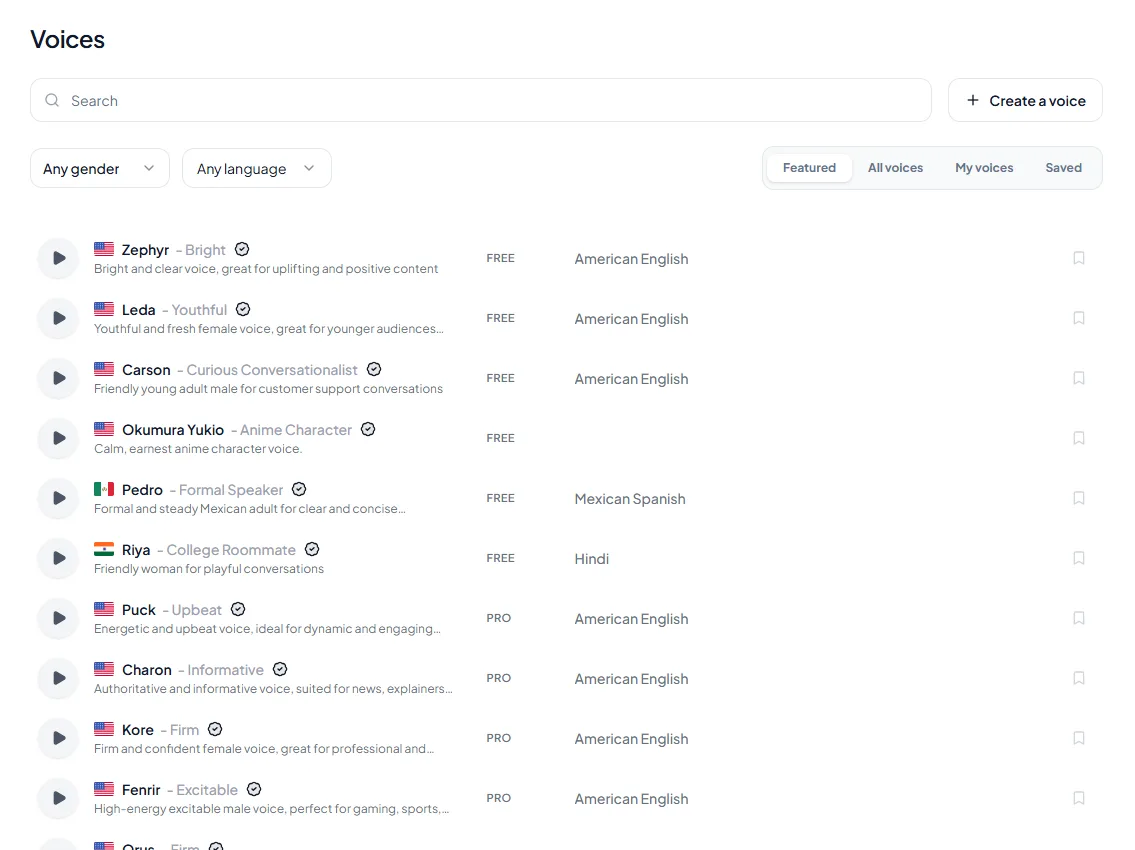
1. **Write 3 or 4 lines** of real dialogue for each character.
2. **Generate them with 2 or 3 candidate voices** per character.
3. **Play the characters back to back.** If you can't tell them apart with your eyes closed, change one voice.
4. **Ask someone else to listen.** Fresh ears catch confusion you've stopped hearing.

<figure style="margin:28px 0;padding:0"><img src="/blog/product/app-voice-library.webp" alt="The Kveeky voice library with search, gender and language filters, and a FREE or PRO tag on each voice." width="1150" height="850" loading="lazy" decoding="async" style="display:block;width:100%;height:auto;border-radius:var(--kv-radius-md);border:1px solid var(--kv-blue-100)"><figcaption style="margin-top:10px;font:400 14px/1.5 var(--kv-font-body);color:var(--kv-gray-600)">Use the gender and language filters and the preview button to audition 2 or 3 candidate voices per character. The FREE or PRO tag shows which voices the free plan can use.</figcaption></figure>

<div style="margin:28px 0;padding:20px 22px;background:var(--kv-blue-50);border:1px solid var(--kv-blue-100);border-radius:var(--kv-radius-md)"><div style="font:700 17px/1.3 var(--kv-font-heading);color:var(--kv-blue-950);margin-bottom:8px">Which contrasts should my two voices have?</div><p style="margin:0 0 12px;font:400 15px/1.5 var(--kv-font-body);color:var(--kv-gray-600)">Pick your project. The suggestions come from the contrast table above: use at least 2 contrasts between speakers who talk to each other.</p><div style="display:flex;flex-wrap:wrap;gap:12px;margin-bottom:12px"><label style="flex:1 1 200px;min-width:0;font:600 15px/1.4 var(--kv-font-body);color:var(--kv-gray-800)">I am making<select id="dl1-s" style="display:block;width:100%;box-sizing:border-box;min-height:44px;margin-top:6px;padding:0 12px;border:1px solid var(--kv-blue-100);border-radius:var(--kv-radius-sm);font:400 16px/1 var(--kv-font-body);color:var(--kv-gray-800);background:var(--kv-white)"><option value="0">A podcast with a host and a guest</option><option value="1">A training role-play (instructor and customer)</option><option value="2">An animated story or audio drama</option><option value="3">A course with a second voice for tips and warnings</option><option value="4">A skit with a fast argument</option></select></label></div><div id="dl1-o" aria-live="polite" style="padding:14px 16px;background:var(--kv-white);border:1px solid var(--kv-blue-100);border-radius:var(--kv-radius-sm);font:400 16px/1.6 var(--kv-font-body);color:var(--kv-gray-800)"></div><script>(function(){try{var d=["<strong>Energy and pace.</strong> A serious host against an excited guest, one slower and one quicker. Add gender or age if you want clear separation in short clips. See <a href=\"/blog/start-podcast-ai-voices\" style=\"color:var(--kv-blue-700)\">how to start a podcast with AI voices</a>.", "<strong>Gender or age, plus energy.</strong> An adult instructor and a younger customer voice, calm against nervous. Keep each role on one voice so learners always know who is speaking.", "<strong>Describe each character in 3 words</strong> (for example \"grumpy, slow, deep\"), then pick voices that already sound close. Use accent only because it fits the character, never as a joke.", "<strong>Accent or gender.</strong> A second voice that marks warnings and tips works best when it is easy to tell apart from the main narrator. See <a href=\"/blog/multi-voice-courses-narrator-strategy\" style=\"color:var(--kv-blue-700)\">multi-voice course narration</a> for when it helps.", "<strong>Pace and energy.</strong> Quick and nervous against slow and thoughtful, with short turns and a small overlap in the edit to make the argument feel real."],s=document.getElementById("dl1-s"),o=document.getElementById("dl1-o");if(!s||!o)return;function u(){var r=d[+s.value];if(r)o.innerHTML=r}s.addEventListener("change",u);u()}catch(e){}})();</script></div>

## Writing dialogue for AI voices

Write the way people actually talk. AI voices read formal, written sentences in a stiff way, and dialogue shows it most.

- **Use contractions and short lines.** "You coming?" sounds more real than "Are you going to come with us?"
- **Keep turns short.** Long speeches turn a conversation into a lecture.
- **Add natural reactions, sparingly.** A short "Wait." or "Right..." helps; constant "um" and "like" sounds odd.
- **Use punctuation for timing.** An ellipsis adds hesitation, and a question mark lifts the end of a line.
- **Mark emotions per line.** Note "excited", "calm" or "annoyed" next to each line before you generate.

Here's a short 2-person example. The word in brackets is your reminder of the Emotion setting to pick for that line; you do not type it into the text:

```
HOST (Happy):  Okay, big question. Does this actually save time?
GUEST (Calm):  Honestly? Yes. We cut our editing in half.
HOST:          Wait... half?
GUEST (Happy): I know. We didn't believe it either.
```

You'd generate the HOST lines with one voice and the GUEST lines with another. For more on directing feeling, see our guide to [AI voice emotion control](https://kveeky.com/blog/ai-voice-with-emotion).

## Two voices step by step

This workflow works for a 2-person conversation and scales to a full cast.

1. **Split the script by speaker.** Label every line with the character's name.
2. **Create a voice profile per character.** Write down the voice, speed, volume and usual emotion.
3. **Generate each character's lines.** Paste one character's lines, pick their voice and apply their settings.
4. **Generate line by line for important moments.** Separate clips make it easier to fix one line later.
5. **Name files clearly,** for example "03_guest.mp3", so the order is obvious.
6. **Download the audio** for each clip, so you can edit and mix them.
7. **Assemble in your editor** (next section).

<figure style="margin:28px 0;padding:0"><img src="/blog/product/app-text-to-speech.webp" alt="The Kveeky text-to-speech editor with a script in the text box and the Settings panel showing Voice, Transcript Language, Speed, Volume, Emotion and Custom Punctuation." width="1150" height="850" loading="lazy" decoding="async" style="display:block;width:100%;height:auto;border-radius:var(--kv-radius-md);border:1px solid var(--kv-blue-100)"><figcaption style="margin-top:10px;font:400 14px/1.5 var(--kv-font-body);color:var(--kv-gray-600)">Look at the Settings panel: Voice, Speed, Volume and Emotion are the four things to write in each character's profile. Paste one character's lines, pick their voice and apply their settings.</figcaption></figure>

<div style="margin:28px 0;padding:20px 22px;background:var(--kv-blue-50);border:1px solid var(--kv-blue-100);border-radius:var(--kv-radius-md)"><div style="font:700 17px/1.3 var(--kv-font-heading);color:var(--kv-blue-950);margin-bottom:8px">Copy-ready voice profile (one per character)</div><p style="margin:0 0 12px;font:400 15px/1.5 var(--kv-font-body);color:var(--kv-gray-600)">Paste one per character into your notes and reuse it every time they speak, so the voice and settings never drift.</p><pre id="dl3-t" style="margin:0 0 12px;padding:14px 16px;background:var(--kv-white);border:1px solid var(--kv-blue-100);border-radius:var(--kv-radius-sm);font:400 15px/1.6 var(--kv-font-body);color:var(--kv-gray-800);white-space:pre-wrap;overflow-wrap:anywhere;min-width:0">CHARACTER VOICE PROFILE
Name: [character]
Three words: [e.g. grumpy, slow, deep]
Voice: [voice name in the library]
Speed: [e.g. 0.9x]    Volume: [e.g. 100%]
Usual emotion: [Neutral / Happy / Love / Angry / Calm / Sad]
Name spelling (by sound): [how to spell it so it is read right]
File names: 01_[name].mp3, 02_[name].mp3 ...</pre><button type="button" id="dl3-b" style="min-height:44px;padding:0 16px;border:0;border-radius:var(--kv-radius-sm);background:var(--kv-blue-700);color:var(--kv-white);font:700 15px/1 var(--kv-font-body);cursor:pointer">Copy text</button> <span id="dl3-m" aria-live="polite" style="font:400 14px/1.4 var(--kv-font-body);color:var(--kv-gray-600)"></span><script>(function(){try{var t=document.getElementById("dl3-t"),b=document.getElementById("dl3-b"),m=document.getElementById("dl3-m");if(!t||!b||!m)return;b.addEventListener("click",function(){var x=t.textContent;try{navigator.clipboard.writeText(x).then(function(){m.textContent="Copied."},function(){m.textContent="Select the text and copy it."})}catch(e){m.textContent="Select the text and copy it."}})}catch(e){}})();</script></div>

### How Kveeky helps

<figure style="margin:28px 0;padding:0"><a href="https://kveeky.com/"><img src="https://cdn.kveeky.com/portals/public-uploads/c033eba2-39d4-4683-a5a9-c8cf2ffc6d01.webp" alt="The Kveeky homepage voice demo with three numbered areas: the voice list, the script box and the language and play controls." width="1180" height="532" loading="lazy" decoding="async" style="display:block;width:100%;height:auto;border-radius:14px;border:1px solid #dbeafe"></a><figcaption style="margin-top:12px"><ol style="margin:0;padding:0"><li style="display:flex;gap:10px;align-items:flex-start;margin:0 0 6px;padding:0;list-style:none"><span style="flex:0 0 24px;height:24px;border-radius:50%;background:#1d4ed8;color:#fff;font:700 13px/24px var(--kv-font-heading);text-align:center">1</span><span style="font:400 15px/1.5 var(--kv-font-body);color:#1f2937"><span style="font-weight:700">Pick a voice.</span> Voices are tagged Free or Premium.</span></li><li style="display:flex;gap:10px;align-items:flex-start;margin:0 0 6px;padding:0;list-style:none"><span style="flex:0 0 24px;height:24px;border-radius:50%;background:#1d4ed8;color:#fff;font:700 13px/24px var(--kv-font-heading);text-align:center">2</span><span style="font:400 15px/1.5 var(--kv-font-body);color:#1f2937"><span style="font-weight:700">Type or paste a short line.</span> Pick an emotion if you want one.</span></li><li style="display:flex;gap:10px;align-items:flex-start;margin:0 0 6px;padding:0;list-style:none"><span style="flex:0 0 24px;height:24px;border-radius:50%;background:#1d4ed8;color:#fff;font:700 13px/24px var(--kv-font-heading);text-align:center">3</span><span style="font:400 15px/1.5 var(--kv-font-body);color:#1f2937"><span style="font-weight:700">Choose the language and press play</span> to hear it.</span></li></ol><p style="margin:6px 0 0;font:400 14px/1.5 var(--kv-font-body);color:#6b7280">Try it yourself in the free voice demo on <a href="https://kveeky.com/" style="font:inherit;color:#1d4ed8">Kveeky</a>, no sign-up needed. For longer scripts and downloads, use the free plan.</p></figcaption></figure>

<div style="margin:28px 0;padding:20px 22px;background:var(--kv-blue-50);border:1px solid var(--kv-blue-100);border-radius:var(--kv-radius-md)"><div style="font:700 17px/1.3 var(--kv-font-heading);color:var(--kv-blue-950);margin-bottom:8px">How long will my dialogue be, and what will it cost in credits?</div><p style="margin:0 0 12px;font:400 15px/1.5 var(--kv-font-body);color:var(--kv-gray-600)">Enter the size of your scene. It uses a speaking pace of 150 words a minute, and the free plan's 500 credits = about 40 seconds. A planning estimate only.</p><div style="display:flex;flex-wrap:wrap;gap:12px;margin-bottom:12px"><label style="flex:1 1 200px;min-width:0;font:600 15px/1.4 var(--kv-font-body);color:var(--kv-gray-800)">Lines in the scene<input id="dl2-l" type="number" inputmode="decimal" value="12" min="0" max="2000" step="1" style="display:block;width:100%;box-sizing:border-box;min-height:44px;margin-top:6px;padding:0 12px;border:1px solid var(--kv-blue-100);border-radius:var(--kv-radius-sm);font:400 16px/1 var(--kv-font-body);color:var(--kv-gray-800);background:var(--kv-white)"></label><label style="flex:1 1 200px;min-width:0;font:600 15px/1.4 var(--kv-font-body);color:var(--kv-gray-800)">Average words per line<input id="dl2-w" type="number" inputmode="decimal" value="14" min="0" max="200" step="1" style="display:block;width:100%;box-sizing:border-box;min-height:44px;margin-top:6px;padding:0 12px;border:1px solid var(--kv-blue-100);border-radius:var(--kv-radius-sm);font:400 16px/1 var(--kv-font-body);color:var(--kv-gray-800);background:var(--kv-white)"></label><label style="flex:1 1 200px;min-width:0;font:600 15px/1.4 var(--kv-font-body);color:var(--kv-gray-800)">Gap between turns (seconds)<input id="dl2-g" type="number" inputmode="decimal" value="0.5" min="0" max="10" step="0.1" style="display:block;width:100%;box-sizing:border-box;min-height:44px;margin-top:6px;padding:0 12px;border:1px solid var(--kv-blue-100);border-radius:var(--kv-radius-sm);font:400 16px/1 var(--kv-font-body);color:var(--kv-gray-800);background:var(--kv-white)"></label></div><div id="dl2-o" aria-live="polite" style="padding:14px 16px;background:var(--kv-white);border:1px solid var(--kv-blue-100);border-radius:var(--kv-radius-sm);font:400 16px/1.6 var(--kv-font-body);color:var(--kv-gray-800)"></div><script>(function(){try{var ids=["dl2-l", "dl2-w", "dl2-g"],o=document.getElementById("dl2-o"),el=[];if(!o)return;for(var i=0;i<ids.length;i++){var e=document.getElementById(ids[i]);if(!e)return;el.push(e)}function u(){var v=[];for(var i=0;i<el.length;i++){var n=parseFloat(el[i].value);v.push(isNaN(n)||n<0?0:n)}var sp=v[0]*v[1]/150*60,tot=sp+v[0]*v[2],cr=sp/0.792,t="<strong>About "+Math.round(tot)+" seconds</strong> with gaps ("+Math.round(sp)+" seconds of speech). That is roughly "+Math.round(cr)+" credits. ";t+=v[0]==0?"Enter the number of lines.":(sp<=40?"It fits inside the free plan's 40 seconds a month, with "+Math.round(40-sp)+" seconds left. Free plan: standard voices only.":"It is more than the free plan's 40 seconds a month; compare plans on the pricing page.");o.innerHTML=t}for(var j=0;j<el.length;j++){el[j].addEventListener("input",u)}u()}catch(e){}})();</script></div>

## Assembling the dialogue

Think of the voices as actors and your editor as the stage. Any audio or video editor that supports several tracks works.

- **Put each character on their own track.** It makes volume and timing fixes much easier.
- **Leave natural gaps between turns.** Most replies start soon after the last line ends; leave longer gaps for thinking or tension.
- **Overlap slightly for fast arguments.** A small overlap makes a heated exchange feel real.
- **Match volume across voices.** Different voices can come out at different loudness levels, so balance them by ear.
- **Add a light background.** Room tone or quiet music makes the voices feel like they're in the same space.
- **Keep effects subtle.** Use background sounds that support the scene, such as rain or a café, without covering the words.

For animation, sync the mouth movements to the finished dialogue track, not the other way around.

<div style="margin:28px 0;padding:20px 22px;background:var(--kv-blue-50);border:1px solid var(--kv-blue-100);border-radius:var(--kv-radius-md)"><div style="font:700 17px/1.3 var(--kv-font-heading);color:var(--kv-blue-950);margin-bottom:8px">Dialogue checklist: audition, generate, assemble</div><p style="margin:0 0 12px;font:400 15px/1.5 var(--kv-font-body);color:var(--kv-gray-600)">Tick each step as you go. Your ticks stay in this browser only.</p><ul style="list-style:none;margin:0 0 12px;padding:0"><li style="margin:0 0 8px"><label style="display:flex;gap:10px;align-items:flex-start;font:400 16px/1.5 var(--kv-font-body);color:var(--kv-gray-800)"><input type="checkbox" class="dl4-c" style="flex:0 0 20px;width:20px;height:20px;margin-top:2px;accent-color:var(--kv-blue-700)"><span style="min-width:0">Each character has a 3-word description and a voice profile</span></label></li><li style="margin:0 0 8px"><label style="display:flex;gap:10px;align-items:flex-start;font:400 16px/1.5 var(--kv-font-body);color:var(--kv-gray-800)"><input type="checkbox" class="dl4-c" style="flex:0 0 20px;width:20px;height:20px;margin-top:2px;accent-color:var(--kv-blue-700)"><span style="min-width:0">I auditioned 2 or 3 candidate voices per character with 3 or 4 real lines</span></label></li><li style="margin:0 0 8px"><label style="display:flex;gap:10px;align-items:flex-start;font:400 16px/1.5 var(--kv-font-body);color:var(--kv-gray-800)"><input type="checkbox" class="dl4-c" style="flex:0 0 20px;width:20px;height:20px;margin-top:2px;accent-color:var(--kv-blue-700)"><span style="min-width:0">I played the characters back to back, and I can tell them apart with my eyes closed</span></label></li><li style="margin:0 0 8px"><label style="display:flex;gap:10px;align-items:flex-start;font:400 16px/1.5 var(--kv-font-body);color:var(--kv-gray-800)"><input type="checkbox" class="dl4-c" style="flex:0 0 20px;width:20px;height:20px;margin-top:2px;accent-color:var(--kv-blue-700)"><span style="min-width:0">Lines are short, with contractions and natural reactions used sparingly</span></label></li><li style="margin:0 0 8px"><label style="display:flex;gap:10px;align-items:flex-start;font:400 16px/1.5 var(--kv-font-body);color:var(--kv-gray-800)"><input type="checkbox" class="dl4-c" style="flex:0 0 20px;width:20px;height:20px;margin-top:2px;accent-color:var(--kv-blue-700)"><span style="min-width:0">Names are spelled by sound and spelled the same everywhere</span></label></li><li style="margin:0 0 8px"><label style="display:flex;gap:10px;align-items:flex-start;font:400 16px/1.5 var(--kv-font-body);color:var(--kv-gray-800)"><input type="checkbox" class="dl4-c" style="flex:0 0 20px;width:20px;height:20px;margin-top:2px;accent-color:var(--kv-blue-700)"><span style="min-width:0">Each clip is named so the order is obvious (for example 03_guest.mp3)</span></label></li><li style="margin:0 0 8px"><label style="display:flex;gap:10px;align-items:flex-start;font:400 16px/1.5 var(--kv-font-body);color:var(--kv-gray-800)"><input type="checkbox" class="dl4-c" style="flex:0 0 20px;width:20px;height:20px;margin-top:2px;accent-color:var(--kv-blue-700)"><span style="min-width:0">Each character is on their own track, with gaps that vary between turns</span></label></li><li style="margin:0 0 8px"><label style="display:flex;gap:10px;align-items:flex-start;font:400 16px/1.5 var(--kv-font-body);color:var(--kv-gray-800)"><input type="checkbox" class="dl4-c" style="flex:0 0 20px;width:20px;height:20px;margin-top:2px;accent-color:var(--kv-blue-700)"><span style="min-width:0">Volume is balanced across voices by ear, and a light background sits under them</span></label></li></ul><div id="dl4-p" aria-live="polite" style="padding:14px 16px;background:var(--kv-white);border:1px solid var(--kv-blue-100);border-radius:var(--kv-radius-sm);font:400 16px/1.6 var(--kv-font-body);color:var(--kv-gray-800)"></div><script>(function(){try{var cs=document.querySelectorAll(".dl4-c"),p=document.getElementById("dl4-p");if(!cs.length||!p)return;var k="kv-dl4";var st=[];try{st=JSON.parse(localStorage.getItem(k)||"[]")}catch(e){st=[]}for(var i=0;i<cs.length;i++){if(st[i])cs[i].checked=true;cs[i].addEventListener("change",u)}function u(){var n=0,a=[];for(var i=0;i<cs.length;i++){a.push(cs[i].checked);if(cs[i].checked)n++}try{localStorage.setItem(k,JSON.stringify(a))}catch(e){}p.textContent=n+" of "+cs.length+" done"+(n==cs.length?". The scene is ready to export.":".")}u()}catch(e){}})();</script></div>

<details style="margin:16px 0;padding:14px 18px;background:var(--kv-white);border:1px solid var(--kv-blue-100);border-radius:var(--kv-radius-md)"><summary style="cursor:pointer;font:700 16px/1.4 var(--kv-font-heading);color:var(--kv-blue-950)">Show me: a track layout for a 2-person scene</summary><div style="margin-top:10px;font:400 16px/1.6 var(--kv-font-body);color:var(--kv-gray-800)"><ul style="margin:0;padding-left:20px"><li><strong>Track 1, Host:</strong> 01_host.mp3, 03_host.mp3, 05_host.mp3</li><li><strong>Track 2, Guest:</strong> 02_guest.mp3, 04_guest.mp3, 06_guest.mp3</li><li><strong>Track 3, background:</strong> room tone or quiet music, kept low so the words stay clear</li><li><strong>Timing:</strong> most replies start soon after the last line ends; leave longer gaps for thinking or tension; overlap slightly for a fast argument</li></ul></div></details>

## Character AI voices

Character voices need a clear personality you can hear in a few seconds. Describe each character in 3 words, such as "grumpy, slow, deep" or "cheerful, fast, bright". Then pick a voice that already sounds close to those words.

Use settings to push it further:

- **Voice choice:** a lower voice for older or tougher characters, a higher one for younger or lighter ones.
- **Speed:** slower for calm or wise characters, faster for nervous or excited ones.
- **Emotion:** a default emotion per character, such as calm for a mentor and excited for a sidekick.

For anime, game and cartoon styles, browse our [library of character and anime AI voices](https://kveeky.com/ai-voices). If you want one of your characters to sound like you, check the [pricing page](https://kveeky.com/pricing) for voice cloning on your plan. Only clone voices you have permission to use.

## Common pitfalls

- **Voices that sound too similar.** If listeners can't tell 2 characters apart, change one voice entirely.
- **Inconsistent settings.** A character who speeds up or changes voice between scenes breaks the story. Keep a voice profile and reuse it.
- **Mispronounced names.** Spell names by sound, and use the same spelling everywhere.
- **Over-thick accents.** Pick a clearer voice if words get lost.
- **Robotic turn-taking.** Identical gaps between every line sound mechanical. Vary them as people do.

If a character still sounds stiff, the fixes in our guide to [make an AI voiceover sound less robotic](https://kveeky.com/blog/how-to-make-your-ai-voiceover-sound-less-robotic-in-5-minutes) apply to dialogue too. To keep each character consistent across a series, see our guide to [voice customization for video producers](https://kveeky.com/blog/mastering-voice-customization-for-video-producers).

Using multiple voices for a show? See [how to start a podcast with AI voices](https://kveeky.com/blog/start-podcast-ai-voices) for the full launch checklist.

## Frequently asked questions

### What AI voice generator can create multiple character voices?

Any generator with a large voice library works if you generate each character separately. Kveeky has 700+ AI voices in 40+ languages, plus speed, volume and emotion settings for each character.

### Can I create multiple voiceovers with different voices in one project?

Yes. Generate each character's lines with their own voice, download the clips and place them on separate tracks in your video or audio editor.

### How do I create multiple voice tones from one voice model?

Change speed and emotion for each role, for example calm and slow for one and excited and fast for another. Separate voices are still clearer for listeners.

### Can you give everyone in a live chat a unique TTS voice?

That's a feature of live-stream chat bots, not of voiceover generators. For recorded videos and podcasts, assign each character a fixed voice and generate their lines in advance.

### Which AI voice tools work for synchronous dialogue delivery?

For recorded content, generate each line, then sync the turns in an editor. Real-time, back-and-forth voice conversations need a conversational voice platform instead.

### How do I make an AI two-person conversation sound natural?

Use 2 clearly different voices, keep turns short, vary the gaps between lines and add one or two natural reactions such as "Wait..." or a short laugh.

### How many voices can I use in one dialogue?

As many as you can tell apart. Each character needs a clearly different voice, and every extra voice is one more track in your editor. For a 2-person chat, 2 voices are enough.

### How do I keep a character's voice consistent across scenes?

Write a voice profile for each character (voice, speed, volume and usual emotion) and reuse it every time they speak. Changing the voice or settings between scenes breaks the story.

### Can I make a multi-voice dialogue on the free plan?

Yes, within limits. Kveeky's free plan gives 500 credits a month (about 40 seconds) and standard voices, with no credit card. Use the planner above to check whether your scene fits.

<div style="margin:28px 0;padding:20px 22px;background:var(--kv-blue-50);border:1px solid var(--kv-blue-100);border-radius:var(--kv-radius-md)"><div style="font:700 17px/1.3 var(--kv-font-heading);color:var(--kv-blue-950);margin-bottom:8px">Keep reading</div><ul style="margin:0;padding-left:20px;font:400 16px/1.6 var(--kv-font-body);color:var(--kv-gray-800)"><li style="margin:0 0 6px"><a href="/blog/start-podcast-ai-voices" style="color:var(--kv-blue-700)">How to start a podcast with AI voices</a></li><li style="margin:0 0 6px"><a href="/blog/multi-voice-courses-narrator-strategy" style="color:var(--kv-blue-700)">Multi-voice course narration</a></li><li style="margin:0 0 6px"><a href="/blog/ai-voice-with-emotion" style="color:var(--kv-blue-700)">AI voice with emotion</a></li><li style="margin:0 0 6px"><a href="/blog/how-to-make-your-ai-voiceover-sound-less-robotic-in-5-minutes" style="color:var(--kv-blue-700)">Make an AI voiceover sound less robotic</a></li><li style="margin:0 0 6px"><a href="/blog/mastering-voice-customization-for-video-producers" style="color:var(--kv-blue-700)">Voice customization for video producers</a></li><li style="margin:0 0 6px"><a href="/ai-voices" style="color:var(--kv-blue-700)">Character and anime AI voices</a></li><li style="margin:0 0 6px"><a href="https://kveeky.com/resources/words-to-minutes-calculator" style="color:var(--kv-blue-700)">Words to minutes calculator</a></li><li style="margin:0 0 6px"><a href="https://kveeky.com/pricing" style="color:var(--kv-blue-700)">Kveeky pricing</a></li></ul></div>

## How we checked this guide

This guide is written by Hitesh Kumawat for the Kveeky team. **Disclosure: Kveeky makes an AI voice generator.** The workflow works with any text-to-speech tool and video editor.

- Kveeky features and plan details come from kveeky.com and its pricing page, retrieved October 6, 2026.
- No external statistics are used, and no Kveeky usage data is used in this guide.

Your next step: write a 6-line conversation between 2 characters, pick 2 voices that differ in pitch and pace, and assemble it on 2 tracks. If you're turning dialogue into a show, see how creators produce [AI voiceover for podcasts](https://kveeky.com/voiceover/podcasts/).

<script type="application/ld+json">
{"@context":"https://schema.org","@type":"FAQPage","mainEntity":[
{"@type":"Question","name":"What AI voice generator can create multiple character voices?","acceptedAnswer":{"@type":"Answer","text":"Any generator with a large voice library works if you generate each character separately. Kveeky has 700+ AI voices in 40+ languages, plus speed, volume and emotion settings for each character."}},
{"@type":"Question","name":"Can I create multiple voiceovers with different voices in one project?","acceptedAnswer":{"@type":"Answer","text":"Yes. Generate each character's lines with their own voice, download the clips and place them on separate tracks in your video or audio editor."}},
{"@type":"Question","name":"How do I create multiple voice tones from one voice model?","acceptedAnswer":{"@type":"Answer","text":"Change speed and emotion for each role, for example calm and slow for one and excited and fast for another. Separate voices are still clearer for listeners."}},
{"@type":"Question","name":"Can you give everyone in a live chat a unique TTS voice?","acceptedAnswer":{"@type":"Answer","text":"That's a feature of live-stream chat bots, not of voiceover generators. For recorded videos and podcasts, assign each character a fixed voice and generate their lines in advance."}},
{"@type":"Question","name":"Which AI voice tools work for synchronous dialogue delivery?","acceptedAnswer":{"@type":"Answer","text":"For recorded content, generate each line, then sync the turns in an editor. Real-time, back-and-forth voice conversations need a conversational voice platform instead."}},
{"@type":"Question","name":"How do I make an AI two-person conversation sound natural?","acceptedAnswer":{"@type":"Answer","text":"Use 2 clearly different voices, keep turns short, vary the gaps between lines and add one or two natural reactions such as \"Wait...\" or a short laugh."}},
{"@type":"Question","name":"How many voices can I use in one dialogue?","acceptedAnswer":{"@type":"Answer","text":"As many as you can tell apart. Each character needs a clearly different voice, and every extra voice is one more track in your editor. For a 2-person chat, 2 voices are enough."}},
{"@type":"Question","name":"How do I keep a character's voice consistent across scenes?","acceptedAnswer":{"@type":"Answer","text":"Write a voice profile for each character (voice, speed, volume and usual emotion) and reuse it every time they speak. Changing the voice or settings between scenes breaks the story."}},
{"@type":"Question","name":"Can I make a multi-voice dialogue on the free plan?","acceptedAnswer":{"@type":"Answer","text":"Yes, within limits. Kveeky's free plan gives 500 credits a month (about 40 seconds) and standard voices, with no credit card. Use the planner above to check whether your scene fits."}}
]}
</script>
