TL;DR
- Lock one voice and one set of settings in a spec sheet, generate one file per slide, normalize loudness, and regenerate only changed lines. A calculator budgets a 40-module course.
On this page
Consistent voiceover for training videos comes from three locked choices: one voice, one set of settings (speed, volume, emotion) and one script style, applied to every module. Generate one audio file per slide, and when content changes, regenerate only the changed lines, not the module.
Last updated: October 16, 2026. Plan allowances come from kveeky.com/pricing.md, read on that date.
Write a one-page voice spec sheet before module 1: voice, transcript language, speed, volume, emotion, pronunciation list. Reuse it for all 40 modules, save a reference clip, and normalize loudness after export. Use the picker and calculator below for your own course.
This guide is for instructional designers and L&D teams who maintain a training library over many months, with several authors. You'll get a spec sheet to copy, a drift diagnosis table, a rule for what to regenerate after each kind of change and a calculator for the rebuild budget. Kveeky is the example tool, and its limits are stated where they matter. Disclosure: Kveeky makes an AI voice generator.
Why does narration drift across a training course?
Narration drifts when small choices are made per module instead of per course: a different voice, a nudged speed slider, a term pronounced two ways or files exported at different loudness. Listeners hear the seams long before they can name them.
Human recording drifts for the same reasons, plus the studio, the microphone and the narrator's mood on the day. AI narration removes the performer from the equation, but not the choices around it. Settings still get changed, and scripts still get written by five people.
Use the table to find the cause of the drift you hear, then filter by where the fix lives.
Tap a group to filter the causes.
| Cause | What listeners notice | Fix |
|---|---|---|
| Different voices in different modules | Learners wonder if the course was stitched together | Name one voice in the spec sheet; never choose per module |
| Speed or emotion changed between sessions | Module 12 sounds rushed next to module 3 | Write down speed, volume and emotion; reset to the same values each session |
| Names and jargon said two ways | The product name changes pronunciation between slides | One say-it-as list for the whole course; edit it before generating |
| Terminology differs between authors | A feature is a dashboard in one module and a console in the next | One glossary; search it before you generate |
| Slides generated in long blocks | Pacing and pauses differ from one block to the next | One file per slide, similar length, same punctuation style |
| Loudness differs between files | Learners keep touching the volume control | Normalize every file to one loudness target after export |
| Voice replaced mid-project | New modules sound slightly different from old ones | Keep reference clips; regenerate all if you must switch |
| Different export format or sample rate | Some files sound duller or fail to import | Download every file the same way and keep one audio format |
What should a course voice spec sheet contain?
A voice spec sheet is a one-page record of every choice that shapes how the narrator sounds, so any author can reproduce it. It is the most useful consistency tool, because it replaces memory with a file.
In the Kveeky editor the settings are the voice, Transcript Language, Speed (default 1x), Volume (default 100%), Emotion (Neutral, Happy, Love, Angry, Calm or Sad) and Custom Punctuation. There is no pitch control, so leave pitch out of your sheet. Most compliance and process courses can stay on Neutral for every module.

Fill it in once, store it with the course files, and paste it into every new module brief.
Voice: ____ (name exactly as shown in the voice list)
Transcript Language: ____
Speed: 1x (change only by team decision)
Volume: 100%
Emotion: Neutral
Custom Punctuation / say-it-as list: ____
Words per minute for scripts: 150 (130 for technical slides)
File rule: one file per slide, named M##-S## (example M12-S04)
Loudness target after export: ____ LUFS, same for every file
Reference clip: ____ (module 1, slide 1, 30 seconds)
Approved by / date: ____
How do you generate 40 modules so they match?
Generate slide by slide, in the same order, from the spec sheet, and compare each new module's first file with your reference clip. Consistency is mostly process, so a repeatable routine beats careful listening on day one.
- Write the glossary and say-it-as list first. Expected result: every product name, acronym and person has one spelling for the narrator.
- Test the voice on your hardest slide. Pick the slide with jargon, numbers and a list. Expected result: a 30-second clip you'd happily hear 200 times. Save it as the reference clip.
- Fill in the spec sheet and freeze it. Expected result: a dated file that every author can open.
- Draft all scripts at the same pace. At 150 words per minute a 5-minute module is about 750 words. Our guide to AI voiceover scripts covers writing for the ear.
- Generate one file per slide, named by slide ID. Expected result:
M12-S04style names, so a fix replaces exactly one file. - Listen to each module's first and last file next to the reference clip. Expected result: same voice, same speed, same level.
- Export every file the same way, then normalize loudness once. Expected result: no learner reaches for the volume control between modules.
On loudness, the European Broadcasting Union recommends an average programme loudness of -23 LUFS in its R 128 recommendation (retrieved 2026-10-16). That is a broadcast reference. For training, the key rule is the same target for every file, whichever number your platform or house style sets.
Tick as you go. Your ticks are saved in this browser only.
How Kveeky helps
Kveeky lets you choose a voice from its library, set the language, speed, volume and emotion, generate the speech and download the audio, which is all the routine above needs. Search the library by language and gender, preview each voice, and note whether it is tagged FREE or PRO before you commit the course to it.
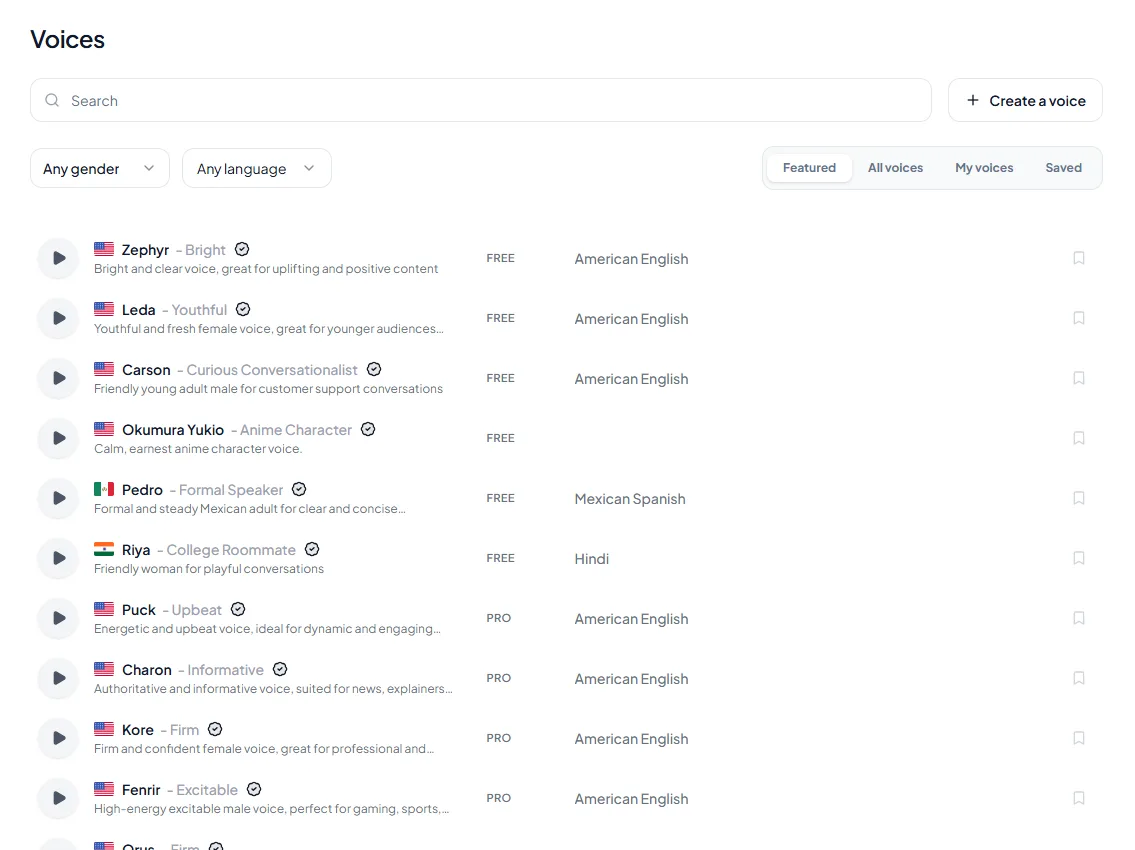
Kveeky's limits are worth knowing: there is no pitch control, and the app does not enforce your course settings for you, so the spec sheet and file naming are your safeguards. The free plan (500 credits a month, about 40 seconds, no credit card) is for testing voices. For voice cloning, check the pricing page for what each plan includes.
What do you regenerate when content changes?
Regenerate the smallest unit that contains the change, using the unchanged voice and settings. For most edits that is one slide file, not a module and never the course.
Tap the change you are facing for the smallest safe fix.
The exception is a voice change: a new voice means regenerating everything, because even a close match is audible when learners move from module 7 to module 8. Mixing narrators on purpose is a different decision, covered in our post on when to use different narrators in one course.
How much does a 40-module rebuild cost?
A 40-module course of 5-minute modules is 200 finished minutes, and with a 50% allowance for retakes you generate about 300 minutes. On Kveeky's monthly plans that is 3 months of Basic or 2 months of Premium, and later updates are small.
The calculator uses the plan allowances from kveeky.com/pricing.md (retrieved 2026-10-16). Change the numbers to match your course.
Allowances per month: Free about 40 seconds, Basic 100 at $9, Pro 133 at $19.99, Premium 200 at $29, Business 1,000 at $99, monthly billing. The free plan is 500 credits.
Worked example: 40 modules with quarterly policy updates
At the defaults, the course is 200 finished minutes and about 30,000 words. The cheapest first build is 3 months of Basic at $27, or 2 months of Premium at $58 if you want it done sooner. An update touching 8% of lines is about 24 minutes of generation, which any paid plan covers in one month.
| Item | Number | How it is worked out |
|---|---|---|
| Finished audio | 200 minutes | 40 modules x 5 minutes |
| Script words | 30,000 | 200 minutes x 150 words |
| Generation with retakes | 300 minutes | 200 x 1.5 |
| Quarterly update (8%) | about 24 minutes | 200 x 0.08 x 1.5 |
| Free plan test | about 40 seconds a month | 500 credits, about 13 slides at 75 words |
The 50% retake allowance and the 8% change rate are planning assumptions, not measurements. For general per-video pricing, see AI voiceover cost per video, and use the words to minutes calculator for any script.
How do you check consistency before you publish?
Compare a sample from the first, middle and last module with your reference clip, at normal speed and on the same headphones. Three samples catch most drift for about 10 minutes of listening.
Open what you need.
What if two authors both generate audio?
How do I stop a narrator sounding flat in a long course?
Is narration really why learners drop out?
What about a course in several languages?
For the wider course workflow, including captions and accessibility, read the e-learning voiceover guide.
Keep reading: E-learning voiceover guide · AI voiceover scripts · Multi-voice courses · Why students drop off your course · AI voiceover cost per video · Less robotic AI voiceover · Kveeky pricing
Frequently asked questions
How do you keep the same voice across a whole training course?
Choose one voice, language, speed, volume and emotion setting, write them in a spec sheet, and use the same values for every module. Generate slide by slide and keep a reference clip to compare new files against.
Can you change one line of narration without redoing the whole module?
Yes, if you generate one file per slide. Edit the script row, regenerate that one file with the same voice and settings, and replace it in your authoring tool.
What loudness should training video narration be?
Pick one target and apply it to every file. The European Broadcasting Union recommends an average programme loudness of -23 LUFS for broadcast, which is a sensible reference if your platform has no stricter rule.
How many words is a 5-minute training module?
About 750 words at 150 words per minute, or 650 at 130. A 40-module course of 5-minute modules is about 30,000 words at 150.
Will AI narration sound the same next year?
Not guaranteed. Vendors can change or retire voices, so save reference clips and your settings. If a voice changes noticeably, regenerate the whole course in one pass instead of mixing old and new files.
Can the free plan narrate a 40-module course?
No. The free plan gives 500 credits a month, about 40 seconds, which is enough to test voices on a few slides. A 40-module course needs a paid plan, and paid plans include commercial usage rights.
How we checked this guide
This guide is written by Govind Kumar for the Kveeky team. Disclosure: Kveeky makes an AI voice generator. No Kveeky usage data is used here. We did not run listening tests, so we make no claim about how any voice sounds.
- Kveeky plans, minutes and commercial rights wording: kveeky.com/pricing.md, retrieved 2026-10-16.
- Kveeky editor settings: observed in the app on 2026-10-15 (voice, Transcript Language, Speed, Volume, Emotion, Custom Punctuation; no pitch control).
- Loudness reference: -23 LUFS average programme loudness, EBU R 128, retrieved 2026-10-16. We did not confirm the current tolerance and don't quote it.
- 150 words per minute average speaking rate: as used on our words to minutes calculator.
- The 130 wpm slow pace, the 50% retake allowance and the 8% update rate are our planning assumptions.
Your next step: write the spec sheet today, then paste the hardest slide of module 1 into Kveeky to record your reference clip before you generate anything else.
Turn your script into a voiceover
Paste your text, pick a voice and download the audio. Free to start, no credit card.