# Free Online Text to Speech with Realistic AI Voices

Published: August 19, 2025 · Author: Mohit Singh

Kveeky AI is a free online text to speech tool with 700+ realistic AI voices in 40+ languages. Paste your script, pick a voice, adjust speed and emotion, then download the audio. The free plan gives you 500 credits a month, about 40 seconds of audio, with no credit card.

*Last updated: October 6, 2026. Plan details were checked on the [Kveeky](https://kveeky.com/) pricing page on that date.*

This is the plain guide to what Kveeky does, what you get for free and how to get natural-sounding results. If you searched for "Kveeky" or "Kveeky AI", this page answers the common questions in one place.

<div style="margin:28px 0;padding:20px 22px;background:var(--kv-blue-50);border:1px solid var(--kv-blue-100);border-radius:var(--kv-radius-md)"><div style="font:700 17px/1.3 var(--kv-font-heading);color:var(--kv-blue-950);margin-bottom:8px">Quick answer</div><p style="margin:0;font:400 16px/1.6 var(--kv-font-body);color:var(--kv-gray-800)">Yes, Kveeky has a free plan: 500 credits a month (about 40 seconds of audio), standard voices and no credit card. Paste a script, pick a voice, set speed and emotion, and download the audio. Use the planner below to see how many minutes your scripts need.</p></div>

> **Key Takeaways**
>
> - **What it is:** a web-based AI voice generator. You turn written scripts into voiceovers for videos, courses, ads and podcasts.
> - **Free plan:** 500 credits a month (about 40 seconds), standard voices and no credit card. Check the pricing page for voice cloning on your plan.
> - **Voices and languages:** 700+ AI voices with voices in 40+ languages.
> - **Realism tools:** speed and volume control, plus 6 emotions (Neutral, Happy, Love, Angry, Calm and Sad).
> - **Paid plans** start at $9/month, or $7.50/month billed yearly, and every paid plan includes commercial usage rights.

**On this page:** [What it is](#what-is-kveeky-ai) · [How to use it](#using-kveeky-free-tts) · [Free vs paid](#what-you-get-free) · [Voices and languages](#voices-and-languages) · [Realistic results](#what-makes-a-voice-realistic) · [Use cases](#what-you-can-make) · [Responsible use](#responsible-use) · [FAQ](#frequently-asked-questions)

## What is Kveeky AI?

Kveeky is an AI voice generator, also called a text to speech tool, for creators and small teams. It works in your web browser, so there's nothing to install.

The idea is simple: paste a script, pick a voice, download the audio. Creators have used it to make 2M+ voiceovers and 6M+ minutes of audio, and it has 50,000+ users.

<figure style="margin:28px 0;padding:0"><a href="https://kveeky.com/"><img src="https://cdn.kveeky.com/portals/public-uploads/c033eba2-39d4-4683-a5a9-c8cf2ffc6d01.webp" alt="The Kveeky homepage voice demo with three numbered areas: the voice list, the script box and the language and play controls." width="1180" height="532" loading="lazy" decoding="async" style="display:block;width:100%;height:auto;border-radius:14px;border:1px solid #dbeafe"></a><figcaption style="margin-top:12px"><ol style="margin:0;padding:0"><li style="display:flex;gap:10px;align-items:flex-start;margin:0 0 6px;padding:0;list-style:none"><span style="flex:0 0 24px;height:24px;border-radius:50%;background:#1d4ed8;color:#fff;font:700 13px/24px var(--kv-font-heading);text-align:center">1</span><span style="font:400 15px/1.5 var(--kv-font-body);color:#1f2937"><span style="font-weight:700">Pick a voice.</span> Voices are tagged Free or Premium.</span></li><li style="display:flex;gap:10px;align-items:flex-start;margin:0 0 6px;padding:0;list-style:none"><span style="flex:0 0 24px;height:24px;border-radius:50%;background:#1d4ed8;color:#fff;font:700 13px/24px var(--kv-font-heading);text-align:center">2</span><span style="font:400 15px/1.5 var(--kv-font-body);color:#1f2937"><span style="font-weight:700">Type or paste a short line.</span> Pick an emotion if you want one.</span></li><li style="display:flex;gap:10px;align-items:flex-start;margin:0 0 6px;padding:0;list-style:none"><span style="flex:0 0 24px;height:24px;border-radius:50%;background:#1d4ed8;color:#fff;font:700 13px/24px var(--kv-font-heading);text-align:center">3</span><span style="font:400 15px/1.5 var(--kv-font-body);color:#1f2937"><span style="font-weight:700">Choose the language and press play</span> to hear it.</span></li></ol><p style="margin:6px 0 0;font:400 14px/1.5 var(--kv-font-body);color:#6b7280">Try it yourself in the free voice demo on <a href="https://kveeky.com/" style="font:inherit;color:#1d4ed8">Kveeky</a>, no sign-up needed. For longer scripts and downloads, use the free plan.</p></figcaption></figure>

## Using Kveeky free TTS

You can make your first voiceover in a few minutes.

1. **Sign up for the free plan.** No credit card is needed.
2. **Paste your script.** Short sentences sound more natural than long ones.
3. **Pick a voice in your language.** Free and premium voices are labelled in the picker.
4. **Adjust delivery.** Set the speed and volume. Choose an Emotion where a line needs feeling.
5. **Generate and listen.** Fix any word that sounds wrong, then generate again.
6. **Download the audio.** Then upload it to your video editor or platform.

Here is the editor, and a short script to practise on:

<figure style="margin:28px 0;padding:0"><img src="/blog/product/app-text-to-speech.webp" alt="The Kveeky text-to-speech editor with a script in the text box and the Settings panel showing Voice, Transcript Language, Speed, Volume, Emotion and Custom Punctuation." width="1150" height="850" loading="lazy" decoding="async" style="display:block;width:100%;height:auto;border-radius:var(--kv-radius-md);border:1px solid var(--kv-blue-100)"><figcaption style="margin-top:10px;font:400 14px/1.5 var(--kv-font-body);color:var(--kv-gray-600)">Look at the Settings panel next to the script box: Voice, Transcript Language, Speed, Volume, Emotion (Neutral, Happy, Love, Angry, Calm or Sad) and Custom Punctuation. Kveeky has no pitch control, so pick the voice that already sounds right.</figcaption></figure>

<div style="margin:28px 0;padding:20px 22px;background:var(--kv-blue-50);border:1px solid var(--kv-blue-100);border-radius:var(--kv-radius-md)"><div style="font:700 17px/1.3 var(--kv-font-heading);color:var(--kv-blue-950);margin-bottom:8px">Try it: a practice script to paste into the editor</div><p style="margin:0 0 12px;font:400 15px/1.5 var(--kv-font-body);color:var(--kv-gray-600)">Paste it into the text box, generate it once with Neutral and once with Calm or Happy in the Emotion setting, and compare.</p><pre id="fr2-t" style="margin:0 0 12px;padding:14px 16px;background:var(--kv-white);border:1px solid var(--kv-blue-100);border-radius:var(--kv-radius-sm);font:400 15px/1.6 var(--kv-font-body);color:var(--kv-gray-800);white-space:pre-wrap;overflow-wrap:anywhere;min-width:0">Welcome to the course. Today you will build your first project.
First, open the editor. Next, paste your script.
Short sentences sound natural, so keep them short.
Now, listen once. Fix any word that sounds wrong. Then generate it again.</pre><button type="button" id="fr2-b" style="min-height:44px;padding:0 16px;border:0;border-radius:var(--kv-radius-sm);background:var(--kv-blue-700);color:var(--kv-white);font:700 15px/1 var(--kv-font-body);cursor:pointer">Copy text</button> <span id="fr2-m" aria-live="polite" style="font:400 14px/1.4 var(--kv-font-body);color:var(--kv-gray-600)"></span><script>(function(){try{var t=document.getElementById("fr2-t"),b=document.getElementById("fr2-b"),m=document.getElementById("fr2-m");if(!t||!b||!m)return;b.addEventListener("click",function(){var x=t.textContent;try{navigator.clipboard.writeText(x).then(function(){m.textContent="Copied."},function(){m.textContent="Select the text and copy it."})}catch(e){m.textContent="Select the text and copy it."}})}catch(e){}})();</script></div>

<div style="margin:28px 0;padding:20px 22px;background:var(--kv-blue-50);border:1px solid var(--kv-blue-100);border-radius:var(--kv-radius-md)"><div style="font:700 17px/1.3 var(--kv-font-heading);color:var(--kv-blue-950);margin-bottom:8px">Before you download: a 6-point check</div><p style="margin:0 0 12px;font:400 15px/1.5 var(--kv-font-body);color:var(--kv-gray-600)">Tick each point as you test your voiceover. Your ticks stay in this browser only.</p><ul style="list-style:none;margin:0 0 12px;padding:0"><li style="margin:0 0 8px"><label style="display:flex;gap:10px;align-items:flex-start;font:400 16px/1.5 var(--kv-font-body);color:var(--kv-gray-800)"><input type="checkbox" class="fr4-c" style="flex:0 0 20px;width:20px;height:20px;margin-top:2px;accent-color:var(--kv-blue-700)"><span style="min-width:0">Sentences are short and sound like speech (contractions are fine)</span></label></li><li style="margin:0 0 8px"><label style="display:flex;gap:10px;align-items:flex-start;font:400 16px/1.5 var(--kv-font-body);color:var(--kv-gray-800)"><input type="checkbox" class="fr4-c" style="flex:0 0 20px;width:20px;height:20px;margin-top:2px;accent-color:var(--kv-blue-700)"><span style="min-width:0">One idea per sentence</span></label></li><li style="margin:0 0 8px"><label style="display:flex;gap:10px;align-items:flex-start;font:400 16px/1.5 var(--kv-font-body);color:var(--kv-gray-800)"><input type="checkbox" class="fr4-c" style="flex:0 0 20px;width:20px;height:20px;margin-top:2px;accent-color:var(--kv-blue-700)"><span style="min-width:0">Pauses are placed on purpose with commas and full stops</span></label></li><li style="margin:0 0 8px"><label style="display:flex;gap:10px;align-items:flex-start;font:400 16px/1.5 var(--kv-font-body);color:var(--kv-gray-800)"><input type="checkbox" class="fr4-c" style="flex:0 0 20px;width:20px;height:20px;margin-top:2px;accent-color:var(--kv-blue-700)"><span style="min-width:0">Names, brands and numbers sound right (re-spell them as they sound if not)</span></label></li><li style="margin:0 0 8px"><label style="display:flex;gap:10px;align-items:flex-start;font:400 16px/1.5 var(--kv-font-body);color:var(--kv-gray-800)"><input type="checkbox" class="fr4-c" style="flex:0 0 20px;width:20px;height:20px;margin-top:2px;accent-color:var(--kv-blue-700)"><span style="min-width:0">Speed matches the section: slower for steps, slightly faster for hooks</span></label></li><li style="margin:0 0 8px"><label style="display:flex;gap:10px;align-items:flex-start;font:400 16px/1.5 var(--kv-font-body);color:var(--kv-gray-800)"><input type="checkbox" class="fr4-c" style="flex:0 0 20px;width:20px;height:20px;margin-top:2px;accent-color:var(--kv-blue-700)"><span style="min-width:0">I listened to the whole audio once before publishing</span></label></li></ul><div id="fr4-p" aria-live="polite" style="padding:14px 16px;background:var(--kv-white);border:1px solid var(--kv-blue-100);border-radius:var(--kv-radius-sm);font:400 16px/1.6 var(--kv-font-body);color:var(--kv-gray-800)"></div><script>(function(){try{var cs=document.querySelectorAll(".fr4-c"),p=document.getElementById("fr4-p");if(!cs.length||!p)return;var k="kv-fr4";var st=[];try{st=JSON.parse(localStorage.getItem(k)||"[]")}catch(e){st=[]}for(var i=0;i<cs.length;i++){if(st[i])cs[i].checked=true;cs[i].addEventListener("change",u)}function u(){var n=0,a=[];for(var i=0;i<cs.length;i++){a.push(cs[i].checked);if(cs[i].checked)n++}try{localStorage.setItem(k,JSON.stringify(a))}catch(e){}p.textContent=n+" of "+cs.length+" done"+(n==cs.length?". Ready to download.":".")}u()}catch(e){}})();</script></div>

## What you get free

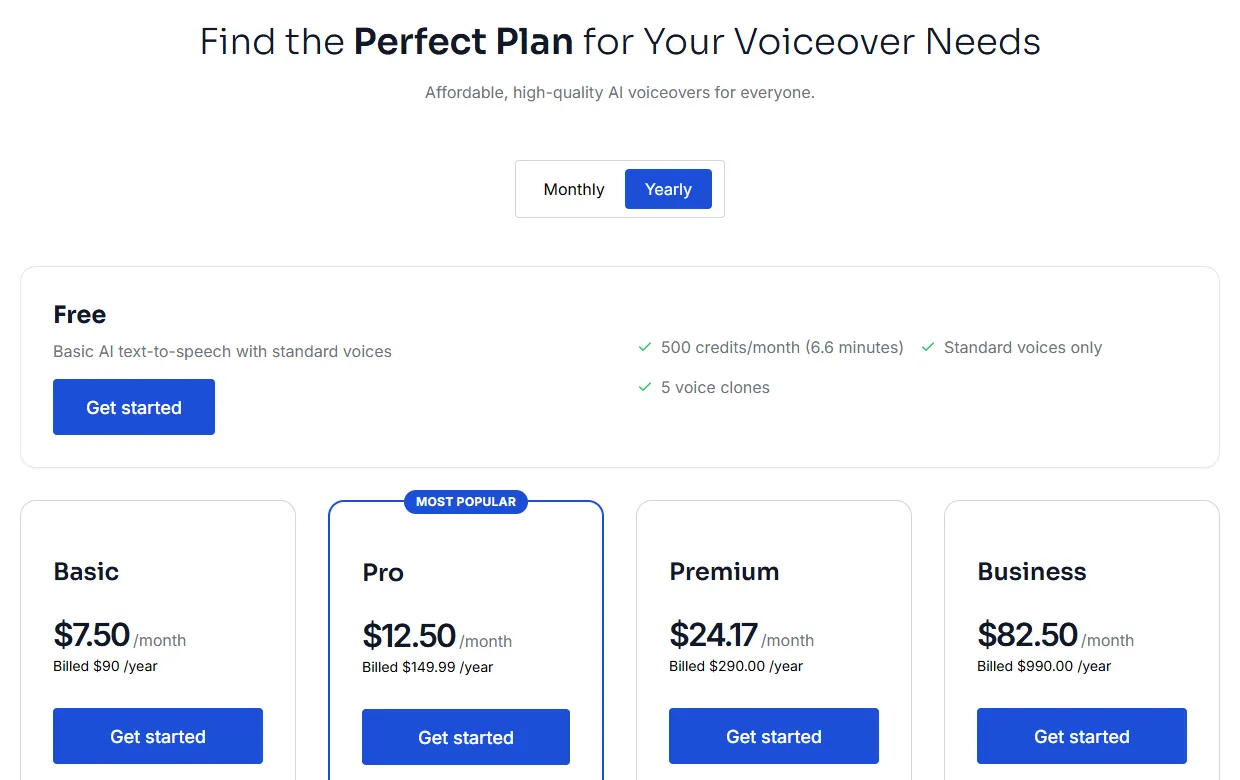
The free plan is for testing voices and short projects. Paid plans add minutes, every voice and commercial rights. To see when a free plan stops being enough, read [what you get with free vs paid TTS](https://kveeky.com/blog/free-vs-paid-text-to-speech).

<table>
<thead>
<tr><th>Plan</th><th>Monthly billing</th><th>Yearly billing (per month)</th><th>Included per month</th></tr>
</thead>
<tbody>
<tr><td>Free</td><td>$0</td><td>$0</td><td>500 credits (about 40 seconds), standard voices</td></tr>
<tr><td>Basic</td><td>$9</td><td>$7.50</td><td>100 min, all 700+ voices, 5 clones</td></tr>
<tr><td>Pro</td><td>$19.99</td><td>$12.50</td><td>133 min, 10 clones, voice localization</td></tr>
<tr><td>Premium</td><td>$29</td><td>$24.17</td><td>200 min, 10 clones, voice localization</td></tr>
<tr><td>Business</td><td>$99</td><td>$82.50</td><td>1,000 min, 20 clones, voice localization</td></tr>
</tbody>
</table>

<img src="https://cdn.kveeky.com/portals/public-uploads/fd9b99bd-9fd4-4d11-aeeb-afb143dffff8.webp" alt="The Kveeky pricing page listing the Free plan and the yearly prices of the Basic, Pro, Premium and Business plans." width="100%" style="width: 100%; display: block;" />

Every paid plan includes commercial usage rights for the audio you generate. Check the [Kveeky pricing page](https://kveeky.com/pricing/) for the current version.

**Where the free plan falls short:** it uses standard voices only, and about 40 seconds a month suits testing more than regular publishing.

Comparing Kveeky with another browser-based tool? Our [Luvvoice alternatives comparison](https://kveeky.com/blog/best-luvvoice-alternatives-ai-voice) puts both side by side, including where Luvvoice wins.

<div style="margin:28px 0;padding:20px 22px;background:var(--kv-blue-50);border:1px solid var(--kv-blue-100);border-radius:var(--kv-radius-md)"><div style="font:700 17px/1.3 var(--kv-font-heading);color:var(--kv-blue-950);margin-bottom:8px">How many minutes do my scripts need?</div><p style="margin:0 0 12px;font:400 15px/1.5 var(--kv-font-body);color:var(--kv-gray-600)">Enter your script length and how many you make a month. It uses a speaking pace of 150 words a minute and the plan minutes from the table above. It is an estimate, not a quote.</p><div style="display:flex;flex-wrap:wrap;gap:12px;margin-bottom:12px"><label style="flex:1 1 200px;min-width:0;font:600 15px/1.4 var(--kv-font-body);color:var(--kv-gray-800)">Words per script<input id="fr1-w" type="number" inputmode="decimal" value="300" min="0" max="100000" step="10" style="display:block;width:100%;box-sizing:border-box;min-height:44px;margin-top:6px;padding:0 12px;border:1px solid var(--kv-blue-100);border-radius:var(--kv-radius-sm);font:400 16px/1 var(--kv-font-body);color:var(--kv-gray-800);background:var(--kv-white)"></label><label style="flex:1 1 200px;min-width:0;font:600 15px/1.4 var(--kv-font-body);color:var(--kv-gray-800)">Scripts per month<input id="fr1-n" type="number" inputmode="decimal" value="4" min="0" max="1000" step="1" style="display:block;width:100%;box-sizing:border-box;min-height:44px;margin-top:6px;padding:0 12px;border:1px solid var(--kv-blue-100);border-radius:var(--kv-radius-sm);font:400 16px/1 var(--kv-font-body);color:var(--kv-gray-800);background:var(--kv-white)"></label></div><div id="fr1-o" aria-live="polite" style="padding:14px 16px;background:var(--kv-white);border:1px solid var(--kv-blue-100);border-radius:var(--kv-radius-sm);font:400 16px/1.6 var(--kv-font-body);color:var(--kv-gray-800)"></div><script>(function(){try{var ids=["fr1-w", "fr1-n"],o=document.getElementById("fr1-o"),el=[];if(!o)return;for(var i=0;i<ids.length;i++){var e=document.getElementById(ids[i]);if(!e)return;el.push(e)}function u(){var v=[];for(var i=0;i<el.length;i++){var n=parseFloat(el[i].value);v.push(isNaN(n)||n<0?0:n)}var m=v[0]*v[1]/150,s=m*60,c=s/0.792,pl=[["Free",0.67],["Basic",100],["Pro",133],["Premium",200],["Business",1000]],r="",i;for(i=0;i<pl.length;i++){if(m<=pl[i][1]){r=pl[i][0];break}}var t="<strong>About "+m.toFixed(1)+" minutes a month</strong> ("+Math.round(s)+" seconds, roughly "+Math.round(c)+" credits at 500 credits = 40 seconds). ";t+=m==0?"Enter a script length to start.":(r?"The smallest plan in the table that covers it: <strong>"+r+"</strong>. ":"That is above the Business plan minutes in the table; ask about it on the pricing page. ");if(m>0&&r=="Free")t+="The free plan covers this, with standard voices only.";else if(m>0&&r)t+="The free plan's about 40 seconds would run out first. Premium voices need a paid plan.";o.innerHTML=t}for(var j=0;j<el.length;j++){el[j].addEventListener("input",u)}u()}catch(e){}})();</script></div>

<details style="margin:16px 0;padding:14px 18px;background:var(--kv-white);border:1px solid var(--kv-blue-100);border-radius:var(--kv-radius-md)"><summary style="cursor:pointer;font:700 16px/1.4 var(--kv-font-heading);color:var(--kv-blue-950)">Show me: what the free plan does and does not include</summary><div style="margin-top:10px;font:400 16px/1.6 var(--kv-font-body);color:var(--kv-gray-800)"><ul style="margin:0;padding-left:20px"><li><strong>Included:</strong> 500 credits a month (about 40 seconds), standard voices, no credit card.</li><li><strong>Not included:</strong> premium voices (all 700+ voices need a paid plan), and commercial usage rights, which every paid plan includes.</li><li><strong>Voice cloning:</strong> check the <a href="https://kveeky.com/pricing" style="color:var(--kv-blue-700)">pricing page</a> for what each plan lists.</li></ul></div></details>

## Voices and languages

Kveeky has 700+ AI voices, with voices in 40+ languages. That includes male and female voices, different ages and accents, and calm or energetic styles.

- **Language pages:** the site has 100+ language pages. That's a count of pages, not of languages you can generate, so open the page for your language to see its voices. Start at our [text to speech language pages](https://kveeky.com/languages).
- **Character voices:** for storytelling and fan content, browse the [character and anime AI voices library](https://kveeky.com/ai-voices).
- **Voice cloning:** limits vary by plan, so check the pricing page for yours. Clone only voices you have permission to use.

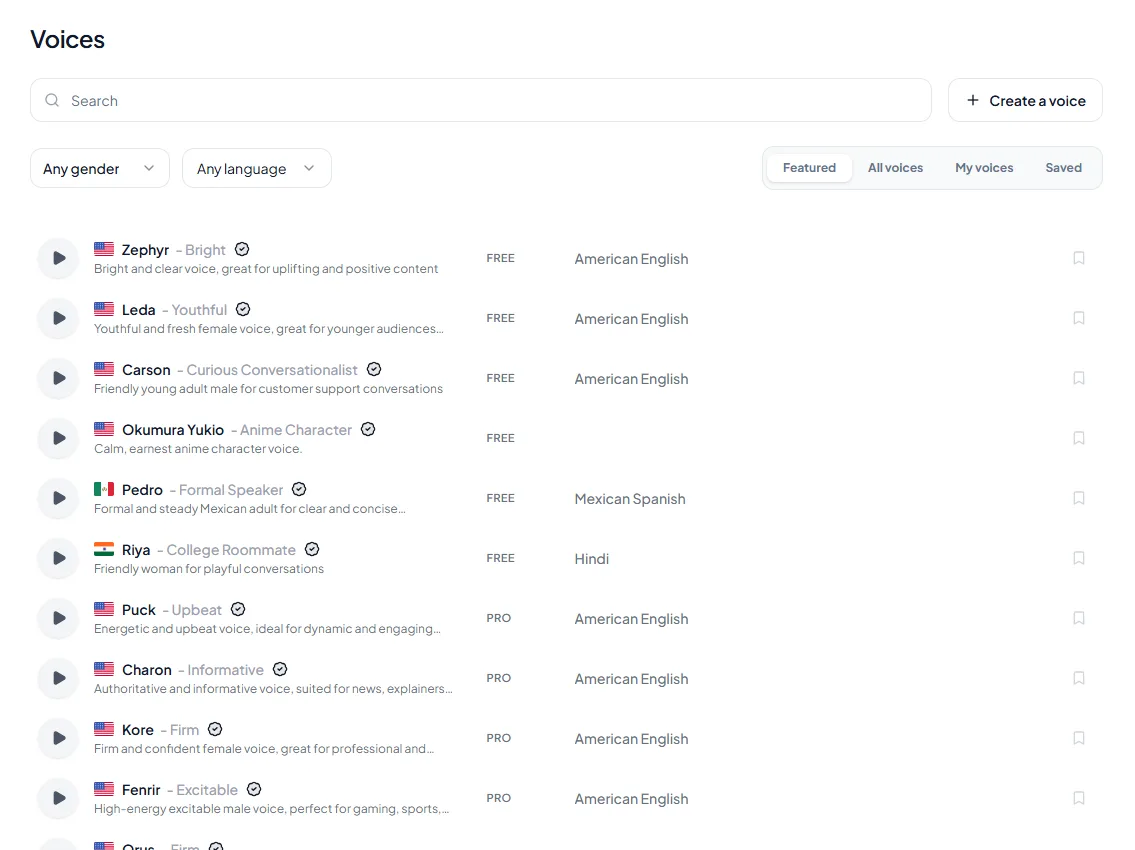
<figure style="margin:28px 0;padding:0"><img src="/blog/product/app-voice-library.webp" alt="The Kveeky voice library with search, gender and language filters, and a FREE or PRO tag on each voice." width="1150" height="850" loading="lazy" decoding="async" style="display:block;width:100%;height:auto;border-radius:var(--kv-radius-md);border:1px solid var(--kv-blue-100)"><figcaption style="margin-top:10px;font:400 14px/1.5 var(--kv-font-body);color:var(--kv-gray-600)">In the voice library, use the search box and the gender and language filters, press a voice's preview button, and check its FREE or PRO tag. Free-plan voices are the ones tagged FREE.</figcaption></figure>

## What makes a voice realistic

A realistic AI voice gets 3 things right: pronunciation, rhythm and emotion.

- **Pronunciation.** Names, brands and numbers must sound right. If one doesn't, re-spell it the way it sounds.
- **Rhythm and pauses.** People pause at commas and before key points. Punctuation is your main tool here.
- **Emotion.** A product launch should sound excited and a safety notice should sound calm. The Emotion setting handles this in Kveeky.

**Tips for more natural results**

1. **Write the way people talk.** Use contractions and short sentences.
2. **Keep 1 idea per sentence.** Long, nested sentences are harder to read naturally.
3. **Add pauses on purpose.** A comma or a full stop before a key point gives it weight.
4. **Change speed by section.** Slow down for steps, speed up slightly for hooks.
5. **Listen once before you publish.** Fix mispronunciations early.

If your audio still sounds flat, our guide on [making an AI voiceover sound less robotic](https://kveeky.com/blog/how-to-make-your-ai-voiceover-sound-less-robotic-in-5-minutes) covers more fixes.

<div style="margin:28px 0;padding:20px 22px;background:var(--kv-blue-50);border:1px solid var(--kv-blue-100);border-radius:var(--kv-radius-md)"><div style="font:700 17px/1.3 var(--kv-font-heading);color:var(--kv-blue-950);margin-bottom:8px">What are you making? Get a starting setup</div><p style="margin:0 0 12px;font:400 15px/1.5 var(--kv-font-body);color:var(--kv-gray-600)">Pick a project. The suggestions use this guide's own tips; always listen once before you publish.</p><div style="display:flex;flex-wrap:wrap;gap:12px;margin-bottom:12px"><label style="flex:1 1 200px;min-width:0;font:600 15px/1.4 var(--kv-font-body);color:var(--kv-gray-800)">I am making<select id="fr3-s" style="display:block;width:100%;box-sizing:border-box;min-height:44px;margin-top:6px;padding:0 12px;border:1px solid var(--kv-blue-100);border-radius:var(--kv-radius-sm);font:400 16px/1 var(--kv-font-body);color:var(--kv-gray-800);background:var(--kv-white)"><option value="0">An explainer or product video</option><option value="1">A YouTube or social clip</option><option value="2">A course or training video</option><option value="3">A podcast or audio article</option><option value="4">A safety notice or calm announcement</option></select></label></div><div id="fr3-o" aria-live="polite" style="padding:14px 16px;background:var(--kv-white);border:1px solid var(--kv-blue-100);border-radius:var(--kv-radius-sm);font:400 16px/1.6 var(--kv-font-body);color:var(--kv-gray-800)"></div><script>(function(){try{var d=["<strong>Steady and clear.</strong> Write short, conversational sentences, slow down slightly for steps, and keep the Emotion setting on Neutral. See <a href=\"https://kveeky.com/voiceover/explainer-videos/\" style=\"color:var(--kv-blue-700)\">AI voiceover for explainer videos</a>.", "<strong>Strong hook.</strong> Speed up slightly for the hook, slow down for the point, and try Happy for a launch. Listen to the first sentence before you generate the rest.", "<strong>Consistent.</strong> Use the same voice in every lesson so learners get one narrator, and slow the speed a little for step-by-step parts.", "<strong>Long-form.</strong> Use short paragraphs, let punctuation set the pauses, and check the minutes in the planner above, because long audio uses credits quickly.", "<strong>Calm.</strong> Choose the Calm emotion, keep sentences short and put a full stop before the key instruction so it gets weight."],s=document.getElementById("fr3-s"),o=document.getElementById("fr3-o");if(!s||!o)return;function u(){var r=d[+s.value];if(r)o.innerHTML=r}s.addEventListener("change",u);u()}catch(e){}})();</script></div>

## What you can make

Most people use Kveeky for narration where a clear, natural voice matters more than acting.

- **Explainer and product videos** that walk through a feature or idea.
- **YouTube and social clips**, where a strong hook helps.
- **Courses and training videos**, where consistency across lessons matters.
- **Podcasts and audio articles** made from written posts.

For long-form drama or a character that needs real acting, a human voice artist is still the better choice.

## Responsible use

Realistic voices bring responsibilities.

- **Be open about AI voices** when your audience would expect to know.
- **Clone only with consent.** Use your own voice or a voice you have written permission to use.
- **Read the plan terms** before you publish commercially. Every paid Kveeky plan includes commercial usage rights.

## Frequently asked questions

### Is Kveeky AI free?

Yes. Kveeky's free plan gives you 500 credits a month, about 40 seconds of audio, with standard voices. You don't need a credit card. Paid plans start at $9/month, or $7.50/month billed yearly.

### How many voices and languages does Kveeky have?

Kveeky has 700+ AI voices, with voices in 40+ languages. The site also has 100+ language pages, but that's a count of pages, so check your language's page to see which voices it has.

### Can I download Kveeky audio as MP3?

Yes. You can download your voiceover as an audio file and upload it to your video editor or platform.

### Can I use Kveeky voices commercially?

Every paid Kveeky plan includes commercial usage rights for the audio you generate. Check the pricing page for the current terms before you publish.

### How do I make Kveeky voices sound more realistic?

Write short, conversational sentences, use punctuation for pauses and adjust speed and volume. Pick an Emotion such as Happy or Calm where a line needs feeling.

### How many minutes is 500 credits on Kveeky?

The free plan's 500 credits are about 40 seconds of audio a month. At a speaking pace of 150 words a minute, that is roughly 100 words. Use the planner above for your own scripts.

### Do I need a credit card for the free plan?

No. The free plan needs no credit card. You can paste a script, pick a standard voice and download the audio.

### Which Kveeky voices are free?

The free plan uses standard voices. In the voice library each voice carries a FREE or PRO tag, so check the tag before you plan a project. Paid plans unlock all 700+ voices.

### Does Kveeky have a pitch control?

No. Kveeky's settings are voice, transcript language, speed, volume, emotion (Neutral, Happy, Love, Angry, Calm or Sad) and custom punctuation. Choose a voice that already sounds right for the job.

<div style="margin:28px 0;padding:20px 22px;background:var(--kv-blue-50);border:1px solid var(--kv-blue-100);border-radius:var(--kv-radius-md)"><div style="font:700 17px/1.3 var(--kv-font-heading);color:var(--kv-blue-950);margin-bottom:8px">Keep reading</div><ul style="margin:0;padding-left:20px;font:400 16px/1.6 var(--kv-font-body);color:var(--kv-gray-800)"><li style="margin:0 0 6px"><a href="/blog/free-vs-paid-text-to-speech" style="color:var(--kv-blue-700)">Free vs paid text to speech: when to upgrade</a></li><li style="margin:0 0 6px"><a href="/blog/10-best-free-ai-voice-generatorover-tools" style="color:var(--kv-blue-700)">10 best free AI voiceover generators</a></li><li style="margin:0 0 6px"><a href="/blog/best-luvvoice-alternatives-ai-voice" style="color:var(--kv-blue-700)">Best Luvvoice alternatives</a></li><li style="margin:0 0 6px"><a href="/blog/how-to-make-your-ai-voiceover-sound-less-robotic-in-5-minutes" style="color:var(--kv-blue-700)">Make your AI voiceover sound less robotic</a></li><li style="margin:0 0 6px"><a href="/blog/ai-voice-with-emotion" style="color:var(--kv-blue-700)">AI voice with emotion: how to direct feeling</a></li><li style="margin:0 0 6px"><a href="/blog/choosing-your-ideal-text-to-voice-generator-software" style="color:var(--kv-blue-700)">Choosing text to voice software</a></li><li style="margin:0 0 6px"><a href="https://kveeky.com/resources/words-to-minutes-calculator" style="color:var(--kv-blue-700)">Words to minutes calculator</a></li><li style="margin:0 0 6px"><a href="https://kveeky.com/pricing" style="color:var(--kv-blue-700)">Kveeky pricing</a></li></ul></div>

## How we checked this guide

This guide is written by Mohit Singh for the Kveeky team. **Disclosure: Kveeky makes an AI voice generator, and this page describes our own product.**

- Plans, prices, voice and language counts come from the [Kveeky pricing page](https://kveeky.com/pricing/) and Kveeky's published product facts, checked on October 6, 2026.
- User, voiceover and minute totals (50,000+ users, 2M+ voiceovers, 6M+ minutes) are Kveeky's published figures.
- No competitor claims are made in this guide.

Ready to try it on a real project? Pick a short script and follow Kveeky's guide to [AI voiceovers for explainer videos](https://kveeky.com/voiceover/explainer-videos/). Comparing other free tools too? See our [10 best free AI voiceover generators](https://kveeky.com/blog/10-best-free-ai-voice-generatorover-tools), or use our checklist for [choosing text to voice software](https://kveeky.com/blog/choosing-your-ideal-text-to-voice-generator-software).


<script type="application/ld+json">
{"@context":"https://schema.org","@type":"FAQPage","mainEntity":[
{"@type":"Question","name":"Is Kveeky AI free?","acceptedAnswer":{"@type":"Answer","text":"Yes. Kveeky's free plan gives you 500 credits a month, about 40 seconds of audio, with standard voices. You don't need a credit card. Paid plans start at $9/month, or $7.50/month billed yearly."}},
{"@type":"Question","name":"How many voices and languages does Kveeky have?","acceptedAnswer":{"@type":"Answer","text":"Kveeky has 700+ AI voices, with voices in 40+ languages. The site also has 100+ language pages, but that's a count of pages, so check your language's page to see which voices it has."}},
{"@type":"Question","name":"Can I download Kveeky audio as MP3?","acceptedAnswer":{"@type":"Answer","text":"Yes. You can download your voiceover as an audio file and upload it to your video editor or platform."}},
{"@type":"Question","name":"Can I use Kveeky voices commercially?","acceptedAnswer":{"@type":"Answer","text":"Every paid Kveeky plan includes commercial usage rights for the audio you generate. Check the pricing page for the current terms before you publish."}},
{"@type":"Question","name":"How do I make Kveeky voices sound more realistic?","acceptedAnswer":{"@type":"Answer","text":"Write short, conversational sentences, use punctuation for pauses and adjust speed and volume. Pick an Emotion such as Happy or Calm where a line needs feeling."}},
{"@type":"Question","name":"How many minutes is 500 credits on Kveeky?","acceptedAnswer":{"@type":"Answer","text":"The free plan's 500 credits are about 40 seconds of audio a month. At a speaking pace of 150 words a minute, that is roughly 100 words. Use the planner above for your own scripts."}},
{"@type":"Question","name":"Do I need a credit card for the free plan?","acceptedAnswer":{"@type":"Answer","text":"No. The free plan needs no credit card. You can paste a script, pick a standard voice and download the audio."}},
{"@type":"Question","name":"Which Kveeky voices are free?","acceptedAnswer":{"@type":"Answer","text":"The free plan uses standard voices. In the voice library each voice carries a FREE or PRO tag, so check the tag before you plan a project. Paid plans unlock all 700+ voices."}},
{"@type":"Question","name":"Does Kveeky have a pitch control?","acceptedAnswer":{"@type":"Answer","text":"No. Kveeky's settings are voice, transcript language, speed, volume, emotion (Neutral, Happy, Love, Angry, Calm or Sad) and custom punctuation. Choose a voice that already sounds right for the job."}}
]}
</script>