# How to Choose the Right AI Voice for Your Video or Brand (2026)

Published: October 18, 2026 · Author: Govind Kumar

To choose the right AI voice, decide who is listening and what they should do, then match the voice's accent, pace and tone to that job. Audition 3 voices on the same short script and keep the one that still sounds right on your longest paragraph.

*Last updated: October 16, 2026. Plan details were read from kveeky.com on that date.*

<div style="margin:28px 0;padding:20px 22px;background:var(--kv-blue-50);border:1px solid var(--kv-blue-100);border-radius:var(--kv-radius-md);min-width:0;box-sizing:border-box;overflow-wrap:anywhere;border-left:4px solid var(--kv-blue-700)"><div style="font:700 17px/1.3 var(--kv-font-heading);color:var(--kv-blue-950);margin-bottom:8px">Quick answer</div><p style="margin:0;font:400 16px/1.6 var(--kv-font-body);color:var(--kv-gray-800)">Pick by job, not by sample. Match the accent to your audience, the pace to your content (about 150 words per minute is a normal narration speed), and the tone to your brand. Then test 3 voices on one script. The picker, test script and checklist below do the work for you.</p></div>

This guide is for creators, marketers and small teams choosing a voice for videos, ads, courses or phone audio. It has a picker by content type, a brand-to-voice table, a copyable test script, a free-plan audition calculator and a checklist.

**Disclosure: Kveeky makes an AI voice generator.** We use [Kveeky](https://kveeky.com) for the examples, and we say where other approaches fit better.

<div style="margin:28px 0;padding:20px 22px;background:var(--kv-white);border:1px solid var(--kv-blue-100);border-left:4px solid var(--kv-blue-700);border-radius:var(--kv-radius-md)"><div style="font:700 18px/1.3 var(--kv-font-heading);color:var(--kv-blue-950);margin-bottom:12px">Key Takeaways</div><ul style="list-style:none;margin:0;padding:0"><li style="margin:0 0 10px;padding-left:28px;position:relative;font:400 16px/1.6 var(--kv-font-body);color:var(--kv-gray-800)"><span aria-hidden="true" style="position:absolute;left:0;top:2px;width:20px;height:20px;border-radius:50%;background:var(--kv-blue-700);color:var(--kv-white);font:700 12px/20px var(--kv-font-body);text-align:center">&#10003;</span><strong>Choose by job.</strong> The same voice can suit a product demo and fail a bedtime story. Name the listener and the action first.</li><li style="margin:0 0 10px;padding-left:28px;position:relative;font:400 16px/1.6 var(--kv-font-body);color:var(--kv-gray-800)"><span aria-hidden="true" style="position:absolute;left:0;top:2px;width:20px;height:20px;border-radius:50%;background:var(--kv-blue-700);color:var(--kv-white);font:700 12px/20px var(--kv-font-body);text-align:center">&#10003;</span><strong>Accent and language come before personality.</strong> Pick the voice your audience expects to hear, US or UK first for most English videos.</li><li style="margin:0 0 10px;padding-left:28px;position:relative;font:400 16px/1.6 var(--kv-font-body);color:var(--kv-gray-800)"><span aria-hidden="true" style="position:absolute;left:0;top:2px;width:20px;height:20px;border-radius:50%;background:var(--kv-blue-700);color:var(--kv-white);font:700 12px/20px var(--kv-font-body);text-align:center">&#10003;</span><strong>Audition 3 voices on one script</strong> with your real names, numbers and a long paragraph. A 70-word test is about 28 seconds of audio.</li><li style="margin:0 0 10px;padding-left:28px;position:relative;font:400 16px/1.6 var(--kv-font-body);color:var(--kv-gray-800)"><span aria-hidden="true" style="position:absolute;left:0;top:2px;width:20px;height:20px;border-radius:50%;background:var(--kv-blue-700);color:var(--kv-white);font:700 12px/20px var(--kv-font-body);text-align:center">&#10003;</span><strong>Use one voice and one set of settings</strong> across a series, so listeners recognize you.</li><li style="margin:0 0 10px;padding-left:28px;position:relative;font:400 16px/1.6 var(--kv-font-body);color:var(--kv-gray-800)"><span aria-hidden="true" style="position:absolute;left:0;top:2px;width:20px;height:20px;border-radius:50%;background:var(--kv-blue-700);color:var(--kv-white);font:700 12px/20px var(--kv-font-body);text-align:center">&#10003;</span><strong>Check the plan.</strong> Kveeky's free plan has 500 credits a month (about 40 seconds) and every paid plan includes commercial usage rights.</li></ul></div>

**On this page:** [What makes a voice right](#what-makes-an-ai-voice-the-right-one) · [Picker by content type](#which-ai-voice-fits-your-content-type) · [Brand to voice](#how-do-you-match-an-ai-voice-to-your-brand) · [Settings](#which-settings-change-how-a-voice-sounds) · [Audition](#how-do-you-test-an-ai-voice-before-you-commit) · [Free vs paid](#should-you-pick-a-free-or-paid-voice) · [FAQ](#frequently-asked-questions)

## What makes an AI voice the right one?

A right voice is one your listener believes and can follow for the whole piece. Realism on a demo page matters less than fit with your audience, content and brand.

Pages that rank for this question agree on the basics: match the voice to the brand, the audience and the format, keep it consistent and test it in context. Most stop at advice. They don't give you a way to decide, so this guide adds a picker, a table and a test you can run in 10 minutes.

<table>
<thead>
<tr><th style="white-space:nowrap">Criterion</th><th>The question to ask</th><th>Red flag</th></tr>
</thead>
<tbody>
<tr><td style="white-space:nowrap">Language and accent</td><td>Does it match where my listeners live?</td><td>A UK brand with an unmarked US accent, or the reverse</td></tr>
<tr><td style="white-space:nowrap">Pace</td><td>Can a new listener follow every sentence?</td><td>Numbers and names blur together</td></tr>
<tr><td style="white-space:nowrap">Tone</td><td>Does it sound like our writing?</td><td>Cheerful voice, serious script</td></tr>
<tr><td style="white-space:nowrap">Stamina</td><td>Is it still pleasant at minute 5?</td><td>Same rhythm on every sentence</td></tr>
<tr><td style="white-space:nowrap">Pronunciation</td><td>Does it say my product and people names correctly?</td><td>Names you must respell every time</td></tr>
<tr><td style="white-space:nowrap">Rights and cost</td><td>Can I use it commercially on my plan?</td><td>Free-plan audio in a paid ad</td></tr>
</tbody>
</table>

## Which AI voice fits your content type?

Use a calm, neutral voice for explainers, demos and training, an expressive one for stories and a punchy one for short social video. The picker gives a starting profile for each type, and the table underneath shows all of them at once.

<div style="margin:28px 0;padding:20px 22px;background:var(--kv-blue-50);border:1px solid var(--kv-blue-100);border-radius:var(--kv-radius-md);min-width:0;box-sizing:border-box;overflow-wrap:anywhere"><div style="font:700 17px/1.3 var(--kv-font-heading);color:var(--kv-blue-950);margin-bottom:8px">Which voice fits what you are making?</div><p style="margin:0 0 12px;font:400 15px/1.5 var(--kv-font-body);color:var(--kv-gray-600)">Click your content type. These are starting profiles from our editorial judgment, not rules; the settings named are the ones in the Kveeky editor.</p><div role="group" aria-label="Which voice fits what you are making?" style="display:flex;flex-wrap:wrap;gap:8px;margin-bottom:14px"><button type="button" aria-pressed="false" data-a="&lt;strong&gt;Voice:&lt;/strong&gt; neutral to warm, mid-range, the accent of your biggest audience (US or UK first). &lt;strong&gt;Settings:&lt;/strong&gt; Speed 1x, Emotion Neutral. &lt;strong&gt;Avoid:&lt;/strong&gt; a voice that sounds bored on line 3 of a 10-minute script. Test your longest paragraph, not the first sentence." style="min-height:44px;padding:8px 14px;border:1px solid var(--kv-blue-100);border-radius:var(--kv-radius-sm);background:var(--kv-white);color:var(--kv-blue-700);font:600 15px/1.3 var(--kv-font-body);cursor:pointer" onclick="var o=document.getElementById('vpk-o');if(!o)return;var s=this.parentNode.children;for(var i=0;i<s.length;i++){s[i].setAttribute('aria-pressed','false');s[i].style.background='var(--kv-white)';s[i].style.color='var(--kv-blue-700)'}this.setAttribute('aria-pressed','true');this.style.background='var(--kv-blue-700)';this.style.color='var(--kv-white)';o.innerHTML=this.getAttribute('data-a')">YouTube explainer</button><button type="button" aria-pressed="false" data-a="&lt;strong&gt;Voice:&lt;/strong&gt; clear, confident, a little brighter than a narrator. &lt;strong&gt;Settings:&lt;/strong&gt; start at Speed 1x and nudge up in small steps; Emotion Happy for upbeat offers, Neutral for serious ones. &lt;strong&gt;Avoid:&lt;/strong&gt; rushing so the price or call to action is lost." style="min-height:44px;padding:8px 14px;border:1px solid var(--kv-blue-100);border-radius:var(--kv-radius-sm);background:var(--kv-white);color:var(--kv-blue-700);font:600 15px/1.3 var(--kv-font-body);cursor:pointer" onclick="var o=document.getElementById('vpk-o');if(!o)return;var s=this.parentNode.children;for(var i=0;i<s.length;i++){s[i].setAttribute('aria-pressed','false');s[i].style.background='var(--kv-white)';s[i].style.color='var(--kv-blue-700)'}this.setAttribute('aria-pressed','true');this.style.background='var(--kv-blue-700)';this.style.color='var(--kv-white)';o.innerHTML=this.getAttribute('data-a')">Ad or promo</button><button type="button" aria-pressed="false" data-a="&lt;strong&gt;Voice:&lt;/strong&gt; calm, even, easy to follow for 20 minutes. &lt;strong&gt;Settings:&lt;/strong&gt; Speed 1x or slightly slower for new concepts, Emotion Neutral or Calm. &lt;strong&gt;Avoid:&lt;/strong&gt; a different voice per module unless you mean it." style="min-height:44px;padding:8px 14px;border:1px solid var(--kv-blue-100);border-radius:var(--kv-radius-sm);background:var(--kv-white);color:var(--kv-blue-700);font:600 15px/1.3 var(--kv-font-body);cursor:pointer" onclick="var o=document.getElementById('vpk-o');if(!o)return;var s=this.parentNode.children;for(var i=0;i<s.length;i++){s[i].setAttribute('aria-pressed','false');s[i].style.background='var(--kv-white)';s[i].style.color='var(--kv-blue-700)'}this.setAttribute('aria-pressed','true');this.style.background='var(--kv-blue-700)';this.style.color='var(--kv-white)';o.innerHTML=this.getAttribute('data-a')">Course or training</button><button type="button" aria-pressed="false" data-a="&lt;strong&gt;Voice:&lt;/strong&gt; warm, unhurried, with the accent your callers use. &lt;strong&gt;Settings:&lt;/strong&gt; Speed 1x or a little slower, Emotion Calm. &lt;strong&gt;Avoid:&lt;/strong&gt; a voice that sounds too cheerful when delivering bad news." style="min-height:44px;padding:8px 14px;border:1px solid var(--kv-blue-100);border-radius:var(--kv-radius-sm);background:var(--kv-white);color:var(--kv-blue-700);font:600 15px/1.3 var(--kv-font-body);cursor:pointer" onclick="var o=document.getElementById('vpk-o');if(!o)return;var s=this.parentNode.children;for(var i=0;i<s.length;i++){s[i].setAttribute('aria-pressed','false');s[i].style.background='var(--kv-white)';s[i].style.color='var(--kv-blue-700)'}this.setAttribute('aria-pressed','true');this.style.background='var(--kv-blue-700)';this.style.color='var(--kv-white)';o.innerHTML=this.getAttribute('data-a')">Phone or receptionist</button><button type="button" aria-pressed="false" data-a="&lt;strong&gt;Voice:&lt;/strong&gt; expressive, with range. &lt;strong&gt;Settings:&lt;/strong&gt; change Emotion per scene (Happy, Sad, Angry, Calm, Love). &lt;strong&gt;Avoid:&lt;/strong&gt; using one emotion for a whole chapter; it flattens fast." style="min-height:44px;padding:8px 14px;border:1px solid var(--kv-blue-100);border-radius:var(--kv-radius-sm);background:var(--kv-white);color:var(--kv-blue-700);font:600 15px/1.3 var(--kv-font-body);cursor:pointer" onclick="var o=document.getElementById('vpk-o');if(!o)return;var s=this.parentNode.children;for(var i=0;i<s.length;i++){s[i].setAttribute('aria-pressed','false');s[i].style.background='var(--kv-white)';s[i].style.color='var(--kv-blue-700)'}this.setAttribute('aria-pressed','true');this.style.background='var(--kv-blue-700)';this.style.color='var(--kv-white)';o.innerHTML=this.getAttribute('data-a')">Story or character</button><button type="button" aria-pressed="false" data-a="&lt;strong&gt;Voice:&lt;/strong&gt; calm and confident, neutral accent for a global buyer. &lt;strong&gt;Settings:&lt;/strong&gt; Speed 1x, Emotion Neutral. &lt;strong&gt;Avoid:&lt;/strong&gt; hype. Demos win trust by sounding certain, not excited." style="min-height:44px;padding:8px 14px;border:1px solid var(--kv-blue-100);border-radius:var(--kv-radius-sm);background:var(--kv-white);color:var(--kv-blue-700);font:600 15px/1.3 var(--kv-font-body);cursor:pointer" onclick="var o=document.getElementById('vpk-o');if(!o)return;var s=this.parentNode.children;for(var i=0;i<s.length;i++){s[i].setAttribute('aria-pressed','false');s[i].style.background='var(--kv-white)';s[i].style.color='var(--kv-blue-700)'}this.setAttribute('aria-pressed','true');this.style.background='var(--kv-blue-700)';this.style.color='var(--kv-white)';o.innerHTML=this.getAttribute('data-a')">Product demo</button><button type="button" aria-pressed="false" data-a="&lt;strong&gt;Voice:&lt;/strong&gt; punchy and distinctive; the first second decides if people stay. &lt;strong&gt;Settings:&lt;/strong&gt; Speed 1x or a bit faster, Emotion to match the joke or hook. &lt;strong&gt;Avoid:&lt;/strong&gt; a voice so common that viewers scroll past it as a default." style="min-height:44px;padding:8px 14px;border:1px solid var(--kv-blue-100);border-radius:var(--kv-radius-sm);background:var(--kv-white);color:var(--kv-blue-700);font:600 15px/1.3 var(--kv-font-body);cursor:pointer" onclick="var o=document.getElementById('vpk-o');if(!o)return;var s=this.parentNode.children;for(var i=0;i<s.length;i++){s[i].setAttribute('aria-pressed','false');s[i].style.background='var(--kv-white)';s[i].style.color='var(--kv-blue-700)'}this.setAttribute('aria-pressed','true');this.style.background='var(--kv-blue-700)';this.style.color='var(--kv-white)';o.innerHTML=this.getAttribute('data-a')">Short social video</button></div><div id="vpk-o" aria-live="polite" style="padding:14px 16px;background:var(--kv-white);border:1px solid var(--kv-blue-100);border-radius:var(--kv-radius-sm);font:400 16px/1.6 var(--kv-font-body);color:var(--kv-gray-800)">Pick a content type above to see the voice profile.</div></div>

<table>
<thead>
<tr><th style="white-space:nowrap">Content type</th><th>Tone</th><th>Pace</th><th>Emotion setting</th></tr>
</thead>
<tbody>
<tr><td style="white-space:nowrap">YouTube explainer</td><td>Neutral to warm</td><td>Normal</td><td>Neutral</td></tr>
<tr><td style="white-space:nowrap">Ad or promo</td><td>Bright, confident</td><td>Normal to slightly quicker</td><td>Happy or Neutral</td></tr>
<tr><td style="white-space:nowrap">Course or training</td><td>Calm, even</td><td>Normal to slower</td><td>Neutral or Calm</td></tr>
<tr><td style="white-space:nowrap">Phone or receptionist</td><td>Warm, unhurried</td><td>Normal to slower</td><td>Calm</td></tr>
<tr><td style="white-space:nowrap">Story or character</td><td>Expressive</td><td>Varies by scene</td><td>Change per scene</td></tr>
<tr><td style="white-space:nowrap">Product demo</td><td>Confident, plain</td><td>Normal</td><td>Neutral</td></tr>
<tr><td style="white-space:nowrap">Short social video</td><td>Punchy</td><td>Normal to quicker</td><td>Match the hook</td></tr>
</tbody>
</table>

For deeper dives, see our guides on <a href="/blog/ai-voice-tone-niche-strategy" style="color:var(--kv-blue-700)">matching tone to a niche</a>, <a href="/blog/ai-voice-for-youtube" style="color:var(--kv-blue-700)">AI voice for YouTube</a> and <a href="/blog/ai-receptionist-platforms-natural-voices" style="color:var(--kv-blue-700)">natural-sounding AI receptionist voices</a>.

## How do you match an AI voice to your brand?

Translate your brand's written personality into three voice choices: accent, pace and warmth. If your writing is plain and direct, choose a plain, direct voice, not the most dramatic sample in the library.

<table>
<thead>
<tr><th style="white-space:nowrap">If your brand is...</th><th>Choose a voice that is...</th><th>Test it on...</th></tr>
</thead>
<tbody>
<tr><td style="white-space:nowrap">Friendly and casual</td><td>Warm, mid-pace, light on stress</td><td>A line with a joke or an aside</td></tr>
<tr><td style="white-space:nowrap">Expert and precise</td><td>Even, clear, neutral accent</td><td>A line with numbers and a technical term</td></tr>
<tr><td style="white-space:nowrap">Premium and calm</td><td>Lower-energy, slower, steady</td><td>A line with a pause and a price</td></tr>
<tr><td style="white-space:nowrap">Energetic and young</td><td>Bright, quicker, expressive</td><td>A hook under 10 words</td></tr>
<tr><td style="white-space:nowrap">Public service or healthcare</td><td>Clear, reassuring, no hype</td><td>A line with instructions or bad news</td></tr>
</tbody>
</table>

Write your voice choice down next to your logo and colors. Our <a href="/blog/ai-brand-voice-guide-template" style="color:var(--kv-blue-700)">brand voice guide template</a> has a place for it, and the piece on <a href="/blog/synthetic-voices-brand-consistency" style="color:var(--kv-blue-700)">synthetic voices and brand consistency</a> covers how to keep it steady across channels.

**Language matters as much as personality.** If you publish in more than one language, pick a voice per language rather than forcing one accent onto all of them. Check what exists on the [English text to speech](https://kveeky.com/languages/english-text-to-speech) page, and browse the full [AI voices catalog](https://kveeky.com/ai-voices).

## Which settings change how a voice sounds?

In the Kveeky editor you can change the voice, the transcript language, speed, volume, emotion and custom punctuation. There is no pitch control, so the voice itself must already be in the right register.

<figure style="margin:28px 0;padding:0"><img src="/blog/product/app-text-to-speech.webp" alt="The Kveeky text-to-speech editor with a script in the text box and the Settings panel showing Voice, Transcript Language, Speed, Volume, Emotion and Custom Punctuation." width="1150" height="850" loading="lazy" decoding="async" style="display:block;width:100%;height:auto;border-radius:var(--kv-radius-md);border:1px solid var(--kv-blue-100)"><figcaption style="margin-top:10px;font:400 14px/1.5 var(--kv-font-body);color:var(--kv-gray-600)">The Settings panel in the Kveeky editor. Choose the Voice first, then adjust Speed (default 1x), Volume (default 100%) and Emotion (Neutral, Happy, Love, Angry, Calm or Sad). Custom Punctuation takes punctuation hints and special word guides, useful for names. Change one setting at a time so you know what caused the difference.</figcaption></figure>

Because pitch can't be changed, a voice that is too high or too low for your brand can't be fixed by a slider. Move on to a different voice. Speed and emotion are for fine tuning, not rescue. For control details, read our guides on [AI voice with emotion](/blog/ai-voice-with-emotion) and [adding personality with pacing and pauses](/blog/adding-personality-to-ai-voices-pacing-pauses-emphasis-tricks).

## How do you test an AI voice before you commit?

Run the same script through 3 voices with identical settings, listen to each at normal volume, and score them against the checklist. Use a script that includes names, numbers, a list, a question and a bad-news line, because those expose weak voices fastest.

<div style="margin:28px 0;padding:20px 22px;background:var(--kv-blue-50);border:1px solid var(--kv-blue-100);border-radius:var(--kv-radius-md);min-width:0;box-sizing:border-box;overflow-wrap:anywhere"><div style="font:700 17px/1.3 var(--kv-font-heading);color:var(--kv-blue-950);margin-bottom:8px">Copy this 6-line voice test script</div><p style="margin:0 0 12px;font:400 15px/1.5 var(--kv-font-body);color:var(--kv-gray-600)">Paste it into the editor with each candidate voice. Replace the names and numbers with your own. About 70 words, so roughly 28 seconds of audio.</p><div id="vcb-t" data-copytext="Hi, I'm calling about order 48,215 placed on March 3.
It ships in 2 to 3 business days for $14.90.
Ready? Here are the 3 steps: open Settings, tap Billing, then confirm.
Honestly, that went better than we expected!
Sorry, that is not something we can refund.
Please say the name Siobhan Nguyen, then spell it: S-I-O-B-H-A-N." style="padding:14px 16px;background:var(--kv-white);border:1px solid var(--kv-blue-100);border-radius:var(--kv-radius-sm);font:400 16px/1.6 var(--kv-font-body);color:var(--kv-gray-800)">Hi, I'm calling about order 48,215 placed on March 3.<br>It ships in 2 to 3 business days for $14.90.<br>Ready? Here are the 3 steps: open Settings, tap Billing, then confirm.<br>Honestly, that went better than we expected!<br>Sorry, that is not something we can refund.<br>Please say the name Siobhan Nguyen, then spell it: S-I-O-B-H-A-N.</div><div style="display:flex;flex-wrap:wrap;align-items:center;gap:12px;margin-top:12px"><button type="button" id="vcb-b" style="min-height:44px;padding:0 18px;border:0;border-radius:var(--kv-radius-sm);background:var(--kv-blue-700);color:var(--kv-white);font:600 16px/1 var(--kv-font-body);cursor:pointer">Copy</button></div><script>(function(){try{var b=document.getElementById("vcb-b"),t=document.getElementById("vcb-t");if(!b||!t)return;b.addEventListener("click",function(){try{var x=t.getAttribute("data-copytext");if(navigator.clipboard&&navigator.clipboard.writeText){navigator.clipboard.writeText(x).then(function(){b.textContent="Copied";setTimeout(function(){b.textContent="Copy"},1800)},function(){})}else{var r=document.createRange();r.selectNodeContents(t);var s=window.getSelection();s.removeAllRanges();s.addRange(r)}}catch(e){}})}catch(e){}})();</script></div>

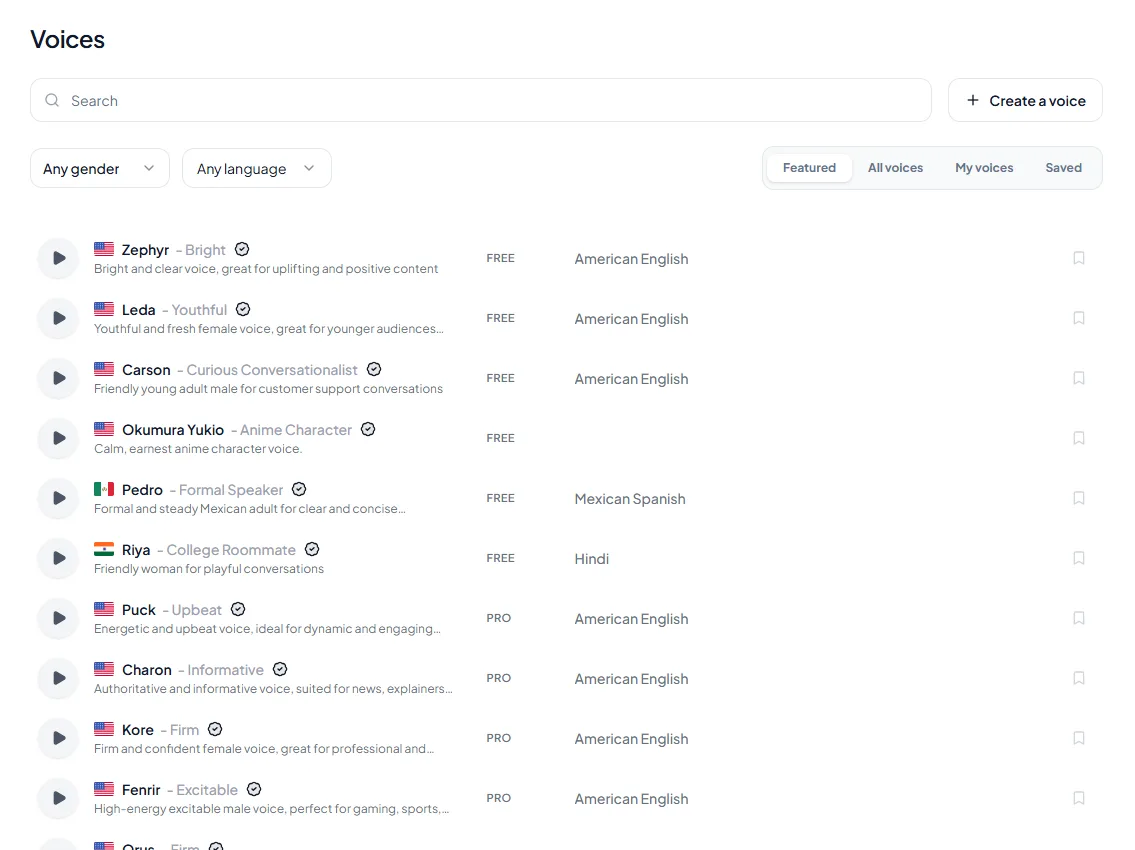
<figure style="margin:28px 0;padding:0"><img src="/blog/product/app-voice-library.webp" alt="The Voices page in the Kveeky app: a search box, gender and language filters, the tabs Featured, All voices, My voices and Saved, and a list of stock voices, each with a preview button and a FREE or PRO tag." width="1150" height="850" loading="lazy" decoding="async" style="display:block;width:100%;height:auto;border-radius:var(--kv-radius-md);border:1px solid var(--kv-blue-100)"><figcaption style="margin-top:10px;font:400 14px/1.5 var(--kv-font-body);color:var(--kv-gray-600)">The Voices page. Filter by gender and language, press the preview button on each voice, and save your 3 favorites with the save button so they appear under Saved. Each voice shows its accent and a FREE or PRO tag. Preview first, then spend credits on the full test script for your top 3 only.</figcaption></figure>

<div style="margin:28px 0;padding:20px 22px;background:var(--kv-blue-50);border:1px solid var(--kv-blue-100);border-radius:var(--kv-radius-md);min-width:0;box-sizing:border-box;overflow-wrap:anywhere"><div style="font:700 17px/1.3 var(--kv-font-heading);color:var(--kv-blue-950);margin-bottom:8px">Audition budget calculator</div><p style="margin:0 0 12px;font:400 15px/1.5 var(--kv-font-body);color:var(--kv-gray-600)">How much of the free plan does a voice test use? The free plan gives 500 credits a month, which is about 40 seconds. Speaking time uses 150 words per minute.</p><div style="display:flex;flex-wrap:wrap;gap:12px;margin-bottom:14px"><label for="vac-w" style="display:flex;flex-direction:column;gap:4px;flex:1 1 150px;min-width:0;font:600 14px/1.3 var(--kv-font-body);color:var(--kv-gray-800)">Words in your test script<input id="vac-w" type="number" inputmode="decimal" min="5" step="1" value="50" style="box-sizing:border-box;width:100%;min-width:0;min-height:44px;padding:0 12px;border:1px solid var(--kv-blue-100);border-radius:var(--kv-radius-sm);font:400 16px/1 var(--kv-font-body);color:var(--kv-gray-800);background:var(--kv-white)"></label><label for="vac-v" style="display:flex;flex-direction:column;gap:4px;flex:1 1 150px;min-width:0;font:600 14px/1.3 var(--kv-font-body);color:var(--kv-gray-800)">Voices you want to compare<input id="vac-v" type="number" inputmode="decimal" min="1" step="1" value="4" style="box-sizing:border-box;width:100%;min-width:0;min-height:44px;padding:0 12px;border:1px solid var(--kv-blue-100);border-radius:var(--kv-radius-sm);font:400 16px/1 var(--kv-font-body);color:var(--kv-gray-800);background:var(--kv-white)"></label><label for="vac-r" style="display:flex;flex-direction:column;gap:4px;flex:1 1 150px;min-width:0;font:600 14px/1.3 var(--kv-font-body);color:var(--kv-gray-800)">Extra takes per voice (speed, emotion)<input id="vac-r" type="number" inputmode="decimal" min="0" step="1" value="1" style="box-sizing:border-box;width:100%;min-width:0;min-height:44px;padding:0 12px;border:1px solid var(--kv-blue-100);border-radius:var(--kv-radius-sm);font:400 16px/1 var(--kv-font-body);color:var(--kv-gray-800);background:var(--kv-white)"></label></div><div id="vac-o" aria-live="polite" style="padding:14px 16px;background:var(--kv-white);border:1px solid var(--kv-blue-100);border-radius:var(--kv-radius-sm);font:400 16px/1.6 var(--kv-font-body);color:var(--kv-gray-800)">Change a number to see the result.</div><script>(function(){try{var ids=["w","v","r"],o=document.getElementById("vac-o");if(!o)return;var els=[];for(var i=0;i<ids.length;i++){var e=document.getElementById("vac-"+ids[i]);if(!e)return;els.push(e)}function run(){try{var v={};for(var i=0;i<ids.length;i++){var n=parseFloat(els[i].value);v[ids[i]]=isNaN(n)||n<0?0:n}var secs=Math.round(v.w/150*60);var gen=Math.round(v.v*(1+v.r));var tot=secs*gen;var left=40-tot;var h="A "+v.w+"-word script runs about <strong>"+secs+" seconds</strong> at 150 words per minute. "+v.v+" voices with "+v.r+" extra take(s) each is <strong>"+gen+" generations, about "+tot+" seconds</strong>. ";if(left>=0){h+="That uses "+Math.round(tot/40*100)+"% of the free plan month and leaves about <strong>"+left+" seconds</strong> for your real script."}else{h+="That is <strong>"+(-left)+" seconds more</strong> than the free plan month. Shorten the test script, compare fewer voices, or preview voices from the library first."}o.innerHTML=h}catch(e){}}for(var i=0;i<els.length;i++){els[i].addEventListener("input",run);els[i].addEventListener("change",run)}run()}catch(e){}})();</script></div>

**Worked example.** A UK bakery wants a voice for a 60-second Instagram video. The test script is 70 words (about 28 seconds). They shortlist 4 voices from the library previews and cut that to 3 after listening. With 1 extra take each for a different emotion, that is 6 generations, about 168 seconds, or 42% of the free plan month. They keep the 228 seconds that remain for the real video. The calculator above lets you rerun this with your own numbers.

<div style="margin:28px 0;padding:20px 22px;background:var(--kv-blue-50);border:1px solid var(--kv-blue-100);border-radius:var(--kv-radius-md);min-width:0;box-sizing:border-box;overflow-wrap:anywhere"><div style="font:700 17px/1.3 var(--kv-font-heading);color:var(--kv-blue-950);margin-bottom:8px">Voice choice checklist</div><p style="margin:0 0 12px;font:400 15px/1.5 var(--kv-font-body);color:var(--kv-gray-600)">Tick each item as you finish it.</p><ul style="list-style:none;margin:0 0 12px;padding:0"><li style="margin:0 0 8px"><label style="display:flex;gap:10px;align-items:flex-start;min-height:44px;font:400 16px/1.5 var(--kv-font-body);color:var(--kv-gray-800);cursor:pointer"><input type="checkbox" class="vcl-c" style="flex:0 0 20px;width:20px;height:20px;margin-top:3px">I know the job: who listens, where, and what they should do next.</label></li><li style="margin:0 0 8px"><label style="display:flex;gap:10px;align-items:flex-start;min-height:44px;font:400 16px/1.5 var(--kv-font-body);color:var(--kv-gray-800);cursor:pointer"><input type="checkbox" class="vcl-c" style="flex:0 0 20px;width:20px;height:20px;margin-top:3px">The accent and language match the audience I want to reach.</label></li><li style="margin:0 0 8px"><label style="display:flex;gap:10px;align-items:flex-start;min-height:44px;font:400 16px/1.5 var(--kv-font-body);color:var(--kv-gray-800);cursor:pointer"><input type="checkbox" class="vcl-c" style="flex:0 0 20px;width:20px;height:20px;margin-top:3px">I tested 3 voices on the same script, with my real names and numbers.</label></li><li style="margin:0 0 8px"><label style="display:flex;gap:10px;align-items:flex-start;min-height:44px;font:400 16px/1.5 var(--kv-font-body);color:var(--kv-gray-800);cursor:pointer"><input type="checkbox" class="vcl-c" style="flex:0 0 20px;width:20px;height:20px;margin-top:3px">I listened to the longest paragraph, not just the first line.</label></li><li style="margin:0 0 8px"><label style="display:flex;gap:10px;align-items:flex-start;min-height:44px;font:400 16px/1.5 var(--kv-font-body);color:var(--kv-gray-800);cursor:pointer"><input type="checkbox" class="vcl-c" style="flex:0 0 20px;width:20px;height:20px;margin-top:3px">I picked a speed and emotion, then used the same settings for every file.</label></li><li style="margin:0 0 8px"><label style="display:flex;gap:10px;align-items:flex-start;min-height:44px;font:400 16px/1.5 var(--kv-font-body);color:var(--kv-gray-800);cursor:pointer"><input type="checkbox" class="vcl-c" style="flex:0 0 20px;width:20px;height:20px;margin-top:3px">I checked whether the voice is free or paid on my plan, and what my plan allows for commercial use.</label></li><li style="margin:0 0 8px"><label style="display:flex;gap:10px;align-items:flex-start;min-height:44px;font:400 16px/1.5 var(--kv-font-body);color:var(--kv-gray-800);cursor:pointer"><input type="checkbox" class="vcl-c" style="flex:0 0 20px;width:20px;height:20px;margin-top:3px">I wrote down the voice name so the next video uses the same one.</label></li></ul><div id="vcl-o" aria-live="polite" style="padding:14px 16px;background:var(--kv-white);border:1px solid var(--kv-blue-100);border-radius:var(--kv-radius-sm);font:400 16px/1.6 var(--kv-font-body);color:var(--kv-gray-800)"></div><script>(function(){try{var o=document.getElementById("vcl-o");var cs=document.getElementsByClassName("vcl-c");if(!o||!cs.length)return;function run(){var n=0;for(var i=0;i<cs.length;i++){if(cs[i].checked)n++}var m=n===cs.length?"Ready. Generate your real script with this voice.":n>=5?"Nearly there. Finish the unchecked items before you commit.":"Keep testing. A voice you have not auditioned is a guess.";o.textContent=n+" of "+cs.length+" done. "+m}for(var i=0;i<cs.length;i++){cs[i].addEventListener("change",run)}run()}catch(e){}})();</script></div>

<details style="margin:12px 0;border:1px solid var(--kv-blue-100);border-radius:var(--kv-radius-md);background:var(--kv-white)"><summary style="min-height:44px;display:flex;align-items:center;padding:6px 16px;font:600 16px/1.4 var(--kv-font-body);color:var(--kv-blue-950);cursor:pointer">What if two voices sound equally good?</summary><div style="padding:0 16px 16px;font:400 16px/1.6 var(--kv-font-body);color:var(--kv-gray-800)"><p style="margin:0">Pick the one with the accent closer to your audience. If they still tie, pick the one that handled your hardest line (a name, a price, a long list). If it is still a tie, choose the voice that is available on your plan without upgrading.</p></div></details>

<details style="margin:12px 0;border:1px solid var(--kv-blue-100);border-radius:var(--kv-radius-md);background:var(--kv-white)"><summary style="min-height:44px;display:flex;align-items:center;padding:6px 16px;font:600 16px/1.4 var(--kv-font-body);color:var(--kv-blue-950);cursor:pointer">What should I do if the voice mispronounces a name?</summary><div style="padding:0 16px 16px;font:400 16px/1.6 var(--kv-font-body);color:var(--kv-gray-800)"><p style="margin:0">Try respelling the name the way it sounds, or use the Custom Punctuation box for punctuation hints and word guides. If a voice needs fixes on every name, it is the wrong voice for that project.</p></div></details>

## Should you pick one voice or several?

Pick one voice for a series or brand, and add a second only when the content needs it. A repeated voice is recognized the way a logo is. For courses with several narrators, read <a href="/blog/multi-voice-courses-narrator-strategy" style="color:var(--kv-blue-700)">when to use different narrators</a>.

## Should you pick a free or paid voice?

Use free voices to test and paid voices when the audio will be published commercially. In the Kveeky library each voice is tagged FREE or PRO, and the free plan covers standard voices only.

<table>
<thead>
<tr><th style="white-space:nowrap">Kveeky plan</th><th>Price per month</th><th>Included per month</th></tr>
</thead>
<tbody>
<tr><td style="white-space:nowrap">Free</td><td>$0</td><td>500 credits (about 40 seconds), standard voices</td></tr>
<tr><td style="white-space:nowrap">Basic</td><td>$9.00</td><td>100 minutes</td></tr>
<tr><td style="white-space:nowrap">Pro</td><td>$19.99</td><td>133 minutes</td></tr>
<tr><td style="white-space:nowrap">Premium</td><td>$29</td><td>200 minutes</td></tr>
<tr><td style="white-space:nowrap">Business</td><td>$99</td><td>1,000 minutes</td></tr>
</tbody>
</table>

Prices are monthly billing from [Kveeky pricing](https://kveeky.com/pricing), retrieved 2026-10-16. The pricing page states that every paid plan includes commercial usage rights for generated audio. If you want a voice modeled on a real person, check the pricing page for what your plan includes and get written consent from the speaker. Our guide to [commercial use rights by tool](/blog/ai-voice-commercial-use-rights) compares the terms of other tools.

If you're still unsure whether you need a stock voice at all, <a href="/blog/text-to-speech-vs-voice-cloning" style="color:var(--kv-blue-700)">text to speech vs voice cloning</a> explains the difference. When you have a shortlist, paste the test script into the free plan and compare for yourself.

## Frequently asked questions

### How do I choose the right AI voice?

Start with the job: who listens, where and what they should do. Then pick the accent and language of that audience, audition 3 voices on the same script, and keep the one that still sounds right on your longest paragraph.

### How many voices should I test before choosing?

Three is enough for most projects. Fewer than 3 gives you no comparison, and more than 5 mostly adds noise. Use the same script and the same settings for each, so the voice is the only thing that changes.

### Should my brand use one AI voice everywhere?

Usually yes. A repeated voice becomes part of how people recognize you. Use a second voice only on purpose, such as a different narrator for customer quotes or a separate product line.

### Does gender or accent matter when picking an AI voice?

Accent matters most when your audience is local, because listeners notice an accent that does not match the speaker they expect. Gender is a brand choice, not a quality difference. Choose what fits your audience and your other brand material.

### Can I use a free AI voice for a commercial video?

On Kveeky, the free plan (500 credits a month, no credit card) covers testing. Every paid plan includes commercial usage rights for generated audio, per kveeky.com/pricing.md retrieved 2026-10-16. Check any other tool's own terms.

<div style="margin:28px 0"><div style="font:700 18px/1.3 var(--kv-font-heading);color:var(--kv-blue-950);margin:0 0 8px">Keep reading</div><div style="display:flex;flex-wrap:wrap;gap:10px"><a href="/blog/ai-voice-tone-niche-strategy" style="flex:1 1 240px;display:block;padding:12px 14px;background:var(--kv-white);border:1px solid var(--kv-blue-100);border-radius:var(--kv-radius-sm);text-decoration:none;color:var(--kv-blue-700);font:600 16px/1.4 var(--kv-font-body)">Matching AI voice tone to your niche<span style="display:block;margin-top:4px;font:400 14px/1.5 var(--kv-font-body);color:var(--kv-gray-600)">Gaming, finance and self-help need different voices.</span></a><a href="/blog/ai-brand-voice-guide-template" style="flex:1 1 240px;display:block;padding:12px 14px;background:var(--kv-white);border:1px solid var(--kv-blue-100);border-radius:var(--kv-radius-sm);text-decoration:none;color:var(--kv-blue-700);font:600 16px/1.4 var(--kv-font-body)">Brand voice guide template<span style="display:block;margin-top:4px;font:400 14px/1.5 var(--kv-font-body);color:var(--kv-gray-600)">Write your voice choice down once.</span></a><a href="/blog/how-to-make-your-ai-voiceover-sound-less-robotic-in-5-minutes" style="flex:1 1 240px;display:block;padding:12px 14px;background:var(--kv-white);border:1px solid var(--kv-blue-100);border-radius:var(--kv-radius-sm);text-decoration:none;color:var(--kv-blue-700);font:600 16px/1.4 var(--kv-font-body)">Less robotic AI voiceover<span style="display:block;margin-top:4px;font:400 14px/1.5 var(--kv-font-body);color:var(--kv-gray-600)">Fixes after you pick the voice.</span></a><a href="/blog/ai-voice-with-emotion" style="flex:1 1 240px;display:block;padding:12px 14px;background:var(--kv-white);border:1px solid var(--kv-blue-100);border-radius:var(--kv-radius-sm);text-decoration:none;color:var(--kv-blue-700);font:600 16px/1.4 var(--kv-font-body)">AI voice with emotion<span style="display:block;margin-top:4px;font:400 14px/1.5 var(--kv-font-body);color:var(--kv-gray-600)">Use the emotion setting without overdoing it.</span></a></div></div>

## How we checked this guide

This guide is written by Govind Kumar for the [Kveeky](https://kveeky.com/) team. **Disclosure: Kveeky makes an AI voice generator.** No Kveeky usage data is used here, and we ran no listening tests, so we make no claims about how any voice sounds. The content-type profiles and brand table are our editorial judgment.

- Kveeky plans, free plan and commercial-rights wording: [kveeky.com/pricing.md](https://kveeky.com/pricing.md), retrieved 2026-10-16.
- Kveeky editor settings and Voices page (voice, transcript language, speed, volume, emotion, custom punctuation, FREE/PRO tags): Kveeky app, free plan, read-only, observed 2026-10-15.
- Common advice on matching voices to brand and audience, read for coverage and not used as evidence: [Camb.ai](https://www.camb.ai/blog-post/how-to-select-natural-and-engaging-ai-voices), [Thoughtly](https://www.thoughtly.com/blog/how-to-choose-a-voice-ai-personality-that-reflects-your-brand), [Dialzara](https://dialzara.com/blog/5-steps-to-match-ai-voice-with-brand-style/) and [Copycopter](https://copycopter.ai/faqs/voiceover-brand-tone), all retrieved 2026-10-16.
- 150 words per minute average speaking rate: National Center for Voice and Speech, as used on our [words to minutes calculator](https://kveeky.com/resources/words-to-minutes-calculator).

The 70-word test script length and the 3-voice audition are our planning suggestions. Prices change, so confirm on the vendor's page before you budget.

Your next step: copy the test script, run it through 3 voices on the free plan, and tick the checklist. You can start at [kveeky.com](https://kveeky.com/).

<script type="application/ld+json">
{"@context": "https://schema.org", "@type": "FAQPage", "mainEntity": [{"@type": "Question", "name": "How do I choose the right AI voice?", "acceptedAnswer": {"@type": "Answer", "text": "Start with the job: who listens, where and what they should do. Then pick the accent and language of that audience, audition 3 voices on the same script, and keep the one that still sounds right on your longest paragraph."}}, {"@type": "Question", "name": "How many voices should I test before choosing?", "acceptedAnswer": {"@type": "Answer", "text": "Three is enough for most projects. Fewer than 3 gives you no comparison, and more than 5 mostly adds noise. Use the same script and the same settings for each, so the voice is the only thing that changes."}}, {"@type": "Question", "name": "Should my brand use one AI voice everywhere?", "acceptedAnswer": {"@type": "Answer", "text": "Usually yes. A repeated voice becomes part of how people recognize you. Use a second voice only on purpose, such as a different narrator for customer quotes or a separate product line."}}, {"@type": "Question", "name": "Does gender or accent matter when picking an AI voice?", "acceptedAnswer": {"@type": "Answer", "text": "Accent matters most when your audience is local, because listeners notice an accent that does not match the speaker they expect. Gender is a brand choice, not a quality difference. Choose what fits your audience and your other brand material."}}, {"@type": "Question", "name": "Can I use a free AI voice for a commercial video?", "acceptedAnswer": {"@type": "Answer", "text": "On Kveeky, the free plan (500 credits a month, no credit card) covers testing. Every paid plan includes commercial usage rights for generated audio, per kveeky.com/pricing.md retrieved 2026-10-16. Check any other tool's own terms."}}]}
</script>
