TL;DR
- The best AI voice generator for small business in 2026, compared by real cost per finished minute, commercial rights, team seats and free-plan limits.
On this page
The best AI voice generator for small business in 2026 depends on volume and team size. Kveeky gives the lowest cost per minute among entry-level plans (about $0.075 on the yearly Basic plan) with commercial rights on every paid plan. ElevenLabs leads on realism and team seats, Murf on polished narration, and Narakeet on pay-as-you-go.
Last updated: October 7, 2026. Every price, minute allowance and licence term below was checked on the vendor's own pricing page on that date.
Kveeky has the lowest entry-plan cost per minute here (about $0.075 on yearly Basic) with commercial rights on every paid plan. Pick ElevenLabs for realism and seats, Murf for polished narration, Narakeet for occasional use. Use the calculator below with your own minutes.
Small teams use AI voices for training videos, product demos, ads, phone menus and social clips. The hard part isn't finding a tool. It's knowing what a plan really costs per usable minute, whether you can legally use the audio for a client or an ad, and whether more than one person can work in the account.
- Cheapest entry-level plan per minute: Kveeky. Basic is $7.50/month billed yearly for 100 minutes, and Business is $82.50/month billed yearly for 1,000 minutes.
- Best voice realism and real team seats: ElevenLabs. Scale includes 3 seats and Business includes 10, but per-minute cost is about 2× Kveeky's.
- Free plans are for testing only. ElevenLabs, Murf, WellSaid, Speechify Studio and Narakeet free tiers don't include commercial use, and Typecast's free plan requires attribution.
- Check seats before you buy. Murf's Creator and Business plans include 1 editor seat; team collaboration is on Enterprise.
- 3 tools that still appear on other "best of" lists are out: PlayHT no longer resolves, LOVO's site is paused, and Resemble AI now sells deepfake detection.
How we picked
We picked tools a 2–20 person business can buy with a card today and use for commercial work. Each tool had to be operating on October 7, 2026, publish its prices, and allow commercial use on at least one self-serve plan.
We compared 5 things that matter to a small business, in this order:
- Cost per minute of audio, monthly and yearly, from each vendor's own allowance.
- Commercial rights on free and paid plans, quoted from the pricing page.
- Team access: how many people can use one account.
- Languages and voices, as each vendor states them.
- Voice cloning, for teams that want a consistent spokesperson voice.
We didn't run blind listening tests, so we don't rank voice quality with a score. Listen to the free tier of your top 2 picks with your own script before you pay.
AI use is still uneven by company size. The U.S. Census Bureau reported in May 2026 that less than 20% of firms with 4 or fewer employees used AI, compared with 37% of firms with 250 or more. Voice is one of the easiest places for a small team to start, because the output is a file you can check before anyone hears it.
Quick comparison
Prices are in USD, checked on October 7, 2026. "Yearly" is the monthly equivalent when billed annually.
| Tool | Best for | Cheapest paid plan (monthly / yearly) | Audio included | Team or business plan | Free plan commercial use |
|---|---|---|---|---|---|
| Kveeky | Lowest entry-plan cost per minute, 40+ languages | Basic $9 / $7.50 | 100 min/month | Business $99 / $82.50, 1,000 min/month | No (paid plans include commercial rights) |
| ElevenLabs | Voice realism, cloning, seats | Starter $6 / $5 | About 30 min/month | Scale $299 / $249.17 (3 seats); Business $990 / $825 (10 seats) | No |
| Murf AI | Polished narration in a studio editor | Creator $29 / $19 | 2 hours/month (24 hours/year on yearly) | Business $99 / $66, 8 hours/month, 1 editor seat | No |
| WellSaid | English corporate training | Starter $19 / $10 | 20 min/month | Business $160/user/month, yearly only, up to 5 seats | No (trial only) |
| Typecast | Cheapest entry, expressive voices | Basic $5 / $54 per year | About 35 min/month | Business $69 / $744 per year, adds team members | Attribution required |
| Narakeet | Occasional use, no subscription | 30-minute top-up $6 | Pay per minute, credits never expire | Add colleagues via support; shared credits | No |
| Listnr | High-volume agencies | Individual $19 / $190 per year | About 2 hours/month | Agency $99 / $990 per year, about 25 hours/month | No |
Cost per finished minute
Divide the plan price by the minutes it includes, then adjust for retakes. Every regeneration uses credits, so the minutes you publish are usually fewer than the minutes you pay for.
Cost per minute of included audio
These figures use each vendor's own stated allowance. Some vendors give approximate minutes from a credit conversion, marked "about".
| Tool and plan | Monthly billing | Yearly billing |
|---|---|---|
| Kveeky Basic (100 min) | $0.090/min | $0.075/min |
| Kveeky Business (1,000 min) | $0.099/min | $0.083/min |
| ElevenLabs Starter (about 30 min) | $0.200/min | $0.167/min |
| ElevenLabs Pro (about 600 min) | $0.165/min | $0.138/min |
| Murf Creator (2 hours) | $0.242/min | $0.158/min |
| Murf Business (8 hours) | $0.206/min | $0.138/min |
| WellSaid Starter (20 min) | $0.950/min | $0.500/min |
| WellSaid Pro (180 min) | $0.272/min | $0.183/min |
| Typecast Basic (about 35 min) | $0.143/min | $0.129/min |
| Typecast Business (about 250 min) | $0.276/min | $0.248/min |
| Narakeet top-ups (30 to 10,000 min) | $0.20/min down to $0.05/min, no expiry | |
| Listnr Individual (about 2 hours) | $0.158/min | $0.132/min |
| Listnr Agency (about 25 hours) | $0.066/min | $0.055/min |
Worked example: 60 finished minutes a month
Say your team publishes 60 minutes of voiceover a month, such as 12 five-minute training videos. Expect to regenerate some lines, so plan for about 1.5× generation: 90 minutes. Here is the cheapest plan that covers 90 minutes on each tool, billed yearly.
| Tool | Cheapest plan covering 90 min/month | Monthly cost (yearly billing) | Cost per finished minute |
|---|---|---|---|
| Kveeky | Basic (100 min) | $7.50 | $0.13 |
| Narakeet | 1,000-minute top-up, used over about 11 months | About $9 | About $0.15 |
| Listnr | Individual (about 120 min) | $15.83 | $0.26 |
| ElevenLabs | Creator (about 121 min) | $18.33 | $0.31 |
| Murf AI | Creator (24 hours/year) | $19 | $0.32 |
| Typecast | Pro (about 90 min) | $26 | $0.43 |
| WellSaid | Pro (180 min) | $33 | $0.55 |
Enter the finished minutes you publish each month and how much you regenerate. The post suggests planning for about 1.5 times your finished minutes. The list uses the plan prices and allowances from the tables above (checked October 7, 2026); Narakeet top-ups are not included because they are pay-as-you-go ($0.20 to $0.05 a minute).
The gap grows with volume. At 1,000 minutes a month, Kveeky Business costs $82.50 billed yearly, while the ElevenLabs plan that covers it (Pro, about 600 minutes) is too small and the next tier is Scale at $249.17. For a full per-video breakdown, see our guide to what an AI voiceover costs per video.
1. Kveeky
Kveeky is the best AI voice generator for small business teams that publish regularly and want a low, predictable cost per minute. Paste a script, pick a voice, adjust it and download the audio.
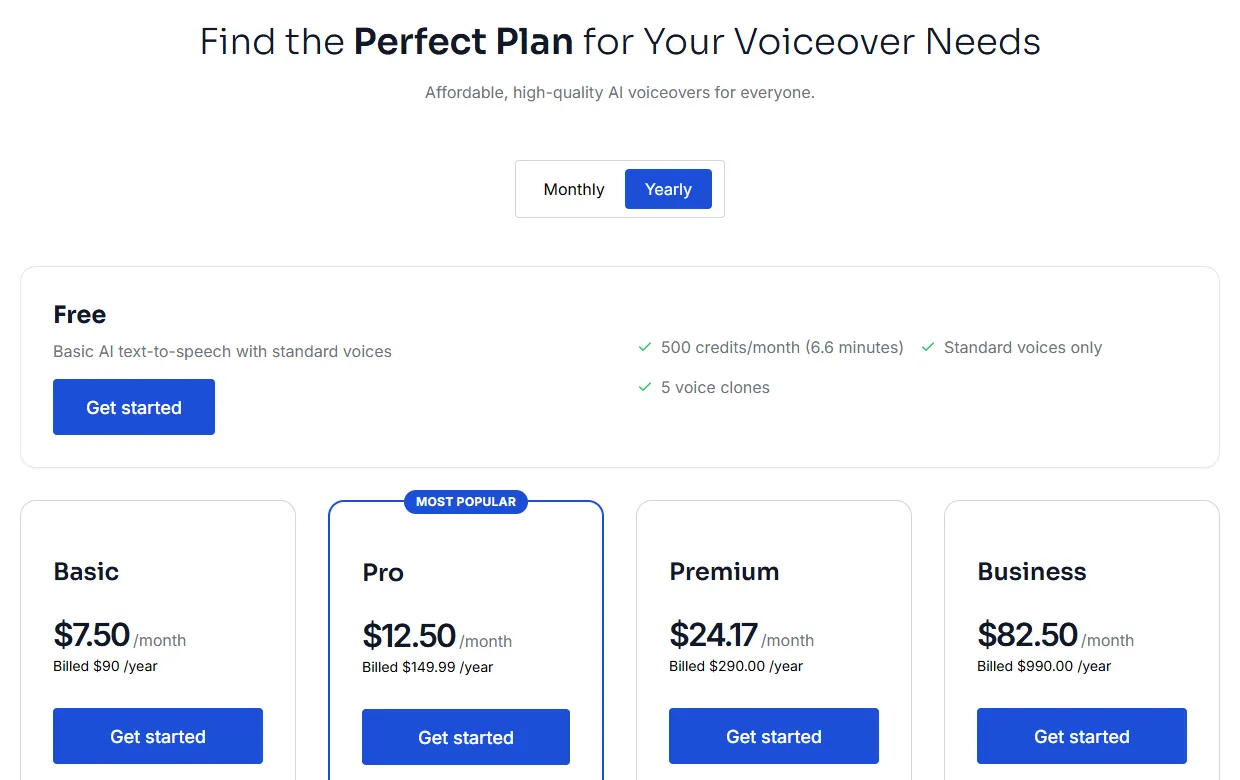
- Price: Basic $9/month, or $7.50/month billed yearly ($90) for 100 minutes. Pro $19.99 or $12.50 yearly (133 minutes). Premium $29 or $24.17 yearly (200 minutes). Business $99 or $82.50 yearly ($990) for 1,000 minutes.
- Voices and languages: 700+ AI voices in 40+ languages on every paid plan.
- Commercial use: every paid plan includes commercial usage rights for generated audio. The free plan (500 credits, about 40 seconds a month, no card) is for testing.
- Voice cloning: available on paid plans, with more clones on higher plans and pro voice cloning on Business. Check the Kveeky pricing page for the current numbers.
- Controls and export: speed, volume, a choice of 6 emotions (Neutral, Happy, Love, Angry, Calm or Sad), and an audio download.

Real samples from the Kveeky voice library.
2. ElevenLabs
ElevenLabs is the pick when voice realism and real multi-seat collaboration matter more than cost.
- Price: Starter $6/month or $5 yearly (about 30 minutes). Creator $22 or $18.33 (about 121 minutes). Pro $99 or $82.50 (about 600 minutes, single user). Scale $299 or $249.17 (about 1,800 minutes, 3 seats). Business $990 or $825 (about 6,000 minutes, 10 seats).
- Commercial use: the commercial licence starts on Starter. The free plan doesn't include it.
- Voices and languages: the vendor states over 11,000 voices and 74 languages.
- Cloning: instant cloning from Starter, professional cloning from Creator.
3. Murf AI
Murf suits teams that want a studio-style editor for slides and narration, and work through it one person at a time.
- Price: Creator $29/month or $19 yearly (2 hours a month, or 24 hours a year when billed yearly). Business $99 or $66 yearly (8 hours a month).
- Commercial use: "Commercial Rights" on Creator; Business adds a "Business License". Broadcasting rights are an Enterprise add-on. The free plan has no commercial rights and no downloads.
- Seats: Creator and Business include 1 editor seat. Sharing and collaboration are on Enterprise.
- Voices and languages: the vendor states more than 200 voices in more than 30 languages and accents.
4. WellSaid
WellSaid is built for corporate learning teams that work mainly in English and want a shared workspace.
- Price: Starter $19/month or $10 yearly (20 minutes). Pro $49 or $33 yearly (180 minutes). Business $160 per user per month, billed yearly only (2,880 minutes a year per user).
- Commercial use: "Full commercial rights" on all paid plans. The trial has none.
- Seats: Business supports up to 5 seats with a team workspace.
- Languages: English only below Enterprise. Voice cloning isn't offered.
5. Typecast
Typecast has the lowest entry price and expressive character voices.
- Price: Basic $5/month or $54 a year (about 35 minutes). Pro $29 or $312 a year (about 90 minutes). Business $69 or $744 a year (about 250 minutes).
- Commercial use: a commercial licence on Basic and up. Free-plan downloads require attribution.
- Seats: "Add team members" is on Business only, and Typecast says businesses and agencies should use the Business plan.
- Note: credits are spent when you download, not when you preview.
6. Narakeet
Narakeet is the pick if your audio needs come in bursts, such as one training course a quarter.
- Price: no subscription. Top-ups from $6 for 30 minutes ($0.20/min) to $500 for 10,000 minutes ($0.05/min). Credits never expire, and billing is per second of output.
- Commercial use: yes on any purchase; free accounts (20 conversions) are not for commercial use.
- Team: colleagues can be added through support and share the same credits.
- Voices and languages: the vendor states 900 voices and 100 languages.
7. Listnr
Listnr's Agency plan has the lowest cost per minute of any monthly subscription here, if you need around 25 hours a month.
- Price: Individual $19/month or $190 a year (about 2 hours a month). Solo $39 or $390 (about 5 hours, "for creators or small teams"). Agency $99 or $990 a year (about 25 hours).
- Commercial use: commercial rights on all paid plans, none on free.
- Seats: seat-based licences and team roles are custom or Enterprise.
- Cloning: included from Individual.
Tools we left out
Several tools that still appear on other "best AI voice generator" lists are not options a business can buy today.
- PlayHT: Meta acquired PlayAI in July 2025, and play.ht no longer resolves as of October 7, 2026.
- LOVO (Genny): lovo.ai returned "This deployment is temporarily paused" on October 7, 2026.
- Resemble AI: its pricing page now sells deepfake detection and watermarking, from $350/month, not creator text-to-speech.
- Speechify Studio: yearly plans start at $100, but the page doesn't state the monthly price or the credit period, so we couldn't compare cost per minute. If you're weighing it, read our Speechify alternatives guide.
Which fits your use case
Match the tool to the job, not to the longest feature list.
Click your use. The answer repeats the use-case table below.
| Your main use | What matters most | Best fit | Runner-up |
|---|---|---|---|
| Training and e-learning videos | Volume, consistency, cost per minute | Kveeky (Premium or Business) | WellSaid if English-only and you need a team workspace |
| Ads and promos | Realism, a recognizable brand voice | ElevenLabs (Creator or Pro) | Kveeky with its 6 emotions |
| Phone menus and voicemail | Clear voice, easy audio download, easy updates | Kveeky (Basic) | Narakeet pay-as-you-go |
| Multilingual videos | Languages and voice localization | Kveeky (Pro and up) | ElevenLabs |
| Occasional projects | No monthly fee | Narakeet | Kveeky monthly Basic, cancel any time |
| Agency producing 20+ hours a month | Lowest cost at high volume | Listnr Agency | Kveeky Business |
Phone audio has its own rules for prompts and consistency; our guide to AI voice branding for phone systems covers scripts and setup. For ad use, see AI voiceovers for advertisements. For seasonal greetings and closure notices, copy a script from our holiday voice message scripts or festival voice message scripts.
Rights, seats and free plans
Most "best" lists skip the licence and seat details, and those are what cause problems later. Check these 5 points on the vendor's own pricing page.
- Commercial use on your plan. Free plans in this list either exclude commercial use or require attribution. Publish client or ad audio only from a paid plan. Our guide to commercial use of AI voiceovers by plan shows the rights table for 10 tools.
- Broadcast and client work. Some vendors separate "commercial" from "broadcast" rights, such as Murf's Enterprise add-on. If audio will air on TV or radio, confirm it in writing.
- Seats. "Business" doesn't always mean multi-user. Murf Business has 1 editor seat, while ElevenLabs Scale has 3.
- Monthly vs yearly allowances. Murf's yearly Creator plan gives 24 hours a year, not 2 hours every month.
- What uses credits. Some tools charge on generation, Typecast on download. Retakes add up, so plan for about 1.5× your finished minutes.
Tick each point on the vendor pricing page before you buy. All 5 are from the section above.
Ticked: 0 of 5
Not legal advice: for contracts with clients, keep a copy of the plan terms that applied on the day you generated the audio. Comparing AI with hiring talent? See our breakdown of the cost of hiring a voice actor for 100 videos.
Rolling out in a small team
A 2-week rollout is enough for most small businesses.
- List your audio jobs for the next 3 months: training, ads, demos, phone prompts. Estimate finished minutes.
- Shortlist 2 tools from the use-case table and test both free tiers with the same 60-second script.
- Pick 1–2 house voices and write down the voice name and the speed, volume and emotion settings.
- Make a pronunciation list for your brand, product and place names.
- Buy the smallest paid plan that covers 1.5× your monthly minutes, billed monthly for the first month.
- Switch to yearly billing once usage is stable. On Kveeky, yearly billing cuts Basic from $9 to $7.50 a month.
Tick each step as your team completes it.
Ticked: 0 of 6
For a step-by-step on choosing features, see our guide to choosing text-to-voice generator software. For more free options, see our list of the best free AI voice generators, and for marketing use cases, our roundup of text-to-speech marketing tools.
Paste it into your team notes. Fill the blanks once, then every video uses the same sound.
Tool and plan: ____ (commercial rights confirmed on: ____)
Speed: ____ | Volume: ____ | Emotion: ____
Pronunciation list: brand ____ | product ____ | place names ____
Test line used: ____
Approved by: ____ on ____
Open what you need.
How do retakes change my cost?
What is the difference between commercial and broadcast rights?
Where do I preview Kveeky voices before paying?
Keep reading: AI voiceover cost per video · Free vs paid text to speech · Best free AI voice generators · Synthetic voices and brand consistency · AI voice commercial use rights · AI voiceovers for customer onboarding · Kveeky pricing · Words to minutes calculator · AI voice generator comparisons
Frequently asked questions
What is the best AI voice generator for small business?
For most small teams, Kveeky gives the lowest cost per minute among entry-level plans, from $7.50/month billed yearly for 100 minutes, with commercial rights on every paid plan. ElevenLabs is better if you need top realism and multiple seats, and Narakeet if you only need audio occasionally.
How much does an AI voice generator cost per minute?
On the plans we compared, it ranges from about $0.055 to $0.95 per minute of included audio. Kveeky Basic works out to $0.075 per minute billed yearly. Plan for about 1.5× your finished minutes to cover retakes.
Can I use AI voices commercially on a free plan?
Usually not. ElevenLabs, Murf, WellSaid, Speechify Studio, Narakeet and Listnr free tiers don't include commercial use, and Typecast's free plan requires attribution. Use a paid plan for client, ad or business audio.
Which AI voice generators include team seats?
ElevenLabs includes 3 seats on Scale and 10 on Business, and WellSaid Business supports up to 5. Typecast adds team members on Business. Murf's Creator and Business plans have 1 editor seat, with collaboration on Enterprise.
Is PlayHT still available for businesses?
No. Meta acquired PlayAI in July 2025, and play.ht no longer resolved when we checked on October 7, 2026. Choose an operating tool and download any old audio you still have.
Do I need voice cloning for my business?
Only if you want one recognizable spokesperson voice across everything. Stock voices work for most training, demo and phone audio. If you clone, get the speaker's written consent first.
How many minutes of AI voice does a small business need a month?
Estimate your finished minutes, then multiply by about 1.5 for retakes. Twelve five-minute training videos is 60 finished minutes, so plan for about 90 generated minutes.
Is monthly or yearly billing better for an AI voice generator?
Yearly billing lowers the monthly price on every subscription compared here (Kveeky Basic goes from $9 to $7.50 a month). Start monthly for the first month, then switch once your usage is stable.
Does Kveeky let a small business use its free plan commercially?
No. The free plan (500 credits a month, about 40 seconds, no card) is for testing. Commercial rights come with every paid plan.
How do I make my team sound consistent?
Pick 1 or 2 house voices and write down the voice name and the speed, volume and emotion settings, plus a pronunciation list for brand and product names.
How we checked this guide
This guide is written by Deepak Gupta for the Kveeky team. Disclosure: Kveeky makes an AI voice generator. We placed Kveeky first on cost per minute because its published allowances give the lowest entry-level rate in this comparison (Listnr's Agency plan is cheaper per minute, but only at about 25 hours a month); we state where it is weaker. No Kveeky usage data is used.
- Kveeky plans and rights: kveeky.com/pricing.md, retrieved 2026-10-07.
- ElevenLabs: elevenlabs.io/pricing, retrieved 2026-10-07.
- Murf AI: murf.ai/pricing, retrieved 2026-10-07.
- WellSaid: wellsaid.io/pricing, retrieved 2026-10-07.
- Typecast: typecast.ai/pricing, retrieved 2026-10-07.
- Narakeet: narakeet.com/docs/pricing, retrieved 2026-10-07.
- Listnr: listnr.ai/pricing, retrieved 2026-10-07.
- Speechify Studio: speechify.com/pricing-studio, retrieved 2026-10-07.
- Resemble AI: resemble.ai/pricing, retrieved 2026-10-07.
- PlayAI acquisition: Verdict, July 2025; play.ht DNS check, 2026-10-07.
- AI use by firm size: U.S. Census Bureau, "AI use among businesses", May 26, 2026.
Cost per minute is our calculation: plan price ÷ the vendor's stated minutes. Vendors that state credits give approximate minutes, which we label "about".
Your next step: write down how many finished minutes your team needs next month, multiply by 1.5, and pick the smallest plan above that covers it. Then test that tool's free tier with your own 60-second script, starting with the Kveeky voice generator for training videos.
Turn your script into a voiceover
Paste your text, pick a voice and download the audio. Free to start, no credit card.