AI Chat with PDF: A Practical Guide for Scriptwriters & Voiceover Creators

AI chat with PDF tools let you upload a document and ask it questions, so you can pull facts, summaries and quotes without reading every page. For video creators, the best use is turning a report, manual or paper into a voiceover script. Extract the key points, rewrite them for the ear, then voice them.
Last updated: October 6, 2026. Tool features and free-tier limits were checked on each vendor's own site on that date.
This guide is for YouTubers, educators, marketers and voiceover creators who start from long documents. It explains how these tools work, compares 5 options with free tiers, and shows a PDF-to-voiceover workflow you can copy.
Key Takeaways
- What it is: you upload a PDF, ask questions in plain language, and get answers drawn from that document, often with page references.
- Best video use: turning reports, manuals and research into short, spoken scripts for explainers, tutorials and news-style videos.
- Free options exist: ChatPDF's free plan covers 2 documents a day, AskYourPDF's covers 1 document a day, and Smallpdf needs no sign-up (vendor sites, retrieved 2026-10-06).
- Always check the facts. Ask for page numbers and confirm every number against the PDF before it goes into a script.
- Rewrite for the ear before voicing. PDF language is written to be read; shorten sentences and spell out numbers and symbols before you generate audio.
On this page: What it is · How it works · Video use cases · Comparison · Workflow · Prompts · Privacy · FAQ
What is AI chat with PDF?
AI chat with PDF is a feature that turns a static document into something you can question. Instead of scrolling through 80 pages, you type a request. For example: "Summarize chapter 3 in simple words" or "List every statistic in this report with its page number."
The tool answers from the document you uploaded. Good tools show the page or passage each answer came from, so you can check it.
How does chat with PDF work?
Most tools follow the same 4 steps:
- You upload a PDF. Scanned pages need text recognition (OCR) first, which some tools do for you.
- The tool splits the text into small sections and indexes them.
- Your question is matched to the most relevant sections.
- An AI model writes the answer from those sections, often with a page reference.
This approach is called retrieval-augmented generation (RAG). AWS describes it as making a language model reference "an authoritative knowledge base outside of its training data" before it answers. Here, that knowledge base is your PDF.
Best tools for chat with PDF with video use cases
The best chat with PDF tools for video work are the ones that give page references, handle long files and let you rewrite answers in a conversational tone. Here are the main ways creators combine chat with PDF and video.
- Explainer and YouTube channels: upload a government or industry report and ask for the 5 main findings in plain language.
- Tutorials and product videos: upload a product manual and ask for the steps to complete one task, written as spoken instructions.
- Course and education videos: upload a textbook chapter and ask for a summary plus 5 review questions.
- News-style and research videos: upload a paper and ask for the main finding, the method and the limits, each with a page number.
- Repurposing: some tools, such as ChatPDF, also accept YouTube videos and websites as sources, so you can question a talk and its slide deck together.
Once you have the facts, the script and the voice do the rest. Our guide to writing an AI voiceover script covers how to make that text sound natural.
5 AI chat with PDF tools compared
These 5 tools were chosen because each publishes its features on its own site. Free-tier details were checked on October 6, 2026 and change often.
| Tool | Free tier | Useful for video creators | Watch out for |
|---|---|---|---|
| ChatPDF | 2 documents a day | Built-in citations, chats across several files, accepts YouTube videos and websites, works in any language | Paid plan price not shown on its homepage |
| AskYourPDF | 1 document a day, up to 100 pages, 50 questions a day | Long documents on paid plans; Premium is $11.99/month billed yearly | Free tier is tight for daily research |
| Smallpdf Chat PDF | Free to start, no sign-up | Page references, works on scanned PDFs after text recognition | Files are deleted after 1 hour unless saved to an account |
| Adobe Acrobat AI Assistant | Free trial | Summaries with citations, plus podcast-style audio overviews | Paid plans from $9.99/month (Acrobat Express); Acrobat Studio is $24.99/month |
| PDF7 | Free, no limits stated | Chat with PDF plus 40+ PDF tools such as merge and compress | Says no files are stored on its server; check this fits your client rules |
Where each one wins: ChatPDF is the simplest for quick research. AskYourPDF suits long documents on a paid plan. Smallpdf is fastest when you don't want an account. Adobe fits teams already using Acrobat, and PDF7 suits people who also need everyday PDF tools.
How to turn a PDF into a voiceover script
This workflow takes you from a long document to a finished voiceover file.
- Upload the PDF to your chat tool and ask for the 5 most important points, each with a page number.
- Check every point against the page it came from. Delete anything you can't find in the PDF.
- Ask for a spoken draft: "Rewrite these points as a 60-second script for a friendly video narrator. Short sentences, no jargon."
- Edit the draft for the ear. Spell out numbers and symbols, add commas where you want pauses, and re-spell hard names phonetically.
- Generate the voiceover. In Kveeky, paste the script, pick one of 700+ voices, adjust tone, pitch and speed, and download an MP3 or WAV.
- Add it to your video and line up the visuals with the audio.
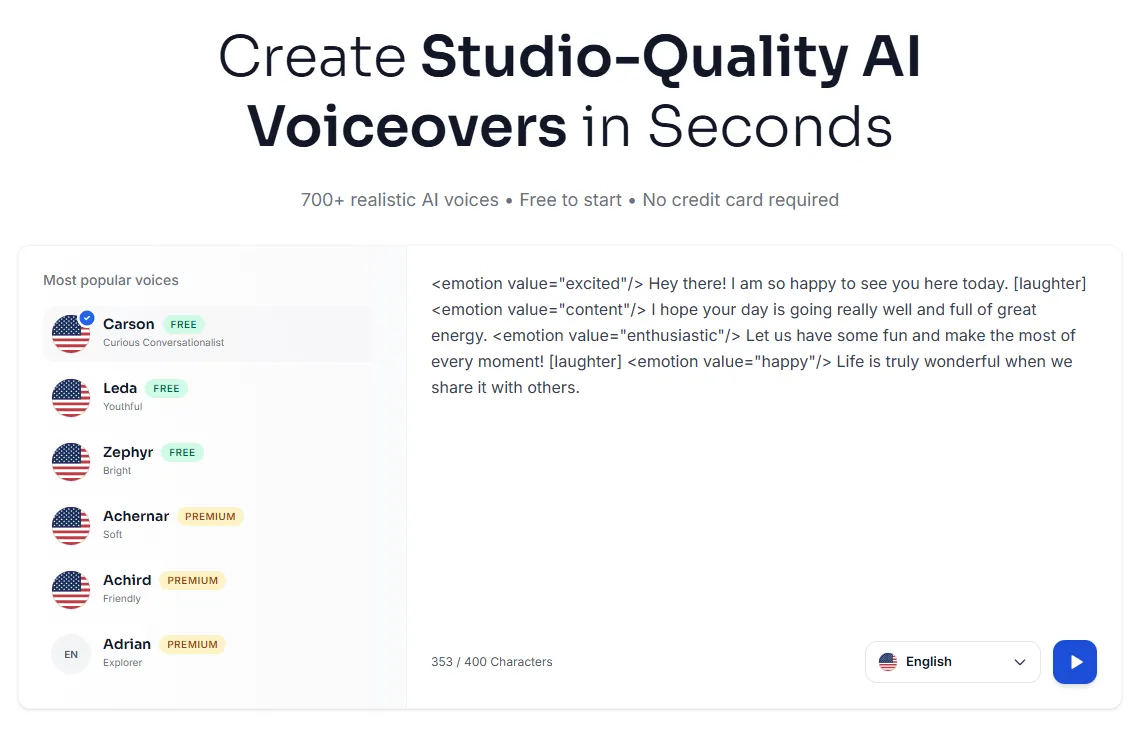
If you want the audio to sound more energetic or calm, add emotion tags such as <emotion value="excited"/> before a line. For a full video workflow, see our guide on how to convert text to speech in videos.
Prompts that work for script research
Copy these prompts and change the details to fit your document.
- "Summarize this document in 5 points for a general audience. Give the page number for each."
- "What statistics does this report mention? Quote each one exactly with its page."
- "Explain section 4 as if to a beginner, in under 100 words."
- "Turn the steps on pages 12 to 15 into spoken instructions for a tutorial video."
- "Build a 5-minute video outline from this document: hook, 3 main points, summary."
- "What does this document NOT answer about [topic]?"
The last prompt is useful. It shows gaps you need to fill from other sources before you publish.
Privacy and accuracy checks
Chat with PDF tools are fast, but they need 2 habits.
Privacy. Read the tool's privacy policy before you upload client documents, contracts or unreleased material. Smallpdf, for example, says files are deleted after 1 hour unless saved, and PDF7 says it stores no files on its server.
Accuracy. AI answers can be wrong, even with citations. Check every number, name and quote against the source page before it goes into a script. If you turn one long source into several videos, our guide to turning one webinar into short-form videos shows how to keep each clip accurate.
Frequently asked questions
What are the best free chat with PDF tools for video use cases?
ChatPDF's free plan covers 2 documents a day and adds citations. Smallpdf Chat PDF needs no sign-up, and AskYourPDF's free plan covers 1 document a day. All 3 can help you turn reports and manuals into video scripts (vendor sites, retrieved 2026-10-06).
Can chat with PDF tools read scanned PDFs?
Some can. Smallpdf says its Chat PDF works with scanned PDFs after the text has been recognized. AskYourPDF lists OCR support on paid plans. Check each tool before uploading scans.
Can I turn a PDF directly into a voiceover?
Yes, in 2 steps. Use a chat with PDF tool to pull the key points and rewrite them as a short spoken script. Then paste the script into an AI voice generator such as Kveeky and download the audio.
Are AI chat with PDF answers accurate?
They're usually close, but not always right. Ask for page numbers and check every fact against the source before you publish or voice it.
Can chat with PDF tools translate a document?
Many can answer in a different language from the document. ChatPDF says you can upload a document in one language and ask questions in another. Have a native speaker check translated scripts before voicing them.
How we checked this guide
This guide is written by Ankit Agarwal for the Kveeky team. Disclosure: Kveeky makes an AI voice generator. We do not make or sell any of the chat with PDF tools listed.
- Tool features and limits come from each vendor's own site, retrieved 2026-10-06: ChatPDF, AskYourPDF pricing, Smallpdf Chat PDF, Adobe Acrobat AI Assistant and PDF7.
- The RAG definition comes from AWS: What is retrieval-augmented generation?, retrieved 2026-10-06.
- No Kveeky usage data is used in this guide.
Next step: take one PDF you already have, run the first 3 prompts above, and turn the result into a 60-second script. Then voice it with one of the voices for AI voiceovers for YouTube videos.