How to Convert Text to Speech in Videos

To make text to speech videos, write a short script and turn it into audio with a text-to-speech tool. Then add that audio to your video and line up the visuals. You can use the TTS built into some video editors, or an AI voice generator that gives you more voices and exports an MP3 or WAV.
Last updated: October 6, 2026. Editor features were checked on Microsoft's Clipchamp support page on that date.
This guide is for YouTubers, educators, marketers and social media creators who want a voiceover without recording their own voice. It covers the 2 main methods, a 6-step workflow, audio polish and multilingual videos.
Key Takeaways
- 2 ways to do it: use your video editor's built-in text to speech, or generate the voice in an AI voice tool and import the file.
- Built-in TTS is convenient for quick videos. Clipchamp, for example, lets you choose language, voice, pitch and speed inside the editor.
- A separate AI voice tool gives more choice: Kveeky has 700+ voices in 40+ languages, emotion tags, and MP3 or WAV export.
- Write for the ear first. Short sentences and clear punctuation do more for quality than any setting.
- Generate the voice before you cut the video. The audio sets the timing, and the visuals follow it.
On this page: 2 methods · 6 steps · Built-in editor TTS · Audio polish · Other languages · Mistakes · FAQ
2 ways to make text to speech videos
| Method | How it works | Best for | Trade-off |
|---|---|---|---|
| Built-in editor TTS | Type text in your video editor; it creates the voice on the timeline | Quick social clips and simple tutorials | Fewer voices and delivery controls; tied to that editor |
| AI voice generator + editor | Generate the voice in a TTS tool, download the file, import it into any editor | YouTube, courses, ads and multilingual videos | One extra step to import the audio |
If you post mostly on TikTok, its in-app voices are a third option. Our guide on how to use TikTok's text-to-speech feature covers that.
How to make text to speech videos in 6 steps
This workflow works with any video editor.
- Write the script for the ear. Use short sentences, contractions and plain words. If you stumble reading it aloud, the AI voice will too.
- Pick a voice that fits the video. A calm voice suits tutorials; a brighter, faster voice suits short social clips.
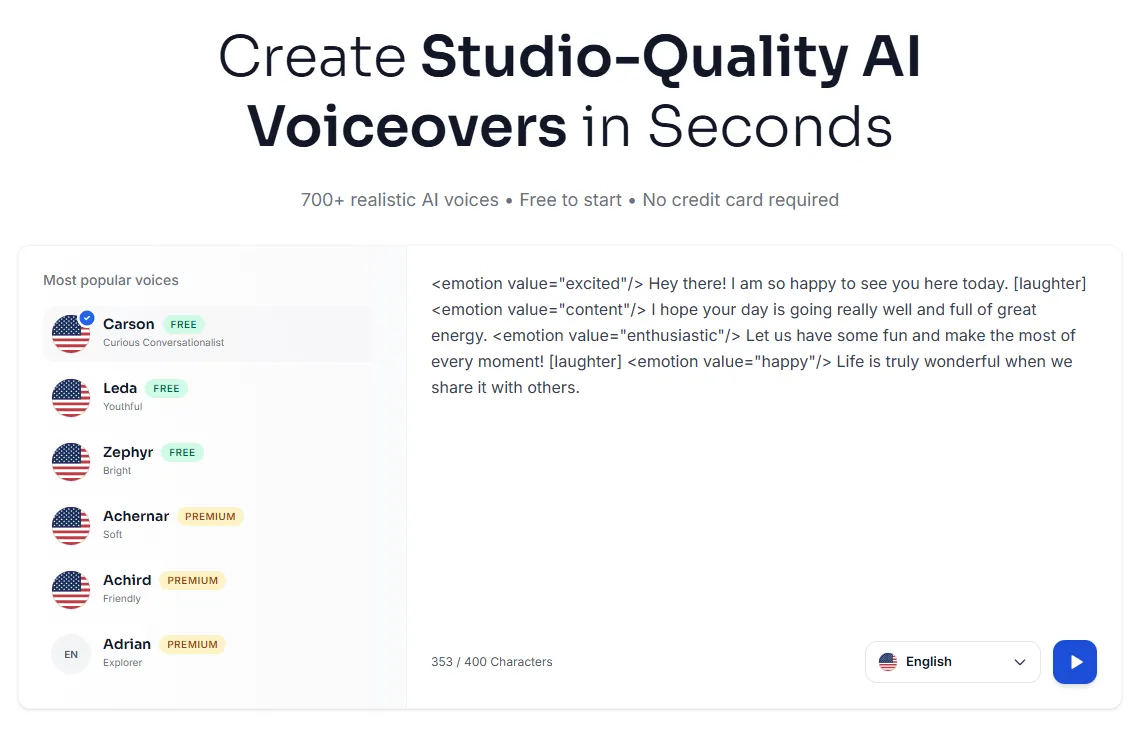
- Generate the voiceover. In Kveeky, paste the script, choose from 700+ voices, and adjust tone, pitch and speed. Add emotion tags such as
<emotion value="excited"/>where a line needs more energy. - Listen once and fix problems. Re-spell names that sound wrong and add commas where a pause is missing.
- Download MP3 or WAV and import it into your editor.
- Cut the video to the voice. Place the audio first, then line up each visual with the sentence it belongs to. Add captions and export.
For deeper script tips, see our guide to writing a script for AI voiceover. If you're adding a voice to a tutorial or software demo, our tips for screen recording with voiceover help.
How to use text to speech inside a video editor
Some editors create the voice directly on the timeline. In Microsoft Clipchamp, the steps are:
- Open the record & create tab in the toolbar.
- Select text to speech. A text to speech tab opens in the property panel.
- Choose a language and a voice, and preview it.
- Type your text, then adjust pitch and speed in the advanced settings if needed.
- Select save to add the voiceover to your timeline.
Clipchamp notes that the character limit varies by language. For longer scripts, it suggests creating several text to speech items. That's a good habit with any tool: one item per paragraph is easier to fix later.
How to make the voice sit well in the video
A clean voiceover still needs a little mixing to sound right with music and sound effects.
- Keep music well below the voice, and lower it further while someone is speaking.
- Match loudness across clips so one section isn't louder than another.
- Leave short gaps between sections so the video has room to breathe.
- Add captions. Many people watch with the sound off.
- Don't speed the voice up too much to fit a time limit. Cut words instead.
If the voice still sounds flat, these tips on adding pacing, pauses and emphasis to AI voices help.
How to make text to speech videos in other languages
To reach viewers in another language, translate the script, have a native speaker check it, then generate the voice in that language. Don't translate idioms word for word; rewrite them so they make sense locally.
Kveeky has voices in 40+ languages. Our text-to-speech language pages let you check which voices are available for your language before you start. Check each language individually, since coverage varies.
Common mistakes with text to speech videos
- Pasting a blog post as the script. Written text is too dense for the ear. Rewrite it in short, spoken sentences.
- Cutting the video before the voice exists. You'll end up stretching clips to fit. Generate the voice first.
- Generating the whole script in one go. One wrong word then means redoing everything. Work paragraph by paragraph.
- Changing voices between videos in a series. A consistent voice helps viewers recognize your channel.
To turn this into a repeatable routine, see our 30-minute script-to-upload voiceover workflow.
Frequently asked questions
How do I make a video with text to speech for free?
Use the text to speech built into a free video editor, or generate the voice with a free AI voice plan and import it. Kveeky's free plan gives 500 credits a month (about 6.6 minutes) with standard voices and no credit card.
Can I add text to speech to an existing video?
Yes. Write a script that matches the video, generate the voiceover, then place the audio on your editor's timeline. Trim or slow the clips until the voice and visuals line up.
Which is better: built-in editor TTS or a separate AI voice tool?
Built-in TTS is quicker for simple clips. A separate AI voice tool usually gives more voices, more control over emotion and speed, and a file you can reuse in any editor.
Can I use text to speech voices in monetized videos?
Check your tool's terms. Every paid Kveeky plan includes commercial usage rights for the audio you generate, while free plans may have limits.
What audio format should I export for video?
MP3 works for most uploads and keeps files small. Choose WAV if you plan to do more audio editing, since it keeps full quality.
How we checked this guide
This guide is written by Ankit Agarwal for the Kveeky team. Disclosure: Kveeky makes an AI voice generator.
- Clipchamp steps and its character-limit note: Microsoft Support, How to use the text to speech feature, retrieved 2026-10-06.
- Kveeky features and plans (700+ voices, 40+ languages, free plan, MP3 and WAV, commercial rights on paid plans): kveeky.com/pricing and kveeky.com, retrieved 2026-10-06.
- No Kveeky usage data is used in this guide.
Next step: write a 30-second script, generate it in 2 different voices, and pick the one that fits your video. For short-form clips, our page on AI voiceovers for social media videos shows voices that suit fast formats.